


- Posts: 17
- Thank you received: 0
3 Post Moderation Rule for New Boarders (25 Jan 2021)
New boarders will have their posts moderated - Don't worry if you cannot see your post immediately.
.MXF FILES WRONG REEL NUMBER
- timetraveller
-
 Topic Author
- Offline
- New Member
-

Less
More
19 Jan 2015 18:15 - 19 Jan 2015 18:17 #58636
by timetraveller
.MXF FILES WRONG REEL NUMBER was created by timetraveller
Hi Everyone!
This is my first thread in this community
When importing .mxf files (DNxHD36 codec), made in Resolve or Scratch (tried both) from Alexa ProRes 444 files, they show an incorrect/corrupted reel name. (see attached picture)
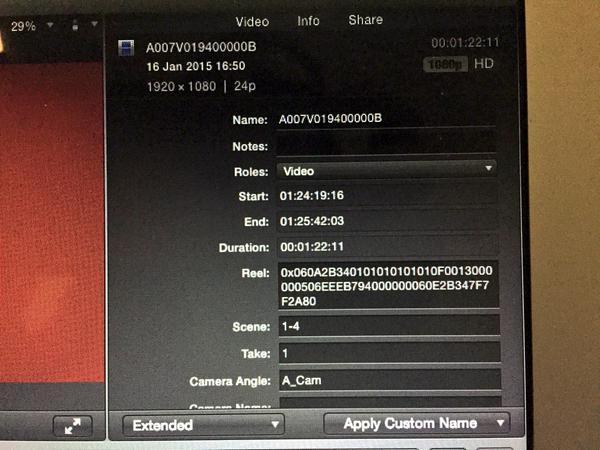
Is it only me? Corrupted software? bug in Yosemite? Thoughts, ideas?
Thanks a lot
This is my first thread in this community
When importing .mxf files (DNxHD36 codec), made in Resolve or Scratch (tried both) from Alexa ProRes 444 files, they show an incorrect/corrupted reel name. (see attached picture)
Is it only me? Corrupted software? bug in Yosemite? Thoughts, ideas?
Thanks a lot
Last edit: 19 Jan 2015 18:17 by timetraveller.
Please Log in to join the conversation.
- Andreas Kiel
-
- Offline
- Platinum Member
-

Less
More
- Posts: 1077
- Thank you received: 189
19 Jan 2015 19:33 #58643
by Andreas Kiel
Replied by Andreas Kiel on topic .MXF FILES WRONG REEL NUMBER
hmmm,
looks like a valid mxf reel number.
since file based systems with mxf exist in most cases have reel number per file.
- andreas
looks like a valid mxf reel number.
since file based systems with mxf exist in most cases have reel number per file.
- andreas
Please Log in to join the conversation.
- timetraveller
-
Topic Author
- Offline
- New Member
-
Less
More
- Posts: 17
- Thank you received: 0
19 Jan 2015 19:45 - 19 Jan 2015 19:46 #58645
by timetraveller
Replied by timetraveller on topic .MXF FILES WRONG REEL NUMBER
Thanks for the answer, but I'm afraid you're wrong: The reel number is included in the filename.
For instance:
clip name:A002C002_141102_R34R
reel number: A002R34R
Alexa naming convention:
A - camera index/unit
002 - reel counter
C - clip index
002 - clip counter
_141102_ - shooting date
R34R - unique camera id
As you can see in the picture, in the reel field, is totally different..
For instance:
clip name:A002C002_141102_R34R
reel number: A002R34R
Alexa naming convention:
A - camera index/unit
002 - reel counter
C - clip index
002 - clip counter
_141102_ - shooting date
R34R - unique camera id
As you can see in the picture, in the reel field, is totally different..
Last edit: 19 Jan 2015 19:46 by timetraveller.
Please Log in to join the conversation.
- ronny courtens
-

- Offline
- Moderator
-

Less
More
- Posts: 4455
- Thank you received: 962
19 Jan 2015 19:54 #58647
by ronny courtens
Replied by ronny courtens on topic .MXF FILES WRONG REEL NUMBER
You say the footage is ProRes 4444 shot with the Alexa. What happens when you import the ProRes 4444 files directly into FCP X without going through an extra conversion to DNXHD (which I don't really understand, BTW) ?
- Ronny
- Ronny
Please Log in to join the conversation.
- Andreas Kiel
-
- Offline
- Platinum Member
-
Less
More
- Posts: 1077
- Thank you received: 189
19 Jan 2015 20:07 #58648
by Andreas Kiel
Replied by Andreas Kiel on topic .MXF FILES WRONG REEL NUMBER
miguel,
you mix up reel names create by file names and mxf metadata which include reel names.
you have to find a utility which convert the mxf metadata and replaces the unique mxf file name with the file name.
- andreas
p.s. you forgot the alexa way to add the left/right cam to the file name
you mix up reel names create by file names and mxf metadata which include reel names.
you have to find a utility which convert the mxf metadata and replaces the unique mxf file name with the file name.
- andreas
p.s. you forgot the alexa way to add the left/right cam to the file name
Please Log in to join the conversation.
- timetraveller
-
Topic Author
- Offline
- New Member
-
Less
More
- Posts: 17
- Thank you received: 0
19 Jan 2015 20:10 #58649
by timetraveller
Replied by timetraveller on topic .MXF FILES WRONG REEL NUMBER
Hi Ronny, thanks for answering.
The originals, when imported, shows the right reel number in FCPX.
The original footage is going to be handled by a DIT on set as the shooting involves 2 or even 3 cameras some days. It's an 8 weeks shooting.
The originals are sent to a lab (DELUXE) for storing, waiting for final conforming in Smoke and color correction in Lustre.
This workflow was used in the previous feature we made 1 year ago, although the editing was made in Media Composer.
Right now we're testing for the next shooting (March), as we don't know yet if we're editing in FCPX or MC, we're testing with the file format we used as we know it worked ok.
The originals, when imported, shows the right reel number in FCPX.
The original footage is going to be handled by a DIT on set as the shooting involves 2 or even 3 cameras some days. It's an 8 weeks shooting.
The originals are sent to a lab (DELUXE) for storing, waiting for final conforming in Smoke and color correction in Lustre.
This workflow was used in the previous feature we made 1 year ago, although the editing was made in Media Composer.
Right now we're testing for the next shooting (March), as we don't know yet if we're editing in FCPX or MC, we're testing with the file format we used as we know it worked ok.
Please Log in to join the conversation.
- timetraveller
-
Topic Author
- Offline
- New Member
-
Less
More
- Posts: 17
- Thank you received: 0
19 Jan 2015 20:16 - 19 Jan 2015 20:36 #58650
by timetraveller
Replied by timetraveller on topic .MXF FILES WRONG REEL NUMBER
These .mxf, when used in Avid MC shows all the metadata correctly (timecode, tape ID)
It's only in FCPX when the problem exist.
I think the metadata of the file is correct, it seems that FCPX does't handle that metadata correctly.
It's only in FCPX when the problem exist.
I think the metadata of the file is correct, it seems that FCPX does't handle that metadata correctly.
Last edit: 19 Jan 2015 20:36 by timetraveller.
Please Log in to join the conversation.
- ronny courtens
-
- Offline
- Moderator
-
Less
More
- Posts: 4455
- Thank you received: 962
19 Jan 2015 20:36 - 19 Jan 2015 20:45 #58652
by ronny courtens
Replied by ronny courtens on topic .MXF FILES WRONG REEL NUMBER
If the reel number from the original footage is correct when imported in FCP X it is obvious that the reel number information gets corrupted during the transcoding process to DNXHD.
I absolutely don't understand why anyone would convert perfectly good original ProRes footage from an Arri to DNXHD, even when you edit in MC. MC works fine with ProRes 4444 over AMA, the conversion to DNX is a lossy and unnecessary extra step.
We recently did a movie with the Alexa in ProRes 4444 XQ, which was edited in FCP X and graded in Resolve. The whole process was flawless and the grading artists said he had a great time with the 12-bit XQ footage. Flame also works with ProRes without any issues.
Lustre does not read ProRes files directly because it is running on a Linux operating system. You must use a MacPro workstation as a server running the WireTap Gateway to stream the content into the Lustre. You will also need a fast connection from that MacPro server into Lustre since the RGB stream that the WireTap Gateway will provide is pretty large. Or you can convert the ProRes 4444 files to DPX prior to grading, which will work with Lustre. But I really don't get the unnecessary, time-consuming and lossy extra steps.
If this was my production I would simply consider a different lab that will handle my native Alexa ProRes files from start to end without having to jump through all these hoops. Will save you a LOT of time, headaches and money!
- Ronny
I absolutely don't understand why anyone would convert perfectly good original ProRes footage from an Arri to DNXHD, even when you edit in MC. MC works fine with ProRes 4444 over AMA, the conversion to DNX is a lossy and unnecessary extra step.
We recently did a movie with the Alexa in ProRes 4444 XQ, which was edited in FCP X and graded in Resolve. The whole process was flawless and the grading artists said he had a great time with the 12-bit XQ footage. Flame also works with ProRes without any issues.
Lustre does not read ProRes files directly because it is running on a Linux operating system. You must use a MacPro workstation as a server running the WireTap Gateway to stream the content into the Lustre. You will also need a fast connection from that MacPro server into Lustre since the RGB stream that the WireTap Gateway will provide is pretty large. Or you can convert the ProRes 4444 files to DPX prior to grading, which will work with Lustre. But I really don't get the unnecessary, time-consuming and lossy extra steps.
If this was my production I would simply consider a different lab that will handle my native Alexa ProRes files from start to end without having to jump through all these hoops. Will save you a LOT of time, headaches and money!
- Ronny
Last edit: 19 Jan 2015 20:45 by ronny courtens.
Please Log in to join the conversation.
- timetraveller
-
Topic Author
- Offline
- New Member
-
Less
More
- Posts: 17
- Thank you received: 0
19 Jan 2015 21:07 - 19 Jan 2015 21:13 #58655
by timetraveller
Replied by timetraveller on topic .MXF FILES WRONG REEL NUMBER
Hi Ronny, thanks for the detailed answer.
It's not corrupted as I've checked it works in Avid MC flawlessly. I'm afraid the problem it's in the FCPX end.
Avid MC works ok over AMA, but working with DNxHD36 has many advantages:
1. You can work much faster, as the machine has to handle much smaller files. When the project grows in Terabytes and has to handle 60 days of material, it gets laggy.
2. You can throw the files of ALL you movie to a 2TB portable drive and work on a laptop on the Go, on Set, or at Director's Home (there's many days during the editing process he can't come to the editing room)
3. Raid Storage - These 2 movies I'm talking about involves A LOT of footage. 2 cameras minimum every day. Some specific days we'll have 6 cameras. Action and complex scenes that has the cameras rolling more than they should (the digital age problem, you know).
We simply don't have enough space for store that amount of originals, besides, I prefer to work with light files for the reasons mentioned in 1.
4. (And very important) Prior to shooting, the DOP creates an specific LUT based on a week of tests he makes.
This LUT is approved by the director and applied to all the material during the transcoding to .mxf.
The Director DOESN'T WANT to look at washed out files when editing, nor look at files with a Preset LUT (I know I can apply a preset Alexa LUT in FCPX), he demands (and it's a polite word compared to how he actually asks for it) to work with material that it's 80% the final look.
It's not a big deal, anyway. When the movie is closed, I just have to send edls to the lab and they conform in Smoke.
You're right, they transcode to .dpx prior to work in Lustre.
So, to keep it short:
When it's a "small" movie with 1-2 cameras, that involves a reasonable amount of material, I agree that best is using originals along the pipeline. But this is not the case.
P.S. I've heard a lot of good things about the Alexa in ProRes 4444 XQ, I hope to use it soon.
It's not corrupted as I've checked it works in Avid MC flawlessly. I'm afraid the problem it's in the FCPX end.
Avid MC works ok over AMA, but working with DNxHD36 has many advantages:
1. You can work much faster, as the machine has to handle much smaller files. When the project grows in Terabytes and has to handle 60 days of material, it gets laggy.
2. You can throw the files of ALL you movie to a 2TB portable drive and work on a laptop on the Go, on Set, or at Director's Home (there's many days during the editing process he can't come to the editing room)
3. Raid Storage - These 2 movies I'm talking about involves A LOT of footage. 2 cameras minimum every day. Some specific days we'll have 6 cameras. Action and complex scenes that has the cameras rolling more than they should (the digital age problem, you know).
We simply don't have enough space for store that amount of originals, besides, I prefer to work with light files for the reasons mentioned in 1.
4. (And very important) Prior to shooting, the DOP creates an specific LUT based on a week of tests he makes.
This LUT is approved by the director and applied to all the material during the transcoding to .mxf.
The Director DOESN'T WANT to look at washed out files when editing, nor look at files with a Preset LUT (I know I can apply a preset Alexa LUT in FCPX), he demands (and it's a polite word compared to how he actually asks for it) to work with material that it's 80% the final look.
It's not a big deal, anyway. When the movie is closed, I just have to send edls to the lab and they conform in Smoke.
You're right, they transcode to .dpx prior to work in Lustre.
So, to keep it short:
When it's a "small" movie with 1-2 cameras, that involves a reasonable amount of material, I agree that best is using originals along the pipeline. But this is not the case.
P.S. I've heard a lot of good things about the Alexa in ProRes 4444 XQ, I hope to use it soon.
Last edit: 19 Jan 2015 21:13 by timetraveller.
Please Log in to join the conversation.

19 Jan 2015 21:38 #58660
by rgpearson
Replied by rgpearson on topic .MXF FILES WRONG REEL NUMBER
Maybe try transcoding to ProRes Proxy? It's about the same data rate as DNxHD36.
Or if you must use the mxf files, you could just manually enter each reel name in the inspector (selecting the whole group of clips at once).
Or if you must use the mxf files, you could just manually enter each reel name in the inspector (selecting the whole group of clips at once).
Please Log in to join the conversation.
- ronny courtens
-
- Offline
- Moderator
-
Less
More
- Posts: 4455
- Thank you received: 962
19 Jan 2015 21:48 #58661
by ronny courtens
Replied by ronny courtens on topic .MXF FILES WRONG REEL NUMBER
If that's the workflow you need to follow, I agree you have no other choice. But I feel sorry that you have to work this way.
We also apply custom LUTs on-set, on the original ProRes Log footage. These LUTs are converted to 3D LUTs that are perfectly read by FCP X (LUT Utility) and that get carried over in the final grading workflow in Resolve. I don't see why on-set LUTs would make any difference.
In this respect FCP X is a much better tool. You always work with the original camera files, and if you need to take your work on a laptop you just create proxy media inside the app. This is a seamless process that does no require any relinking or workarounds.
Now back to your original question: the fact that MC reads the reel data correctly does not mean anything. The reel data are correct in the original footage, and they are read correctly by FCP X. The error happens during the DNX conversion, where the reel data are re-written in a format that apparently only MC understands. But as you never would edit these DNX copies in FCP X because you can work with the original files, this is not a real world problem. You just have to decide what system you will be editing on, then define the correct post-production pipeline.
- Ronny
We also apply custom LUTs on-set, on the original ProRes Log footage. These LUTs are converted to 3D LUTs that are perfectly read by FCP X (LUT Utility) and that get carried over in the final grading workflow in Resolve. I don't see why on-set LUTs would make any difference.
In this respect FCP X is a much better tool. You always work with the original camera files, and if you need to take your work on a laptop you just create proxy media inside the app. This is a seamless process that does no require any relinking or workarounds.
Now back to your original question: the fact that MC reads the reel data correctly does not mean anything. The reel data are correct in the original footage, and they are read correctly by FCP X. The error happens during the DNX conversion, where the reel data are re-written in a format that apparently only MC understands. But as you never would edit these DNX copies in FCP X because you can work with the original files, this is not a real world problem. You just have to decide what system you will be editing on, then define the correct post-production pipeline.
- Ronny
Please Log in to join the conversation.
- timetraveller
-
Topic Author
- Offline
- New Member
-
Less
More
- Posts: 17
- Thank you received: 0
19 Jan 2015 22:24 - 19 Jan 2015 22:30 #58666
by timetraveller
If we could edit with the original files, this is the best solution. I have only used the integrated option which doesn't allow custom LUTS, not "LUT Utility" app.
I also agree with this. I just have to create an "on the go" Library with the material I'll be working on.
I have used proxies in other smaller projects and took the library anywhere.
I'm on your side, I prefer FCPX!! That's why I'm pushing to edit on it.
But I have to cover my back in case I finally edit again ( :S ) in MC (or have to go back to it in the middle of the road)
When I was talking about the portable drive, I was referring to the advantages DNXHD36 gave me in the past with Avid.
On a side note, I have to say that the DNxHD36 look much better on screen that the FCPX proxies. For offline editing, I feel it's a bit superior than the equivalent flavor of ProRes
That's right, but that doesn't mean that the file is corrupted. You said it: "FCPX doesn't understand it"
That's the problem, I have to figure out a pipeline that cover my back in case that I have to go back.
In the meantime, I just found this problem with the reel numbers in .mxf.
Replied by timetraveller on topic .MXF FILES WRONG REEL NUMBER
ronny courtens wrote: We also apply custom LUTs on-set, on the original ProRes Log footage. These LUTs are converted to 3D LUTs that are perfectly read by FCP X (LUT Utility) and that get carried over in the final grading workflow in Resolve. I don't see why on-set LUTs would make any difference.
If we could edit with the original files, this is the best solution. I have only used the integrated option which doesn't allow custom LUTS, not "LUT Utility" app.
ronny courtens wrote: In this respect FCP X is a much better tool. You always work with the original camera files, and if you need to take your work on a laptop you just create proxy media inside the app. This is a seamless process that does no require any relinking or workarounds.
I also agree with this. I just have to create an "on the go" Library with the material I'll be working on.
I have used proxies in other smaller projects and took the library anywhere.
I'm on your side, I prefer FCPX!! That's why I'm pushing to edit on it.
But I have to cover my back in case I finally edit again ( :S ) in MC (or have to go back to it in the middle of the road)
When I was talking about the portable drive, I was referring to the advantages DNXHD36 gave me in the past with Avid.
On a side note, I have to say that the DNxHD36 look much better on screen that the FCPX proxies. For offline editing, I feel it's a bit superior than the equivalent flavor of ProRes
ronny courtens wrote: The error happens during the DNX conversion, where the reel data are re-written in a format that apparently only MC understands.
That's right, but that doesn't mean that the file is corrupted. You said it: "FCPX doesn't understand it"
ronny courtens wrote: But as you never would edit these DNX copies in FCP X because you can work with the original files, this is not a real world problem. You just have to decide what system you will be editing on, then define the correct post-production pipeline.
That's the problem, I have to figure out a pipeline that cover my back in case that I have to go back.
In the meantime, I just found this problem with the reel numbers in .mxf.
Last edit: 19 Jan 2015 22:30 by timetraveller.
Please Log in to join the conversation.
- timetraveller
-
Topic Author
- Offline
- New Member
-
Less
More
- Posts: 17
- Thank you received: 0
19 Jan 2015 22:33 #58668
by timetraveller
Replied by timetraveller on topic .MXF FILES WRONG REEL NUMBER
By the way, I recently did a job that was graded in SGO Mistika, and the colorist preferred .DPX files and an .XML instead of the original ProRes...I still don't know why.
Please Log in to join the conversation.
19 Jan 2015 23:43 #58675
by rgpearson
Perhaps this is because FCPX creates half-resolution proxies. If the DIT output ProRes files of equal resolution to the DNxHD, I doubt anyone could tell the difference.
Replied by rgpearson on topic .MXF FILES WRONG REEL NUMBER
timetraveller wrote: On a side note, I have to say that the DNxHD36 look much better on screen that the FCPX proxies. For offline editing, I feel it's a bit superior than the equivalent flavor of ProRes
Perhaps this is because FCPX creates half-resolution proxies. If the DIT output ProRes files of equal resolution to the DNxHD, I doubt anyone could tell the difference.
Please Log in to join the conversation.
- timetraveller
-
Topic Author
- Offline
- New Member
-
Less
More
- Posts: 17
- Thank you received: 0
20 Jan 2015 00:29 - 20 Jan 2015 00:31 #58676
by timetraveller
I'm aware that FCPX creates 1024x576 from 2k Alexa files.
I meant when comparing equal resolution files and equal bitrate (ProRes Proxy). I can tell the difference. Anyway, it was a couple of years go when I made the last tests, maybe things have changed since then. What I don't remember is if there was difference in encoding times.
Replied by timetraveller on topic .MXF FILES WRONG REEL NUMBER
rgpearson wrote:
timetraveller wrote: On a side note, I have to say that the DNxHD36 look much better on screen that the FCPX proxies. For offline editing, I feel it's a bit superior than the equivalent flavor of ProRes
Perhaps this is because FCPX creates half-resolution proxies. If the DIT output ProRes files of equal resolution to the DNxHD, I doubt anyone could tell the difference.
I'm aware that FCPX creates 1024x576 from 2k Alexa files.
I meant when comparing equal resolution files and equal bitrate (ProRes Proxy). I can tell the difference. Anyway, it was a couple of years go when I made the last tests, maybe things have changed since then. What I don't remember is if there was difference in encoding times.
Last edit: 20 Jan 2015 00:31 by timetraveller.
Please Log in to join the conversation.
- timetraveller
-
Topic Author
- Offline
- New Member
-
Less
More
- Posts: 17
- Thank you received: 0
20 Jan 2015 03:55 - 20 Jan 2015 04:03 #58684
by timetraveller
Replied by timetraveller on topic .MXF FILES WRONG REEL NUMBER
Hi again!
I've been making some tests with Resolve and I came to a few new conclusions:
1. Export to .mov with DNxHD36 shows reel number in FCPX CORRECTLY
2.Export to .mov with ProRes Proxy shows reel number in FCPX CORRECTLY
3. Export to .mxf with DNxHD36 shows reel number in FCPX INCORRECTLY
So the problem for FCPX it seems to be in the .mxf wrapping, not in the codec.
I just want to let you know guys.
I've been making some tests with Resolve and I came to a few new conclusions:
1. Export to .mov with DNxHD36 shows reel number in FCPX CORRECTLY
2.Export to .mov with ProRes Proxy shows reel number in FCPX CORRECTLY
3. Export to .mxf with DNxHD36 shows reel number in FCPX INCORRECTLY
So the problem for FCPX it seems to be in the .mxf wrapping, not in the codec.
I just want to let you know guys.
Last edit: 20 Jan 2015 04:03 by timetraveller.
Please Log in to join the conversation.
- timetraveller
-
Topic Author
- Offline
- New Member
-
Less
More
- Posts: 17
- Thank you received: 0
20 Jan 2015 04:01 - 20 Jan 2015 06:42 #58685
by timetraveller
I've been making some test comparing both codes, and I'm impressed:
At 1:1 both codecs' results are identical.
No noticeable difference in encoding times.
Pixel peeping at 6:1 ProRes resolves more detail than DNxHD, which is a bit softer.
Very surprised with the results, two years ago it was the opposite and by much larger margin, though the conditions weren't the same:
Today: Resolve 11 in Macbook Retina
2 years ago: DVS Clipster in HP Workstation
I wonder if Clipster did something wrong when encoding the proRes then...
Replied by timetraveller on topic .MXF FILES WRONG REEL NUMBER
timetraveller wrote:
rgpearson wrote:
timetraveller wrote: On a side note, I have to say that the DNxHD36 look much better on screen that the FCPX proxies. For offline editing, I feel it's a bit superior than the equivalent flavor of ProRes
Perhaps this is because FCPX creates half-resolution proxies. If the DIT output ProRes files of equal resolution to the DNxHD, I doubt anyone could tell the difference.
I'm aware that FCPX creates 1024x576 from 2k Alexa files.
I meant when comparing equal resolution files and equal bitrate (ProRes Proxy). I can tell the difference. Anyway, it was a couple of years go when I made the last tests, maybe things have changed since then. What I don't remember is if there was difference in encoding times.
I've been making some test comparing both codes, and I'm impressed:
At 1:1 both codecs' results are identical.
No noticeable difference in encoding times.
Pixel peeping at 6:1 ProRes resolves more detail than DNxHD, which is a bit softer.
Very surprised with the results, two years ago it was the opposite and by much larger margin, though the conditions weren't the same:
Today: Resolve 11 in Macbook Retina
2 years ago: DVS Clipster in HP Workstation
I wonder if Clipster did something wrong when encoding the proRes then...
Last edit: 20 Jan 2015 06:42 by timetraveller.
Please Log in to join the conversation.
20 Jan 2015 16:26 #58714
by rgpearson
Replied by rgpearson on topic .MXF FILES WRONG REEL NUMBER
Thanks for the info. Since using MXF files in FCPX is a brand new feature, I wonder if they'll fix the metadata problems in a later version (assuming the problem is on their end). For the time being, it looks like ProRes is still the way to go for FCP.
Please Log in to join the conversation.

06 Feb 2015 13:17 #59409
by neils
Replied by neils on topic .MXF FILES WRONG REEL NUMBER
timetraveller,
I've understood exactly what you're reporting. I did a similar test but in FCP 7.
Imported DNxHD36 files transcoded (from Red R3D) in Resolve 11.1.3. When drag and drop imported in FCP 7 (yes, FCP 7 also supports Avid DNxHD .mxf media files natively now), I get a long (and wrong) Reel name exactly like you are seeing in FCP X. BTW, In Resolve, the same DNxHD .mxf files show the correct reel name.
When I do a small test edit and save an EDL out of FCP 7, of course the reel names in the EDL are wrong. However, from the same edit if I make an XML and take that into Resolve, Resolve correctly sees Reel names and even relinks to original files. So, the Resolve DNxHD35 .mxf files do have an embedded Reel name, just that FCP 7 does not see it (and in your case FCP X too).
My guess is that .mxf import into FCP 7 and X is working, but the metadata read and import does not work correctly yet.
A bit off topic...
As a test I imported an ALE from Resolve Irelating to the same transcodes), into CinemaTools and made a batch list to take to FCP 7 (like the old film workflow), the ALE does convey correct Reel names to FCP 7, but of course these imported offline clips do not link up to the .mxf files. If I force relink, I get the mismatched Reel name warning, and the Reel name goes back to the long gibberish one.
Please let me know if you find a fix. This could be an interesting Avid-FCP workflow.
Neil Sadwelkar
I've understood exactly what you're reporting. I did a similar test but in FCP 7.
Imported DNxHD36 files transcoded (from Red R3D) in Resolve 11.1.3. When drag and drop imported in FCP 7 (yes, FCP 7 also supports Avid DNxHD .mxf media files natively now), I get a long (and wrong) Reel name exactly like you are seeing in FCP X. BTW, In Resolve, the same DNxHD .mxf files show the correct reel name.
When I do a small test edit and save an EDL out of FCP 7, of course the reel names in the EDL are wrong. However, from the same edit if I make an XML and take that into Resolve, Resolve correctly sees Reel names and even relinks to original files. So, the Resolve DNxHD35 .mxf files do have an embedded Reel name, just that FCP 7 does not see it (and in your case FCP X too).
My guess is that .mxf import into FCP 7 and X is working, but the metadata read and import does not work correctly yet.
A bit off topic...
As a test I imported an ALE from Resolve Irelating to the same transcodes), into CinemaTools and made a batch list to take to FCP 7 (like the old film workflow), the ALE does convey correct Reel names to FCP 7, but of course these imported offline clips do not link up to the .mxf files. If I force relink, I get the mismatched Reel name warning, and the Reel name goes back to the long gibberish one.
Please let me know if you find a fix. This could be an interesting Avid-FCP workflow.
Neil Sadwelkar
Please Log in to join the conversation.
- JPM Editor
-
- Offline
- Premium Member
-

06 Feb 2015 15:32 - 06 Feb 2015 15:35 #59413
by JPM Editor
Jesús Pérez-Miranda
Cut People CEO & Founder
www.cutpeople.es
Replied by JPM Editor on topic .MXF FILES WRONG REEL NUMBER
Hello Time Traveller and welcome to the forum!
Very interesting and informative thread!
I'd like to share with you a few thoughts about the workflow that you are discussing. I hope you find them useful:
That's why I also think that encoding the proxies in Resolve is better for this particular project. If you go with "MOV - ProRes Proxy or DNxHD36", you shouldn't have any problems either with FCPX or AVID.
The only big caveat that I see is: if you decide to switch back to Avid in the middle of the project (I really hope not!), how are you going to translate to Avid all the work already done in FCPX?
- You could export the edited projects as XMLs and then open them in Resolve and export to AAF from there... But it's far from being a seamless workflow.
- And what about all the logging work: clip notes, markers, synchronization, keywords, etc.?
Very interesting and informative thread!
I'd like to share with you a few thoughts about the workflow that you are discussing. I hope you find them useful:
- In Resolve, the main difference between exporting MXF (Avid Round-Trip) or MOV (Final Cut Pro Round-Trip), is where the Reel metadata is stored. It seems that each container saves the Reel metadata in a different place. FCPX is not reading this metadata correctly, like if it was looking for it as if the files were MOV. Hopefully Apple will fix this in the next update.
- If you need to generate proxies that are compatible with both Avid and FCPX, I recommend you to use MOVs with whatever codec you prefer (DNxHD36 or ProRes Proxy). Avid can AMA Link to MOV files and read the ProRes codec in PC and Mac, but it can only encode ProRes on a Mac.
- I totally understand the need to generate the proxies outside of FCPX, in software like Resolve. It has some advantages:
- In FCPX, in order to generate proxies, first you would need to store the original files in the edit suite locally and that takes a lot of disk space in a feature film like you are describing.
- The proxies that FCPX generates are half the resolution of your 2K original media. I don't think the quality of the half-res proxies is going to be enough for the director.
- The proxies generated in FCPX don't have the custom 3D LUT burnt in. Even if you use a plugin like LUT Utility, you would have to manually apply the LUT to the clips in the timeline (you can't do that in the Browser, so the source footage would always look washed out, making your director really mad).
That's why I also think that encoding the proxies in Resolve is better for this particular project. If you go with "MOV - ProRes Proxy or DNxHD36", you shouldn't have any problems either with FCPX or AVID.
The only big caveat that I see is: if you decide to switch back to Avid in the middle of the project (I really hope not!), how are you going to translate to Avid all the work already done in FCPX?
- You could export the edited projects as XMLs and then open them in Resolve and export to AAF from there... But it's far from being a seamless workflow.
- And what about all the logging work: clip notes, markers, synchronization, keywords, etc.?
Jesús Pérez-Miranda
Cut People CEO & Founder
www.cutpeople.es
Last edit: 06 Feb 2015 15:35 by JPM Editor.
Please Log in to join the conversation.
