


- Posts: 164
- Thank you received: 0
3 Post Moderation Rule for New Boarders (25 Jan 2021)
New boarders will have their posts moderated - Don't worry if you cannot see your post immediately.
problem with FCPX & HD
- Schwalbach
-
 Topic Author
- Offline
- Elite Member
-

Less
More
14 Jan 2015 21:05 #58463
by Schwalbach
problem with FCPX & HD was created by Schwalbach
Suddenly FCPX is giving the following error:
"Final Cut Pro cannot save changes to the library.
The hard disk where your library is located may be full
or unavailable or permissions may have changed. To
avoid losing your work, quit Final Cut Pro".
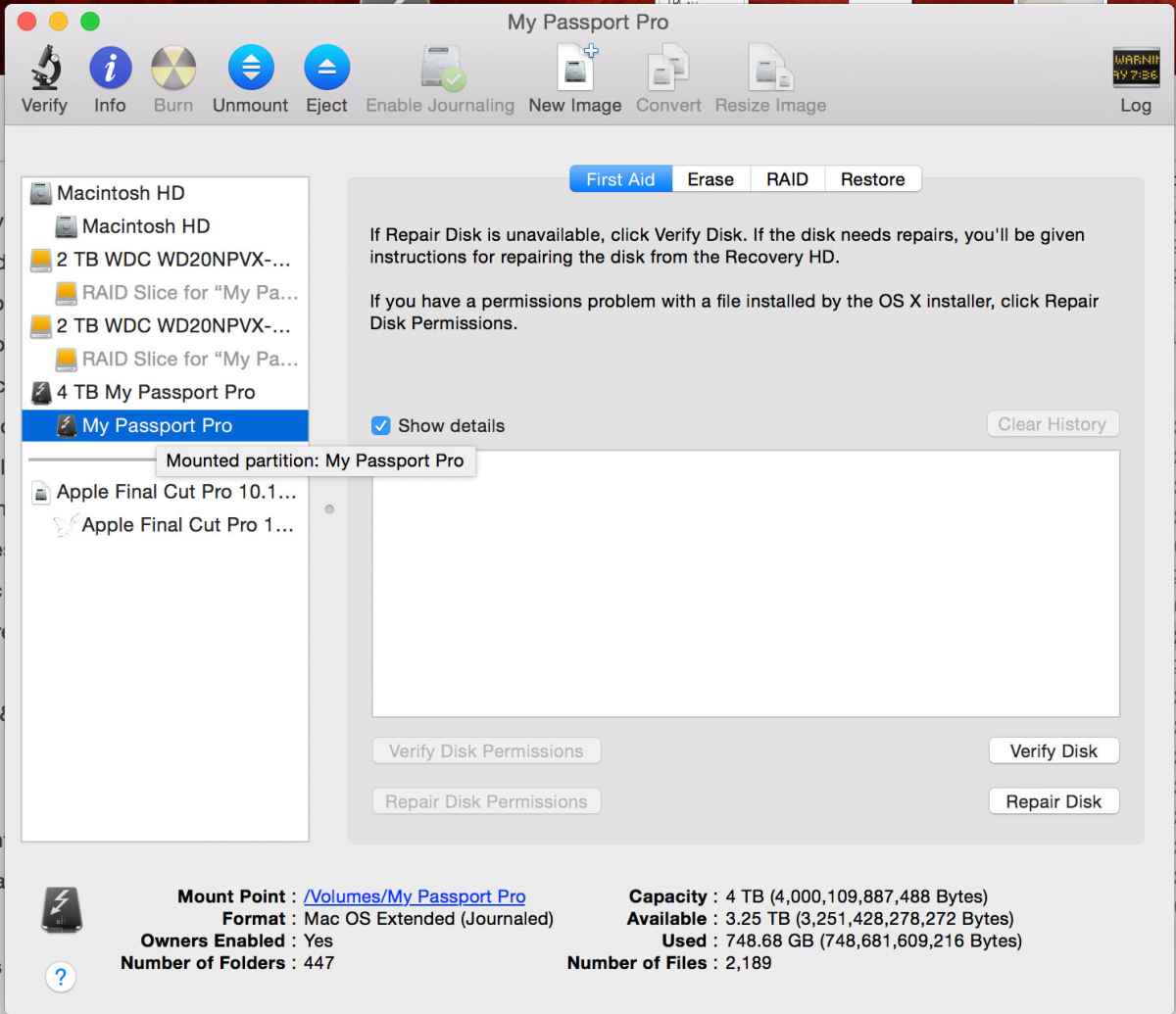
The fact is that this HD is a 4T thunderbolt HD and it has over 3T of free space.
I manage to write data on it outside FCPX without problems.
Is this a known issue?
please help.
thanks
joni
"Final Cut Pro cannot save changes to the library.
The hard disk where your library is located may be full
or unavailable or permissions may have changed. To
avoid losing your work, quit Final Cut Pro".
The fact is that this HD is a 4T thunderbolt HD and it has over 3T of free space.
I manage to write data on it outside FCPX without problems.
Is this a known issue?
please help.
thanks
joni
Please Log in to join the conversation.
- Tom Wolsky
-

- Offline
- Moderator
-

14 Jan 2015 21:11 #58464
by Tom Wolsky
Replied by Tom Wolsky on topic problem with FCPX & HD
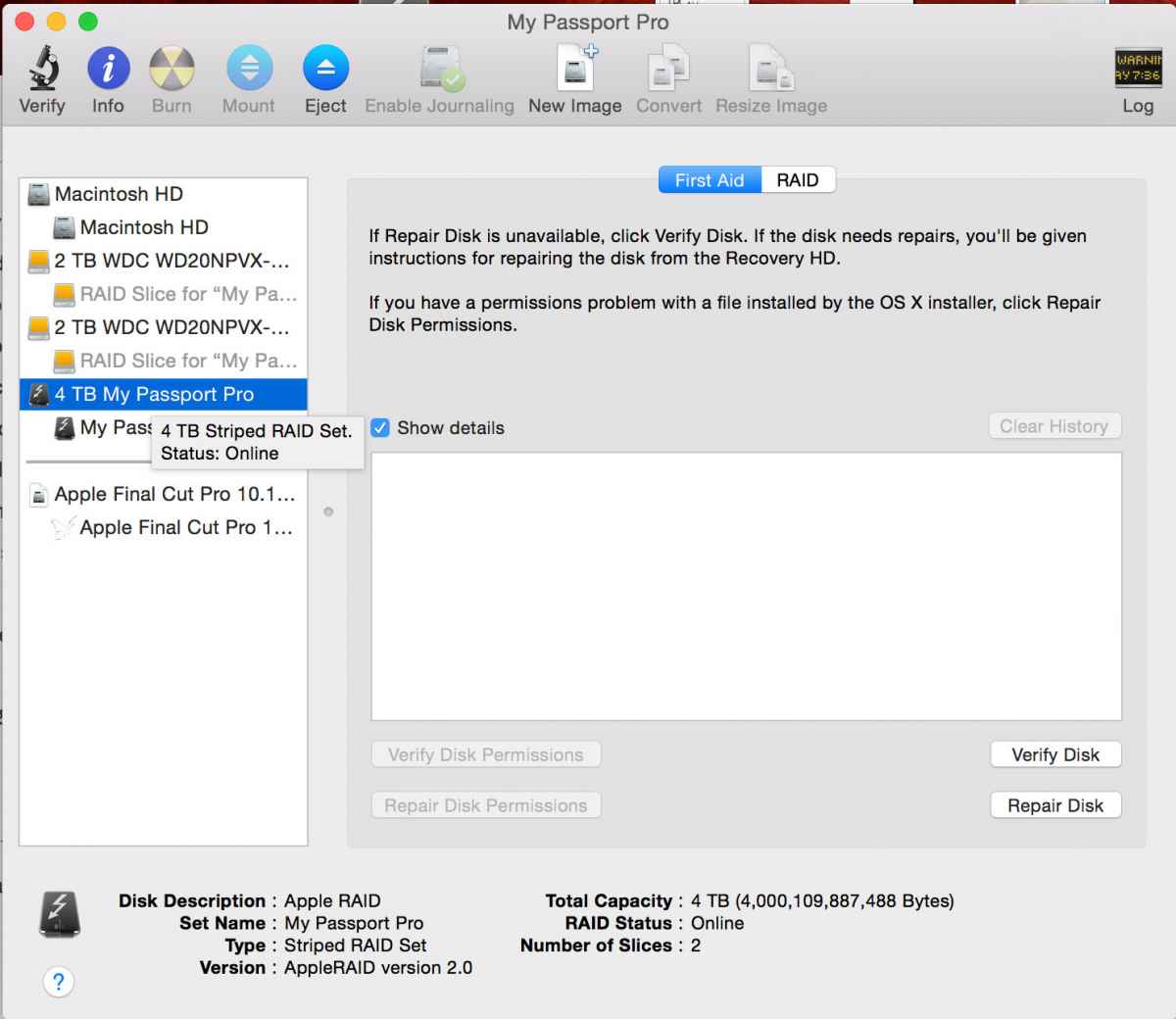
How is the drive formatted? What are the read/write permissions? What version of the software are you using? Does the drive appear under Devices in the import window?
Please Log in to join the conversation.
- Schwalbach
-
Topic Author
- Offline
- Elite Member
-
Less
More
- Posts: 164
- Thank you received: 0
15 Jan 2015 06:23 - 15 Jan 2015 06:57 #58486
by Schwalbach
Mac OS Extended (Journaled)
pics in Disk Utility attached.
[/quote]What are the read/write permissions?[/quote]
Read/Write for everyone.
[/quote]What version of the software are you using?[/quote]
10.1.4
[/quote]Does the drive appear under Devices in the import window?[/quote]
Yes
Replied by Schwalbach on topic problem with FCPX & HD
Tom Wolsky wrote: How is the drive formatted?
Mac OS Extended (Journaled)
pics in Disk Utility attached.
[/quote]What are the read/write permissions?[/quote]
Read/Write for everyone.
[/quote]What version of the software are you using?[/quote]
10.1.4
[/quote]Does the drive appear under Devices in the import window?[/quote]
Yes
Last edit: 15 Jan 2015 06:57 by Schwalbach.
Please Log in to join the conversation.
- Karsten Schlüter
-

- Offline
- Moderator
-
Less
More
- Posts: 3790
- Thank you received: 718
15 Jan 2015 07:10 #58490
by Karsten Schlüter
sorry for asking silly questions - but are you sure, your Lib is on THAT drive?
check your Lib/Project settings ...
The "Where is what and for real?"-thingie of FCPX could be confusing ...
btw: nice drive ....
Replied by Karsten Schlüter on topic problem with FCPX & HD
Schwalbach wrote: … The hard disk where your library is located may be full
or unavailable or permissions may have changed.…
sorry for asking silly questions - but are you sure, your Lib is on THAT drive?
check your Lib/Project settings ...
The "Where is what and for real?"-thingie of FCPX could be confusing ...
btw: nice drive ....
Please Log in to join the conversation.
- Schwalbach
-
Topic Author
- Offline
- Elite Member
-
Less
More
- Posts: 164
- Thank you received: 0
15 Jan 2015 07:26 #58492
by Schwalbach
Replied by Schwalbach on topic problem with FCPX & HD
Karsten,
Yes, the library is on that drive and the original media too. Check the attached image.
I just bought this drive to edit this project on the go (macbook pro) as I was having disk space issues on my 1T usb3 HD.
This is a really nice drive and cost me a fortune!!! And it's stopping me from getting the job done. Very frustrating!!!
Yes, the library is on that drive and the original media too. Check the attached image.
I just bought this drive to edit this project on the go (macbook pro) as I was having disk space issues on my 1T usb3 HD.
This is a really nice drive and cost me a fortune!!! And it's stopping me from getting the job done. Very frustrating!!!
Please Log in to join the conversation.
- Karsten Schlüter
-
- Offline
- Moderator
-
Less
More
- Posts: 3790
- Thank you received: 718
15 Jan 2015 07:28 - 15 Jan 2015 07:38 #58493
by Karsten Schlüter
actually I see only your DiskUtility shots ...
Your [strike]Project[/strike] Library settings in FCPX would tell ...
select your Lib in the Lib Pane ("Mediathek") and see, what the Info pane tells
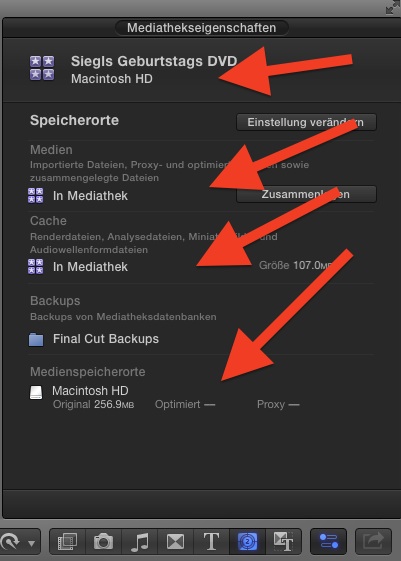
(sorry, me lazy to switch to english GUI ... but, you get it anyhow)
Replied by Karsten Schlüter on topic problem with FCPX & HD
Schwalbach wrote: … Check the attached image.…
actually I see only your DiskUtility shots ...
Your [strike]Project[/strike] Library settings in FCPX would tell ...
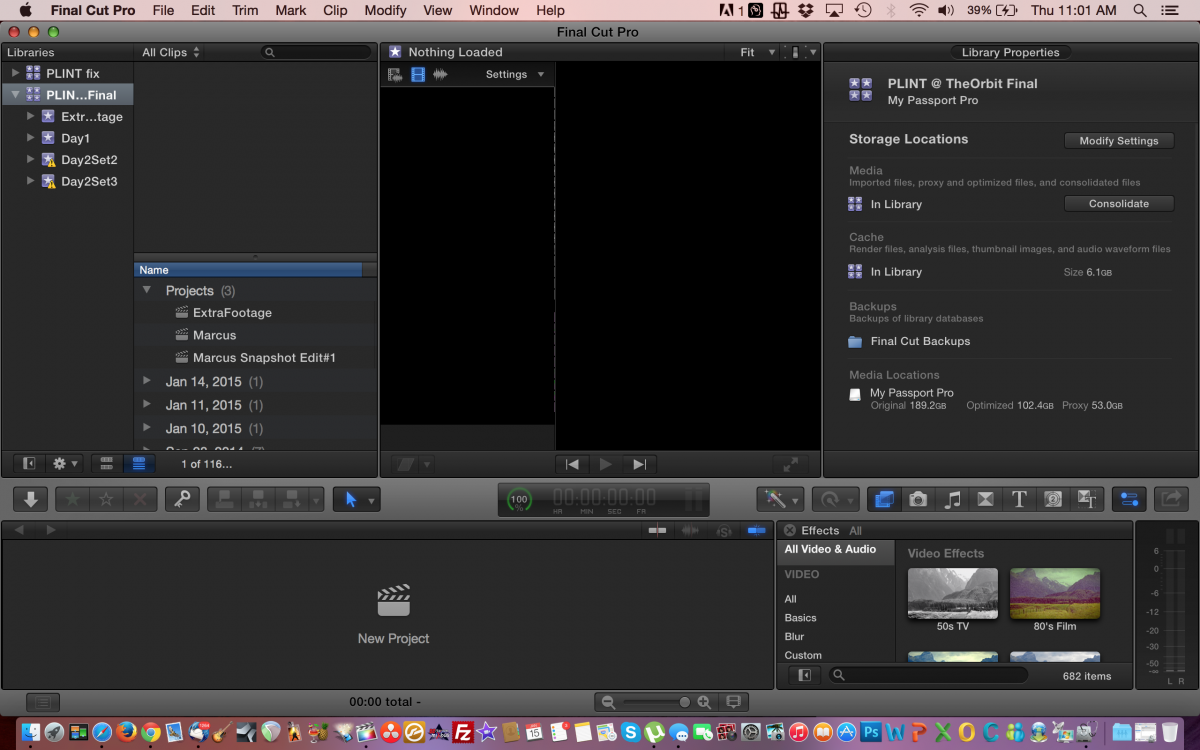
select your Lib in the Lib Pane ("Mediathek") and see, what the Info pane tells
(sorry, me lazy to switch to english GUI ... but, you get it anyhow)
Last edit: 15 Jan 2015 07:38 by Karsten Schlüter.
Please Log in to join the conversation.
- Schwalbach
-
Topic Author
- Offline
- Elite Member
-
Less
More
- Posts: 164
- Thank you received: 0
15 Jan 2015 08:41 #58495
by Schwalbach
Replied by Schwalbach on topic problem with FCPX & HD
Karsten,
Can you explain how to I go to LibPane and check its settings etc?
Can you explain how to I go to LibPane and check its settings etc?
Karsten Schlüter wrote:
Schwalbach wrote: … Check the attached image.…
actually I see only your DiskUtility shots ...
Your [strike]Project[/strike] Library settings in FCPX would tell ...
select your Lib in the Lib Pane ("Mediathek") and see, what the Info pane tells
(sorry, me lazy to switch to english GUI ... but, you get it anyhow)
Please Log in to join the conversation.
- Schwalbach
-
Topic Author
- Offline
- Elite Member
-
Less
More
- Posts: 164
- Thank you received: 0
15 Jan 2015 09:01 #58496
by Schwalbach
Replied by Schwalbach on topic problem with FCPX & HD
Karsten,
here it is, the image of the Lib properties...
here it is, the image of the Lib properties...
Please Log in to join the conversation.
- Schwalbach
-
Topic Author
- Offline
- Elite Member
-
Less
More
- Posts: 164
- Thank you received: 0
15 Jan 2015 09:29 #58497
by Schwalbach
Replied by Schwalbach on topic problem with FCPX & HD
it looks like only fcpx can't write on this volume.
I can copy large file into the drive using finder without problems.
Now fcpx does't even let me close the library and start a new one to test it out. It gives me the same error.
please help
I can copy large file into the drive using finder without problems.
Now fcpx does't even let me close the library and start a new one to test it out. It gives me the same error.
please help
Please Log in to join the conversation.
- Karsten Schlüter
-
- Offline
- Moderator
-
Less
More
- Posts: 3790
- Thank you received: 718
15 Jan 2015 09:56 #58498
by Karsten Schlüter
In FCPX click/select the Lib on the left on on the right in the Info pane you see what I have posted
Replied by Karsten Schlüter on topic problem with FCPX & HD
Schwalbach wrote: Karsten,
Can you explain how to I go to LibPane and check its settings etc?]
In FCPX click/select the Lib on the left on on the right in the Info pane you see what I have posted
Please Log in to join the conversation.
- Karsten Schlüter
-
- Offline
- Moderator
-
Less
More
- Posts: 3790
- Thank you received: 718
15 Jan 2015 11:52 #58501
by Karsten Schlüter
Replied by Karsten Schlüter on topic problem with FCPX & HD
hmmm ... ?
afai can tell, FCPX 'knows' it should use your extHDD. Good!
two things I would do:
* quit FCPX
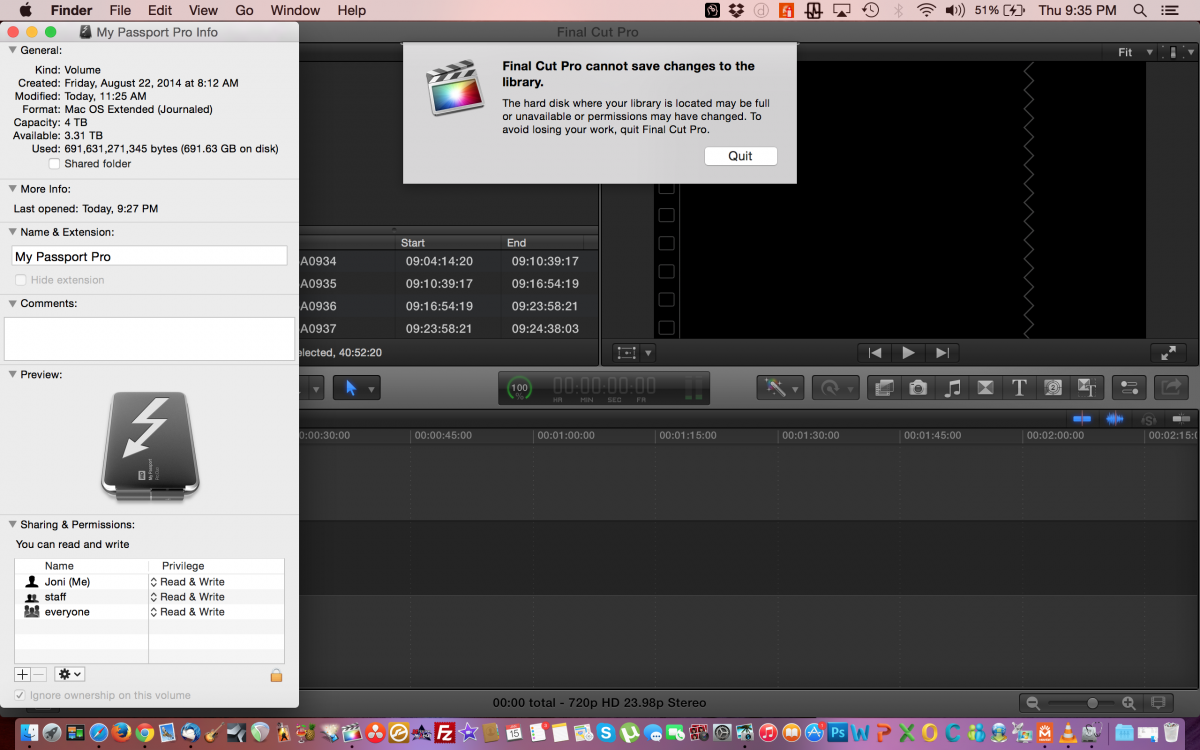
* in Finder (not FCPX), select your drive, ctrl-i to open its Info, check 'ignore ownership on this volume' (being in that info: your drive is hfs formatted, correct?)
* and, on launch of FCPX, hold both keys cmd-opt/alt, and ok 'delete prefs' ... maybe, FCPX needs a lil' slap on the backhead
...
hey that's 3 thinsg I'd do ... :silly:
afai can tell, FCPX 'knows' it should use your extHDD. Good!
two things I would do:
* quit FCPX
* in Finder (not FCPX), select your drive, ctrl-i to open its Info, check 'ignore ownership on this volume' (being in that info: your drive is hfs formatted, correct?)
* and, on launch of FCPX, hold both keys cmd-opt/alt, and ok 'delete prefs' ... maybe, FCPX needs a lil' slap on the backhead
...
hey that's 3 thinsg I'd do ... :silly:
Please Log in to join the conversation.
- Tom Wolsky
-
- Offline
- Moderator
-
15 Jan 2015 12:40 #58504
by Tom Wolsky
Replied by Tom Wolsky on topic problem with FCPX & HD
Is this problem persistent, every time you open FCP and work in it, or did it happen once?
Please Log in to join the conversation.
- Schwalbach
-
Topic Author
- Offline
- Elite Member
-
Less
More
- Posts: 164
- Thank you received: 0
15 Jan 2015 19:34 #58525
by Schwalbach
Replied by Schwalbach on topic problem with FCPX & HD
Karsten. thank you so much for trying to help me.
I have done what you suggested and....nothing. Still getting the same error message. See attached image.
This is so annoying. I don't know what to do anymore :silly:
I have done what you suggested and....nothing. Still getting the same error message. See attached image.
This is so annoying. I don't know what to do anymore :silly:
Karsten Schlüter wrote: hmmm ... ?
afai can tell, FCPX 'knows' it should use your extHDD. Good!
two things I would do:
* quit FCPX
* in Finder (not FCPX), select your drive, ctrl-i to open its Info, check 'ignore ownership on this volume' (being in that info: your drive is hfs formatted, correct?)
* and, on launch of FCPX, hold both keys cmd-opt/alt, and ok 'delete prefs' ... maybe, FCPX needs a lil' slap on the backhead
...
hey that's 3 thinsg I'd do ... :silly:
Please Log in to join the conversation.
- Schwalbach
-
Topic Author
- Offline
- Elite Member
-
Less
More
- Posts: 164
- Thank you received: 0
15 Jan 2015 19:46 #58527
by Schwalbach
Replied by Schwalbach on topic problem with FCPX & HD
Tom,
Happens every time I open this library or any other on this HD. Even if I try to create a new one on this HD.
thanks
joni
Happens every time I open this library or any other on this HD. Even if I try to create a new one on this HD.
thanks
joni
Please Log in to join the conversation.
- Tom Wolsky
-
- Offline
- Moderator
-
15 Jan 2015 19:50 #58528
by Tom Wolsky
Replied by Tom Wolsky on topic problem with FCPX & HD
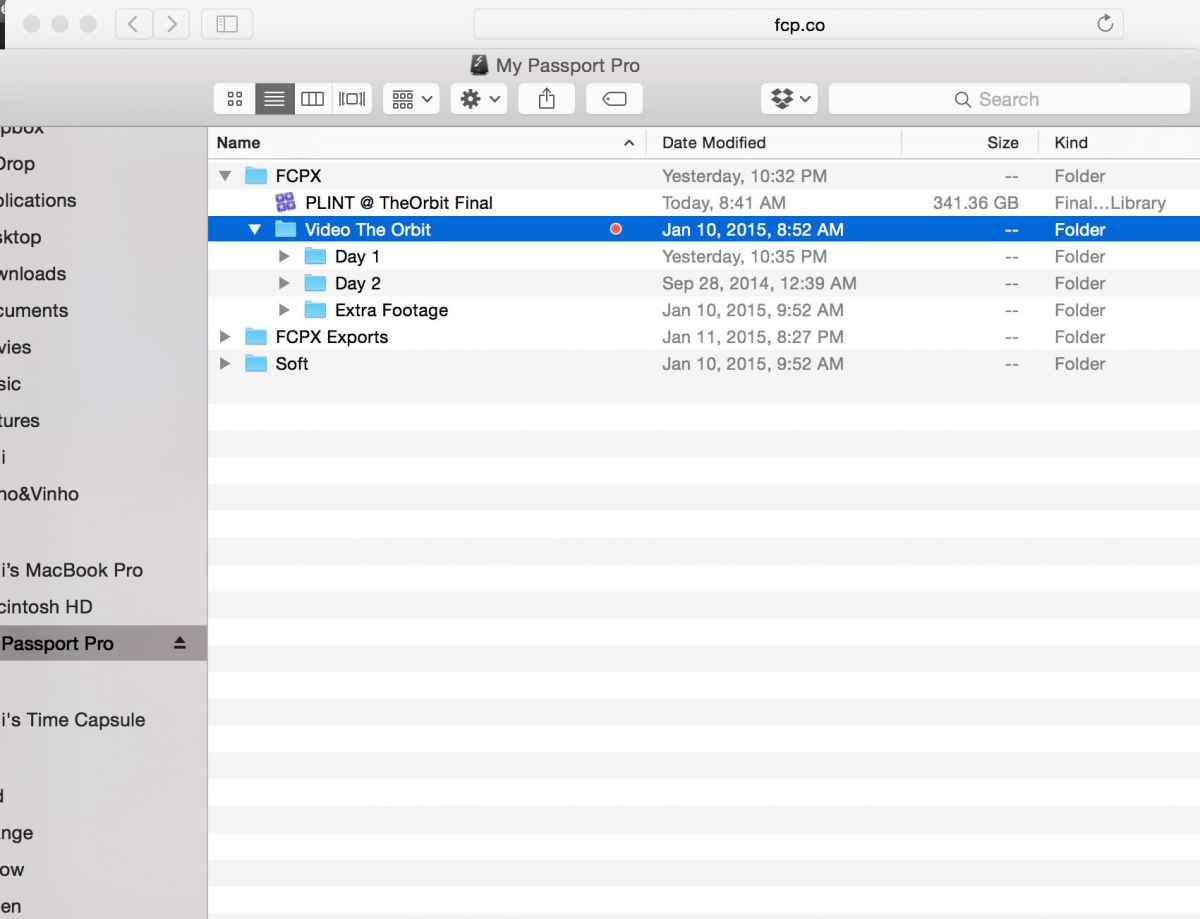
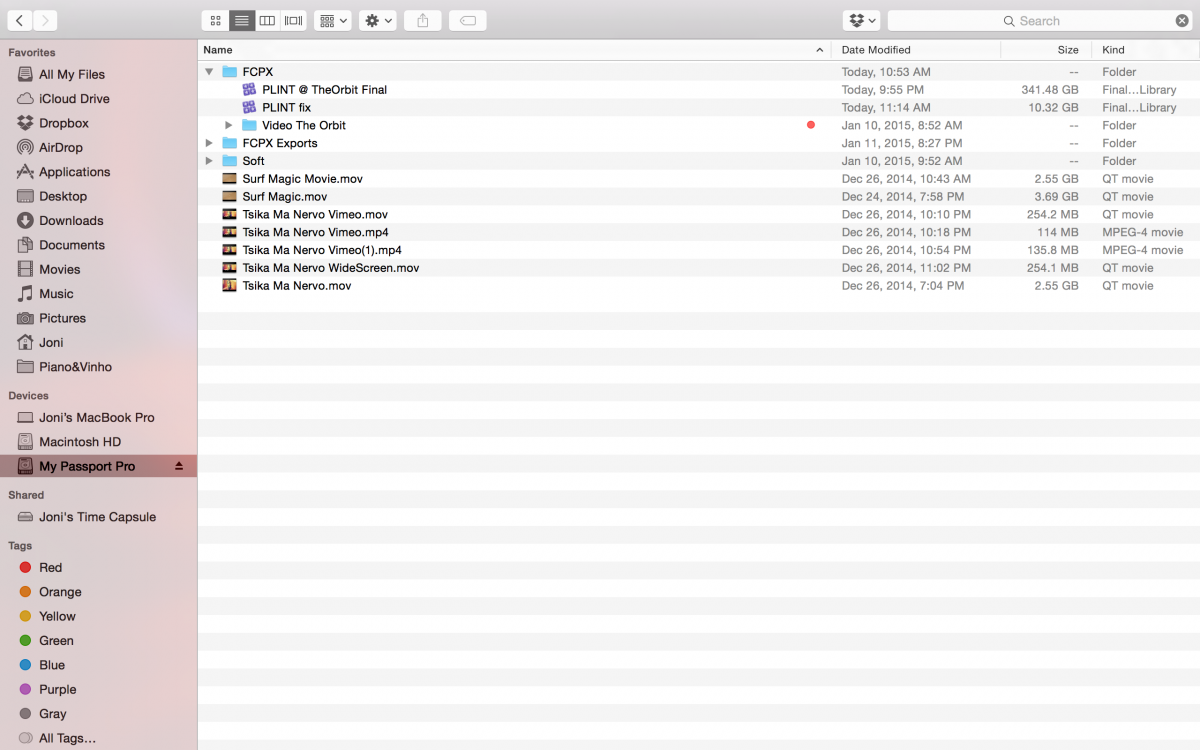
One other thing: would it be possible to see a screen shot of the root level of the drive?
Please Log in to join the conversation.
- Schwalbach
-
Topic Author
- Offline
- Elite Member
-
Less
More
- Posts: 164
- Thank you received: 0
15 Jan 2015 19:56 #58529
by Schwalbach
Replied by Schwalbach on topic problem with FCPX & HD
Tom, here it is...
Please Log in to join the conversation.
- Tom Wolsky
-
- Offline
- Moderator
-
15 Jan 2015 20:51 #58532
by Tom Wolsky
Replied by Tom Wolsky on topic problem with FCPX & HD
Sorry. Can't see any reason for this not working. Try rebooting with all other devices disconnected. I can't see anything on the drive that would prevent this.
Please Log in to join the conversation.


16 Jan 2015 05:55 #58545
by joema
Can you try running Disk Utility, selecting that volume and doing "Verify Disk". Note any errors that appear. You can also try "Repair Disk".
Also, it is just FCP X that has problems with that drive? Can other programs (e.g, Black Magic performance test) create files and do I/O there?
Are the libraries in question all in the root of that drive? If yes can you try creating a library in a sub-folder of that drive?
Replied by joema on topic problem with FCPX & HD
Schwalbach wrote: Suddenly FCPX is giving the following error:
"Final Cut Pro cannot save changes to the library.
The hard disk where your library is located may be full
or unavailable or permissions may have changed. To
avoid losing your work, quit Final Cut Pro"...
Can you try running Disk Utility, selecting that volume and doing "Verify Disk". Note any errors that appear. You can also try "Repair Disk".
Also, it is just FCP X that has problems with that drive? Can other programs (e.g, Black Magic performance test) create files and do I/O there?
Are the libraries in question all in the root of that drive? If yes can you try creating a library in a sub-folder of that drive?
Please Log in to join the conversation.
- Schwalbach
-
Topic Author
- Offline
- Elite Member
-
Less
More
- Posts: 164
- Thank you received: 0
16 Jan 2015 09:41 #58548
by Schwalbach
Replied by Schwalbach on topic problem with FCPX & HD
Thank Tom. It's weird!!!
It was driving me crazy and I just deleted the whole library and I building everything from scratch.
I least I manage to keep working on this.
Will let you know if I get stuck again at some point.
Really appreciate your help.
best, joni
It was driving me crazy and I just deleted the whole library and I building everything from scratch.
I least I manage to keep working on this.
Will let you know if I get stuck again at some point.
Really appreciate your help.
best, joni
Tom Wolsky wrote: Sorry. Can't see any reason for this not working. Try rebooting with all other devices disconnected. I can't see anything on the drive that would prevent this.
Please Log in to join the conversation.
- Schwalbach
-
Topic Author
- Offline
- Elite Member
-
Less
More
- Posts: 164
- Thank you received: 0
16 Jan 2015 09:42 #58549
by Schwalbach
Replied by Schwalbach on topic problem with FCPX & HD
Joema, Thanks for the hints.
I was going crazy and needed to work on the project so deleted everything and doing it all form scratch.

I was going crazy and needed to work on the project so deleted everything and doing it all form scratch.
joema wrote:
Schwalbach wrote: Suddenly FCPX is giving the following error:
"Final Cut Pro cannot save changes to the library.
The hard disk where your library is located may be full
or unavailable or permissions may have changed. To
avoid losing your work, quit Final Cut Pro"...
Can you try running Disk Utility, selecting that volume and doing "Verify Disk". Note any errors that appear. You can also try "Repair Disk".
Also, it is just FCP X that has problems with that drive? Can other programs (e.g, Black Magic performance test) create files and do I/O there?
Are the libraries in question all in the root of that drive? If yes can you try creating a library in a sub-folder of that drive?
Please Log in to join the conversation.
