


- Posts: 1433
- Thank you received: 64
3 Post Moderation Rule for New Boarders (25 Jan 2021)
New boarders will have their posts moderated - Don't worry if you cannot see your post immediately.
10.1.5 PRE-RELEASE DISCUSSION
- Disproportionate Pictures
-
 Topic Author
- Offline
- Platinum Member
-

Less
More
12 Jan 2015 00:45 #58326
by Disproportionate Pictures
Replied by Disproportionate Pictures on topic 10.1.5 PRE-RELEASE DISCUSSION
I think the challenge there will be that they'll have to come up with alternate arrangements for windows.
Right now the Event and Viewer live above the centre tool bar, and the Project window lives below it. If the Project window was moved to it's own display, then it would make sense to have the Viewer and Event Browser stacked vs side by side, I think. No doubt more flexibility in window layouts is something I'd like to see addressed in a UI update.
Right now the Event and Viewer live above the centre tool bar, and the Project window lives below it. If the Project window was moved to it's own display, then it would make sense to have the Viewer and Event Browser stacked vs side by side, I think. No doubt more flexibility in window layouts is something I'd like to see addressed in a UI update.
The topic has been locked.
- Don Rumsey
-

- Offline
- Elite Member
-

Less
More
- Posts: 220
- Thank you received: 17
12 Jan 2015 00:56 #58327
by Don Rumsey
Replied by Don Rumsey on topic 10.1.5 PRE-RELEASE DISCUSSION
I'd hate to say the dreaded Adobe word, but i do miss that in Premiere. to be able to move anything and everything around. Ahhhh...
The topic has been locked.
- Bretwilliams
-

- Offline
- Senior Member
-

Less
More
- Posts: 74
- Thank you received: 28
12 Jan 2015 05:03 #58337
by Bretwilliams
Replied by Bretwilliams on topic 10.1.5 PRE-RELEASE DISCUSSION
You can program any shortcut in any menu of any app to any available key in keyboard prefs in system prefs under keyboard and then shortcuts. For example, add the app Final Cut Pro, then type the exact menu item- A/V Output and then choose the key. I chose f17. I have f18 and f19 mapped (just via X shortcuts) to better performance and high quality, so f17 turning on and off video output seemed like a good choice.
The topic has been locked.
12 Jan 2015 12:48 #58347
by Wardos
Replied by Wardos on topic 10.1.5 PRE-RELEASE DISCUSSION
Yeah but why has no one yet, mapped all the fcp7 shortcuts to the X.
I think that a lot of people would love that
I think that a lot of people would love that
The topic has been locked.
- ronny courtens
-

- Offline
- Moderator
-

Less
More
- Posts: 4455
- Thank you received: 962
12 Jan 2015 13:10 #58350
by ronny courtens
Replied by ronny courtens on topic 10.1.5 PRE-RELEASE DISCUSSION
When I started testing FCP X in 2011 I decided to re-map a lot of keyboard shortcuts so it would look more familiar to our FCP editors once they started working with the program. I think it was BenB on these forums who suggested that this was not a good way to deal with this. And he was right. A few months later I restored all keyboard shortcuts to their default and we only added new shortcuts for very specific FCP X functions we use. It simply felt better.
The worst thing you can do with FCP X is to try and make it work like classic FCP. It's a different application, in many ways much better than the old one. And when you work with it as it was intended to, I think you will experience that you will work much faster.
- Ronny
The worst thing you can do with FCP X is to try and make it work like classic FCP. It's a different application, in many ways much better than the old one. And when you work with it as it was intended to, I think you will experience that you will work much faster.
- Ronny
The topic has been locked.
- Bretwilliams
-
- Offline
- Senior Member
-
Less
More
- Posts: 74
- Thank you received: 28
12 Jan 2015 13:51 - 13 Jan 2015 05:42 #58352
by Bretwilliams
Replied by Bretwilliams on topic 10.1.5 PRE-RELEASE DISCUSSION
I think wherever they can be Apple retained the same shortcuts in functions that are the same. FCPX feels the most like FCP legacy than any other app. Zooming in the canvas or timeline (cmd +- in nun pad), the hand tool, trimming and nudging (< >), volume increase/decrease (ctrl +- on standard keyboard), shift z to show all in canvas or timeline, and even the new audio tools are almost the same (used to be cmd option L and now it's ctrl opt L). Even the jkl feels right. Cmd 1,2,3 for bin, timeline, canvas. I can't remember but I think these are basically the same if not exactly the same. But it's not the same app and doesn't function the same. So I think they tried to give the new functions a better layout ( line the insert and connect keys) moving many functions to regular keys instead of function keys. I dislike function keys because then you have to hobble your Mac, turning off things like volume, brightness, and many other OS functions, all of which Apple moved to function keys si they could shrink their keyboards years ago.
What functions aren't mapped or could be mapped better?
Edit: I also forgot shift+s for audio scrubbing & N for snapping. Really, most of your day to day operations are these same wherever possible. My muscle memory was definitely happier on X than Premiere, even with the pseudo FCP shortcut set which just maps similar things to similar things.
What functions aren't mapped or could be mapped better?
Edit: I also forgot shift+s for audio scrubbing & N for snapping. Really, most of your day to day operations are these same wherever possible. My muscle memory was definitely happier on X than Premiere, even with the pseudo FCP shortcut set which just maps similar things to similar things.
Last edit: 13 Jan 2015 05:42 by Bretwilliams.
The topic has been locked.
- Karsten Schlüter
-

- Offline
- Moderator
-
Less
More
- Posts: 3790
- Thank you received: 718
12 Jan 2015 13:57 #58353
by Karsten Schlüter
As a FinalCut-Virgin = haven't used legacy FC before, I must admit, there's some 'logic' and lots of convenience with the out-of-the-box key-mapping, never felt the wish to re-map anything:
'finesse' aka editing (jogging, nudging) is on the right hand, 'switching' is on the left - as a 'rightie' that's fine!
I'm actually using only one custom item, "apply 50% slowmo", mapped as ctrl-shift-G (memo: Geschwindigkeit/speed); which is easy to do - for me.-
Some short-cuts need some hilarios memo, as Q = qnnected clip, but ... anyhow :blink:
Fingers crossed (pun pahhhh!), a forth-coming switchable-custom-layout has some simple mapping I can remember.... :lol:
Replied by Karsten Schlüter on topic 10.1.5 PRE-RELEASE DISCUSSION
ronny courtens wrote: ... The worst thing you can do with FCP X is to try and make it work like classic FCP. ...
As a FinalCut-Virgin = haven't used legacy FC before, I must admit, there's some 'logic' and lots of convenience with the out-of-the-box key-mapping, never felt the wish to re-map anything:
'finesse' aka editing (jogging, nudging) is on the right hand, 'switching' is on the left - as a 'rightie' that's fine!
I'm actually using only one custom item, "apply 50% slowmo", mapped as ctrl-shift-G (memo: Geschwindigkeit/speed); which is easy to do - for me.-
Some short-cuts need some hilarios memo, as Q = qnnected clip, but ... anyhow :blink:
Fingers crossed (pun pahhhh!), a forth-coming switchable-custom-layout has some simple mapping I can remember.... :lol:
The topic has been locked.

14 Jan 2015 14:42 #58435
by hyphen
Replied by hyphen on topic 10.1.5 PRE-RELEASE DISCUSSION
Hi all,
I am brand new to the forum but a frequent lurker... Anyway, what I would love to see in fcpx 10.1.5 is opacity and some keyframe controls directly on the clip, not in the video animation menu. Also being able to lock audio tracks into place would help a lot... What else, oh yes, a project wide preference to have the quality of slow mo set to a specific mode and the option to transcode on import to all prores codecs.
Cheers
I am brand new to the forum but a frequent lurker... Anyway, what I would love to see in fcpx 10.1.5 is opacity and some keyframe controls directly on the clip, not in the video animation menu. Also being able to lock audio tracks into place would help a lot... What else, oh yes, a project wide preference to have the quality of slow mo set to a specific mode and the option to transcode on import to all prores codecs.
Cheers
The topic has been locked.
14 Jan 2015 23:06 #58474
by BenB
Replied by BenB on topic 10.1.5 PRE-RELEASE DISCUSSION
When I sold my old Saturn for a Lexus, I would never dream of putting Saturn floor mats, Saturn quality tires and accoutrements into it. Ugh, why go backwards? Makes no sense what so ever....
If you want to drive a Saturn, drive a Saturn! Don't go buy a BMW and force it to look, feel, and smell like a Saturn!
If you want to drive a Saturn, drive a Saturn! Don't go buy a BMW and force it to look, feel, and smell like a Saturn!
The topic has been locked.
14 Jan 2015 23:38 #58475
by hyphen
Care to expand?
Cheers
Replied by hyphen on topic 10.1.5 PRE-RELEASE DISCUSSION
BenB wrote: When I sold my old Saturn for a Lexus, I would never dream of putting Saturn floor mats, Saturn quality tires and accoutrements into it. Ugh, why go backwards? Makes no sense what so ever....
If you want to drive a Saturn, drive a Saturn! Don't go buy a BMW and force it to look, feel, and smell like a Saturn!
Care to expand?
Cheers
The topic has been locked.
15 Jan 2015 03:38 - 15 Jan 2015 03:38 #58482
by BenB
Replied by BenB on topic 10.1.5 PRE-RELEASE DISCUSSION
I already did, I bought a Lexus, and edit with/teach FCPX.
Last edit: 15 Jan 2015 03:38 by BenB.
The topic has been locked.
- Karsten Schlüter
-
- Offline
- Moderator
-
Less
More
- Posts: 3790
- Thank you received: 718
15 Jan 2015 08:03 #58494
by Karsten Schlüter
um…, well, like…, …say, um ...... If you want … no BMW, but a Porsche:
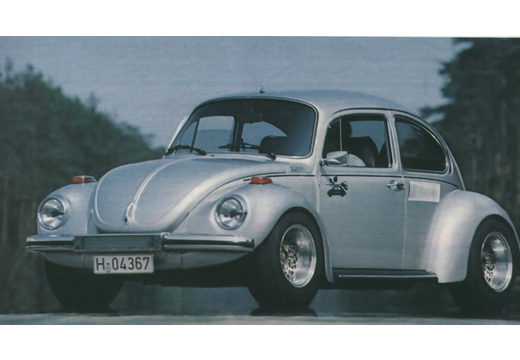
The (in)famous Nordstadt-Käfer, a "beetle-body on a Carrera-chassis'-homunculus from the early 70ies... I well remember that - everybody wanted one! And there was a very well written article about it in the Playboy-magazine... yes, you all bought it for the well-written articles, I know............... :woohoo:
Replied by Karsten Schlüter on topic 10.1.5 PRE-RELEASE DISCUSSION
BenB wrote: … Don't go buy a BMW and force it to look, feel, and smell like a Saturn!
um…, well, like…, …say, um ...... If you want … no BMW, but a Porsche:
The (in)famous Nordstadt-Käfer, a "beetle-body on a Carrera-chassis'-homunculus from the early 70ies... I well remember that - everybody wanted one! And there was a very well written article about it in the Playboy-magazine... yes, you all bought it for the well-written articles, I know............... :woohoo:
The topic has been locked.
15 Jan 2015 12:19 #58503
by hyphen
I am quite new with fcpx. There are parts that are simply wonderful (tagging for example) and the speed is bliss. Still when it comes to multi layer video and audio I have issues. With video, opacity levels are very hard to adjust to adjust when it comes to having many layers "playing at the same time where you have to revisit and adjust levels. With audio I wish clips would stay in place and not move upwards after an edit/cut. I have a lot to learn I guess but I can't see how I can deal with those issues.
Replied by hyphen on topic 10.1.5 PRE-RELEASE DISCUSSION
BenB wrote: I already did, I bought a Lexus, and edit with/teach FCPX.
I am quite new with fcpx. There are parts that are simply wonderful (tagging for example) and the speed is bliss. Still when it comes to multi layer video and audio I have issues. With video, opacity levels are very hard to adjust to adjust when it comes to having many layers "playing at the same time where you have to revisit and adjust levels. With audio I wish clips would stay in place and not move upwards after an edit/cut. I have a lot to learn I guess but I can't see how I can deal with those issues.
The topic has been locked.
- Disproportionate Pictures
-
Topic Author
- Offline
- Platinum Member
-
Less
More
- Posts: 1433
- Thank you received: 64
15 Jan 2015 16:39 #58515
by Disproportionate Pictures
Replied by Disproportionate Pictures on topic 10.1.5 PRE-RELEASE DISCUSSION
Nice discussion from Richard Taylor's Google hangout about 2014 in review and 2015 expectations.
The topic has been locked.
- daviddelreal
-
- Offline
- Elite Member
-
Less
More
- Posts: 230
- Thank you received: 6
19 Jan 2015 21:51 #58663
by daviddelreal
Replied by daviddelreal on topic 10.1.5 PRE-RELEASE DISCUSSION
Hmmmm....I smell updates in the air.....could we possibly have an update tomorrow????
The topic has been locked.
19 Jan 2015 22:01 - 19 Jan 2015 22:02 #58665
by BenB
Replied by BenB on topic 10.1.5 PRE-RELEASE DISCUSSION
I doubt it, way too early.
Hyphe; I've no issue with adjusting opacity, nor with audio. I do massive audio work, too. Compound Clips, Roles, metadata makes it all a snap once you learn the system.
Hyphe; I've no issue with adjusting opacity, nor with audio. I do massive audio work, too. Compound Clips, Roles, metadata makes it all a snap once you learn the system.
Last edit: 19 Jan 2015 22:02 by BenB.
The topic has been locked.
- DmitriZigany
-
- Offline
- Platinum Member
-
Less
More
- Posts: 730
- Thank you received: 26
20 Jan 2015 12:12 #58695
by DmitriZigany
Replied by DmitriZigany on topic 10.1.5 PRE-RELEASE DISCUSSION
BenB,
How do you work with opacity?
I wouldn't mind if they made the opacity settings accessable directly on the clip somehow. I too find it a bit of a pain to work with opacities. Unless there's a way to do it I don't know about.
How do you work with opacity?
I wouldn't mind if they made the opacity settings accessable directly on the clip somehow. I too find it a bit of a pain to work with opacities. Unless there's a way to do it I don't know about.
The topic has been locked.
20 Jan 2015 12:37 #58697
by BenB
Replied by BenB on topic 10.1.5 PRE-RELEASE DISCUSSION
I don't find it difficult to access the slider in the Inspector. Yes, an opacity line in the Timeline would be nice, faster, but accessing in the Inspector I do not find slows me down at all. There is also Control-V to access the Opacity animation section in the timeline. Either way you use, I don't find it slow or cumbersome, really.
The topic has been locked.
- JPM Editor
-
- Offline
- Premium Member
-

20 Jan 2015 13:07 #58700
by JPM Editor
I know back in FCP7 we used to have opacity bars for video clips, and Audio Level bars for audio clips. We cannot have this in FCPX because of the design: clips can contain both video and audio in the same layer. I think it would be cumbersome to have two different bars overlapping, don't you think? Maybe someone else has a better idea of implementing it?
Anyway, what Ben B just said it's fine: use the slider in the Inspector or open de Video animation menu with Ctrl+V. If you don't want to see all the parameters, you can solo the Opacity bar this way:
- Select all the clips whose Opacity you want to adjust.
- Press Ctrl+Shift+V to Solo the Opacity Animation parameter (you won't see anything happening, but it will).
- Finally, you press Ctrl+V to show de Video Animation, but this time you will only see the Opacity parameter for all the selected clips.
Very fast and efficient, in my opinion. And you don't waste too much vertical space in the timeline this way.
Jesús Pérez-Miranda
Cut People CEO & Founder
www.cutpeople.es
Replied by JPM Editor on topic 10.1.5 PRE-RELEASE DISCUSSION
hyphen wrote: Hi all,
I am brand new to the forum but a frequent lurker... Anyway, what I would love to see in fcpx 10.1.5 is opacity and some keyframe controls directly on the clip, not in the video animation menu.
I know back in FCP7 we used to have opacity bars for video clips, and Audio Level bars for audio clips. We cannot have this in FCPX because of the design: clips can contain both video and audio in the same layer. I think it would be cumbersome to have two different bars overlapping, don't you think? Maybe someone else has a better idea of implementing it?
Anyway, what Ben B just said it's fine: use the slider in the Inspector or open de Video animation menu with Ctrl+V. If you don't want to see all the parameters, you can solo the Opacity bar this way:
- Select all the clips whose Opacity you want to adjust.
- Press Ctrl+Shift+V to Solo the Opacity Animation parameter (you won't see anything happening, but it will).
- Finally, you press Ctrl+V to show de Video Animation, but this time you will only see the Opacity parameter for all the selected clips.
Very fast and efficient, in my opinion. And you don't waste too much vertical space in the timeline this way.
Jesús Pérez-Miranda
Cut People CEO & Founder
www.cutpeople.es
The topic has been locked.
20 Jan 2015 13:07 #58701
by hyphen
Hi BenB
Mu problem with opacity control is more apparent with multi-layered video. Once I created a sequence that had 6 layers of videos playing at the same time. Those had varying opacity levels that had to be adjusted in relation to each other. Ending up with the animation menus expanded on all six layers is a bit of a nightmare. Additionally, I use opacity for fade ins/outs. Having the controls directly on the clip, in my opinion, is faster.
I think that the meta data work in fcpx is monumental. The manner in which one can tag clips is a life saver. The only problem I have not sorted out with multi track audio is the way audio clips move when you perform cuts even when in their own storyline. I recently cut a trailer that had 4 tracks of audio: dialogue, ambience (stereo), effects and music (stereo). Getting rid of a part in the video/dialogue section of a clip, causes what ever is underneath to move up and that made my life harder that I would like it to be. Basically knowing that your audio stays locked in its own storyline, again in my opinion, is easier.
Replied by hyphen on topic 10.1.5 PRE-RELEASE DISCUSSION
BenB wrote: I doubt it, way too early.
Hyphe; I've no issue with adjusting opacity, nor with audio. I do massive audio work, too. Compound Clips, Roles, metadata makes it all a snap once you learn the system.
Hi BenB
Mu problem with opacity control is more apparent with multi-layered video. Once I created a sequence that had 6 layers of videos playing at the same time. Those had varying opacity levels that had to be adjusted in relation to each other. Ending up with the animation menus expanded on all six layers is a bit of a nightmare. Additionally, I use opacity for fade ins/outs. Having the controls directly on the clip, in my opinion, is faster.
I think that the meta data work in fcpx is monumental. The manner in which one can tag clips is a life saver. The only problem I have not sorted out with multi track audio is the way audio clips move when you perform cuts even when in their own storyline. I recently cut a trailer that had 4 tracks of audio: dialogue, ambience (stereo), effects and music (stereo). Getting rid of a part in the video/dialogue section of a clip, causes what ever is underneath to move up and that made my life harder that I would like it to be. Basically knowing that your audio stays locked in its own storyline, again in my opinion, is easier.
The topic has been locked.
