


3 Post Moderation Rule for New Boarders (25 Jan 2021)
New boarders will have their posts moderated - Don't worry if you cannot see your post immediately.
10.1.5 PRE-RELEASE DISCUSSION
- Tom Wolsky
-

- Offline
- Moderator
-

- Disproportionate Pictures
-
 Topic Author
- Offline
- Platinum Member
-

- Posts: 1433
- Thank you received: 64
Even the MacPro, with PCIe being replaced with Thunderbolt, is looking to make Apple's support of pro peripherals as painless for them as possible.

What hardware of Avid's are you talking about? Apple has never had an interest in Avid's type of hardware. There's no future in that stuff.
Beats is a major online streaming service, and a staff of super creative people who fit right in with taking iTunes into the future.
Apple is developing Logic Pro X, why would they take on ProTools? Just to re-write the whole thing from scratch? Naw, makes no sense.
Photos is going to be just fine. Folks will be very happy with it, if they look at it honestly. But there will always be haters who bash what Apple does and preach Apple's doom. They've always been around, they alway will be, ignore them.
As for backwards compatibility, FCPX is the only app with that issue, and that is because of such a drastic paradigm shift, there's nothing similar. Look how much work was put into 7toX! That was a hell of an effort. Apple told them to go ahead and do it, because they could do it better and faster than Apple had resources to.
Pages, Numbers, Keynote, none have had backwards compatibility issues. I run my business on them, have for years. When I upgraded, my old documents had no issue with the new versions.
Backwards compatibility has to end at some point, or you tie yourself to outdated technology and code and your app will never evolve.
If Apple bought Avid, a company that is bleeding to death, what would they gain? A product line that is not successful. So they'd have to throw it all out and start from scratch. What's the point in that?
- Disproportionate Pictures
-
Topic Author
- Offline
- Platinum Member
-
- Posts: 1433
- Thank you received: 64
I'm not saying that backwards compatibility should last forever, but saying FCPX was the only instance isn't true.

When I'm cutting spots I want the smallest vertical footprint but when I am editing the audio I want to see nothing but waveforms. The F keys are easily accessible and I'm left handed so all of my shortcut keys tend to be on the left side of the keyboard. The F keys were open. Easy to toggle between views.
Actually, I updated to the newer Paged, Numbers, Keynote the day they were release. I never had issues opening documents from my previous versions. I've never seen that issue. Now, if you were on a really old version of those apps, yes, there were issues. But that's like going from FCP 3 to FCP X.

BenB wrote: As for backwards compatibility, FCPX is the only app with that issue, and that is because of such a drastic paradigm shift, there's nothing similar. Look how much work was put into 7toX! That was a hell of an effort. Apple told them to go ahead and do it, because they could do it better and faster than Apple had resources to.
Pages, Numbers, Keynote, none have had backwards compatibility issues. I run my business on them, have for years. When I upgraded, my old documents had no issue with the new versions.
Unfortunately, you are not correct here. See attached screen grab for a case in point.
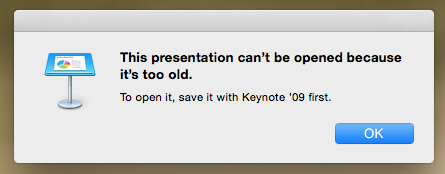
BenB wrote: That's exactly what I said, if you go from a version of anything too far back, yes, there is backwards compatibility. But, if you upgraded to iWork 09, there was no issue. That's normal for any major application upgrade. My studio kept up with iWork latest versions. We didn't have issues. That's all I'm saying. Try opening an FCP3 XML file with 7toX.
No, that's not what you said. You said that FCPX was the only Apple application that had backwards compatibility issues.
And for what it's worth, I searched my file server for the oldest .PPT file I had online. It's from June 1999. Still opens flawlessly in PowerPoint 2011. And the iWork forward-compatibility track record is nothing to crow about either when compared to the Office lineup. Microsoft only broke forward compatibility one time that I know of (from .doc to .docx) and they provided free plugins for older versions of Office to allow them to open the newer format.
I feel queasy using Microsoft as an example of how Apple could do better in a particular area. I need to go lie down now.

@Alex4D

- Disproportionate Pictures
-
Topic Author
- Offline
- Platinum Member
-
- Posts: 1433
- Thank you received: 64
As for A/V Output. I'd like to see being able to switch frame-rates and resolutions without having to quit and restart FCPX, that would be wonderful.
I have sent feedback. If we all send feedback with this? and other great ideas that are going around lately, perhaps we can all have a more efficient 2015!!...
- Tom Wolsky
-
- Offline
- Moderator
-
- Don Rumsey
-

- Offline
- Elite Member
-

- Posts: 220
- Thank you received: 17
- Posts: 971
- Thank you received: 46
- Disproportionate Pictures
-
Topic Author
- Offline
- Platinum Member
-
- Posts: 1433
- Thank you received: 64
Don Rumsey wrote: Here I am editing and thought of this. Of course it may have been mentioned before with expanded UI capabilities. Having a secondary monitor with my browser on it nice and big. I would love to have the event viewer over there as well.
Wish granted! You can already do this.
Window>Show Events on Second Display
I would personally like to be able to push the Projects window to a second display as well, so that you get the full display height for complex timelines.
- Don Rumsey
-
- Offline
- Elite Member
-
- Posts: 220
- Thank you received: 17
- Disproportionate Pictures
-
Topic Author
- Offline
- Platinum Member
-
- Posts: 1433
- Thank you received: 64
Cause that would basically be what I'm asking for- Event and Viewer on one display, and Project window on the other.
- Don Rumsey
-
- Offline
- Elite Member
-
- Posts: 220
- Thank you received: 17
