


- Posts: 22
- Thank you received: 0
3 Post Moderation Rule for New Boarders (25 Jan 2021)
New boarders will have their posts moderated - Don't worry if you cannot see your post immediately.
FCP Has gone haywire, anyone know how to fix this?
30 Oct 2014 00:44 - 30 Oct 2014 01:34 #55135
by cvest12
FCP Has gone haywire, anyone know how to fix this? was created by cvest12
This started today and i have no idea what to do. The pixelated image changes when my cursor moves over it.
www.fcp.co/community/10737-cole-vest/photos/album?albumid=177
www.fcp.co/community/10737-cole-vest/photos/album?albumid=177
Last edit: 30 Oct 2014 01:34 by cvest12.
Please Log in to join the conversation.
- ronny courtens
-

- Offline
- Moderator
-

Less
More
- Posts: 4455
- Thank you received: 962
30 Oct 2014 09:29 #55145
by ronny courtens
Replied by ronny courtens on topic FCP Has gone haywire, anyone know how to fix this?
Wow, scary!
Shut down you computer and restart. If this doesn't help:
Launch FCP X while holding down the ALT+CMD keys. You will get a message asking you if you want to delete your FCP X preferences. Confirm and let FCP X start up, open your Library and see if the problem is solved. If this doesn't help:
We need information about your system:
- Computer model
- Amount of RAM
- version of FCP X and OS
- How much space do you have left on your system drive?
Ronny
Shut down you computer and restart. If this doesn't help:
Launch FCP X while holding down the ALT+CMD keys. You will get a message asking you if you want to delete your FCP X preferences. Confirm and let FCP X start up, open your Library and see if the problem is solved. If this doesn't help:
We need information about your system:
- Computer model
- Amount of RAM
- version of FCP X and OS
- How much space do you have left on your system drive?
Ronny
Please Log in to join the conversation.
30 Oct 2014 14:57 #55165
by cvest12
Thanks so much for the reply! I have done what you said and it did not solve the issue. Previously I went into my computers library and deleted all final cut .plist's. FCP does not have this issue until I load this certain library so I'm assuming it is something corrupted with this particular file.
I have a late 2013 rMBP with 16 GB of RAM running Yosemite. My final cut is 10.1.3, I also have almost 900 gb of free space on my SSD.
Replied by cvest12 on topic FCP Has gone haywire, anyone know how to fix this?
ronny courtens wrote: Wow, scary!
Shut down you computer and restart. If this doesn't help:
Launch FCP X while holding down the ALT+CMD keys. You will get a message asking you if you want to delete your FCP X preferences. Confirm and let FCP X start up, open your Library and see if the problem is solved. If this doesn't help:
We need information about your system:
- Computer model
- Amount of RAM
- version of FCP X and OS
- How much space do you have left on your system drive?
Ronny
Thanks so much for the reply! I have done what you said and it did not solve the issue. Previously I went into my computers library and deleted all final cut .plist's. FCP does not have this issue until I load this certain library so I'm assuming it is something corrupted with this particular file.
I have a late 2013 rMBP with 16 GB of RAM running Yosemite. My final cut is 10.1.3, I also have almost 900 gb of free space on my SSD.
Please Log in to join the conversation.
- ronny courtens
-
- Offline
- Moderator
-
Less
More
- Posts: 4455
- Thank you received: 962
30 Oct 2014 15:58 #55169
by ronny courtens
Replied by ronny courtens on topic FCP Has gone haywire, anyone know how to fix this?
Thank you for the information.
So you are saying that this only happens when you open one particular Library and that it does not happen with other Libraries?
- Ronny
So you are saying that this only happens when you open one particular Library and that it does not happen with other Libraries?
- Ronny
Please Log in to join the conversation.
30 Oct 2014 17:33 #55188
by cvest12
Replied by cvest12 on topic FCP Has gone haywire, anyone know how to fix this?
It only happens when I open this library
Please Log in to join the conversation.
- ronny courtens
-
- Offline
- Moderator
-
Less
More
- Posts: 4455
- Thank you received: 962
30 Oct 2014 17:39 #55189
by ronny courtens
Replied by ronny courtens on topic FCP Has gone haywire, anyone know how to fix this?
Close FCP X.
Select the Library in Finder, R-click it and choose "Open Package Content".
Post a screenshot of the content.
- Ronny
Select the Library in Finder, R-click it and choose "Open Package Content".
Post a screenshot of the content.
- Ronny
Please Log in to join the conversation.
30 Oct 2014 20:56 #55207
by cvest12

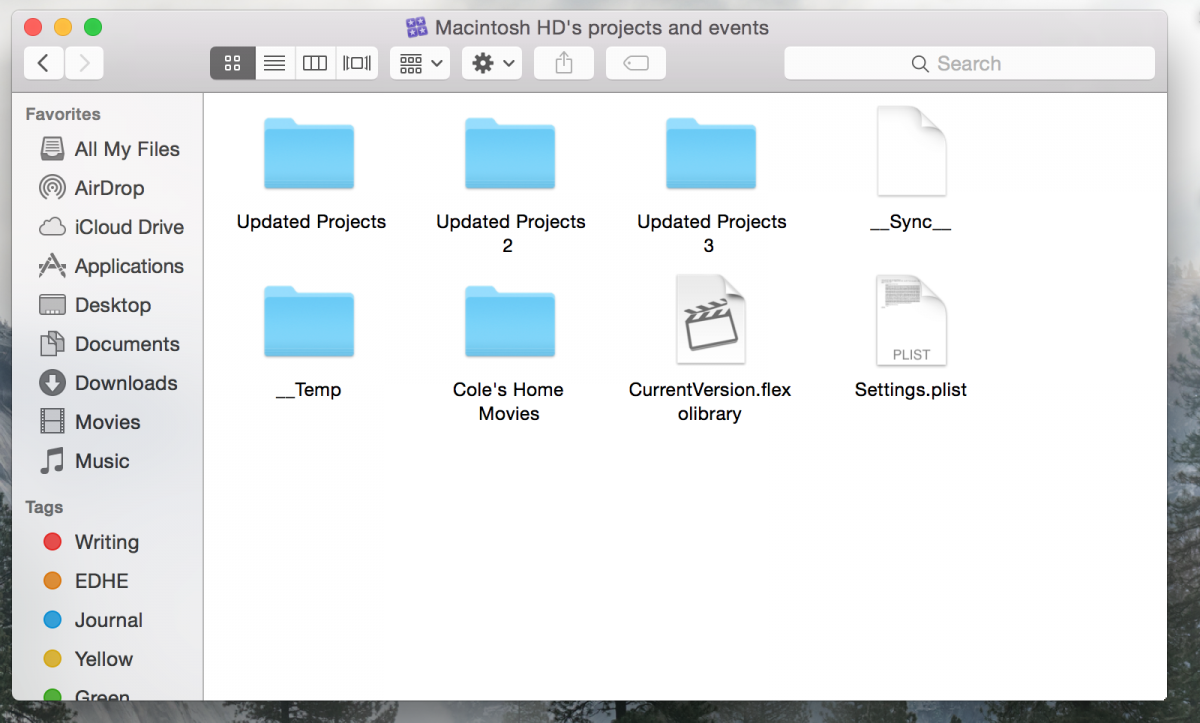
This is what I'm showing
Replied by cvest12 on topic FCP Has gone haywire, anyone know how to fix this?
This is what I'm showing
Please Log in to join the conversation.
- Tom Wolsky
-

- Offline
- Moderator
-
30 Oct 2014 21:20 #55211
by Tom Wolsky
Replied by Tom Wolsky on topic FCP Has gone haywire, anyone know how to fix this?
That looks like the contents of the application not of the library.
Please Log in to join the conversation.
- ronny courtens
-
- Offline
- Moderator
-
Less
More
- Posts: 4455
- Thank you received: 962
30 Oct 2014 21:24 #55212
by ronny courtens
Replied by ronny courtens on topic FCP Has gone haywire, anyone know how to fix this?
Tom is correct, my bad.
When I said Library, I meant of course the FCP X Library that is giving you trouble.
So: open a Finder window, find the problematic FCP X Library, R-click it and choose Show Package Content. Please post a screenshot of that window.
- Ronny
When I said Library, I meant of course the FCP X Library that is giving you trouble.
So: open a Finder window, find the problematic FCP X Library, R-click it and choose Show Package Content. Please post a screenshot of that window.
- Ronny
Please Log in to join the conversation.
- ronny courtens
-
- Offline
- Moderator
-
Less
More
- Posts: 4455
- Thank you received: 962
30 Oct 2014 21:37 #55217
by ronny courtens
Replied by ronny courtens on topic FCP Has gone haywire, anyone know how to fix this?
Okay, thank you.
Final question: what is the file size of this FCP X Library? Is it big?
You can check this by selecting the Library icon and pressing CMD+I. This will open a window where you can see the size of the Library.

- Ronny
Final question: what is the file size of this FCP X Library? Is it big?
You can check this by selecting the Library icon and pressing CMD+I. This will open a window where you can see the size of the Library.
- Ronny
Please Log in to join the conversation.
30 Oct 2014 21:38 #55218
by cvest12
Replied by cvest12 on topic FCP Has gone haywire, anyone know how to fix this?
it is rather large to my knowledge it is 48.6 GB
Please Log in to join the conversation.
- ronny courtens
-
- Offline
- Moderator
-
Less
More
- Posts: 4455
- Thank you received: 962
30 Oct 2014 21:48 #55220
by ronny courtens
Replied by ronny courtens on topic FCP Has gone haywire, anyone know how to fix this?
Yes that's fairly large. I was going to suggest to make a safety copy of it before doing the next step, but that will be difficult to do seeing how large this thing is.
Just to be sure: is the problem happening with every project you have in this Library, or is it happening only when you open the VHS Home videos project that you have shown in the screenshot you have made?
- Ronny
Just to be sure: is the problem happening with every project you have in this Library, or is it happening only when you open the VHS Home videos project that you have shown in the screenshot you have made?
- Ronny
Please Log in to join the conversation.
30 Oct 2014 22:03 - 30 Oct 2014 22:03 #55221
by cvest12
Replied by cvest12 on topic FCP Has gone haywire, anyone know how to fix this?
If I open FCP and it loads the problem library and I close it and import a new video I get the same problem. Once I close and reopen FCP then the newly imported video is fine.
Last edit: 30 Oct 2014 22:03 by cvest12.
Please Log in to join the conversation.
- ronny courtens
-
- Offline
- Moderator
-
Less
More
- Posts: 4455
- Thank you received: 962
30 Oct 2014 22:09 #55223
by ronny courtens
Replied by ronny courtens on topic FCP Has gone haywire, anyone know how to fix this?
Okay, let's do a test.
Close FCP X and launch it again.
When it opens and you don't do anything in the timeline, do you see the problem that you have posted?
If not, when does the problem appear?
- Ronny
Close FCP X and launch it again.
When it opens and you don't do anything in the timeline, do you see the problem that you have posted?
If not, when does the problem appear?
- Ronny
Please Log in to join the conversation.
30 Oct 2014 22:11 #55225
by cvest12
Replied by cvest12 on topic FCP Has gone haywire, anyone know how to fix this?
It only occurs when I open the Home Movies library in FCP. No other library causes any trouble.
Please Log in to join the conversation.
- ronny courtens
-
- Offline
- Moderator
-
Less
More
- Posts: 4455
- Thank you received: 962
30 Oct 2014 22:20 #55226
by ronny courtens
Replied by ronny courtens on topic FCP Has gone haywire, anyone know how to fix this?
Okay, I think you are confusing Libraries and Events. So let's start all over to find out what's going on.
This is what I see in the screenshot you have posted:
Your Library is called "Macintosh HD's projects and events". And inside that Library you have 4 Events:
- Updated Projects
- Updated Projects 1
- Updated Projects 2
- Cole's Home Movies
So I think you mean that the problem occurs whenever you open the Cole's Home Movies event. Is that correct?
- Ronny
This is what I see in the screenshot you have posted:
Your Library is called "Macintosh HD's projects and events". And inside that Library you have 4 Events:
- Updated Projects
- Updated Projects 1
- Updated Projects 2
- Cole's Home Movies
So I think you mean that the problem occurs whenever you open the Cole's Home Movies event. Is that correct?
- Ronny
Please Log in to join the conversation.
30 Oct 2014 22:21 #55228
by cvest12
Replied by cvest12 on topic FCP Has gone haywire, anyone know how to fix this?
Yes, sorry, it only occurs when I open "Cole's Home Movies"
Please Log in to join the conversation.
- ronny courtens
-
- Offline
- Moderator
-
Less
More
- Posts: 4455
- Thank you received: 962
30 Oct 2014 22:30 #55229
by ronny courtens
Replied by ronny courtens on topic FCP Has gone haywire, anyone know how to fix this?
Okay, no problem. You got me confused for a moment.
Open FCP X.
Open the Home Movies Event
Make a screenshot of the Library browser and the clip Browser so I can see what is inside that Event
- Ronny
Open FCP X.
Open the Home Movies Event
Make a screenshot of the Library browser and the clip Browser so I can see what is inside that Event
- Ronny
Please Log in to join the conversation.
