


- Posts: 4455
- Thank you received: 962
3 Post Moderation Rule for New Boarders (25 Jan 2021)
New boarders will have their posts moderated - Don't worry if you cannot see your post immediately.
Force relink: a final harsh solution anyone?
- ronny courtens
-

- Offline
- Moderator
-

Less
More
07 Sep 2014 18:40 #52329
by ronny courtens
Replied by ronny courtens on topic Force relink: a final harsh solution anyone?
Happy to hear it works! You will find QtChange a very useful utility whenever you need to work with original footage that has no real time code track.
- Ronny
- Ronny
Please Log in to join the conversation.


08 Sep 2014 13:58 #52389
by VidGreg
Replied by VidGreg on topic Force relink: a final harsh solution anyone?
Neat trick.
Learned something new that could really help with TCs. Wish FCPX handled TCs better.
Have never used/heard of QtChange so now curious. Looks like an app I want to check out. Seems to offer other ways to manipulate parameters.
Thanks Ronny
Sure Ivan is breathing easier.
Greg
Learned something new that could really help with TCs. Wish FCPX handled TCs better.
Have never used/heard of QtChange so now curious. Looks like an app I want to check out. Seems to offer other ways to manipulate parameters.
Thanks Ronny
Sure Ivan is breathing easier.
Greg
Please Log in to join the conversation.
- ronny courtens
-
- Offline
- Moderator
-
Less
More
- Posts: 4455
- Thank you received: 962
08 Sep 2014 14:24 #52390
by ronny courtens
Replied by ronny courtens on topic Force relink: a final harsh solution anyone?
Hey Greg,
The problem with some DSLR cams is that there actually is no time code track on the footage, only time/date information. That's why you get different start and end TC when you convert these files in different applications, and the difference is also quite random. QtChange can add an actual TC track to any clip, making the clip better suited for being used in an editing workflow.
I think FCP X handles time code pretty well as long as the time code on the files is correct. The only thing that has gone mlssing from earlier versions is a way to detect source TC from a clip on the timeline. There is a workaround for this, but it should not require a workaround at all. We could do it in earlier versions, I don't know why this has changed.
I like NLEs that are very strict when you try to relink, and I will tell you why. In classic FCP you were able to force-relink any clip to any other piece of video even if the two files were not compatible at all. I cannot tell you how many mails I have received from people who had completely screwed up their FCP edits by relinking incompatible files. Even the slightest offset in the TCs or the duration of the clips you want to relink can ruin your entire project. That's when I said: please stop preventing people from being able to do this. So I'm happy FCP X is much stricter in this respect and I'm holding my breath if Apple ever brings this FCP "feature" back to FCP X
- Ronny
The problem with some DSLR cams is that there actually is no time code track on the footage, only time/date information. That's why you get different start and end TC when you convert these files in different applications, and the difference is also quite random. QtChange can add an actual TC track to any clip, making the clip better suited for being used in an editing workflow.
I think FCP X handles time code pretty well as long as the time code on the files is correct. The only thing that has gone mlssing from earlier versions is a way to detect source TC from a clip on the timeline. There is a workaround for this, but it should not require a workaround at all. We could do it in earlier versions, I don't know why this has changed.
I like NLEs that are very strict when you try to relink, and I will tell you why. In classic FCP you were able to force-relink any clip to any other piece of video even if the two files were not compatible at all. I cannot tell you how many mails I have received from people who had completely screwed up their FCP edits by relinking incompatible files. Even the slightest offset in the TCs or the duration of the clips you want to relink can ruin your entire project. That's when I said: please stop preventing people from being able to do this. So I'm happy FCP X is much stricter in this respect and I'm holding my breath if Apple ever brings this FCP "feature" back to FCP X
- Ronny
Please Log in to join the conversation.
08 Sep 2014 15:36 #52394
by VidGreg
Replied by VidGreg on topic Force relink: a final harsh solution anyone?
Ronny
Not missing legacy FCP at all. Bye bye bins, sequences with lots of duplicate media, out of sync audio, etc…
Of course most of my legacy FCP was tape based footage and just glad I don't have to "black stripe" cards now a days. Ech!
Just did a multi-cam shoot with borrowed equipment and forgot to reset the time/date so managed to shoot in 2005 this year. Also two cams had the same default names in the meta-data. Live and learn.
Been caught up in re-link issues many times.
Still TC is sometimes valuable for 3rd party/application exchange. Given how many improvements have been made to FCP, wouldn't mind a new take on TCs.
Just be glad I'm not the programmer
Greg
Not missing legacy FCP at all. Bye bye bins, sequences with lots of duplicate media, out of sync audio, etc…
Of course most of my legacy FCP was tape based footage and just glad I don't have to "black stripe" cards now a days. Ech!
Just did a multi-cam shoot with borrowed equipment and forgot to reset the time/date so managed to shoot in 2005 this year. Also two cams had the same default names in the meta-data. Live and learn.
Been caught up in re-link issues many times.
Still TC is sometimes valuable for 3rd party/application exchange. Given how many improvements have been made to FCP, wouldn't mind a new take on TCs.
Just be glad I'm not the programmer
Greg
Please Log in to join the conversation.

11 Sep 2014 04:22 #52539
by ivannoel
Replied by ivannoel on topic Force relink: a final harsh solution anyone?
Hi there again!
Here's one I think even you might not know the answer to...
(I wrote to the maker of QTchange, and he didn't know).
You'll recall I could not reconnect files though they had the same attributes, then we discovered we needed to alter the TC of the new files.
This worked, which was great.
But... not completely. As I waded through my 105min edit, I discovered that of the 1200 files, still 300 files will not reconnect.
I have checked, and re-checked: they have the same length, format, frame rate, TC, according to fcpx and also QTchange, they are absolutely identical.
Yet I still get the error message 'no shared media range'.
I still can reconnect to the original ones.
So, the question is.. what is left? What else could be different in the files for fcpx to refuse to reconnect.
Thanks for any thoughts you might have.
Ivan
Here's one I think even you might not know the answer to...
(I wrote to the maker of QTchange, and he didn't know).
You'll recall I could not reconnect files though they had the same attributes, then we discovered we needed to alter the TC of the new files.
This worked, which was great.
But... not completely. As I waded through my 105min edit, I discovered that of the 1200 files, still 300 files will not reconnect.
I have checked, and re-checked: they have the same length, format, frame rate, TC, according to fcpx and also QTchange, they are absolutely identical.
Yet I still get the error message 'no shared media range'.
I still can reconnect to the original ones.
So, the question is.. what is left? What else could be different in the files for fcpx to refuse to reconnect.
Thanks for any thoughts you might have.
Ivan
Please Log in to join the conversation.
- ronny courtens
-
- Offline
- Moderator
-
Less
More
- Posts: 4455
- Thank you received: 962
11 Sep 2014 07:50 #52543
by ronny courtens
Replied by ronny courtens on topic Force relink: a final harsh solution anyone?
I think I know the reason, and I'm afraid there will be no solution. But we always should test before we speak, so...
Can you send me one of these problematic files, along with its originally converted file?
- Ronny
Can you send me one of these problematic files, along with its originally converted file?
- Ronny
Please Log in to join the conversation.
- ronny courtens
-
- Offline
- Moderator
-
Less
More
- Posts: 4455
- Thank you received: 962
11 Sep 2014 15:57 #52560
by ronny courtens
Replied by ronny courtens on topic Force relink: a final harsh solution anyone?
Hey Ivan,
Thank you for the files. What surprises me: I am able to relink one version of the clip to the other version without any issues. Where does it go wrong on your system?
- Ronny
Thank you for the files. What surprises me: I am able to relink one version of the clip to the other version without any issues. Where does it go wrong on your system?
- Ronny
Please Log in to join the conversation.
11 Sep 2014 16:47 #52565
by ivannoel
Replied by ivannoel on topic Force relink: a final harsh solution anyone?
Hi,
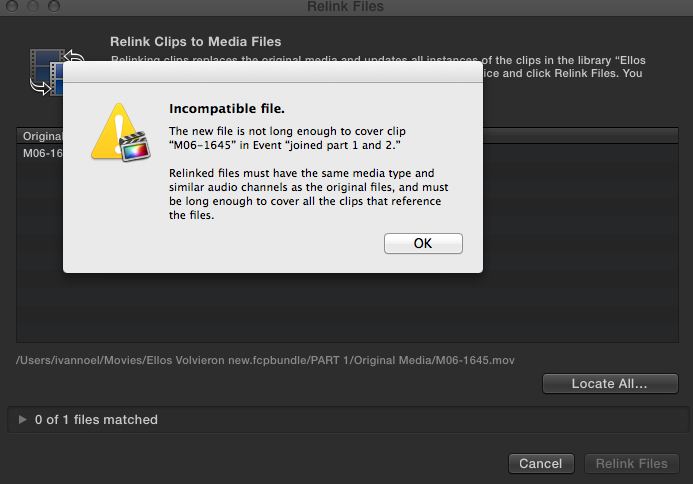
Well, after your last messages I tried various things out and found out that, interestingly, the red unlinked file will no longer reconnect with ANY video file, not the original and not the new one.
what the...?
it gives me this error (attached).
Well, if the reason isn't obvious, don't worry too much about it, ...I can reconnect 300 files manually, it will take me days, but better than it was before.
Well, after your last messages I tried various things out and found out that, interestingly, the red unlinked file will no longer reconnect with ANY video file, not the original and not the new one.
what the...?
it gives me this error (attached).
Well, if the reason isn't obvious, don't worry too much about it, ...I can reconnect 300 files manually, it will take me days, but better than it was before.
Please Log in to join the conversation.
- ronny courtens
-
- Offline
- Moderator
-
Less
More
- Posts: 4455
- Thank you received: 962
11 Sep 2014 16:56 #52566
by ronny courtens
Replied by ronny courtens on topic Force relink: a final harsh solution anyone?
The reason is very obvious.
Have you intentionally unlinked clips imported into FCP X by dragging them out of their original media folder? If so: that's a recipe for disaster. Never mess with the folder structure of a Library. Never even open a Library. You can do everything you want straight inside FCP X, and you don't need to un-link any lips to relink them to different media.
- Ronny
Have you intentionally unlinked clips imported into FCP X by dragging them out of their original media folder? If so: that's a recipe for disaster. Never mess with the folder structure of a Library. Never even open a Library. You can do everything you want straight inside FCP X, and you don't need to un-link any lips to relink them to different media.
- Ronny
Please Log in to join the conversation.
11 Sep 2014 17:29 #52567
by ivannoel
Replied by ivannoel on topic Force relink: a final harsh solution anyone?
actually no, I've never done that.
However... if you recall, the previous problem I had one week before: some weird and unexplained 'bug' that caused my fcpx to completely unlink each and every file for no apparent reason (and thus, I imagine, changing data within the libraries).
This was 'solved' (at least temporarily) by re-dragging all the files in groups into the browser (relink command didn't work).
We thought it had been because of disc errors due to lack of space, but it has done it again twice on a new disc with 30% free space.
Anyhow, my guess is that this problem must come from that same unexpected and as yet unexplained general disconnect, whatever it is.
Why is does this with just 25% of my files, is odd.
But in any case, thanks again for your time and suggestions.
I am now going to relink 300 files manually!!
However... if you recall, the previous problem I had one week before: some weird and unexplained 'bug' that caused my fcpx to completely unlink each and every file for no apparent reason (and thus, I imagine, changing data within the libraries).
This was 'solved' (at least temporarily) by re-dragging all the files in groups into the browser (relink command didn't work).
We thought it had been because of disc errors due to lack of space, but it has done it again twice on a new disc with 30% free space.
Anyhow, my guess is that this problem must come from that same unexpected and as yet unexplained general disconnect, whatever it is.
Why is does this with just 25% of my files, is odd.
But in any case, thanks again for your time and suggestions.
I am now going to relink 300 files manually!!
Please Log in to join the conversation.
- ronny courtens
-
- Offline
- Moderator
-
Less
More
- Posts: 4455
- Thank you received: 962
11 Sep 2014 18:27 - 11 Sep 2014 18:27 #52569
by ronny courtens
Replied by ronny courtens on topic Force relink: a final harsh solution anyone?
Ah yes, that was on that Windows-formatted drive. Well, that certainly could explain a lot of the unexpected issues you have been having. As soon as you are able to finish your project: format that drive for Mac.
Good luck with the relinking
- Ronny
Good luck with the relinking
- Ronny
Last edit: 11 Sep 2014 18:27 by ronny courtens.
Please Log in to join the conversation.
11 Sep 2014 18:29 #52570
by ivannoel
Replied by ivannoel on topic Force relink: a final harsh solution anyone?
mm not that either, it also doesn't like mac formatted drive. I moved everything to a mac journaled 4TB drive a few days ago, and it did the same... 
Please Log in to join the conversation.
- ronny courtens
-
- Offline
- Moderator
-
Less
More
- Posts: 4455
- Thank you received: 962
11 Sep 2014 18:35 #52571
by ronny courtens
Replied by ronny courtens on topic Force relink: a final harsh solution anyone?
Mmmm I wouldn't be so sure. When you move a damaged project from a wrongly formatted drive to a fresh drive, this doesn't mean the project will magically be cured. But now at least as soon as you have restored everything you should be able to finish this project without fearing further corruption.
- Ronny
- Ronny
Please Log in to join the conversation.
11 Sep 2014 18:53 #52574
by ivannoel
Replied by ivannoel on topic Force relink: a final harsh solution anyone?
fcpx did the complete de-liking with each and everyone of my projects, ones that were fine before, and on other discs.
I fear it is just a question of time it will ruin my projects again: two days ago I created a brand new small (publicity) project on a separate mac disc, with new files, and yesterday, when I reopened fcpx it had completely de-linked everything.
maybe a computer thing, but it's just 2 months old.
Whatever, manual I go!
I fear it is just a question of time it will ruin my projects again: two days ago I created a brand new small (publicity) project on a separate mac disc, with new files, and yesterday, when I reopened fcpx it had completely de-linked everything.
maybe a computer thing, but it's just 2 months old.
Whatever, manual I go!
Please Log in to join the conversation.
- ronny courtens
-
- Offline
- Moderator
-
Less
More
- Posts: 4455
- Thank you received: 962
11 Sep 2014 18:58 #52575
by ronny courtens
Replied by ronny courtens on topic Force relink: a final harsh solution anyone?
I'm absolutely sure it's not FCP X. If this were the case the forums would be filled with reports about this, but I don't see any. So yes, you might check your system as soon as this is possible. It's not normal that you have this problem while no-one else seems to have it. A fresh install of the OS and all applications is always a good idea when you see exceptional behavior like this.
- Ronny
- Ronny
Please Log in to join the conversation.
