


- Posts: 69
- Thank you received: 1
3 Post Moderation Rule for New Boarders (25 Jan 2021)
New boarders will have their posts moderated - Don't worry if you cannot see your post immediately.
Force relink: a final harsh solution anyone?
05 Sep 2014 19:20 - 05 Sep 2014 19:21 #52232
by ivannoel
Force relink: a final harsh solution anyone? was created by ivannoel
Hi guys,
This forum has been near magic me and solving my problems.
I don't think there is a solution to this one, but I believe in magic.
I need to force fcpx to relink files that have the same name and length as the originals, but different ...something (I converted magic lantern RAW files with cliphouse, until I realised it did a very poor job, and re-converted all 2000 files in Resolve).
Has anyone thought or tried a creative way to be able to do this?
I would be very grateful, as premiere in 15 days.
Thanks guys!
Ivan
btw,I tried:
1) asking it kindly
2) de-linking files, and importing new files in fcpx browser
3) tried using fcpexchange software, but not an option for me as it only works one file at a time).
4) as Ronny from this forum suggested, I tried exporting an XML, then importing it into a new library
5) I even tried the incredibly long-winded way of exporting xml, converting with Xto7 software, opening in FCP7, re-linking there (it will in FCP7), expoting an XML, using 7toX and re-importing in fcpx, but I lose ALL effects (size, retiming, color, etc), and compound clips, which for 2000 clips is too difficult.
my 'new' files are the same format (proresHQ), same names, and same lengths as the originals, though slightly different sizes it seems.
This forum has been near magic me and solving my problems.
I don't think there is a solution to this one, but I believe in magic.
I need to force fcpx to relink files that have the same name and length as the originals, but different ...something (I converted magic lantern RAW files with cliphouse, until I realised it did a very poor job, and re-converted all 2000 files in Resolve).
Has anyone thought or tried a creative way to be able to do this?
I would be very grateful, as premiere in 15 days.
Thanks guys!
Ivan
btw,I tried:
1) asking it kindly
2) de-linking files, and importing new files in fcpx browser
3) tried using fcpexchange software, but not an option for me as it only works one file at a time).
4) as Ronny from this forum suggested, I tried exporting an XML, then importing it into a new library
5) I even tried the incredibly long-winded way of exporting xml, converting with Xto7 software, opening in FCP7, re-linking there (it will in FCP7), expoting an XML, using 7toX and re-importing in fcpx, but I lose ALL effects (size, retiming, color, etc), and compound clips, which for 2000 clips is too difficult.
my 'new' files are the same format (proresHQ), same names, and same lengths as the originals, though slightly different sizes it seems.
Last edit: 05 Sep 2014 19:21 by ivannoel.
Please Log in to join the conversation.

06 Sep 2014 00:11 #52244
by plysat
Can't sleep? Try this: fcpxpert.net ;-)
Replied by plysat on topic Force relink: a final harsh solution anyone?
Did you try going into Resolve 11 lite (reads fcpxml and seems to do a good job retaining effects etc) it's free, so worth a shot. It will export fcpxml as well, so should be pretty close when you bring it back to X...
Can't sleep? Try this: fcpxpert.net ;-)
Please Log in to join the conversation.

06 Sep 2014 00:53 - 06 Sep 2014 01:38 #52245
by canelson
--
Matias Canelson
www.canelson.us
Replied by canelson on topic Force relink: a final harsh solution anyone?
[strike]Did you try FCPXchange?
telemarq.com/products/fcpxchange/ [/strike]
Sorry, I didn´t read you already tried it. My bad.
telemarq.com/products/fcpxchange/ [/strike]
Sorry, I didn´t read you already tried it. My bad.
--
Matias Canelson
www.canelson.us
Last edit: 06 Sep 2014 01:38 by canelson.
Please Log in to join the conversation.
06 Sep 2014 02:15 #52248
by ivannoel
Replied by ivannoel on topic Force relink: a final harsh solution anyone?
hi there,
it sounded like a (black) magic idea! ...but then I tried and it gave me 'could not relink files: wrong timecode extents'... (my files are exactly the same as the original, just converted with another software).
maybe a way to force relink in resolve?
Thanks
it sounded like a (black) magic idea! ...but then I tried and it gave me 'could not relink files: wrong timecode extents'... (my files are exactly the same as the original, just converted with another software).
maybe a way to force relink in resolve?
Thanks
Please Log in to join the conversation.

06 Sep 2014 13:35 #52256
by BenB
Replied by BenB on topic Force relink: a final harsh solution anyone?
Exactly what "other software" did you use? I think that's going to be the culprit.
Please Log in to join the conversation.
06 Sep 2014 13:51 #52257
by ivannoel
Replied by ivannoel on topic Force relink: a final harsh solution anyone?
Resolve!
the culprit is fcpx that refuses point blank to relink to anything but exactly the original, not even if the new file is the same length, same name, same format...
I just wish I knew of way to 'fool' it.
the culprit is fcpx that refuses point blank to relink to anything but exactly the original, not even if the new file is the same length, same name, same format...
I just wish I knew of way to 'fool' it.
Please Log in to join the conversation.
- ronny courtens
-

- Offline
- Moderator
-

Less
More
- Posts: 4455
- Thank you received: 962
06 Sep 2014 14:53 - 06 Sep 2014 14:54 #52260
by ronny courtens
Replied by ronny courtens on topic Force relink: a final harsh solution anyone?
When you try to relink one file in FCP X, what is the error message you get?
- Ronny
- Ronny
Last edit: 06 Sep 2014 14:54 by ronny courtens.
Please Log in to join the conversation.
06 Sep 2014 15:20 #52263
by ivannoel
Replied by ivannoel on topic Force relink: a final harsh solution anyone?
hi there Ronny,
I didnt' want you to get bored this weekend!
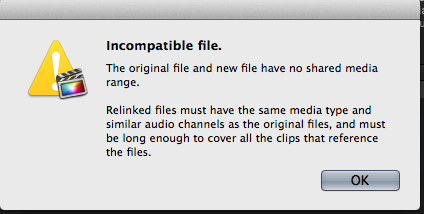
Here is the error from fcpx.
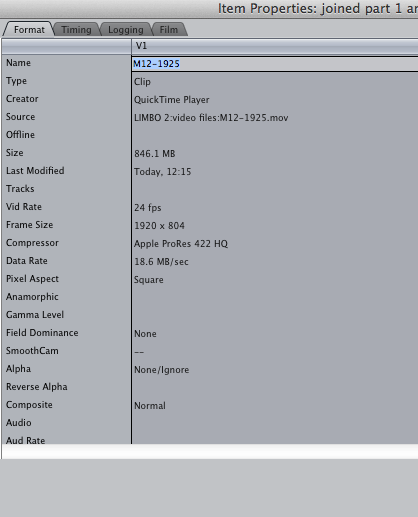
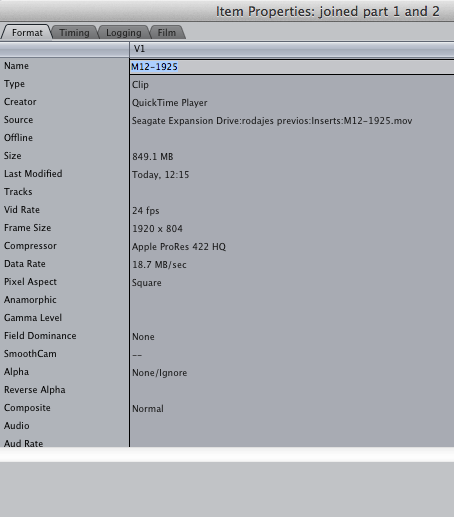
Also i attach item properties of both the original and the file i am trying to relink... you'll see they are pretty much identical, except from a very slightly different bitrate...
I also attach the error i get trying to reconnect in resolve.
Thanks!
I didnt' want you to get bored this weekend!
Here is the error from fcpx.
Also i attach item properties of both the original and the file i am trying to relink... you'll see they are pretty much identical, except from a very slightly different bitrate...
I also attach the error i get trying to reconnect in resolve.
Thanks!

Please Log in to join the conversation.
- ronny courtens
-
- Offline
- Moderator
-
Less
More
- Posts: 4455
- Thank you received: 962
06 Sep 2014 15:55 #52266
by ronny courtens
Replied by ronny courtens on topic Force relink: a final harsh solution anyone?
I certainly won't get bored on this issue 
Yep, it's a nasty situation. I think the "ProRes" files from that crappy converter are non-standard and you will never be able to relink them to properly encoded ProRes files using the FCP X Relink tool. So it will indeed require some magic to get this work.
Can you send me one of your PR422 HQ clips that has been created with the converter and the same clip that has been created in Resolve? I will have a look at the structure of both files to see where the incompatibility really is, and see if we can find a way to get them relinked.
You can send the clips via We Transfer or Airbridge to this address: ronnycourtens(at)mac(dot)com
- Ronny
Yep, it's a nasty situation. I think the "ProRes" files from that crappy converter are non-standard and you will never be able to relink them to properly encoded ProRes files using the FCP X Relink tool. So it will indeed require some magic to get this work.
Can you send me one of your PR422 HQ clips that has been created with the converter and the same clip that has been created in Resolve? I will have a look at the structure of both files to see where the incompatibility really is, and see if we can find a way to get them relinked.
You can send the clips via We Transfer or Airbridge to this address: ronnycourtens(at)mac(dot)com
- Ronny
Please Log in to join the conversation.
06 Sep 2014 16:28 #52267
by ivannoel
Replied by ivannoel on topic Force relink: a final harsh solution anyone?
ok, files on their way!
I chose the shortest clip i had.
saludos!
I chose the shortest clip i had.
saludos!
Please Log in to join the conversation.
- ronny courtens
-
- Offline
- Moderator
-
Less
More
- Posts: 4455
- Thank you received: 962
06 Sep 2014 18:08 - 06 Sep 2014 18:09 #52271
by ronny courtens
Replied by ronny courtens on topic Force relink: a final harsh solution anyone?
Okay, I have been able to relink the "Cliphouse" ProRes clip to the "Resolve" ProRes clip 
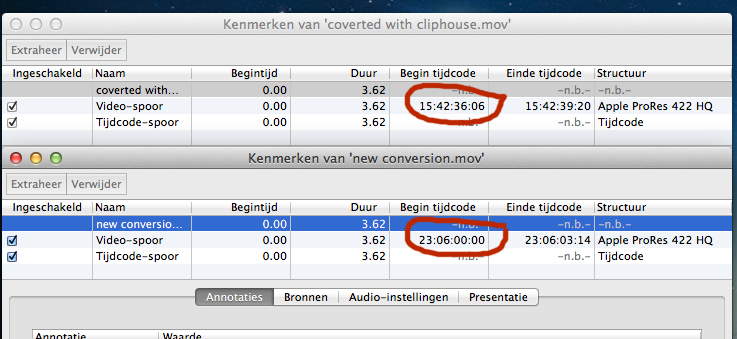
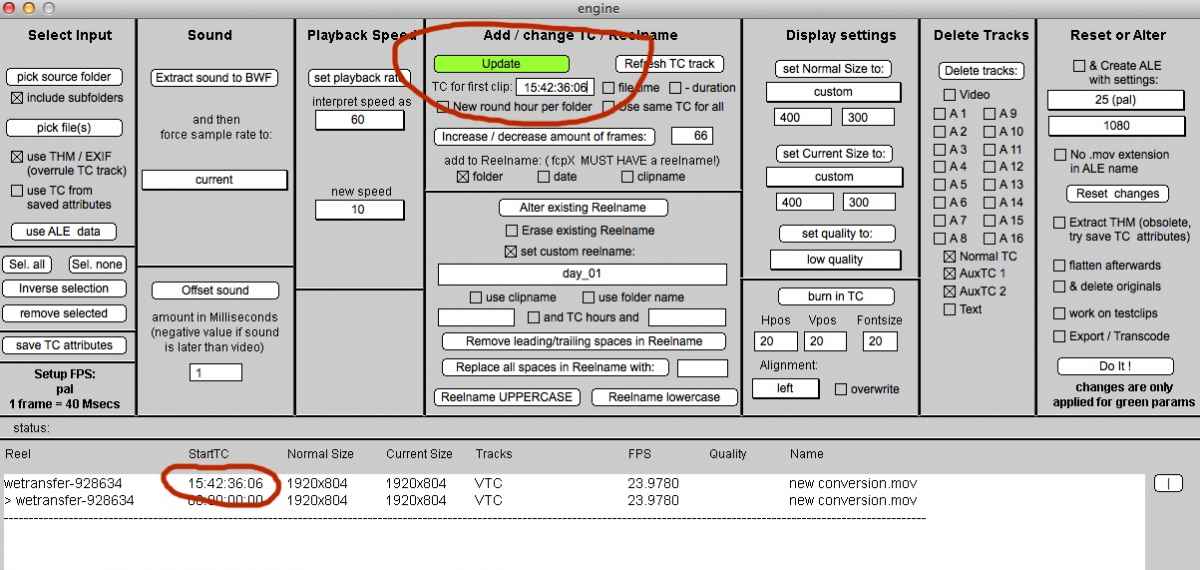
The cause of your issue is simple: the start and end time codes of your cliphouse clips and your new clips do not match. The cliphouse clip you have sent me starts at 15:42:36:06, while the newly converted clip starts at 23:06:00:00
So I have used QtChange for Mac to modify the start time code of the new clip so it matches the start time code of the cliphouse clip:
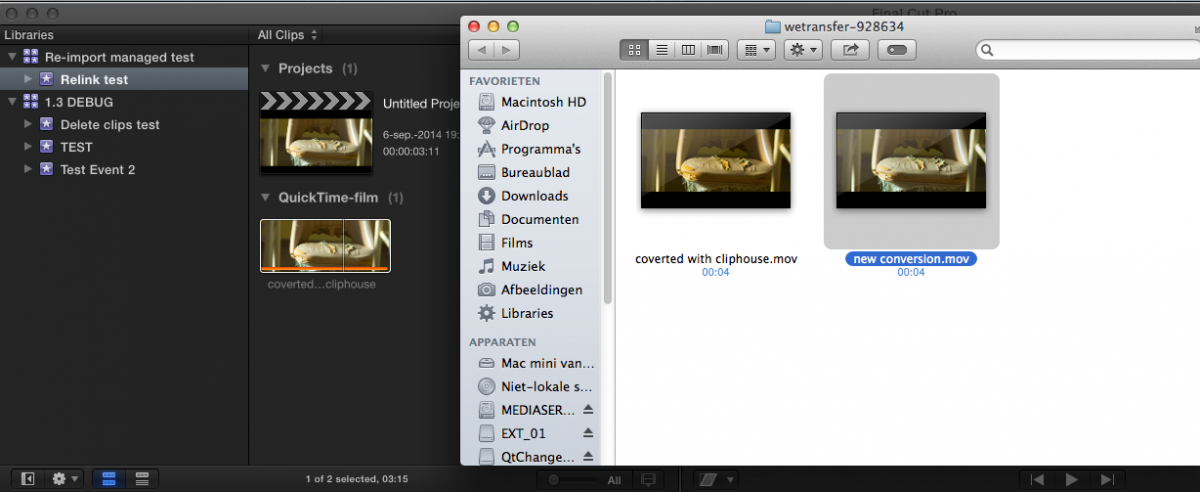
Here you see the relinked cliphouse clip in FCP X. When I choose Reveal in Finder you see it is linked to the Resolve clip ("new conversion") in the We Transfer folder you have sent me:
So you have two choices:
1. You reconvert your original footage in Resolve and you make sure to set the correct time codes for the converted files.
2. If the start tc offset between all your cliphouse clips and your new clips is the same, you use QtChange for Mac to batch-change all the start time codes of the new clips and you will be able to relink the cliphouse clips to the new clips.
QtChange is not free (25 bucks) and you can find it here: www.videotoolshed.com/product/42/qtchange
- Ronny
The cause of your issue is simple: the start and end time codes of your cliphouse clips and your new clips do not match. The cliphouse clip you have sent me starts at 15:42:36:06, while the newly converted clip starts at 23:06:00:00
So I have used QtChange for Mac to modify the start time code of the new clip so it matches the start time code of the cliphouse clip:
Here you see the relinked cliphouse clip in FCP X. When I choose Reveal in Finder you see it is linked to the Resolve clip ("new conversion") in the We Transfer folder you have sent me:
So you have two choices:
1. You reconvert your original footage in Resolve and you make sure to set the correct time codes for the converted files.
2. If the start tc offset between all your cliphouse clips and your new clips is the same, you use QtChange for Mac to batch-change all the start time codes of the new clips and you will be able to relink the cliphouse clips to the new clips.
QtChange is not free (25 bucks) and you can find it here: www.videotoolshed.com/product/42/qtchange
- Ronny
Last edit: 06 Sep 2014 18:09 by ronny courtens.
Please Log in to join the conversation.
07 Sep 2014 02:57 #52285
by ivannoel
Replied by ivannoel on topic Force relink: a final harsh solution anyone?
Hi there!
Well, this is as close to magic as I expected!
Of course I don't understand at all how time codes can change, since all my clips are entire the clips shot, never cut into pieces. I imagine they should all start at 00:00 and end at the end of the clip, but perhaps this is something to do with the magic lantern files.
In any case, let's see if I myself can make the magic trick work at home.
It took me about 7 days to convert all my files (about 6TB of RAWS), so I don't think that is feasible.
So, I guess I will download the software you suggested and HOPE they all have the same gap between them!
Once again, Ronny to the rescue.
Thanks from deepest Argentina.
Ivan
Well, this is as close to magic as I expected!
Of course I don't understand at all how time codes can change, since all my clips are entire the clips shot, never cut into pieces. I imagine they should all start at 00:00 and end at the end of the clip, but perhaps this is something to do with the magic lantern files.
In any case, let's see if I myself can make the magic trick work at home.
It took me about 7 days to convert all my files (about 6TB of RAWS), so I don't think that is feasible.
So, I guess I will download the software you suggested and HOPE they all have the same gap between them!
Once again, Ronny to the rescue.
Thanks from deepest Argentina.
Ivan
Please Log in to join the conversation.
- ronny courtens
-
- Offline
- Moderator
-
Less
More
- Posts: 4455
- Thank you received: 962
07 Sep 2014 07:30 #52292
by ronny courtens
Replied by ronny courtens on topic Force relink: a final harsh solution anyone?
Ivan,
I have no clue why the start tc's are different, perhaps some different setting in the encoder softwares?
Anyway, you can calculate the difference between the start tc of your original clips and your new clips using a tc calculator like this one: www.michaelcinquin.com/tools/timecode_keykode
If you see that the offset is the same for all your clips (which I think it will be) then it's very easy to change the time codes of all your new clips at once. You only need to select the clip folder in QtChange, enter the correct start time code for the first clip in the folder and press the "Do It!" button. Success!!
- Ronny
I have no clue why the start tc's are different, perhaps some different setting in the encoder softwares?
Anyway, you can calculate the difference between the start tc of your original clips and your new clips using a tc calculator like this one: www.michaelcinquin.com/tools/timecode_keykode
If you see that the offset is the same for all your clips (which I think it will be) then it's very easy to change the time codes of all your new clips at once. You only need to select the clip folder in QtChange, enter the correct start time code for the first clip in the folder and press the "Do It!" button. Success!!
- Ronny
Please Log in to join the conversation.
07 Sep 2014 12:31 #52298
by ivannoel
Replied by ivannoel on topic Force relink: a final harsh solution anyone?
hi!
Sadly, the clips hace completely random start TC... the gap between them changes in every clip...
I have written to the creators of QT change, to see if they have a way, but it's unlikely.
I guess I am probably left with the only option of the very long Xto7 and 7toX way, and will have to repeat all the effects and compound clips again.
But it NEARLY worked!
once again, thanks so much for the different ideas/options.
Ivan
Sadly, the clips hace completely random start TC... the gap between them changes in every clip...
I have written to the creators of QT change, to see if they have a way, but it's unlikely.
I guess I am probably left with the only option of the very long Xto7 and 7toX way, and will have to repeat all the effects and compound clips again.
But it NEARLY worked!
once again, thanks so much for the different ideas/options.
Ivan
Please Log in to join the conversation.
- ronny courtens
-
- Offline
- Moderator
-
Less
More
- Posts: 4455
- Thank you received: 962
07 Sep 2014 13:13 #52302
by ronny courtens
Replied by ronny courtens on topic Force relink: a final harsh solution anyone?
Sorry to hear that. As there is no logic in the time code of your files, there is nothing you can do to automize this process.
Next time you convert Magic Lantern files, use QtChange to batch-reset all the start time codes of the converted clips to zero. If you need to reconvert them afterwards, then at least you can do the same with the reconverted files and you won't have any issues relinking. A useful lesson for anyone following this thread.
- Ronny
Next time you convert Magic Lantern files, use QtChange to batch-reset all the start time codes of the converted clips to zero. If you need to reconvert them afterwards, then at least you can do the same with the reconverted files and you won't have any issues relinking. A useful lesson for anyone following this thread.
- Ronny
Please Log in to join the conversation.
07 Sep 2014 14:59 - 07 Sep 2014 16:05 #52322
by ivannoel
Replied by ivannoel on topic Force relink: a final harsh solution anyone?
Well, it's magic time for QTchange people!
The guy answered that it IS possible to batch change all TC from originals to new video files.
He says 'save TC attributes' then 'apply' them to the new (batch) files.
I am onto it now.
Ivan
The guy answered that it IS possible to batch change all TC from originals to new video files.
He says 'save TC attributes' then 'apply' them to the new (batch) files.
I am onto it now.
Ivan
Last edit: 07 Sep 2014 16:05 by ivannoel.
Please Log in to join the conversation.
- ronny courtens
-
- Offline
- Moderator
-
Less
More
- Posts: 4455
- Thank you received: 962
07 Sep 2014 16:03 #52323
by ronny courtens
Replied by ronny courtens on topic Force relink: a final harsh solution anyone?
That's correct. I know how to do this, but first I would like to test it out on the clips you have sent me. I will be back in 15 minutes, hopefully with good news and a step-by-step explanation.
- Ronny
- Ronny
Please Log in to join the conversation.
- ronny courtens
-
- Offline
- Moderator
-
Less
More
- Posts: 4455
- Thank you received: 962
07 Sep 2014 16:52 - 07 Sep 2014 17:01 #52325
by ronny courtens
Replied by ronny courtens on topic Force relink: a final harsh solution anyone?
Here we go:
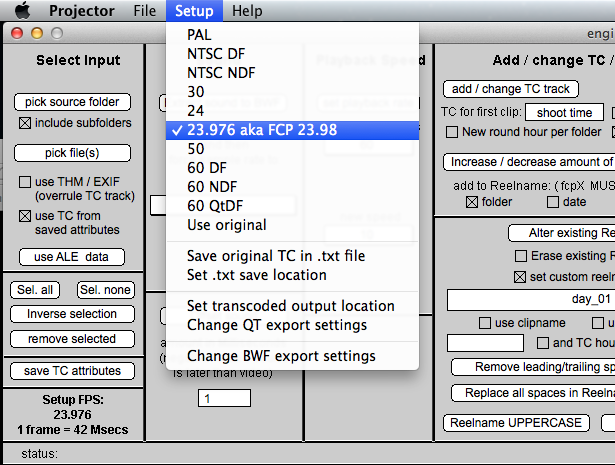
1. Launch QtChange and (very important) make sure to set the correct frame rate in Setup:
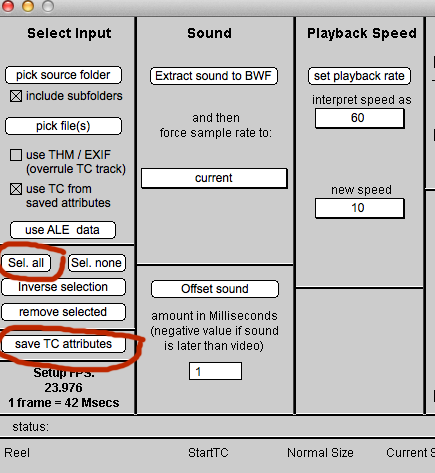
2. Load the folder in which your originally converted files are stored (the ones you imported in FCP X). The files of that folder will be loaded in QtChange. In the Select Input window press Sel.All, then press Save TC Attributes:
A small file called 'filename.att' wil be saved next to your clips in the clips' folder:

3. Move (or copy) the "filename.att" files from the originally converted files folder to the folder where you have stored the new converted files:

4. Launch QtChange and first select "Use TC from saved attributes" in the Select Input window:
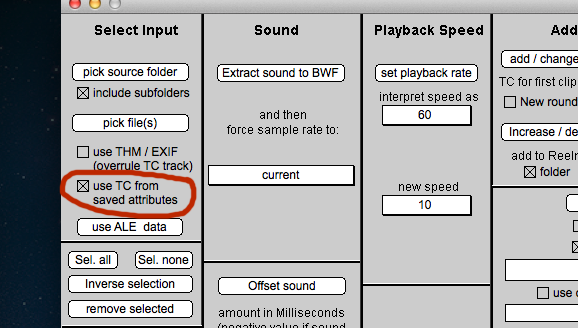
5. Then load ("Pick Source folder") the folder with the new converted files. In the Select Input window press the "Sel.All" button to highlight all the files.
In the Add/Change TC window press "Refresh TC track"(it will be highlighted in green), and finally press "Do it!" to modify the original TC of all the files to the TC from their "filename.att" files:
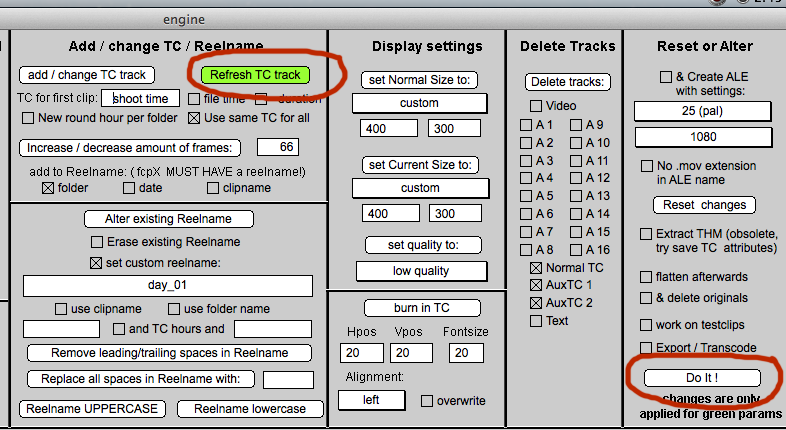
The only condition for this to work is that all the new converted clips have exactly the same filename as the originally converted clips. But you said they have the same filename, so this should do the trick.
Using this method I have reset the TC of the Resolve clip you have sent me and I have been able to relink the original clip to this clip in FCP X.
Hop this works for you.
- Ronny
1. Launch QtChange and (very important) make sure to set the correct frame rate in Setup:
2. Load the folder in which your originally converted files are stored (the ones you imported in FCP X). The files of that folder will be loaded in QtChange. In the Select Input window press Sel.All, then press Save TC Attributes:
A small file called 'filename.att' wil be saved next to your clips in the clips' folder:
3. Move (or copy) the "filename.att" files from the originally converted files folder to the folder where you have stored the new converted files:
4. Launch QtChange and first select "Use TC from saved attributes" in the Select Input window:
5. Then load ("Pick Source folder") the folder with the new converted files. In the Select Input window press the "Sel.All" button to highlight all the files.
In the Add/Change TC window press "Refresh TC track"(it will be highlighted in green), and finally press "Do it!" to modify the original TC of all the files to the TC from their "filename.att" files:
The only condition for this to work is that all the new converted clips have exactly the same filename as the originally converted clips. But you said they have the same filename, so this should do the trick.
Using this method I have reset the TC of the Resolve clip you have sent me and I have been able to relink the original clip to this clip in FCP X.
Hop this works for you.
- Ronny
Last edit: 07 Sep 2014 17:01 by ronny courtens.
Please Log in to join the conversation.
- ronny courtens
-
- Offline
- Moderator
-
Less
More
- Posts: 4455
- Thank you received: 962
07 Sep 2014 17:03 #52326
by ronny courtens
Replied by ronny courtens on topic Force relink: a final harsh solution anyone?
I have updated the reply above with the missing screenshots (-:
- Ronny
- Ronny
Please Log in to join the conversation.
07 Sep 2014 18:28 #52327
by ivannoel
Replied by ivannoel on topic Force relink: a final harsh solution anyone?
Well, I'll be damned!
It seems to work!
of course the odd problem here and there (due to different frame rates between clips - but nothing i can't do manually with a few clips).
So, in the end, it was more hard word than magic. By that I mean the work of all (helpers on this forum, yourself, the maker of the software etc).
So now a weight is taken off my shoulders, and I can actually get started on the colour correction! ...13 days to go to premiere!
Many thanks to Ronny, as always.
Ivan
It seems to work!
of course the odd problem here and there (due to different frame rates between clips - but nothing i can't do manually with a few clips).
So, in the end, it was more hard word than magic. By that I mean the work of all (helpers on this forum, yourself, the maker of the software etc).
So now a weight is taken off my shoulders, and I can actually get started on the colour correction! ...13 days to go to premiere!
Many thanks to Ronny, as always.
Ivan
Please Log in to join the conversation.
