


- Posts: 4455
- Thank you received: 962
3 Post Moderation Rule for New Boarders (25 Jan 2021)
New boarders will have their posts moderated - Don't worry if you cannot see your post immediately.
10.1.3 Released
- ronny courtens
-

- Offline
- Moderator
-

Less
More
21 Aug 2014 14:48 #51589
by ronny courtens
Replied by ronny courtens on topic 10.1.3 Released
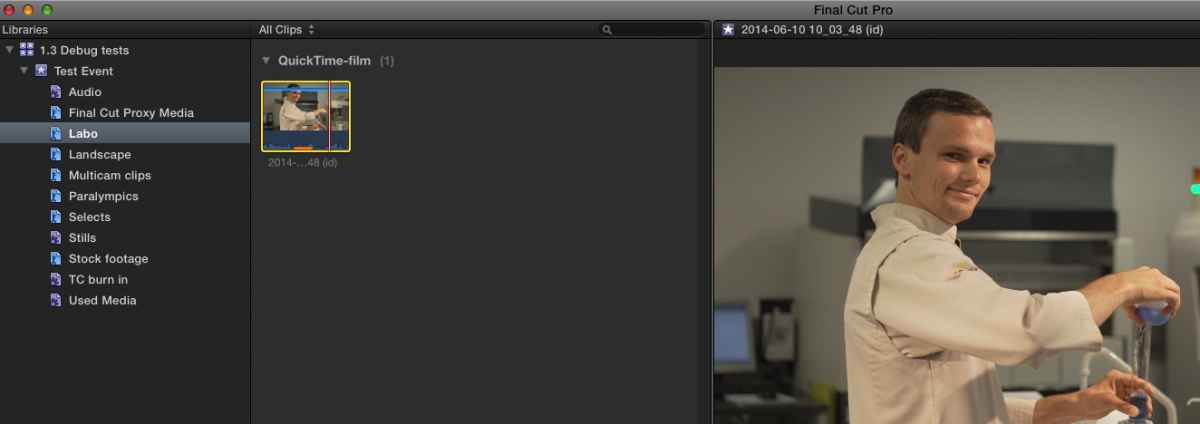
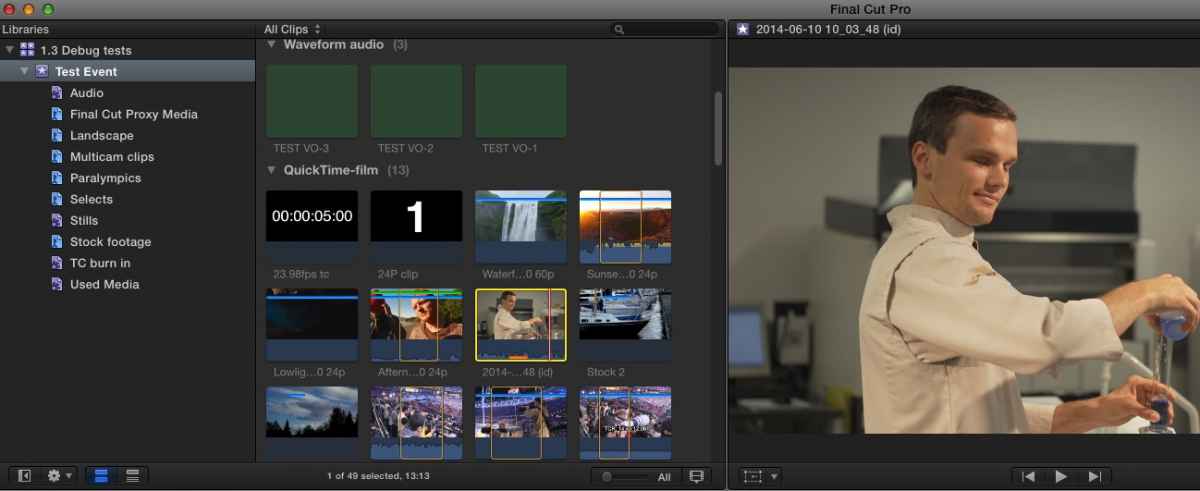
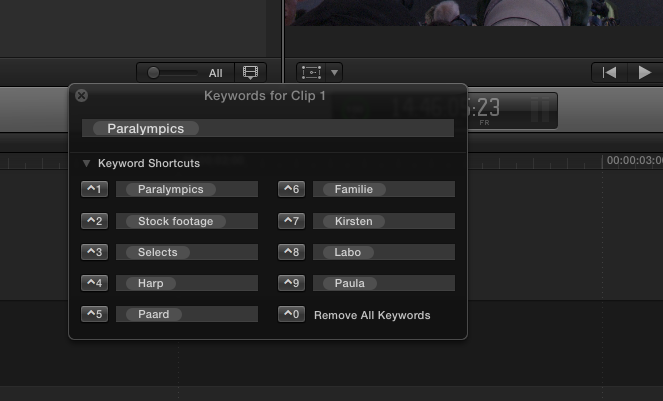
I must have an FCP X guardian angel because I don't have any problems with Backups nor do I see the keyword problems Ben is describing.
Lab clip in Event:
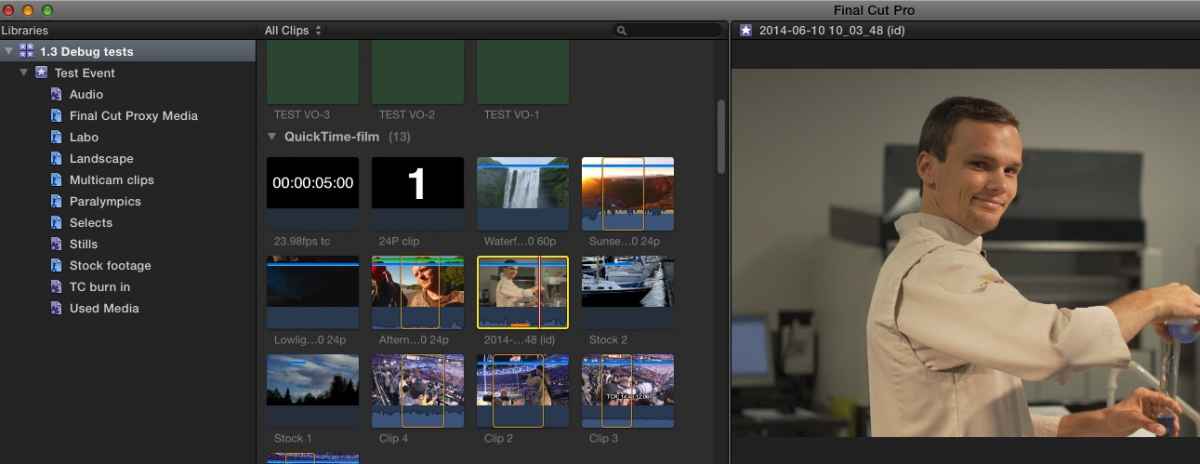
Lab clip in Labo keyword collection:
Lab clip still in Event after deleting Labo keyword collection:
Keyword editor is not the active pane, all keyword tags show:
Strange indeed.
Are you sure you have refreshed your FCP X preferences after the update? This fixes a lot of issues caused by cross-version preferences.
- Ronny
Lab clip in Event:
Lab clip in Labo keyword collection:
Lab clip still in Event after deleting Labo keyword collection:
Keyword editor is not the active pane, all keyword tags show:
Strange indeed.
Are you sure you have refreshed your FCP X preferences after the update? This fixes a lot of issues caused by cross-version preferences.
- Ronny
Please Log in to join the conversation.


21 Aug 2014 14:50 #51590
by tpayton
Ouch. However, I'm not able to reproduce this on my end. Any chance you are viewing the keyword collection itself? Maybe try deleting prefs.
Replied by tpayton on topic 10.1.3 Released
BenB wrote: Bug, when you delete a keyword in the keyword editor, it deletes the clip from the Event. Not cool.
Also, when the keyword editor is not the active pane, the keyword tags go solid white.
Ouch. However, I'm not able to reproduce this on my end. Any chance you are viewing the keyword collection itself? Maybe try deleting prefs.
Please Log in to join the conversation.


21 Aug 2014 14:53 - 21 Aug 2014 14:54 #51591
by RGPphotog
Replied by RGPphotog on topic 10.1.3 Released
When you say "refresh" preferences I assume you mean trash the existing ones so FCP X is forced to rebuild?
Didn't solve the backups loop bug for me. Nor did deleting and reinstalling FCPX. And once might be a pref fluke. Multiple Macs able to reproduce the issue is not a corrupt preferences issue. And of course not everyone will experience the bugs, or the pro-apps team would likely have found it before releasing the update.
EDIT: I've not come across the keyword issues as of yet.
Didn't solve the backups loop bug for me. Nor did deleting and reinstalling FCPX. And once might be a pref fluke. Multiple Macs able to reproduce the issue is not a corrupt preferences issue. And of course not everyone will experience the bugs, or the pro-apps team would likely have found it before releasing the update.
EDIT: I've not come across the keyword issues as of yet.
Last edit: 21 Aug 2014 14:54 by RGPphotog.
Please Log in to join the conversation.
- ronny courtens
-
- Offline
- Moderator
-
Less
More
- Posts: 4455
- Thank you received: 962
21 Aug 2014 15:15 #51593
by ronny courtens
Replied by ronny courtens on topic 10.1.3 Released
That's a fair assessment. The backups looping seems to affect a number of users on different machines, so we can safely call this a bug.
I haven't updated our production machines yet, but so far I see no issues on my test system (new MP 700D with system drive wiped clean every month). So I must be lucky. Post as much feedback as you can, Backups not working is scary :pinch:
- Ronny
I haven't updated our production machines yet, but so far I see no issues on my test system (new MP 700D with system drive wiped clean every month). So I must be lucky. Post as much feedback as you can, Backups not working is scary :pinch:
- Ronny
Please Log in to join the conversation.
- ronny courtens
-
- Offline
- Moderator
-
Less
More
- Posts: 4455
- Thank you received: 962
21 Aug 2014 15:41 #51595
by ronny courtens
Replied by ronny courtens on topic 10.1.3 Released
There's a special thread going on about this:
www.fcp.co/forum/4-final-cut-pro-x-fcpx/...n-fcpx-10-1-3-backup
I don't have the problem, but others surely do.
- Ronny
www.fcp.co/forum/4-final-cut-pro-x-fcpx/...n-fcpx-10-1-3-backup
I don't have the problem, but others surely do.
- Ronny
Please Log in to join the conversation.
21 Aug 2014 16:02 #51597
by tpayton
Replied by tpayton on topic 10.1.3 Released
I wonder if it has some issue with a specifically formatted drive, or permissions. Odd.
Please Log in to join the conversation.

21 Aug 2014 16:20 #51601
by Henrik
Replied by Henrik on topic 10.1.3 Released
Hi everybody!
My first post:
I have a problem with the automatic backup function in the 10.1.3. When I select an external device, doesn´t matter whether it´s Ex-fat, Fat 32 og journaled, I wont get any backup files. If i backup locally everything is fine, but that's not so interesting....
Anyone experienced the same or have a solution?
Henrik
Oslo
My first post:
I have a problem with the automatic backup function in the 10.1.3. When I select an external device, doesn´t matter whether it´s Ex-fat, Fat 32 og journaled, I wont get any backup files. If i backup locally everything is fine, but that's not so interesting....
Anyone experienced the same or have a solution?
Henrik
Oslo
Please Log in to join the conversation.
- ronny courtens
-
- Offline
- Moderator
-
Less
More
- Posts: 4455
- Thank you received: 962
21 Aug 2014 19:13 #51606
by ronny courtens
Replied by ronny courtens on topic 10.1.3 Released
Hi Henrik, and welcome to the forum.
You should not backup to a drive that is formatted for Windows (Ex-FAT or Fat 32). But that's not the problem here. I have been running some tests with Library backups in 10.1.3 and there is definitely something wrong.
Here's what I did:
1. I tried to store the backups of an existing Library onto different external drives that did not have any Final Cut Backup folders yet, and indeed this did not work. No matter what I tried no Final Cut Backups folder was created on any of these drives.
2. Then I manually created a Final Cut Backups folder on one of the drives and tried to set this folder as the backups destination. No backups were created inside this folder.
3. When I reset the backups for the Library to the existing Final Cut Backups folder on my system drive, backups were created.
So apparently FCP X only can store backups on your system drive for now. Can anyone confirm this?
- Ronny
You should not backup to a drive that is formatted for Windows (Ex-FAT or Fat 32). But that's not the problem here. I have been running some tests with Library backups in 10.1.3 and there is definitely something wrong.
Here's what I did:
1. I tried to store the backups of an existing Library onto different external drives that did not have any Final Cut Backup folders yet, and indeed this did not work. No matter what I tried no Final Cut Backups folder was created on any of these drives.
2. Then I manually created a Final Cut Backups folder on one of the drives and tried to set this folder as the backups destination. No backups were created inside this folder.
3. When I reset the backups for the Library to the existing Final Cut Backups folder on my system drive, backups were created.
So apparently FCP X only can store backups on your system drive for now. Can anyone confirm this?
- Ronny
Please Log in to join the conversation.
21 Aug 2014 19:20 - 21 Aug 2014 19:21 #51607
by RGPphotog
Replied by RGPphotog on topic 10.1.3 Released
All of our Macs are set to create backups in the default users>movies folder since system drives get Time Machine (style) backups while our media drives do not. I tried moving this folder too, but didn't work for us. So FCPX fails to write the backup at all and I'm assuming it eventually goes into this backup loop because of this reason.
Perhaps Apple tried to use some kind of verifying action on backups and if FCPX fails that verification test it immediately tries to save a backup again. And failing again to infinity and beyond.
Perhaps Apple tried to use some kind of verifying action on backups and if FCPX fails that verification test it immediately tries to save a backup again. And failing again to infinity and beyond.
Last edit: 21 Aug 2014 19:21 by RGPphotog. Reason: typo
Please Log in to join the conversation.
21 Aug 2014 19:27 #51608
by RGPphotog
Replied by RGPphotog on topic 10.1.3 Released
The first question that Apple will have to address is why it fails to write a backup in the first place.
Second would be how many times should FCPX retry a backup action before it "times out"
Thirdly would be some kind of an alert to the user stating that FCP X failed to create a backup upon time-out—perhaps with options to manually save a copy, and submitting necessary debug info to Apple.
Second would be how many times should FCPX retry a backup action before it "times out"
Thirdly would be some kind of an alert to the user stating that FCP X failed to create a backup upon time-out—perhaps with options to manually save a copy, and submitting necessary debug info to Apple.
Please Log in to join the conversation.
21 Aug 2014 21:44 #51611
by plysat
Can't sleep? Try this: fcpxpert.net ;-)
Replied by plysat on topic 10.1.3 Released
Ronny wrote - "I must have an FCP X guardian angel because I don't have any problems with Backups nor do I see the keyword problems Ben is describing."
Me too, I see neither of those issues. I wonder if it's a system specific thing? I'm on a 2012 iMac. And it's far from pristine. In fact, i haven't done a clean install of anything since I got it. FWIW
Me too, I see neither of those issues. I wonder if it's a system specific thing? I'm on a 2012 iMac. And it's far from pristine. In fact, i haven't done a clean install of anything since I got it. FWIW
Can't sleep? Try this: fcpxpert.net ;-)
Please Log in to join the conversation.

22 Aug 2014 00:37 #51612
by marchyman
Yup.. And it has been that way for a long time. Sometimes you get a small download, sometimes a large, and other time a small followed by a large. It's the way things work and Apple hasn't (to the best of my knowledge) explained why. I don't expect they ever will.
As long as the end result is a working application accept it. It will do your blood pressure good.
Replied by marchyman on topic 10.1.3 Released
MsJustine wrote: Something with the App Store is not right.
Yup.. And it has been that way for a long time. Sometimes you get a small download, sometimes a large, and other time a small followed by a large. It's the way things work and Apple hasn't (to the best of my knowledge) explained why. I don't expect they ever will.
As long as the end result is a working application accept it. It will do your blood pressure good.
Please Log in to join the conversation.
22 Aug 2014 08:28 #51624
by Henrik
Replied by Henrik on topic 10.1.3 Released
A big "thank you" to all.
Ronny: Yes that´s my conclusion as well...
- Chris at Apple Pro Apps mailed me regarding this issue, so I hope some update will come soon.
RGPphotog: Totally agree!
Sorry for the late reply...had to sleep.
Ronny: Yes that´s my conclusion as well...
- Chris at Apple Pro Apps mailed me regarding this issue, so I hope some update will come soon.
RGPphotog: Totally agree!
Sorry for the late reply...had to sleep.
Please Log in to join the conversation.

22 Aug 2014 22:56 - 22 Aug 2014 22:58 #51663
by BenB
Replied by BenB on topic 10.1.3 Released
Discovered my specific bugs are Yosimite related. Never mind...
But the class I just finished teaching found a few.
I am VERY happy to admit that we did not have any crashes in 5 days of training. That is a first!
And no backup issues on Amy of the 8 Macs being used. But I know the minute I get home, crank up my studio Mac, I'll see it. Just my luck...
But the class I just finished teaching found a few.
I am VERY happy to admit that we did not have any crashes in 5 days of training. That is a first!
And no backup issues on Amy of the 8 Macs being used. But I know the minute I get home, crank up my studio Mac, I'll see it. Just my luck...
Last edit: 22 Aug 2014 22:58 by BenB.
Please Log in to join the conversation.
