


- Posts: 35
- Thank you received: 0
3 Post Moderation Rule for New Boarders (25 Jan 2021)
New boarders will have their posts moderated - Don't worry if you cannot see your post immediately.
Coremelt RGB Trails glitches driving me mad! Can anyone suggest an alternative similar effect?
09 Sep 2014 07:26 #52436
by airmiami
Replied by airmiami on topic Coremelt RGB Trails glitches driving me mad! Can anyone suggest an alternative similar effect?
Hmm.... ok
Soooooo - which option do you think would be cheapest/advisable of the following? :
1 - replace my graphics card in my MBP (can this even be done? Sorry for the dumb questions here by the way)
2 - purchase a used Mini?
3 - purchase a used iMac?
Soooooo - which option do you think would be cheapest/advisable of the following? :
1 - replace my graphics card in my MBP (can this even be done? Sorry for the dumb questions here by the way)
2 - purchase a used Mini?
3 - purchase a used iMac?
Please Log in to join the conversation.
- ronny courtens
-

- Offline
- Moderator
-

Less
More
- Posts: 4455
- Thank you received: 962
09 Sep 2014 07:32 #52437
by ronny courtens
Replied by ronny courtens on topic Coremelt RGB Trails glitches driving me mad! Can anyone suggest an alternative similar effect?
1. Not possible.
2./3. Let me think about this for a minute
- Ronny
2./3. Let me think about this for a minute
- Ronny
Please Log in to join the conversation.
09 Sep 2014 07:35 - 09 Sep 2014 07:37 #52438
by airmiami
Replied by airmiami on topic Coremelt RGB Trails glitches driving me mad! Can anyone suggest an alternative similar effect?
No eBay APP ID and/or Cert ID defined in Kunena configurationThanks Ronny - really do appreciate this.
I'm not looking to replace my MBP just yet as I upgraded it for music use / increased the storage on here, etc.
I sold my iMac last year as I wasn't really using it any more, but it seems that second hand iMacs go cheaper than an equivalent spec macbook, so.....
I mean, is THIS Mini good enough, for example? :
I'm not looking to replace my MBP just yet as I upgraded it for music use / increased the storage on here, etc.
I sold my iMac last year as I wasn't really using it any more, but it seems that second hand iMacs go cheaper than an equivalent spec macbook, so.....
I mean, is THIS Mini good enough, for example? :
Last edit: 09 Sep 2014 07:37 by airmiami.
Please Log in to join the conversation.
- ronny courtens
-
- Offline
- Moderator
-
Less
More
- Posts: 4455
- Thank you received: 962
09 Sep 2014 08:19 #52439
by ronny courtens
Replied by ronny courtens on topic Coremelt RGB Trails glitches driving me mad! Can anyone suggest an alternative similar effect?
No, it isn't. You will need a dedicated graphics card, and the Mini only has an integrated card.
I just did a test on an 2008 MacPro I have here. It has an old Nvidia 8800 GT card inside with only 512 MB VRAM. The RGB Trails plugin works without any issues on it in Motion 5. I do understand why you absolutely want this plugin, I don't know of any other one that does these kinds of trails. I will have a look at different options in the used iMac range.
- Ronny
I just did a test on an 2008 MacPro I have here. It has an old Nvidia 8800 GT card inside with only 512 MB VRAM. The RGB Trails plugin works without any issues on it in Motion 5. I do understand why you absolutely want this plugin, I don't know of any other one that does these kinds of trails. I will have a look at different options in the used iMac range.
- Ronny
Please Log in to join the conversation.
09 Sep 2014 08:31 #52440
by airmiami
Replied by airmiami on topic Coremelt RGB Trails glitches driving me mad! Can anyone suggest an alternative similar effect?
Hi again Ronny -
Ok, but I thought that your Mini worked ok? Does that not have an integrated card?
Also, why should an older 2008 Macbook Pro work when my 2011 doesn't?
And why do you think an iMac would make sense then?
No, it isn't. You will need a dedicated graphics card, and the Mini only has an integrated card.
I just did a test on an 2008 MacPro I have here. It has an old Nvidia 8800 GT card inside with only 512 MB VRAM. The RGB Trails plugin works without any issues on it in Motion 5. I do understand why you absolutely want this plugin, I don't know of any other one that does these kinds of trails. I will have a look at different options in the used iMac range.
- Ronny
Ok, but I thought that your Mini worked ok? Does that not have an integrated card?
Also, why should an older 2008 Macbook Pro work when my 2011 doesn't?
And why do you think an iMac would make sense then?
No, it isn't. You will need a dedicated graphics card, and the Mini only has an integrated card.
I just did a test on an 2008 MacPro I have here. It has an old Nvidia 8800 GT card inside with only 512 MB VRAM. The RGB Trails plugin works without any issues on it in Motion 5. I do understand why you absolutely want this plugin, I don't know of any other one that does these kinds of trails. I will have a look at different options in the used iMac range.
- Ronny
Please Log in to join the conversation.
- Karsten Schlüter
-

- Offline
- Moderator
-
Less
More
- Posts: 3790
- Thank you received: 718
09 Sep 2014 09:09 - 09 Sep 2014 09:18 #52441
by Karsten Schlüter
Replied by Karsten Schlüter on topic Coremelt RGB Trails glitches driving me mad! Can anyone suggest an alternative similar effect?
... meant as a Plan B (it's allways good to have a plan B...) :
What are you looking for - visually?
For instance, there's a free 'trail' effect avail here:
www.fcp.co/forum/simulated-effects/17419...px-effect-tky-trails
now, to create diff. 'layers' for diff. color chanels, you could 'stack' your clip 3 times, apply some extreme color-'corrections', and apply that trail-filter. nudging each track a few frames and or apply slightly diff. speeds, and or appyling some Gaussian blur could give a somewhat suimliar result as this plug-in...
Just to avoid $$$$ ...
What are you looking for - visually?
For instance, there's a free 'trail' effect avail here:
www.fcp.co/forum/simulated-effects/17419...px-effect-tky-trails
now, to create diff. 'layers' for diff. color chanels, you could 'stack' your clip 3 times, apply some extreme color-'corrections', and apply that trail-filter. nudging each track a few frames and or apply slightly diff. speeds, and or appyling some Gaussian blur could give a somewhat suimliar result as this plug-in...
Just to avoid $$$$ ...
Last edit: 09 Sep 2014 09:18 by Karsten Schlüter.
Please Log in to join the conversation.
- ronny courtens
-
- Offline
- Moderator
-
Less
More
- Posts: 4455
- Thank you received: 962
09 Sep 2014 09:27 #52442
by ronny courtens
Replied by ronny courtens on topic Coremelt RGB Trails glitches driving me mad! Can anyone suggest an alternative similar effect?
Bobby,
- On my 2011 Mini with Motion 5 I can export without the glitches but I do have them while adjusting the plugin. With FCP X I get the glitches in the app and after exporting.
- On an old 2008 MAC PRO (not MBP) with a dedicated 8800 GT 512 MB graphics card I don't get any glitches at all, not in the app and not after exporting.
- On any recent iMac or MacPro this plugin runs perfectly, without any glitches.
- Your MBP has a dedicated graphics card, but it does not have enough VRAM to work with this plugin.
This means that an old 512 MB dedicated full graphics card in a 2008 MacPro works better with this plugin than a modern integrated Intel 512 MB graphics card in a 2010 Mini.
That's why I say you will need a computer with a dedicated graphics card with at least 512 MB VRAM. As a second-hand MBP often is more expensive than a similar second-hand iMac I think a second-hand iMac would be a better option.
Your specs should be:
At least an i5 processor for iMac or MBP
Minimum 4 GB RAM (8 GB if you want to use FCP X on this machine)
A dedicated graphics card with at least 512 MB VRAM (1 GB would be much, much better for this plugin)
If the price for such a system is too high I would advise you to look for a different effect, such as the one Karsten has suggested. You will never get the exact effect of what the RGB Trails effect does, but it is indeed a good plan B.
- Ronny
- On my 2011 Mini with Motion 5 I can export without the glitches but I do have them while adjusting the plugin. With FCP X I get the glitches in the app and after exporting.
- On an old 2008 MAC PRO (not MBP) with a dedicated 8800 GT 512 MB graphics card I don't get any glitches at all, not in the app and not after exporting.
- On any recent iMac or MacPro this plugin runs perfectly, without any glitches.
- Your MBP has a dedicated graphics card, but it does not have enough VRAM to work with this plugin.
This means that an old 512 MB dedicated full graphics card in a 2008 MacPro works better with this plugin than a modern integrated Intel 512 MB graphics card in a 2010 Mini.
That's why I say you will need a computer with a dedicated graphics card with at least 512 MB VRAM. As a second-hand MBP often is more expensive than a similar second-hand iMac I think a second-hand iMac would be a better option.
Your specs should be:
At least an i5 processor for iMac or MBP
Minimum 4 GB RAM (8 GB if you want to use FCP X on this machine)
A dedicated graphics card with at least 512 MB VRAM (1 GB would be much, much better for this plugin)
If the price for such a system is too high I would advise you to look for a different effect, such as the one Karsten has suggested. You will never get the exact effect of what the RGB Trails effect does, but it is indeed a good plan B.
- Ronny
Please Log in to join the conversation.
- Karsten Schlüter
-
- Offline
- Moderator
-
Less
More
- Posts: 3790
- Thank you received: 718
09 Sep 2014 09:45 #52445
by Karsten Schlüter
If you're looking for a cheap solution - just ask me... LOL!
Thanks, Ronny, for your commendation!
Replied by Karsten Schlüter on topic Coremelt RGB Trails glitches driving me mad! Can anyone suggest an alternative similar effect?
ronny courtens wrote: .... but it is indeed a good plan B...
If you're looking for a cheap solution - just ask me... LOL!
Thanks, Ronny, for your commendation!
Please Log in to join the conversation.
09 Sep 2014 18:27 #52456
by airmiami
Replied by airmiami on topic Coremelt RGB Trails glitches driving me mad! Can anyone suggest an alternative similar effect?
No eBay APP ID and/or Cert ID defined in Kunena configurationRonny -
this is all great info, very much appreciated.
I think the iMac looks like the plan here.
How do I figure out though form specs how much VRAM a machine has? Like, how for example do I figure out the VRAM on this mini :
You mentioned
"- On my 2011 Mini with Motion 5 I can export without the glitches but I do have them while adjusting the plugin. With FCP X I get the glitches in the app and after exporting."
.... I mean, that would be fine for me. I don't need to see the effect until it's rendered out (in this instance) - so even not having a dedicated graphics card would not be a problem
this is all great info, very much appreciated.
I think the iMac looks like the plan here.
How do I figure out though form specs how much VRAM a machine has? Like, how for example do I figure out the VRAM on this mini :
You mentioned
"- On my 2011 Mini with Motion 5 I can export without the glitches but I do have them while adjusting the plugin. With FCP X I get the glitches in the app and after exporting."
.... I mean, that would be fine for me. I don't need to see the effect until it's rendered out (in this instance) - so even not having a dedicated graphics card would not be a problem
Please Log in to join the conversation.
09 Sep 2014 18:30 #52457
by airmiami
Replied by airmiami on topic Coremelt RGB Trails glitches driving me mad! Can anyone suggest an alternative similar effect?
Hi Karsten -
I've tried other trails filters and indeed stacked them in the way you suggest, but it just doesn't give me the same results really
I've tried other trails filters and indeed stacked them in the way you suggest, but it just doesn't give me the same results really
Please Log in to join the conversation.
- ronny courtens
-
- Offline
- Moderator
-
Less
More
- Posts: 4455
- Thank you received: 962
09 Sep 2014 19:21 #52458
by ronny courtens
Replied by ronny courtens on topic Coremelt RGB Trails glitches driving me mad! Can anyone suggest an alternative similar effect?
You will easily get info about the graphics card in any iMac. They don't often mention the card in the Mini because it is integrated, which means it shares it VRAM between the computer display attached to it and the applications.
- Ronny
- Ronny
Please Log in to join the conversation.
09 Sep 2014 19:31 #52459
by airmiami
Replied by airmiami on topic Coremelt RGB Trails glitches driving me mad! Can anyone suggest an alternative similar effect?
Ronny -
your Mini, are they the usual specs? It seems like all of the ones I'm looking at on ebay don't have such high amount of VRAM
your Mini, are they the usual specs? It seems like all of the ones I'm looking at on ebay don't have such high amount of VRAM
Please Log in to join the conversation.
- ronny courtens
-
- Offline
- Moderator
-
Less
More
- Posts: 4455
- Thank you received: 962
09 Sep 2014 19:42 #52460
by ronny courtens
Replied by ronny courtens on topic Coremelt RGB Trails glitches driving me mad! Can anyone suggest an alternative similar effect?
The 2010 Mini I'm typing on here has a standard Intel HD card with 512MB VRAM. That's an absolute minimum. I can get this effect "working" with Motion 5 on this Mini, but only when exporting. This is absolutely NOT what you should be looking for.
- Ronny
- Ronny
Please Log in to join the conversation.
09 Sep 2014 19:59 - 09 Sep 2014 20:07 #52461
by airmiami
Replied by airmiami on topic Coremelt RGB Trails glitches driving me mad! Can anyone suggest an alternative similar effect?
No eBay APP ID and/or Cert ID defined in Kunena configuration I know it's not ideal, but at least it allows me to finish a couple of videos. Like I said, I don't mind the glitching as long as the glitching does not render out.
It just seems to me that all of the Minis I look at on ebay don't have the VRAM that yours has. This one seems identical to yours, except it has 288mb of vram, correct? :
I know it's not ideal, but at least it allows me to finish a couple of videos. Like I said, I don't mind the glitching as long as the glitching does not render out.It just seems to me that all of the Minis I look at on ebay don't have the VRAM that yours has. This one seems identical to yours, except it has 288mb of vram, correct? :
Last edit: 09 Sep 2014 20:07 by airmiami.
Please Log in to join the conversation.
- ronny courtens
-
- Offline
- Moderator
-
Less
More
- Posts: 4455
- Thank you received: 962
10 Sep 2014 06:02 #52477
by ronny courtens
Replied by ronny courtens on topic Coremelt RGB Trails glitches driving me mad! Can anyone suggest an alternative similar effect?
Yes. In an earlier reply I have sent you a screenshot of the Mini, you can see it has 512 MB VRAM.
I have been able to render out this effect from Motion with this Mini. Does that mean you will be able to do the same thing with a similar Mini? Possibly, but there is no guarantee. There are many factors that can affect the performance of an integrated graphics card (type of display attached, system configuration....).That's why I told you it is better NOT to use a Mini with integrated graphics for this effect. You are doing this at your own risk.
- Ronny
I have been able to render out this effect from Motion with this Mini. Does that mean you will be able to do the same thing with a similar Mini? Possibly, but there is no guarantee. There are many factors that can affect the performance of an integrated graphics card (type of display attached, system configuration....).That's why I told you it is better NOT to use a Mini with integrated graphics for this effect. You are doing this at your own risk.
- Ronny
Please Log in to join the conversation.
- Karsten Schlüter
-
- Offline
- Moderator
-
Less
More
- Posts: 3790
- Thank you received: 718
10 Sep 2014 06:15 - 10 Sep 2014 06:16 #52478
by Karsten Schlüter
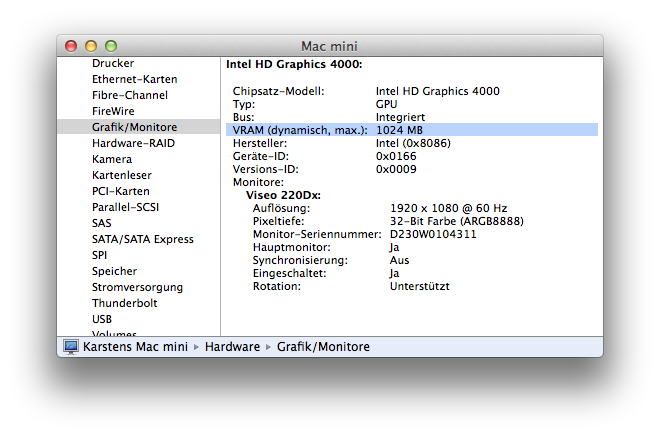
though the VRAM depends on the RAM in toto is avail, my maxxed-out Mini = 16GB Ram, offers a gig of VRAM :
I don't own that specific plug-in, but FCPX and all stuff 'flies' on my set-up ...
So, perhaps, you 'just' have to add another 100bucks for 2x 8GBs of Ram ... ?
Replied by Karsten Schlüter on topic Coremelt RGB Trails glitches driving me mad! Can anyone suggest an alternative similar effect?
airmiami wrote: ... It just seems to me that all of the Minis I look at on ebay don't have the VRAM that yours has. ..
though the VRAM depends on the RAM in toto is avail, my maxxed-out Mini = 16GB Ram, offers a gig of VRAM :
I don't own that specific plug-in, but FCPX and all stuff 'flies' on my set-up ...
So, perhaps, you 'just' have to add another 100bucks for 2x 8GBs of Ram ... ?
Last edit: 10 Sep 2014 06:16 by Karsten Schlüter.
Please Log in to join the conversation.
10 Sep 2014 18:49 #52508
by airmiami
Replied by airmiami on topic Coremelt RGB Trails glitches driving me mad! Can anyone suggest an alternative similar effect?
Hmm....
Seems though that my MBP only allows for a maximum of 8GB ram, which it already has
Seems though that my MBP only allows for a maximum of 8GB ram, which it already has
Please Log in to join the conversation.
