


- Posts: 35
- Thank you received: 0
3 Post Moderation Rule for New Boarders (25 Jan 2021)
New boarders will have their posts moderated - Don't worry if you cannot see your post immediately.
Coremelt RGB Trails glitches driving me mad! Can anyone suggest an alternative similar effect?
30 Jul 2014 14:58 #50700
by airmiami
Coremelt RGB Trails glitches driving me mad! Can anyone suggest an alternative similar effect? was created by airmiami
Hi everyone -
I'm new to this forum, but I'm always on here reading up on FCP, so very happy to finally register!
Ok, hopefully someone can help me out here, because I'm pulling my hair out at this point and I really need a solution.
I purchased the Coremelt Motion Graphics box, pretty much for one effect, the RGB Trails plugin :

It "Creates ghostly trails behind movement in the image with different lengths in each color channel."
Now, I'm running FCPX 10.1 on my Macbook Pro, OSX 10.9.4, 2.66Ghz Intel Core 2 Duo, 8GB 1067 MHz DDR3 etc etc...
but the plugin either crashes FCPX, or renders out as a horrible glitchy soup :

I spoke with Eberhard at Coremelt via email, who said "This particular effect uses a certain OpenGL feature which might cause the problem on this graphics hardware.
I'm not aware of any other software that does this effect but there's probably one.
The host application in the screen shot is FCP 7, you could also try Motion 4/5.
Some OpenGL parameters may be different on other host applications so it might work on your computer."
I've never used Motion and don't really have the time/$$ to be onto new software. So I was wondering, is there anything else out there effects wise that I can use within FCP that will achieve this same effect for me? I've tried 'Trails' combined with 'Chromatic Blur', but I just don't get this smooth ghostly RGB blur.
Either that or could someone maybe suggest what's going wrong here....?
Thanks!
I'm new to this forum, but I'm always on here reading up on FCP, so very happy to finally register!
Ok, hopefully someone can help me out here, because I'm pulling my hair out at this point and I really need a solution.
I purchased the Coremelt Motion Graphics box, pretty much for one effect, the RGB Trails plugin :
It "Creates ghostly trails behind movement in the image with different lengths in each color channel."
Now, I'm running FCPX 10.1 on my Macbook Pro, OSX 10.9.4, 2.66Ghz Intel Core 2 Duo, 8GB 1067 MHz DDR3 etc etc...
but the plugin either crashes FCPX, or renders out as a horrible glitchy soup :
I spoke with Eberhard at Coremelt via email, who said "This particular effect uses a certain OpenGL feature which might cause the problem on this graphics hardware.
I'm not aware of any other software that does this effect but there's probably one.
The host application in the screen shot is FCP 7, you could also try Motion 4/5.
Some OpenGL parameters may be different on other host applications so it might work on your computer."
I've never used Motion and don't really have the time/$$ to be onto new software. So I was wondering, is there anything else out there effects wise that I can use within FCP that will achieve this same effect for me? I've tried 'Trails' combined with 'Chromatic Blur', but I just don't get this smooth ghostly RGB blur.
Either that or could someone maybe suggest what's going wrong here....?
Thanks!
Please Log in to join the conversation.
- ronny courtens
-

- Offline
- Moderator
-

Less
More
- Posts: 4455
- Thank you received: 962
31 Jul 2014 19:52 #50786
by ronny courtens
Replied by ronny courtens on topic Coremelt RGB Trails glitches driving me mad! Can anyone suggest an alternative similar effect?
There are only two other plugin manufacturers that offer a similar effect: GenArts and BorisFX. Unfortunately these plugin collections are quite expensive and you have to buy the entire package just to get that one. The Sapphire plugins haven't even been updated yet for FCP X or Motion 5. So that won't help you much.
This is indeed a render issue and it is related to how the effect addresses your graphics card. So I did a test on an MBP with a similar graphics card.
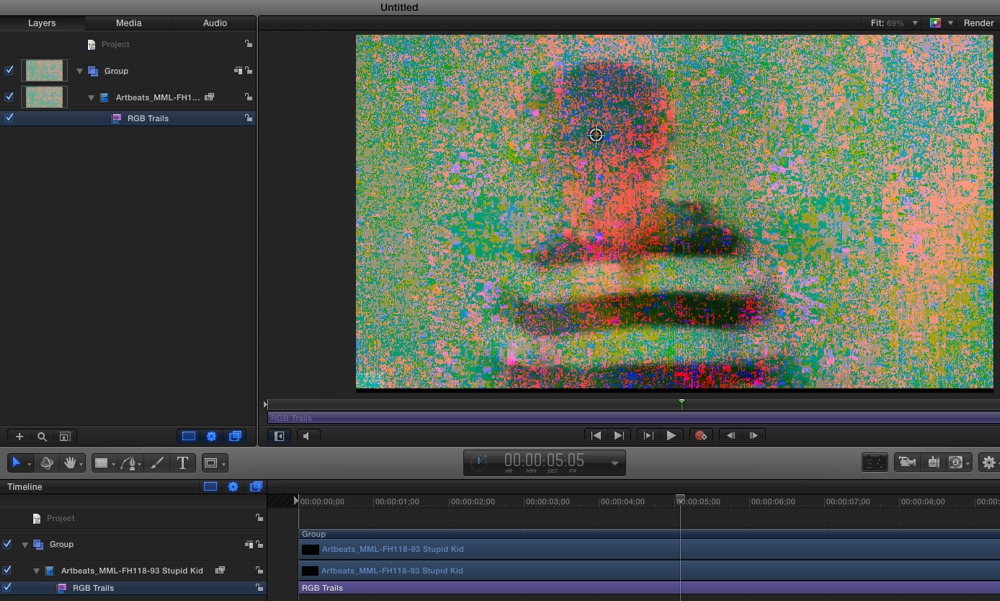
In FCP X I get the glitches on the timeline and after exporting, no help. However Motion 5 addresses the GPU differently than FCP X, and this is what I got in Motion 5:
On the timeline sometimes it works, sometimes I get the glitches:
But after exporting the file with the effect the video is always okay:
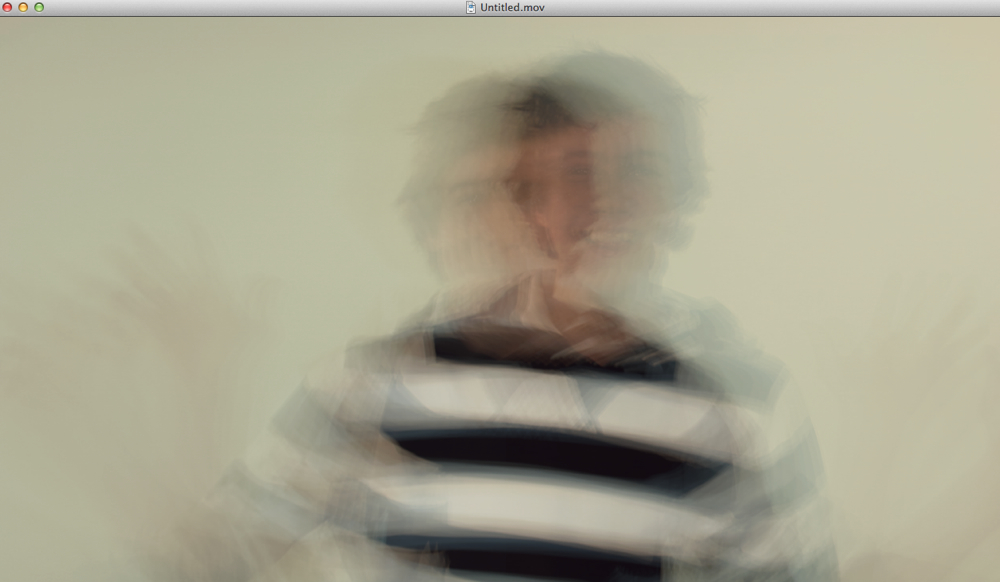
So if you have Motion 5 it probably could work. For this kind of job you don't need any real Motion skills: you create a project, you drop the footage in the timeline, you apply and tweak the effect and you export. Then you can import the video with the effect in FCP X. If you have any issues with this we can guide you through this.
- Ronny
This is indeed a render issue and it is related to how the effect addresses your graphics card. So I did a test on an MBP with a similar graphics card.
In FCP X I get the glitches on the timeline and after exporting, no help. However Motion 5 addresses the GPU differently than FCP X, and this is what I got in Motion 5:
On the timeline sometimes it works, sometimes I get the glitches:
But after exporting the file with the effect the video is always okay:
So if you have Motion 5 it probably could work. For this kind of job you don't need any real Motion skills: you create a project, you drop the footage in the timeline, you apply and tweak the effect and you export. Then you can import the video with the effect in FCP X. If you have any issues with this we can guide you through this.
- Ronny
Please Log in to join the conversation.
15 Aug 2014 02:10 #51323
by airmiami
Hi Ronny -
cheers for the advice here, it's really appreciated!
I'm curious as to why it would not work on my MBP, but work on yours. Bah! Very interesting that it glitches inside of FCPX, but not in the export....
Ok, I now have Motion - but also have zero idea how to use it or add effects to anything! :blush:
If you could give me a super dumbed-down walk through on doing that I'd really be so grateful.
Why do you think it is that it would work in Motion on my MBP, but not FCPX?
Replied by airmiami on topic Coremelt RGB Trails glitches driving me mad! Can anyone suggest an alternative similar effect?
ronny courtens wrote: There are only two other plugin manufacturers that offer a similar effect: GenArts and BorisFX. Unfortunately these plugin collections are quite expensive and you have to buy the entire package just to get that one. The Sapphire plugins haven't even been updated yet for FCP X or Motion 5. So that won't help you much.
This is indeed a render issue and it is related to how the effect addresses your graphics card. So I did a test on an MBP with a similar graphics card.
In FCP X I get the glitches on the timeline and after exporting, no help. However Motion 5 addresses the GPU differently than FCP X, and this is what I got in Motion 5:
On the timeline sometimes it works, sometimes I get the glitches:
But after exporting the file with the effect the video is always okay:
So if you have Motion 5 it probably could work. For this kind of job you don't need any real Motion skills: you create a project, you drop the footage in the timeline, you apply and tweak the effect and you export. Then you can import the video with the effect in FCP X. If you have any issues with this we can guide you through this.
- Ronny
Hi Ronny -
cheers for the advice here, it's really appreciated!
I'm curious as to why it would not work on my MBP, but work on yours. Bah!
Very interesting that it glitches inside of FCPX, but not in the export....Ok, I now have Motion - but also have zero idea how to use it or add effects to anything! :blush:
If you could give me a super dumbed-down walk through on doing that I'd really be so grateful.
Why do you think it is that it would work in Motion on my MBP, but not FCPX?
Please Log in to join the conversation.
- ronny courtens
-
- Offline
- Moderator
-
Less
More
- Posts: 4455
- Thank you received: 962
15 Aug 2014 09:13 - 15 Aug 2014 09:17 #51339
by ronny courtens
Replied by ronny courtens on topic Coremelt RGB Trails glitches driving me mad! Can anyone suggest an alternative similar effect?
Just to be clear: the effect did not work with FCP X on the MBP, I got glitches in the timeline and on the exported file. The screenshot I made was done with Motion 5 on the same machine: sometimes glitches on the timeline (which means the issue is GPU related), but not in the exported video.
Here's how to use this effect in Motion 5:
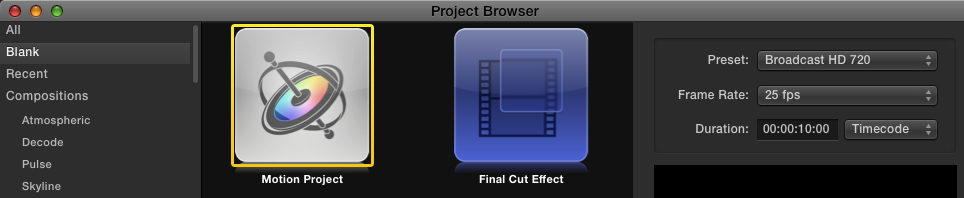
1. Launch Motion and in the Project Browser create a new Motion project using exactly the same settings as your FCP X project, then click Open. Here I have created a 1280x720 25fps project, your settings may differ:
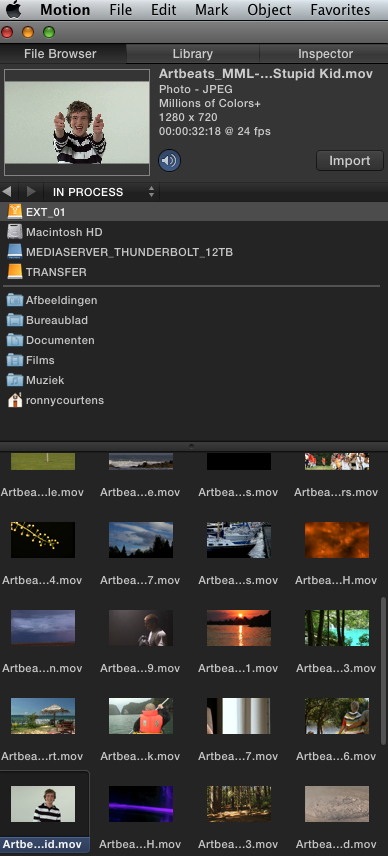
2. When the project is open, go to the File Browser and select the clip you want to use. The clip will open in the little preview window:
3. Click the Import button to add the clip to your timeline. Make sure your Viewer size is set to "Fit" so you can see the entire image in your Viewer:
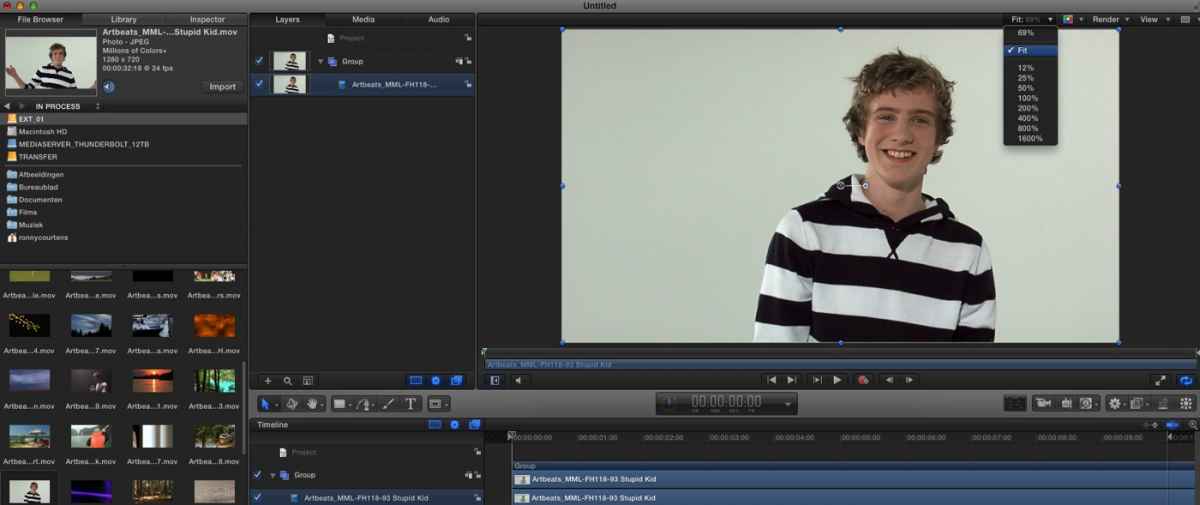
4. To add the effect to your clip click the Library tab > Filters > C2 folder and in the filter list select RGB Trails. Then press Apply to apply the filter to your clip:

5. The filter is added to the Layers tab under your clip. Select the filter and click the Inspector > Filter tab to adjust the filter settings. This filter is very GPU intensive and you only will see the effect while you play the timeline (which is obvious, as it creates the trails based on the movement in the clip):
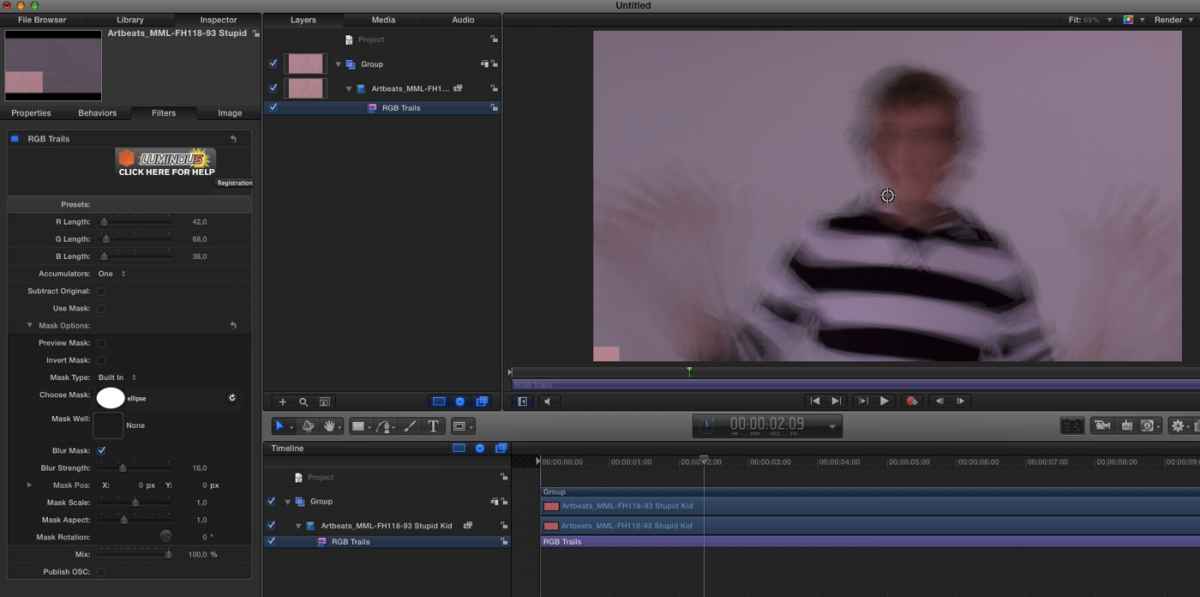
6. Unless you have a very powerful GPU you will experience random glitches when adjusting the effect and when playing the clip. On a simple MBP with 8GB RAM I had a little pink square over the image, and sometimes the viewer went black or the image was very glitchy. That's because the GPU cannot handle the effect in realtime.
Now here's the trick: Select Mark > RAM Preview > All to store the effect in your RAM so you can play and preview the effect whenever you want to check the result without any glitches:
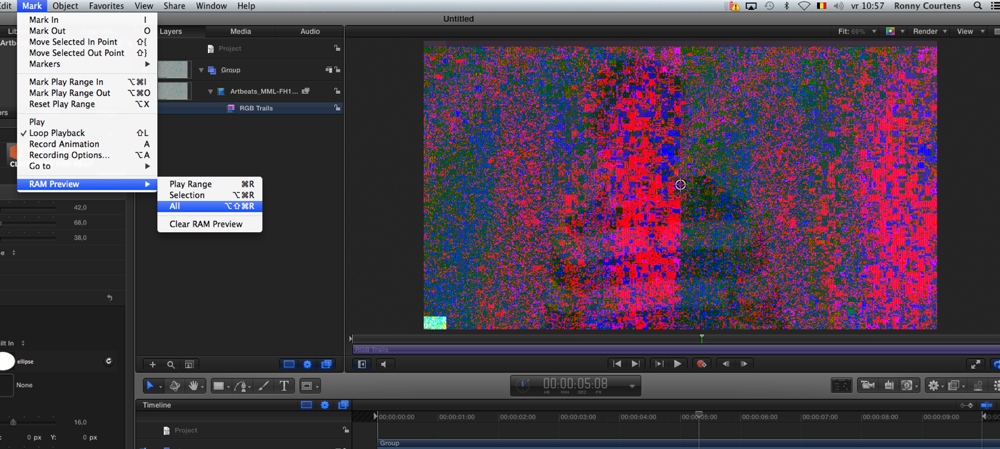
NOTE: depending on how heavily you modify the effect you still may notice some small glitches in the RAM preview. Don't worry, these will all be gone when you export the movie.
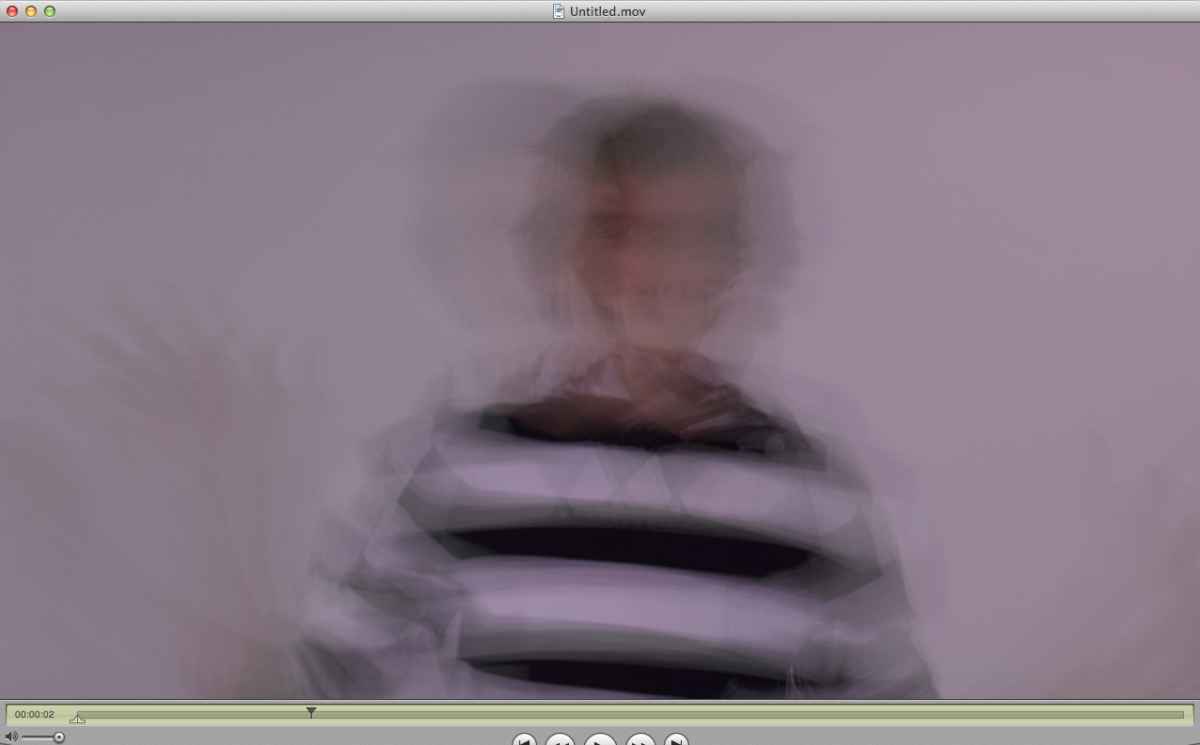
7. When you are happy with the result select Share > Export Movie > Current Settings. Your final video will not have any glitches:
- Ronny
Here's how to use this effect in Motion 5:
1. Launch Motion and in the Project Browser create a new Motion project using exactly the same settings as your FCP X project, then click Open. Here I have created a 1280x720 25fps project, your settings may differ:
2. When the project is open, go to the File Browser and select the clip you want to use. The clip will open in the little preview window:
3. Click the Import button to add the clip to your timeline. Make sure your Viewer size is set to "Fit" so you can see the entire image in your Viewer:
4. To add the effect to your clip click the Library tab > Filters > C2 folder and in the filter list select RGB Trails. Then press Apply to apply the filter to your clip:
5. The filter is added to the Layers tab under your clip. Select the filter and click the Inspector > Filter tab to adjust the filter settings. This filter is very GPU intensive and you only will see the effect while you play the timeline (which is obvious, as it creates the trails based on the movement in the clip):
6. Unless you have a very powerful GPU you will experience random glitches when adjusting the effect and when playing the clip. On a simple MBP with 8GB RAM I had a little pink square over the image, and sometimes the viewer went black or the image was very glitchy. That's because the GPU cannot handle the effect in realtime.
Now here's the trick: Select Mark > RAM Preview > All to store the effect in your RAM so you can play and preview the effect whenever you want to check the result without any glitches:
NOTE: depending on how heavily you modify the effect you still may notice some small glitches in the RAM preview. Don't worry, these will all be gone when you export the movie.
7. When you are happy with the result select Share > Export Movie > Current Settings. Your final video will not have any glitches:
- Ronny
Last edit: 15 Aug 2014 09:17 by ronny courtens.
Please Log in to join the conversation.
08 Sep 2014 01:39 - 08 Sep 2014 01:52 #52341
by airmiami
Hi Ronny -
Apologies for my late reply here. I'm finally up and running after a dead laptop fiasco. Anyways...
Ok, so I have followed your steps here word-for-word (though I did change the duration in Step 1 to 220 seconds, which is the length of my movie file. Was that the correct thing to do? It seemed like Motion did not automatically recognize the length of my movie otherwise)
However, when I come to " Share > Export Movie " - I get no pop-up box, so am unable to export anything. I'm at a loss as to why that is. I don't have Mackeeper or any other anti-virus software installed (as I've Googled this problem to see what's going on, and people have suggested to uninstall these).
(Screenshot below)
Help!

Replied by airmiami on topic Coremelt RGB Trails glitches driving me mad! Can anyone suggest an alternative similar effect?
ronny courtens wrote: Just to be clear: the effect did not work with FCP X on the MBP, I got glitches in the timeline and on the exported file. The screenshot I made was done with Motion 5 on the same machine: sometimes glitches on the timeline (which means the issue is GPU related), but not in the exported video.
Here's how to use this effect in Motion 5:
1. Launch Motion and in the Project Browser create a new Motion project using exactly the same settings as your FCP X project, then click Open. Here I have created a 1280x720 25fps project, your settings may differ:
2. When the project is open, go to the File Browser and select the clip you want to use. The clip will open in the little preview window:
3. Click the Import button to add the clip to your timeline. Make sure your Viewer size is set to "Fit" so you can see the entire image in your Viewer:
4. To add the effect to your clip click the Library tab > Filters > C2 folder and in the filter list select RGB Trails. Then press Apply to apply the filter to your clip:
5. The filter is added to the Layers tab under your clip. Select the filter and click the Inspector > Filter tab to adjust the filter settings. This filter is very GPU intensive and you only will see the effect while you play the timeline (which is obvious, as it creates the trails based on the movement in the clip):
6. Unless you have a very powerful GPU you will experience random glitches when adjusting the effect and when playing the clip. On a simple MBP with 8GB RAM I had a little pink square over the image, and sometimes the viewer went black or the image was very glitchy. That's because the GPU cannot handle the effect in realtime.
Now here's the trick: Select Mark > RAM Preview > All to store the effect in your RAM so you can play and preview the effect whenever you want to check the result without any glitches:
NOTE: depending on how heavily you modify the effect you still may notice some small glitches in the RAM preview. Don't worry, these will all be gone when you export the movie.
7. When you are happy with the result select Share > Export Movie > Current Settings. Your final video will not have any glitches:
- Ronny
Hi Ronny -
Apologies for my late reply here. I'm finally up and running after a dead laptop fiasco. Anyways...
Ok, so I have followed your steps here word-for-word (though I did change the duration in Step 1 to 220 seconds, which is the length of my movie file. Was that the correct thing to do? It seemed like Motion did not automatically recognize the length of my movie otherwise)
However, when I come to " Share > Export Movie " - I get no pop-up box, so am unable to export anything. I'm at a loss as to why that is. I don't have Mackeeper or any other anti-virus software installed (as I've Googled this problem to see what's going on, and people have suggested to uninstall these).
(Screenshot below)
Help!
Last edit: 08 Sep 2014 01:52 by airmiami.
Please Log in to join the conversation.
- ronny courtens
-
- Offline
- Moderator
-
Less
More
- Posts: 4455
- Thank you received: 962
08 Sep 2014 05:54 #52357
by ronny courtens
Replied by ronny courtens on topic Coremelt RGB Trails glitches driving me mad! Can anyone suggest an alternative similar effect?
Select Export Movie, this will open the Export settings window. Choose Export: Same As Source.
- Ronny
- Ronny
Please Log in to join the conversation.
08 Sep 2014 07:12 #52363
by airmiami
Hi Ronny -
Yes, there was no window at all, so I re-installed Motion and everything worked this time. HOWEVER... upon export, I have the same glitchy file (See below). I don't understand it

Replied by airmiami on topic Coremelt RGB Trails glitches driving me mad! Can anyone suggest an alternative similar effect?
ronny courtens wrote: Select Export Movie, this will open the Export settings window. Choose Export: Same As Source.
- Ronny
Hi Ronny -
Yes, there was no window at all, so I re-installed Motion and everything worked this time. HOWEVER... upon export, I have the same glitchy file (See below). I don't understand it
Please Log in to join the conversation.
- ronny courtens
-
- Offline
- Moderator
-
Less
More
- Posts: 4455
- Thank you received: 962
08 Sep 2014 07:34 #52365
by ronny courtens
Replied by ronny courtens on topic Coremelt RGB Trails glitches driving me mad! Can anyone suggest an alternative similar effect?
Nor do I. I have tried this a few times and I always get a clean export, as you can see in the screenshots. There might be something wrong with your graphics card, or you are pushing the effect way beyond what your graphics card can handle.
One more thought: you said you reinstalled Motion. Create a new project and try again. If this still doesn't work I'm afraid you will not be able to use this particular effect on your system.
- Ronny
One more thought: you said you reinstalled Motion. Create a new project and try again. If this still doesn't work I'm afraid you will not be able to use this particular effect on your system.
- Ronny
Please Log in to join the conversation.
08 Sep 2014 07:39 #52367
by airmiami
I will try this, thanks.
I literally did just apply the effect though and don't change any of the settings, so I can't figure out what the problem is. What specs are your MBP if you don't mind me asking?
Replied by airmiami on topic Coremelt RGB Trails glitches driving me mad! Can anyone suggest an alternative similar effect?
ronny courtens wrote: Nor do I. I have tried this a few times and I always get a clean export, as you can see in the screenshots. There might be something wrong with your graphics card, or you are pushing the effect way beyond what your graphics card can handle.
One more thought: you said you reinstalled Motion. Create a new project and try again. If this still doesn't work I'm afraid you will not be able to use this particular effect on your system.
- Ronny
I will try this, thanks.
I literally did just apply the effect though and don't change any of the settings, so I can't figure out what the problem is. What specs are your MBP if you don't mind me asking?
Please Log in to join the conversation.
- ronny courtens
-
- Offline
- Moderator
-
Less
More
- Posts: 4455
- Thank you received: 962
08 Sep 2014 08:48 #52369
by ronny courtens
Replied by ronny courtens on topic Coremelt RGB Trails glitches driving me mad! Can anyone suggest an alternative similar effect?
The latest test I did (with the screenshots I posted) was at home on a 2011 Mac Mini i5 which only has a dedicated Intel HD graphics card:

So I'm really surprised why this does not work on your MBP.
- Ronny
So I'm really surprised why this does not work on your MBP.
- Ronny
Please Log in to join the conversation.
09 Sep 2014 04:11 #52423
by airmiami
Wow, strange... Yep, I tried again a couple of times and I'm getting the exact same problem. I'm gutted as I really need to finish a music video and really do need that effect. I'm tempted to buy another macbook (older even) on ebay just for this, and then re-sell it. My MBP has decent enough spec - 2.66ghz Intel Core 2 Duo, 8gb...
Do you think that even an older Macbook with a lesser spec running Motion might be do-able for me?
Replied by airmiami on topic Coremelt RGB Trails glitches driving me mad! Can anyone suggest an alternative similar effect?
ronny courtens wrote: The latest test I did (with the screenshots I posted) was at home on a 2011 Mac Mini i5 which only has a dedicated Intel HD graphics card:
So I'm really surprised why this does not work on your MBP.
- Ronny
Wow, strange... Yep, I tried again a couple of times and I'm getting the exact same problem. I'm gutted as I really need to finish a music video and really do need that effect. I'm tempted to buy another macbook (older even) on ebay just for this, and then re-sell it. My MBP has decent enough spec - 2.66ghz Intel Core 2 Duo, 8gb...
Do you think that even an older Macbook with a lesser spec running Motion might be do-able for me?
Please Log in to join the conversation.
- Karsten Schlüter
-

- Offline
- Moderator
-
Less
More
- Posts: 3790
- Thank you received: 718
09 Sep 2014 04:39 - 09 Sep 2014 04:40 #52424
by Karsten Schlüter
Replied by Karsten Schlüter on topic Coremelt RGB Trails glitches driving me mad! Can anyone suggest an alternative similar effect?
completely off-topic and apologizes for being grumpy and so 'Deutsch', but
@ airmiami:
Would you be so kind to stop 'full quote' in your replies?
Esp. illustrated advices as from honorable forum member Ronny need no 'full-quote' and just blow-up threads...
(I like to add a few lines quoting in my replies too, ... you can edit, what is quoted) ...
<creeping under my stone> :silly:
@ airmiami:
Would you be so kind to stop 'full quote' in your replies?
Esp. illustrated advices as from honorable forum member Ronny need no 'full-quote' and just blow-up threads...
(I like to add a few lines quoting in my replies too, ... you can edit, what is quoted) ...
<creeping under my stone> :silly:
Last edit: 09 Sep 2014 04:40 by Karsten Schlüter.
Please Log in to join the conversation.
09 Sep 2014 06:38 #52428
by airmiami
Replied by airmiami on topic Coremelt RGB Trails glitches driving me mad! Can anyone suggest an alternative similar effect?
Sorry, I wasn't aware that anyone else was even viewing this thread to be honest, as Ronny was the only person who bothered to assist me here.
So ......
I'm wondering if my graphics card is incompatible here. Mine is :
NVIDIA GeForce 320M 256 MB graphics
Coremelt list the following ones as being incompatible/not supported with their software :
nVidia GeForce FX 5200 Ultra
Intel GMA 950
ATI Radeon 8500, 9200
So ......
I'm wondering if my graphics card is incompatible here. Mine is :
NVIDIA GeForce 320M 256 MB graphics
Coremelt list the following ones as being incompatible/not supported with their software :
nVidia GeForce FX 5200 Ultra
Intel GMA 950
ATI Radeon 8500, 9200
Please Log in to join the conversation.
- Karsten Schlüter
-
- Offline
- Moderator
-
Less
More
- Posts: 3790
- Thank you received: 718
09 Sep 2014 06:49 #52430
by Karsten Schlüter
hmmm:

that's a few more than just Ronny and you ..
LOL - now it's ME bloating this thread!
Sorry, woke up early, too much time to bustle on the boards ... :woohoo:
... interesting topic, but highly specialized - lucky, Ronny cared for you ... fingers-crossed, you'll find a solution!
(and now I really stop wasting your time ... it's a community, always time for a chat ... )
Replied by Karsten Schlüter on topic Coremelt RGB Trails glitches driving me mad! Can anyone suggest an alternative similar effect?
… Sorry, I wasn't aware that anyone else was even viewing this thread to be honest, as Ronny was the only person who bothered to assist me here. …
hmmm:
that's a few more than just Ronny and you ..
LOL - now it's ME bloating this thread!
Sorry, woke up early, too much time to bustle on the boards ... :woohoo:
... interesting topic, but highly specialized - lucky, Ronny cared for you ... fingers-crossed, you'll find a solution!
(and now I really stop wasting your time ... it's a community, always time for a chat ... )
Please Log in to join the conversation.
09 Sep 2014 06:53 #52432
by airmiami
Replied by airmiami on topic Coremelt RGB Trails glitches driving me mad! Can anyone suggest an alternative similar effect?
I refresh this thread page maybe every 15 minutes because I really need this problem resolving asap...
The fact that I'm looking now to buy s second-hand laptop or mac mini or whatever it takes shows how desperate I've become to sort this out.
The fact that I'm looking now to buy s second-hand laptop or mac mini or whatever it takes shows how desperate I've become to sort this out.
Please Log in to join the conversation.
- ronny courtens
-
- Offline
- Moderator
-
Less
More
- Posts: 4455
- Thank you received: 962
09 Sep 2014 06:58 #52433
by ronny courtens
Replied by ronny courtens on topic Coremelt RGB Trails glitches driving me mad! Can anyone suggest an alternative similar effect?
This plugin is very different from others. The standard compatibility requirements may not apply here, so I suggest you get in contact with Eberhard at CoreMelt to see what he can advise you. You will need to send him a Console report of the glitches. Sounds scary, but it's very easy
1. Launch the Console utility from your Applications > Utility folder.
Choose "All Messages" in the Console.
2. Then launch FCP X and apply the RGB Trails filter to your video.
While the glitches appear you will see messages from Final Cut Pro in the Messages window of the Console.
3. Make a screenshot of these messages and send them to eberhard (at) coremelt.com with my regards. Also add a short description of the problem you are having. I think he will be able to find out why it doesn't work for you and give you advice about your hardware as well.
Keep us updated.
- Ronny
1. Launch the Console utility from your Applications > Utility folder.
Choose "All Messages" in the Console.
2. Then launch FCP X and apply the RGB Trails filter to your video.
While the glitches appear you will see messages from Final Cut Pro in the Messages window of the Console.
3. Make a screenshot of these messages and send them to eberhard (at) coremelt.com with my regards. Also add a short description of the problem you are having. I think he will be able to find out why it doesn't work for you and give you advice about your hardware as well.
Keep us updated.
- Ronny
Please Log in to join the conversation.
09 Sep 2014 07:01 #52434
by airmiami
Replied by airmiami on topic Coremelt RGB Trails glitches driving me mad! Can anyone suggest an alternative similar effect?
Unfortunately I've tried that already - he suggested I give him my serial number and they'd refund me. Sweet of him, but I really need this to work for me! Like I said, this specific effect is what I'm looking for, and I can't think of any other way around this.
I'm looking at Macbooks and Minis on ebay right now... not entirely sure how 'old' a computer I can use though.
I'm looking at Macbooks and Minis on ebay right now... not entirely sure how 'old' a computer I can use though.
Please Log in to join the conversation.
- ronny courtens
-
- Offline
- Moderator
-
Less
More
- Posts: 4455
- Thank you received: 962
09 Sep 2014 07:10 #52435
by ronny courtens
Replied by ronny courtens on topic Coremelt RGB Trails glitches driving me mad! Can anyone suggest an alternative similar effect?
Okay. Then we will have to find a solution ourselves, won't we?
I think it's the limited amount of VRAM of your graphics card that causes the glitches because I don't get any glitches with this plugin on a new iMac. Even the integrated Intel card of my smallest Mini has twice as much VRAM as your Nvidia 320 card.
So if you really want to get better hardware to be able to use this plugin this is the first thing you will need to consider. For any serious graphics work today you need a GPU with at least 1 GB VRAM, and the more the merrier
- Ronny
I think it's the limited amount of VRAM of your graphics card that causes the glitches because I don't get any glitches with this plugin on a new iMac. Even the integrated Intel card of my smallest Mini has twice as much VRAM as your Nvidia 320 card.
So if you really want to get better hardware to be able to use this plugin this is the first thing you will need to consider. For any serious graphics work today you need a GPU with at least 1 GB VRAM, and the more the merrier
- Ronny
Please Log in to join the conversation.
