


- Posts: 18
- Thank you received: 0
3 Post Moderation Rule for New Boarders (25 Jan 2021)
New boarders will have their posts moderated - Don't worry if you cannot see your post immediately.
Huge problems copying projects to external hard drive
02 Aug 2014 08:54 #50868
by Hassler
Replied by Hassler on topic Huge problems copying projects to external hard drive
Hi Ronny!
That is what I tried to do, but for some reason I still get that message, really weird since the files are definitely not on the 3rd drive.. I'm trying to consolidate from my 2nd disc "Intenso" to the 3rd "Framtid 4". I will restart my computer and see if it helps!
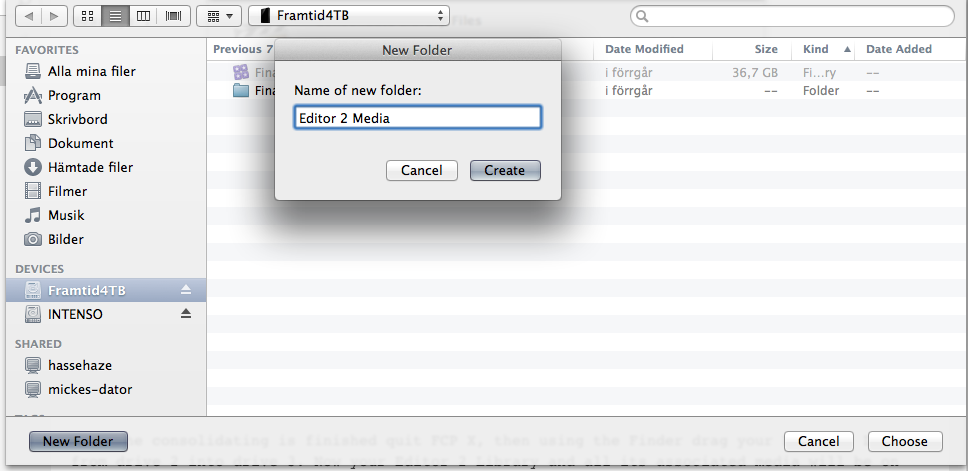
That is what I tried to do, but for some reason I still get that message, really weird since the files are definitely not on the 3rd drive.. I'm trying to consolidate from my 2nd disc "Intenso" to the 3rd "Framtid 4". I will restart my computer and see if it helps!
Please Log in to join the conversation.
- ronny courtens
-

- Offline
- Moderator
-

Less
More
- Posts: 4455
- Thank you received: 962
02 Aug 2014 08:55 #50870
by ronny courtens
Replied by ronny courtens on topic Huge problems copying projects to external hard drive
Good idea. Also empty your Trash bin.
- Ronny
- Ronny
Please Log in to join the conversation.
02 Aug 2014 13:45 #50887
by Hassler
Replied by Hassler on topic Huge problems copying projects to external hard drive
Hej!
I tried to restart my computer and empty the trash bin but unfortunately the problem is still there. Even if I create a new folder on drive nr 3 and try to consolidate the library from drive 2 to the empty folder it still says that there are no files to consolidate and that they already exist in the empty drive. Something must have gone very wrong in the process of transferring the files in the first place, although it is really weird that they are playable with out problem on drive 2!
I tried to restart my computer and empty the trash bin but unfortunately the problem is still there. Even if I create a new folder on drive nr 3 and try to consolidate the library from drive 2 to the empty folder it still says that there are no files to consolidate and that they already exist in the empty drive. Something must have gone very wrong in the process of transferring the files in the first place, although it is really weird that they are playable with out problem on drive 2!
Please Log in to join the conversation.
- ronny courtens
-
- Offline
- Moderator
-
Less
More
- Posts: 4455
- Thank you received: 962
02 Aug 2014 13:51 #50888
by ronny courtens
Replied by ronny courtens on topic Huge problems copying projects to external hard drive
Okay, this is what you can do:
Instead of consolidating the Library to drive 3, consolidate it to a new "Media" folder on drive 2.
If this works you can copy the Media folder from drive 2 to drive 3 using the Finder, then also copy the Library file to drive 3, disconnect drive 2 and see if you can open the Library and play the files. Maybe you will have to relink, but as everything is inside the same folder that will be easy.
- Ronny
Instead of consolidating the Library to drive 3, consolidate it to a new "Media" folder on drive 2.
If this works you can copy the Media folder from drive 2 to drive 3 using the Finder, then also copy the Library file to drive 3, disconnect drive 2 and see if you can open the Library and play the files. Maybe you will have to relink, but as everything is inside the same folder that will be easy.
- Ronny
Please Log in to join the conversation.
03 Aug 2014 11:49 #50904
by Hassler
Replied by Hassler on topic Huge problems copying projects to external hard drive
Hi!
Thank you, I did that and at least I'm now one step further to be able to edit the whole timeline! I now have all the material in two different libraries but on the same drive nr 3. I had to relink the files stored in the new folder "Media" to the project timeline (library 2, "Paula") but I could, as you said, do that quite quickly.
The only problem left is that I cannot copy the project/timelines from any of the two libraries to the other. When I do that the clips just turn red and there is not the possibility to relink them in the new library.
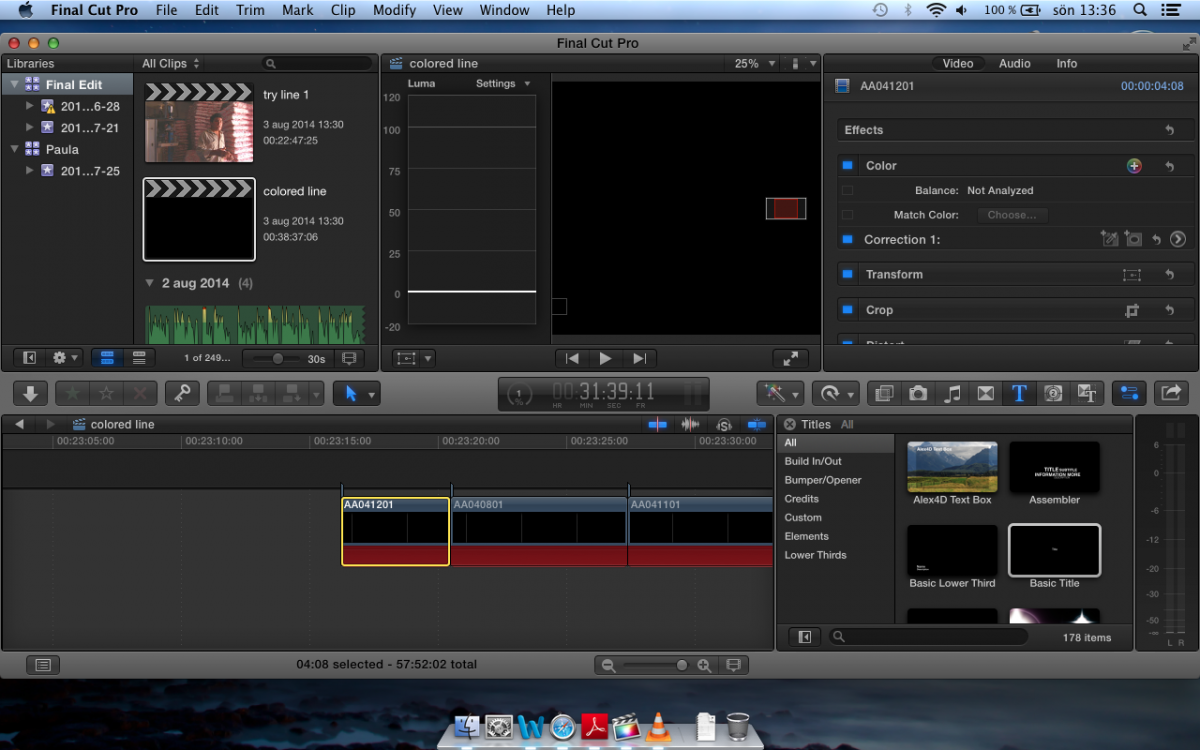
I have seen this before, and then we draged the whole library 1 on top of library 2 and we could relink the files. However, that took very long time and a lot of space on the hard drive, at least 1,5TB. I could do that now again, I think, but perhaps there is an easier way to fix it that I don't know about .
Thank you, I did that and at least I'm now one step further to be able to edit the whole timeline! I now have all the material in two different libraries but on the same drive nr 3. I had to relink the files stored in the new folder "Media" to the project timeline (library 2, "Paula") but I could, as you said, do that quite quickly.
The only problem left is that I cannot copy the project/timelines from any of the two libraries to the other. When I do that the clips just turn red and there is not the possibility to relink them in the new library.
I have seen this before, and then we draged the whole library 1 on top of library 2 and we could relink the files. However, that took very long time and a lot of space on the hard drive, at least 1,5TB. I could do that now again, I think, but perhaps there is an easier way to fix it that I don't know about
. Please Log in to join the conversation.
- ronny courtens
-
- Offline
- Moderator
-
Less
More
- Posts: 4455
- Thank you received: 962
03 Aug 2014 13:42 #50905
by ronny courtens
Replied by ronny courtens on topic Huge problems copying projects to external hard drive
The clips of your Paula Library are linked to the media inside the "Media" folder on drive 3.
Are you sure the clips in your Final Edit Library are also linked to an external folder on drive 3?
R-click a clip in the Final Edit Library and select "Reveal in Finder". This should bring you to the original media of that clip. Make sure all the media of the Final Edit Library are inside an external folder on drive 3 and not inside the Original Media folder of the Library. If not you will not be able to copy Projects between the two Libraries without also copying all the actual media.
- Ronny
Are you sure the clips in your Final Edit Library are also linked to an external folder on drive 3?
R-click a clip in the Final Edit Library and select "Reveal in Finder". This should bring you to the original media of that clip. Make sure all the media of the Final Edit Library are inside an external folder on drive 3 and not inside the Original Media folder of the Library. If not you will not be able to copy Projects between the two Libraries without also copying all the actual media.
- Ronny
Please Log in to join the conversation.
03 Aug 2014 14:04 #50906
by Hassler
Replied by Hassler on topic Huge problems copying projects to external hard drive
Aha! I think now we are on to something .
When I check the "Final Edit" library it looks fine, all but 3 clips are linked to an external folder: "Final Edit media" on drive 3. Those other three clips are linked to "Original media". It is probably because I added them from my computer after the transfer. I did place them in the folder "Final edit media" and imported them via fcp but perhaps this is not the correct way of doing it.
However, the files in the library "Paula" are NOT linked to "Media" but to "Original media", all of them. This is probably what is causing the problems...
Does this mean that the clips in the folder "Media" are still linked to the original files on drive 2?
.When I check the "Final Edit" library it looks fine, all but 3 clips are linked to an external folder: "Final Edit media" on drive 3. Those other three clips are linked to "Original media". It is probably because I added them from my computer after the transfer. I did place them in the folder "Final edit media" and imported them via fcp but perhaps this is not the correct way of doing it.
However, the files in the library "Paula" are NOT linked to "Media" but to "Original media", all of them. This is probably what is causing the problems...
Does this mean that the clips in the folder "Media" are still linked to the original files on drive 2?
Please Log in to join the conversation.
- ronny courtens
-
- Offline
- Moderator
-
Less
More
- Posts: 4455
- Thank you received: 962
04 Aug 2014 06:53 - 04 Aug 2014 07:07 #50928
by ronny courtens
Replied by ronny courtens on topic Huge problems copying projects to external hard drive
Okay, we are getting somewhere. Most of your media is still managed, that explains the issues.
- I think you have imported the 3 files into the Final Edit library with "copy to library" selected in your import options. That's why the 3 files have been copied to the original media folder. Solution:
1. Consolidate the "Final Edit" library to the "Final Edit Media" folder on drive 3 again to make sure you have no original media inside the Final Edit library anymore.
- When you have relinked the clips of the Paula library I guess you have left the "copy clips into library" option selected in the Relink window. That's why the files have been imported in the library. Solution:
2. Consolidate the "Paula" library to the "Media" folder on drive 3 to make sure you have no original media in the Paula library anymore.
3. Check to make sure that both libraries have correctly been consolidated to the external folders. There should not be any physical clips inside the Original Media folders anymore.
4. Drag the Event from the Paula library onto the Final Edit library. A window will appear saying media will be copied, blabla... Deselect Optimized and Render files and just press OK. As all your media are inside external folders no media will be copied at all, only symlinks. That is why it so important that all the media are inside external folders before you do this.
Now both your projects will be inside the Final Edit library and you should be able to join them.
- Ronny
- I think you have imported the 3 files into the Final Edit library with "copy to library" selected in your import options. That's why the 3 files have been copied to the original media folder. Solution:
1. Consolidate the "Final Edit" library to the "Final Edit Media" folder on drive 3 again to make sure you have no original media inside the Final Edit library anymore.
- When you have relinked the clips of the Paula library I guess you have left the "copy clips into library" option selected in the Relink window. That's why the files have been imported in the library. Solution:
2. Consolidate the "Paula" library to the "Media" folder on drive 3 to make sure you have no original media in the Paula library anymore.
3. Check to make sure that both libraries have correctly been consolidated to the external folders. There should not be any physical clips inside the Original Media folders anymore.
4. Drag the Event from the Paula library onto the Final Edit library. A window will appear saying media will be copied, blabla... Deselect Optimized and Render files and just press OK. As all your media are inside external folders no media will be copied at all, only symlinks. That is why it so important that all the media are inside external folders before you do this.
Now both your projects will be inside the Final Edit library and you should be able to join them.
- Ronny
Last edit: 04 Aug 2014 07:07 by ronny courtens.
Please Log in to join the conversation.
07 Aug 2014 11:22 #51060
by Hassler
Replied by Hassler on topic Huge problems copying projects to external hard drive
Hi Ronny!
Thank you for your continuous help, I think that soon I will be able to edit the whole timeline, however still some problems.
1. I have made sure that both libraries are consolidated in external folders (Media and Final edit Media).
2. When I drag the "Paula" event to the "Final edit library" the clips become missing. Should I relink them or will this cause some other trouble?
All the best!
Malin
Thank you for your continuous help, I think that soon I will be able to edit the whole timeline, however still some problems.
1. I have made sure that both libraries are consolidated in external folders (Media and Final edit Media).
2. When I drag the "Paula" event to the "Final edit library" the clips become missing. Should I relink them or will this cause some other trouble?
All the best!
Malin
Please Log in to join the conversation.
07 Aug 2014 12:56 #51062
by Hassler
Replied by Hassler on topic Huge problems copying projects to external hard drive
Another issue...
If I was to relink the files from the project in the "Paula" event once I have dragged it over to the "Final edit" library, it seems like it would take for ever and probably cause me the same problem again that I had before with a lack of space.
I tried on one clip just to see if it would work and it took the computer around 5 minutes/clip to relink it from "Media" to the copied project in the "Final Edit" library. Im guessing that relinking is not an option in this case.
A wierd thing I discovered was that if I copy parts of the project in the "Paula" event and paste them into the project timeline in "Final edit" it works, but it does not work if I copy/paste the whole timeline. This goes for all clips; even if they work fine if I paste them one by one they turn missing if I paste the whole timeline.
I could of course do this but it would mean that I have to edit everything again, hoping there is still another solution!
If I was to relink the files from the project in the "Paula" event once I have dragged it over to the "Final edit" library, it seems like it would take for ever and probably cause me the same problem again that I had before with a lack of space.
I tried on one clip just to see if it would work and it took the computer around 5 minutes/clip to relink it from "Media" to the copied project in the "Final Edit" library. Im guessing that relinking is not an option in this case.
A wierd thing I discovered was that if I copy parts of the project in the "Paula" event and paste them into the project timeline in "Final edit" it works, but it does not work if I copy/paste the whole timeline. This goes for all clips; even if they work fine if I paste them one by one they turn missing if I paste the whole timeline.
I could of course do this but it would mean that I have to edit everything again, hoping there is still another solution!
Please Log in to join the conversation.
07 Aug 2014 14:28 #51064
by Hassler
Replied by Hassler on topic Huge problems copying projects to external hard drive
And another question; could a solution be to re-do it and copy event nr 2 to the same library as event 1? In other words have everything in Final edit media?
Please Log in to join the conversation.
- ronny courtens
-
- Offline
- Moderator
-
Less
More
- Posts: 4455
- Thank you received: 962
08 Aug 2014 21:02 #51107
by ronny courtens
Replied by ronny courtens on topic Huge problems copying projects to external hard drive
Hej Malin,
Sorry for the late reply, I was in Denmark the past few days.
Considering what you are telling me I think it would indeed be a good idea to consolidate the media from event 2 to the Final Edit Media folder as well. This way all your media will be inside the same external folder and you shouldn't have any problems putting event 2 in Library 1. If this still does not work I would advise you to update to 10.1.2, which has far better media management options. Keep us updated on your progress.
- Ronny
Sorry for the late reply, I was in Denmark the past few days.
Considering what you are telling me I think it would indeed be a good idea to consolidate the media from event 2 to the Final Edit Media folder as well. This way all your media will be inside the same external folder and you shouldn't have any problems putting event 2 in Library 1. If this still does not work I would advise you to update to 10.1.2, which has far better media management options. Keep us updated on your progress.
- Ronny
Please Log in to join the conversation.
- Darren Roark
-

- Offline
- Platinum Member
-

08 Aug 2014 22:23 #51110
by Darren Roark
Replied by Darren Roark on topic Huge problems copying projects to external hard drive
Hi Ronny,
I have seen the red markers on many doc projects I have helped out on. All had to be reconnected. What is the Reject marker and what does it mean?
Thanks as always!
I have seen the red markers on many doc projects I have helped out on. All had to be reconnected. What is the Reject marker and what does it mean?
Thanks as always!
Please Log in to join the conversation.
09 Aug 2014 07:32 #51118
by Hassler
Replied by Hassler on topic Huge problems copying projects to external hard drive
Hi Ronny!
No worries at all, hope you enjoyed Scandinavia.
It worked! I now have the whole timeline on one drive and can finally start to edit the whole film!
I cannot thank you enough for your help, it would have been difficult to finish this project without it..
Once again, thank you so much!
Al the best,
Malin
No worries at all, hope you enjoyed Scandinavia
.It worked! I now have the whole timeline on one drive and can finally start to edit the whole film!
I cannot thank you enough for your help, it would have been difficult to finish this project without it..
Once again, thank you so much!
Al the best,
Malin
Please Log in to join the conversation.
- ronny courtens
-
- Offline
- Moderator
-
Less
More
- Posts: 4455
- Thank you received: 962
09 Aug 2014 08:08 #51119
by ronny courtens
Replied by ronny courtens on topic Huge problems copying projects to external hard drive
Hi Malin,
I always enjoy my visits to Scandinavia. I work with Metronome Production in Copenhagen, helping them establish best practices in their FCP X workflows for cutting major entertainment shows for Scandinavian television. It's a great company with highly professional people.
I am so glad everything has worked out fine for you and you can finally finish your production. I have taken some notes in the process which I will convey to Apple. There seems to be some fragility in the process of merging Libraries from different editors if the media have been consolidated to different folders. This has been an interesting experience.
Have a nice weekend!
- Ronny
I always enjoy my visits to Scandinavia. I work with Metronome Production in Copenhagen, helping them establish best practices in their FCP X workflows for cutting major entertainment shows for Scandinavian television. It's a great company with highly professional people.
I am so glad everything has worked out fine for you and you can finally finish your production. I have taken some notes in the process which I will convey to Apple. There seems to be some fragility in the process of merging Libraries from different editors if the media have been consolidated to different folders. This has been an interesting experience.
Have a nice weekend!
- Ronny
Please Log in to join the conversation.
- ronny courtens
-
- Offline
- Moderator
-
Less
More
- Posts: 4455
- Thank you received: 962
09 Aug 2014 08:18 #51120
by ronny courtens
Replied by ronny courtens on topic Huge problems copying projects to external hard drive
Hey Darren,
Yes I have seen these bars before as well and there is no documentation on what they really mean. If media gets offline you would expect a Media Offline warning on the clips, then at least you know you need to relink. I have posted feedback asking clarification about this.
I mentioned Reject marking when Malin posted this screenshot:
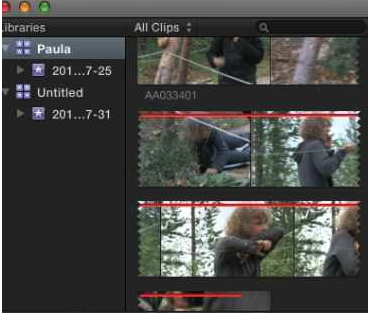
I thought the red line was just a Reject indicator, just like you get a green line on top of a clip when you have marked the clip or part of it as a Favorite.
- Ronny
Yes I have seen these bars before as well and there is no documentation on what they really mean. If media gets offline you would expect a Media Offline warning on the clips, then at least you know you need to relink. I have posted feedback asking clarification about this.
I mentioned Reject marking when Malin posted this screenshot:
I thought the red line was just a Reject indicator, just like you get a green line on top of a clip when you have marked the clip or part of it as a Favorite.
- Ronny
Please Log in to join the conversation.
- MandyMckinney
-
- Offline
- New Member
-

Less
More
- Posts: 1
- Thank you received: 0
10 Mar 2015 05:03 - 16 May 2015 08:24 #61110
by MandyMckinney
Replied by MandyMckinney on topic Huge problems copying projects to external hard drive
Thanks for the solution. I have some problem like this. But I just bought a
new external drive 2015
last week.
Last edit: 16 May 2015 08:24 by MandyMckinney.
Please Log in to join the conversation.

10 Mar 2015 11:25 #61117
by BenB
Replied by BenB on topic Huge problems copying projects to external hard drive
Otherworld Computing, G-Tech, LaCie, Promise, there's lots, everyone has their favorites.
Please Log in to join the conversation.
