


- Posts: 18
- Thank you received: 0
3 Post Moderation Rule for New Boarders (25 Jan 2021)
New boarders will have their posts moderated - Don't worry if you cannot see your post immediately.
Huge problems copying projects to external hard drive
29 Jul 2014 07:57 #50646
by Hassler
Huge problems copying projects to external hard drive was created by Hassler
Hej! I would really appreciate it if someone with better skills in fcp could guide me through this.
As the headline says, I'm having huge troubles copying projects to an external hard drive and continue working with them. I'm using fcp 10.1.1. A friend of mine and I have been working on two different parts of a movie on two different computers and with two different hard drives. Now we wish to put these parts together to create the whole movie. Therefore we bought a new (third) hard drive to transfer the projects to.
Here is our workflow:
1. We first consolidated the projects on to our respective hard drives to make sure that all external files where linked to the particular project that we wanted to move.
2. Then we copied all the original media files from her and my hard drive into the new, (3) hard drive.
3. Then we went in to fcp, chose "new library" and placed it into the new (3) hard drive.
4. From there we copied the project over to the new library on the new hard drive. We did this with both projects, but it was not possible to place both of them in the same library that we just had created, so we had to create a new one. We now had 2 libraries, both with different projects, and all the original media on this 3rd hard drive. This is a drive of 3TB.
Now to the problem. When we open final cut we can see both projects in the different libraries. However, it is not possible to move any of the projects to the other, in other words we cannot put the film parts together.
When we try, the files turn red and there is not even the option to relink the files. If we use the cursor and move one event over to the other (copy I guess) the files at least turn "missing" and we could start to relink them, which worked but took forever. However, we only got half way when the program said that there was no longer any space on our new 3TB drive! There where also several files that the program did not manage to find even though they where placed on to the new drive.
We are completely lost in this and have no idea how to move forward. Buy a 5TB drive?
There must be some easier way to go about this right? Im sure we have done some mistakes but I can't seem to find a clear description on how to copy projects into an external hard drive in 10.1.1 and continue working with the files?
Would be awesome to get some guidance in this! Thanx in advance
As the headline says, I'm having huge troubles copying projects to an external hard drive and continue working with them. I'm using fcp 10.1.1. A friend of mine and I have been working on two different parts of a movie on two different computers and with two different hard drives. Now we wish to put these parts together to create the whole movie. Therefore we bought a new (third) hard drive to transfer the projects to.
Here is our workflow:
1. We first consolidated the projects on to our respective hard drives to make sure that all external files where linked to the particular project that we wanted to move.
2. Then we copied all the original media files from her and my hard drive into the new, (3) hard drive.
3. Then we went in to fcp, chose "new library" and placed it into the new (3) hard drive.
4. From there we copied the project over to the new library on the new hard drive. We did this with both projects, but it was not possible to place both of them in the same library that we just had created, so we had to create a new one. We now had 2 libraries, both with different projects, and all the original media on this 3rd hard drive. This is a drive of 3TB.
Now to the problem. When we open final cut we can see both projects in the different libraries. However, it is not possible to move any of the projects to the other, in other words we cannot put the film parts together.
When we try, the files turn red and there is not even the option to relink the files. If we use the cursor and move one event over to the other (copy I guess) the files at least turn "missing" and we could start to relink them, which worked but took forever. However, we only got half way when the program said that there was no longer any space on our new 3TB drive! There where also several files that the program did not manage to find even though they where placed on to the new drive.
We are completely lost in this and have no idea how to move forward. Buy a 5TB drive?
There must be some easier way to go about this right? Im sure we have done some mistakes but I can't seem to find a clear description on how to copy projects into an external hard drive in 10.1.1 and continue working with the files?
Would be awesome to get some guidance in this! Thanx in advance
Please Log in to join the conversation.
- ronny courtens
-

- Offline
- Moderator
-

Less
More
- Posts: 4455
- Thank you received: 962
29 Jul 2014 12:14 - 29 Jul 2014 12:23 #50650
by ronny courtens
Replied by ronny courtens on topic Huge problems copying projects to external hard drive
Hej Malin, and welcome to the forum.
The key for collaborating on a production between two or more editors is that every editor has exactly the same media, even if one editor uses entirely different clips from the media than the other. This seems not to be the case here. Furthermore I suspect you have been copying files using the Finder instead of from within FCP X, which is not a good thing to do. But no sweat, I think we can get this sorted out starting fresh. This would go much faster in 10.1.2 but I guess you don't want to update in the middle of a product, which is understandable.
So here is what I would do:
1. I suppose you still have the two drives from which you have originally edited? If so, first check if everything is still working as it should: connect both drives to your computer, launch FCP X and open both your Libraries. See if all the media are there and if both your Projects are intact. If there are problems: post back here and tell us what does not work. If there are no problems:
2. Connect your empty third drive to your system. In FCP X select one or more events in the first Library, then choose File > Copy Event to Library > New Library. Make sure the new Library gets stored onto your third drive and call it "Final Edit". This will copy the Event(s) and their Project(s) from the first original Library into the Final Edit Library on your third drive.
3. In FCP X select one or more events in the second Library, then choose File > Copy Event to Library > Final Edit. This will also copy the Event(s) and their Project(s) from the second original Library into the Final Edit Library on your third drive.
4. Close the original Libraries so you only have the Final Edit Library open. Check if all the media is available and if the Projects play well. If everything is okay, select the Final Edit Library in FCP X and use the Consolidate command to make sure all your media is consolidated onto the third drive. It would be best to NOT consolidate into the Library itself, but into a new folder (call it Final Edit Media). Here's a little video on how to do this in 10.1:
Only when all this is done can you remove the original two drives from your system. Now you should have all your media and projects in the Final Edit Library playing only from the third drive and you can merge the two Projects: create a new Project (Final Edit) and copy/paste the contents of the two parts into the final edit.
If during the process anything goes wrong, post back here so we can assist you. Whatever you do: do NOT delete anything from the original drives until everything works perfectly on the new drive.
- Ronny
The key for collaborating on a production between two or more editors is that every editor has exactly the same media, even if one editor uses entirely different clips from the media than the other. This seems not to be the case here. Furthermore I suspect you have been copying files using the Finder instead of from within FCP X, which is not a good thing to do. But no sweat, I think we can get this sorted out starting fresh. This would go much faster in 10.1.2 but I guess you don't want to update in the middle of a product, which is understandable.
So here is what I would do:
1. I suppose you still have the two drives from which you have originally edited? If so, first check if everything is still working as it should: connect both drives to your computer, launch FCP X and open both your Libraries. See if all the media are there and if both your Projects are intact. If there are problems: post back here and tell us what does not work. If there are no problems:
2. Connect your empty third drive to your system. In FCP X select one or more events in the first Library, then choose File > Copy Event to Library > New Library. Make sure the new Library gets stored onto your third drive and call it "Final Edit". This will copy the Event(s) and their Project(s) from the first original Library into the Final Edit Library on your third drive.
3. In FCP X select one or more events in the second Library, then choose File > Copy Event to Library > Final Edit. This will also copy the Event(s) and their Project(s) from the second original Library into the Final Edit Library on your third drive.
4. Close the original Libraries so you only have the Final Edit Library open. Check if all the media is available and if the Projects play well. If everything is okay, select the Final Edit Library in FCP X and use the Consolidate command to make sure all your media is consolidated onto the third drive. It would be best to NOT consolidate into the Library itself, but into a new folder (call it Final Edit Media). Here's a little video on how to do this in 10.1:
Only when all this is done can you remove the original two drives from your system. Now you should have all your media and projects in the Final Edit Library playing only from the third drive and you can merge the two Projects: create a new Project (Final Edit) and copy/paste the contents of the two parts into the final edit.
If during the process anything goes wrong, post back here so we can assist you. Whatever you do: do NOT delete anything from the original drives until everything works perfectly on the new drive.
- Ronny
Last edit: 29 Jul 2014 12:23 by ronny courtens.
Please Log in to join the conversation.
29 Jul 2014 18:16 #50660
by Hassler
Replied by Hassler on topic Huge problems copying projects to external hard drive
Hej Ronny! Thank you so much for your quick answer and for the welcoming! I will follow your advice and see if I can make it work .
Cheers!
Malin
.Cheers!
Malin
Please Log in to join the conversation.
29 Jul 2014 18:17 #50661
by Hassler
Replied by Hassler on topic Huge problems copying projects to external hard drive
Oh, another question just came up! I only have 2 usb ports on my computer, can I do the transfer stepwise, one external drive at a time?
Please Log in to join the conversation.
- ronny courtens
-
- Offline
- Moderator
-
Less
More
- Posts: 4455
- Thank you received: 962
29 Jul 2014 18:39 #50662
by ronny courtens
Replied by ronny courtens on topic Huge problems copying projects to external hard drive
Yes you can do this. First connect the original drives to check if everything is okay, then disconnect one of them and connect the empty drive.
When the event(s) from the first drive have been copied over into the new Library on the empty drive disconnect the first drive and connect the second drive, then copy the event(s) from the second drive into the new Library as well.
I do hope you are using USB3 drives or it could take a long time to copy everything over, depending on the amount of footage you have on both drives.
- Ronny
When the event(s) from the first drive have been copied over into the new Library on the empty drive disconnect the first drive and connect the second drive, then copy the event(s) from the second drive into the new Library as well.
I do hope you are using USB3 drives or it could take a long time to copy everything over, depending on the amount of footage you have on both drives.
- Ronny
Please Log in to join the conversation.
31 Jul 2014 17:42 #50775
by Hassler
Replied by Hassler on topic Huge problems copying projects to external hard drive
Hi Ronny! I have now started to do the transfers, but I encountered one issue in the process. Now I have copied the event with projects from the first hard drive (1) to the empty one (3). When I detach it to connect the second hard drive (2), the files from hard drive 1 in the new event "Final edit" are missing. Should I consolidate them on the new drive before copying the events from disc nr 2? I attach a print screen on how it looks now. Thank you so much for helping out!

Please Log in to join the conversation.
31 Jul 2014 17:54 #50777
by Hassler
Replied by Hassler on topic Huge problems copying projects to external hard drive
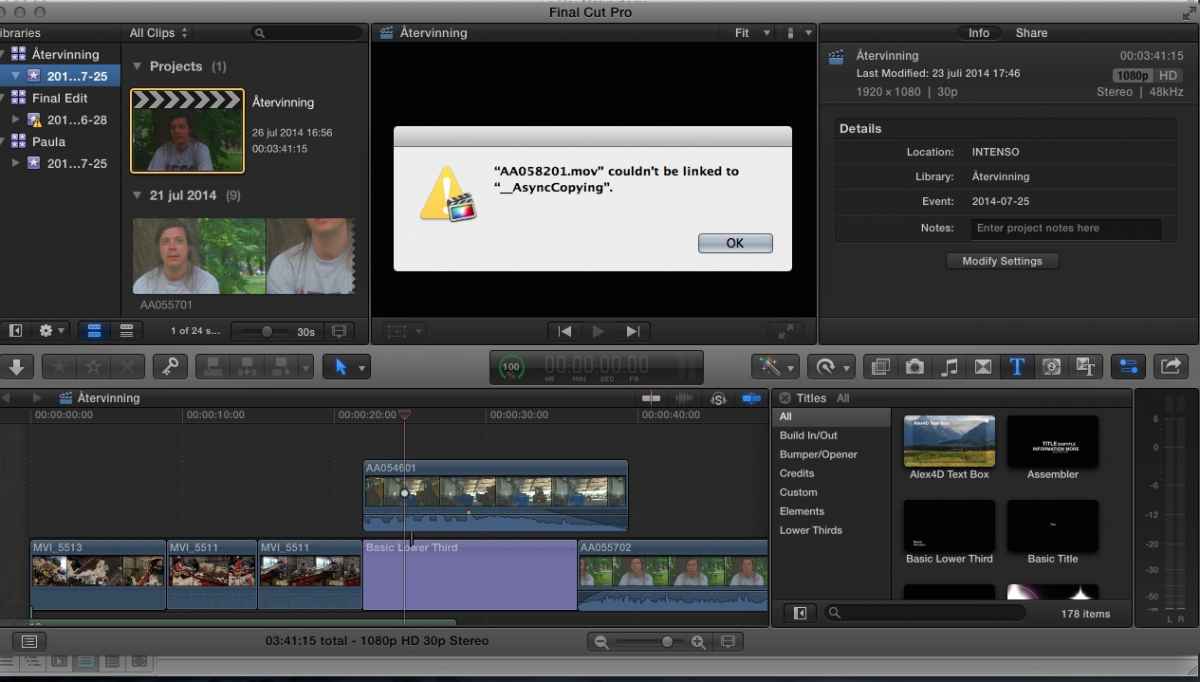
I also discovered another issue.. when I try to copy another event from drive 2, I get a message saying that the files cannot be linked and therefore not copied (please see the print screen attached). My guess is that it might be so that the files are not consolidated on the original drive, but since it is full I cannot consolidate them there..
Please Log in to join the conversation.
- ronny courtens
-
- Offline
- Moderator
-
Less
More
- Posts: 4455
- Thank you received: 962
31 Jul 2014 18:27 - 31 Jul 2014 18:40 #50780
by ronny courtens
Replied by ronny courtens on topic Huge problems copying projects to external hard drive
Hej Malin,
Yes, you should consolidate the files from drive 1 to the third drive before disconnecting drive 1. Just make sure you consolidate the files to an external folder on drive 3, and not into the Library.
Then you can check if everything works fine for the project and media with the first drive disconnected before you connect the second drive.
Do this first, then post back so we can tackle that second problem once the files from drive 1 are OK..
- Ronny
Yes, you should consolidate the files from drive 1 to the third drive before disconnecting drive 1. Just make sure you consolidate the files to an external folder on drive 3, and not into the Library.
Then you can check if everything works fine for the project and media with the first drive disconnected before you connect the second drive.
Do this first, then post back so we can tackle that second problem once the files from drive 1 are OK..
- Ronny
Last edit: 31 Jul 2014 18:40 by ronny courtens.
Please Log in to join the conversation.
01 Aug 2014 09:20 #50804
by Hassler
Replied by Hassler on topic Huge problems copying projects to external hard drive
Hej again Ronny!
I followed your steps for transferring the events and it worked beautifully for the first event, so one large problem solved! At least I now have 2/3rds of the project on drive nr 3 so thank you so much for that.
With drive nr 2 it doesn't want to work as smoothly unfortunately. I consolidate the files in the original library on disk 2. I get a message saying that the files are already there. So I go on, connect drive nr 3 and choose "copy event to library", choosing "final edit" on the 3rd drive. Then I just get a message saying that file x cannot be copied. I tried to delete that particular file but it didn't help and fcp just keeps saying the same for any of the other files in the event (please see attached image).
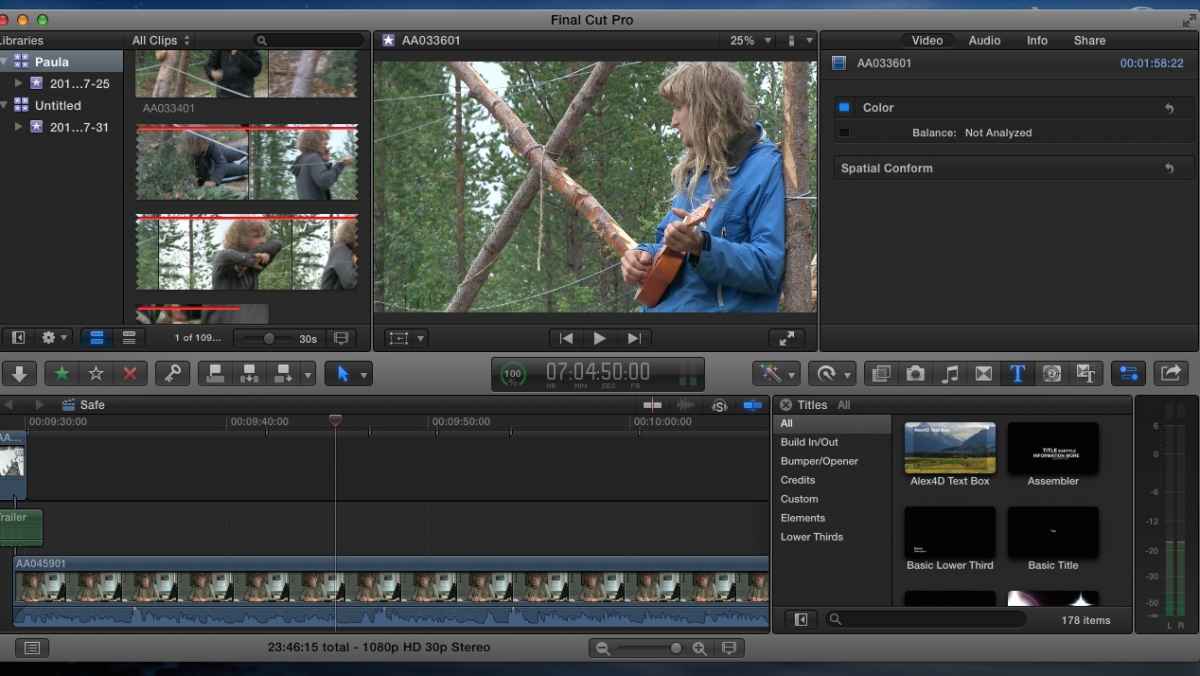
I did discover that two of the clips in the library had a red stripe on them (I'm attaching an image) but they play as usual without the stripe on the timeline and I don't get any missing file warnings.
I guess something has gone wrong in the process somewhere when I have been working with the files.
All the best,
Malin
I followed your steps for transferring the events and it worked beautifully for the first event, so one large problem solved! At least I now have 2/3rds of the project on drive nr 3 so thank you so much for that
.With drive nr 2 it doesn't want to work as smoothly unfortunately. I consolidate the files in the original library on disk 2. I get a message saying that the files are already there. So I go on, connect drive nr 3 and choose "copy event to library", choosing "final edit" on the 3rd drive. Then I just get a message saying that file x cannot be copied. I tried to delete that particular file but it didn't help and fcp just keeps saying the same for any of the other files in the event (please see attached image).
I did discover that two of the clips in the library had a red stripe on them (I'm attaching an image) but they play as usual without the stripe on the timeline and I don't get any missing file warnings.
I guess something has gone wrong in the process somewhere when I have been working with the files.
All the best,
Malin
Please Log in to join the conversation.
- ronny courtens
-
- Offline
- Moderator
-
Less
More
- Posts: 4455
- Thank you received: 962
01 Aug 2014 09:52 #50811
by ronny courtens
Replied by ronny courtens on topic Huge problems copying projects to external hard drive
Hej Malin,
I don't see the screenshot. Make sure the attachment is not bigger than 350 Kb. Then click Add File to select the still you wish to attach, finally click Insert to add the still to your post.
- Ronny
I don't see the screenshot. Make sure the attachment is not bigger than 350 Kb. Then click Add File to select the still you wish to attach, finally click Insert to add the still to your post.
- Ronny
Please Log in to join the conversation.
01 Aug 2014 10:19 #50812
by Hassler
Replied by Hassler on topic Huge problems copying projects to external hard drive
Forgot to press insert! Here the come
Please Log in to join the conversation.
01 Aug 2014 10:23 #50813
by Hassler
Replied by Hassler on topic Huge problems copying projects to external hard drive
Forgot to press insert! Here the come
[
[
Please Log in to join the conversation.
- ronny courtens
-
- Offline
- Moderator
-
Less
More
- Posts: 4455
- Thank you received: 962
01 Aug 2014 10:23 - 01 Aug 2014 10:24 #50814
by ronny courtens
Replied by ronny courtens on topic Huge problems copying projects to external hard drive
Does not seem to work. When you klick Insert you should see a link appear under your text. Then press Submit and check your submitted post to see if the attachment has been added.
EDIT: I can see them now
- Ronny
EDIT: I can see them now
- Ronny
Last edit: 01 Aug 2014 10:24 by ronny courtens.
Please Log in to join the conversation.
- ronny courtens
-
- Offline
- Moderator
-
Less
More
- Posts: 4455
- Thank you received: 962
01 Aug 2014 10:26 #50816
by ronny courtens
Replied by ronny courtens on topic Huge problems copying projects to external hard drive
Okay. Don't worry about the red line, that's just a Reject marker line. I will be back soon with further comments, have to finish something right now.
- Ronny
- Ronny
Please Log in to join the conversation.
- ronny courtens
-
- Offline
- Moderator
-
Less
More
- Posts: 4455
- Thank you received: 962
01 Aug 2014 11:40 - 01 Aug 2014 11:42 #50822
by ronny courtens
Replied by ronny courtens on topic Huge problems copying projects to external hard drive
Hej Malin, we are back
Okay, we have had to deal with the _AsyncCopying problem before, and this is not an easy one. Let me explain.
When you copy media between Libraries or Events FCP X first puts links to the original media in an _AsyncCopying folder in your destination Library, then it starts replacing the links with the actual media. This is to prevent data loss in case of a connection failure during the copying or moving process.
Now why does FCP X not allow files from your drive 2 to be added to the _AsyncCopy folder when you want to copy them onto drive 3? Great question, and difficult to answer without seeing the actual media.
So here's a first suggestion:
Quit FCP X and shut down your computer. Disconnect any external drives.
Power up the computer again without any drives connected, then shut down the computer again. This should flush any existing _AsyncCopy folders in the new Library.
Connect drive 2 and 3 to your computer, power it up and launch FCP X.
Now try copying the Event from drive 2 to the new Library on drive 3 again.
If this does not work, post back.
- Ronny
Okay, we have had to deal with the _AsyncCopying problem before, and this is not an easy one. Let me explain.
When you copy media between Libraries or Events FCP X first puts links to the original media in an _AsyncCopying folder in your destination Library, then it starts replacing the links with the actual media. This is to prevent data loss in case of a connection failure during the copying or moving process.
Now why does FCP X not allow files from your drive 2 to be added to the _AsyncCopy folder when you want to copy them onto drive 3? Great question, and difficult to answer without seeing the actual media.
So here's a first suggestion:
Quit FCP X and shut down your computer. Disconnect any external drives.
Power up the computer again without any drives connected, then shut down the computer again. This should flush any existing _AsyncCopy folders in the new Library.
Connect drive 2 and 3 to your computer, power it up and launch FCP X.
Now try copying the Event from drive 2 to the new Library on drive 3 again.
If this does not work, post back.
- Ronny
Last edit: 01 Aug 2014 11:42 by ronny courtens.
Please Log in to join the conversation.
- ronny courtens
-
- Offline
- Moderator
-
Less
More
- Posts: 4455
- Thank you received: 962
01 Aug 2014 12:26 #50823
by ronny courtens
Replied by ronny courtens on topic Huge problems copying projects to external hard drive
Also you should check how much space you have left on drive 3 now that all media from drive 1 have been copied over to it. If you don't have enough space left on drive 3 to accommodate for the media of drive 2 you also can get this message.
- Ronny
- Ronny
Please Log in to join the conversation.
01 Aug 2014 13:51 #50832
by Hassler
Replied by Hassler on topic Huge problems copying projects to external hard drive
Hi!
Aha, at least good to hear that you have seen this before and to get an explanation.
Unfortunately it did not work to shut down the computer and restart it, and I have 3,5TB left on drive 3 so should not be a problem of space at least. What I'm guessing is that something went wrong when we transfered the material onto drive 2 from my friends computer. She was editing on her mac and had to transfer the event/project to external hard drive 2 in order for me to put the parts together. We live in different cities and since I had all the material on drive 2 I though we were good to go, but perhaps we should meet up again and try to transfer the Event directly from her computer to the drive nr 3?
I really appreciate your help, wouldn't have solved this on my own!
Aha, at least good to hear that you have seen this before and to get an explanation
.Unfortunately it did not work to shut down the computer and restart it, and I have 3,5TB left on drive 3 so should not be a problem of space at least. What I'm guessing is that something went wrong when we transfered the material onto drive 2 from my friends computer. She was editing on her mac and had to transfer the event/project to external hard drive 2 in order for me to put the parts together. We live in different cities and since I had all the material on drive 2 I though we were good to go, but perhaps we should meet up again and try to transfer the Event directly from her computer to the drive nr 3?
I really appreciate your help, wouldn't have solved this on my own!
Please Log in to join the conversation.
- ronny courtens
-
- Offline
- Moderator
-
Less
More
- Posts: 4455
- Thank you received: 962
01 Aug 2014 16:40 - 01 Aug 2014 16:42 #50845
by ronny courtens
Replied by ronny courtens on topic Huge problems copying projects to external hard drive
I think it would indeed be a good last resort to re-consolidate the Library directly to drive 3 from her computer. But if you can open her Library from drive 2 on your computer, everything plays fine and you see no missing media, there should be no problem.
Can you try a last thing?
Connect drive 2 and drive 3 to your computer and open both the Library from drive 2 and the "Final Edit" Library in FCP X. Does everything play normally? Can you open and play media and projects from the two Libraries? If so:
1. Select the drive 2 Library and consolidate the Library to a new folder on drive 3. Do not consolidate to the same folder as the Final Edit Library folder, create a new one. When the Library is consolidated: close FCP X.
2. Move the Library file from drive 2 to drive 3 via Finder, then shut down the computer and disconnect drive 2.
3. Start the computer, launch FCP X and open the "Drive 2" Library and the "Final Edit" Library, both are ow on drive 3.
4. Check again if media and projects from both Libraries play well. If everything is okay:
5. In the FCP X browser click the Event of the "Drive 2" Library and drag the Event onto the "Final Edit " Library. You will see a green + sign when you drag. Release the mouse and you should get a message asking you if you want to copy over Optimized and Proxy files. Deselect both options, then press OK. Your Drive 2 Event will now be copied over to your Final Edit Library and your Final Edit Library now should have your Event and your Project as well as the Event and the Project from your friend.
Does that work? If so you can now join both Projects into one:
I am assuming here that your Project is part 1 and your friend's Project is part 2 of the final edit.
- Duplicate your Project (to protect it) and name the duplicate "Final Edit".
- Open the Project of your friend, press CMD+ A and CMD+C to copy the content of this Project.
- Open the "Final Edit" Project, go to the end of the timeline and press CMD+V to paste the clips of your fiend's Project at the end.
I hope this will work. If anything fails please report back to and tell us at what point it went wrong, then maybe we can better see what could be causing all this.
- Ronny
Can you try a last thing?
Connect drive 2 and drive 3 to your computer and open both the Library from drive 2 and the "Final Edit" Library in FCP X. Does everything play normally? Can you open and play media and projects from the two Libraries? If so:
1. Select the drive 2 Library and consolidate the Library to a new folder on drive 3. Do not consolidate to the same folder as the Final Edit Library folder, create a new one. When the Library is consolidated: close FCP X.
2. Move the Library file from drive 2 to drive 3 via Finder, then shut down the computer and disconnect drive 2.
3. Start the computer, launch FCP X and open the "Drive 2" Library and the "Final Edit" Library, both are ow on drive 3.
4. Check again if media and projects from both Libraries play well. If everything is okay:
5. In the FCP X browser click the Event of the "Drive 2" Library and drag the Event onto the "Final Edit " Library. You will see a green + sign when you drag. Release the mouse and you should get a message asking you if you want to copy over Optimized and Proxy files. Deselect both options, then press OK. Your Drive 2 Event will now be copied over to your Final Edit Library and your Final Edit Library now should have your Event and your Project as well as the Event and the Project from your friend.
Does that work? If so you can now join both Projects into one:
I am assuming here that your Project is part 1 and your friend's Project is part 2 of the final edit.
- Duplicate your Project (to protect it) and name the duplicate "Final Edit".
- Open the Project of your friend, press CMD+ A and CMD+C to copy the content of this Project.
- Open the "Final Edit" Project, go to the end of the timeline and press CMD+V to paste the clips of your fiend's Project at the end.
I hope this will work. If anything fails please report back to and tell us at what point it went wrong, then maybe we can better see what could be causing all this.
- Ronny
Last edit: 01 Aug 2014 16:42 by ronny courtens.
Please Log in to join the conversation.
02 Aug 2014 07:14 #50866
by Hassler
Replied by Hassler on topic Huge problems copying projects to external hard drive
Hi! Unfortunately there seems to be some other error. I can't consolidate the files from drive 2 to another folder on drive 3. When I try I just get the message: "There are no files to consolidate. All the files already exist in the selected location". But there is nothing on the 3rd drive except the library from drive 1...
Please Log in to join the conversation.
- ronny courtens
-
- Offline
- Moderator
-
Less
More
- Posts: 4455
- Thank you received: 962
02 Aug 2014 07:43 #50867
by ronny courtens
Replied by ronny courtens on topic Huge problems copying projects to external hard drive
Hi Malin,
No problem, we will sort this out. You are running FCP X 10.1.1, right?
Select the Library, then go to File > Consolidate Library Files.
Now you should see a window asking you to where you want to consolidate your Library media. By default it points to the Library you have selected:
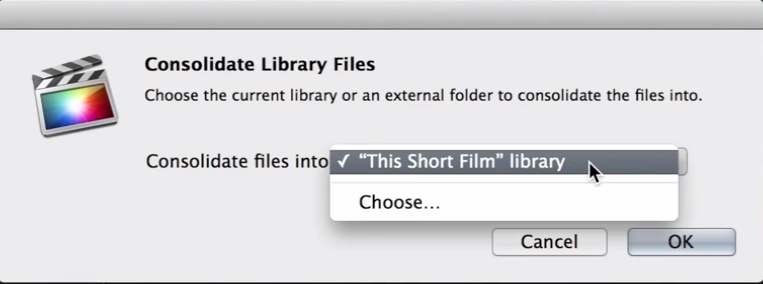
But that's not what you want. You want the media to be consolidated onto your third drive and not inside your Library. So in the window you click on "Choose...". This will open a Finder window. In the Finder window go to your third drive, create a new Folder on that drive and name the folder "Editor 2 Media". Then click OK.
Now FCP X will start copying over all the media files for the Editor 2 Library from your drive 2 into the "Editor 2 Media" folder on your third drive. Wait until this is done.
When the consolidating is finished quit FCP X, then using the Finder drag your Editor 2 Library from drive 2 into drive 3. Now your Editor 2 Library and all its associated media will be on drive 3.
Then eject drive 2 and disconnect it from your computer. Now you have everything you need on drive 3 and you can continue the process of joining the Projects, starting from point 4 in my previous directions.
If anything goes wrong anywhere, just post back immediately and I will guide you through this. I'm at my computer the whole day.
- Ronny
No problem, we will sort this out. You are running FCP X 10.1.1, right?
Select the Library, then go to File > Consolidate Library Files.
Now you should see a window asking you to where you want to consolidate your Library media. By default it points to the Library you have selected:
But that's not what you want. You want the media to be consolidated onto your third drive and not inside your Library. So in the window you click on "Choose...". This will open a Finder window. In the Finder window go to your third drive, create a new Folder on that drive and name the folder "Editor 2 Media". Then click OK.
Now FCP X will start copying over all the media files for the Editor 2 Library from your drive 2 into the "Editor 2 Media" folder on your third drive. Wait until this is done.
When the consolidating is finished quit FCP X, then using the Finder drag your Editor 2 Library from drive 2 into drive 3. Now your Editor 2 Library and all its associated media will be on drive 3.
Then eject drive 2 and disconnect it from your computer. Now you have everything you need on drive 3 and you can continue the process of joining the Projects, starting from point 4 in my previous directions.
If anything goes wrong anywhere, just post back immediately and I will guide you through this. I'm at my computer the whole day.
- Ronny
Please Log in to join the conversation.
