


- Posts: 479
- Thank you received: 5
3 Post Moderation Rule for New Boarders (25 Jan 2021)
New boarders will have their posts moderated - Don't worry if you cannot see your post immediately.
labeling keyword clips
22 Jul 2014 15:34 #50317
by parkerhqj
labeling keyword clips was created by parkerhqj
I am logging b-roll from a shoot and I'm trying to label individual clips in the browser after I've put the clips in keyword collections. What happens when I try that is that whatever I label individual clips, it changes it for all clips in that collection - and even in other collections. Presumably, it is renaming the entire clip in the browser - it's a long clip and spanned two keyword collections. Is there no way around this? Not sure if I'm making myself clear. thx
Please Log in to join the conversation.
- Tom Wolsky
-

- Offline
- Moderator
-

22 Jul 2014 15:54 #50318
by Tom Wolsky
Replied by Tom Wolsky on topic labeling keyword clips
Clip names are shared throughout the browser. Use notes or favorites. Favorites can be renamed.
Please Log in to join the conversation.
22 Jul 2014 18:22 #50322
by parkerhqj
Replied by parkerhqj on topic labeling keyword clips
Unfortunately, notes in the browser can only be applied to the entire clip, not individual ranges. A lot of my longer clips will have multiple selects from each one. I've used favorites in the past and renamed them, but it adds steps to the process and you can only see them in list view. And even then you've got to open the clips to see the favorites. Just enough of a hassle to deter lazy me. I think I'll just put the individual ranges into keyword collections and do without the labels. I can still see the thumbnail which is usually pretty helpful.
Please Log in to join the conversation.
22 Jul 2014 18:29 #50323
by parkerhqj
Replied by parkerhqj on topic labeling keyword clips
What about key wording each clip and then arranging them with smart collections using keywords as search criteria? So art class is the smart collection with each keyword beginning with ac and then a modifying word - so ac paint1 is followed by ac paint2, etc. I don't know - maybe that's even more work. I'll play around with it.
Please Log in to join the conversation.
- Tom Wolsky
-
- Offline
- Moderator
-
22 Jul 2014 18:56 #50324
by Tom Wolsky
Replied by Tom Wolsky on topic labeling keyword clips
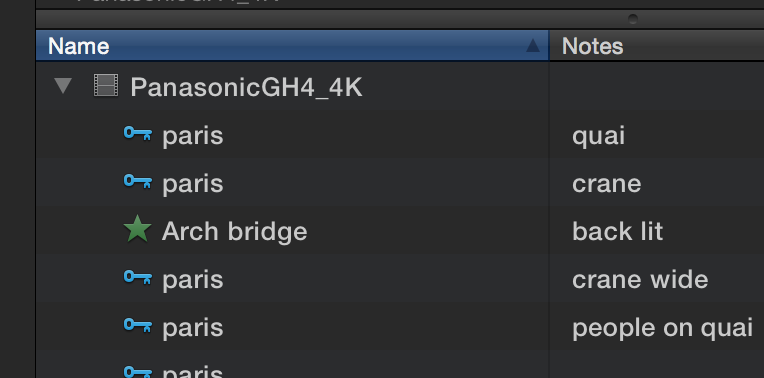
What version are you using? Notes on favs and keywords are independent.
Please Log in to join the conversation.
22 Jul 2014 19:10 #50325
by parkerhqj
Replied by parkerhqj on topic labeling keyword clips
10.1.2.
I'm not sure what you're saying. Independent of each other? I just wanted to be able to label my selected ranges within a clip - in the browser - and as far as I can tell, the only way to do that is to use Favorites. I'll have to look into Notes more thoroughly. thx
I'm not sure what you're saying. Independent of each other? I just wanted to be able to label my selected ranges within a clip - in the browser - and as far as I can tell, the only way to do that is to use Favorites. I'll have to look into Notes more thoroughly. thx
Please Log in to join the conversation.
- Tom Wolsky
-
- Offline
- Moderator
-
22 Jul 2014 19:27 #50327
by Tom Wolsky
Replied by Tom Wolsky on topic labeling keyword clips
Like this
Please Log in to join the conversation.
22 Jul 2014 19:32 #50329
by parkerhqj
Replied by parkerhqj on topic labeling keyword clips
Oh, now I see what you're saying. Then you can filter using the notes. Nice. Thanks!
Please Log in to join the conversation.
22 Jul 2014 21:00 #50333
by tpayton
Replied by tpayton on topic labeling keyword clips
If you are a glutten for punishment you can check out my ridiculously long look at dealing with portions of clips in my "Subclip Love" pseudo tutorial which covers a lot of these issues:
www.youtube.com/playlist?list=PLKFIVTAxh...5NmEIy3bkOiwBbAVVHUZ
The one on keywording might be especially helpful, but you have to watch it from the beginning or you break the chain.
www.youtube.com/playlist?list=PLKFIVTAxh...5NmEIy3bkOiwBbAVVHUZ
The one on keywording might be especially helpful, but you have to watch it from the beginning or you break the chain.
Please Log in to join the conversation.
22 Jul 2014 21:05 #50334
by parkerhqj
Replied by parkerhqj on topic labeling keyword clips
To show how pathetic my life is, I'm looking forward to this! Thanks you for putting the time into doing it. I'm sure it'll be hugely helpful. I'll let you know how it works for me. thx
Please Log in to join the conversation.
22 Jul 2014 21:17 #50335
by tpayton
Replied by tpayton on topic labeling keyword clips
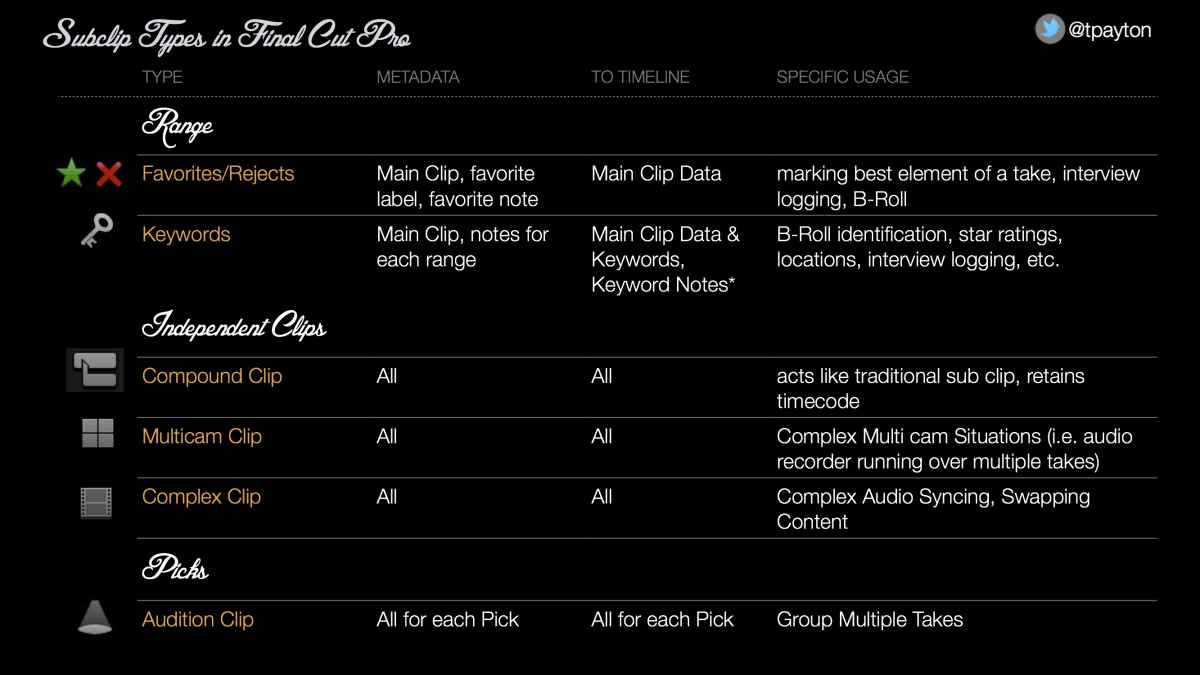
I wrote that tutorial a year ago. Took me that long to actually make it. Here is that chart BTW and a PDF.
Please Log in to join the conversation.
22 Jul 2014 21:24 #50337
by parkerhqj
Replied by parkerhqj on topic labeling keyword clips
Thanks. That's great.
I used compound clips for sub clips when X first came out but I ran into all sorts of problems as compound clips were pretty unstable then. Are they more reliable now? I haven't used them at all.
I used compound clips for sub clips when X first came out but I ran into all sorts of problems as compound clips were pretty unstable then. Are they more reliable now? I haven't used them at all.
Please Log in to join the conversation.
22 Jul 2014 21:27 #50338
by tpayton
Replied by tpayton on topic labeling keyword clips
Way better. 10.0.6 was a major upgrade to the way they work, and now in 10.1.2 they are super solid.
Please Log in to join the conversation.
23 Jul 2014 13:25 #50366
by parkerhqj
Replied by parkerhqj on topic labeling keyword clips
Just got through your tutorial - it was excellent! You're very natural and explain everything clearly. The editing from home thing certainly resonates with me as well - I do a lot more of that than is probably healthy. I'm going to revisit markers now and you've restored my faith in compound clips - I can't wait to start using them again. Thanks for making this available. I encourage anyone who is still struggling with how to organize your footage to watch this series. You ought to charge for it! thx
Please Log in to join the conversation.
23 Jul 2014 13:33 #50367
by tpayton
Replied by tpayton on topic labeling keyword clips
Thanks for your kind words. Investigating "sub clips" has radically changed our workflow. FCPX is incredibly powerful and I hope these can help your workflow.
Please Log in to join the conversation.
23 Jul 2014 13:37 #50368
by parkerhqj
Replied by parkerhqj on topic labeling keyword clips
It's almost as if the metadata has given us almost unlimited options - which is kind of a problem. Too many to choose from. For whatever shortcomings each approach has, compare it to how we were all doing things ten years ago. Yikes.
Please Log in to join the conversation.
