


- Posts: 868
- Thank you received: 85
3 Post Moderation Rule for New Boarders (25 Jan 2021)
New boarders will have their posts moderated - Don't worry if you cannot see your post immediately.
BMPCC Archives & FCPX Damaged
17 Jul 2014 04:28 #50116
by cseeman
Replied by cseeman on topic BMPCC Archives & FCPX Damaged
I rolled back to BMD firmware 1.5. No Change so that's not it.
I've now checked on three systems all with the same issue.
Late 2013 15" MBPr OS 10.9.3, FCPX 10.1.1
2008 MP OS 10.9.4, FCPX 10.1.2
Late 2013 MP OX 10.9.4 FCPX 10.1.3
I've tested locally and over the network. No difference. Only Blackmagic camera archived affected. I think it's specific to the archive .plist as the cards are fine. Individual files in folder instead of archive are fine. One day it was working than suddenly not.
I've now checked on three systems all with the same issue.
Late 2013 15" MBPr OS 10.9.3, FCPX 10.1.1
2008 MP OS 10.9.4, FCPX 10.1.2
Late 2013 MP OX 10.9.4 FCPX 10.1.3
I've tested locally and over the network. No difference. Only Blackmagic camera archived affected. I think it's specific to the archive .plist as the cards are fine. Individual files in folder instead of archive are fine. One day it was working than suddenly not.
Please Log in to join the conversation.
17 Jul 2014 15:14 #50144
by cseeman
Replied by cseeman on topic BMPCC Archives & FCPX Damaged
BMD got back to me and further confirmed they're seeing it across several OS and FCPX versions.
Another editor, one who I believe is FCPX certified has confirmed to me as well.
Oddly it worked for me in the past just as it is for Ronny.
Something is breaking the archive .plist specifically such that FCPX can't read its own BMD camera archive. Unfortunately there's no way to rebuild this .plist that I know of.
Another editor, one who I believe is FCPX certified has confirmed to me as well.
Oddly it worked for me in the past just as it is for Ronny.
Something is breaking the archive .plist specifically such that FCPX can't read its own BMD camera archive. Unfortunately there's no way to rebuild this .plist that I know of.
Please Log in to join the conversation.
18 Jul 2014 21:27 #50201
by cseeman
Replied by cseeman on topic BMPCC Archives & FCPX Damaged
The story gets worse.
Updated BMPCC to firmware 1.8.2.
Card looks fine (as usual).
Archive card.
View Archive and it shows the same issue.
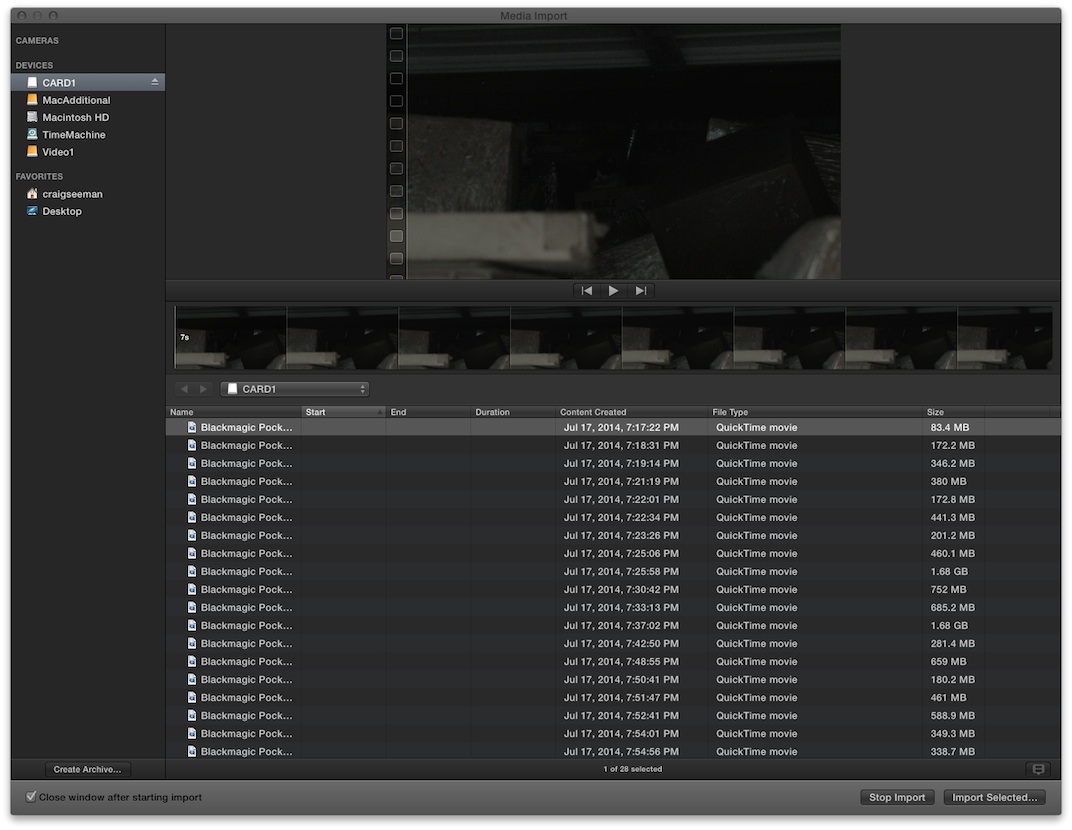
View card and now the start and end time (time code) is completely blank.
Files do import though.
FCPX is CERTAINLY corrupting the metadata.
Updated BMPCC to firmware 1.8.2.
Card looks fine (as usual).
Archive card.
View Archive and it shows the same issue.
View card and now the start and end time (time code) is completely blank.
Files do import though.
FCPX is CERTAINLY corrupting the metadata.
Please Log in to join the conversation.
- Darren Roark
-

- Offline
- Platinum Member
-

18 Jul 2014 22:07 #50203
by Darren Roark
Replied by Darren Roark on topic BMPCC Archives & FCPX Damaged
This is definitely happening. I have a BM camera and I'm certain it's the 10.1.2 update.
If I don't try and open the camera archive in FCP X and just open it up and drag the files from it, the timecode is still there along with the metadata.
Urgh, this is a bad one!
If I don't try and open the camera archive in FCP X and just open it up and drag the files from it, the timecode is still there along with the metadata.
Urgh, this is a bad one!
Please Log in to join the conversation.
18 Jul 2014 23:15 #50204
by cseeman
Replied by cseeman on topic BMPCC Archives & FCPX Damaged
Make sure you report to both Blackmagic and Apple.
Blackmagic got back to me and confirmed the issue.
I've used the FCPX Feedback form to report to Apple. Unfortunately the word limit and the inability to provide screenshots has me wondering if Apple understands the severity of the issue. I know they do occasionally contact people but they haven't contacted me. Others have confirmed the issue and I know others have reported to Apple as well.
Yes drag and drop does work and in that case, the clips are exactly as they should be. It's not impacting the clips themselves.
Blackmagic got back to me and confirmed the issue.
I've used the FCPX Feedback form to report to Apple. Unfortunately the word limit and the inability to provide screenshots has me wondering if Apple understands the severity of the issue. I know they do occasionally contact people but they haven't contacted me. Others have confirmed the issue and I know others have reported to Apple as well.
Yes drag and drop does work and in that case, the clips are exactly as they should be. It's not impacting the clips themselves.
Please Log in to join the conversation.
- ronny courtens
-

- Offline
- Moderator
-

Less
More
- Posts: 4455
- Thank you received: 962
19 Jul 2014 00:30 #50206
by ronny courtens
Replied by ronny courtens on topic BMPCC Archives & FCPX Damaged
From my experience they only contact you if they are NOT clear about the reported issue and they require more information. BM will already have contacted them as well, so I'm pretty sure they fully understand what is happening. Being aware of the problem is one thing, fixing it is another step. And if they have a fix it will be put alongside with other fixes in a software update.
- Ronny
- Ronny
Please Log in to join the conversation.
- Darren Roark
-
- Offline
- Platinum Member
-
19 Jul 2014 00:36 #50207
by Darren Roark
Replied by Darren Roark on topic BMPCC Archives & FCPX Damaged
If I'm understanding all the aspects of the problem correctly, at least there is a workaround for now which is opening up the camera archives and dragging and dropping into FCP.
Does creating the archives in 10.1.2 damage the metadata? I don't have any shot cards at the moment.
Does creating the archives in 10.1.2 damage the metadata? I don't have any shot cards at the moment.
Please Log in to join the conversation.
19 Jul 2014 07:17 - 19 Jul 2014 07:19 #50213
by cseeman
Replied by cseeman on topic BMPCC Archives & FCPX Damaged
The media files themselves are ok. You can import direct from cards (even if TC seems gone), drag and drop and create a folder instead of using FCPX Archive or, if you've created an Archive, pull the files out of that and create a folder.
What doesn't work is importing from Archive directly because the Archive .plist is corrupted and, unlike other .plist files, there's no way to rebuild it. With the BMD 1.8.2 firmware, I now see the files on the card lose their time code display after attempting to import from an archive. Even those files still import with time code unscathed though.
The one correlate is that the Camera firmware update impacts older archives and, now, the display of the time code of clips on the card. I think one of the deeper ramifications is that relinking may be a problem as well. Who knows if this will impact FCPX to Resolve and back workflow.
All my Archives going back months are impacted. I suspect I can't relink to those files now. I may have to pull them out and relink from a folder and see if that works. I dread even trying that.
BMD mentioned they were thinking of testing in 10.0.9 to try there as well. They didn't give me specifics but they did say they test several versions and confirmed it's not just 10.1.2.
My guess is it's a combination of the camera firmware update which impacted how the metadata is handled on the cards and an FCPX update. The odd thing is once you attempt to open an archive it's "borked" even if it was OK previously on earlier camera firmware and FCPX version. Strange that it would do that (if that's what's happening). It's certainly being reported by others at this point and it's BMD/FCPX specific. Other Archives are still OK.
Basically it seems to have occurred around the time FCPX 10.1.2, BMD firmware 1.8, OSX 10.9.4 came out. Rolling them all back doesn't solve the problem though. It almost seems viral. It's baffling.
_____
In short the media still works and the TC is still there but workflows are seriously crippled IMHO.
What doesn't work is importing from Archive directly because the Archive .plist is corrupted and, unlike other .plist files, there's no way to rebuild it. With the BMD 1.8.2 firmware, I now see the files on the card lose their time code display after attempting to import from an archive. Even those files still import with time code unscathed though.
The one correlate is that the Camera firmware update impacts older archives and, now, the display of the time code of clips on the card. I think one of the deeper ramifications is that relinking may be a problem as well. Who knows if this will impact FCPX to Resolve and back workflow.
All my Archives going back months are impacted. I suspect I can't relink to those files now. I may have to pull them out and relink from a folder and see if that works. I dread even trying that.
BMD mentioned they were thinking of testing in 10.0.9 to try there as well. They didn't give me specifics but they did say they test several versions and confirmed it's not just 10.1.2.
My guess is it's a combination of the camera firmware update which impacted how the metadata is handled on the cards and an FCPX update. The odd thing is once you attempt to open an archive it's "borked" even if it was OK previously on earlier camera firmware and FCPX version. Strange that it would do that (if that's what's happening). It's certainly being reported by others at this point and it's BMD/FCPX specific. Other Archives are still OK.
Basically it seems to have occurred around the time FCPX 10.1.2, BMD firmware 1.8, OSX 10.9.4 came out. Rolling them all back doesn't solve the problem though. It almost seems viral. It's baffling.
_____
In short the media still works and the TC is still there but workflows are seriously crippled IMHO.
Last edit: 19 Jul 2014 07:19 by cseeman.
Please Log in to join the conversation.
- Darren Roark
-
- Offline
- Platinum Member
-
19 Jul 2014 18:54 #50226
by Darren Roark
Replied by Darren Roark on topic BMPCC Archives & FCPX Damaged
Can you try making a sparse image of a card and see if it happens there?
Please Log in to join the conversation.
15 Apr 2015 03:16 #62768
by cseeman
Replied by cseeman on topic BMPCC Archives & FCPX Damaged
With FCPX 10.2 update I can now properly display my BMPCC archives created July 2014 and later.
The BMPCC archives created in June 2014 and earlier still exhibit the same issue noted in my original post.
Interesting that there's a specific date demarcation. That could indicate that a version of FCPX or maybe BMPCC firmware preceding date may have been doing something different with the .plist file in the archives.
The BMPCC archives created in June 2014 and earlier still exhibit the same issue noted in my original post.
Interesting that there's a specific date demarcation. That could indicate that a version of FCPX or maybe BMPCC firmware preceding date may have been doing something different with the .plist file in the archives.
Please Log in to join the conversation.
