


- Posts: 868
- Thank you received: 85
3 Post Moderation Rule for New Boarders (25 Jan 2021)
New boarders will have their posts moderated - Don't worry if you cannot see your post immediately.
BMPCC Archives & FCPX Damaged
16 Jul 2014 03:38 #50033
by cseeman
BMPCC Archives & FCPX Damaged was created by cseeman
Blackmagic Pocket Cinema Camera - firmware 1.8 - ProRes Recording
FCPX 10.1.2
OS 10.9.4
• In FCPX create Camera Archive on my dedicated Media Drive from BMPCC card.
• Attempt to import clips from Archive on Media Drive into FCPX.
• All clips show the same duration and video as the first clip in the Archive list in FCPX Import list. The names remain correct though.
• Importing results in only the first clip coming in even when all are selected.
• I notice that all previous Archives from BMPCC including those in which camera had previous firmware and earlier FCPX versions and previous Mavericks versions, show same issue whereas they were correct previously.
• Archives from AVCHD cameras on same Media Drive are fine.
• Open the individual Archives with show Package Contents show all clips are still there with correct durations.
* Create folder and copy files from BMPCC card and those are correct so issue is specifically FCPX Archive function and .plist it creates it seems. Oddly previous good BMPCC Archives have issue as well so it seems "retroactive."
• Right now my only guess is some very odd thing might have impacted all BMPCC camera archive .plist as improbable as that sounds.
Any ideas what's going on?
FCPX 10.1.2
OS 10.9.4
• In FCPX create Camera Archive on my dedicated Media Drive from BMPCC card.
• Attempt to import clips from Archive on Media Drive into FCPX.
• All clips show the same duration and video as the first clip in the Archive list in FCPX Import list. The names remain correct though.
• Importing results in only the first clip coming in even when all are selected.
• I notice that all previous Archives from BMPCC including those in which camera had previous firmware and earlier FCPX versions and previous Mavericks versions, show same issue whereas they were correct previously.
• Archives from AVCHD cameras on same Media Drive are fine.
• Open the individual Archives with show Package Contents show all clips are still there with correct durations.
* Create folder and copy files from BMPCC card and those are correct so issue is specifically FCPX Archive function and .plist it creates it seems. Oddly previous good BMPCC Archives have issue as well so it seems "retroactive."
• Right now my only guess is some very odd thing might have impacted all BMPCC camera archive .plist as improbable as that sounds.
Any ideas what's going on?
Please Log in to join the conversation.
16 Jul 2014 03:50 #50034
by cseeman
Replied by cseeman on topic BMPCC Archives & FCPX Damaged
Deleted FCPX preferences to make sure that wasn't the issue.
What I can determine is that FCPX 10.1.2 Import can't seem to properly read the metadata (.plist I believe) of BMPCC Archives specifically.
What I can determine is that FCPX 10.1.2 Import can't seem to properly read the metadata (.plist I believe) of BMPCC Archives specifically.
Please Log in to join the conversation.
16 Jul 2014 05:15 - 16 Jul 2014 05:16 #50035
by cseeman
Replied by cseeman on topic BMPCC Archives & FCPX Damaged
From Card looks correct.
From Archive all clips have same in/out (that of first clip)
From Archive Thumbs all clips have same Duration and Video (that of first clip)
All my BMPCC Archives look like this.
My AVCHD Archives are OK.
From Archive all clips have same in/out (that of first clip)
From Archive Thumbs all clips have same Duration and Video (that of first clip)
All my BMPCC Archives look like this.
My AVCHD Archives are OK.
Last edit: 16 Jul 2014 05:16 by cseeman.
Please Log in to join the conversation.


- ronny courtens
-

- Offline
- Moderator
-

Less
More
- Posts: 4455
- Thank you received: 962
16 Jul 2014 05:48 #50042
by ronny courtens
Replied by ronny courtens on topic BMPCC Archives & FCPX Damaged
Craig,
Thank you for posting your findings.
I have no BMPCC cards to do a test, but as you have the same issue with formerly created archives from BMPCC cards this problem seems indeed specific to 10.1.2.
This should not affect the media in the archive, only the way 10.1.2 reads the archive .plist.
So people who have the same issue can open the archive (R-click > Show Package Content) and import the media from the archive folder.
Report this issue to Apple immediately so they can fix it. Good of you to have posted this on the BMD forum as well.
- Ronny
Thank you for posting your findings.
I have no BMPCC cards to do a test, but as you have the same issue with formerly created archives from BMPCC cards this problem seems indeed specific to 10.1.2.
This should not affect the media in the archive, only the way 10.1.2 reads the archive .plist.
So people who have the same issue can open the archive (R-click > Show Package Content) and import the media from the archive folder.
Report this issue to Apple immediately so they can fix it. Good of you to have posted this on the BMD forum as well.
- Ronny
Please Log in to join the conversation.
16 Jul 2014 06:07 #50043
by cseeman
Replied by cseeman on topic BMPCC Archives & FCPX Damaged
Thanks Ronny,
Yes I agree this is 10.1.2 specific.
It seems BMPCC ProRes (possibly other BM cameras as well) Archive specific.
Yes I reported to Apple using FCPX Feedback form.
I double checked the Package contents and all the files are there intact so they can be imported directly.
All media is A.OK.
Really frustrating though.
My guess is FCPX is misreading the .plist in the Archive.
I hope the .plists didn't become altered though since there's no way to rebuild them.
I could check one in a text editor.
I do wish I could attach files to Apple's Feedback forms but I can imagine why they don't do that. I do hope they contact me for verification and screenshots.
Given the number of BM and FCPX users I'm surprised others haven't posted... or maybe I'm cursed.
Yes I agree this is 10.1.2 specific.
It seems BMPCC ProRes (possibly other BM cameras as well) Archive specific.
Yes I reported to Apple using FCPX Feedback form.
I double checked the Package contents and all the files are there intact so they can be imported directly.
All media is A.OK.
Really frustrating though.
My guess is FCPX is misreading the .plist in the Archive.
I hope the .plists didn't become altered though since there's no way to rebuild them.
I could check one in a text editor.
I do wish I could attach files to Apple's Feedback forms but I can imagine why they don't do that. I do hope they contact me for verification and screenshots.
Given the number of BM and FCPX users I'm surprised others haven't posted... or maybe I'm cursed.
Please Log in to join the conversation.
- ronny courtens
-
- Offline
- Moderator
-
Less
More
- Posts: 4455
- Thank you received: 962
16 Jul 2014 06:29 #50044
by ronny courtens
Replied by ronny courtens on topic BMPCC Archives & FCPX Damaged
I have sent you a p.m.
I think many people just import from the cards and don't create Archives (though I agree it's a good thing to do so).
Could other people on the forum who have Camera Archives from BMPCC or other BM cameras check this please?
- Ronny
I think many people just import from the cards and don't create Archives (though I agree it's a good thing to do so).
Could other people on the forum who have Camera Archives from BMPCC or other BM cameras check this please?
- Ronny
Please Log in to join the conversation.
16 Jul 2014 14:36 - 16 Jul 2014 14:51 #50082
by cseeman
Replied by cseeman on topic BMPCC Archives & FCPX Damaged
Noticing when I create the Archive, FCPX Import shows File Type as Final Cut Camera Archive. As soon as I use Disclosure Triangle to open the archive for file import in FCPX Import, the File Type change Media Folder.
Noting that if I quit and open FCPX again they are once again call Final Cut Camera Archive.
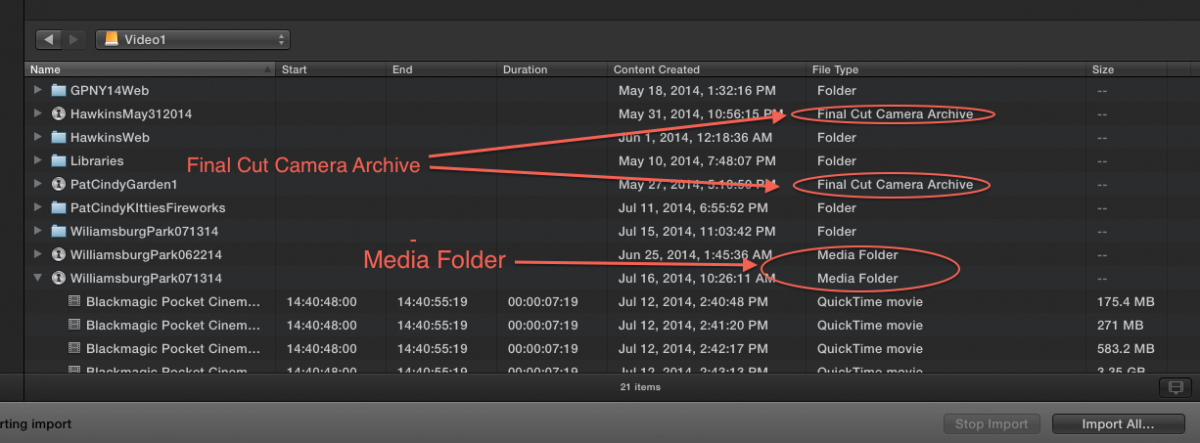
Noting that if I quit and open FCPX again they are once again call Final Cut Camera Archive.
Last edit: 16 Jul 2014 14:51 by cseeman. Reason: Adding note
Please Log in to join the conversation.
16 Jul 2014 15:21 - 16 Jul 2014 15:31 #50084
by cseeman
Replied by cseeman on topic BMPCC Archives & FCPX Damaged
Logged into the drive with Archives from an FCPX 10.1.1 (with OSX 10.9.3) system on the network.
Unfortunately it sees the same thing. All clips in Archive show only duration and video from the first clip.
Either the FCPX 10.1.2 is damaging the Archive .plist itself or something else is.
Unfortunately it sees the same thing. All clips in Archive show only duration and video from the first clip.
Either the FCPX 10.1.2 is damaging the Archive .plist itself or something else is.
Last edit: 16 Jul 2014 15:31 by cseeman.
Please Log in to join the conversation.
- ronny courtens
-
- Offline
- Moderator
-
Less
More
- Posts: 4455
- Thank you received: 962
16 Jul 2014 16:16 #50085
by ronny courtens
Replied by ronny courtens on topic BMPCC Archives & FCPX Damaged
We have been doing some tests as well, on some Camera Archives with ProRes media.
When launching the Import window the archives appear as .fcpcarch containers, as expected.
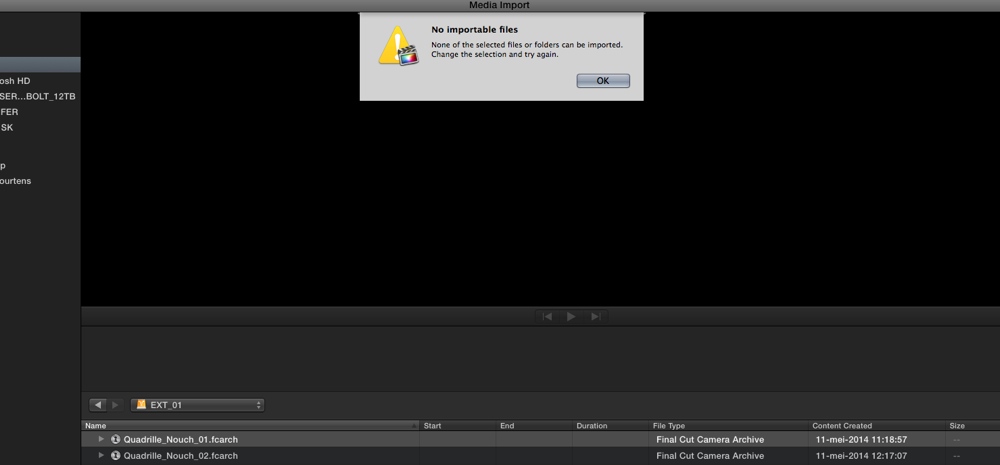
When we select a Camera Archive and press Import we get an error message:
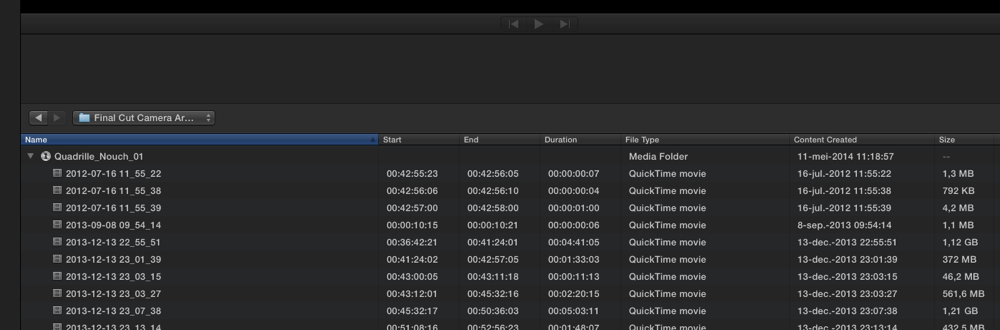
When we open the Archive the .fcpcarch extension disappears and the File Type changes to "Media Folder":
From here on we can import the media anyway we wish, either by selecting the media folder to import all clips:
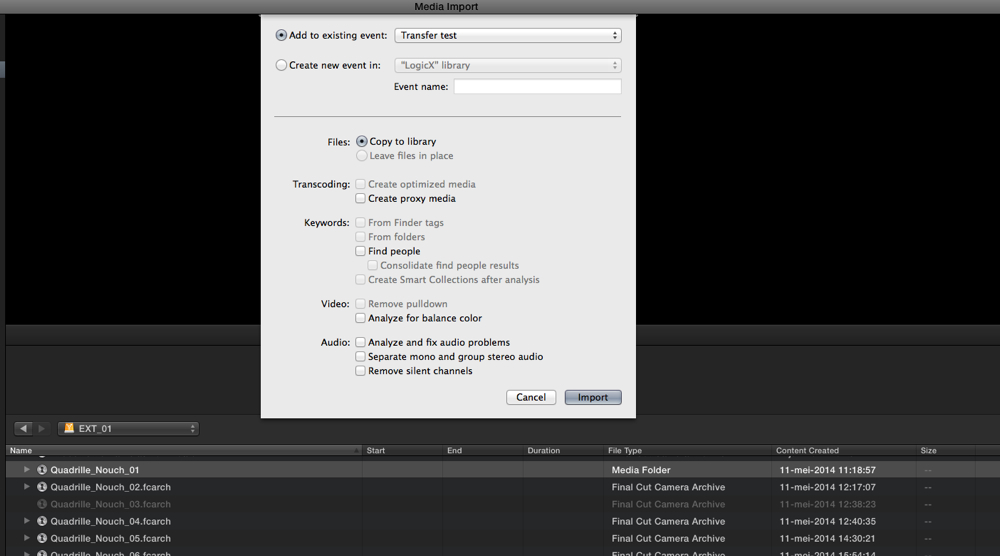
Or by opening the folder to import selected clips with ranges:
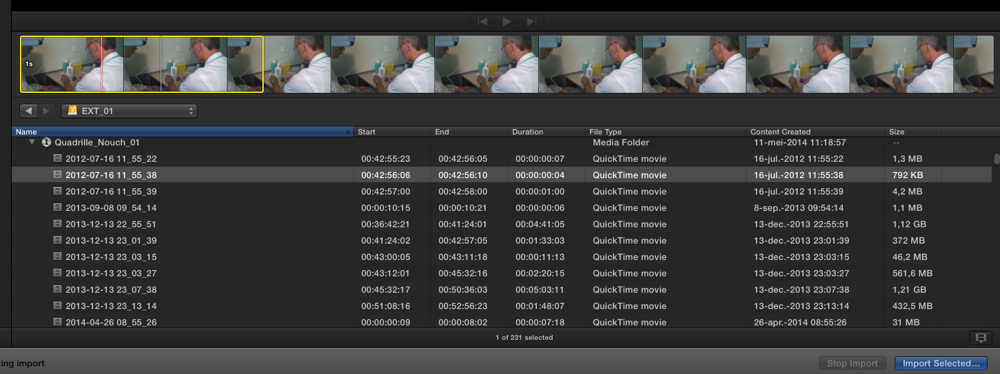
So yes this is awkward behavior. No media inside the Camera Archives is lost and you can still import all clips or selected clips after you have opened the archive, but I can imagine that seeing a "No Importable Files" message appear when you first select the Camera Archive to import your precious footage is not really good for people with a weak heart
Feedback has been sent.
- Ronny
When launching the Import window the archives appear as .fcpcarch containers, as expected.
When we select a Camera Archive and press Import we get an error message:
When we open the Archive the .fcpcarch extension disappears and the File Type changes to "Media Folder":
From here on we can import the media anyway we wish, either by selecting the media folder to import all clips:
Or by opening the folder to import selected clips with ranges:
So yes this is awkward behavior. No media inside the Camera Archives is lost and you can still import all clips or selected clips after you have opened the archive, but I can imagine that seeing a "No Importable Files" message appear when you first select the Camera Archive to import your precious footage is not really good for people with a weak heart
Feedback has been sent.
- Ronny
Please Log in to join the conversation.
16 Jul 2014 16:22 #50086
by cseeman
Replied by cseeman on topic BMPCC Archives & FCPX Damaged
Tested on another system
FCPX 10.1.1
OSX 10.9.3
Archived card to Desktop.
Attempted to import from Desktop and it exhibits the same issue.
Issue is not specific to 10.1.2 nor OSX 10.9.4
Perplexing.
FCPX 10.1.1
OSX 10.9.3
Archived card to Desktop.
Attempted to import from Desktop and it exhibits the same issue.
Issue is not specific to 10.1.2 nor OSX 10.9.4
Perplexing.
Please Log in to join the conversation.
16 Jul 2014 16:31 #50087
by cseeman
Replied by cseeman on topic BMPCC Archives & FCPX Damaged
Hi Ronny,
If you check my screenshots, all my clips show same in/out, duration, video as if coming from the first clip.
I've now checked this on two systems, one with FCPX 10.1.2 and OSX 10.9.4 and FCPX 10.1.1 and OSX 10.9.3.
The only other variable is the camera firmware. Camera was updated from 1.5 to 1.8 but I can't imagine how that would impact old archives.
Basically I can not import BM ProRes files from Camera Archive.
Do you know Camera and Firmware you're using?
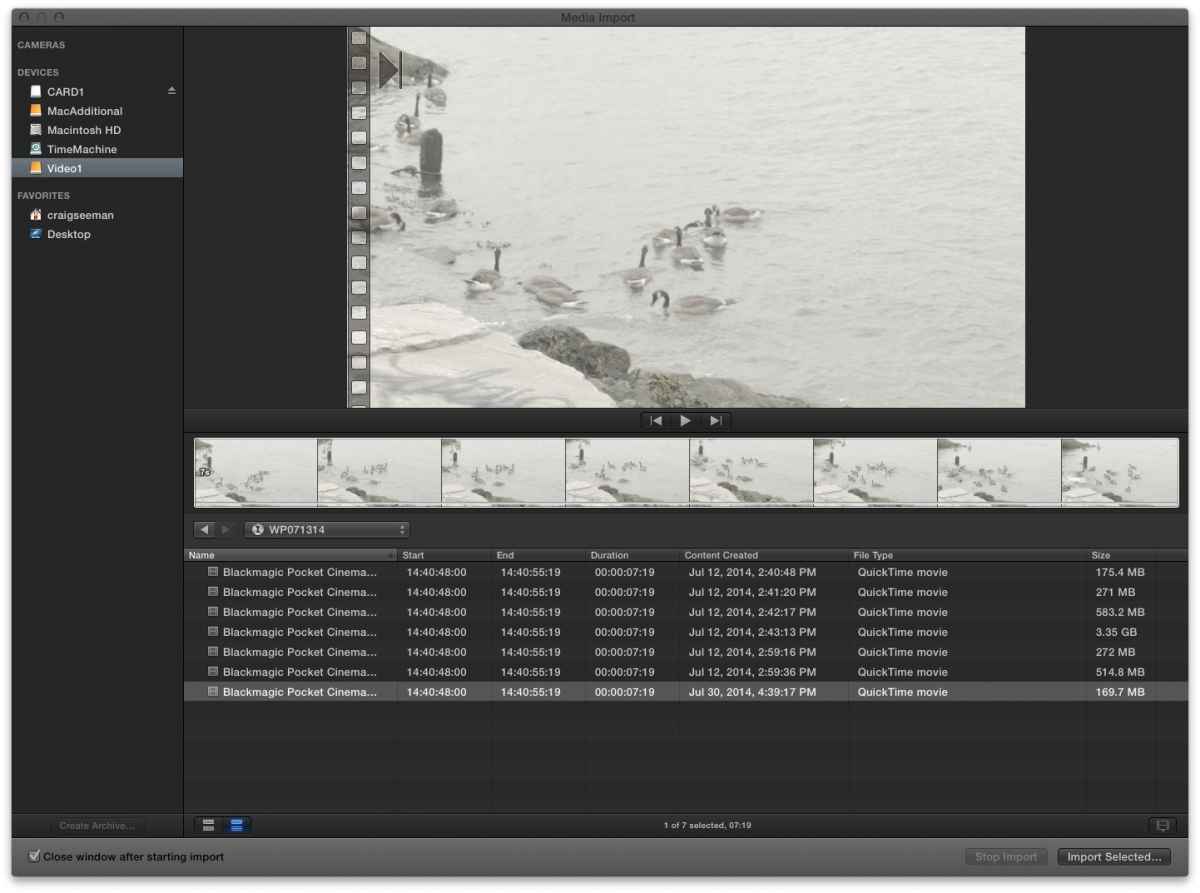
If you check my screenshots, all my clips show same in/out, duration, video as if coming from the first clip.
I've now checked this on two systems, one with FCPX 10.1.2 and OSX 10.9.4 and FCPX 10.1.1 and OSX 10.9.3.
The only other variable is the camera firmware. Camera was updated from 1.5 to 1.8 but I can't imagine how that would impact old archives.
Basically I can not import BM ProRes files from Camera Archive.
Do you know Camera and Firmware you're using?
Please Log in to join the conversation.
- ronny courtens
-
- Offline
- Moderator
-
Less
More
- Posts: 4455
- Thank you received: 962
16 Jul 2014 16:58 #50088
by ronny courtens
Replied by ronny courtens on topic BMPCC Archives & FCPX Damaged
I did some tests with existing archives, not from a BM camera, and I can import from the archives.
Watching your screenshot now I see indeed that every clip has the same tc, which means you cannot import from the archive at all unless you open the archive in Finder and you import form there. That's nasty indeed.
I have no media from BM cameras here. Do you know other people who could do a test with archives from a similar camera as yours?
- Ronny
Watching your screenshot now I see indeed that every clip has the same tc, which means you cannot import from the archive at all unless you open the archive in Finder and you import form there. That's nasty indeed.
I have no media from BM cameras here. Do you know other people who could do a test with archives from a similar camera as yours?
- Ronny
Please Log in to join the conversation.
16 Jul 2014 17:01 - 16 Jul 2014 17:06 #50090
by cseeman
Replied by cseeman on topic BMPCC Archives & FCPX Damaged
I did test from existing archive as well. I'm seeing it on new and pre-existing archives.
I've posted on BMD Post Production forum and have had no response.
Posted on COW FCPX Techniques (the sane forum) and have had no response.
Note I'm now seeing this on TWO systems with different iterations of FCPX and Mavericks.
The only variable I have at the moment is the camera was updated to firmware 1.8 and somehow importing from that impacted older archives... which sounds completely improbable.... but I have no other variable. These systems don't even have same FCPX plugins.
I've posted on BMD Post Production forum and have had no response.
Posted on COW FCPX Techniques (the sane forum) and have had no response.
Note I'm now seeing this on TWO systems with different iterations of FCPX and Mavericks.
The only variable I have at the moment is the camera was updated to firmware 1.8 and somehow importing from that impacted older archives... which sounds completely improbable.... but I have no other variable. These systems don't even have same FCPX plugins.
Last edit: 16 Jul 2014 17:06 by cseeman.
Please Log in to join the conversation.
16 Jul 2014 19:24 #50100
by cseeman
Replied by cseeman on topic BMPCC Archives & FCPX Damaged
Blackmaagic has verified the issue so they are recommending to roll back the firmware on the camera. Odd that it would impact the plist on older archives though. My guess is that FCPX can't read the plist in the archive it creates and once that happens it can't read the older archives either... even though that sounds improbable.
Please Log in to join the conversation.
- ronny courtens
-
- Offline
- Moderator
-
Less
More
- Posts: 4455
- Thank you received: 962
16 Jul 2014 19:26 #50101
by ronny courtens
Replied by ronny courtens on topic BMPCC Archives & FCPX Damaged
Craig,
Thank you for the update. I hope this gets fixed in a next release.
- Ronny
Thank you for the update. I hope this gets fixed in a next release.
- Ronny
Please Log in to join the conversation.
16 Jul 2014 20:28 #50106
by cseeman
Replied by cseeman on topic BMPCC Archives & FCPX Damaged
Thanks for helping.
BMD had me regress to firmware 1.7 and the issue is still present on both 10.1.2 10.9.4 and 10.1.1 10.9.3.
They're going to have me regress to firmware 1.5 which is what I was previously using when it was working.
I guess since the files are ProRes, people haven't been archiving but doing drag and drop.
Since your old archive is working as mine used to something must have changed recently and apparently FCPX can't read the metadata.
BMD had me regress to firmware 1.7 and the issue is still present on both 10.1.2 10.9.4 and 10.1.1 10.9.3.
They're going to have me regress to firmware 1.5 which is what I was previously using when it was working.
I guess since the files are ProRes, people haven't been archiving but doing drag and drop.
Since your old archive is working as mine used to something must have changed recently and apparently FCPX can't read the metadata.
Please Log in to join the conversation.
