


- Posts: 5
- Thank you received: 0
3 Post Moderation Rule for New Boarders (25 Jan 2021)
New boarders will have their posts moderated - Don't worry if you cannot see your post immediately.
How to import Sony XDCAM to FCPX using Content Browser
- Bernadette
-
 Topic Author
- Offline
- New Member
-

Less
More
15 Jul 2014 22:52 #50020
by Bernadette
How to import Sony XDCAM to FCPX using Content Browser was created by Bernadette
Hi all,
Can anyone advise the best workflow to import Sony XDCAM mxf files to FCPX?
I have installed Content Browser and the ProApps Codecs plug in and am importing from Content Browser (Clip/Import into Final Cut Pro). The clips are 1920x1080 50i but FCP Inspector says the clips are coming in at at 1280x720/60p and I can't work out why. When I open the Extended Metadata view, there's no option to change the frame size or the field preference from Progressive. I've set the Preferences in Content browser to PAL but can't see anything in FCP preferences that would help.
I can't find anything online to give me a clear workflow (including the Sony pdf user guide for Content Browser. An experienced editor suggested I ditch Content Browser and use XDCAM transfer which this was supposed to supersede but it doesn't seem to work on a trial basis without registering it. I have had even less success trying to import from FCP.
I'm using the trial version of FCP 10.1.1 Maybe I should be trialling Avid instead?
I have spent many many frustrating hours trying to solve this. I'd be grateful for any advice. Please help!
Thank you!
Can anyone advise the best workflow to import Sony XDCAM mxf files to FCPX?
I have installed Content Browser and the ProApps Codecs plug in and am importing from Content Browser (Clip/Import into Final Cut Pro). The clips are 1920x1080 50i but FCP Inspector says the clips are coming in at at 1280x720/60p and I can't work out why. When I open the Extended Metadata view, there's no option to change the frame size or the field preference from Progressive. I've set the Preferences in Content browser to PAL but can't see anything in FCP preferences that would help.
I can't find anything online to give me a clear workflow (including the Sony pdf user guide for Content Browser. An experienced editor suggested I ditch Content Browser and use XDCAM transfer which this was supposed to supersede but it doesn't seem to work on a trial basis without registering it. I have had even less success trying to import from FCP.
I'm using the trial version of FCP 10.1.1 Maybe I should be trialling Avid instead?
I have spent many many frustrating hours trying to solve this. I'd be grateful for any advice. Please help!
Thank you!
Please Log in to join the conversation.
- ronny courtens
-

- Offline
- Moderator
-

Less
More
- Posts: 4455
- Thank you received: 962
16 Jul 2014 06:44 #50046
by ronny courtens
Replied by ronny courtens on topic How to import Sony XDCAM to FCPX using Content Browser
Hi Bernadette, welcome to the forum.
The only thing you need to import XDCAM MXF in FCP X is the latest XAVC/XDCAM plugin for Apple: www.sonycreativesoftware.com/pdzk-lt2
Install the plugin and import the files. No settings to be entered.
FYI: Avid requires a similar plugin to be able to import XDCAM MXF files: www.sonycreativesoftware.com/pdzk-ma2
- Ronny
The only thing you need to import XDCAM MXF in FCP X is the latest XAVC/XDCAM plugin for Apple: www.sonycreativesoftware.com/pdzk-lt2
Install the plugin and import the files. No settings to be entered.
FYI: Avid requires a similar plugin to be able to import XDCAM MXF files: www.sonycreativesoftware.com/pdzk-ma2
- Ronny
Please Log in to join the conversation.
- Bernadette
-
Topic Author
- Offline
- New Member
-
Less
More
- Posts: 5
- Thank you received: 0
18 Jul 2014 07:18 #50180
by Bernadette
Replied by Bernadette on topic How to import Sony XDCAM to FCPX using Content Browser
Thank you so much Ronny. I don't know why Sony - and all the online info I could find - told me I had to import via Content Browser!
I'm just back from filming so was able to import the clips direct off the card via the card reader for the first time - no Content Browser this time! Works a treat, except that the resolution still isn't right, bringing my 50i pix in at 25i. I can't see how to change this? I'm not sure if the field dominance is right either? Again, I can't see how I'd change that option?
So Inspector says:
Frame size: 1920 x 1080
Video frame rate: 25
Codec: XDCAM HD422 1080i50 (50 mbps)
Video Field Dominance: Upper First
Pulldown: None
Shooting Rate: 25
I had had troubles importing direct to FCPX. The vision is saved on an external hard drive but FCPX was only showing me one BPAV folder I saved experimentally - not showing all the other folders with the MXF files. I've deleted the BPAV folder and can now bring in the pix from one hard drive but with the same resolution issue detailed above. For some reason FCP is only reading the other hard drive as a camera, not as a device - I think because of the BPAV folder.
It would be good to know how to resolve the import via Content Browser too - it might be handy to use the essence marks to review and log my vision after filming when I save the cards to external hard drives without necessarily bringing it all into FCP. But right now I'd just be happy to be able to see my pix in the same resolution in FCP as I see in the content browser!
One more question, if I may, I've shot 2 channels of audio. The Channel Configuration in FCP is 8 mono. Inspector says:
Audio Output Channels: 1
I want to be able to see channel 1 and channel 2 as separate tracks at the same time so I can cut between them. I don't know how to do this on the timeline in FCPX?
Thank you again! I can't tell you how helpful it is to have this kind of forum when you're working solo and remotely.
Bernadette
I'm just back from filming so was able to import the clips direct off the card via the card reader for the first time - no Content Browser this time! Works a treat, except that the resolution still isn't right, bringing my 50i pix in at 25i. I can't see how to change this? I'm not sure if the field dominance is right either? Again, I can't see how I'd change that option?
So Inspector says:
Frame size: 1920 x 1080
Video frame rate: 25
Codec: XDCAM HD422 1080i50 (50 mbps)
Video Field Dominance: Upper First
Pulldown: None
Shooting Rate: 25
I had had troubles importing direct to FCPX. The vision is saved on an external hard drive but FCPX was only showing me one BPAV folder I saved experimentally - not showing all the other folders with the MXF files. I've deleted the BPAV folder and can now bring in the pix from one hard drive but with the same resolution issue detailed above. For some reason FCP is only reading the other hard drive as a camera, not as a device - I think because of the BPAV folder.
It would be good to know how to resolve the import via Content Browser too - it might be handy to use the essence marks to review and log my vision after filming when I save the cards to external hard drives without necessarily bringing it all into FCP. But right now I'd just be happy to be able to see my pix in the same resolution in FCP as I see in the content browser!
One more question, if I may, I've shot 2 channels of audio. The Channel Configuration in FCP is 8 mono. Inspector says:
Audio Output Channels: 1
I want to be able to see channel 1 and channel 2 as separate tracks at the same time so I can cut between them. I don't know how to do this on the timeline in FCPX?
Thank you again! I can't tell you how helpful it is to have this kind of forum when you're working solo and remotely.
Bernadette
Please Log in to join the conversation.
- ronny courtens
-
- Offline
- Moderator
-
Less
More
- Posts: 4455
- Thank you received: 962
18 Jul 2014 08:37 - 18 Jul 2014 09:05 #50181
by ronny courtens
Replied by ronny courtens on topic How to import Sony XDCAM to FCPX using Content Browser
Hi Bernadette,
Glad it works now. There are absolutely no issues with your settings.
1080i50 = 25fps interlaced, so that's correct.
And Upper First Field Dominance is correct as well, so all is good
You should not have any BPAV folders at the root level of a drive or FCP X will consider your drive as a camera. If you have any BPAV folders at the root of your drive you can move them from the drive or just put them inside another folder (not called BPAV of course) on the drive to solve this. Happy to hear you had figured this out as well.
Only the new Content Browser will export your XDCAM clips in the correct format for FCP X. And if you want to use this, Sony makes you pay :evil: The advantage of the new Content Browser is that it also allows you to import from old XDCAM discs (yuck) and that all your camera metadata get included in the exported files.
BUT If you only want to import parts of clips when you import from an XDCAM card you don't need Content Browser, you can do this in the FCP X import window:
Select a clip in the import browser, set a Range (In/Out) to the clip and only the selected Range will be imported. Tip: you even can set multiple ranges to the same clip (especially useful with very long clips) and import the selected Ranges all at once.
To cut between different audio channels of a video clip on the timeline:
R-click the clip and choose Expand Audio Components (keyboard shortcut CTRL + ALT + S):

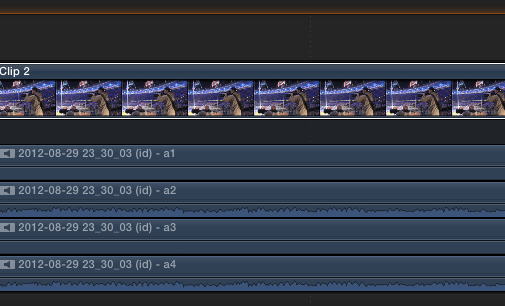
This will reveal every audio channel of the clip in the timeline. Here I have an XDCAM clip with 4 audio channels opened in the timeline:
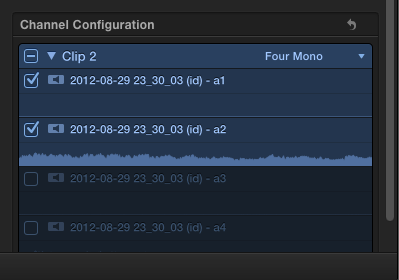
If you only want to see the 2 channels that you have recorded, go to the Inspector > Audio tab and de-select the unused channels:
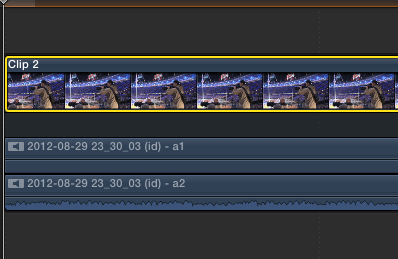
Instantly FCP X will remove the unused channels from your clip in the timeline:
TIP:
If you want to de-select the unused audio channels for all your imported clips at once: select every clip in the Event browser and de-select the unused channels in the Inspector. Now when you put any of these clips in the timeline only the used channels will appear when you expand the audio components on the timeline.
You can use different methods to switch between the separate audio channels "components") on the timeline or to mix them into one another:
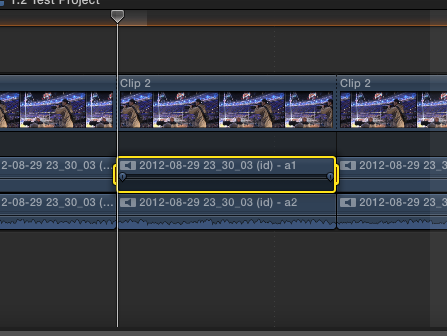
1. You can blade the clip (CMD+B ) and "delete" the audio component between the cuts by selecting it and pressing the DELETE (backslash key):
2. You can simply add keyframes (ALT+CLICK) to a channel to lower, raise or mute the volume of the channel:
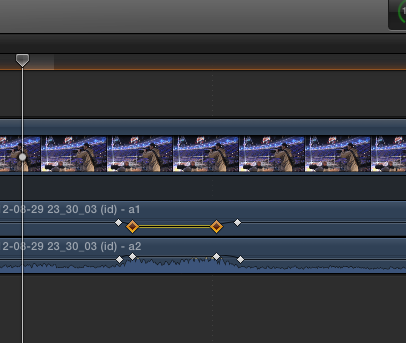
Or the easiest way: just drag inside a channel to set a range, then drag on the volume indicator inside the range to raise, lower or mute the volume of that channel inside the range:
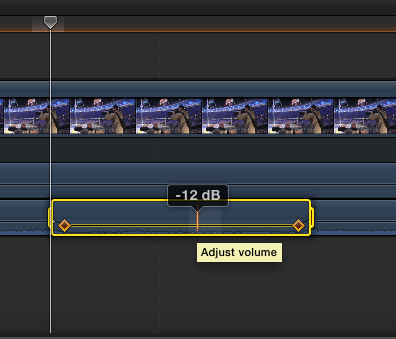
I hope you are enjoying the trial version of FCP X and you will continue to use FCP X on your future projects.
- Ronny
Glad it works now. There are absolutely no issues with your settings.
1080i50 = 25fps interlaced, so that's correct.
And Upper First Field Dominance is correct as well, so all is good
You should not have any BPAV folders at the root level of a drive or FCP X will consider your drive as a camera. If you have any BPAV folders at the root of your drive you can move them from the drive or just put them inside another folder (not called BPAV of course) on the drive to solve this. Happy to hear you had figured this out as well.
Only the new Content Browser will export your XDCAM clips in the correct format for FCP X. And if you want to use this, Sony makes you pay :evil: The advantage of the new Content Browser is that it also allows you to import from old XDCAM discs (yuck) and that all your camera metadata get included in the exported files.
BUT If you only want to import parts of clips when you import from an XDCAM card you don't need Content Browser, you can do this in the FCP X import window:
Select a clip in the import browser, set a Range (In/Out) to the clip and only the selected Range will be imported. Tip: you even can set multiple ranges to the same clip (especially useful with very long clips) and import the selected Ranges all at once.
To cut between different audio channels of a video clip on the timeline:
R-click the clip and choose Expand Audio Components (keyboard shortcut CTRL + ALT + S):
This will reveal every audio channel of the clip in the timeline. Here I have an XDCAM clip with 4 audio channels opened in the timeline:
If you only want to see the 2 channels that you have recorded, go to the Inspector > Audio tab and de-select the unused channels:
Instantly FCP X will remove the unused channels from your clip in the timeline:
TIP:
If you want to de-select the unused audio channels for all your imported clips at once: select every clip in the Event browser and de-select the unused channels in the Inspector. Now when you put any of these clips in the timeline only the used channels will appear when you expand the audio components on the timeline.
You can use different methods to switch between the separate audio channels "components") on the timeline or to mix them into one another:
1. You can blade the clip (CMD+B ) and "delete" the audio component between the cuts by selecting it and pressing the DELETE (backslash key):
2. You can simply add keyframes (ALT+CLICK) to a channel to lower, raise or mute the volume of the channel:
Or the easiest way: just drag inside a channel to set a range, then drag on the volume indicator inside the range to raise, lower or mute the volume of that channel inside the range:
I hope you are enjoying the trial version of FCP X and you will continue to use FCP X on your future projects.
- Ronny
Last edit: 18 Jul 2014 09:05 by ronny courtens.
Please Log in to join the conversation.
- Bernadette
-
Topic Author
- Offline
- New Member
-
Less
More
- Posts: 5
- Thank you received: 0
21 Jul 2014 07:11 #50260
by Bernadette
Replied by Bernadette on topic How to import Sony XDCAM to FCPX using Content Browser
Dearest Ronny,
You are my hero!
Thank you so much for such a comprehensive, step by step response - and for the reassurance! Most of what I'd learnt about FCP7 was from years as a producer sitting in the edit. Learning FCPX is like starting all over again - but without the benefit of being able to watch an expert editor using it, to learn by example. So, I have to re-learn every simple command from scratch so it feels like I'm starting all over, which is very frustrating - especially when you live remotely. Encountering problems importing XDCAM clips wasn't covered anywhere in FCP "help' topics and I couldn't find an editor using the latest Content Browser and FCP to help so I was stuck spending hours trawling the internet trying to find answers, while still hitting my head against the proverbial brick wall trying everything I could think of in between. It's been a very long and frustrating waste of time that has cost me many hours of time and emotional energy! So, your prompt and clear responses have been a shining beacon of clarity in the middle of a long dark tunnel that was going nowhere fast! Finally getting the import process from XDCAM right, thanks to your help, means I can now get stuck into learning how to edit all over again!!! But at least I can start, now I'm confident the settings are right.
The audio channel configuration guide you plotted for me was much a great step by step guide. You have gone to so much trouble! Thank you, thank you, thank you!!!
And, yes, I am now likely to stick with FCP - if only because I don't think I could bear starting all over again with ANOTHER system! I'm now trying to work out how to import MP4 files which is a whole new challenge!
Again, thank you so much. I really can't express how grateful I am for your help and how much difference it's made.
Kind regards,
Bernadette
You are my hero!
Thank you so much for such a comprehensive, step by step response - and for the reassurance! Most of what I'd learnt about FCP7 was from years as a producer sitting in the edit. Learning FCPX is like starting all over again - but without the benefit of being able to watch an expert editor using it, to learn by example. So, I have to re-learn every simple command from scratch so it feels like I'm starting all over, which is very frustrating - especially when you live remotely. Encountering problems importing XDCAM clips wasn't covered anywhere in FCP "help' topics and I couldn't find an editor using the latest Content Browser and FCP to help so I was stuck spending hours trawling the internet trying to find answers, while still hitting my head against the proverbial brick wall trying everything I could think of in between. It's been a very long and frustrating waste of time that has cost me many hours of time and emotional energy! So, your prompt and clear responses have been a shining beacon of clarity in the middle of a long dark tunnel that was going nowhere fast! Finally getting the import process from XDCAM right, thanks to your help, means I can now get stuck into learning how to edit all over again!!! But at least I can start, now I'm confident the settings are right.
The audio channel configuration guide you plotted for me was much a great step by step guide. You have gone to so much trouble! Thank you, thank you, thank you!!!
And, yes, I am now likely to stick with FCP - if only because I don't think I could bear starting all over again with ANOTHER system! I'm now trying to work out how to import MP4 files which is a whole new challenge!
Again, thank you so much. I really can't express how grateful I am for your help and how much difference it's made.
Kind regards,
Bernadette
Please Log in to join the conversation.
- ronny courtens
-
- Offline
- Moderator
-
Less
More
- Posts: 4455
- Thank you received: 962
21 Jul 2014 09:55 - 21 Jul 2014 09:56 #50264
by ronny courtens
Replied by ronny courtens on topic How to import Sony XDCAM to FCPX using Content Browser
Hi Bernadette,
Once you get to the actual editing you will quickly reach that "aha" moment that most people seem to experience after a short time of using FCP X. I have seen many skilled editors struggle with FCP X and curse it at first, then slowly accept its unique workflow to finally say: why haven't we been able to edit like this all our lives?
After you have dealt with how to properly import your footage the next step is NOT to start editing but to learn how thoroughly you can organize your imported footage in the Library Browser.
Database-driven organization is what sets FCP X apart from any other NLE: the better you organize your footage PRIOR to editing using keyword collections, smart collections, tags a.s.o the more you will feel the benefits of this application. And no other NLE in the world can cope with the organizational tools in FCP X.
Once you know how to make full use of the organizational strengths of FCP X you will find the editing process much faster and more fun than ever. Being able to easily search and find every shot you need during the editing process without having to scroll through tons of footage, opening bins and viewing clips in a preview window every time you need a specific clip is huge time-saver and a revelation. So that's the next important step in learning FCP X.
The FCP X manual only scratches the surface of what the application can do. If you really want to learn this deep application seriously I would advise to get some basic online training to get familiar with the many tools and workflows. It will make the learning much easier. And if you have any questions this forum is undoubtedly the best place in the world to come to.
- Ronny
Once you get to the actual editing you will quickly reach that "aha" moment that most people seem to experience after a short time of using FCP X. I have seen many skilled editors struggle with FCP X and curse it at first, then slowly accept its unique workflow to finally say: why haven't we been able to edit like this all our lives?
After you have dealt with how to properly import your footage the next step is NOT to start editing but to learn how thoroughly you can organize your imported footage in the Library Browser.
Database-driven organization is what sets FCP X apart from any other NLE: the better you organize your footage PRIOR to editing using keyword collections, smart collections, tags a.s.o the more you will feel the benefits of this application. And no other NLE in the world can cope with the organizational tools in FCP X.
Once you know how to make full use of the organizational strengths of FCP X you will find the editing process much faster and more fun than ever. Being able to easily search and find every shot you need during the editing process without having to scroll through tons of footage, opening bins and viewing clips in a preview window every time you need a specific clip is huge time-saver and a revelation. So that's the next important step in learning FCP X.
The FCP X manual only scratches the surface of what the application can do. If you really want to learn this deep application seriously I would advise to get some basic online training to get familiar with the many tools and workflows. It will make the learning much easier. And if you have any questions this forum is undoubtedly the best place in the world to come to.
- Ronny
Last edit: 21 Jul 2014 09:56 by ronny courtens.
Please Log in to join the conversation.
- Bernadette
-
Topic Author
- Offline
- New Member
-
Less
More
- Posts: 5
- Thank you received: 0
24 Jul 2014 07:24 #50406
by Bernadette
Replied by Bernadette on topic How to import Sony XDCAM to FCPX using Content Browser
You are a great advocate for FCP X Ronny! I had spent quite a bit of time doing some online FCP X training in preparation (via Lynda.com) which really stressed the keyword/smart collections etc. It was frustrating being ready to get stuck into that new take on logging my shots, then not be able to import them!
The organisational tools do sound appealing to help categorise the grabs and shots I want to use going through the wilds - and then, critically, being able to find them quickly with a search tool. It did sound like a great advantage, so I'm glad you've stressed that point, confirming this.
It's reassuring to hear the "aha" moment is not so far down the track, but, as you suggest, I've got a lot of logging to organise my footage first so that's sometime away still!
I'm thinking it might help fast track the adjustment process (and the different terminology for simple edits like overwrite and insert!) if I get a FCP X overlay for my keyboard so I don't have to memorise all the shortcuts initially?
Bernadette
The organisational tools do sound appealing to help categorise the grabs and shots I want to use going through the wilds - and then, critically, being able to find them quickly with a search tool. It did sound like a great advantage, so I'm glad you've stressed that point, confirming this.
It's reassuring to hear the "aha" moment is not so far down the track, but, as you suggest, I've got a lot of logging to organise my footage first so that's sometime away still!
I'm thinking it might help fast track the adjustment process (and the different terminology for simple edits like overwrite and insert!) if I get a FCP X overlay for my keyboard so I don't have to memorise all the shortcuts initially?
Bernadette
Please Log in to join the conversation.
- ronny courtens
-
- Offline
- Moderator
-
Less
More
- Posts: 4455
- Thank you received: 962
24 Jul 2014 07:47 #50407
by ronny courtens
Replied by ronny courtens on topic How to import Sony XDCAM to FCPX using Content Browser
Hi Bernadette,
We all have different ways of editing, some swear by keyboard shortcuts and others prefer using the mouse and the menus. One method is not any better or faster than the other, simply use whatever works best for you. A dedicated keyboard can help when you start learning any different NLE but gradually you will develop your own way of working and most of the times that will be a combination of keyboard shortcuts, contextual menus and clicking. It's just a matter of experience.
I know some people get upset at first because FCP X uses a new terminology that sometimes differs from classic FCP. But it does not really matter wether you call a timeline a project or a sequence, as long as you know what it is and how it works. Words are just words and you will find it's extremely easy to adapt to any new terminology after a little while.
I hope you will tell us more about your project "in the wilds" and if you have any questions we are here to assist you.
- Ronny
We all have different ways of editing, some swear by keyboard shortcuts and others prefer using the mouse and the menus. One method is not any better or faster than the other, simply use whatever works best for you. A dedicated keyboard can help when you start learning any different NLE but gradually you will develop your own way of working and most of the times that will be a combination of keyboard shortcuts, contextual menus and clicking. It's just a matter of experience.
I know some people get upset at first because FCP X uses a new terminology that sometimes differs from classic FCP. But it does not really matter wether you call a timeline a project or a sequence, as long as you know what it is and how it works. Words are just words and you will find it's extremely easy to adapt to any new terminology after a little while.
I hope you will tell us more about your project "in the wilds" and if you have any questions we are here to assist you.
- Ronny
Please Log in to join the conversation.

Less
More
- Posts: 971
- Thank you received: 46
24 Jul 2014 07:55 #50408
by MsJustine
Replied by MsJustine on topic How to import Sony XDCAM to FCPX using Content Browser
What about software for the XDCAM disks? We use from time to time, the disks, whicg records into a XDCAM player/recorder, it has a firewire port on the rear of the player/recorder, do I need a seperate plugin from Sony?
Please Log in to join the conversation.
- ronny courtens
-
- Offline
- Moderator
-
Less
More
- Posts: 4455
- Thank you received: 962
24 Jul 2014 08:01 - 24 Jul 2014 08:02 #50409
by ronny courtens
Replied by ronny courtens on topic How to import Sony XDCAM to FCPX using Content Browser
Hey MsJustine,
I haven't seen any XDCAM discs for a long while, so I have no recent experience with these. If the deck has a FireWire port I guess you could ingest the footage as you would do from an old DV or HDV camera or deck. If you want to access the files on the disk you will need the new Sony XDCAM Browser software mentioned above.
- Ronny
I haven't seen any XDCAM discs for a long while, so I have no recent experience with these. If the deck has a FireWire port I guess you could ingest the footage as you would do from an old DV or HDV camera or deck. If you want to access the files on the disk you will need the new Sony XDCAM Browser software mentioned above.
- Ronny
Last edit: 24 Jul 2014 08:02 by ronny courtens.
Please Log in to join the conversation.
Less
More
- Posts: 971
- Thank you received: 46
24 Jul 2014 08:05 #50410
by MsJustine
Replied by MsJustine on topic How to import Sony XDCAM to FCPX using Content Browser
I tried to download Content Browser, all that happened is that the link led me back to the page that lists all the software/hardware, page 1 of 24... I tried everything, remember this is darkest Africa, of which I am in the Arse end of.. Right down south... The national broadcaster last updated to XDCAM when XDCAM was already 2nd hand for most basement studio's in the USA.. Hell the news department edits on "cheese-graters" with less RAM than my ipad, and uses FCP 7!!!
Any ideas??
Any ideas??
Please Log in to join the conversation.
- ronny courtens
-
- Offline
- Moderator
-
Less
More
- Posts: 4455
- Thank you received: 962
24 Jul 2014 08:12 #50412
by ronny courtens
Replied by ronny courtens on topic How to import Sony XDCAM to FCPX using Content Browser
This is the one you need:
www.sonycreativesoftware.com/contentbrowser
You can download a free trial, just press the button and it will download instantly. If it works for you and you want to use it on a daily basis you will have to buy it.
- Ronny
www.sonycreativesoftware.com/contentbrowser
You can download a free trial, just press the button and it will download instantly. If it works for you and you want to use it on a daily basis you will have to buy it.
- Ronny
Please Log in to join the conversation.
Less
More
- Posts: 971
- Thank you received: 46
24 Jul 2014 08:15 #50413
by MsJustine
Replied by MsJustine on topic How to import Sony XDCAM to FCPX using Content Browser
Thanks Ronny,
I will download it, not install it, until I really need it, my broadcaster will never pay the $20 to me for the full version, they do not support freelancers, never have, never will... $20 is a sum here...Thanks for the website link...
I will download it, not install it, until I really need it, my broadcaster will never pay the $20 to me for the full version, they do not support freelancers, never have, never will... $20 is a sum here...Thanks for the website link...
Please Log in to join the conversation.
- Bernadette
-
Topic Author
- Offline
- New Member
-
Less
More
- Posts: 5
- Thank you received: 0
08 Nov 2014 03:31 #55679
by Bernadette
Replied by Bernadette on topic How to import Sony XDCAM to FCPX using Content Browser
Dearest Ronny!
I've, possibly mistakenly in retrospect, upgraded to Yosemite and now Sony Content Browser is running so slow it's unusable. It's as if it has no plug in. I have Content Browser version 2.2.1 and the plug in PDZK-LT2_1.2.1.
Everything worked perfectly until the OS X upgrade
Desperately needing to transfer my XDCAM cards to hard drives so I can keep shooting each day! Please help! (I have done a workaround to archive via FCPX in the past though this isn't my preferred workflow - but I can't get that to work now either so I'm desperate)
With thanks,
Bernadette
I've, possibly mistakenly in retrospect, upgraded to Yosemite and now Sony Content Browser is running so slow it's unusable. It's as if it has no plug in. I have Content Browser version 2.2.1 and the plug in PDZK-LT2_1.2.1.
Everything worked perfectly until the OS X upgrade
Desperately needing to transfer my XDCAM cards to hard drives so I can keep shooting each day! Please help! (I have done a workaround to archive via FCPX in the past though this isn't my preferred workflow - but I can't get that to work now either so I'm desperate)
With thanks,
Bernadette
Please Log in to join the conversation.

08 Nov 2014 05:18 #55682
by Deano
Replied by Deano on topic How to import Sony XDCAM to FCPX using Content Browser
Hi Bernadette,
I use Content Browser, use Yosemite and I have no degradation of speed.
Currently I am using XDCAM Disc media, because in Australia for TV broadcast it (XDCAM HD422 50) is still the gold standard for a lot of content.
Use Content Browser to 'generate' exported files from disc, suitable for editing within FCPX.
That done, you will still need to then import these 'unwrapped' Quicktime Movie files into FCPX.
You can also use Content Browser to 'write' exported work from FCPX, to Disc Masters.
That said, the way one handles XDCAM optical media is a handful, and considering FCPX's greatest strength is digital media asset management, its one of the few areas of the software that I think under-delivers - in this specific instance.
I use FCPX heavily now for TV Production content and it's fantastic for organising media - as Ronnie correctly mentions here.
However - it would have been fantastic to be able to just import and export vision directly from/to XDCAM disc media, like you can from SxS cards.
I use Content Browser, use Yosemite and I have no degradation of speed.
Currently I am using XDCAM Disc media, because in Australia for TV broadcast it (XDCAM HD422 50) is still the gold standard for a lot of content.
Use Content Browser to 'generate' exported files from disc, suitable for editing within FCPX.
That done, you will still need to then import these 'unwrapped' Quicktime Movie files into FCPX.
You can also use Content Browser to 'write' exported work from FCPX, to Disc Masters.
That said, the way one handles XDCAM optical media is a handful, and considering FCPX's greatest strength is digital media asset management, its one of the few areas of the software that I think under-delivers - in this specific instance.
I use FCPX heavily now for TV Production content and it's fantastic for organising media - as Ronnie correctly mentions here.
However - it would have been fantastic to be able to just import and export vision directly from/to XDCAM disc media, like you can from SxS cards.
Please Log in to join the conversation.
- ronny courtens
-
- Offline
- Moderator
-
Less
More
- Posts: 4455
- Thank you received: 962
08 Nov 2014 11:19 #55686
by ronny courtens
Replied by ronny courtens on topic How to import Sony XDCAM to FCPX using Content Browser
Hey Bernadette,
Ouch, it's really not a good idea to update an OS in the middle of such a project. I can confirm that Content Browser works well under Yosemite here, but I have learned that what works on one system after an update does not necessarily work on other updated systems.
In the meantime Sony have (once more) changed their software. Content Browser has been replaced with Catalyst Browse, which reads any of the dozens of different proprietary codecs Sony has come up with. I haven't used it yet as it is still very new. But if Content Browser does not work for you as it should, I think it is worth downloading the new Catalyst Browser (free) and see if it works better for you to read your clips and to transcode them to ProRes 422:
www.sonycreativesoftware.com/catalystbrowse
- Ronny
Ouch, it's really not a good idea to update an OS in the middle of such a project. I can confirm that Content Browser works well under Yosemite here, but I have learned that what works on one system after an update does not necessarily work on other updated systems.
In the meantime Sony have (once more) changed their software. Content Browser has been replaced with Catalyst Browse, which reads any of the dozens of different proprietary codecs Sony has come up with. I haven't used it yet as it is still very new. But if Content Browser does not work for you as it should, I think it is worth downloading the new Catalyst Browser (free) and see if it works better for you to read your clips and to transcode them to ProRes 422:
www.sonycreativesoftware.com/catalystbrowse
- Ronny
Please Log in to join the conversation.
08 Nov 2014 20:19 #55703
by irishdave
Replied by irishdave on topic How to import Sony XDCAM to FCPX using Content Browser
Hi
I use xdcam optical discs daily
For FCP X import is very easy
You don't need XDCAM transfer , XDACAM browser , content browser, catalyst etc
Simply copy the complete file structure of your optical disc or SxS card and import through FCP X
So mount your media on your desk top create a new folder and copy ALL elements of source to it
Open FCP X import window and look for your new folder
It will show up as File Type XDCAM Format plugin in import window
Works great for me
Please let me know if this also works for you
Good luck
Dave
I use xdcam optical discs daily
For FCP X import is very easy
You don't need XDCAM transfer , XDACAM browser , content browser, catalyst etc
Simply copy the complete file structure of your optical disc or SxS card and import through FCP X
So mount your media on your desk top create a new folder and copy ALL elements of source to it
Open FCP X import window and look for your new folder
It will show up as File Type XDCAM Format plugin in import window
Works great for me
Please let me know if this also works for you
Good luck
Dave

Please Log in to join the conversation.
09 Nov 2014 02:11 #55712
by Deano
Replied by Deano on topic How to import Sony XDCAM to FCPX using Content Browser
So you saying IrishDave - you can read these with a stock standard FCP X install?
Do you ever write to Optical disc masters?
Having to supply 8 mono channels via roles assignments is a right, royal pain.
Dean...
Do you ever write to Optical disc masters?
Having to supply 8 mono channels via roles assignments is a right, royal pain.
Dean...
Please Log in to join the conversation.
09 Nov 2014 05:58 #55713
by irishdave
Replied by irishdave on topic How to import Sony XDCAM to FCPX using Content Browser
Hey Dean
Good to hear from you
Yep your stock standard FCP X, with the XDCAM MXF plugin of course
Please try this import method of mine and let me know if it works for you
I found this by workflow by accident and don't see anyone else doing it this way
The whole work around to export MXF with 8 channels of audio is a pain as you say
I haven't tried to write back to disc with FCP X but always did it with FCP 7 no problem
I have been using FCP since version 2, working for CNN and BBC and now Aljazeera English
Done all the war zone stuff now safely working in Washington DC..originally from Belfast , Northern Ireland
But now loving X , but fighting against the cynics all the time
The cynics you usually have not even tried X
I will see if I can write back to disc
FYI at the moment I do use the content browser exporter only to export MXF from FCP X
I then FTP that MXF back to office
Keep in touch , all the best
Dave
Good to hear from you
Yep your stock standard FCP X, with the XDCAM MXF plugin of course
Please try this import method of mine and let me know if it works for you
I found this by workflow by accident and don't see anyone else doing it this way
The whole work around to export MXF with 8 channels of audio is a pain as you say
I haven't tried to write back to disc with FCP X but always did it with FCP 7 no problem
I have been using FCP since version 2, working for CNN and BBC and now Aljazeera English
Done all the war zone stuff now safely working in Washington DC..originally from Belfast , Northern Ireland
But now loving X , but fighting against the cynics all the time
The cynics you usually have not even tried X
I will see if I can write back to disc
FYI at the moment I do use the content browser exporter only to export MXF from FCP X
I then FTP that MXF back to office
Keep in touch , all the best
Dave
Please Log in to join the conversation.
11 Nov 2014 01:37 #55789
by Deano
Replied by Deano on topic How to import Sony XDCAM to FCPX using Content Browser
Thanks Dave,
Yep - I indeed did download the XDCAM plug-in from Sony's site:
www.sonycreativesoftware.com/download/pdzk-lt2
And it worked fine - as you say by copying the folder structure to a hard drive.
That's handy to know, however that's just silly by Sony to not offer import support of optical media at the first instance.
I Edit and Produce National TV show content and we would have several 50GB discs full of XDCAM HD422 content per EP...so to copy say 300GB of XDCAM data to my drive first, before I can THEN import them into FCP X is a waste of time and space (particularly as I only have a PDW-U1 drive).
I will use Content Browser to at least save time...but hopefully someone at SONY can get their act together!
Another question for the MXF-MXF heads out there... whats the best workflow/software you all use that handles AVID MXF content for import into FCP X? Its not for me really, but a colleague raised the question to me yesterday...
Dean...
Yep - I indeed did download the XDCAM plug-in from Sony's site:
www.sonycreativesoftware.com/download/pdzk-lt2
And it worked fine - as you say by copying the folder structure to a hard drive.
That's handy to know, however that's just silly by Sony to not offer import support of optical media at the first instance.
I Edit and Produce National TV show content and we would have several 50GB discs full of XDCAM HD422 content per EP...so to copy say 300GB of XDCAM data to my drive first, before I can THEN import them into FCP X is a waste of time and space (particularly as I only have a PDW-U1 drive).
I will use Content Browser to at least save time...but hopefully someone at SONY can get their act together!
Another question for the MXF-MXF heads out there... whats the best workflow/software you all use that handles AVID MXF content for import into FCP X? Its not for me really, but a colleague raised the question to me yesterday...
Dean...
Please Log in to join the conversation.
