


- Posts: 11
- Thank you received: 1
3 Post Moderation Rule for New Boarders (25 Jan 2021)
New boarders will have their posts moderated - Don't worry if you cannot see your post immediately.
Conforming 23,976fps to 25fps Video with FCPX?
- Mischmaster
-
 Topic Author
- Offline
- New Member
-

Less
More
14 Jul 2014 13:27 #49880
by Mischmaster
Ronny, thank you for your great explanations. I think I'm messing up something with the Retiming function. It's getting a little bit awkward for me. My problem is solved and I now know, how to do the conforming in FCPX, but I don't unerstand how it works technically.
Finally what I don't understand is, why I doesn't get the same result, with using audomatic speed and just exporting the video with 25fps in FCPX.
Replied by Mischmaster on topic Conforming 23,976fps to 25fps Video with FCPX?
ronny courtens wrote: But in some cases, I want do conform the video to another filmspeed. And there for I want to use FCPX or compressor. But no one has the answer, how to conform video with that...
Everyone here has gone into every length to explain exactly how to do this, so maybe the problem is that you are not listening? I will recap the replies in two steps.
First a general explanation on how 24fps masters (video and audio) get conformed to 25fps for broadcasting in Europe:
- In our studio in Paris we conform 24 to 25 on a daily basis and if the 25fps video needs to have exactly the same length as the 24 fps master we use an Alchemist to make the highest quality video conversion. Audio gets separately conformed in ProTools and both get assembled in FCP X for final export.
- Most of our clients do NOT want this. Many 24fps programs that need to be converted to 25fps for broadcasting in Europe are converted to 25fps masters that run 4% faster without changing the audio pitch. This is an easier and higher quality conforming process and no-one notices the 4% speed difference anyway. In these cases we just use Automatic Speed in FCP X to convert the 24fps master to a new 25 master that runs 4% faster. The converted video and audio quality are excellent (we now use ProRes 4444 XQ) and the process is fast, we never need ProTools nor any external hardware video converter for any of this.
This conversion method is also preferred for BBC deliveries (from the BBC Delivery Standards Guidelines): Currently speed change is the preferred method of changing between 24fps (including 23.98) and 25fps standards.
Now back to your specific question:
If you only need to conform a 23.98 fps movie file to 25 fps to check if your conformed audio from ProTools will be in sync with a 25fps video master that you don't have, both FCP X and Compressor will do a great job. This is easiest in FCP X:
- import the 23.98 fps video in FCP X
- create a 25 fps project (choose Custom settings and set Frame Rate to 25 fps)
- drop the 23.98 fps video onto the 25 fps timeline and export as a master file
This procedure conforms the video frame rate from 23.98 to 25 fps without changing the actual length of the program, so your "25 fps" ProTools audio should be in sync with your exported 25 fps video. You have already mentioned that this method works and that your audio is in sync, so what more can we say?
- Ronny
Ronny, thank you for your great explanations. I think I'm messing up something with the Retiming function. It's getting a little bit awkward for me. My problem is solved and I now know, how to do the conforming in FCPX, but I don't unerstand how it works technically.
Finally what I don't understand is, why I doesn't get the same result, with using audomatic speed and just exporting the video with 25fps in FCPX.
Please Log in to join the conversation.
- KarlSutton
-
- Offline
- Senior Member
-

Less
More
- Posts: 66
- Thank you received: 2
25 Aug 2014 14:26 #51756
by KarlSutton
Replied by KarlSutton on topic Conforming 23,976fps to 25fps Video with FCPX?
Ronny thank you for directing me to this thread - when I use the Automatic Speed method and export out the piece the audio is still slightly higher pitched. I'm probably more sensitive to it since I did the score, so I'm wondering if anyone can suggest a way to make the pitch normal & in sync. I've tried time compression in Pro Tools but it doesn't stay in sync.
Please Log in to join the conversation.
- Mischmaster
-
Topic Author
- Offline
- New Member
-
Less
More
- Posts: 11
- Thank you received: 1
25 Aug 2014 17:25 #51766
by Mischmaster
Replied by Mischmaster on topic Conforming 23,976fps to 25fps Video with FCPX?
Hi,
I use Timefactory 2 by Zynaptiq to get perfect sync and pitch correction. If you dont't need pitch corretion, Protools' Sample Rate Conversion is very fast and absolutely in sync. I use it every day.
I use Timefactory 2 by Zynaptiq to get perfect sync and pitch correction. If you dont't need pitch corretion, Protools' Sample Rate Conversion is very fast and absolutely in sync. I use it every day.
Please Log in to join the conversation.
- haysoos123
-
- Offline
- Platinum Member
-

Less
More
- Posts: 402
- Thank you received: 72
25 Aug 2014 17:55 #51768
by haysoos123
Replied by haysoos123 on topic Conforming 23,976fps to 25fps Video with FCPX?
Hi Ronny,
Are you POSITIVE that you're applying Automatic Speed to get from 24 to 25fps? I just had the experience recently of working on a project that used some 25fps stock footage, and my timeline was 23.976. If I cut the clips in, it will have AUTOMATICALLY conformed it (even though CMD-R says that it's 100% speed), without applying Automatic Speed. In fact, applying Automatic Speed caused it to add dupe frames! This was very inconsistent behavior, and confused me for a while. Perhaps this is what's happening to the OP.
Are you POSITIVE that you're applying Automatic Speed to get from 24 to 25fps? I just had the experience recently of working on a project that used some 25fps stock footage, and my timeline was 23.976. If I cut the clips in, it will have AUTOMATICALLY conformed it (even though CMD-R says that it's 100% speed), without applying Automatic Speed. In fact, applying Automatic Speed caused it to add dupe frames! This was very inconsistent behavior, and confused me for a while. Perhaps this is what's happening to the OP.
Please Log in to join the conversation.
- Darren Roark
-
- Offline
- Platinum Member
-
25 Aug 2014 18:14 #51770
by Darren Roark
This confused me to no end once. The way it worked before is you had to conform 25 to 23.976, then after an update to FCP X it started doing this automatically.
I was restoring a film that was shot at 24fps and needed to make a PAL version at 25, so I hit conform speed, the playback was horribly choppy. After a lot of fussing around, I realized after I simply dropped the clip in the 25p timeline, the duration had changed between the clip and the project by a few minutes. The film was 89 min at 24, then it was 86ish min at 25.* The playback and pitch correction was perfect.
That's how I realized that it had made the change. I also had to add a clip at the head that was 25p so FCP X wouldn't change the frame rate automatically in the project. This is not in the manual, but it should be.
*(It's not a great film so I prefer the PAL version as it takes three minutes less time to watch!)
Replied by Darren Roark on topic Conforming 23,976fps to 25fps Video with FCPX?
haysoos123 wrote: If I cut the clips in, it will have AUTOMATICALLY conformed it (even though CMD-R says that it's 100% speed), without applying Automatic Speed. In fact, applying Automatic Speed caused it to add dupe frames! This was very inconsistent behavior, and confused me for a while. Perhaps this is what's happening to the OP.
This confused me to no end once. The way it worked before is you had to conform 25 to 23.976, then after an update to FCP X it started doing this automatically.
I was restoring a film that was shot at 24fps and needed to make a PAL version at 25, so I hit conform speed, the playback was horribly choppy. After a lot of fussing around, I realized after I simply dropped the clip in the 25p timeline, the duration had changed between the clip and the project by a few minutes. The film was 89 min at 24, then it was 86ish min at 25.* The playback and pitch correction was perfect.
That's how I realized that it had made the change. I also had to add a clip at the head that was 25p so FCP X wouldn't change the frame rate automatically in the project. This is not in the manual, but it should be.
*(It's not a great film so I prefer the PAL version as it takes three minutes less time to watch!)
Please Log in to join the conversation.
- ronny courtens
-

- Offline
- Moderator
-

Less
More
- Posts: 4455
- Thank you received: 962
25 Aug 2014 21:13 #51776
by ronny courtens
Replied by ronny courtens on topic Conforming 23,976fps to 25fps Video with FCPX?
Well, my bad. I can confirm what Haysoos and Darren say. I just tested this on a short film and indeed there is no need to apply Automatic Speed at all. FCP X just conforms the video right on the timeline and makes the total length 4% shorter without affecting the pitch. I'm sure this used to be different, apparently X is getting better all the time  So my apologies for the misleading advice.
- Ronny
So my apologies for the misleading advice.- Ronny
Please Log in to join the conversation.
- Darren Roark
-
- Offline
- Platinum Member
-
25 Aug 2014 21:26 #51778
by Darren Roark
Replied by Darren Roark on topic Conforming 23,976fps to 25fps Video with FCPX?
Hi Ronny,
You are just paying the price for jumping on board with FCP X early on! You were completely correct, that is until they changed it.
I think this started around version 10.0.8 and I spent about two hours scratching my head thinking I was going crazy before I figured it out. I had delivered four feature films using X before they made the speed conform automatic so I was used to having to set the conform, then it changed without warning. (I read the version changes.)
I still think you have a flawless track record.
You are just paying the price for jumping on board with FCP X early on! You were completely correct, that is until they changed it.
I think this started around version 10.0.8 and I spent about two hours scratching my head thinking I was going crazy before I figured it out. I had delivered four feature films using X before they made the speed conform automatic so I was used to having to set the conform, then it changed without warning. (I read the version changes.)
I still think you have a flawless track record.
Please Log in to join the conversation.
- KarlSutton
-
- Offline
- Senior Member
-
Less
More
- Posts: 66
- Thank you received: 2
25 Aug 2014 22:03 - 17 Oct 2016 08:22 #51780
by KarlSutton
Replied by KarlSutton on topic Conforming 23,976fps to 25fps Video with FCPX?
I was asked by my producer to try this software (iSkysoft Video converter) to make a PAL version - when I followed steps it created a file that says it is 25FPS but doesn't seem sped up at all. I'm not sure if I should trust this process? The audio was in sync and the correct pitch though. Thoughts?
Last edit: 17 Oct 2016 08:22 by peteramwiggins. Reason: Unlinked to spammy software
Please Log in to join the conversation.
- KarlSutton
-
- Offline
- Senior Member
-
Less
More
- Posts: 66
- Thank you received: 2
25 Aug 2014 22:06 #51781
by KarlSutton
Without affecting pitch? That I haven't heard yet, I really would like to figure that out. Everyone sounds like they've had some helium on my tests!
Replied by KarlSutton on topic Conforming 23,976fps to 25fps Video with FCPX?
ronny courtens wrote: FCP X just conforms the video right on the timeline and makes the total length 4% shorter without affecting the pitch.
- Ronny
Without affecting pitch? That I haven't heard yet, I really would like to figure that out. Everyone sounds like they've had some helium on my tests!
Please Log in to join the conversation.
- Darren Roark
-
- Offline
- Platinum Member
-
25 Aug 2014 22:24 #51782
by Darren Roark
Replied by Darren Roark on topic Conforming 23,976fps to 25fps Video with FCPX?
It does to my ears. Part of why I was so confused at first was because nothing seemed different.
I could be wrong but I think it alters the sample rate so there isn't any pitch shifting. At least that's my theory, if you sped up the sampling, you would just 'ignore' parts of it, and slowing down you would duplicate some parts. If I'm wrong, please someone correct me.
Also, iSkysoft, Wondershare, Aimersoft, who are all the same company sell scamware. They take free open source software and slap a new GUI over it and sell it. Often these are much worse versions of the freeware versions they steal from.
They advertise all over the internet driving their pages to the top of google searches.
Handbrake and MPEG Streamclip are and always will be free and does all the stuff the iSkysoft crapware does but better.
I could be wrong but I think it alters the sample rate so there isn't any pitch shifting. At least that's my theory, if you sped up the sampling, you would just 'ignore' parts of it, and slowing down you would duplicate some parts. If I'm wrong, please someone correct me.
Also, iSkysoft, Wondershare, Aimersoft, who are all the same company sell scamware. They take free open source software and slap a new GUI over it and sell it. Often these are much worse versions of the freeware versions they steal from.
They advertise all over the internet driving their pages to the top of google searches.
Handbrake and MPEG Streamclip are and always will be free and does all the stuff the iSkysoft crapware does but better.
Please Log in to join the conversation.
- ronny courtens
-
- Offline
- Moderator
-
Less
More
- Posts: 4455
- Thank you received: 962
25 Aug 2014 22:28 #51783
by ronny courtens
Replied by ronny courtens on topic Conforming 23,976fps to 25fps Video with FCPX?
Hey Karl,
Yep, I am noticing the same thing with the audio. Will have to do some more testing on this since it has changed a lot since I last used it on my system.
BTW: a software converter like the one you mention just adds or drops frames when converting the frame rate, so your video will get choppy. Plus I agree with Darren that the encoding quality with these cheap media converters is lousy. To convert frame rates without any quality loss you need an expensive hardware converter with predictive motion algorithms. If you just use a software converter you might as well use QT player or MPEG Streamclip instead.
- Ronny
Yep, I am noticing the same thing with the audio. Will have to do some more testing on this since it has changed a lot since I last used it on my system.
BTW: a software converter like the one you mention just adds or drops frames when converting the frame rate, so your video will get choppy. Plus I agree with Darren that the encoding quality with these cheap media converters is lousy. To convert frame rates without any quality loss you need an expensive hardware converter with predictive motion algorithms. If you just use a software converter you might as well use QT player or MPEG Streamclip instead.
- Ronny
Please Log in to join the conversation.
- Darren Roark
-
- Offline
- Platinum Member
-
25 Aug 2014 22:51 - 25 Aug 2014 22:55 #51785
by Darren Roark
Replied by Darren Roark on topic Conforming 23,976fps to 25fps Video with FCPX?
Do this as a test, put the 23.976 footage in a project with preset 25p settings, then drop in a 23.976 clip and see if the project settings automatically change. It does for me anyway. (Or at least it did prior to 10.1.1)
However, if I already have a generator on the timeline, and then put in 23.976 footage, FCPX doesn't change the project frame rate.
A Teranex can do great standards conversion and Blackmagic sells a model for $1400 USd.
As far as software goes, for the times where the running time can't change, or the program is interlaced, Episode Pro does as good if not better of a job converting between different TV formats. It's not cheap.
Also, Compressor has some tricky to set up settings that do a damn good job with optical flow even!
Luckily the best looking method, slowdown or speedup comes with and is free in FCP X!
Even the best standards converter is still going to create a created 'mush frame' or two per second. Kind of like how Twixtor and optical flow work.
When I go to Australia and a TV show or film I know well is playing on TV, I notice the pitch difference if it wasn't corrected. When you have seen "Ghostbusters" as many times as I have, you notice Bill Murray doesn't sound quite the same.
However, if I already have a generator on the timeline, and then put in 23.976 footage, FCPX doesn't change the project frame rate.
A Teranex can do great standards conversion and Blackmagic sells a model for $1400 USd.
As far as software goes, for the times where the running time can't change, or the program is interlaced, Episode Pro does as good if not better of a job converting between different TV formats. It's not cheap.
Also, Compressor has some tricky to set up settings that do a damn good job with optical flow even!
Luckily the best looking method, slowdown or speedup comes with and is free in FCP X!
Even the best standards converter is still going to create a created 'mush frame' or two per second. Kind of like how Twixtor and optical flow work.
When I go to Australia and a TV show or film I know well is playing on TV, I notice the pitch difference if it wasn't corrected. When you have seen "Ghostbusters" as many times as I have, you notice Bill Murray doesn't sound quite the same.
Last edit: 25 Aug 2014 22:55 by Darren Roark.
Please Log in to join the conversation.
- ronny courtens
-
- Offline
- Moderator
-
Less
More
- Posts: 4455
- Thank you received: 962
26 Aug 2014 13:46 - 26 Aug 2014 13:51 #51799
by ronny courtens
Replied by ronny courtens on topic Conforming 23,976fps to 25fps Video with FCPX?
I have talked to one of our guys who actually does all the transcoding and delivery stuff at our shop and he confirmed that FCP X automatically conforms frame rates and you don't need to do anything to conform frame rates on the timeline. That's why in 10.1 they have replaced the confusing "Conform Speed" option with "Automatic Speed". So to conform 24fps to 25 fps you just drop the 24fps clip into a 25fps timeline and there is no need for any further action, it just happens.
When you drop a 24fps clip into a 25fps timeline FCP X will play the original frames at a higher frame rate, which means the clip will play faster and the total duration will be 4% shorter. Audio will stay perfectly in synch, so it also will play faster resulting in a pitch shift.
- If you want to compensate for the pitch shift in FCP X you can use one of the Pitch filters in the FCP X audio section. According to our audio guy the AUPitch filter does a very decent job, and for correcting the pitch on a 24 > 25fps timeline you select the Universal Preset and set Pitch between -90 and -96. If the audio is extremely complex the filter offers many parameters you can tweak, but the default settings will do a great job for most projects.
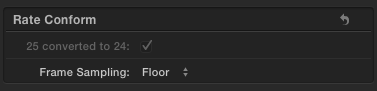
- If your video has very intensive motion or you are experiencing conforming artifacts you can change the way FCP X conforms the video by going to the Inspector > Video tab and selecting a different Frame Sampling method in the Rate Conform section. Rate Conform only appears when video is getting conformed on the timeline, you won't see this option in any other circumstances. You can choose between 4 settings:
Floor is the default setting and it doesn't require rendering. This works very well for most jobs. The other settings are Nearest Neighbor to compensate for motion artifacts and Frame Blending to reduce stuttering, and finally Optical Flow which performs thorough motion analyzing and requires long render times.
- Ronny
When you drop a 24fps clip into a 25fps timeline FCP X will play the original frames at a higher frame rate, which means the clip will play faster and the total duration will be 4% shorter. Audio will stay perfectly in synch, so it also will play faster resulting in a pitch shift.
- If you want to compensate for the pitch shift in FCP X you can use one of the Pitch filters in the FCP X audio section. According to our audio guy the AUPitch filter does a very decent job, and for correcting the pitch on a 24 > 25fps timeline you select the Universal Preset and set Pitch between -90 and -96. If the audio is extremely complex the filter offers many parameters you can tweak, but the default settings will do a great job for most projects.
- If your video has very intensive motion or you are experiencing conforming artifacts you can change the way FCP X conforms the video by going to the Inspector > Video tab and selecting a different Frame Sampling method in the Rate Conform section. Rate Conform only appears when video is getting conformed on the timeline, you won't see this option in any other circumstances. You can choose between 4 settings:
Floor is the default setting and it doesn't require rendering. This works very well for most jobs. The other settings are Nearest Neighbor to compensate for motion artifacts and Frame Blending to reduce stuttering, and finally Optical Flow which performs thorough motion analyzing and requires long render times.
- Ronny
Last edit: 26 Aug 2014 13:51 by ronny courtens.
Please Log in to join the conversation.
- KarlSutton
-
- Offline
- Senior Member
-
Less
More
- Posts: 66
- Thank you received: 2
26 Aug 2014 16:19 #51806
by KarlSutton
Replied by KarlSutton on topic Conforming 23,976fps to 25fps Video with FCPX?
Thanks Ronny - all good info! I'm hoping to use
time factory
to handle the audio. FCPX did a pretty good job with the dialogue but the music is somewhat mangled. I may trry applying different AU filters to the stems first & see if I can get better results that way. Thank you all so much for the help.
Please Log in to join the conversation.
- Mischmaster
-
Topic Author
- Offline
- New Member
-
Less
More
- Posts: 11
- Thank you received: 1
26 Aug 2014 22:05 #51827
by Mischmaster
If you want to get perfect results with Time Factory 2, than you should work on dialogue and music/FX seperately.
Always use the "dirac" codec. For whole mixes, you get the best results with the "standard" setting (but the voices sound a little bit metal and the music is not very clear under 100hz). We prefer to use the "standard" setting for music/fx and the "voice" setting for our dialogue stems. After the pitch, we mix the mfx and dialogue stem together again and we get perfect results. Done with the german version of Game of Thrones and all were happy.
Replied by Mischmaster on topic Conforming 23,976fps to 25fps Video with FCPX?
KarlSutton wrote: Thanks Ronny - all good info! I'm hoping to use time factory to handle the audio. FCPX did a pretty good job with the dialogue but the music is somewhat mangled. I may trry applying different AU filters to the stems first & see if I can get better results that way. Thank you all so much for the help.
If you want to get perfect results with Time Factory 2, than you should work on dialogue and music/FX seperately.
Always use the "dirac" codec. For whole mixes, you get the best results with the "standard" setting (but the voices sound a little bit metal and the music is not very clear under 100hz). We prefer to use the "standard" setting for music/fx and the "voice" setting for our dialogue stems. After the pitch, we mix the mfx and dialogue stem together again and we get perfect results. Done with the german version of Game of Thrones and all were happy.
Please Log in to join the conversation.
16 Oct 2016 18:37 #80821
by Perig
Replied by Perig on topic Conforming 23,976fps to 25fps Video with FCPX?
Hello everyone,
very useful topic, got almost all information I was looking for from it.
Here to the part I am still missing (trying to put a 25fps clip into a 24fps timeline):
How do I get FCPX to NOT conform my 25fps clip in my 24fps timeline.
I other words, is there a way to remove the automatic Rate Conform? (it is ticked but can't be unticked, see attach)
Or in other words, is there a way to drop a clip at any framerate into a timeline and maintain the original length of the clip? (Other than doing the math oneself and apply a custom retime)
I think I managed to to so in compressor (with retiming at 100% and retiming quality at "best - motion compensated" I'm quite sure I take advantage of optical flow), but it implies one more render...
Thanks in advance for your help!
Side question, not so important: what DOES automatic speed do now? It seems to apply the expected retime (a 96% in my case), but it is already conformed, so in my case it just makes the timeline even longer... I'm really confused
very useful topic, got almost all information I was looking for from it.
Here to the part I am still missing (trying to put a 25fps clip into a 24fps timeline):
How do I get FCPX to NOT conform my 25fps clip in my 24fps timeline.
I other words, is there a way to remove the automatic Rate Conform? (it is ticked but can't be unticked, see attach)
Or in other words, is there a way to drop a clip at any framerate into a timeline and maintain the original length of the clip? (Other than doing the math oneself and apply a custom retime)
I think I managed to to so in compressor (with retiming at 100% and retiming quality at "best - motion compensated" I'm quite sure I take advantage of optical flow), but it implies one more render...
Thanks in advance for your help!
Side question, not so important: what DOES automatic speed do now? It seems to apply the expected retime (a 96% in my case), but it is already conformed, so in my case it just makes the timeline even longer... I'm really confused
Please Log in to join the conversation.
