


- Posts: 11
- Thank you received: 1
3 Post Moderation Rule for New Boarders (25 Jan 2021)
New boarders will have their posts moderated - Don't worry if you cannot see your post immediately.
Conforming 23,976fps to 25fps Video with FCPX?
- Mischmaster
-
 Topic Author
- Offline
- New Member
-

Less
More
11 Jul 2014 12:10 #49672
by Mischmaster
Conforming 23,976fps to 25fps Video with FCPX? was created by Mischmaster
Hi,
can someone tell me, how to conform a 23,976fps filmspeed video to 25fps. I'm using FCPX for conforming, cause Compressor is slower and I don't have Cinema Tools.
I'm not sure, if I do it right.
There two ways, I tried, but I'm not sure, which is the correct one.
So I open a new Projekt with 25fps. Then I import the 23,976 movie.
Now, do I need the "retime" function "automatic speed" or not.
Or do I have just to export the video and it has 25fps filmspeed.
I'm not sure, if I just export it, without retiming, only the framerate changes to 25fps, but the video has still 23,976 filmspeed.
Thank for your help!
Michael
can someone tell me, how to conform a 23,976fps filmspeed video to 25fps. I'm using FCPX for conforming, cause Compressor is slower and I don't have Cinema Tools.
I'm not sure, if I do it right.
There two ways, I tried, but I'm not sure, which is the correct one.
So I open a new Projekt with 25fps. Then I import the 23,976 movie.
Now, do I need the "retime" function "automatic speed" or not.
Or do I have just to export the video and it has 25fps filmspeed.
I'm not sure, if I just export it, without retiming, only the framerate changes to 25fps, but the video has still 23,976 filmspeed.
Thank for your help!
Michael
Please Log in to join the conversation.

11 Jul 2014 12:26 - 11 Jul 2014 12:28 #49674
by BenB
Replied by BenB on topic Conforming 23,976fps to 25fps Video with FCPX?
If you use the Automatic Speed function, you will change the duration and speed of the clip. This is a speed effect.
If you don't want to change the timing of the clip, and want a quick and dirty job, drop the 23.98 clip into a 25p Timeline, then export it as a QT file.
If you want a very clean conversion done, use Compressor with frame rate conversion at its highest settings.
If you don't want to change the timing of the clip, and want a quick and dirty job, drop the 23.98 clip into a 25p Timeline, then export it as a QT file.
If you want a very clean conversion done, use Compressor with frame rate conversion at its highest settings.
Last edit: 11 Jul 2014 12:28 by BenB.
Please Log in to join the conversation.
- ronny courtens
-

- Offline
- Moderator
-

Less
More
- Posts: 4455
- Thank you received: 962
11 Jul 2014 12:41 - 11 Jul 2014 12:47 #49675
by ronny courtens
Replied by ronny courtens on topic Conforming 23,976fps to 25fps Video with FCPX?
Just deleted my reply as it was exactly the same as what Ben says.
Just adding:
- Using "Automatic Speed" will produce the most fluent result but it will slightly change the speed of your video (4%). The audio pitch will not be changed. Actually this is Cinema Tools built right into FCP X.
- Dropping the 23.98 clip into a 25p timeline does not alter the speed of the clip but you might get a slightly choppy playback.
- Ronny
Just adding:
- Using "Automatic Speed" will produce the most fluent result but it will slightly change the speed of your video (4%). The audio pitch will not be changed. Actually this is Cinema Tools built right into FCP X.
- Dropping the 23.98 clip into a 25p timeline does not alter the speed of the clip but you might get a slightly choppy playback.
- Ronny
Last edit: 11 Jul 2014 12:47 by ronny courtens.
Please Log in to join the conversation.
- Mischmaster
-
Topic Author
- Offline
- New Member
-
Less
More
- Posts: 11
- Thank you received: 1
11 Jul 2014 12:46 #49677
by Mischmaster
Replied by Mischmaster on topic Conforming 23,976fps to 25fps Video with FCPX?
But isn't Automatic speed function, what I need? The 23,98 video has to run faster, to become a 25fps video. But using automatic speed, the 23,98 and the 25 video are not in sync. Only if I do your quick and dirty job, they are in sync, what makes me wonder.
Please Log in to join the conversation.
11 Jul 2014 12:46 #49678
by BenB
Replied by BenB on topic Conforming 23,976fps to 25fps Video with FCPX?
Compressor may take longer (the new update is MUCH faster), but the quality will be better.
Please Log in to join the conversation.
- Mischmaster
-
Topic Author
- Offline
- New Member
-
Less
More
- Posts: 11
- Thank you received: 1
11 Jul 2014 13:02 #49680
by Mischmaster
Replied by Mischmaster on topic Conforming 23,976fps to 25fps Video with FCPX?
At the Moment, I'm doing an export with Compressor. It takes me 1,5hrs for a 1hr long movie.
I'm using the retiming function "23,98 @ 25". Is that right?
Unfortunately Compressor does not have the option "25 @ 2398", what I also need
The dirty way in FCPX takes about 2 minutes to export.
I'm using the retiming function "23,98 @ 25". Is that right?
Unfortunately Compressor does not have the option "25 @ 2398", what I also need
The dirty way in FCPX takes about 2 minutes to export.
Please Log in to join the conversation.
- Mischmaster
-
Topic Author
- Offline
- New Member
-
Less
More
- Posts: 11
- Thank you received: 1
11 Jul 2014 13:37 #49685
by Mischmaster
Replied by Mischmaster on topic Conforming 23,976fps to 25fps Video with FCPX?
Ok... I did some testing. I have the same video, provided by Warner Bros., in 23,98fps and 25fps filmspeed (!). I want to convert the 23,98 to 25 filmspeed.
I created a new project with 25fps. Then I imported the 23,98fps movie.
Then I used the retime function "automatic speed" and the retime bat says 104,27%. In the retime custom options windows, there is a checkbox "change length". I was checked. Result: The delivered 25fps and the conformed video are NOT in sync. The conformed runs too fast.
Next Test with retime 104,27% and "changed lenght" checkbox is uncheckt. Result: Not in sync
Next test without retime, just exporting the video. Result: Videos ARE in sync.
So, what is the retiming function for. Not for conforming framerates, I think!
I created a new project with 25fps. Then I imported the 23,98fps movie.
Then I used the retime function "automatic speed" and the retime bat says 104,27%. In the retime custom options windows, there is a checkbox "change length". I was checked. Result: The delivered 25fps and the conformed video are NOT in sync. The conformed runs too fast.
Next Test with retime 104,27% and "changed lenght" checkbox is uncheckt. Result: Not in sync
Next test without retime, just exporting the video. Result: Videos ARE in sync.
So, what is the retiming function for. Not for conforming framerates, I think!
Please Log in to join the conversation.
11 Jul 2014 15:25 - 11 Jul 2014 15:31 #49692
by BenB
Replied by BenB on topic Conforming 23,976fps to 25fps Video with FCPX?
It is for "conforming" frame rates. It is not for "transcoding" frame rates. Two very different operations I think you're confusing.
Automatic Speed is a "speed effect", not a transcoding command. It takes all of the original frames, and retimes them to "conform" to the frame rate of the Timeilne. None of the originals are thrown out, nor are fake frames filled in. It simply re-counts the original frames, and re-numbers them to give a fast or slow motion effect.
Example, I shoot in 60fps. I drop that in a 24fps Timeline. I "conform" that clip so that I get a 40% slow motion clip, only using the original frames of my clip. Very clean, in-camera accurate slow motion. That is "conforming", or "retiming" effect not transcoding.
What you're wanting to do is a transcoding operation. You want to transcode from one frame rate to another.
When you set that "Retiming Control" in Compressor, you are changing the speed and duration (timing) of the clip, NOT simply transcoding frame rates.
In Compressor, apply the ProRes (or whatever codec you want to use). Go to the Video section, set the frame rate there. And un-check the Clean Aperture option, it is outdated and silly.
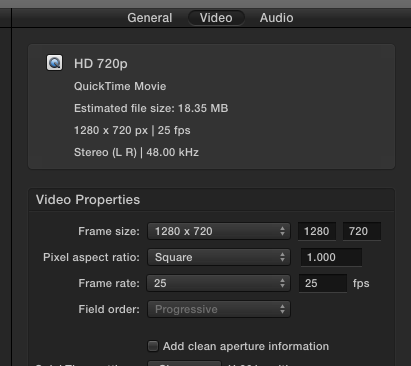
It gets confusing, I know, but that's just how it is. Also, in Compressor set the Retiming Quality to Best, and check Adaptive Details for the best quality transcode. It will take more time, but will give better results. You can have fast and OK quality, or slow and better quality.
OR as you've done, simply drop it in an FCPX Timeline, export, and have a quick, dirty, stuttering version.
But what you've been doing are "retiming" for fast or slow motion special effects.
Automatic Speed is a "speed effect", not a transcoding command. It takes all of the original frames, and retimes them to "conform" to the frame rate of the Timeilne. None of the originals are thrown out, nor are fake frames filled in. It simply re-counts the original frames, and re-numbers them to give a fast or slow motion effect.
Example, I shoot in 60fps. I drop that in a 24fps Timeline. I "conform" that clip so that I get a 40% slow motion clip, only using the original frames of my clip. Very clean, in-camera accurate slow motion. That is "conforming", or "retiming" effect not transcoding.
What you're wanting to do is a transcoding operation. You want to transcode from one frame rate to another.
When you set that "Retiming Control" in Compressor, you are changing the speed and duration (timing) of the clip, NOT simply transcoding frame rates.
In Compressor, apply the ProRes (or whatever codec you want to use). Go to the Video section, set the frame rate there. And un-check the Clean Aperture option, it is outdated and silly.
It gets confusing, I know, but that's just how it is. Also, in Compressor set the Retiming Quality to Best, and check Adaptive Details for the best quality transcode. It will take more time, but will give better results. You can have fast and OK quality, or slow and better quality.
OR as you've done, simply drop it in an FCPX Timeline, export, and have a quick, dirty, stuttering version.
But what you've been doing are "retiming" for fast or slow motion special effects.
Last edit: 11 Jul 2014 15:31 by BenB.
Please Log in to join the conversation.
- Mischmaster
-
Topic Author
- Offline
- New Member
-
Less
More
- Posts: 11
- Thank you received: 1
11 Jul 2014 17:00 - 11 Jul 2014 17:15 #49700
by Mischmaster
Replied by Mischmaster on topic Conforming 23,976fps to 25fps Video with FCPX?
Hi,
thanks for your explanation. Now I understand the issue a little better. But I tried to example with compressor, but it doesn' work. The video is not in sync with the 25fps movie. After compressor, the lenghth of the converted file is as long as zhe 23,98 file. So no filmspeed change has been done. The file was just "sliced" into 25 frames instead the former 23,98 frames.
Finally compressor does not the same like FCPX.
thanks for your explanation. Now I understand the issue a little better. But I tried to example with compressor, but it doesn' work. The video is not in sync with the 25fps movie. After compressor, the lenghth of the converted file is as long as zhe 23,98 file. So no filmspeed change has been done. The file was just "sliced" into 25 frames instead the former 23,98 frames.
Finally compressor does not the same like FCPX.
Last edit: 11 Jul 2014 17:15 by Mischmaster.
Please Log in to join the conversation.
11 Jul 2014 19:38 #49708
by BenB
Replied by BenB on topic Conforming 23,976fps to 25fps Video with FCPX?
OK, now I'm confused. What is your goal, specifically?
1- To have a clip changed from one frame rate to the other with the same duration?
2- Or to have a clip slowed or sped up using all of its original frames?
1- To have a clip changed from one frame rate to the other with the same duration?
2- Or to have a clip slowed or sped up using all of its original frames?
Please Log in to join the conversation.
- Darren Roark
-
- Offline
- Platinum Member
-

11 Jul 2014 20:01 #49711
by Darren Roark
Yeah, that's what I was wondering.
One thing I love about FCP X is how it automatically handles this and does a darn fine job of pitch correcting the audio. But yes, it does change the speed up or down 4% depending which way you go.
I would always prefer that to removing or adding one frame per second to avoid changing the time.
Replied by Darren Roark on topic Conforming 23,976fps to 25fps Video with FCPX?
BenB wrote: OK, now I'm confused. What is your goal, specifically?
1- To have a clip changed from one frame rate to the other with the same duration?
2- Or to have a clip slowed or sped up using all of its original frames?
Yeah, that's what I was wondering.
One thing I love about FCP X is how it automatically handles this and does a darn fine job of pitch correcting the audio. But yes, it does change the speed up or down 4% depending which way you go.
I would always prefer that to removing or adding one frame per second to avoid changing the time.
Please Log in to join the conversation.
12 Jul 2014 02:33 #49722
by BenB
Replied by BenB on topic Conforming 23,976fps to 25fps Video with FCPX?
1- Achieved by dropping the clip in the proper fps timeline, and if desired, exporting a ProRes file. Frame rate transcoded!
2- Achieved by dropping the clip in the proper fps timeline, and using the Automatic Speed command. Slow/Fast motion special effect done!
2- Achieved by dropping the clip in the proper fps timeline, and using the Automatic Speed command. Slow/Fast motion special effect done!
Please Log in to join the conversation.
- Mischmaster
-
Topic Author
- Offline
- New Member
-
Less
More
- Posts: 11
- Thank you received: 1
12 Jul 2014 07:24 - 12 Jul 2014 07:30 #49727
by Mischmaster
Replied by Mischmaster on topic Conforming 23,976fps to 25fps Video with FCPX?
Ok,
I'm working in a dubbing company in Germany. We mostly get movies in filmspeed (!) 23,98fps or 24fps. 23,98 will be for BluRay and 24fps will be for cinemas. But german television in 25fps.
So we are working on Game of Thrones, and we have been delivered two differend videoy. One with filmspeed 23,98, what will be BluRay at the end, and one with 25fps, what will be shown on TV. So, we did the whole dubbing process with the 23,98fps video, then we did a sample rate conversion and a pitchcorrection in ProTools to fit to the 25fps video. Everything is fine.
But sometimes we don't get a 25fps video from our customers, but ony a 23,98fps video. But we have to deliver them a 25fps Audio. So we can't check, if the audio will be in sync with the 25fps video they will use fpr german TV. So I would like to convert the 23,98fps video to 25fps video to have a reference for the sample rate converted audio.
I convert the 23,98fps audio by 4,1% in ProTools to be 25fps filespeed. So the video has to run 4,1% faster too. retiming the 23,98fps video with 104,27% is NOT in sync with 25fps picture, what we have exeptionally get from our customer. So it can't be so hard to do, cause all post production studios in US do this everyday to provide whole europe 25fps video for TV.
Michael
I'm working in a dubbing company in Germany. We mostly get movies in filmspeed (!) 23,98fps or 24fps. 23,98 will be for BluRay and 24fps will be for cinemas. But german television in 25fps.
So we are working on Game of Thrones, and we have been delivered two differend videoy. One with filmspeed 23,98, what will be BluRay at the end, and one with 25fps, what will be shown on TV. So, we did the whole dubbing process with the 23,98fps video, then we did a sample rate conversion and a pitchcorrection in ProTools to fit to the 25fps video. Everything is fine.
But sometimes we don't get a 25fps video from our customers, but ony a 23,98fps video. But we have to deliver them a 25fps Audio. So we can't check, if the audio will be in sync with the 25fps video they will use fpr german TV. So I would like to convert the 23,98fps video to 25fps video to have a reference for the sample rate converted audio.
I convert the 23,98fps audio by 4,1% in ProTools to be 25fps filespeed. So the video has to run 4,1% faster too. retiming the 23,98fps video with 104,27% is NOT in sync with 25fps picture, what we have exeptionally get from our customer. So it can't be so hard to do, cause all post production studios in US do this everyday to provide whole europe 25fps video for TV.
Michael
Last edit: 12 Jul 2014 07:30 by Mischmaster.
Please Log in to join the conversation.
12 Jul 2014 08:21 #49728
by FCPGuy
Check with the Author of this post he helped me out. Looks like he is also from Germany.
Replied by FCPGuy on topic Conforming 23,976fps to 25fps Video with FCPX?
Mischmaster wrote: Ok,
I'm working in a dubbing company in Germany. We mostly get movies in filmspeed (!) 23,98fps or 24fps. 23,98 will be for BluRay and 24fps will be for cinemas. But german television in 25fps.
So we are working on Game of Thrones, and we have been delivered two differend videoy. One with filmspeed 23,98, what will be BluRay at the end, and one with 25fps, what will be shown on TV. So, we did the whole dubbing process with the 23,98fps video, then we did a sample rate conversion and a pitchcorrection in ProTools to fit to the 25fps video. Everything is fine.
But sometimes we don't get a 25fps video from our customers, but ony a 23,98fps video. But we have to deliver them a 25fps Audio. So we can't check, if the audio will be in sync with the 25fps video they will use fpr german TV. So I would like to convert the 23,98fps video to 25fps video to have a reference for the sample rate converted audio.
I convert the 23,98fps audio by 4,1% in ProTools to be 25fps filespeed. So the video has to run 4,1% faster too. retiming the 23,98fps video with 104,27% is NOT in sync with 25fps picture, what we have exeptionally get from our customer. So it can't be so hard to do, cause all post production studios in US do this everyday to provide whole europe 25fps video for TV.
Michael
Check with the Author of this post he helped me out. Looks like he is also from Germany.
Please Log in to join the conversation.
- Mischmaster
-
Topic Author
- Offline
- New Member
-
Less
More
- Posts: 11
- Thank you received: 1
13 Jul 2014 07:02 #49770
by Mischmaster
Replied by Mischmaster on topic Conforming 23,976fps to 25fps Video with FCPX?
Thanks for the hint, but he isn't answering.
Anyone else got an idea?
Actually I got an solution. Just putting a 23,98 video in a 25fps timeline and export (no retiming). Then the new 25fps video runs at 25fps filmspeed. But thats not logical for me.
Anyone else got an idea?
Actually I got an solution. Just putting a 23,98 video in a 25fps timeline and export (no retiming). Then the new 25fps video runs at 25fps filmspeed. But thats not logical for me.
Please Log in to join the conversation.
- Andreas Kiel
-
- Offline
- Platinum Member
-
Less
More
- Posts: 1077
- Thank you received: 189
13 Jul 2014 11:15 #49779
by Andreas Kiel
Replied by Andreas Kiel on topic Conforming 23,976fps to 25fps Video with FCPX?
I think many clever people here have already explained the options and what happens when and why.
Understanding "video" also means understanding the difference between NTSC and non NTSC format.
A 23.976 fps format is actually 24 fps but each frame needs a longer time to display (1001/1000).
Therefore the time for a 23.976 movie is about that time longer.
If you make a simple conform from 23.976 to 24 the audio will run out of sync.
Let's say audio is 48000 Hz sampling rate – means 48000 samples per real world time second.
Since the the 24 fps video now also runs on real world time seconds audio and video don't match any more – too many samples.
So simple solution just change the sample rate to match - this no quality loss as all samples are still there.
The needed sample rate will be 48048 Hz and the audio will match.
Once you have the 24 fps version you can use the standard 24->25 procedure.
Anyway, if you are working in dubbing company shouldn't there be a Teranex?
- Andreas
Understanding "video" also means understanding the difference between NTSC and non NTSC format.
A 23.976 fps format is actually 24 fps but each frame needs a longer time to display (1001/1000).
Therefore the time for a 23.976 movie is about that time longer.
If you make a simple conform from 23.976 to 24 the audio will run out of sync.
Let's say audio is 48000 Hz sampling rate – means 48000 samples per real world time second.
Since the the 24 fps video now also runs on real world time seconds audio and video don't match any more – too many samples.
So simple solution just change the sample rate to match - this no quality loss as all samples are still there.
The needed sample rate will be 48048 Hz and the audio will match.
Once you have the 24 fps version you can use the standard 24->25 procedure.
Anyway, if you are working in dubbing company shouldn't there be a Teranex?
- Andreas
Please Log in to join the conversation.
- Mischmaster
-
Topic Author
- Offline
- New Member
-
Less
More
- Posts: 11
- Thank you received: 1
13 Jul 2014 11:30 #49781
by Mischmaster
Replied by Mischmaster on topic Conforming 23,976fps to 25fps Video with FCPX?
Hi,
conforming the audio is not the problem. I do this everyday in ProTools. But conforming the video is the question!
We don't need a Teranex, because normally we get the right videos delivered. But in some cases, I want do conform the video to another filmspeed. And there for I want to use FCPX or compressor. But no one has the answer, how to conform video with that...
conforming the audio is not the problem. I do this everyday in ProTools. But conforming the video is the question!
We don't need a Teranex, because normally we get the right videos delivered. But in some cases, I want do conform the video to another filmspeed. And there for I want to use FCPX or compressor. But no one has the answer, how to conform video with that...
Please Log in to join the conversation.
- Andreas Kiel
-
- Offline
- Platinum Member
-
Less
More
- Posts: 1077
- Thank you received: 189
13 Jul 2014 12:27 #49783
by Andreas Kiel
Replied by Andreas Kiel on topic Conforming 23,976fps to 25fps Video with FCPX?
May my explanation wasn't that good.
Here another try. As said 23.976 actually is "24 @ slow seconds"
( frameDuration="1001/24000s < - >frameDuration="1000/24000s")
So a 1 hour 23.976 movie will take 1.001 hours to reach the last frame.
To make the 24 movie the same runtime (3.6 second more = 0.01%) as the NTSC one is just degrading quality and totally senseless.
And in this case you don't need ProTools at all – nobody will hear the 0.01% pitch.
From 24 to 25 is just a matter of taste. Most of the movies in TV with 24 are just converted by playback speed to 25 and the pitch is adjusted which you can do in FCP X. Okay in this case you got a 4.2% time difference, maybe the producer doesn't like. Then try pulldown inserting frames or go the painful way.
As others asked: where is the problem?
- Andreas
Here another try. As said 23.976 actually is "24 @ slow seconds"
( frameDuration="1001/24000s < - >frameDuration="1000/24000s")
So a 1 hour 23.976 movie will take 1.001 hours to reach the last frame.
To make the 24 movie the same runtime (3.6 second more = 0.01%) as the NTSC one is just degrading quality and totally senseless.
And in this case you don't need ProTools at all – nobody will hear the 0.01% pitch.
From 24 to 25 is just a matter of taste. Most of the movies in TV with 24 are just converted by playback speed to 25 and the pitch is adjusted which you can do in FCP X. Okay in this case you got a 4.2% time difference, maybe the producer doesn't like. Then try pulldown inserting frames or go the painful way.
As others asked: where is the problem?
- Andreas
Please Log in to join the conversation.
- ronny courtens
-
- Offline
- Moderator
-
Less
More
- Posts: 4455
- Thank you received: 962
13 Jul 2014 13:04 - 13 Jul 2014 13:08 #49785
by ronny courtens
Replied by ronny courtens on topic Conforming 23,976fps to 25fps Video with FCPX?
But in some cases, I want do conform the video to another filmspeed. And there for I want to use FCPX or compressor. But no one has the answer, how to conform video with that...
Everyone here has gone into every length to explain exactly how to do this, so maybe the problem is that you are not listening? I will recap the replies in two steps.
First a general explanation on how 24fps masters (video and audio) get conformed to 25fps for broadcasting in Europe:
- In our studio in Paris we conform 24 to 25 on a daily basis and if the 25fps video needs to have exactly the same length as the 24 fps master we use an Alchemist to make the highest quality video conversion. Audio gets separately conformed in ProTools and both get assembled in FCP X for final export.
- Most of our clients do NOT want this. Many 24fps programs that need to be converted to 25fps for broadcasting in Europe are converted to 25fps masters that run 4% faster without changing the audio pitch. This is an easier and higher quality conforming process and no-one notices the 4% speed difference anyway. In these cases we just use Automatic Speed in FCP X to convert the 24fps master to a new 25 master that runs 4% faster. The converted video and audio quality are excellent (we now use ProRes 4444 XQ) and the process is fast, we never need ProTools nor any external hardware video converter for any of this.
This conversion method is also preferred for BBC deliveries (from the BBC Delivery Standards Guidelines): Currently speed change is the preferred method of changing between 24fps (including 23.98) and 25fps standards.
Now back to your specific question:
If you only need to conform a 23.98 fps movie file to 25 fps to check if your conformed audio from ProTools will be in sync with a 25fps video master that you don't have, both FCP X and Compressor will do a great job. This is easiest in FCP X:
- import the 23.98 fps video in FCP X
- create a 25 fps project (choose Custom settings and set Frame Rate to 25 fps)
- drop the 23.98 fps video onto the 25 fps timeline and export as a master file
This procedure conforms the video frame rate from 23.98 to 25 fps without changing the actual length of the program, so your "25 fps" ProTools audio should be in sync with your exported 25 fps video. You have already mentioned that this method works and that your audio is in sync, so what more can we say?
- Ronny
Everyone here has gone into every length to explain exactly how to do this, so maybe the problem is that you are not listening? I will recap the replies in two steps.
First a general explanation on how 24fps masters (video and audio) get conformed to 25fps for broadcasting in Europe:
- In our studio in Paris we conform 24 to 25 on a daily basis and if the 25fps video needs to have exactly the same length as the 24 fps master we use an Alchemist to make the highest quality video conversion. Audio gets separately conformed in ProTools and both get assembled in FCP X for final export.
- Most of our clients do NOT want this. Many 24fps programs that need to be converted to 25fps for broadcasting in Europe are converted to 25fps masters that run 4% faster without changing the audio pitch. This is an easier and higher quality conforming process and no-one notices the 4% speed difference anyway. In these cases we just use Automatic Speed in FCP X to convert the 24fps master to a new 25 master that runs 4% faster. The converted video and audio quality are excellent (we now use ProRes 4444 XQ) and the process is fast, we never need ProTools nor any external hardware video converter for any of this.
This conversion method is also preferred for BBC deliveries (from the BBC Delivery Standards Guidelines): Currently speed change is the preferred method of changing between 24fps (including 23.98) and 25fps standards.
Now back to your specific question:
If you only need to conform a 23.98 fps movie file to 25 fps to check if your conformed audio from ProTools will be in sync with a 25fps video master that you don't have, both FCP X and Compressor will do a great job. This is easiest in FCP X:
- import the 23.98 fps video in FCP X
- create a 25 fps project (choose Custom settings and set Frame Rate to 25 fps)
- drop the 23.98 fps video onto the 25 fps timeline and export as a master file
This procedure conforms the video frame rate from 23.98 to 25 fps without changing the actual length of the program, so your "25 fps" ProTools audio should be in sync with your exported 25 fps video. You have already mentioned that this method works and that your audio is in sync, so what more can we say?
- Ronny
Last edit: 13 Jul 2014 13:08 by ronny courtens.
Please Log in to join the conversation.
- Andreas Kiel
-
- Offline
- Platinum Member
-
Less
More
- Posts: 1077
- Thank you received: 189
13 Jul 2014 14:09 #49792
by Andreas Kiel
Replied by Andreas Kiel on topic Conforming 23,976fps to 25fps Video with FCPX?
Ronny,
Excellent summary!
- Andreas
Excellent summary!
- Andreas
Please Log in to join the conversation.
