


- Posts: 213
- Thank you received: 30
3 Post Moderation Rule for New Boarders (25 Jan 2021)
New boarders will have their posts moderated - Don't worry if you cannot see your post immediately.
10.1.2 Bug report
04 Jul 2014 16:08 #49187
by FernKraft
Replied by FernKraft on topic 10.1.2 Bug report
Thanks BenB! Very curious situation we are in. I'm Glad, and a little sad to know I'm not alone in this. I'm interested as to how this will effect our 3rd party sound mix... I've always loved that FCPX made wave files, but this, this is a little odd.
Please Log in to join the conversation.
- ronny courtens
-

- Offline
- Moderator
-

Less
More
- Posts: 4455
- Thank you received: 962
04 Jul 2014 19:33 #49194
by ronny courtens
Replied by ronny courtens on topic 10.1.2 Bug report
FCP X has always optimized MP3 audio files. This is from the apple support pages:
For better import and playback performance, Final Cut Pro automatically transcodes all MP3 audio files to WAV audio files. When transcoding files, Final Cut Pro always retains the original media for future use.
As the paper says: in earlier versions MP3 was optimized to WAV. Since 10.1.2 MP3 gets optimized to AIFF-C "sowt" (uncompressed PCM little-endian). When you import an MP3 file in an Event FCP X automatically creates an optimized AIFF file. This file is wrapped in a .mov container but it's an audio-only PCM file.
These are the specifications of such a file in FCP X:
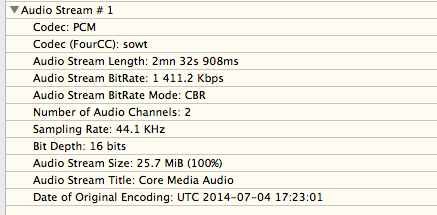
So nothing really has changed except for the format. If you don't want to use the optimized file you can easily delete it from the Optimized Media folder and it will not reappear until you decide to manually optimize the MP3 file again. This has no influence at all on sending projects to external DAWs as the exported XML always refers to the original media and not to any optimized or proxy media.
- Ronny
For better import and playback performance, Final Cut Pro automatically transcodes all MP3 audio files to WAV audio files. When transcoding files, Final Cut Pro always retains the original media for future use.
As the paper says: in earlier versions MP3 was optimized to WAV. Since 10.1.2 MP3 gets optimized to AIFF-C "sowt" (uncompressed PCM little-endian). When you import an MP3 file in an Event FCP X automatically creates an optimized AIFF file. This file is wrapped in a .mov container but it's an audio-only PCM file.
These are the specifications of such a file in FCP X:
So nothing really has changed except for the format. If you don't want to use the optimized file you can easily delete it from the Optimized Media folder and it will not reappear until you decide to manually optimize the MP3 file again. This has no influence at all on sending projects to external DAWs as the exported XML always refers to the original media and not to any optimized or proxy media.
- Ronny
Please Log in to join the conversation.
- Darren Roark
-

- Offline
- Platinum Member
-

04 Jul 2014 19:55 #49195
by Darren Roark
XtoPro converts everything to wav files when the AAF is made, so it shouldn't affect your sound mixes.
Replied by Darren Roark on topic 10.1.2 Bug report
FernKraft wrote: Thanks BenB! Very curious situation we are in. I'm Glad, and a little sad to know I'm not alone in this. I'm interested as to how this will effect our 3rd party sound mix... I've always loved that FCPX made wave files, but this, this is a little odd.
XtoPro converts everything to wav files when the AAF is made, so it shouldn't affect your sound mixes.
Please Log in to join the conversation.
- Tom Wolsky
-

- Offline
- Moderator
-
04 Jul 2014 20:34 #49197
by Tom Wolsky
Replied by Tom Wolsky on topic 10.1.2 Bug report
As always reveal in Finder takes you to the original file location, but oddly the inspector doesn't show that there is a transcoded version though the mov file is in High Quality folder. Not sure what the benefit of making it a QuickTime though rather than AIFF or WAV. Probably some AV Foundation thing.
Please Log in to join the conversation.
- ronny courtens
-
- Offline
- Moderator
-
Less
More
- Posts: 4455
- Thank you received: 962
04 Jul 2014 20:38 #49199
by ronny courtens
Replied by ronny courtens on topic 10.1.2 Bug report
There is no benefit at all, it's just a .mov container with an AIFF file inside. It's not really important either as the file is only used for optimizing playback and nothing else.
- Ronny
- Ronny
Please Log in to join the conversation.
05 Jul 2014 00:06 #49213
by FernKraft
Replied by FernKraft on topic 10.1.2 Bug report
Thanks Ronny, that is good to hear.
by the way, what paper are you referring too?
by the way, what paper are you referring too?
Please Log in to join the conversation.
- ronny courtens
-
- Offline
- Moderator
-
Less
More
- Posts: 4455
- Thank you received: 962
05 Jul 2014 04:34 #49217
by ronny courtens
Replied by ronny courtens on topic 10.1.2 Bug report
Hi Marcel,
I was referring to the apple support page on optimizing media: support.apple.com/kb/PH12702
- Ronny
I was referring to the apple support page on optimizing media: support.apple.com/kb/PH12702
- Ronny
Please Log in to join the conversation.
09 Jul 2014 21:20 #49551
by Julian
Replied by Julian on topic 10.1.2 Bug report
So I've got a weird bug. For some reason I am unable to add cross dissolves or fade to color (among others) to my multi cam clips. But if I go and add the new "color panels" transition to the clip, I can then replace the color panels with the dissolve or fade to color. This happened on a new project created in 10.1.2 as well as one updated for 10.1.2.
Please Log in to join the conversation.
09 Jul 2014 22:14 #49554
by JasonP
I am not able to replicate that bug. Adding transitions (cross dissolve, fade to color, and checkerboard) to a multicam clip works fine both by selecting the edit and double clicking the transition in the browser and by dragging the transition onto the edit.
Replied by JasonP on topic 10.1.2 Bug report
Julian wrote: So I've got a weird bug. For some reason I am unable to add cross dissolves or fade to color (among others) to my multi cam clips. But if I go and add the new "color panels" transition to the clip, I can then replace the color panels with the dissolve or fade to color. This happened on a new project created in 10.1.2 as well as one updated for 10.1.2.
I am not able to replicate that bug. Adding transitions (cross dissolve, fade to color, and checkerboard) to a multicam clip works fine both by selecting the edit and double clicking the transition in the browser and by dragging the transition onto the edit.
Please Log in to join the conversation.
- Tom Wolsky
-
- Offline
- Moderator
-
09 Jul 2014 22:20 #49555
by Tom Wolsky
Replied by Tom Wolsky on topic 10.1.2 Bug report
Can any one repro this one?
Please Log in to join the conversation.
- ronny courtens
-
- Offline
- Moderator
-
Less
More
- Posts: 4455
- Thank you received: 962
09 Jul 2014 22:51 - 09 Jul 2014 22:52 #49556
by ronny courtens
Replied by ronny courtens on topic 10.1.2 Bug report
Nope, everything working as expected here. I can add cross-dissolve and fade-to-color as well as any other transition either by double-clicking or by dragging.
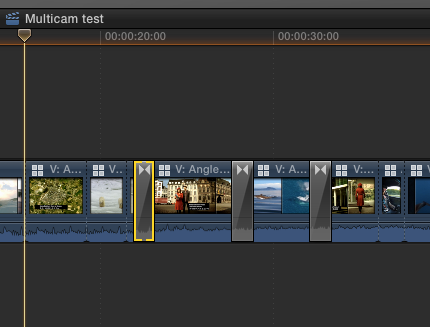
Julian: maybe you can refresh your FCP X preferences and see if this solves your problem.
- Ronny
Julian: maybe you can refresh your FCP X preferences and see if this solves your problem.
- Ronny
Last edit: 09 Jul 2014 22:52 by ronny courtens.
Please Log in to join the conversation.
09 Jul 2014 23:13 #49558
by tpayton
BTW. You can now do this by holding down command-option while launching FCPX (you have to do it as you click on the app icon).
Replied by tpayton on topic 10.1.2 Bug report
ronny courtens wrote: Julian: maybe you can refresh your FCP X preferences and see if this solves your problem.
BTW. You can now do this by holding down command-option while launching FCPX (you have to do it as you click on the app icon).
Please Log in to join the conversation.
- verstaerker
-

- Offline
- Senior Member
-

Less
More
- Posts: 67
- Thank you received: 0
11 Jul 2014 11:08 - 11 Jul 2014 11:42 #49666
by verstaerker
Replied by verstaerker on topic 10.1.2 Bug report
i'm getting an really annoying one wich i've never encountered in former version
when doing bg-rendering it's rendering certain parts over and over again .. never finishes
the console is full of:
11.07.14 13:01:03,619 Final Cut Pro[521]: AVF error: Perf capability check failed: 0xe00002be
11.07.14 13:01:03,619 Final Cut Pro[521]: AVF error: Branch_QT0::pushBits, Context Creation Failed.
11.07.14 13:01:11,469 Final Cut Pro[521]: CoreAnimation: warning, deleted thread with uncommitted CATransaction; set CA_DEBUG_TRANSACTIONS=1 in environment to log backtraces.
anyone ever seen this and has any advice for me?
i can reproduce by using the frame-hold function and use frame blending as quality
when doing bg-rendering it's rendering certain parts over and over again .. never finishes
the console is full of:
11.07.14 13:01:03,619 Final Cut Pro[521]: AVF error: Perf capability check failed: 0xe00002be
11.07.14 13:01:03,619 Final Cut Pro[521]: AVF error: Branch_QT0::pushBits, Context Creation Failed.
11.07.14 13:01:11,469 Final Cut Pro[521]: CoreAnimation: warning, deleted thread with uncommitted CATransaction; set CA_DEBUG_TRANSACTIONS=1 in environment to log backtraces.
anyone ever seen this and has any advice for me?
i can reproduce by using the frame-hold function and use frame blending as quality
Last edit: 11 Jul 2014 11:42 by verstaerker.
Please Log in to join the conversation.
- ronny courtens
-
- Offline
- Moderator
-
Less
More
- Posts: 4455
- Thank you received: 962
11 Jul 2014 11:46 #49668
by ronny courtens
Replied by ronny courtens on topic 10.1.2 Bug report
Either you have corrupt media or effects on the timeline, or you have conflicting render files due to constant Background Rendering. Try this:
- Disable background rendering (most people leave this off by default).
- Select your Project icon in the Browser and choose File > Delete Generated Project Files.
- In the window that pops up select Delete Render Files and press OK.
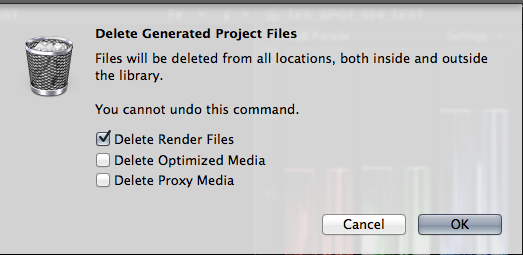
- Now re-render your timeline manually (SHIFT+CTRL+R). Do NOT use Background Rendering.
When the timeline is rendered check if you still see orange lines anywhere. If not: all is well and you only had conflicting render files caused by background rendering. If you do see orange lines: check the clips on which the lines appear. You may have to replace them.
- Ronny
- Disable background rendering (most people leave this off by default).
- Select your Project icon in the Browser and choose File > Delete Generated Project Files.
- In the window that pops up select Delete Render Files and press OK.
- Now re-render your timeline manually (SHIFT+CTRL+R). Do NOT use Background Rendering.
When the timeline is rendered check if you still see orange lines anywhere. If not: all is well and you only had conflicting render files caused by background rendering. If you do see orange lines: check the clips on which the lines appear. You may have to replace them.
- Ronny
Please Log in to join the conversation.
- verstaerker
-
- Offline
- Senior Member
-
Less
More
- Posts: 67
- Thank you received: 0
11 Jul 2014 11:55 #49669
by verstaerker
Replied by verstaerker on topic 10.1.2 Bug report
thx for your answer .. i tried what you suggested, but when i manually render the clip with frame hold and frame blending it won't render it and i have to restart FCP
i will feedback apple about it
i will feedback apple about it
Please Log in to join the conversation.
