


3 Post Moderation Rule for New Boarders (25 Jan 2021)
New boarders will have their posts moderated - Don't worry if you cannot see your post immediately.
Timecode Issues with a GoPro Black Hero 3+

Please Log in to join the conversation.
BenB wrote: Ah, what is called "free run" timecode. TOD was always the actual time and date timecode (as 24 hour time and the date, not "timecode") written to a tape or encoded file. This terminology must be changing. First I've heard Free-Run referred to as TOD.
It might be a regional and/or job function difference. I've always been asked by camera people if I wanted "normal" or "time of day" timecode while VT/engineers ask "Record Run" or "Free Run".
Please Log in to join the conversation.
- Andreas Kiel
-

- Offline
- Platinum Member
-

- Posts: 1077
- Thank you received: 189
philbh wrote: It might be a regional and/or job function difference. I've always been asked by camera people if I wanted "normal" or "time of day" timecode while VT/engineers ask "Record Run" or "Free Run".
I agree. Most companies/productions I worked with use TOD (just the word) as a TC created by an external device witch feeds the cams running "free run". Also some cams can be jam synched with a master (cam) at the "time of day".
Using the date included is unusable. But it can be helpful working with DSLRs or cams like GoPro.
As mentioned earlier you need a custom workflow for that to add this as metadata.
- Andreas
Please Log in to join the conversation.
Please Log in to join the conversation.
- Scott Markowitz
-
- Offline
- Elite Member
-

- Posts: 161
- Thank you received: 31
While FCPX provides tools to make dealing with 0 hour timecode manageable, it's still problematic at times.
If you need to conform your work in Autodesk Smoke or Resolve, then there can be major headaches trying to figure out which clips belong where. The tools all around are getting better at dealing with these situations.
However, I think that the camera manufacturers should take notice that a TOD- or running Timecode- is far more useful in any editing situation.
In this day and age, there is no excuse (IMHO) for any camera to record 0 hour code. The camera should be doing as much as possible to make distinguishing between clips easier.
In the mean time, it's a good idea to make mezzanine files- with discreet timecode from file to file- before importing into your FCPX job. Especially if you're going to be making any XML trips out of the app for audio, color, or FX.
I encourage everyone to send feedback to the camera manufacturers that you deal with about this issue.
(With everyone's help, we can wipe out 0 hour timecode in our lifetime.)

Please Log in to join the conversation.
- magnus.nilsson
-
- Offline
- New Member
-

- Posts: 1
- Thank you received: 0
BenB wrote: Mine correspond to the framer rate. The super high frame rates all start at zero, the normal frame rates start at the running tc time.
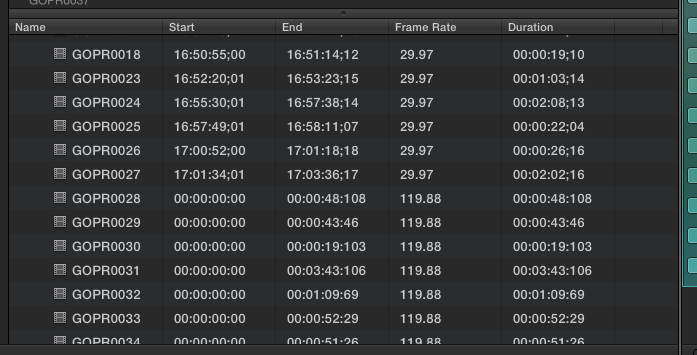
I am really new to editing. My friends Hero 3+ does the same when we shoot 1080/60, time code starts at 0. Very bad when we use multiple cameras and try to get it in sync later. Any good workarounds (besides shooting in 1080/30 instead).
Please Log in to join the conversation.
