


- Posts: 177
- Thank you received: 12
3 Post Moderation Rule for New Boarders (25 Jan 2021)
New boarders will have their posts moderated - Don't worry if you cannot see your post immediately.
Timecode Issues with a GoPro Black Hero 3+
- Nervebroke
-
 Topic Author
- Offline
- Elite Member
-

Less
More
24 Jun 2014 00:14 #48317
by Nervebroke
Timecode Issues with a GoPro Black Hero 3+ was created by Nervebroke
I have a problem. When ever I ingest video from my GoPro Black Hero3+ camera into FCPX I get the time the video was shot, in Hrs Min Sec. Not the running time of the clip. I am having a very hard time trying to explain. I will try and make a video to show.
I am using FCPX 10.1.1
it is the same on my Late 2013 iMac or my mid 2012 MacBook Pro
Any one with a GoPro Black Hero3+ have this issue? My regular GoPro Black Hero does not have this issue.
At a loss
Dave
I am using FCPX 10.1.1
it is the same on my Late 2013 iMac or my mid 2012 MacBook Pro
Any one with a GoPro Black Hero3+ have this issue? My regular GoPro Black Hero does not have this issue.
At a loss
Dave
Please Log in to join the conversation.

24 Jun 2014 02:42 #48329
by BenB
Replied by BenB on topic Timecode Issues with a GoPro Black Hero 3+
I'm not understanding. Are you saying the timecode in the Dashboard is showing that? Or the name of the clips are the creation date/time?
I have a GoPro Black also, three of them, and their fine. They do ingest with the creation date/time, but you just select them all in the Browser, go to the Modify menu, to Apply Custom Name, and select Original Name From Camera.
I have a GoPro Black also, three of them, and their fine. They do ingest with the creation date/time, but you just select them all in the Browser, go to the Modify menu, to Apply Custom Name, and select Original Name From Camera.
Please Log in to join the conversation.
- Nervebroke
-
Topic Author
- Offline
- Elite Member
-
Less
More
- Posts: 177
- Thank you received: 12
24 Jun 2014 03:28 #48332
by Nervebroke
Replied by Nervebroke on topic Timecode Issues with a GoPro Black Hero 3+
I have no way of trying to explain this. I will get some screen grabs and put them up.
Please Log in to join the conversation.
- Nervebroke
-
Topic Author
- Offline
- Elite Member
-
Less
More
- Posts: 177
- Thank you received: 12
24 Jun 2014 03:50 - 24 Jun 2014 03:50 #48334
by Nervebroke
Replied by Nervebroke on topic Timecode Issues with a GoPro Black Hero 3+
Ok.
Here is the screen shot of the import window
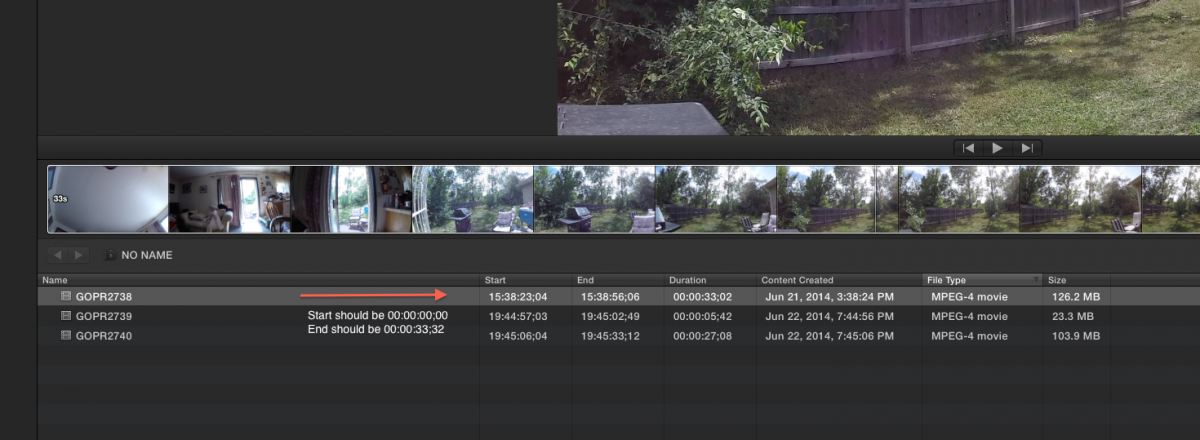
Here is the screen shot of the import window
Last edit: 24 Jun 2014 03:50 by Nervebroke.
Please Log in to join the conversation.
- Nervebroke
-
Topic Author
- Offline
- Elite Member
-
Less
More
- Posts: 177
- Thank you received: 12
24 Jun 2014 03:55 - 24 Jun 2014 04:00 #48335
by Nervebroke
Replied by Nervebroke on topic Timecode Issues with a GoPro Black Hero 3+
Sorry I am having issues adding png's
Last edit: 24 Jun 2014 04:00 by Nervebroke. Reason: issues adding images
Please Log in to join the conversation.
- Nervebroke
-
Topic Author
- Offline
- Elite Member
-
Less
More
- Posts: 177
- Thank you received: 12
24 Jun 2014 04:02 - 24 Jun 2014 04:04 #48336
by Nervebroke
Replied by Nervebroke on topic Timecode Issues with a GoPro Black Hero 3+
It will not let me add anymore screen shots so I guess I will have to make a video and put a link on you tube
Last edit: 24 Jun 2014 04:04 by Nervebroke. Reason: poor forum skills I guess
Please Log in to join the conversation.
24 Jun 2014 04:14 #48337
by BenB
Replied by BenB on topic Timecode Issues with a GoPro Black Hero 3+
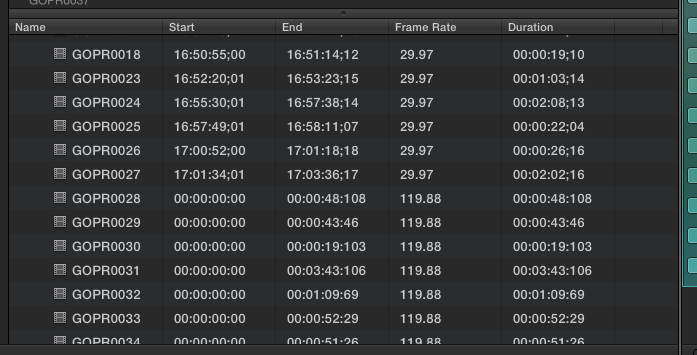
Mine correspond to the framer rate. The super high frame rates all start at zero, the normal frame rates start at the running tc time.
Please Log in to join the conversation.
- Nervebroke
-
Topic Author
- Offline
- Elite Member
-
Less
More
- Posts: 177
- Thank you received: 12
24 Jun 2014 04:28 #48339
by Nervebroke
Replied by Nervebroke on topic Timecode Issues with a GoPro Black Hero 3+
Ben
Thanks.
I will have to do some testing with frame rates higher than 60fps.
I guess I can delete the quick video I was making
Dave
Thanks.
I will have to do some testing with frame rates higher than 60fps.
I guess I can delete the quick video I was making
Dave
Please Log in to join the conversation.

24 Jun 2014 19:11 #48396
by philbh
Replied by philbh on topic Timecode Issues with a GoPro Black Hero 3+
Why do you want your timecode to start at 00:00:00:00? Having every clip use the record time for timecode is perfect - from a post production perspective.
One of the greatest upgrades on the Canon 5D mark III was that it recorded time of day as the clips timecode, it really helped locate clips quickly.
One of the greatest upgrades on the Canon 5D mark III was that it recorded time of day as the clips timecode, it really helped locate clips quickly.
Please Log in to join the conversation.
- Nervebroke
-
Topic Author
- Offline
- Elite Member
-
Less
More
- Posts: 177
- Thank you received: 12
24 Jun 2014 23:36 #48409
by Nervebroke
Replied by Nervebroke on topic Timecode Issues with a GoPro Black Hero 3+
That is not the issue. The problem is when you import the footage into an event and scrub over the clip, in the event viewer the time code shows the time of day the video was shot. If you open it in its own timeline it still shows the time of day the video was shot. Now if you drop it into a "Project" then the timecode shows the duration of the clip. This is the only camera I have that does this. I know hard to explain.
Dave
Dave
Please Log in to join the conversation.
24 Jun 2014 23:45 - 24 Jun 2014 23:46 #48410
by BenB
Replied by BenB on topic Timecode Issues with a GoPro Black Hero 3+
OK, what do you mean by time of day? The scrubber doesn't show that for anything, it shows hour:minute:second:frame, not time of day.
And for the way I edit, the stuff I edit, I actually prefer all my clips to start at 0. Actually, it makes no difference to me. Some editors use/need it, some don't, it is not a universal.
And for the way I edit, the stuff I edit, I actually prefer all my clips to start at 0. Actually, it makes no difference to me. Some editors use/need it, some don't, it is not a universal.
Last edit: 24 Jun 2014 23:46 by BenB.
Please Log in to join the conversation.
- Nervebroke
-
Topic Author
- Offline
- Elite Member
-
Less
More
- Posts: 177
- Thank you received: 12
24 Jun 2014 23:52 - 24 Jun 2014 23:54 #48412
by Nervebroke
Replied by Nervebroke on topic Timecode Issues with a GoPro Black Hero 3+
This clip is being scrubbed in the event browser. I shows the time of day the video was shot on that day not the clip duration.
Dave
sorry I can not get the png to post so never mind until I can get a video up
Dave
sorry I can not get the png to post so never mind until I can get a video up
Last edit: 24 Jun 2014 23:54 by Nervebroke.
Please Log in to join the conversation.
- Darren Roark
-
- Offline
- Platinum Member
-

25 Jun 2014 00:44 - 25 Jun 2014 00:47 #48418
by Darren Roark
Replied by Darren Roark on topic Timecode Issues with a GoPro Black Hero 3+
I don't think there is a way to change the clips displayed timecode to clip length in the event. There is a less than convenient workaround. You can make a project with all your go pro clips, then one by one, make them compound clips.
They will be in the event starting at 00:00:00
Compound clips cause some system slowdowns in some cases, so it's not perfect.
They will be in the event starting at 00:00:00
Compound clips cause some system slowdowns in some cases, so it's not perfect.
Last edit: 25 Jun 2014 00:47 by Darren Roark. Reason: added
Please Log in to join the conversation.
- Nervebroke
-
Topic Author
- Offline
- Elite Member
-
Less
More
- Posts: 177
- Thank you received: 12
25 Jun 2014 01:25 - 25 Jun 2014 03:47 #48420
by Nervebroke
Replied by Nervebroke on topic Timecode Issues with a GoPro Black Hero 3+
Darren.
Thanks! you understand what I was trying to say. The other workaround is to use MPEG streamclips and convert them to ProRes. I am going to try compressor and see if that works. Like I have said this is the only GoPro camera I have that does this.
Thanks! you understand what I was trying to say. The other workaround is to use MPEG streamclips and convert them to ProRes. I am going to try compressor and see if that works. Like I have said this is the only GoPro camera I have that does this.
Last edit: 25 Jun 2014 03:47 by Nervebroke. Reason: typo
Please Log in to join the conversation.
25 Jun 2014 04:09 #48436
by BenB
Replied by BenB on topic Timecode Issues with a GoPro Black Hero 3+
I've never seen that, I'd have to see a screen shot. I use GoPro constantly, and never had this issue, as it has been described.
Please Log in to join the conversation.
- Nervebroke
-
Topic Author
- Offline
- Elite Member
-
Less
More
- Posts: 177
- Thank you received: 12
25 Jun 2014 04:17 #48438
by Nervebroke
Replied by Nervebroke on topic Timecode Issues with a GoPro Black Hero 3+
I will but for some reason the new site will not let me upload any images other than the 1st one I posted.
Please Log in to join the conversation.
- Andreas Kiel
-
- Offline
- Platinum Member
-
Less
More
- Posts: 1077
- Thank you received: 189
25 Jun 2014 07:13 #48440
by Andreas Kiel
Replied by Andreas Kiel on topic Timecode Issues with a GoPro Black Hero 3+
I also still don't understand the problem.
Screenshots would be really helpful. Maybe you can post some on Dropbox or a similar service.
- Andreas
P.S.
I love the TOD TC.
For a private movie we used 4 GoPros mounted on 2 moto bikes. First bike 1 helmet, 1 fixed front, 1 fixed back, other bike 1 fixed front. TOD TC is the only way to sync the cams (more or less)
Screenshots would be really helpful. Maybe you can post some on Dropbox or a similar service.
- Andreas
P.S.
I love the TOD TC.
For a private movie we used 4 GoPros mounted on 2 moto bikes. First bike 1 helmet, 1 fixed front, 1 fixed back, other bike 1 fixed front. TOD TC is the only way to sync the cams (more or less)
Please Log in to join the conversation.
25 Jun 2014 07:37 #48442
by Seanus
Sean Lander - Editing since 1982 - AVID 1991 - FCP 1999 - FCPX 2011
Replied by Seanus on topic Timecode Issues with a GoPro Black Hero 3+
Sorry to go a little Off Topic but is it only the BLACK edition of the GoPro that does Time of Day code.
I've got a Silver and can only get it to do 00.00.00.00 very annoying.
I've got a Silver and can only get it to do 00.00.00.00 very annoying.
Sean Lander - Editing since 1982 - AVID 1991 - FCP 1999 - FCPX 2011
Please Log in to join the conversation.
- Andreas Kiel
-
- Offline
- Platinum Member
-
Less
More
- Posts: 1077
- Thank you received: 189
25 Jun 2014 07:49 #48443
by Andreas Kiel
Replied by Andreas Kiel on topic Timecode Issues with a GoPro Black Hero 3+
Sorry my bad.
I (we) do have all versions since HD.
What I do is to convert all movies to ProRes using the creation date as TC in case it's needed.
But yes, this is a custom workflow.
- Andreas
I (we) do have all versions since HD.
What I do is to convert all movies to ProRes using the creation date as TC in case it's needed.
But yes, this is a custom workflow.
- Andreas
Please Log in to join the conversation.
25 Jun 2014 08:07 #48445
by philbh
Time of Day timecode is when the timecode takes its information from the time the clip was shot. Very useful when you have more than one camera (assuming that you've remembered to set the time on all cameras).
When I first started editing, we would offline on an Avid and then take an EDL to a linear tape suite for the online. The importance of timecode was drummed in to me during this time, having all your clips start at 0 was a bad thing.
In the world of Avid, if the clips had the same reel number and repeating timecode, you could find yourself relinking sequences to the wrong clip.
Replied by philbh on topic Timecode Issues with a GoPro Black Hero 3+
BenB wrote: OK, what do you mean by time of day? The scrubber doesn't show that for anything, it shows hour:minute:second:frame, not time of day.
And for the way I edit, the stuff I edit, I actually prefer all my clips to start at 0. Actually, it makes no difference to me. Some editors use/need it, some don't, it is not a universal.
Time of Day timecode is when the timecode takes its information from the time the clip was shot. Very useful when you have more than one camera (assuming that you've remembered to set the time on all cameras).
When I first started editing, we would offline on an Avid and then take an EDL to a linear tape suite for the online. The importance of timecode was drummed in to me during this time, having all your clips start at 0 was a bad thing.
In the world of Avid, if the clips had the same reel number and repeating timecode, you could find yourself relinking sequences to the wrong clip.
Please Log in to join the conversation.
