


- Posts: 402
- Thank you received: 72
3 Post Moderation Rule for New Boarders (25 Jan 2021)
New boarders will have their posts moderated - Don't worry if you cannot see your post immediately.
How do you work with detached audio????
- haysoos123
-

- Offline
- Platinum Member
-

Less
More
30 Apr 2014 00:56 #45399
by haysoos123
Replied by haysoos123 on topic How do you work with detached audio????
You should post some screenshots of your expanded audio so we can get a better idea. Also, make sure you are using the latest version of FCPX (10.1.1).
Please Log in to join the conversation.
- Carsten Orlt
-

- Offline
- Platinum Member
-
Less
More
- Posts: 422
- Thank you received: 82
30 Apr 2014 00:59 #45400
by Carsten Orlt
Replied by Carsten Orlt on topic How do you work with detached audio????
Interesting problem 
Now the only thing I can think of is that your second track from the zoom is disabled in the audio inspector.
Please check the following: select the clip in the timeline. open the audio inspector pan. open the triangle for the connected audio clip and see if the second track is disabled? If yes that's your problem.
If not we have to keep digging
Now the only thing I can think of is that your second track from the zoom is disabled in the audio inspector.
Please check the following: select the clip in the timeline. open the audio inspector pan. open the triangle for the connected audio clip and see if the second track is disabled? If yes that's your problem.
If not we have to keep digging
Please Log in to join the conversation.
- Carsten Orlt
-
- Offline
- Platinum Member
-
Less
More
- Posts: 422
- Thank you received: 82
30 Apr 2014 01:02 #45401
by Carsten Orlt
Replied by Carsten Orlt on topic How do you work with detached audio????
PS also check the audio inspector when selecting the synced clip in the event. If the connected clip group (open triangle) has the second track disabled it will stay disabled every time you edit the clip into the timeline.
Please Log in to join the conversation.
- haysoos123
-
- Offline
- Platinum Member
-
Less
More
- Posts: 402
- Thank you received: 72
30 Apr 2014 01:04 #45402
by haysoos123
Replied by haysoos123 on topic How do you work with detached audio????
Oh ok, I see you posted some while I was replying.
Taking things one at a time... in the first shot, you have the clip opened in the timeline, and as you can see, you can manually move those zoom audio clips around. You can't move them any farther to the left at the moment because they're hitting the very head of the clip, so to do so you have to expand the gap clip that they're attached to to the left (or trim the head of the audio so you have space to slide them).
Taking things one at a time... in the first shot, you have the clip opened in the timeline, and as you can see, you can manually move those zoom audio clips around. You can't move them any farther to the left at the moment because they're hitting the very head of the clip, so to do so you have to expand the gap clip that they're attached to to the left (or trim the head of the audio so you have space to slide them).
Please Log in to join the conversation.

30 Apr 2014 01:17 #45406
by DBoy
Replied by DBoy on topic How do you work with detached audio????
Yes, sorry I thad figured that one out a few posts back and for forgot to mention it. Now, if I could just get past this last hurdle...thanks for helping, really appreciate it.haysoos123 wrote: Oh ok, I see you posted some while I was replying.
Taking things one at a time... in the first shot, you have the clip opened in the timeline, and as you can see, you can manually move those zoom audio clips around. You can't move them any farther to the left at the moment because they're hitting the very head of the clip, so to do so you have to expand the gap clip that they're attached to to the left (or trim the head of the audio so you have space to slide them).
Please Log in to join the conversation.
30 Apr 2014 01:28 #45407
by DBoy
Replied by DBoy on topic How do you work with detached audio????
Here's another with three zoom tracks this time:
Expanded in project timeline:
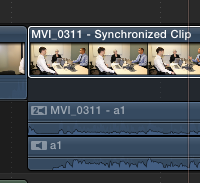
And opened in it's own timeline:
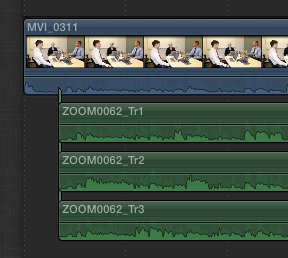
Inspector doesn't show all the tracks but all the checkboxes are checked.
Expanded in project timeline:
And opened in it's own timeline:
Inspector doesn't show all the tracks but all the checkboxes are checked.
Please Log in to join the conversation.
- Carsten Orlt
-
- Offline
- Platinum Member
-
Less
More
- Posts: 422
- Thank you received: 82
30 Apr 2014 01:36 #45408
by Carsten Orlt
Replied by Carsten Orlt on topic How do you work with detached audio????
can you please post a screenshot of the audio inspector pan. Both when selecting the clip in the event and when selecting in the timeline. Thank you.
Please Log in to join the conversation.
- Carsten Orlt
-
- Offline
- Platinum Member
-
Less
More
- Posts: 422
- Thank you received: 82
30 Apr 2014 01:47 #45409
by Carsten Orlt
Replied by Carsten Orlt on topic How do you work with detached audio????
Ok I know what the problem is.
Your Zoom audio is one file per track and not a MULTI TRACK clip. Normally when you import Zoom files (at least from my H4n) the tracks are contained within one clip showing in your event instead of 2-4 clips for the same recording.
FCP actually only shows one clip as connected even though you connected more than one as you do. Therefor the audio inspector only shows one instance of connected clips and you can only expand this one instance.
Any way you could import your zoom files as multi track? This way you only connect one audio clip in your sync clip and the connected clip section in the audio pan would show than the individual tracks of that on clip.
Basically any master clip (audio or video) can have multiple audio tracks.
Your Zoom audio is one file per track and not a MULTI TRACK clip. Normally when you import Zoom files (at least from my H4n) the tracks are contained within one clip showing in your event instead of 2-4 clips for the same recording.
FCP actually only shows one clip as connected even though you connected more than one as you do. Therefor the audio inspector only shows one instance of connected clips and you can only expand this one instance.
Any way you could import your zoom files as multi track? This way you only connect one audio clip in your sync clip and the connected clip section in the audio pan would show than the individual tracks of that on clip.
Basically any master clip (audio or video) can have multiple audio tracks.
Please Log in to join the conversation.

30 Apr 2014 01:50 - 30 Apr 2014 01:51 #45410
by BenB
Replied by BenB on topic How do you work with detached audio????
When you configure your Audio Channels (not tracks, please stop calling things "tracks", there are not tracks, thank you) to work the way you need, then Expand Audio Component, editing audio is fine.
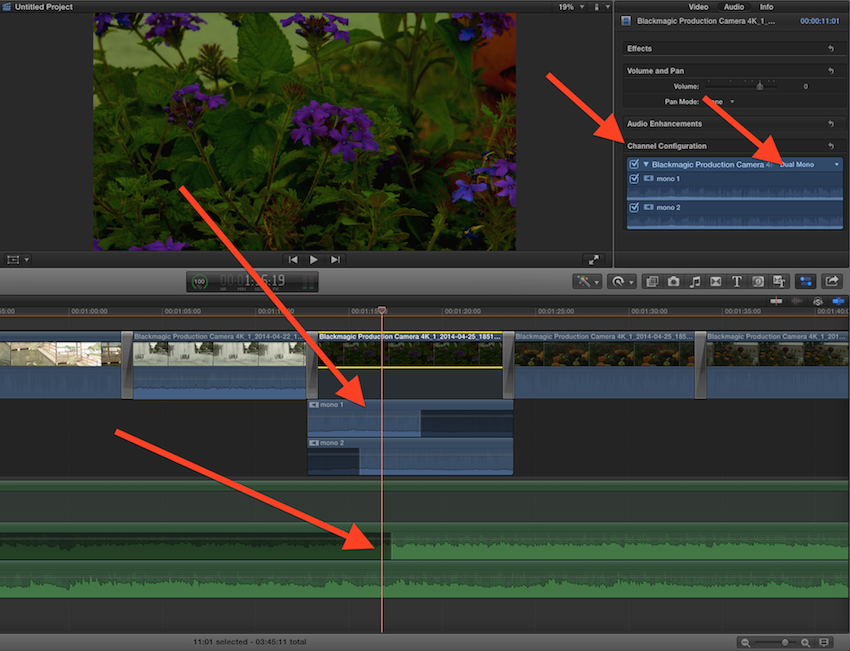
That said, if you have clean audio, it should sync well. If it doesn't right-click that resulting Sync Clip, choose "Open In Timeline" and manually adjust. I'm not sure what is difficult about that. You can move the audio channels around as you wish very easily.
So, I'm confused. Are you wanting a Sync clip, or a Multicam clip?
That said, if you have clean audio, it should sync well. If it doesn't right-click that resulting Sync Clip, choose "Open In Timeline" and manually adjust. I'm not sure what is difficult about that. You can move the audio channels around as you wish very easily.
So, I'm confused. Are you wanting a Sync clip, or a Multicam clip?
Last edit: 30 Apr 2014 01:51 by BenB.
Please Log in to join the conversation.
30 Apr 2014 02:04 #45411
by DBoy
Replied by DBoy on topic How do you work with detached audio????
I see what you mean. Not sure why FCPX still can't treat the individual tracks as such. Not sure how to import them as a multitrack clip the H6 simply has a folder with the individual tracks as separate files.cofe wrote: Ok I know what the problem is.
Your Zoom audio is one file per track and not a MULTI TRACK clip. Normally when you import Zoom files (at least from my H4n) the tracks are contained within one clip showing in your event instead of 2-4 clips for the same recording.
FCP actually only shows one clip as connected even though you connected more than one as you do. Therefor the audio inspector only shows one instance of connected clips and you can only expand this one instance.
Any way you could import your zoom files as multi track? This way you only connect one audio clip in your sync clip and the connected clip section in the audio pan would show than the individual tracks of that on clip.
Basically any master clip (audio or video) can have multiple audio tracks.
Please Log in to join the conversation.
30 Apr 2014 02:19 #45412
by BenB
Replied by BenB on topic How do you work with detached audio????
There are no "tracks", and trying to force that will only make things worse.
FCPX has "timelines" and "story lines".
FCPX has "timelines" and "story lines".
Please Log in to join the conversation.
- Carsten Orlt
-
- Offline
- Platinum Member
-
Less
More
- Posts: 422
- Thank you received: 82
30 Apr 2014 02:21 #45413
by Carsten Orlt
I hear ya. Didn't know this problem existed myself
Don't have the H6n (yet) so don't know how to deal with this. If something springs to mind I'll post.
Sorry!
Replied by Carsten Orlt on topic How do you work with detached audio????
DBoy wrote: I see what you mean. Not sure why FCPX still can't treat the individual tracks as such. Not sure how to import them as a multitrack clip the H6 simply has a folder with the individual tracks as separate files.
I hear ya. Didn't know this problem existed myself
Don't have the H6n (yet) so don't know how to deal with this. If something springs to mind I'll post.
Sorry!
Please Log in to join the conversation.
- Carsten Orlt
-
- Offline
- Platinum Member
-
Less
More
- Posts: 422
- Thank you received: 82
30 Apr 2014 02:26 #45414
by Carsten Orlt
Relax Ben. DBoy has a specific problem that is related to what we used to call tracks and is called by FCP components not showing. The manipulation of those 'whatever you call it' is actually his secondary problem because he can't even see all his audio tracks/components in the first place prohibiting all editing.
Replied by Carsten Orlt on topic How do you work with detached audio????
BenB wrote: There are no "tracks", and trying to force that will only make things worse.
FCPX has "timelines" and "story lines".
Relax Ben. DBoy has a specific problem that is related to what we used to call tracks and is called by FCP components not showing. The manipulation of those 'whatever you call it' is actually his secondary problem because he can't even see all his audio tracks/components in the first place prohibiting all editing.
Please Log in to join the conversation.
- Carsten Orlt
-
- Offline
- Platinum Member
-
Less
More
- Posts: 422
- Thank you received: 82
30 Apr 2014 02:37 #45415
by Carsten Orlt
Replied by Carsten Orlt on topic How do you work with detached audio????
What you could do - but I would treat this with caution and as a last resort - is to make a compound from your individual Zoom tracks in the synced clip. This will make them one clip and I just tried it will make them available as components when expanded.
I say this with caution because I do try to avoid compound clips at all cost and only as a last resort because I had problems with them in the past. 10.1.1 might be better with them but I do not want to find out on time critical work
I say this with caution because I do try to avoid compound clips at all cost and only as a last resort because I had problems with them in the past. 10.1.1 might be better with them but I do not want to find out on time critical work
Please Log in to join the conversation.
30 Apr 2014 03:41 #45416
by DBoy
Replied by DBoy on topic How do you work with detached audio????
Gotcha, I finished an edit today using the compound clip method and it worked adequately for what I needed to do. I'll see what I can find out about the H6 track import and post back. Still concerned that all L cuts are basically rendered useless when breaking edited clips apart but hey, onwards an upwards  . Thanks for your help!
. Thanks for your help! Please Log in to join the conversation.
- Carsten Orlt
-
- Offline
- Platinum Member
-
Less
More
- Posts: 422
- Thank you received: 82
30 Apr 2014 04:41 #45418
by Carsten Orlt
Replied by Carsten Orlt on topic How do you work with detached audio????
Good one.
If you don't mind me asking why do you need to break the clips apart? The idea about revealing components/tracks is that you don't have to. But you may have a certain reason?
When you check on the H6n maybe also check if recording into a multitrack wave file is actually something you need to set before recording? Maybe the H6n has the option to either created individual files or multi tracks.
If you don't mind me asking why do you need to break the clips apart? The idea about revealing components/tracks is that you don't have to. But you may have a certain reason?
When you check on the H6n maybe also check if recording into a multitrack wave file is actually something you need to set before recording? Maybe the H6n has the option to either created individual files or multi tracks.
Please Log in to join the conversation.
30 Apr 2014 05:30 - 30 Apr 2014 05:33 #45419
by DBoy
Replied by DBoy on topic How do you work with detached audio????
Breaking the clips apart is the only way I can reliably do L cuts and adjust levels/eq/fx on individual tracks in the project timeline. As far as the H6 is concerned, will have to see if there's a better way to record/export.cofe wrote: Good one.
If you don't mind me asking why do you need to break the clips apart? The idea about revealing components/tracks is that you don't have to. But you may have a certain reason?
When you check on the H6n maybe also check if recording into a multitrack wave file is actually something you need to set before recording? Maybe the H6n has the option to either created individual files or multi tracks.
Last edit: 30 Apr 2014 05:33 by DBoy.
Please Log in to join the conversation.
- Carsten Orlt
-
- Offline
- Platinum Member
-
Less
More
- Posts: 422
- Thank you received: 82
01 May 2014 02:52 - 01 May 2014 02:52 #45444
by Carsten Orlt
I created a screen rec of working with audio components. Maybe this will give you some ideas that you can work with them reliable even with L-cuts.
Just some food for thoughts
www.dropbox.com/s/vz0bzmrr3qml830/AudioEditing.mp4
Replied by Carsten Orlt on topic How do you work with detached audio????
DBoy wrote: Breaking the clips apart is the only way I can reliably do L cuts and adjust levels/eq/fx on individual tracks in the project timeline.
I created a screen rec of working with audio components. Maybe this will give you some ideas that you can work with them reliable even with L-cuts.
Just some food for thoughts
www.dropbox.com/s/vz0bzmrr3qml830/AudioEditing.mp4
Last edit: 01 May 2014 02:52 by Carsten Orlt.
Please Log in to join the conversation.
01 May 2014 03:38 #45445
by DBoy
Replied by DBoy on topic How do you work with detached audio????
Thanks for that and I do understand that process completely. I just need to have the tracks display properly in order to work that way. For now, breaking the items apart is my temporary solution. Even then, why they reset themselves when doing so seems like odd behavior.
Please Log in to join the conversation.
- Carsten Orlt
-
- Offline
- Platinum Member
-
Less
More
- Posts: 422
- Thank you received: 82
01 May 2014 05:23 #45446
by Carsten Orlt
Replied by Carsten Orlt on topic How do you work with detached audio????
I'm sorry. I finally understood the extend of your problem.
And I agree L-cuts shouldn't be reset when splitting and sync clips should list all connected clips.
Room for improvement ...
And I agree L-cuts shouldn't be reset when splitting and sync clips should list all connected clips.
Room for improvement ...
Please Log in to join the conversation.
