


- Posts: 26
- Thank you received: 0
3 Post Moderation Rule for New Boarders (25 Jan 2021)
New boarders will have their posts moderated - Don't worry if you cannot see your post immediately.
How do you work with detached audio????
29 Apr 2014 19:27 #45369
by DBoy
How do you work with detached audio???? was created by DBoy
I have synced up 3 tracks of zoom audio to my dslr footage. Using the "synchronize clips" command results in often unusable out of sync audio. If I manually sync the audio and make compound clips I am stuck with the three tracks combined as one "track" along with the camera audio. The only way I can find to edit the tracks individually is to expand the compound clip in it's own timeline and guess the edits from there. Surely there must be a better workflow, I would love to simply connect the audio to the video clip and edit normally. How do you approach this? Thanks.
Please Log in to join the conversation.
- Darren Roark
-

- Offline
- Platinum Member
-

29 Apr 2014 19:33 #45370
by Darren Roark
Replied by Darren Roark on topic How do you work with detached audio????
You can right click and 'open in timeline' while it's all as one track as you say. Then you can make changes and toggle back to the project.
It's hard to get your head around at first, but trying to make FCP X conform to the track based world is frustrating. The best thing to do is try to learn how it works and you won't look back. The Ripple Training guys have amazing tutorials on this.
It's hard to get your head around at first, but trying to make FCP X conform to the track based world is frustrating. The best thing to do is try to learn how it works and you won't look back. The Ripple Training guys have amazing tutorials on this.
Please Log in to join the conversation.
- haysoos123
-
- Offline
- Platinum Member
-
Less
More
- Posts: 402
- Thank you received: 72
29 Apr 2014 20:00 #45373
by haysoos123
Replied by haysoos123 on topic How do you work with detached audio????
It's actually worth asking why you're not getting good sync results. The cameras should be recording a guide audio track, and the program will use this to match the waveforms. A hard sound like a clapper board will help. In most cases, it's pretty good at synching this. So first you should take a look at your production process and see why this isn't working.
Just to clarify, if you synchronize clips and find it's out of sync, you can "open in timeline" the synchronized clip and then manually correct it in there. The synchronized clips will act like any other clip, i.e., you can expand the audio or detach it in a timeline, and you don't need to step into them like a compound clip. You can also expand and detach audio from a compound clip, but I would not usually use them to sync audio.
Just to clarify, if you synchronize clips and find it's out of sync, you can "open in timeline" the synchronized clip and then manually correct it in there. The synchronized clips will act like any other clip, i.e., you can expand the audio or detach it in a timeline, and you don't need to step into them like a compound clip. You can also expand and detach audio from a compound clip, but I would not usually use them to sync audio.
Please Log in to join the conversation.
29 Apr 2014 21:05 #45376
by DBoy
Replied by DBoy on topic How do you work with detached audio????
Used clapper and a nice guide (feed from the zoom to camera) and FCPX STILL gets confused occasionally when syncing tracks. I also don't see any way to correct this after the fact. Opening the synchronized clip in the timeline does not allow me to "slip" the tracks at all. How are you manually correcting a synchronized clip?haysoos123 wrote: It's actually worth asking why you're not getting good sync results. The cameras should be recording a guide audio track, and the program will use this to match the waveforms. A hard sound like a clapper board will help. In most cases, it's pretty good at synching this. So first you should take a look at your production process and see why this isn't working.
Just to clarify, if you synchronize clips and find it's out of sync, you can "open in timeline" the synchronized clip and then manually correct it in there. The synchronized clips will act like any other clip, i.e., you can expand the audio or detach it in a timeline, and you don't need to step into them like a compound clip. You can also expand and detach audio from a compound clip, but I would not usually use them to sync audio.
Please Log in to join the conversation.

29 Apr 2014 21:17 #45378
by moviestim
Replied by moviestim on topic How do you work with detached audio????
Can you take a screen shot of your clips when you have opened them in the timeline?
Please Log in to join the conversation.

29 Apr 2014 21:37 #45379
by joema
Is it possible one recorder ran continuously and others were stopped/started? While FCP is good at syncing a few clips from a single take, it isn't good at syncing lots of clips, or searching through multiple clips looking for a match. Plural Eyes ver 3 is very good at this -- I have seen it search through hundreds of clips and correctly sync.
I have had good results with audio sync on FCP X, but only when using a few clips which I confidently know are from the same take.
Replied by joema on topic How do you work with detached audio????
While FCP clip sync prioritizes audio waveform, I think (but am not sure) it also uses other indicators, including maybe file timestamp. Was the date/time set properly on all recorders?DBoy wrote: I have synced up 3 tracks of zoom audio to my dslr footage. Using the "synchronize clips" command results in often unusable out of sync audio....
Is it possible one recorder ran continuously and others were stopped/started? While FCP is good at syncing a few clips from a single take, it isn't good at syncing lots of clips, or searching through multiple clips looking for a match. Plural Eyes ver 3 is very good at this -- I have seen it search through hundreds of clips and correctly sync.
I have had good results with audio sync on FCP X, but only when using a few clips which I confidently know are from the same take.
Please Log in to join the conversation.
29 Apr 2014 21:44 #45380
by DBoy
Replied by DBoy on topic How do you work with detached audio????
Thanks, might be worth taking a look at plural eyes. The audio clips are all coming from the same take off the Zoom H6, pretty straightforward.
Please Log in to join the conversation.
29 Apr 2014 22:01 #45382
by moviestim
Replied by moviestim on topic How do you work with detached audio????
Did you solve your slip problem? You said you were not able to move the clips after opening them in the timeline. Do you still need help with that?
Please Log in to join the conversation.
29 Apr 2014 22:10 #45383
by DBoy
Replied by DBoy on topic How do you work with detached audio????
Thanks, I still cannot seem to slip the audio to a synchronized clip in the timeline. Thoughts? Looks like making compound clips first then breaking them apart after things are edited is working for now though.moviestim wrote: Did you solve your slip problem? You said you were not able to move the clips after opening them in the timeline. Do you still need help with that?
Please Log in to join the conversation.
29 Apr 2014 22:28 #45385
by moviestim
Replied by moviestim on topic How do you work with detached audio????
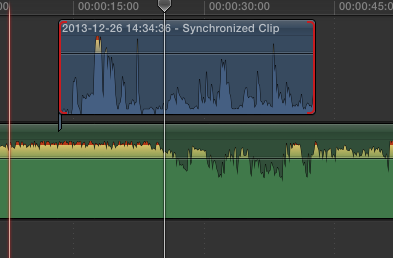
I'm still having a hard time visualizing the problem. The only reasons you wouldn't be able to slip edit in the timeline is if you have no media handles or you are slipping the main storyline and the connected clips are coming with it. Is there anyway you can take a screenshot and describe your workflow exactly from start to where you encounter the problem? Depending on how many clips you are syncing Multicam may be a better option for you than a synchronized or compound clips.
Please Log in to join the conversation.
- Carsten Orlt
-

- Offline
- Platinum Member
-
Less
More
- Posts: 422
- Thank you received: 82
29 Apr 2014 22:38 #45386
by Carsten Orlt
Replied by Carsten Orlt on topic How do you work with detached audio????
Here are a few tricks I learned after working a lot with synced clips.
If your audio takes are much longer than your video takes, meaning audio takes span several video takes, you can speed up the process and accuracy of the syncing by selecting the relevant audio part of your audio with setting an in and out. This way FCP only tries to match the current selection in the audio clip with the video. It helps tremendously to help FCP not getting confused.
For the actual editing you have 2 options. Say you have radio mics on a couple of actors/talents and a boom, edit the sync clip into your project and than open the audio inspector pan to switch of tracks that are not relevant for the particular clip. You can do this individually for every clip in the project even if they are coming from the same synced master clip. Secondly you can option-double-click a synced clip in the project and your individual audio tracks will expand right in the timeline (If you select all clips in the timeline you almost get the same as tracks just not horizontally alligned). Now you have again diff ways to adjust the individual tracks. Either use the range tool on any of the tracks to mark a section you e.g. want to mute and press delete. It doesn't create a gab but just mutes that section for that track. Or you can keyframe the volume on each track individually. By the way if you disabled tracks via the audio inspector pan they will not show up in the expanded clip in the timeline, so you only see what is active.
Collapsing the expanding tracks is the same as collapsing normal audio expansion.
If you need to slip audio out of sync than you need to detach the audio tracks from the clip. But if you want to do things like delay a hello from the outgoing clip over the next clip you can do things like expand the audio for the outgoing, shorten the video to before the hello, choose the blade tool and split the audio before the hello and FCP will only detach the end of the audio.
Hope that helps.
Happy editing
Carsten
If your audio takes are much longer than your video takes, meaning audio takes span several video takes, you can speed up the process and accuracy of the syncing by selecting the relevant audio part of your audio with setting an in and out. This way FCP only tries to match the current selection in the audio clip with the video. It helps tremendously to help FCP not getting confused.
For the actual editing you have 2 options. Say you have radio mics on a couple of actors/talents and a boom, edit the sync clip into your project and than open the audio inspector pan to switch of tracks that are not relevant for the particular clip. You can do this individually for every clip in the project even if they are coming from the same synced master clip. Secondly you can option-double-click a synced clip in the project and your individual audio tracks will expand right in the timeline (If you select all clips in the timeline you almost get the same as tracks just not horizontally alligned). Now you have again diff ways to adjust the individual tracks. Either use the range tool on any of the tracks to mark a section you e.g. want to mute and press delete. It doesn't create a gab but just mutes that section for that track. Or you can keyframe the volume on each track individually. By the way if you disabled tracks via the audio inspector pan they will not show up in the expanded clip in the timeline, so you only see what is active.
Collapsing the expanding tracks is the same as collapsing normal audio expansion.
If you need to slip audio out of sync than you need to detach the audio tracks from the clip. But if you want to do things like delay a hello from the outgoing clip over the next clip you can do things like expand the audio for the outgoing, shorten the video to before the hello, choose the blade tool and split the audio before the hello and FCP will only detach the end of the audio.
Hope that helps.
Happy editing
Carsten
Please Log in to join the conversation.
29 Apr 2014 22:39 #45387
by DBoy
Replied by DBoy on topic How do you work with detached audio????
I am talking about slipping the audio to a synchronized clip, as in moving one or more tracks to sync with the rest. I don't think you can do this to a synchronized clip once it is......"synchronized". Not talking about general editing of clips in the timeline.moviestim wrote: I'm still having a hard time visualizing the problem. The only reasons you wouldn't be able to slip edit in the timeline is if you have no media handles or you are slipping the main storyline and the connected clips are coming with it. Is there anyway you can take a screenshot and describe your workflow exactly from start to where you encounter the problem? Depending on how many clips you are syncing Multicam may be a better option for you than a synchronized or compound clips.
Please Log in to join the conversation.
29 Apr 2014 22:45 #45388
by DBoy
 I wish there was a way to "nest" the audio without having to rely on FCPX to synchronize it though. I guess that's what compound clips are for. Thanks.
Replied by DBoy on topic How do you work with detached audio????
Yes indeed that helps. Didn't know about the option-double click ninja movecofe wrote: Here are a few tricks I learned after working a lot with synced clips.
If your audio takes are much longer than your video takes, meaning audio takes span several video takes, you can speed up the process and accuracy of the syncing by selecting the relevant audio part of your audio with setting an in and out. This way FCP only tries to match the current selection in the audio clip with the video. It helps tremendously to help FCP not getting confused.
For the actual editing you have 2 options. Say you have radio mics on a couple of actors/talents and a boom, edit the sync clip into your project and than open the audio inspector pan to switch of tracks that are not relevant for the particular clip. You can do this individually for every clip in the project even if they are coming from the same synced master clip. Secondly you can option-double-click a synced clip in the project and your individual audio tracks will expand right in the timeline (If you select all clips in the timeline you almost get the same as tracks just not horizontally alligned). Now you have again diff ways to adjust the individual tracks. Either use the range tool on any of the tracks to mark a section you e.g. want to mute and press delete. It doesn't create a gab but just mutes that section for that track. Or you can keyframe the volume on each track individually. By the way if you disabled tracks via the audio inspector pan they will not show up in the expanded clip in the timeline, so you only see what is active.
Collapsing the expanding tracks is the same as collapsing normal audio expansion.
If you need to slip audio out of sync than you need to detach the audio tracks from the clip. But if you want to do things like delay a hello from the outgoing clip over the next clip you can do things like expand the audio for the outgoing, shorten the video to before the hello, choose the blade tool and split the audio before the hello and FCP will only detach the end of the audio.
Hope that helps.
Happy editing
Carsten
I wish there was a way to "nest" the audio without having to rely on FCPX to synchronize it though. I guess that's what compound clips are for. Thanks. Please Log in to join the conversation.
29 Apr 2014 22:57 #45389
by DBoy
Replied by DBoy on topic How do you work with detached audio????
Actually option double click does nothing to the synchronized clip in the project timeline. Expanding the audio gives me a track from the camera and a mono track of the three "nested" audio files from the recorder. Only way to see all the tracks is to open the synchronized clip in it's own timeline which is like using a compound clip once again.
Please Log in to join the conversation.
- Carsten Orlt
-
- Offline
- Platinum Member
-
Less
More
- Posts: 422
- Thank you received: 82
29 Apr 2014 23:11 - 29 Apr 2014 23:25 #45390
by Carsten Orlt
Replied by Carsten Orlt on topic How do you work with detached audio????
Hmm, not sure why this is not working for you. The actual command is called 'expand audio components' which can be evoked from the contextual menu by right clicking on a clip and choose the command.
There is actually 2 ways to expand. the way you describe which only expand the groups as one as seen in the audio inspector, or the full set of individual audio 'components
There is actually 2 ways to expand. the way you describe which only expand the groups as one as seen in the audio inspector, or the full set of individual audio 'components
Last edit: 29 Apr 2014 23:25 by Carsten Orlt.
Please Log in to join the conversation.
- haysoos123
-
- Offline
- Platinum Member
-
Less
More
- Posts: 402
- Thank you received: 72
29 Apr 2014 23:14 #45391
by haysoos123
Replied by haysoos123 on topic How do you work with detached audio????
I don't see why you can't slip the audio after you "open in timeline." Maybe you're trying to use the "slip" tool? When I say slip in this context, I mean just moving the entire audio clip. It's just attached audio, so you should be able to move it.
Also, in terms of the nested audio, have you tried to right-click on the clip in the timeline to "expand audio components"?
Also, in terms of the nested audio, have you tried to right-click on the clip in the timeline to "expand audio components"?
Please Log in to join the conversation.
29 Apr 2014 23:48 #45392
by DBoy
Replied by DBoy on topic How do you work with detached audio????
Expand audio components doesn't expand all the tracks. It gives you the audio attached to the video and a single track containing the three "nested" zoom tracks. Only way to access those is to open the synchronized clip in it's own timeline. You can't edit the individual tracks in the project timeline. Furthermore, any L cuts you do using synchronized clips in the project timeline get "forgotten" or reset should you want to break apart the elements and do your fine tuning.
Please Log in to join the conversation.

29 Apr 2014 23:55 #45394
by BenB
Replied by BenB on topic How do you work with detached audio????
Expand Audio Components does in fact expand all the audio channels, according to how they are configured in the Inspector, and allows you to edit each individually.
Please Log in to join the conversation.
- Carsten Orlt
-
- Offline
- Platinum Member
-
Less
More
- Posts: 422
- Thank you received: 82
30 Apr 2014 00:19 #45395
by Carsten Orlt
As Ben said it does work. Not sure what but please trust 'us' that you are doing something wrong. Unfortunately it is not obvious to me right now what?
Maybe you audio only file is actually not 3 individual track but interpreted by FCP as one. Don't know how this could be but I'm throwing things around.
Replied by Carsten Orlt on topic How do you work with detached audio????
DBoy wrote: Expand audio components doesn't expand all the tracks. It gives you the audio attached to the video and a single track containing the three "nested" zoom tracks. Only way to access those is to open the synchronized clip in it's own timeline. You can't edit the individual tracks in the project timeline. Furthermore, any L cuts you do using synchronized clips in the project timeline get "forgotten" or reset should you want to break apart the elements and do your fine tuning.
As Ben said it does work. Not sure what but please trust 'us' that you are doing something wrong. Unfortunately it is not obvious to me right now what?
Maybe you audio only file is actually not 3 individual track but interpreted by FCP as one. Don't know how this could be but I'm throwing things around.
Please Log in to join the conversation.
30 Apr 2014 00:54 #45398
by DBoy
Replied by DBoy on topic How do you work with detached audio????
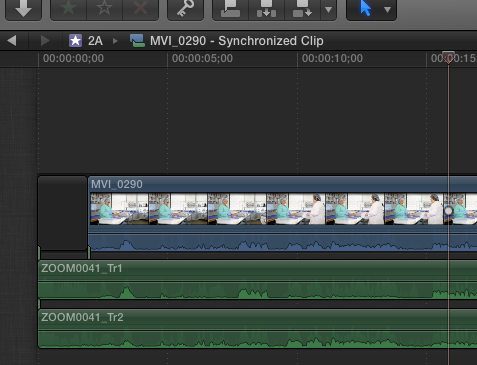
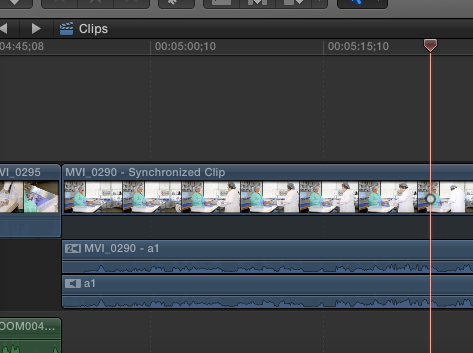
Sorry guys and I really do appreciate your help but no matter what I do expanding the clip in the project timeline does not give me the individual tracks. Even just two zoom tracks are showing up as one in the project timeline. There is no provision for this in the inspector as well. Opening the clip in it's own timeline shows the two separate zoom tracks as well as the camera audio track. Plus as I said it kills any L cuts if you break apart the items.
Here are screenshots:
Here are screenshots:
Please Log in to join the conversation.
