


- Posts: 786
- Thank you received: 21
3 Post Moderation Rule for New Boarders (25 Jan 2021)
New boarders will have their posts moderated - Don't worry if you cannot see your post immediately.
Please help... FCPX is NOT showing the Events or Projects folder.
- Jonathan Levin
-

- Offline
- Platinum Member
-

Less
More
14 Mar 2014 01:07 #42646
by Jonathan Levin
Replied by Jonathan Levin on topic Please help... FCPX is NOT showing the Events or Projects folder.
Maybe someone could clear this up for me:
If Libraries, and especially Events are containers for media and assets, why is there a File>New Folder, and when would someone choose that over making an Event? I understand about smart collections, and keywords.
I suppose if I were to have my way, I'd call a "Library" a Project, and an "Event", well, just a folder (or bin), and a "Project" just a sequence
I've gotten used to the new way and I am fine with that, but somehow I believe that engineers secretly or not so secretly hate artists.
It's kind of like every time Photoshop comes out with a new version, things are moved around, keyboard short cuts change. Everything becomes bloated and slow. It's like they have a half dozen different groups of people working on different parts of the program and no one talks to one another....and never mind the people that have to use it.
I digress.
Jonathan
If Libraries, and especially Events are containers for media and assets, why is there a File>New Folder, and when would someone choose that over making an Event? I understand about smart collections, and keywords.
I suppose if I were to have my way, I'd call a "Library" a Project, and an "Event", well, just a folder (or bin), and a "Project" just a sequence
I've gotten used to the new way and I am fine with that, but somehow I believe that engineers secretly or not so secretly hate artists.
It's kind of like every time Photoshop comes out with a new version, things are moved around, keyboard short cuts change. Everything becomes bloated and slow. It's like they have a half dozen different groups of people working on different parts of the program and no one talks to one another....and never mind the people that have to use it.
I digress.
Jonathan
Please Log in to join the conversation.
14 Mar 2014 02:54 #42648
by plysat
Can't sleep? Try this: fcpxpert.net ;-)
Replied by plysat on topic Please help... FCPX is NOT showing the Events or Projects folder.
"If Libraries, and especially Events are containers for media and assets, why is there a File>New Folder, and when would someone choose that over making an Event? "
I put groups of KW collections in folders. Selects, MX from different sources, Cuts, Final Versions, Works in progress etc. Until you can have a keyword collection of keyword collections I'll continue to use folders.
I put groups of KW collections in folders. Selects, MX from different sources, Cuts, Final Versions, Works in progress etc. Until you can have a keyword collection of keyword collections I'll continue to use folders.
Can't sleep? Try this: fcpxpert.net ;-)
Please Log in to join the conversation.

14 Mar 2014 13:34 #42653
by anickt
Replied by anickt on topic Please help... FCPX is NOT showing the Events or Projects folder.
Just because something is there doesn't mean you "have" to use it. You just have to figure out what works for you.
I tried using smart folders, for instance, and found they just didn't click with the way I work either in long or short-form. That's not to say there won't be someone else who can't live without them, I just don't find them necessary.
I use Photoshop for what I need it to do and that doesn't begin to approach all of the things it CAN do. I've just learned what I really need from it and couldn't care less about the rest.
I tried using smart folders, for instance, and found they just didn't click with the way I work either in long or short-form. That's not to say there won't be someone else who can't live without them, I just don't find them necessary.
I use Photoshop for what I need it to do and that doesn't begin to approach all of the things it CAN do. I've just learned what I really need from it and couldn't care less about the rest.
Please Log in to join the conversation.

14 Mar 2014 14:19 - 14 Mar 2014 14:27 #42654
by BenB
Replied by BenB on topic Please help... FCPX is NOT showing the Events or Projects folder.
You won't get far if you insist on cramming these new tools in to old paradigms. They don't fit that way.
A "Production" (what you call a project) can utilize one or more Libraries. Yes, I and other have used multiple Libraries for a single large production. A Library is not a "project" in the traditional sense, and there is no single project file any longer. Drop that paradigm.
An Event is a virtual container, nothing more or less, and does not relate to anything you used before.
A "Project" is only one form of Timeline. FCPX is based on Timelines and Metadata. A single clip in an Event is a Timeline, a virtual container, and can be opened into the Timeline by itself. Something you could not do previously. A Multicam is a type of Timeline, as is a Compound Clip, a Sync Clip, or of course a Project. Which works best for what you need to achieve at the moment?
Smart Collections save me hours, if not days of time on projects. Separating out stills from music, etc. Keyword collections save me tons of time, also. In fact, once I keyword all my clips, I actually know exactly what the edit is going to be.
I keyword music, voice overs, sound effects, etc. I put all of those keyword collections into a folder called Audio. Poof, done, fast, easy, no other NLE can beat the speed and ease of media management here.
Make a keyword collection for keyword collections? You sure as heck can do that! Simply create a Smart Collection that specifies all the keywords you want to include in it.
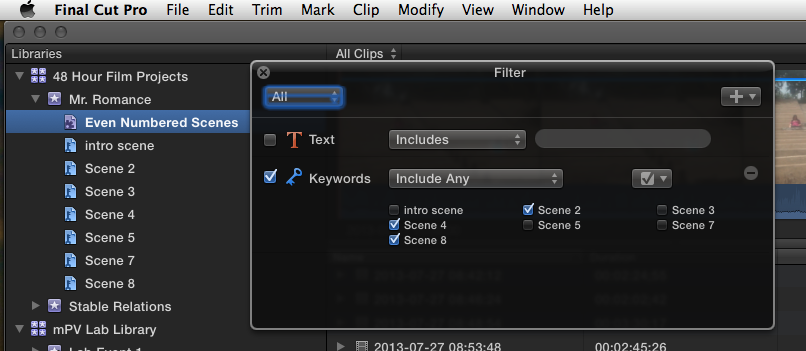
Again, if you try to force FCPX's media management paradigms into older NLE paradigms, you'll never get it, you'll lose time working, it simply doesn't work. I've taught dozens and dozens of editors, new and old, FCPX, and only when they forget the old ways, do they skyrocket with FCPX. And not a single one has ever looked back. Especially the old time seasoned editors.
And if you don't need one of the tools, you're not forced to use it.
images.apple.com/final-cut-pro/docs/Media_Management.pdf
A "Production" (what you call a project) can utilize one or more Libraries. Yes, I and other have used multiple Libraries for a single large production. A Library is not a "project" in the traditional sense, and there is no single project file any longer. Drop that paradigm.
An Event is a virtual container, nothing more or less, and does not relate to anything you used before.
A "Project" is only one form of Timeline. FCPX is based on Timelines and Metadata. A single clip in an Event is a Timeline, a virtual container, and can be opened into the Timeline by itself. Something you could not do previously. A Multicam is a type of Timeline, as is a Compound Clip, a Sync Clip, or of course a Project. Which works best for what you need to achieve at the moment?
Smart Collections save me hours, if not days of time on projects. Separating out stills from music, etc. Keyword collections save me tons of time, also. In fact, once I keyword all my clips, I actually know exactly what the edit is going to be.
I keyword music, voice overs, sound effects, etc. I put all of those keyword collections into a folder called Audio. Poof, done, fast, easy, no other NLE can beat the speed and ease of media management here.
Make a keyword collection for keyword collections? You sure as heck can do that! Simply create a Smart Collection that specifies all the keywords you want to include in it.
Again, if you try to force FCPX's media management paradigms into older NLE paradigms, you'll never get it, you'll lose time working, it simply doesn't work. I've taught dozens and dozens of editors, new and old, FCPX, and only when they forget the old ways, do they skyrocket with FCPX. And not a single one has ever looked back. Especially the old time seasoned editors.
And if you don't need one of the tools, you're not forced to use it.
images.apple.com/final-cut-pro/docs/Media_Management.pdf
Last edit: 14 Mar 2014 14:27 by BenB.
Please Log in to join the conversation.
14 Mar 2014 15:03 #42667
by plysat
Can't sleep? Try this: fcpxpert.net ;-)
Replied by plysat on topic Please help... FCPX is NOT showing the Events or Projects folder.
"Make a keyword collection for keyword collections? You sure as heck can do that! Simply create a Smart Collection that specifies all the keywords you want to include in it."
Of course. But Folders do serve a purpose. Partly for visual organization in the browser, and partly because you can't make a keyword collection of keyword *collections*. IOW, you can't have any organizational levels below a KC. Select one, and everything in it appears in the browser, which is not always desirable. If I have - as I often do - between 4 and 20 different spots for a movie, all with a half dozen or more versions, with dozens of WIP snapshots, and maybe the name has changed at version 5 or something, I don't want to see everything at once, I want them all in individual collections, which I can do manually or "smart". But I need a folder in which to put all these collections so I don't have dozens of them scrolling off the screen. So, a folder "cuts"... In that folder, a folder for each spot. And in those folders, smart collections for sent to client ("sent" in notes field), WIP's (snapshots), and any other KC's smart or not, related to that spot.
Of course. But Folders do serve a purpose. Partly for visual organization in the browser, and partly because you can't make a keyword collection of keyword *collections*. IOW, you can't have any organizational levels below a KC. Select one, and everything in it appears in the browser, which is not always desirable. If I have - as I often do - between 4 and 20 different spots for a movie, all with a half dozen or more versions, with dozens of WIP snapshots, and maybe the name has changed at version 5 or something, I don't want to see everything at once, I want them all in individual collections, which I can do manually or "smart". But I need a folder in which to put all these collections so I don't have dozens of them scrolling off the screen. So, a folder "cuts"... In that folder, a folder for each spot. And in those folders, smart collections for sent to client ("sent" in notes field), WIP's (snapshots), and any other KC's smart or not, related to that spot.
Can't sleep? Try this: fcpxpert.net ;-)
Please Log in to join the conversation.
14 Mar 2014 16:25 #42683
by BenB
Replied by BenB on topic Please help... FCPX is NOT showing the Events or Projects folder.
"...you can't make a keyword collection of keyword *collections*" I can, as stated, make a single collection that encompasses multiple other collections. But I now see you explain you're not doing that, you're trying to sub-divide a single keyword collection.
Correct, unless you add a second, third, forth keyword to those clips with the original keyword. Or you can use other tools to achieve the same thing, as you are doing. Notes use in a smart collection, folders, fav/rej ratings, etc.
How would you physically break down a single "keyword" into sub-groups?
Version numbers as second keywords?
I like the way you're using Notes in smart collections, actually.
OR create an Event for each version? Using External Media, that could be potentially another method. Lots of ways to get a result.
But yes, in the end, that's what folders (and sub-folders) are for.
I'm hoping that soon we can use the Custom Metadata Field in smart searches.
Correct, unless you add a second, third, forth keyword to those clips with the original keyword. Or you can use other tools to achieve the same thing, as you are doing. Notes use in a smart collection, folders, fav/rej ratings, etc.
How would you physically break down a single "keyword" into sub-groups?
Version numbers as second keywords?
I like the way you're using Notes in smart collections, actually.
OR create an Event for each version? Using External Media, that could be potentially another method. Lots of ways to get a result.
But yes, in the end, that's what folders (and sub-folders) are for.
I'm hoping that soon we can use the Custom Metadata Field in smart searches.
Please Log in to join the conversation.
- Jonathan Levin
-
- Offline
- Platinum Member
-
Less
More
- Posts: 786
- Thank you received: 21
14 Mar 2014 17:37 #42687
by Jonathan Levin
Replied by Jonathan Levin on topic Please help... FCPX is NOT showing the Events or Projects folder.
Great thread guys! Learning much today!
Please Log in to join the conversation.
- Jamie McWilliams
-

- Offline
- New Member
-

Less
More
- Posts: 3
- Thank you received: 0
24 Mar 2014 18:48 #43326
by Jamie McWilliams
Replied by Jamie McWilliams on topic Please help... FCPX is NOT showing the Events or Projects folder.
My problem with the new system is not in editing, but in providing file footage. Many of my projects involve resorts and the contract stipulates file footage of the visuals. Until recently it was not hard to go back to the event folders that were labeled by names such as "Golf Course," "Beach" etc. Now, having only an very long list of hundred of shots makes the process much more time consuming. Reading the posts, its still not clear if there is a simple way to generate folders for tasks like this. If so, please explain.
Also, another annoying change is with importing media. Now, the send to heading is always the last opened event. Fine. But when I create a new event, or choose a previously created event and import the shot...on the next import selection the import window choice has NOT changed to my last selection. Again, another time waster unless its just a malfunction of my program.
Also, another annoying change is with importing media. Now, the send to heading is always the last opened event. Fine. But when I create a new event, or choose a previously created event and import the shot...on the next import selection the import window choice has NOT changed to my last selection. Again, another time waster unless its just a malfunction of my program.
Please Log in to join the conversation.
24 Mar 2014 18:59 #43328
by plysat
Can't sleep? Try this: fcpxpert.net ;-)
Replied by plysat on topic Please help... FCPX is NOT showing the Events or Projects folder.
"Until recently it was not hard to go back to the event folders that were labeled by names such as "Golf Course," "Beach" etc. Now, having only an very long list of hundred of shots makes the process much more time consuming."
Not sure I understand... Do you mean looking for footage in the Finder, Or in FCP X browser? If it's the browser, a library can have multiple Events just as always. If you need to do this in the Finder, don't use managed media. Organize your media however you like in the finder. Make sure you select "leave files in place" in your import preferences. Then, if you drag a Folder to an Event it will create a Keyword Collection collection containing all the items in the Folder.
Not sure I understand... Do you mean looking for footage in the Finder, Or in FCP X browser? If it's the browser, a library can have multiple Events just as always. If you need to do this in the Finder, don't use managed media. Organize your media however you like in the finder. Make sure you select "leave files in place" in your import preferences. Then, if you drag a Folder to an Event it will create a Keyword Collection collection containing all the items in the Folder.
Can't sleep? Try this: fcpxpert.net ;-)
Please Log in to join the conversation.
- Jamie McWilliams
-
- Offline
- New Member
-
Less
More
- Posts: 3
- Thank you received: 0
24 Mar 2014 19:25 #43332
by Jamie McWilliams
Replied by Jamie McWilliams on topic Please help... FCPX is NOT showing the Events or Projects folder.
Sorry. My mistake was not indicating that all the events and projects are assigned to external hard drives. Also, do not understand what "Leave files in place" does or doesn't do.
Please Log in to join the conversation.
24 Mar 2014 19:44 - 24 Mar 2014 19:46 #43333
by plysat
Can't sleep? Try this: fcpxpert.net ;-)
Replied by plysat on topic Please help... FCPX is NOT showing the Events or Projects folder.
What version of FCP X are you using? 10.1 behaves differently than earlier versions...
Leave files in place does just that, it simply references the files from where they are. If you choose to copy files into an event/library, it will do that, and all your media will be contained within the Library.
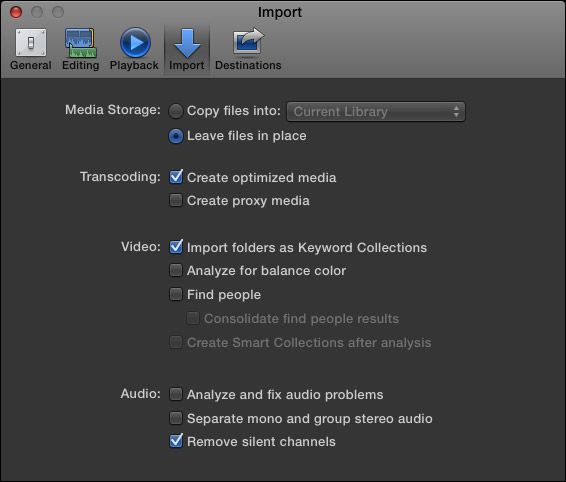
Leave files in place does just that, it simply references the files from where they are. If you choose to copy files into an event/library, it will do that, and all your media will be contained within the Library.
Can't sleep? Try this: fcpxpert.net ;-)
Last edit: 24 Mar 2014 19:46 by plysat.
Please Log in to join the conversation.
- ronny courtens
-

- Offline
- Moderator
-

Less
More
- Posts: 4455
- Thank you received: 962
24 Mar 2014 19:46 #43335
by ronny courtens
Replied by ronny courtens on topic Please help... FCPX is NOT showing the Events or Projects folder.
To elaborate on what Charlie says:
- Put all your original Golf Course footage into a folder called "Golf Course" on your external media drive and import the footage into FCPX with "Leave Files in Place" selected.
- Put all your original Beach footage into a folder called "Beach" and import the footage with "Leave Files in Place" selected.
No matter how you import and organize your footage in FCPX, all the original files for a specific resort will remain in their appropriate folder on your external media drive. Whenever you need to send Golf Course file footage to your client you will find it in the Golf Course folder; when you need Beach file footage you will find it in your Beach folder.
And what's more: if you only need to send selects of the original footage you can do this right in FCPX. In the FCPX Browser select all the clips you need to send to your client and drag or copy them into a new Library. Then consolidate the Library to a new external folder and send the folder to your client.
I think this is much easier than it ever was, unless you are using an old version of FCPX?
-Ronny
- Put all your original Golf Course footage into a folder called "Golf Course" on your external media drive and import the footage into FCPX with "Leave Files in Place" selected.
- Put all your original Beach footage into a folder called "Beach" and import the footage with "Leave Files in Place" selected.
No matter how you import and organize your footage in FCPX, all the original files for a specific resort will remain in their appropriate folder on your external media drive. Whenever you need to send Golf Course file footage to your client you will find it in the Golf Course folder; when you need Beach file footage you will find it in your Beach folder.
And what's more: if you only need to send selects of the original footage you can do this right in FCPX. In the FCPX Browser select all the clips you need to send to your client and drag or copy them into a new Library. Then consolidate the Library to a new external folder and send the folder to your client.
I think this is much easier than it ever was, unless you are using an old version of FCPX?
-Ronny
Please Log in to join the conversation.
- Jamie McWilliams
-
- Offline
- New Member
-
Less
More
- Posts: 3
- Thank you received: 0
24 Mar 2014 20:05 #43339
by Jamie McWilliams
Replied by Jamie McWilliams on topic Please help... FCPX is NOT showing the Events or Projects folder.
Thanks. I switched my preferences to "Leave in Place." My version is the latest, and I am using Mavericks. My footage all comes in via SD cards, so I'm not sure what you mean by importing it. Also, with many shots, I use the handles to only take portions of the footage, not the whole file, especially with interviews.
Please Log in to join the conversation.
