


- Posts: 4
- Thank you received: 0
3 Post Moderation Rule for New Boarders (25 Jan 2021)
New boarders will have their posts moderated - Don't worry if you cannot see your post immediately.
Please help... FCPX is NOT showing the Events or Projects folder.
- jackvanderlee
-
 Topic Author
- Offline
- New Member
-

Less
More
08 Mar 2014 17:44 #42280
by jackvanderlee
Really doubt the way Apple is going... Been using FCP for years to my satisfaction. But the new media management in FCPX is plain and simple f*&#$@g stupid. Every FCP related blog post or website is now trying to "explain" the Library, Event, Project structure, which is a strong indication that there is too f*&#$@g much to explain!!! A "Project" is NOT a time-line, an "Event" is NOT ("You should think of it as a folder where all your media lives...) a folder, and a "Library" is NOT a project. Apple developers - you've got this totally f*&#$@g messed up from the very beginning. It is completely f*&#$@g CONFUSING to every user!!!
Installed FCPX yesterday, (because you simply have to when upgrading to Mavericks...) and no matter where I search for it (internal or external hard drives) the Events or Projects Folders do NOT show up. Yeah, yeah, yeah, got my drives formatted correctly and permissions setup the right way. Also UN-INSTALLED and RE-INSTALLED the whole thing. But nothing works.
Not shouting at you out there guys, but I'm so totally PISSED with Apple because they're simply letting go of all the professional audio/video people like me, who supported their platform for decades. (Jack, thanks for your 2 and half decade of support. Here's your DOWNGRADED version of FCP. - Yup, that's the way it's going to be because now we're really successful, we don't need you anymore. From here we just want to appeal to the masses only. We're sure you'll find something else to work with and sorry about all the investments you've made around all our products throughout the years. Bye!)
I need to finalize this project though...
The Events and Projects Folders are NOT in the movies folder or elsewhere!!!
Who can help me to fix this please?
Really didn't intend to be rude -- but sometimes you HAVE to vent...
Thx!
Jack
Installed FCPX yesterday, (because you simply have to when upgrading to Mavericks...) and no matter where I search for it (internal or external hard drives) the Events or Projects Folders do NOT show up. Yeah, yeah, yeah, got my drives formatted correctly and permissions setup the right way. Also UN-INSTALLED and RE-INSTALLED the whole thing. But nothing works.
Not shouting at you out there guys, but I'm so totally PISSED with Apple because they're simply letting go of all the professional audio/video people like me, who supported their platform for decades. (Jack, thanks for your 2 and half decade of support. Here's your DOWNGRADED version of FCP. - Yup, that's the way it's going to be because now we're really successful, we don't need you anymore. From here we just want to appeal to the masses only. We're sure you'll find something else to work with and sorry about all the investments you've made around all our products throughout the years. Bye!)
I need to finalize this project though...
The Events and Projects Folders are NOT in the movies folder or elsewhere!!!
Who can help me to fix this please?
Really didn't intend to be rude -- but sometimes you HAVE to vent...
Thx!
Jack
Please Log in to join the conversation.
- ronny courtens
-

- Offline
- Moderator
-

Less
More
- Posts: 4455
- Thank you received: 962
08 Mar 2014 18:12 #42284
by ronny courtens
Replied by ronny courtens on topic Please help... FCPX is NOT showing the Events or Projects folder.
Hi Jack,
I is hard to understand what exactly your problem is between all the other things you say, but let's give it a try.
- You have an FCPX project that has been started on a previous version of FCPX (pre-10.1).
- You have updated your OS to Mavericks and FCPX to 10.1.1 mid-project and now you want to finish it in FCPX 10.1.1.
- After the updates you cannot find any "Final Cut Projects" or "Final Cut Events" folders on any of your hard drives anymore. You open the drives in Finder and there are no such folders on any of the drives.
Is all this correct?
-Ronny
I is hard to understand what exactly your problem is between all the other things you say, but let's give it a try.
- You have an FCPX project that has been started on a previous version of FCPX (pre-10.1).
- You have updated your OS to Mavericks and FCPX to 10.1.1 mid-project and now you want to finish it in FCPX 10.1.1.
- After the updates you cannot find any "Final Cut Projects" or "Final Cut Events" folders on any of your hard drives anymore. You open the drives in Finder and there are no such folders on any of the drives.
Is all this correct?
-Ronny
Please Log in to join the conversation.
- jackvanderlee
-
Topic Author
- Offline
- New Member
-
Less
More
- Posts: 4
- Thank you received: 0
08 Mar 2014 18:55 #42290
by jackvanderlee
Replied by jackvanderlee on topic Please help... FCPX is NOT showing the Events or Projects folder.
Hi Ronny,
Thank you so much for responding!
Really appreciate it.
Here's the situation (without all the wining) in a nutshell:
• Clean Install OS to Mavericks
• Downloaded FCP 10.1.1 (Did NOT perform any upgrade)
• Started new project
• in users/Movies/ -- there is a folder created called: Final Cut Pro Backups, that's all.
I CAN make a new event (pops up in Libraries window on left)
I CAN make a new project (pops up in timeline window)
But when I close these, I can NOT open them anymore because:
1. They do not show in FCP Library window.
2. In Finder, there are no such folders as Events or Projects on any of the drives to be found.
Hope you can help me out!
Jack
Thank you so much for responding!
Really appreciate it.
Here's the situation (without all the wining) in a nutshell:
• Clean Install OS to Mavericks
• Downloaded FCP 10.1.1 (Did NOT perform any upgrade)
• Started new project
• in users/Movies/ -- there is a folder created called: Final Cut Pro Backups, that's all.
I CAN make a new event (pops up in Libraries window on left)
I CAN make a new project (pops up in timeline window)
But when I close these, I can NOT open them anymore because:
1. They do not show in FCP Library window.
2. In Finder, there are no such folders as Events or Projects on any of the drives to be found.
Hope you can help me out!
Jack
Please Log in to join the conversation.

08 Mar 2014 19:18 - 08 Mar 2014 19:21 #42294
by BenB
Replied by BenB on topic Please help... FCPX is NOT showing the Events or Projects folder.
All you will see in the Finder is the Library package.
Projects are inside of Events now, everything is inside of the Library.
You say the Event and such are not in the Library? Can you supply a screen shot of this?
When you say you "close" them, exactly what does that mean? When you quit and re-launch FCPX? Do you know how to open and close Libraries?
I'm just guessing, because I have no clue how much you do or don't know about the app.
www.macprovideo.com/hub/final-cut/fcp-x-...-to-libraries-part-1
www.macprovideo.com/hub/final-cut/fcp-x-...-to-libraries-part-2
Projects are inside of Events now, everything is inside of the Library.
You say the Event and such are not in the Library? Can you supply a screen shot of this?
When you say you "close" them, exactly what does that mean? When you quit and re-launch FCPX? Do you know how to open and close Libraries?
I'm just guessing, because I have no clue how much you do or don't know about the app.
www.macprovideo.com/hub/final-cut/fcp-x-...-to-libraries-part-1
www.macprovideo.com/hub/final-cut/fcp-x-...-to-libraries-part-2
Last edit: 08 Mar 2014 19:21 by BenB.
Please Log in to join the conversation.
- ronny courtens
-
- Offline
- Moderator
-
Less
More
- Posts: 4455
- Thank you received: 962
08 Mar 2014 19:21 - 08 Mar 2014 19:26 #42296
by ronny courtens
Replied by ronny courtens on topic Please help... FCPX is NOT showing the Events or Projects folder.
Okay, thank you for the extra information.
First let's see what's wrong with your new Libraries, then we will try to find back your older projects.
-Close FCPX.
-Go to the FCPX icon in your dock, click on it once and don't release the mouse. A window will appear above the icon. Do you see any Libraries listed? Libraries have an .fcpbundle extension:
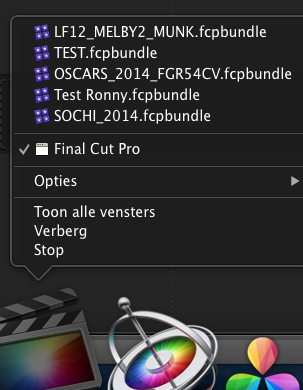
If you see any libraries in the list, click on one to open it. When it opens in FCPX go to the Library Browser, rename the Library to TEST LIBRARY and rename the Event inside it to TEST EVENT.
Then close FCPX and launch it again. Does it open with the TEST LIBRARY?
-Ronny
First let's see what's wrong with your new Libraries, then we will try to find back your older projects.
-Close FCPX.
-Go to the FCPX icon in your dock, click on it once and don't release the mouse. A window will appear above the icon. Do you see any Libraries listed? Libraries have an .fcpbundle extension:
If you see any libraries in the list, click on one to open it. When it opens in FCPX go to the Library Browser, rename the Library to TEST LIBRARY and rename the Event inside it to TEST EVENT.
Then close FCPX and launch it again. Does it open with the TEST LIBRARY?
-Ronny
Last edit: 08 Mar 2014 19:26 by ronny courtens.
Please Log in to join the conversation.
11 Mar 2014 16:09 #42450
by VidGreg
Replied by VidGreg on topic Please help... FCPX is NOT showing the Events or Projects folder.
Hi Jack,
Both Ronny and Ben have given some good answers. Ronny's answer shows you a way to shortcut to your recent projects while opening FCPX; you can also use a right (control click) on the icon as well. This is a systems feature so all of the apps icons allow this shortcut. Pages, textedit, NeoOffice, etc…
I actually think that you are having a different issue and not clicking on the reveal triangle in the library pane. The reveal triangle points to the right when closed and downward when expanded. Once expanded you will see Events and projects (indented).
As Ben said, FCPX 10.1.1 now creates all Events inside the Library and Projects inside Events, thus when you click on the triangle it expands to show you the hierarchy.
Hope this helps, Greg
Both Ronny and Ben have given some good answers. Ronny's answer shows you a way to shortcut to your recent projects while opening FCPX; you can also use a right (control click) on the icon as well. This is a systems feature so all of the apps icons allow this shortcut. Pages, textedit, NeoOffice, etc…
I actually think that you are having a different issue and not clicking on the reveal triangle in the library pane. The reveal triangle points to the right when closed and downward when expanded. Once expanded you will see Events and projects (indented).
As Ben said, FCPX 10.1.1 now creates all Events inside the Library and Projects inside Events, thus when you click on the triangle it expands to show you the hierarchy.
Hope this helps, Greg
Please Log in to join the conversation.
11 Mar 2014 16:54 #42455
by tpayton
Replied by tpayton on topic Please help... FCPX is NOT showing the Events or Projects folder.
Everybody else - On the day FCP 10.1 was released I seem to recall that Ripple Training released a "how to upgrade" video, that I think would be a big help to Jack, but I can't seem to find it now. Anyone have a link? This is all I could find in the archives:
Jack - Sorry you are having trouble, but in my experience at our shop the new library method is pretty fantastic. If you recall when FCP 10 was released there were all sorts of explanations and workarounds on the event/project model. The library model makes much more sense. Hang in there, I think you'll see that it is a fantastic solution.
Jack - Sorry you are having trouble, but in my experience at our shop the new library method is pretty fantastic. If you recall when FCP 10 was released there were all sorts of explanations and workarounds on the event/project model. The library model makes much more sense. Hang in there, I think you'll see that it is a fantastic solution.
Please Log in to join the conversation.
- jackvanderlee
-
Topic Author
- Offline
- New Member
-
Less
More
- Posts: 4
- Thank you received: 0
12 Mar 2014 15:21 #42505
by jackvanderlee
Replied by jackvanderlee on topic Please help... FCPX is NOT showing the Events or Projects folder.
Been abroad for a couple of days. Just back. Hey guys, thanks so much for all your help, really appreciate it. To get this out of my hair, please answer these questions just with a Yes or No.
1. In the latest FCPX, are there anymore files created in the movies folder than just "Final Cut Pro Backups"
2. Are Events and Projects listed ONLY in the Library window?
3. A MST.fcpbundle contains a 'Library' file.
4. A MDT.fcpbundle contains the 'Event' and 'Project' files.
Everyone here is still confused about the new naming convention...
Why is a "Project" call a "Library"?
Why is a "Folder" or previously "Bin" called an "Event"?
Why is a "Timeline" called a "Project"?
That doesn't make sense to anybody here (we're with 7).
Thanks again guys, you rock.
Jack
1. In the latest FCPX, are there anymore files created in the movies folder than just "Final Cut Pro Backups"
2. Are Events and Projects listed ONLY in the Library window?
3. A MST.fcpbundle contains a 'Library' file.
4. A MDT.fcpbundle contains the 'Event' and 'Project' files.
Everyone here is still confused about the new naming convention...
Why is a "Project" call a "Library"?
Why is a "Folder" or previously "Bin" called an "Event"?
Why is a "Timeline" called a "Project"?
That doesn't make sense to anybody here (we're with 7).
Thanks again guys, you rock.
Jack
Please Log in to join the conversation.
12 Mar 2014 15:56 #42507
by tpayton
Replied by tpayton on topic Please help... FCPX is NOT showing the Events or Projects folder.
I'm not entirely sure how familiar you are with FCPX, so if you are new Just to put your mind at ease, there are thousands of us folks cutting with FCPX. TV shows, movies, corporate, documentary, broadcast spots etc. It is a fantastic NLE. There is a learning curve with it just like any other software, and it seem like you are caught in that curve. I would HIGHLY recommend that you get some training such as Ripple Training, or Larry Jordan, or Lynda.com. It's well worth the $50 or so you will spend and you will be much more comfortable with the software and the terminology.
Now to answer your questions:
1. No. However, technically, Motion Templates are there if you have custom motion templates. Also you can of course store a Library there too.
2. Yes. If I understand your question. Libraries contain events, which in turn contain Projects (timelines) and Media. If you have ever used Aperature, Libraries function in the same way in it.
3. Not sure I understand. But a fcpbundle extension is a "library" file. There is not a library in it per say.
4. Again like #3. Libraries are containers (i.e. special folders) for Events which then contain Projects and Media.
- T/
Now to answer your questions:
1. No. However, technically, Motion Templates are there if you have custom motion templates. Also you can of course store a Library there too.
2. Yes. If I understand your question. Libraries contain events, which in turn contain Projects (timelines) and Media. If you have ever used Aperature, Libraries function in the same way in it.
3. Not sure I understand. But a fcpbundle extension is a "library" file. There is not a library in it per say.
4. Again like #3. Libraries are containers (i.e. special folders) for Events which then contain Projects and Media.
- T/
Please Log in to join the conversation.
12 Mar 2014 17:05 - 12 Mar 2014 17:07 #42512
by VidGreg
Replied by VidGreg on topic Please help... FCPX is NOT showing the Events or Projects folder.
Hi Jack,
The very first moment that I downloaded FCP10.1, I thought that the new Library structure would be one of the hardest new features to get a handle on. You and lots of others are having questions. Best to be open to the changes, give it a chance and it will grow on you. Media management is really superior to all other versions of FCP.
Everyone here is still confused about the new naming convention...
Why is a "Project" call a "Library"?
Why is a "Folder" or previously "Bin" called an "Event"?
Why is a "Timeline" called a "Project"?
Yes naming conventions changed.
If I may offer some links to some excellent resources…
First some articles by Phillip Hodgetts. He has provided some well written articles on the new 10.1 including on the new Media management system.
www.philiphodgetts.com/2013/12/final-cut-pro-x-10-1/
Also see this on how to use his excellent, now free app, Event ManagerX to import Events from previous FCP10.9
www.philiphodgetts.com/2013/12/upgrade-y...ries-the-better-way/
His method helps you create separate Libraries and Folders and when they are imported. Better than Apple solution IMHO.
I still use his 7toX Final Cut Pro app to bring in old projects to FCPX
Larry Jordan has some great resources as well…
Also see the links for video reviews by him.
www.larryjordan.biz/fcpx-101-media-management/
FCPX.TV has a great list of resources listed by topics that are very good…
fcpx.tv
And finally,
PixelCorps, MacBreak Studio's channel on YouTube. Steve and Mark have some great short vids on the new 10.1 with segments on the new library structure…
www.youtube.com/user/pixelcorps
Once you spend some time with the new Media Management I hope that you will find it far more flexible and powerful than the previous versions.
Since you seem to be migrating from FCP7, all of the other improvements in 10.1.1 will make you think, why did I wait. For me, just not having audio sync issues was enough to convince me. Add great multi-cam, compositing, metadata tagging, not to mention being vastly faster and if you keep your media external, smaller file sizes, sharing. Lots to love, just have to give it a chance for the romance to settle in.
Hope this helps, Greg
The very first moment that I downloaded FCP10.1, I thought that the new Library structure would be one of the hardest new features to get a handle on. You and lots of others are having questions. Best to be open to the changes, give it a chance and it will grow on you. Media management is really superior to all other versions of FCP.
Everyone here is still confused about the new naming convention...
Why is a "Project" call a "Library"?
Why is a "Folder" or previously "Bin" called an "Event"?
Why is a "Timeline" called a "Project"?
Yes naming conventions changed.
If I may offer some links to some excellent resources…
First some articles by Phillip Hodgetts. He has provided some well written articles on the new 10.1 including on the new Media management system.
www.philiphodgetts.com/2013/12/final-cut-pro-x-10-1/
Also see this on how to use his excellent, now free app, Event ManagerX to import Events from previous FCP10.9
www.philiphodgetts.com/2013/12/upgrade-y...ries-the-better-way/
His method helps you create separate Libraries and Folders and when they are imported. Better than Apple solution IMHO.
I still use his 7toX Final Cut Pro app to bring in old projects to FCPX
Larry Jordan has some great resources as well…
Also see the links for video reviews by him.
www.larryjordan.biz/fcpx-101-media-management/
FCPX.TV has a great list of resources listed by topics that are very good…
fcpx.tv
And finally,
PixelCorps, MacBreak Studio's channel on YouTube. Steve and Mark have some great short vids on the new 10.1 with segments on the new library structure…
www.youtube.com/user/pixelcorps
Once you spend some time with the new Media Management I hope that you will find it far more flexible and powerful than the previous versions.
Since you seem to be migrating from FCP7, all of the other improvements in 10.1.1 will make you think, why did I wait. For me, just not having audio sync issues was enough to convince me. Add great multi-cam, compositing, metadata tagging, not to mention being vastly faster and if you keep your media external, smaller file sizes, sharing. Lots to love, just have to give it a chance for the romance to settle in.
Hope this helps, Greg
Last edit: 12 Mar 2014 17:07 by VidGreg. Reason: Repair links. Sorry still don't have creating links down.
Please Log in to join the conversation.
12 Mar 2014 17:14 #42514
by VidGreg
Replied by VidGreg on topic Please help... FCPX is NOT showing the Events or Projects folder.
Oh ya,
By the way, you can still use FCP7 on Mavericks. If on a fresh system, it is the installer that is the problem if you don't use Migration Assistant. MA will install app on new Mavericks OS and hardware.
FCP7 installer is PowerPC and never updated. There are Terminal hacks to install if you absolutely have to have FCP7.
Hope this helps, Greg
By the way, you can still use FCP7 on Mavericks. If on a fresh system, it is the installer that is the problem if you don't use Migration Assistant. MA will install app on new Mavericks OS and hardware.
FCP7 installer is PowerPC and never updated. There are Terminal hacks to install if you absolutely have to have FCP7.
Hope this helps, Greg
Please Log in to join the conversation.
- haysoos123
-
- Offline
- Platinum Member
-

Less
More
- Posts: 402
- Thank you received: 72
12 Mar 2014 19:39 #42530
by haysoos123
Replied by haysoos123 on topic Please help... FCPX is NOT showing the Events or Projects folder.
Hi Jack,
While I think FCPX is great and I use it almost every day, I do agree along with a lot of people that changing the names to Library/Event/Projects was a terrible decision that contributed a lot to the steepness of the learning curve. I suspect it had to do with the way they originally laid out the separation between Events and Projects in the pre-Library days, thinking that it would be simpler for new users to understand a single timeline as a "project." However, no one actually works that way, and in fact a "project" almost always contains multiple timelines and revisions and versions, etc.
When they added the Libraries, they effectively said, "we done goofed," but then of course we have already established these new names for things.
IMO, "Events" are probably the worst-named thing in FCPX. I understand the original intention was to make it understandable as "this is the footage that belongs to the EVENT of my son's 10th birthday" or the EVENT is "Day 1 of the shoot," but in practice, you are often moving things around different events and using them as just different containers (or BINS), so the whole metaphor breaks down completely. The name EVENT implies just one way or organizing things when in fact it is way more flexible.
While I think FCPX is great and I use it almost every day, I do agree along with a lot of people that changing the names to Library/Event/Projects was a terrible decision that contributed a lot to the steepness of the learning curve. I suspect it had to do with the way they originally laid out the separation between Events and Projects in the pre-Library days, thinking that it would be simpler for new users to understand a single timeline as a "project." However, no one actually works that way, and in fact a "project" almost always contains multiple timelines and revisions and versions, etc.
When they added the Libraries, they effectively said, "we done goofed," but then of course we have already established these new names for things.
IMO, "Events" are probably the worst-named thing in FCPX. I understand the original intention was to make it understandable as "this is the footage that belongs to the EVENT of my son's 10th birthday" or the EVENT is "Day 1 of the shoot," but in practice, you are often moving things around different events and using them as just different containers (or BINS), so the whole metaphor breaks down completely. The name EVENT implies just one way or organizing things when in fact it is way more flexible.
Please Log in to join the conversation.

12 Mar 2014 20:30 - 12 Mar 2014 20:36 #42538
by MJsanders
Replied by MJsanders on topic Please help... FCPX is NOT showing the Events or Projects folder.
Dont know if you have solved this so two quick questions:
1) Did you do a clean install of Mavericks, I E wipe your hard drive and start again??
2) Where did your original FCP X project live? i'm guessing user -> movies -> FCP EVENTS and FCP Projects
Oh by the way, if Im right about 2 then it does beg the question what are you doing having your media on your system disc?
1) Did you do a clean install of Mavericks, I E wipe your hard drive and start again??
2) Where did your original FCP X project live? i'm guessing user -> movies -> FCP EVENTS and FCP Projects
Oh by the way, if Im right about 2 then it does beg the question what are you doing having your media on your system disc?
Last edit: 12 Mar 2014 20:36 by MJsanders.
Please Log in to join the conversation.
- jackvanderlee
-
Topic Author
- Offline
- New Member
-
Less
More
- Posts: 4
- Thank you received: 0
12 Mar 2014 21:05 #42547
by jackvanderlee
Replied by jackvanderlee on topic Please help... FCPX is NOT showing the Events or Projects folder.
Glad to hear someone out there agrees with my "Naming Convention" opinion. My frustration is not exclusive to FCPX. It's the path Apple chose to "Dumb it all down" so they can appeal to the masses. Of course I understand this from a business point of view. But let's be honest -- part of the new FCPX comes from their stupid experiments with... iMovie!!! Did you ever try that app?
I bought Apple products consistently over the years, because Apple always gave me the opportunity to make it easy to understand according to MY wants, needs and ways. A simple example is: Renaming your hard drive. I could call the "Macintosh HD", that always popped up on the right top corner, anything I liked. For example: Jack's Mac. This makes total sense when compared to those stupid PC/Windows naming conventions like "C-drive". When you call your screen a "Desk Top", you don't put your document in a "C-drive". You put it in a "FOLDER" (not an "Event") that carries the name YOU give it. And when you'd like to change it, you CHANGE it. Ever tried that with your PC's C-drive? Exactly...
I noticed that I, and many long-time Apple users around me, are very upset with changing things that really don't need to be changed. Like Save, Save As and naming things the way you want it without breaking any links and PUTTING it anywhere YOU want it. Don't YOU want that anymore? Of course you do!
The fact that FCPX needs to EXPLAIN 'What is what' - and - 'Where it is', is proof of a convoluted interface. Of course you need to familiarize with the software. But I shouldn't need to bother about what a Library, Event or Project actually IS after so many years. THAT should be just plain PEOPLE LOGIC. Not COMPUTER LOGIC.
Apple feels more and more as the "Windows" world where things have always been more rigid, restricted and structured the way Microsoft wants it. In short... the "Apple Feel" is disappearing and I hate it.
(By the way, that "MacIntosh HD" icon in the right top corner has disappeared in Mavericks as well.)
Dinosaur?
Hate change?
Dislike new technologies?
Not at all! (At my home, I can open up the blinds, set the alarm and start the coffee machine -- with my phone.) And I love it.
But I feel that too often changes are NOT made to make things better.
"Apple today: Let's make it different (= incompatible = so now we can sell them another box = so they need to buy the next generation after 14 months.) AGAIN? All this "update stuff" is completely disrupting the workflow of any business these days.
While 'Change is inevitable' and 'Embracing change' are good things to live by, keeping up with OS, office, print, audio, video, photography and more software & hardware updates is completely out of proportion!
I apologize guys. The above doesn't sound like 'about FCPX' anymore.
Or is it?
I bought Apple products consistently over the years, because Apple always gave me the opportunity to make it easy to understand according to MY wants, needs and ways. A simple example is: Renaming your hard drive. I could call the "Macintosh HD", that always popped up on the right top corner, anything I liked. For example: Jack's Mac. This makes total sense when compared to those stupid PC/Windows naming conventions like "C-drive". When you call your screen a "Desk Top", you don't put your document in a "C-drive". You put it in a "FOLDER" (not an "Event") that carries the name YOU give it. And when you'd like to change it, you CHANGE it. Ever tried that with your PC's C-drive? Exactly...
I noticed that I, and many long-time Apple users around me, are very upset with changing things that really don't need to be changed. Like Save, Save As and naming things the way you want it without breaking any links and PUTTING it anywhere YOU want it. Don't YOU want that anymore? Of course you do!
The fact that FCPX needs to EXPLAIN 'What is what' - and - 'Where it is', is proof of a convoluted interface. Of course you need to familiarize with the software. But I shouldn't need to bother about what a Library, Event or Project actually IS after so many years. THAT should be just plain PEOPLE LOGIC. Not COMPUTER LOGIC.
Apple feels more and more as the "Windows" world where things have always been more rigid, restricted and structured the way Microsoft wants it. In short... the "Apple Feel" is disappearing and I hate it.
(By the way, that "MacIntosh HD" icon in the right top corner has disappeared in Mavericks as well.)
Dinosaur?
Hate change?
Dislike new technologies?
Not at all! (At my home, I can open up the blinds, set the alarm and start the coffee machine -- with my phone.) And I love it.
But I feel that too often changes are NOT made to make things better.
"Apple today: Let's make it different (= incompatible = so now we can sell them another box = so they need to buy the next generation after 14 months.) AGAIN? All this "update stuff" is completely disrupting the workflow of any business these days.
While 'Change is inevitable' and 'Embracing change' are good things to live by, keeping up with OS, office, print, audio, video, photography and more software & hardware updates is completely out of proportion!
I apologize guys. The above doesn't sound like 'about FCPX' anymore.
Or is it?
Please Log in to join the conversation.
- Tom Wolsky
-

- Offline
- Moderator
-
12 Mar 2014 21:31 - 12 Mar 2014 21:33 #42553
by Tom Wolsky
Replied by Tom Wolsky on topic Please help... FCPX is NOT showing the Events or Projects folder.
It's your opinion. You can have it of course whether it's right or wrong. It's not very relevant however to helping someone with a problem coming from an earlier version of the application like 10.0.x to 10.1.x.
"The fact that FCPX needs to EXPLAIN 'What is what' - and - 'Where it is', is proof of a convoluted interface."
And this is just wrong when stated as fact. I teach users FCP. Nobody you is new to video editing or post production has any trouble understanding how this application works. It's only when someone expects it to work in some other way that they have difficulties adjusting to it.
"The fact that FCPX needs to EXPLAIN 'What is what' - and - 'Where it is', is proof of a convoluted interface."
And this is just wrong when stated as fact. I teach users FCP. Nobody you is new to video editing or post production has any trouble understanding how this application works. It's only when someone expects it to work in some other way that they have difficulties adjusting to it.
Last edit: 12 Mar 2014 21:33 by Tom Wolsky.
Please Log in to join the conversation.
12 Mar 2014 21:37 #42554
by parkerhqj
Replied by parkerhqj on topic Please help... FCPX is NOT showing the Events or Projects folder.
I've been using FCP since its inception and as much as great as the legacy version was, I would never want to go back to it. Once I got past the unfamiliarity of X - and tolerated its growing pains (which are still active) - I realize what a good program it really is. Don't worry about the naming conventions - just figure out what everything is for and what it can do for you and you'll be fine. And trust me, the masses couldn't tackle this program any more than they could tackle the legacy version. Why do you think you're tearing your hair out? Can you imagine your mother trying to learn this?
Please Log in to join the conversation.
- haysoos123
-
- Offline
- Platinum Member
-
Less
More
- Posts: 402
- Thank you received: 72
12 Mar 2014 22:25 #42564
by haysoos123
Replied by haysoos123 on topic Please help... FCPX is NOT showing the Events or Projects folder.
Jack,
You sound like pretty much everyone that's made this transition, and that's not a bad thing. I started out in Avid, and have years with that and FCP Studio. They are all fine and get the job done, but because of the complexity of the job, none of them have "everything." The best thing you can do is see how this particular tool does things better and go with that.
IMO they have done a good job with trying to find out what the most tedious tasks are an optimizing them. The two most important ones to me are: "How do I find the footage I want to use and manage all of that?" and "How do I shape this enormously complex jigsaw of a timeline?"
Keywording, metadata, smart collections, etc. are amazing. Use them. And for the second question, taking Track Tetris out of the equation goes a long way toward making you think about your CONTENT rather than managing tracks and sync. Moving entire chunks of your story around is so much easier. Roles also help you organize things by content rather than thinking about what tracks they belong to. It's a difference of philosophy, and a refreshing one.
You sound like pretty much everyone that's made this transition, and that's not a bad thing. I started out in Avid, and have years with that and FCP Studio. They are all fine and get the job done, but because of the complexity of the job, none of them have "everything." The best thing you can do is see how this particular tool does things better and go with that.
IMO they have done a good job with trying to find out what the most tedious tasks are an optimizing them. The two most important ones to me are: "How do I find the footage I want to use and manage all of that?" and "How do I shape this enormously complex jigsaw of a timeline?"
Keywording, metadata, smart collections, etc. are amazing. Use them. And for the second question, taking Track Tetris out of the equation goes a long way toward making you think about your CONTENT rather than managing tracks and sync. Moving entire chunks of your story around is so much easier. Roles also help you organize things by content rather than thinking about what tracks they belong to. It's a difference of philosophy, and a refreshing one.
Please Log in to join the conversation.

13 Mar 2014 03:28 #42581
by marchyman
A Project is not called a Library and thinking of it that way is likely to cause issues. A library is container for media (optional), metadata, projects, and associated render files. It is NOT a project.
An Event is not a folder or a bin. Events contain the metadata for the media in or referenced by the event. Bins and folders don't. Metadata is what drives the program.
A Timeline is not called a project. I can open any clip in its own timeline without a project. Ditto with compound clips.
In short, FCPX is NOT FCP 7... stop trying to treat it that way. It is a different program with a different model of operation. The old model of project, sequence, and bins does not match the new model one-to-one. Much more changed than just the names.
Replied by marchyman on topic Please help... FCPX is NOT showing the Events or Projects folder.
jackvanderlee wrote: Why is a "Project" call a "Library"?
Why is a "Folder" or previously "Bin" called an "Event"?
Why is a "Timeline" called a "Project"?
A Project is not called a Library and thinking of it that way is likely to cause issues. A library is container for media (optional), metadata, projects, and associated render files. It is NOT a project.
An Event is not a folder or a bin. Events contain the metadata for the media in or referenced by the event. Bins and folders don't. Metadata is what drives the program.
A Timeline is not called a project. I can open any clip in its own timeline without a project. Ditto with compound clips.
In short, FCPX is NOT FCP 7... stop trying to treat it that way. It is a different program with a different model of operation. The old model of project, sequence, and bins does not match the new model one-to-one. Much more changed than just the names.
Please Log in to join the conversation.
13 Mar 2014 12:09 - 13 Mar 2014 12:14 #42593
by BenB
Replied by BenB on topic Please help... FCPX is NOT showing the Events or Projects folder.
"The fact that FCPX needs to EXPLAIN 'What is what' - and - 'Where it is', is proof of a convoluted interface."
And is true of any NLE or piece of software that if you're new to something, you have to learn it, have things explained to you. So this is a nonsense statement. I'm sorry, but it factually is.
First thing I tell me students in my classes, take everything you've ever learned about any NLE before, especially legacy FCP, and throw it all out the window. I've been teaching NLEs for over a decade now, and nothing has been easier to teach, no other NLE was ever picked up and learned by editors new and old as fast or as easily as FCPX.
Metadata, Timelines, understand those two concepts, the rest falls in to place. These are not "new" concepts either. Many of us have been working this way since Final Cut Server and other media asset management systems became popular.
Only once did I have a student who was totally baffled and couldn't wrap his head around this really simple, fast, easy system. I recommended he go learn Media Composer or Premier Pro, he got a refund, he didn't finish the class. That was about 8 months ago. He just registered for our next class, again. Will be interesting to hear why he didn't stick with PPro or MC.
And is true of any NLE or piece of software that if you're new to something, you have to learn it, have things explained to you. So this is a nonsense statement. I'm sorry, but it factually is.
First thing I tell me students in my classes, take everything you've ever learned about any NLE before, especially legacy FCP, and throw it all out the window. I've been teaching NLEs for over a decade now, and nothing has been easier to teach, no other NLE was ever picked up and learned by editors new and old as fast or as easily as FCPX.
Metadata, Timelines, understand those two concepts, the rest falls in to place. These are not "new" concepts either. Many of us have been working this way since Final Cut Server and other media asset management systems became popular.
- Libraries and Events are virtual containers to help organize media assets.
- Every media asset inside of an Event is a Timeline (clips, Compound, Multicam, Sync, etc).
- Keyword collections, Smart collections, and Analysis collections are the most powerful, flexible, and fastest media management system in any NLE on the market today. Folders/Bins will never be as fast or as easy. Not the same things.
- Ranges work faster and easier than sub-clips with bins/folders ever did.
Only once did I have a student who was totally baffled and couldn't wrap his head around this really simple, fast, easy system. I recommended he go learn Media Composer or Premier Pro, he got a refund, he didn't finish the class. That was about 8 months ago. He just registered for our next class, again. Will be interesting to hear why he didn't stick with PPro or MC.
Last edit: 13 Mar 2014 12:14 by BenB.
Please Log in to join the conversation.
13 Mar 2014 22:20 #42637
by tpayton
Replied by tpayton on topic Please help... FCPX is NOT showing the Events or Projects folder.
BTW. It is interesting to note that in the FCPXML, projects and compound clips are actually called Sequences. 
Please Log in to join the conversation.
