


3 Post Moderation Rule for New Boarders (25 Jan 2021)
New boarders will have their posts moderated - Don't worry if you cannot see your post immediately.
C300 MXF import into 10.1
- Darren Roark
-

- Offline
- Platinum Member
-

Less
More
19 Jun 2014 23:37 #48183
by Darren Roark
Replied by Darren Roark on topic C300 MXF import into 10.1
Bringing your computer back to a 'zero state' will most likely do the trick.
It's a PITA, but it should run better too. Permissions get mucked up over time beyond what disk util can fix, which is what it sounds like is happening. The installer seems to not be able to write to that folder. (Or create it)
Two less nuclear options are creating another user and see if it will work in there. The other is using Onyx to clear cache and log files. Apparently it can repair permissions better than diskutil. Make sure you have cloned your system before doing that.
Installing the Canon, Panasonic, and Sony software to make their camera formats work has always been a huge pain.
It's a PITA, but it should run better too. Permissions get mucked up over time beyond what disk util can fix, which is what it sounds like is happening. The installer seems to not be able to write to that folder. (Or create it)
Two less nuclear options are creating another user and see if it will work in there. The other is using Onyx to clear cache and log files. Apparently it can repair permissions better than diskutil. Make sure you have cloned your system before doing that.
Installing the Canon, Panasonic, and Sony software to make their camera formats work has always been a huge pain.
Please Log in to join the conversation.
21 Jun 2014 00:26 #48218
by hesperax
Replied by hesperax on topic C300 MXF import into 10.1
I forgot that my macbook had a clean install of Mavericks, I tested it there and nothing  , I installed onyx cleaned out the cache and still no progress. I don't know what else could be the matter. If anything else comes to mind please let me know, thank-you for your time. Cheers.
 Please Log in to join the conversation.
21 Jun 2014 00:28 #48219
by hesperax
Replied by hesperax on topic C300 MXF import into 10.1
I have a macbook pro with a fresh mavericks install but that did not help, also I tried the onyx suggestion, again no luck, please let me know if anything else comes to mind. Thank-you for your time. Cheers.
Please Log in to join the conversation.

22 Jul 2014 05:01 #50282
by ptrush
Replied by ptrush on topic C300 MXF import into 10.1
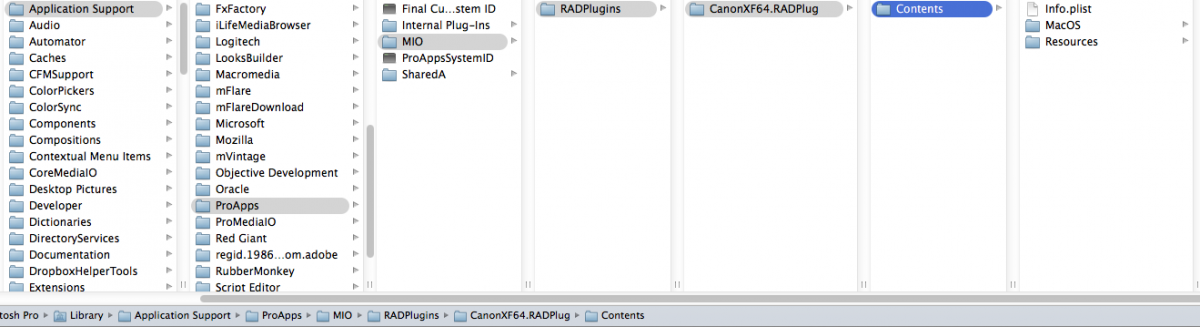
Yes, i am having the same issue here as well. Everything seems to be in it's right place~
Please Log in to join the conversation.
22 Jul 2014 06:15 #50286
by hesperax
Replied by hesperax on topic C300 MXF import into 10.1
Do NOT format, that did not work, what you need are the plugin and the original folder structure. Once you have that just restart and it'll work.
Please Log in to join the conversation.
22 Jul 2014 13:29 - 22 Jul 2014 13:31 #50311
by ptrush
Replied by ptrush on topic C300 MXF import into 10.1
I wasn't going to reformat. No way- Ive got work to do =]
If you look at my screenshot, it appears to have the 'magic folder' necessary to get the canon mxf files visible in fcp. I am actually missing the other folder which doesn't seem to concern MattDavis. I believe I NEED the other folder as well-
I also tried replacing the magic folder with the one I downloaded in the link, but no luck... hope this all makes sense. Really just need someone to upload all the canon folders inside of the RADPlugins folder.
see screen shot.

If you look at my screenshot, it appears to have the 'magic folder' necessary to get the canon mxf files visible in fcp. I am actually missing the other folder which doesn't seem to concern MattDavis. I believe I NEED the other folder as well-
I also tried replacing the magic folder with the one I downloaded in the link, but no luck... hope this all makes sense. Really just need someone to upload all the canon folders inside of the RADPlugins folder.
see screen shot.
Last edit: 22 Jul 2014 13:31 by ptrush.
Please Log in to join the conversation.
22 Jul 2014 14:16 - 22 Jul 2014 14:21 #50315
by ptrush
Replied by ptrush on topic C300 MXF import into 10.1
I've figured it out!!
The problem wasn't with the CanonXF64 plugin, it was the Canon C300 file structure.
The Shooter delivered the files to me on a drive, and the original files structure had been altered.
I just rebuilt the structure and FCPx was happy...Rookie mistake. I should've known
Here's a screen shot just to clear things up!

The problem wasn't with the CanonXF64 plugin, it was the Canon C300 file structure.
The Shooter delivered the files to me on a drive, and the original files structure had been altered.
I just rebuilt the structure and FCPx was happy...Rookie mistake. I should've known
Here's a screen shot just to clear things up!
Last edit: 22 Jul 2014 14:21 by ptrush.
Please Log in to join the conversation.
- philthecorgi
-
- Offline
- New Member
-

Less
More
- Posts: 1
- Thank you received: 0
20 Nov 2014 05:50 #56236
by philthecorgi
Replied by philthecorgi on topic C300 MXF import into 10.1
OMG, I have spent the past several hours trying to find out why I couldn't open MXF files even with the plug in.
ptrush nailed it for me...the MXF files didn't have a parent folder named "CONTENTS". I created the folder, moved the clips in there and it worked!!! I can't believe this was an issue...kind of ridiculous.
Thanks everyone for the help!
ptrush nailed it for me...the MXF files didn't have a parent folder named "CONTENTS". I created the folder, moved the clips in there and it worked!!! I can't believe this was an issue...kind of ridiculous.
Thanks everyone for the help!
Please Log in to join the conversation.

