


- Posts: 59
- Thank you received: 4
3 Post Moderation Rule for New Boarders (25 Jan 2021)
New boarders will have their posts moderated - Don't worry if you cannot see your post immediately.
C300 MXF import into 10.1
16 Jan 2014 21:39 - 16 Jan 2014 21:41 #39123
by MattDavis
C300 MXF import into 10.1 was created by MattDavis
My first C300 edit since upgrading to FCPX 10.1 seems to demonstrate that the Canon FCPX plug-in "Canon XF Plugin for Final Cut Pro X 2.1.1" or XPFM 2.1.1, which delivers an enigmatically named app called "XPFM64Installer" - is broken by either 10.1, Mavericks, or both.
Luckily, my copy of FCP7 is still able to do 'Log and Transfer' of C300 stuff to ProRes, so the pressure is off. I did consider MXF4Mac from Hamburg Pro Media ($239) and I tried the demo version of Calibrated Q MXF plug-in, which works - for $250. Both of these allow MXF rushes to be directly imported into FCPX and used without transcoding or even rewrapping.
So has anyone cracked C300 MXF rushes in FCPX 10.1 yet? Spend money? Use FCP7 as grossly overweight transcode utility? Can we do better than that? :lol:
Luckily, my copy of FCP7 is still able to do 'Log and Transfer' of C300 stuff to ProRes, so the pressure is off. I did consider MXF4Mac from Hamburg Pro Media ($239) and I tried the demo version of Calibrated Q MXF plug-in, which works - for $250. Both of these allow MXF rushes to be directly imported into FCPX and used without transcoding or even rewrapping.
So has anyone cracked C300 MXF rushes in FCPX 10.1 yet? Spend money? Use FCP7 as grossly overweight transcode utility? Can we do better than that? :lol:
Last edit: 16 Jan 2014 21:41 by MattDavis.
Please Log in to join the conversation.
18 Jan 2014 08:06 - 18 Jan 2014 08:08 #39246
by innlens
Replied by innlens on topic C300 MXF import into 10.1
Matt, I use the C300 daily and have NO ISSUES whatsoever. I can import from Cards and hard drive-archives just like always.
Did you install Mavericks fresh and then FCPX over it? I believe Canon and Sony are slow with updating their plug-ins for Mavericks. If you (like me) installed FCPX 10.1 on a running Mavericks machine it should be fine.
To clarify: I first updated Mountain Lion (with FCPX) to Mavericks, and then updated FCPX to 10.1.
Did you install Mavericks fresh and then FCPX over it? I believe Canon and Sony are slow with updating their plug-ins for Mavericks. If you (like me) installed FCPX 10.1 on a running Mavericks machine it should be fine.
To clarify: I first updated Mountain Lion (with FCPX) to Mavericks, and then updated FCPX to 10.1.
Last edit: 18 Jan 2014 08:08 by innlens.
Please Log in to join the conversation.
18 Jan 2014 13:34 #39256
by MattDavis
Replied by MattDavis on topic C300 MXF import into 10.1
Hmmm. I installed Mavericks 'over' Lion, as advised to do so in the 'Take Control over Upgrading to Mavericks' eBook that became a 'distress purchase'. Mavericks then decided to upgrade 10.0.9 to 10.1 by its self, which I thought a little presumptuous.
C300 import had been fine before that, so something somewhere has gone wrong.
C300 import had been fine before that, so something somewhere has gone wrong.
Please Log in to join the conversation.
18 Jan 2014 16:35 #39257
by innlens
Replied by innlens on topic C300 MXF import into 10.1
A friend of mine had the problem with Sony XDCam on a brand-new Mavericks machine. also Sony SxS drivers didm´t work early in Mavericks (I believe all this works now).
Anyway, I guess all you could do is try to reinstall that Canon plug-in and in the worst case you indeed have to go through XDCam Transfer (no need to open FCP7 for that) until Canon fixes this issue.
Anyway, I guess all you could do is try to reinstall that Canon plug-in and in the worst case you indeed have to go through XDCam Transfer (no need to open FCP7 for that) until Canon fixes this issue.
Please Log in to join the conversation.
18 Jan 2014 16:50 #39259
by MattDavis
Replied by MattDavis on topic C300 MXF import into 10.1
Oooh, you had me going for a minute - XDCAM Transfer? Open up MXF structures? Wonderful! I love the batch naming and metadata tagging of XDCAM Transfer. However, it won't open the XF Utility card archives.
I've tried a couple of times to install (and uninstall) the Canon FCPX XPFM 211.
I'm beginning to wonder about the opportunity cost of doing a clean install (and tidy up after it) over just blowing $250 and splitting the bill over the next few C300 edit jobs. Other than MXF, my FCPX system is happy, with XDCAM/SxS and AVCHD/SDHC being the main formats that give no trouble at all.
So you had problems with SxS and I'm having problems with MXF? Plus ca change...
I've tried a couple of times to install (and uninstall) the Canon FCPX XPFM 211.
I'm beginning to wonder about the opportunity cost of doing a clean install (and tidy up after it) over just blowing $250 and splitting the bill over the next few C300 edit jobs. Other than MXF, my FCPX system is happy, with XDCAM/SxS and AVCHD/SDHC being the main formats that give no trouble at all.
So you had problems with SxS and I'm having problems with MXF? Plus ca change...
Please Log in to join the conversation.
18 Jan 2014 18:15 #39260
by innlens
Replied by innlens on topic C300 MXF import into 10.1
I didn´t have any problems 
A friend had problems with XDCam and I heard there was an issue with SxS cards on Mavericks.
These problems would have effected Premiere and Avid just as much, just like your XF problem. It is an OS problem created by the camera-makers, not a FCPX bug. Every NLE depends on the Canon plug-in.
you could use XDCam Transfer, but you need to select every clip in the CLIPS001 folder and then get them as objects in Transfer. Not elegant, but works in a pinch.
A friend had problems with XDCam and I heard there was an issue with SxS cards on Mavericks.
These problems would have effected Premiere and Avid just as much, just like your XF problem. It is an OS problem created by the camera-makers, not a FCPX bug. Every NLE depends on the Canon plug-in.
you could use XDCam Transfer, but you need to select every clip in the CLIPS001 folder and then get them as objects in Transfer. Not elegant, but works in a pinch.
Please Log in to join the conversation.
19 Jan 2014 03:59 #39272
by cgbier
Replied by cgbier on topic C300 MXF import into 10.1
Wasn't there an issue before with XDcam Transfer for Canon MXF? IIRC, audio was gone.
I was using the donation ware rewrapper from that Danish dude until Canon had fixed the plugin for FCP X with my XF100. Google for xfcpx2.
I was using the donation ware rewrapper from that Danish dude until Canon had fixed the plugin for FCP X with my XF100. Google for xfcpx2.
Please Log in to join the conversation.
07 Mar 2014 12:13 - 07 Mar 2014 12:14 #42207
by MattDavis
Replied by MattDavis on topic C300 MXF import into 10.1
:woohoo:
I'm fixed! I'm able to import C300 rushes from card or from XF Utility archives. Huge shout-out to Michael Sanders for sleuthing a solution... Hopefully this will help other FCPX users who find themselves in the same boat:
For whatever reason, no matter how many times I ran the installer, I could not import rushes. Michael and I compared folder contents in the system library (not the ~user level, the main library on the root of the boot drive).
The highlighted folder was NOT there in my library. Putting in a 'donated' copy, and tada! Works just fine!
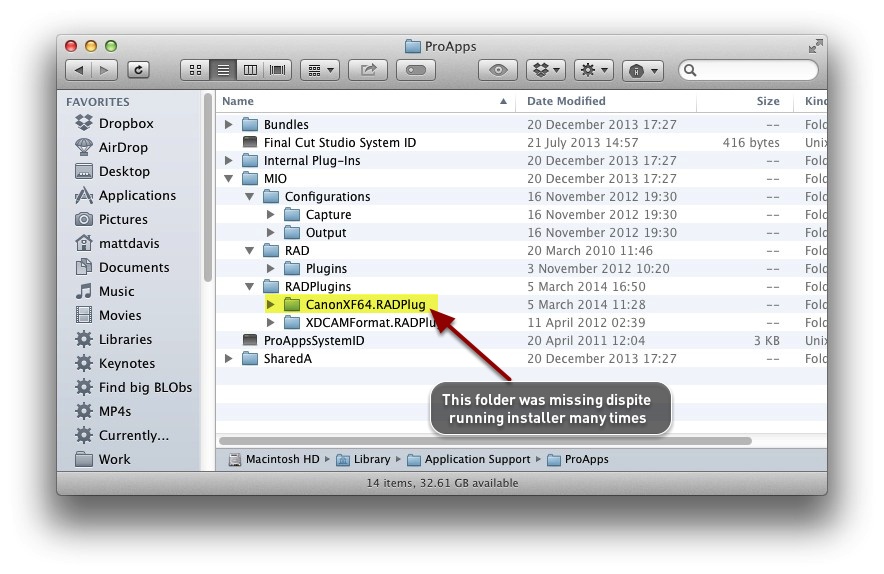
Something about my setup made the installer ignore this vital bit - maybe it didn't want to disturb the XDCAM folder? Maybe it didn't expect to find something in the RADPlug folder and therefore didn't touch it as part of the install?
So, I tried pulling apart the installer to see if there was an easier way of getting hold of this part of the plug-in. So far, no cigar. So it seems you have to find somebody who CAN import C300 rushes into FCPX, and ask them for a copy of this tiny folder. Just literally drag and drop it in, and everything works.
I'm fixed! I'm able to import C300 rushes from card or from XF Utility archives. Huge shout-out to Michael Sanders for sleuthing a solution... Hopefully this will help other FCPX users who find themselves in the same boat:
For whatever reason, no matter how many times I ran the installer, I could not import rushes. Michael and I compared folder contents in the system library (not the ~user level, the main library on the root of the boot drive).
The highlighted folder was NOT there in my library. Putting in a 'donated' copy, and tada! Works just fine!
Something about my setup made the installer ignore this vital bit - maybe it didn't want to disturb the XDCAM folder? Maybe it didn't expect to find something in the RADPlug folder and therefore didn't touch it as part of the install?
So, I tried pulling apart the installer to see if there was an easier way of getting hold of this part of the plug-in. So far, no cigar. So it seems you have to find somebody who CAN import C300 rushes into FCPX, and ask them for a copy of this tiny folder. Just literally drag and drop it in, and everything works.
Last edit: 07 Mar 2014 12:14 by MattDavis.
Please Log in to join the conversation.
- ronny courtens
-

- Offline
- Moderator
-

Less
More
- Posts: 4455
- Thank you received: 962
07 Mar 2014 20:36 #42240
by ronny courtens
Replied by ronny courtens on topic C300 MXF import into 10.1
Hi Matt,
Thank you for sharing this solution. Very helpful for other people who may have the same problem.
-Ronny
Thank you for sharing this solution. Very helpful for other people who may have the same problem.
-Ronny
Please Log in to join the conversation.
- chrisroyfilms
-

- Offline
- New Member
-

Less
More
- Posts: 2
- Thank you received: 0
14 Mar 2014 16:00 #42677
by chrisroyfilms
Replied by chrisroyfilms on topic C300 MXF import into 10.1
Weird. I was having this same issue and looked to see if I had that folder and found that I didn't have permissions to the "RADPlugins" folder. Cleared up the permissions and yes I do have the folder. Now I can import footage directly into FCPX.
Think I need to run permissions check on my system.
Think I need to run permissions check on my system.
Please Log in to join the conversation.
17 Jun 2014 22:02 #47992
by hesperax
Replied by hesperax on topic C300 MXF import into 10.1
Hello everyone,
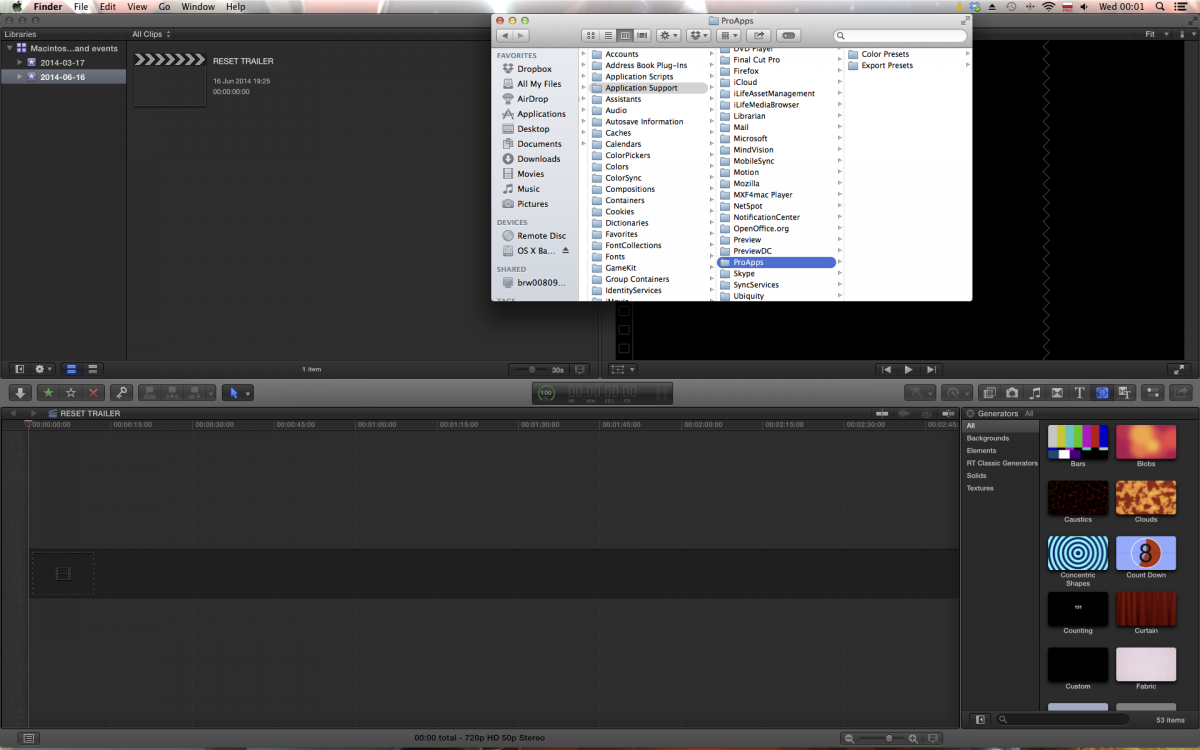
This is my first post and I've tried the above, meaning in FCPX 10.1 I installed the CANON drivers but under the ProApps folder all I have is color presets and export presets, there is no BUNDLES folder or anything like that, I feel silly asking but can anyone help, I've spent way too many ours reading with nothing to show for it. BTW I am trying to import MXF files into FCPX 10.1.1. does anyone know where I can get the above folders or offer an alternative. Cheers and thank-you for your time. Here is a screenshot.
This is my first post and I've tried the above, meaning in FCPX 10.1 I installed the CANON drivers but under the ProApps folder all I have is color presets and export presets, there is no BUNDLES folder or anything like that, I feel silly asking but can anyone help, I've spent way too many ours reading with nothing to show for it. BTW I am trying to import MXF files into FCPX 10.1.1. does anyone know where I can get the above folders or offer an alternative. Cheers and thank-you for your time. Here is a screenshot.
Please Log in to join the conversation.
17 Jun 2014 22:04 #47993
by hesperax
Replied by hesperax on topic C300 MXF import into 10.1
Hi, this does not work for me, 10.1.1 I don't have any RADPlugin folders, any helpe would be greatly appreciated. Thank-you in advance for your time.
Please Log in to join the conversation.
17 Jun 2014 22:08 #47994
by cgbier
Replied by cgbier on topic C300 MXF import into 10.1
What you're looking for should be under Library/Application Support/Canon/XF Utility.
Did you actually install the FCP plugin?
Did you actually install the FCP plugin?
Please Log in to join the conversation.
17 Jun 2014 22:21 #47995
by MattDavis
Replied by MattDavis on topic C300 MXF import into 10.1
Here's a slightly more fleshed out version of the fix - and if you look carefully towards the end, there's a little downloadable file.
mattdavis.pro/2014/03/07/mxf-to-fcpx-not...king-a-possible-fix/
mattdavis.pro/2014/03/07/mxf-to-fcpx-not...king-a-possible-fix/
Please Log in to join the conversation.
17 Jun 2014 22:36 #47997
by hesperax
Replied by hesperax on topic C300 MXF import into 10.1
I installed it, but don't have those folder either. I tried installing it again and it did, then is says already installed, but still no folders? I am on MAVERICKS 10.9.3 and FCPX 10.1.1 I'm gonna restart see if that helps. Thank-you
Please Log in to join the conversation.
17 Jun 2014 22:40 #47998
by hesperax
Replied by hesperax on topic C300 MXF import into 10.1
I have none of those folders, do I need to reveal them in some way? I've installed the plugin and it says it's successful but nothing. I'll restart. Thanks.
Please Log in to join the conversation.
17 Jun 2014 22:55 #47999
by hesperax
Replied by hesperax on topic C300 MXF import into 10.1
good news is I found the folder, better news is I already have the folder that MATT talks about, bad news it still doesn't work? Is there anything I need to do to activate the plugin? I'll try reinstalling it.
Please Log in to join the conversation.
- Darren Roark
-
- Offline
- Platinum Member
-

18 Jun 2014 00:05 #48001
by Darren Roark
Replied by Darren Roark on topic C300 MXF import into 10.1
Apologies if someone said this already, but a thorough permissions repair, make a new user account, and completely uninstall and reinstall FCP X, download a fresh copy from the MAS and see if that work.
There is also the 'nuke it from space' option which is reinstall Mavericks and start the computer over as a new computer. (without migrating from an old user folder or time machine) I know it's a PITA, but it probably would have worked in the first place and taken much less time than trying to troubleshoot the voodoo curse you have now.
Canon and Sony really don't like to make things easy for some reason. The fact that you had to hack the plist in FCP 7 in order to import footage from a t2i is just silly.
There is also the 'nuke it from space' option which is reinstall Mavericks and start the computer over as a new computer. (without migrating from an old user folder or time machine) I know it's a PITA, but it probably would have worked in the first place and taken much less time than trying to troubleshoot the voodoo curse you have now.
Canon and Sony really don't like to make things easy for some reason. The fact that you had to hack the plist in FCP 7 in order to import footage from a t2i is just silly.
Please Log in to join the conversation.
19 Jun 2014 22:58 #48182
by hesperax
Replied by hesperax on topic C300 MXF import into 10.1
Just did a fresh install of FCPX, nothing, do you really think that a clean mavericks install will do it? Never have any sort of issue before that require a solution of such magnitude.
Please Log in to join the conversation.
