


- Posts: 929
- Thank you received: 131
3 Post Moderation Rule for New Boarders (25 Jan 2021)
New boarders will have their posts moderated - Don't worry if you cannot see your post immediately.
FCP 10.1 Collaboration - SAN over ethernet? or workaround
14 Jan 2014 21:05 #38885
by tpayton
FCP 10.1 Collaboration - SAN over ethernet? or workaround was created by tpayton
At our shop we have been using sparse disk images to share FCPX projects over ethernet. Works just dandy for our mostly Canon h264 footage. Now that 10.1 is out, there is great potential for collaboration with libraries, but they are required to be on a SAN, which as far as I know requires Fiber.
I am curious, do you know of any way to run a SAN over ethernet?
(BTW. We can continue to use sparse disk images to share libraries, but that is limited as only one person can mount a sparse disk image at a time.)
I am curious, do you know of any way to run a SAN over ethernet?
(BTW. We can continue to use sparse disk images to share libraries, but that is limited as only one person can mount a sparse disk image at a time.)
Please Log in to join the conversation.
- Darren Roark
-

- Offline
- Platinum Member
-

14 Jan 2014 23:42 #38908
by Darren Roark
Replied by Darren Roark on topic FCP 10.1 Collaboration - SAN over ethernet? or workaround
Now that FCP X can point to media on a server as long as the library is a mounted drive or SAN it's easy to make libraries that do not contain any media, just symlinks and use them like projects back in the FCP 7 days. Then everyone can share the same media at the same time and share libraries back and forth.
You can use smalltree cards or their thunderbolt boxes: www.small-tree.com/ThunderNET_TN1_4P_p/tn1-4p.htm
Much less expensive than fiber and much easier to set up using cat6. I built two systems in 2011 and even with the older cards I was still getting 180MB/s read/write from the internal caldigit RAID-5 card in a 2006 mac pro. The newer versions specs are much faster.
You can use smalltree cards or their thunderbolt boxes: www.small-tree.com/ThunderNET_TN1_4P_p/tn1-4p.htm
Much less expensive than fiber and much easier to set up using cat6. I built two systems in 2011 and even with the older cards I was still getting 180MB/s read/write from the internal caldigit RAID-5 card in a 2006 mac pro. The newer versions specs are much faster.
Please Log in to join the conversation.
14 Jan 2014 23:56 #38910
by tpayton
Replied by tpayton on topic FCP 10.1 Collaboration - SAN over ethernet? or workaround
So small tree can use ethernet, or do you have to convert fiber to ethernet?
Also I have a MacPro I can use as a server (or SAN), so I could put a card in there, but everybody else in my shop has iMacs.
Also I have a MacPro I can use as a server (or SAN), so I could put a card in there, but everybody else in my shop has iMacs.
Please Log in to join the conversation.
- haysoos123
-
- Offline
- Platinum Member
-
Less
More
- Posts: 402
- Thank you received: 72
15 Jan 2014 00:09 #38914
by haysoos123
Replied by haysoos123 on topic FCP 10.1 Collaboration - SAN over ethernet? or workaround
Since libraries can live anywhere now, they've removed 'add san location'. We have gotten rid of our sparse images. However, it still seems like you need to have the libraries locally or over san. I just tested trying to open a library over ethernet, and there's still no support. However, it should work over ethernet if it's shared as an NFS volume by the server.
Please Log in to join the conversation.
15 Jan 2014 00:11 - 15 Jan 2014 00:12 #38915
by plysat
Can't sleep? Try this: fcpxpert.net ;-)
Replied by plysat on topic FCP 10.1 Collaboration - SAN over ethernet? or workaround
As Darren says, all your media on the server, no media (other than renders and proxies) in local Libraries. Easy to copy/duplicate/transfer work between editors. We're running OS X Server with 2 R6 Promise Raids over GB E'net. Works fine here with 5-6 Editors and a mix of NLE's (7,X, Pr)
Can't sleep? Try this: fcpxpert.net ;-)
Last edit: 15 Jan 2014 00:12 by plysat.
Please Log in to join the conversation.
15 Jan 2014 00:13 #38916
by tpayton
As far as I understand it, FCP will only work with locally attached drives or SAN locations (and also with sparse disk images which trick FCP into thinking it is looking at an external drive.) I wasn't aware that a network file server is a location that libraries can live.
I should reiterate that we need a location where libraries can be shared over ethernet without having to invest [strike]an arm and a leg[/strike] in fiber.
Replied by tpayton on topic FCP 10.1 Collaboration - SAN over ethernet? or workaround
haysoos123 wrote: it should work over ethernet if it's shared as an NFS volume by the server.
As far as I understand it, FCP will only work with locally attached drives or SAN locations (and also with sparse disk images which trick FCP into thinking it is looking at an external drive.) I wasn't aware that a network file server is a location that libraries can live.
I should reiterate that we need a location where libraries can be shared over ethernet without having to invest [strike]an arm and a leg[/strike] in fiber.
Please Log in to join the conversation.
- haysoos123
-
- Offline
- Platinum Member
-
Less
More
- Posts: 402
- Thank you received: 72
15 Jan 2014 00:33 #38921
by haysoos123
Yes, you should be able to mount a library off of an NFS share, at least that's what I've read. I don't think it's well documented, but if you do a google on FCPX and NFS you will see people doing it. I am on fiber at the moment, but we'll be moving to 10GigE (over fiber) in the next couple of weeks so I will know for sure soon. Still, though, you can keep libraries local and have the media external through regular ethernet which is officially supported. There may even be performance advantages to keeping the libraries local. You can do a sort of compromise and keep the libraries on the server, but have them copied locally when an editor needs to work on it. I'm going to be evaluating the pros and cons of these approaches in the next few weeks.
Remember that if you do end up with a centralized location for your libraries over NFS or something, you need a way of managing who can write to it because it will get ugly otherwise.
Replied by haysoos123 on topic FCP 10.1 Collaboration - SAN over ethernet? or workaround
tpayton wrote: I wasn't aware that a network file server is a location that libraries can live.
I should reiterate that we need a location where libraries can be shared over ethernet without having to invest [strike]an arm and a leg[/strike] in fiber.
Yes, you should be able to mount a library off of an NFS share, at least that's what I've read. I don't think it's well documented, but if you do a google on FCPX and NFS you will see people doing it. I am on fiber at the moment, but we'll be moving to 10GigE (over fiber) in the next couple of weeks so I will know for sure soon. Still, though, you can keep libraries local and have the media external through regular ethernet which is officially supported. There may even be performance advantages to keeping the libraries local. You can do a sort of compromise and keep the libraries on the server, but have them copied locally when an editor needs to work on it. I'm going to be evaluating the pros and cons of these approaches in the next few weeks.
Remember that if you do end up with a centralized location for your libraries over NFS or something, you need a way of managing who can write to it because it will get ugly otherwise.
Please Log in to join the conversation.
- Darren Roark
-
- Offline
- Platinum Member
-
15 Jan 2014 00:42 #38922
by Darren Roark
It uses cat-6 gig-e cables only. (Except the thunderbolt cables for the boxes) The server card has several ports, and it's best to have a small tree card on the iMacs via thunderbolt.
You can even hook directly to the ethernet ports on the iMacs if you wish and still use the wifi for internet and local networking. It works, just not as well as having the tbolt box hooked to the iMac. Jumbo frames ability is key, so depending on the imacs you have you may need a t-bolt ethernet adapter. This will get you around 100MB/s read write with a fast raid. If you invest in the t-bolt boxes with multiple gig-e lanes, then you can get more speed.
The other thing to make sure of is that the server is running in 64bit mode, and since I already know you are very handy at making even the oldest mac pro do that, you should be fine there.
As someone said here before regarding the libraries living locally and the media living on the shared storage, FCP X can only access libraries on a mounted drive or SAN, but it doesn't give a darn where your media is.
For the indie features using the small tree setup, we had editors 'check out' a project file in FCP 7. The copies being worked on would be opened locally and then copied to a zOLD folder on the server. Then when the editor was finished for the day they would put the project back on the server in a 'current versions' folder.
This way we didn't have to worry about file permissions as all the files could be accessed by anyone at any time. If someone needed a project, we would just save as and send it over. This is the feature I most missed in FCP X.
Replied by Darren Roark on topic FCP 10.1 Collaboration - SAN over ethernet? or workaround
tpayton wrote: So small tree can use ethernet, or do you have to convert fiber to ethernet?
Also I have a MacPro I can use as a server (or SAN), so I could put a card in there, but everybody else in my shop has iMacs.
It uses cat-6 gig-e cables only. (Except the thunderbolt cables for the boxes) The server card has several ports, and it's best to have a small tree card on the iMacs via thunderbolt.
You can even hook directly to the ethernet ports on the iMacs if you wish and still use the wifi for internet and local networking. It works, just not as well as having the tbolt box hooked to the iMac. Jumbo frames ability is key, so depending on the imacs you have you may need a t-bolt ethernet adapter. This will get you around 100MB/s read write with a fast raid. If you invest in the t-bolt boxes with multiple gig-e lanes, then you can get more speed.
The other thing to make sure of is that the server is running in 64bit mode, and since I already know you are very handy at making even the oldest mac pro do that, you should be fine there.
As someone said here before regarding the libraries living locally and the media living on the shared storage, FCP X can only access libraries on a mounted drive or SAN, but it doesn't give a darn where your media is.
For the indie features using the small tree setup, we had editors 'check out' a project file in FCP 7. The copies being worked on would be opened locally and then copied to a zOLD folder on the server. Then when the editor was finished for the day they would put the project back on the server in a 'current versions' folder.
This way we didn't have to worry about file permissions as all the files could be accessed by anyone at any time. If someone needed a project, we would just save as and send it over. This is the feature I most missed in FCP X.
Please Log in to join the conversation.
15 Jan 2014 00:46 #38923
by tpayton
Replied by tpayton on topic FCP 10.1 Collaboration - SAN over ethernet? or workaround
Darren Roark wrote:
tpayton wrote: You can even hook directly to the ethernet ports on the iMacs if you wish and still use the wifi for internet and local networking.
That sounds promising. So where is that solution on Small Tree site? I don't see it.
Please Log in to join the conversation.
15 Jan 2014 00:49 - 15 Jan 2014 00:49 #38924
by tpayton
By the way, thanks for the fast response. FCP.co is quite the community in that I typically get an answer in less than an hour on pretty much any question.
So I googled but all I found was people using sparse disk images. As far as I know NFS is the same as using a Mac OS X file server over ethernet. Isn't that correct?
Replied by tpayton on topic FCP 10.1 Collaboration - SAN over ethernet? or workaround
haysoos123 wrote: if you do a google on FCPX and NFS you will see people doing it.
By the way, thanks for the fast response. FCP.co is quite the community in that I typically get an answer in less than an hour on pretty much any question.
So I googled but all I found was people using sparse disk images. As far as I know NFS is the same as using a Mac OS X file server over ethernet. Isn't that correct?
Last edit: 15 Jan 2014 00:49 by tpayton.
Please Log in to join the conversation.
- Darren Roark
-
- Offline
- Platinum Member
-
15 Jan 2014 01:53 #38926
by Darren Roark
You want something like these for the server side if you only want gb-e speeds. I believe you can use more than one card, didn't need to myself. www.small-tree.com/Six_Port_Copper_PCI_e..._Server_p/pe2g6i.htm
Then you can get the thunderbolt peg boxes www.small-tree.com/ThunderNET_TN1_2P_p/tn1-2p.htm for the iMacs if the built in ethernet port doesn't work well enough for you. That box can accept two ethernet cables to double the bandwidth.
It's close to the idea of HDMI over ethernet, you can run two ethernet cables between two HDMI converters and send a signal. With this, the more ethernet copper you have in the pipe, the faster the speeds can get.
I would call them, they are very helpful and won't try and sell you more than you need. You can try just one server card and some cat-6 cables at first and try it out. You can return them or order more if that's what you need to do.
Replied by Darren Roark on topic FCP 10.1 Collaboration - SAN over ethernet? or workaround
tpayton wrote:
That sounds promising. So where is that solution on Small Tree site? I don't see it.
You want something like these for the server side if you only want gb-e speeds. I believe you can use more than one card, didn't need to myself. www.small-tree.com/Six_Port_Copper_PCI_e..._Server_p/pe2g6i.htm
Then you can get the thunderbolt peg boxes www.small-tree.com/ThunderNET_TN1_2P_p/tn1-2p.htm for the iMacs if the built in ethernet port doesn't work well enough for you. That box can accept two ethernet cables to double the bandwidth.
It's close to the idea of HDMI over ethernet, you can run two ethernet cables between two HDMI converters and send a signal. With this, the more ethernet copper you have in the pipe, the faster the speeds can get.
I would call them, they are very helpful and won't try and sell you more than you need. You can try just one server card and some cat-6 cables at first and try it out. You can return them or order more if that's what you need to do.
Please Log in to join the conversation.
- haysoos123
-
- Offline
- Platinum Member
-
Less
More
- Posts: 402
- Thank you received: 72
15 Jan 2014 02:07 #38927
by haysoos123
No, I think Mac OS X servers don't make NFS volumes by default currently. I think there are easy NFS solutions in Mountain Lion server but I believe Mavericks is still buggy. You can find a discussion here:
forums.creativecow.net/thread/335/59771
Personally, I would currently go with using the server as a repository if you're over ethernet. You can then copy libraries locally or run them off a fast drive while working. Apple really needs to add full ethernet support for libraries.
Replied by haysoos123 on topic FCP 10.1 Collaboration - SAN over ethernet? or workaround
tpayton wrote:
So I googled but all I found was people using sparse disk images. As far as I know NFS is the same as using a Mac OS X file server over ethernet. Isn't that correct?
No, I think Mac OS X servers don't make NFS volumes by default currently. I think there are easy NFS solutions in Mountain Lion server but I believe Mavericks is still buggy. You can find a discussion here:
forums.creativecow.net/thread/335/59771
Personally, I would currently go with using the server as a repository if you're over ethernet. You can then copy libraries locally or run them off a fast drive while working. Apple really needs to add full ethernet support for libraries.
Please Log in to join the conversation.
15 Jan 2014 18:03 #38988
by tpayton
Replied by tpayton on topic FCP 10.1 Collaboration - SAN over ethernet? or workaround
Thanks so much for the info about NSF Manager which can apparently work for FCPX on any Mac (well Mavericks has some issues).
www.bresink.com/osx/NFSManager.html
I downloaded, and it is a little bit geeky but... IT WORKS! I successfully mounted a FCPX Library over wifi no less.
I'm doing some testing now. This is gonna be huge if it works! A $12 solution.
The good news is that now we know that NFS volumes can be used for FCPX sharing of libraries. Fantastic.
www.bresink.com/osx/NFSManager.html
I downloaded, and it is a little bit geeky but... IT WORKS! I successfully mounted a FCPX Library over wifi no less.
I'm doing some testing now. This is gonna be huge if it works! A $12 solution.
The good news is that now we know that NFS volumes can be used for FCPX sharing of libraries. Fantastic.
Please Log in to join the conversation.
15 Jan 2014 18:48 - 15 Jan 2014 18:50 #38992
by tpayton
Replied by tpayton on topic FCP 10.1 Collaboration - SAN over ethernet? or workaround
A quick updat, I got this configured on my iMac with a Raid 5 which we normally get 220MB/sec. So I shared a "Library folder" over ethernet to my assistant editors iMac and she is getting about 110MB/sec.
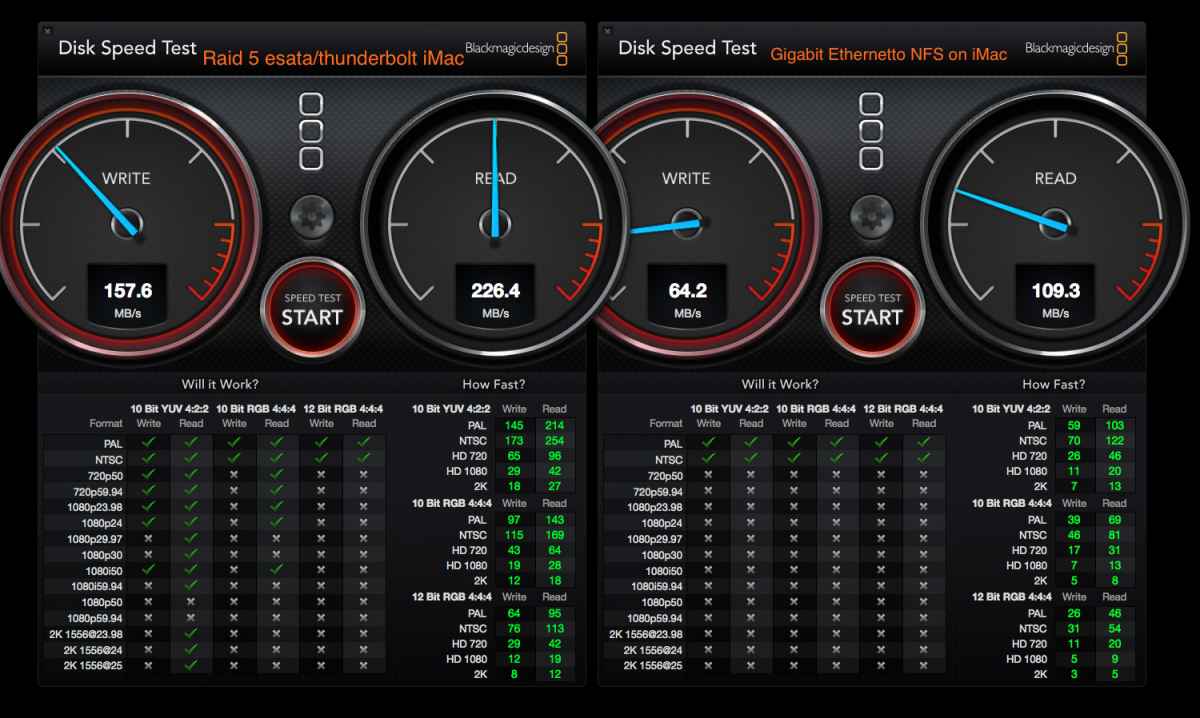
In short this is working unbelievable well and opens up unbelievable collaboration with FCP 10.1 since because of hard links you can quickly create a new library for a second editor to open that contains just the element they need (such as working on a different timeline) for a given project. The creation of this library will be instant since it is actually referencing the original media. Then after the second editor is done, that project timeline can be copied into the original library, and the second library is no longer needed.
Wozers. This is going to be huge for us who don't have the budget for a XSAN and fiber. A definite game changer at our little shop.
No if only Apple would make a NFS enabler in say a new version of Final Cut Server, that would allow this to be done and libraries to be open on more than one machine at a time. That would be fantastic.
In short this is working unbelievable well and opens up unbelievable collaboration with FCP 10.1 since because of hard links you can quickly create a new library for a second editor to open that contains just the element they need (such as working on a different timeline) for a given project. The creation of this library will be instant since it is actually referencing the original media. Then after the second editor is done, that project timeline can be copied into the original library, and the second library is no longer needed.
Wozers. This is going to be huge for us who don't have the budget for a XSAN and fiber. A definite game changer at our little shop.
No if only Apple would make a NFS enabler in say a new version of Final Cut Server, that would allow this to be done and libraries to be open on more than one machine at a time. That would be fantastic.
Last edit: 15 Jan 2014 18:50 by tpayton.
Please Log in to join the conversation.
- Darren Roark
-
- Offline
- Platinum Member
-
15 Jan 2014 20:44 #39020
by Darren Roark
Replied by Darren Roark on topic FCP 10.1 Collaboration - SAN over ethernet? or workaround
That's awesome! The only thing I forgot to mention is that the ethernet connection shouldn't be shared with anything else. (Local network traffic, internet, etc) Also enabling Jumbo Frames is key on both ends. It helps keep the connection consistent.
Please Log in to join the conversation.
15 Jan 2014 20:59 #39021
by tpayton
Replied by tpayton on topic FCP 10.1 Collaboration - SAN over ethernet? or workaround
Actually this is our regular gigabit ethernet network that we share everything else on. Seems to be working dandy.
Turned on Jumbo frames and got a bit more out of ethernet. 74 mb/s read, 115 mb/s write.
The other interesting thing to try would be connecting the two iMac's together with a really long thunderbolt cable. Should get near my original speeds. Granted a 30M thunderbolt cable runs a mere $899. eshop.macsales.com/item/OWC/CBLOPTTB30M/
We've been editing over gigabit ethernet for a year with sparse disk images, so we are completely used to the speed. Not really a problem at all for Canon DLSR footage, which is what we deal with most of the time.
Turned on Jumbo frames and got a bit more out of ethernet. 74 mb/s read, 115 mb/s write.
The other interesting thing to try would be connecting the two iMac's together with a really long thunderbolt cable. Should get near my original speeds. Granted a 30M thunderbolt cable runs a mere $899. eshop.macsales.com/item/OWC/CBLOPTTB30M/
We've been editing over gigabit ethernet for a year with sparse disk images, so we are completely used to the speed. Not really a problem at all for Canon DLSR footage, which is what we deal with most of the time.
Please Log in to join the conversation.
- Darren Roark
-
- Offline
- Platinum Member
-
15 Jan 2014 21:12 #39024
by Darren Roark
Your Tech-Fu is most enviable.
Does the BM test disable the file system cache by default? In the manual it says to select the 5GB test to flood the cache. I still use the AJA test because you can turn it off completely. Would you be willing to test it on that?
I'm setting up a small shop with one editor, one assistant, and one freelancer station, and they don't have much budget at the moment for external networking for now.
Replied by Darren Roark on topic FCP 10.1 Collaboration - SAN over ethernet? or workaround
tpayton wrote: Actually this is our regular gigabit ethernet network that we share everything else on. Seems to be working dandy.
Your Tech-Fu is most enviable.
Does the BM test disable the file system cache by default? In the manual it says to select the 5GB test to flood the cache. I still use the AJA test because you can turn it off completely. Would you be willing to test it on that?
I'm setting up a small shop with one editor, one assistant, and one freelancer station, and they don't have much budget at the moment for external networking for now.
Please Log in to join the conversation.
15 Jan 2014 22:39 #39027
by tpayton
Replied by tpayton on topic FCP 10.1 Collaboration - SAN over ethernet? or workaround
I did all the black magic with 5GB tests. I"m getting slightly better results from AJA:
Direct to RAID 5:
Write 186.7 MB
Read 222.5 MB
I can't get to the iMac over ethernet for a moment, but I'm guessing it will be similar.
I'm hoping to create a tutorial on how to set this all up. It is a little tricky.
Direct to RAID 5:
Write 186.7 MB
Read 222.5 MB
I can't get to the iMac over ethernet for a moment, but I'm guessing it will be similar.
I'm hoping to create a tutorial on how to set this all up. It is a little tricky.
Please Log in to join the conversation.
15 Jan 2014 23:10 #39028
by plysat
Can't sleep? Try this: fcpxpert.net ;-)
Replied by plysat on topic FCP 10.1 Collaboration - SAN over ethernet? or workaround
"I'm hoping to create a tutorial on how to set this all up. It is a little tricky.'
What's the benefit to doing this rather than just keeping media on your NAS and libraries (using symlinks) local. It's quite easy to just pass libraries around now, or even just fcpxml files now that v 1.3 contains pretty much everything. Just curious.
What's the benefit to doing this rather than just keeping media on your NAS and libraries (using symlinks) local. It's quite easy to just pass libraries around now, or even just fcpxml files now that v 1.3 contains pretty much everything. Just curious.
Can't sleep? Try this: fcpxpert.net ;-)
Please Log in to join the conversation.
15 Jan 2014 23:26 - 15 Jan 2014 23:27 #39029
by tpayton
Replied by tpayton on topic FCP 10.1 Collaboration - SAN over ethernet? or workaround
Good point. I think this is just better for those of us wanting to work with large fully managed FCPX libraries.
I spent over a decade with files all over the place, trying to keep track of ever little stock music cue, or graphic that we added to a project. Archiving was a nightmare. Trying to work on a project offsite was even worse. It was a mess and apparently incompatible with our shop.
So the way FCPX managed media was God-sent. Therefore we always copy all media to an event and have been sailing smooth for the past 2 years. We had been putting each job in sparse disk image, which can be easily shared over the network, or copied to an external drive. But only one person can mount a disk image at a time.
The issue we have now is that occasionally my assistant editor and myself are working on the same project at the same time. Mostly corporate documentary style stuff. Hours and hours of interviews. Tons of B-roll. Therefore we can keep the Libraries all managed on my RAID (I do 70% of the editing) and then create new libraries that she or I can open independent of the "main" library. (since FCP is using hard links in a library, it doesn't actually take any time to create a new library with needed media). When we are done we can merge them easily. Plus if I have to take a project offsite, I can just copy one Library and I'm good to go. When I come back, I only need to merge back my changes, not even copy the entire event.
Granted this is very similar to working with external media but with zero headaches. I get to have my cake (fully managed media) and eat it to (have it shared on our network.)
I spent over a decade with files all over the place, trying to keep track of ever little stock music cue, or graphic that we added to a project. Archiving was a nightmare. Trying to work on a project offsite was even worse. It was a mess and apparently incompatible with our shop.
So the way FCPX managed media was God-sent. Therefore we always copy all media to an event and have been sailing smooth for the past 2 years. We had been putting each job in sparse disk image, which can be easily shared over the network, or copied to an external drive. But only one person can mount a disk image at a time.
The issue we have now is that occasionally my assistant editor and myself are working on the same project at the same time. Mostly corporate documentary style stuff. Hours and hours of interviews. Tons of B-roll. Therefore we can keep the Libraries all managed on my RAID (I do 70% of the editing) and then create new libraries that she or I can open independent of the "main" library. (since FCP is using hard links in a library, it doesn't actually take any time to create a new library with needed media). When we are done we can merge them easily. Plus if I have to take a project offsite, I can just copy one Library and I'm good to go. When I come back, I only need to merge back my changes, not even copy the entire event.
Granted this is very similar to working with external media but with zero headaches. I get to have my cake (fully managed media) and eat it to (have it shared on our network.)
Last edit: 15 Jan 2014 23:27 by tpayton.
Please Log in to join the conversation.
