


- Posts: 15
- Thank you received: 0
3 Post Moderation Rule for New Boarders (25 Jan 2021)
New boarders will have their posts moderated - Don't worry if you cannot see your post immediately.
Dual GPUs in old (Classic!) Mac Pros
- Brooklyntreez
-

- Offline
- New Member
-

Less
More
25 Jan 2014 17:05 #39781
by Brooklyntreez
Replied by Brooklyntreez on topic Dual GPUs in old (Classic!) Mac Pros
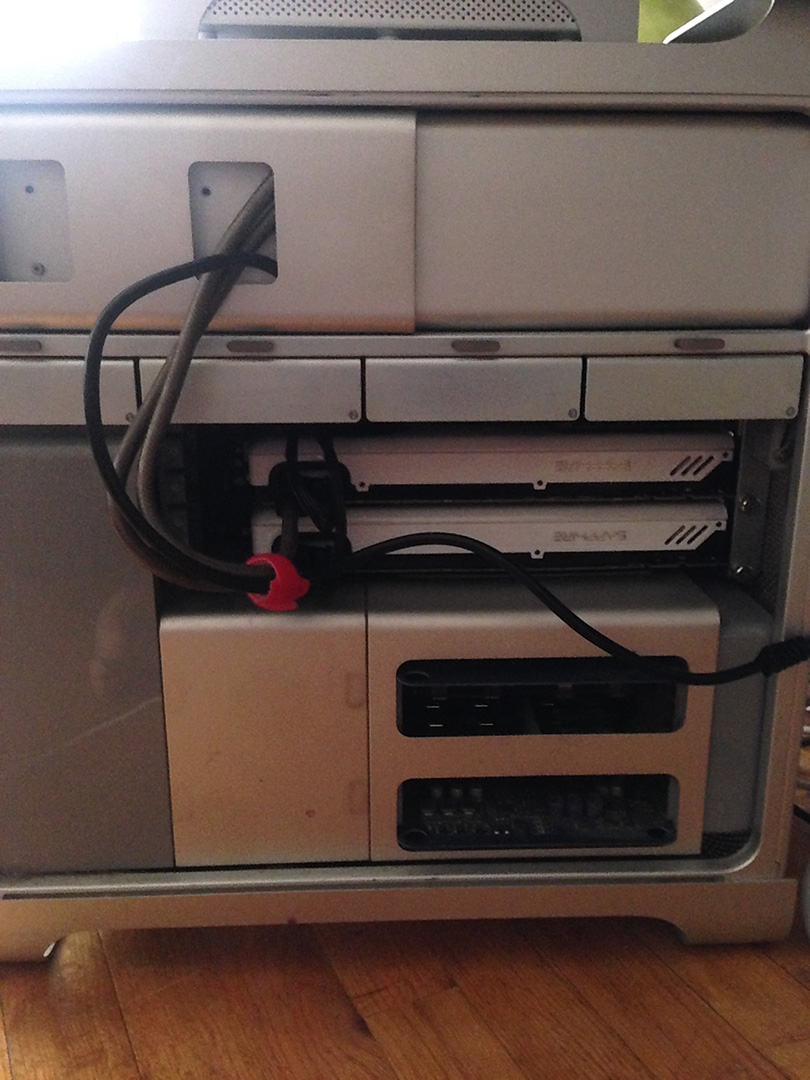
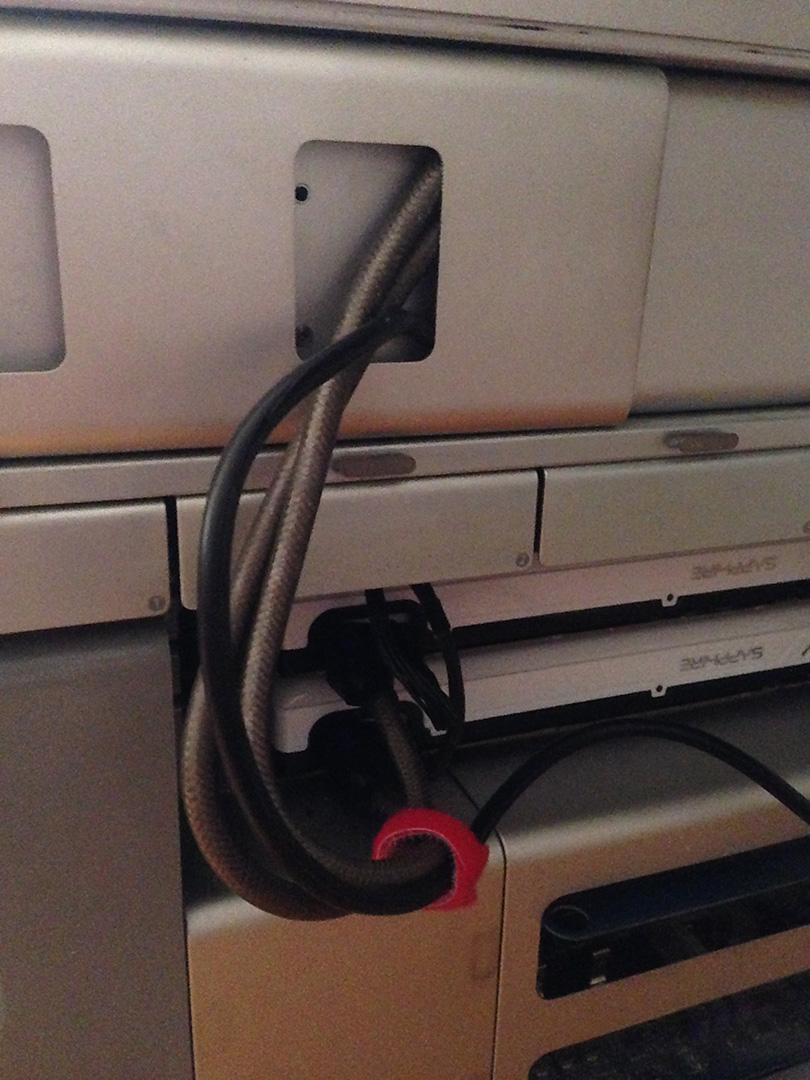
Just installed the EPower-450W with 2x 7950. It was a tight fit but it worked. Good value for $25, the cables alone are worth that price. Mac Pro 2008- the new models are an even tighter squeeze with some drilling involved.
www.newegg.com/Product/Product.aspx?Item=N82E16817101044
www.newegg.com/Product/Product.aspx?Item=N82E16817101044
Please Log in to join the conversation.

25 Jan 2014 17:25 #39784
by pollux
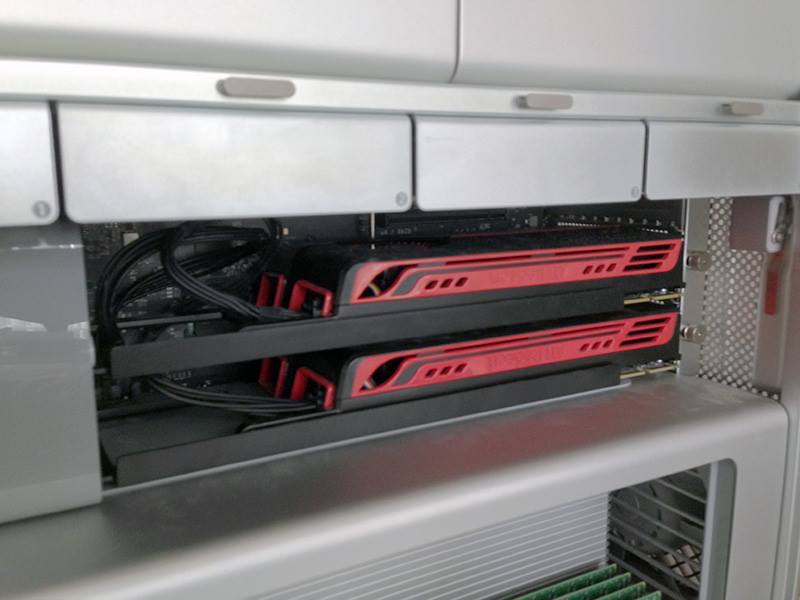
Well, The MacPro has a fan at the front of the of the tower where the PCI slots sit. And the OEM cards already are kinda "sealed" with fan to suck the air (along with MP's PCI slot fan) in and release the hotter air out of the card to the back of of the tower. Even Apple offered dual 5770 BTO before. If the overheat is an issue Apple wouldn't do it.
Replied by pollux on topic Dual GPUs in old (Classic!) Mac Pros
dude at keystone wrote: I asked this in another thread but am interested in what you guys are doing - has anyone worked long enough to test the effect of increased heat and decreased ventilation due to stacking two cards directly above each other? Optimally, you guys are using Slot 1 and Slot 2 since they are x16 lane slots (2009 - 2012 Mac Pro's) so in the case of two ATI Radeon 5770 cards, one directly above the other, there is virtually no space between each card and not only will the lower card's fan be completely blocked by the top card, but the bottom card will heat up the top card as well.
Can any of you look into the result of overheating cards - could translate to reduced performance at best and worst case scenario, failure down the road. The new Mac Pro's thermal design has a huge advantage in this area. Thanks for any testing that shows results after extended processing or editing. -s
Well, The MacPro has a fan at the front of the of the tower where the PCI slots sit. And the OEM cards already are kinda "sealed" with fan to suck the air (along with MP's PCI slot fan) in and release the hotter air out of the card to the back of of the tower. Even Apple offered dual 5770 BTO before. If the overheat is an issue Apple wouldn't do it.
Please Log in to join the conversation.


25 Jan 2014 19:22 #39793
by zzchu
Replied by zzchu on topic Dual GPUs in old (Classic!) Mac Pros
How are you going to replace the side door with the cables like that?
Please Log in to join the conversation.
- Brooklyntreez
-
- Offline
- New Member
-
Less
More
- Posts: 15
- Thank you received: 0
25 Jan 2014 22:11 #39799
by Brooklyntreez
Replied by Brooklyntreez on topic Dual GPUs in old (Classic!) Mac Pros
'Beauty is on the inside' I was not planning on putting the door on, its been off for years now.
These cards for tights with about 5mm of breathing room, so no door helps. The cables that come with the PSU are thick, you could get thinner ones. It even comes with a Mac Pro metal slot cover with a hole for power cable, but I have all my slots full so am going around which is ugly... not bad for a $25 power solution. IStat menu registers 2 cards, FCPX and motion interface seem snappier, they both render noticeably faster and other apps like RealFlow and Cinema 4d have snappier viewport and simulation functionality.
If I didn't already have 2x 7950's, 2x 5770 are excellent for bringing your old tower back to life and easily the biggest bang for your buck without the extra PSU nonsense.
Now I want 3 cards...but thats not happening.
These cards for tights with about 5mm of breathing room, so no door helps. The cables that come with the PSU are thick, you could get thinner ones. It even comes with a Mac Pro metal slot cover with a hole for power cable, but I have all my slots full so am going around which is ugly... not bad for a $25 power solution. IStat menu registers 2 cards, FCPX and motion interface seem snappier, they both render noticeably faster and other apps like RealFlow and Cinema 4d have snappier viewport and simulation functionality.
If I didn't already have 2x 7950's, 2x 5770 are excellent for bringing your old tower back to life and easily the biggest bang for your buck without the extra PSU nonsense.
Now I want 3 cards...but thats not happening.
Please Log in to join the conversation.
25 Jan 2014 22:30 #39800
by pollux
Replied by pollux on topic Dual GPUs in old (Classic!) Mac Pros
I prefer the lack of cable clutter 
Please Log in to join the conversation.
25 Jan 2014 23:30 - 25 Jan 2014 23:31 #39804
by pollux
Replied by pollux on topic Dual GPUs in old (Classic!) Mac Pros
Hm....something really funny
I was asked by a client to send her again the video I did for her a few months ago. This file was a 5 min long video and it had a few of motion based effects in there. Last time it took roughly 8 minutes to export the file. Today I export the same file it takes less than 3 minutes.
Back then I was running 10.0.9 and with single 5770. I suspect the 10.1 and dual cards together are making quite a difference but don't know what's playing the bigger role.
I was asked by a client to send her again the video I did for her a few months ago. This file was a 5 min long video and it had a few of motion based effects in there. Last time it took roughly 8 minutes to export the file. Today I export the same file it takes less than 3 minutes.
Back then I was running 10.0.9 and with single 5770. I suspect the 10.1 and dual cards together are making quite a difference but don't know what's playing the bigger role.
Last edit: 25 Jan 2014 23:31 by pollux.
Please Log in to join the conversation.
- Brooklyntreez
-
- Offline
- New Member
-
Less
More
- Posts: 15
- Thank you received: 0
25 Jan 2014 23:41 #39805
by Brooklyntreez
Replied by Brooklyntreez on topic Dual GPUs in old (Classic!) Mac Pros
Im going for the Chucky look.. :evil:
Please Log in to join the conversation.
26 Jan 2014 06:28 - 26 Jan 2014 06:29 #39823
by artofoe
Replied by artofoe on topic Dual GPUs in old (Classic!) Mac Pros
hi,pollux, for my point of view, both playing bigger role 
10.1.1 render time reduces about 1/4 to 1/3 comparing with 10.0.9 for effects using GPU (but not nvidia K5000).
2 5770 reduces about 1/3 to 1/2.75 comparing with 1 5770 for effects using GPU.
Have fun with your dual card:)
10.1.1 render time reduces about 1/4 to 1/3 comparing with 10.0.9 for effects using GPU (but not nvidia K5000).
2 5770 reduces about 1/3 to 1/2.75 comparing with 1 5770 for effects using GPU.
Have fun with your dual card:)
pollux wrote: Hm....something really funny
I was asked by a client to send her again the video I did for her a few months ago. This file was a 5 min long video and it had a few of motion based effects in there. Last time it took roughly 8 minutes to export the file. Today I export the same file it takes less than 3 minutes.
Back then I was running 10.0.9 and with single 5770. I suspect the 10.1 and dual cards together are making quite a difference but don't know what's playing the bigger role.
Last edit: 26 Jan 2014 06:29 by artofoe.
Please Log in to join the conversation.
- samtorsten
-
Topic Author
- Offline
- New Member
-
Less
More
- Posts: 15
- Thank you received: 1
30 Jan 2014 21:37 #40207
by samtorsten
Replied by samtorsten on topic Dual GPUs in old (Classic!) Mac Pros
Hey there gents,
Forgive me for a minor thread hijack, I posted a new topic but have not had any luck with replies. From reading our topic here it seems there are definitely some folks among us with one, if not two (lookin at you BKtreez!) Mac Edition Sapphire 7950s, which pertains to my question about using the HDMI output for A/V Output in FCPX 10.1
Here's a link to the thread:
www.fcp.co/forum/hardware/19148-hd-7950-...broadcast-monitoring
Specifically wondering if FCPX can use the HDMI port on the 7950 for A/V out.
Please not, the question is NOT how to show viewer or events in second display over HDMI, as the first reply in the topic seems to think is the question.
Many thanks in advance for any help here.
Forgive me for a minor thread hijack, I posted a new topic but have not had any luck with replies. From reading our topic here it seems there are definitely some folks among us with one, if not two (lookin at you BKtreez!) Mac Edition Sapphire 7950s, which pertains to my question about using the HDMI output for A/V Output in FCPX 10.1
Here's a link to the thread:
www.fcp.co/forum/hardware/19148-hd-7950-...broadcast-monitoring
Specifically wondering if FCPX can use the HDMI port on the 7950 for A/V out.
Please not, the question is NOT how to show viewer or events in second display over HDMI, as the first reply in the topic seems to think is the question.
Many thanks in advance for any help here.
Please Log in to join the conversation.
30 Jan 2014 21:59 #40209
by sealtainn
Replied by sealtainn on topic Dual GPUs in old (Classic!) Mac Pros
Sorry I am not a FCPX expert, and although I sort of understand the function of a broadcast monitor it is not something I have used per se.
However, I do have a 7950 (currently replaced by my dual 5770's) & when I used that as my default mac display I did so using the HDMI output directly attached from the 7950 to the HDMI input of a display.
The issue I think you may have is that the HDMI output of the 7950 does not carry an audio signal - just video.
For that reason (absence of audio) if you are truly considering use of the 7950 for A/V via HDMI then I don't think it will work.
However, I do have a 7950 (currently replaced by my dual 5770's) & when I used that as my default mac display I did so using the HDMI output directly attached from the 7950 to the HDMI input of a display.
The issue I think you may have is that the HDMI output of the 7950 does not carry an audio signal - just video.
For that reason (absence of audio) if you are truly considering use of the 7950 for A/V via HDMI then I don't think it will work.
Please Log in to join the conversation.
- samtorsten
-
Topic Author
- Offline
- New Member
-
Less
More
- Posts: 15
- Thank you received: 1
30 Jan 2014 22:15 #40211
by samtorsten
Replied by samtorsten on topic Dual GPUs in old (Classic!) Mac Pros
Interesting, thanks much for letting me know. The offical Sapphire Page is a bit misleading in that regard:
www.sapphiretech.com/presentation/produc...777&psn=&leg=0&lid=1
Specifically the mention of 7.1 surround sound. Most likely this is a function that runs fine under Windows and the marketing people at Sapphire see no reason to mention what won't work under OSX.
Thanks again for this useful info sir.
www.sapphiretech.com/presentation/produc...777&psn=&leg=0&lid=1
Specifically the mention of 7.1 surround sound. Most likely this is a function that runs fine under Windows and the marketing people at Sapphire see no reason to mention what won't work under OSX.
Thanks again for this useful info sir.
Please Log in to join the conversation.
- Brooklyntreez
-
- Offline
- New Member
-
Less
More
- Posts: 15
- Thank you received: 0
01 Feb 2014 21:17 #40351
by Brooklyntreez
Replied by Brooklyntreez on topic Dual GPUs in old (Classic!) Mac Pros
Sorry I don't have a long enough HDMI cable to reach my TV to run a test. As far the specs say the audio is supported. I am curious myself so stay tuned.
Please Log in to join the conversation.
26 Feb 2014 17:27 #41784
by tpayton
Replied by tpayton on topic Dual GPUs in old (Classic!) Mac Pros
With 10.9.2 out, doesn't anyone have any experience with updating an older system i.e. MacPro 1,1 (2006) with the "hacked" version of 10.9.1 and updating to 10.9.2?
Please Log in to join the conversation.
27 Feb 2014 21:50 #41845
by zzchu
Replied by zzchu on topic Dual GPUs in old (Classic!) Mac Pros
I did the upgrade to 10.9.2 on my 2006 Mac Pro after following this thread on MacRumors:
forums.macrumors.com/showthread.php?t=1598176&page=33
Because the 10.9.2 update overwrites that wonderful Tiamo boot.efi, the Mac Pro will not be able to boot from the 10.9.2 system after the update.
You will need to boot the Mac from another hard drive[or mount the hard drive on another Macintosh) and then replace the Tiamo boot.efi in the following 2 places:
System/Library/CoreServices/
usr/standalone/i386/
You may need to make invisible files visible and probably need to change permissions via the terminal to allow the copying over of the Tiamo boot.efi [Have that file available to you somewhere to copy over]
It sounds harder than it is, but it is definitely helpful to have another Mac or iPad to read the thread before you do this in case there any questions. I just followed their instructions.
Good luck.
forums.macrumors.com/showthread.php?t=1598176&page=33
Because the 10.9.2 update overwrites that wonderful Tiamo boot.efi, the Mac Pro will not be able to boot from the 10.9.2 system after the update.
You will need to boot the Mac from another hard drive[or mount the hard drive on another Macintosh) and then replace the Tiamo boot.efi in the following 2 places:
System/Library/CoreServices/
usr/standalone/i386/
You may need to make invisible files visible and probably need to change permissions via the terminal to allow the copying over of the Tiamo boot.efi [Have that file available to you somewhere to copy over]
It sounds harder than it is, but it is definitely helpful to have another Mac or iPad to read the thread before you do this in case there any questions. I just followed their instructions.
Good luck.
Please Log in to join the conversation.
27 Feb 2014 23:13 #41846
by tpayton
Replied by tpayton on topic Dual GPUs in old (Classic!) Mac Pros
Thanks so much for that. I wonder if it is possible to build a new USB key for 10.9.2 and then just do an install over the existing Mavricks install?
Seems like it would theoretically work?
Seems like it would theoretically work?
Please Log in to join the conversation.
28 Feb 2014 02:23 #41853
by zzchu
Replied by zzchu on topic Dual GPUs in old (Classic!) Mac Pros
I have no idea but I'm sure there will be a definitive answer on MacRumors soon about making a standalone 10.9.2 installer for the Mac Pro 1,1 and 2,1 using the Tiamo boot.efi.
The 10.9.2 update is fairly painless as long as you are able to mount the updated drive to replace the boot.efi, it is the easier solution than making a new installer.
I had a Carbon Copy Clone of the hard drive before I updated, so I was able to boot using the copy and then replace the boot.efi on the updated drive.
The 10.9.2 update is fairly painless as long as you are able to mount the updated drive to replace the boot.efi, it is the easier solution than making a new installer.
I had a Carbon Copy Clone of the hard drive before I updated, so I was able to boot using the copy and then replace the boot.efi on the updated drive.
Please Log in to join the conversation.
31 May 2014 23:23 #47069
by fcpco134
Replied by fcpco134 on topic Dual GPUs in old (Classic!) Mac Pros
There are dual HD 7970s in an cMP. Plus it use internal power.
Read carefully.
forums.macrumors.com/showthread.php?t=1732849
Read carefully.
forums.macrumors.com/showthread.php?t=1732849
Please Log in to join the conversation.
- cory.callahan
-
- Offline
- New Member
-
Less
More
- Posts: 1
- Thank you received: 0
18 Aug 2017 03:38 #89965
by cory.callahan
Replied by cory.callahan on topic Dual GPUs in old (Classic!) Mac Pros
im interesed in buying a second 5770 for my mac pro 2,1. my question is does having a 2nd card help at all with render times on davinci resolve? can't seem to find any info on this. could someone try one 5770 with neat video added vs two 5770s? you guys with two cards please do an experiment? thanks
Please Log in to join the conversation.
20 Aug 2017 02:42 #90011
by zzchu
Replied by zzchu on topic Dual GPUs in old (Classic!) Mac Pros
The full version of Resolve, from I've read, will take advantage of multiple video cards/ gpus. If you just need a second identical 5770 card, you can just purchase a cheap PC version and plug it into a free slot .
However, I think you might be better off getting something you can move onto your next Mac Pro?
A single faster card may be better than dual 5770's, IMHO.
However, I think you might be better off getting something you can move onto your next Mac Pro?
A single faster card may be better than dual 5770's, IMHO.
Please Log in to join the conversation.
- DmitriZigany
-
- Offline
- Platinum Member
-

Less
More
- Posts: 730
- Thank you received: 26
20 Aug 2017 11:42 #90016
by DmitriZigany
Replied by DmitriZigany on topic Dual GPUs in old (Classic!) Mac Pros
For what it's worth, I have an old 2006 Mac Pro, that I upgraded to an octo 3ghz 2,1... and just recently I managed to get it to run El Capitan (10.11.6)... Although I haven't tried it with FCPX yet (only 512mb graphics card) it runs the latest Logic Pro X pretty damn well, which is amazing!
Please Log in to join the conversation.
