


- Posts: 148
- Thank you received: 8
3 Post Moderation Rule for New Boarders (25 Jan 2021)
New boarders will have their posts moderated - Don't worry if you cannot see your post immediately.
Dual GPUs in old (Classic!) Mac Pros
10 Jan 2014 15:52 #38668
by pollux
Replied by pollux on topic Dual GPUs in old (Classic!) Mac Pros
Base on the results from bare feats the dual 5770 setup is the best bang-for-the-buck
For those who already have a 5770 in their MP getting a second 5770 as auxiliary is a cheaper (and less hassle) than getting a higher end GPU as replacement.
For those who already have a 5770 in their MP getting a second 5770 as auxiliary is a cheaper (and less hassle) than getting a higher end GPU as replacement.
Please Log in to join the conversation.
10 Jan 2014 15:59 #38669
by dinerdog
Replied by dinerdog on topic Dual GPUs in old (Classic!) Mac Pros
pollux - so would you say it's the same thing if I have a 5870 in MP early 2008? Another one would be nice little boost?
Please Log in to join the conversation.
10 Jan 2014 20:58 #38693
by sealtainn
This was useful but kind of begs the question why Barefeats was previously claiming the dual 5770's were faster than *any* single AMD GPU. From these FCPX tests, the dual 5770's are clearly the slowest in comparison even to the single GPU cases. The previous claim that the dual 5770's were only slightly slower than dual 7970's is obviously either just unfounded fantasy or they ran some other test(s) from the ones published here.
Since I already had 3 different cards I could double up on any of them, so now wondering how to reliably power 2x7950's (I do not think applying the Y splitter cables on the 2 PCIe AUX power sources is sufficient for normal day in day out operations (running a 2 second test lie BruceX is not going to pull the same sustained load).
Not too keen on adding another power supply, but does anyone know how to take the power from the optical drive(s) or have details as to how much power such a conversion could supply?
Replied by sealtainn on topic Dual GPUs in old (Classic!) Mac Pros
cinemaloha wrote: Bare Feats did some rendering time test with a few setups.
barefeats.com/tube05.html
Not Brucex test but a comparison, nonetheless.
This was useful but kind of begs the question why Barefeats was previously claiming the dual 5770's were faster than *any* single AMD GPU. From these FCPX tests, the dual 5770's are clearly the slowest in comparison even to the single GPU cases. The previous claim that the dual 5770's were only slightly slower than dual 7970's is obviously either just unfounded fantasy or they ran some other test(s) from the ones published here.
Since I already had 3 different cards I could double up on any of them, so now wondering how to reliably power 2x7950's (I do not think applying the Y splitter cables on the 2 PCIe AUX power sources is sufficient for normal day in day out operations (running a 2 second test lie BruceX is not going to pull the same sustained load).
Not too keen on adding another power supply, but does anyone know how to take the power from the optical drive(s) or have details as to how much power such a conversion could supply?
Please Log in to join the conversation.
10 Jan 2014 21:03 #38695
by sealtainn
Well going just by BruceX which Barefeats did not publish data on, I'd say the results Ive seen would agree.
But, the latest posting by Barefeats would ay the opposite:i.e. a single 7950 still outperforms a dual 5770 (& thus keeps 2 additional PCIe slots available).
Replied by sealtainn on topic Dual GPUs in old (Classic!) Mac Pros
pollux wrote: Base on the results from bare feats the dual 5770 setup is the best bang-for-the-buck
For those who already have a 5770 in their MP getting a second 5770 as auxiliary is a cheaper (and less hassle) than getting a higher end GPU as replacement.
Well going just by BruceX which Barefeats did not publish data on, I'd say the results Ive seen would agree.
But, the latest posting by Barefeats would ay the opposite:i.e. a single 7950 still outperforms a dual 5770 (& thus keeps 2 additional PCIe slots available).
Please Log in to join the conversation.


10 Jan 2014 22:11 - 11 Jan 2014 00:32 #38696
by zzchu
Replied by zzchu on topic Dual GPUs in old (Classic!) Mac Pros
USPS just dropped off my flashed 5770 card from eBay.
Installation was a breeze. I installed it in slot 3 (as I do not want to give up the hard drive slots just yet.)
Mac Pro 2006 with Dual X5355 and 16 gigs RAM.
flic.kr/p/j6xfzF
flic.kr/p/j6zx5E
I reran the Bruce X test exporting to straight ProRes.
Previously on the single 5770, I got 1:23 seconds from time I hit save to QT player opening.
With the dual card, I got 56 seconds on the first run and 52 seconds on the second run.
I made sure to delete project and event files before each run. Third run 57.55 seconds.
That seemed impressive.
However, when I tried to do some effects on a 2 minute 1080p clip it seemed less impressive to me.
Gaussian Blur: Before: 1 minute 21 seconds After: 1 minute 9 seconds
Triple Effects: Rain, Directional Blur and Underwater: Before: 1:26 seconds After: 1:23 seconds
More tests to be done, but for $126 it is a fun project.
Installation was a breeze. I installed it in slot 3 (as I do not want to give up the hard drive slots just yet.)
Mac Pro 2006 with Dual X5355 and 16 gigs RAM.
flic.kr/p/j6xfzF
flic.kr/p/j6zx5E
I reran the Bruce X test exporting to straight ProRes.
Previously on the single 5770, I got 1:23 seconds from time I hit save to QT player opening.
With the dual card, I got 56 seconds on the first run and 52 seconds on the second run.
I made sure to delete project and event files before each run. Third run 57.55 seconds.
That seemed impressive.
However, when I tried to do some effects on a 2 minute 1080p clip it seemed less impressive to me.
Gaussian Blur: Before: 1 minute 21 seconds After: 1 minute 9 seconds
Triple Effects: Rain, Directional Blur and Underwater: Before: 1:26 seconds After: 1:23 seconds
More tests to be done, but for $126 it is a fun project.
Last edit: 11 Jan 2014 00:32 by zzchu.
Please Log in to join the conversation.
- Darren Roark
-

- Offline
- Platinum Member
-

10 Jan 2014 23:20 #38702
by Darren Roark
Replied by Darren Roark on topic Dual GPUs in old (Classic!) Mac Pros
The 5770s are a great deal considering the 7xxx series AMD GPU shortage caused by people trying to mine litecoins. (I'm still trying to understand bitcoins, now there are new ones to confuse me)
The PC versions of the 7950 are going for $500 at the moment matching the Mac version price. A couple months ago you could get one for $250.
$125 bucks for that much performance increase is pretty amazing.
The PC versions of the 7950 are going for $500 at the moment matching the Mac version price. A couple months ago you could get one for $250.
$125 bucks for that much performance increase is pretty amazing.
Please Log in to join the conversation.
- Brooklyntreez
-
- Offline
- New Member
-

Less
More
- Posts: 15
- Thank you received: 0
11 Jan 2014 05:58 #38710
by Brooklyntreez
Replied by Brooklyntreez on topic Dual GPUs in old (Classic!) Mac Pros
Not sure how many of you have iStat Menus installed? But I think some info there might help me see if I am drawing too much power from the 2nd 7950. Can anyone tell what I am looking for? any tell tell signs? There are PSMI AC/DC levels in Amps and Volts, temp and a bunch of other info. Useful little app.
Screenshot with 1x 7950 rendering c4d. (disconnected the 2nd for now)
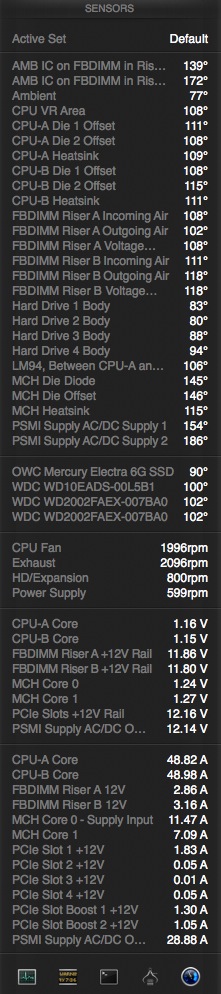
Screenshot with 1x 7950 rendering c4d. (disconnected the 2nd for now)
Please Log in to join the conversation.
11 Jan 2014 06:29 - 11 Jan 2014 06:30 #38711
by pollux
Replied by pollux on topic Dual GPUs in old (Classic!) Mac Pros
Someone on the apple discussion board posted some interesting results
discussions.apple.com/message/24284605#24284605
The guy also mentioned about video playback
discussions.apple.com/message/24284605#24284605
The guy also mentioned about video playback
Last edit: 11 Jan 2014 06:30 by pollux.
Please Log in to join the conversation.
11 Jan 2014 12:21 - 11 Jan 2014 17:48 #38713
by zzchu
Replied by zzchu on topic Dual GPUs in old (Classic!) Mac Pros
Nice link. That seems to explain why some processes show dramatic speed ups while other processes show little if any improvement.
Last edit: 11 Jan 2014 17:48 by zzchu. Reason: grammar.
Please Log in to join the conversation.
11 Jan 2014 15:54 #38716
by pollux
Replied by pollux on topic Dual GPUs in old (Classic!) Mac Pros
So I assume in order to get the improvement from the second video card the source material should be apple stuff like Prores or stuff created by generators.
Now I am preparing a set of test project using a bit of everything from my past project, one with original codec and one transcoded into prores. I have already done the test with single 5770. When the other 5770 arrives I will run these tests again and will report back.
Now I am preparing a set of test project using a bit of everything from my past project, one with original codec and one transcoded into prores. I have already done the test with single 5770. When the other 5770 arrives I will run these tests again and will report back.
Please Log in to join the conversation.
12 Jan 2014 00:03 - 12 Jan 2014 00:03 #38732
by zzchu
Replied by zzchu on topic Dual GPUs in old (Classic!) Mac Pros
One thing the dual HD 5770 didn't help me with is Red Giant's Mojo. (Even after the 8 core upgrade.)
If I even think of hovering over the RG Mojo look choices in the effects panel, FCPX starts to beach ball almost immediately and then finally catches up and gives me a preview of how the look may appear. The rendered clip is fine, but it is brutal to work with as you wait to preview a look. I know I should contact Red Giant, but I guess a plugin not optimized for OpenCL gives little benefits?
Apple's built in looks are fine and plays immediately in contrast.
If I even think of hovering over the RG Mojo look choices in the effects panel, FCPX starts to beach ball almost immediately and then finally catches up and gives me a preview of how the look may appear. The rendered clip is fine, but it is brutal to work with as you wait to preview a look. I know I should contact Red Giant, but I guess a plugin not optimized for OpenCL gives little benefits?
Apple's built in looks are fine and plays immediately in contrast.
Last edit: 12 Jan 2014 00:03 by zzchu.
Please Log in to join the conversation.
13 Jan 2014 01:56 - 13 Jan 2014 02:01 #38773
by pollux
Replied by pollux on topic Dual GPUs in old (Classic!) Mac Pros
RedGiant's plug ins are famous for being slow as snail.
I had the Looks v2 (got it when it was at deep discount) but after a few months of use I got really fed up with the slooooooowwwwwwww render (a 5 minute clip took 45 minutes to render) I then wiped it off my system. Some people may disagree with me but I really find this is one of the worst "investment" I have ever made (even now I still feel a little angry about this)
Tried Mojo too same slow render
I had the Looks v2 (got it when it was at deep discount) but after a few months of use I got really fed up with the slooooooowwwwwwww render (a 5 minute clip took 45 minutes to render) I then wiped it off my system. Some people may disagree with me but I really find this is one of the worst "investment" I have ever made (even now I still feel a little angry about this)
Tried Mojo too same slow render
Last edit: 13 Jan 2014 02:01 by pollux.
Please Log in to join the conversation.
- Darren Roark
-
- Offline
- Platinum Member
-
13 Jan 2014 22:46 #38827
by Darren Roark
The plugin has to be written for dual GPUs, same goes for games in Windows need to be crossfire enabled.
Replied by Darren Roark on topic Dual GPUs in old (Classic!) Mac Pros
zzchu wrote: One thing the dual HD 5770 didn't help me with is Red Giant's Mojo. (Even after the 8 core upgrade.)
I know I should contact Red Giant, but I guess a plugin not optimized for OpenCL gives little benefits?
Apple's built in looks are fine and plays immediately in contrast.
The plugin has to be written for dual GPUs, same goes for games in Windows need to be crossfire enabled.
Please Log in to join the conversation.
19 Jan 2014 12:21 #39294
by acl
Replied by acl on topic Dual GPUs in old (Classic!) Mac Pros
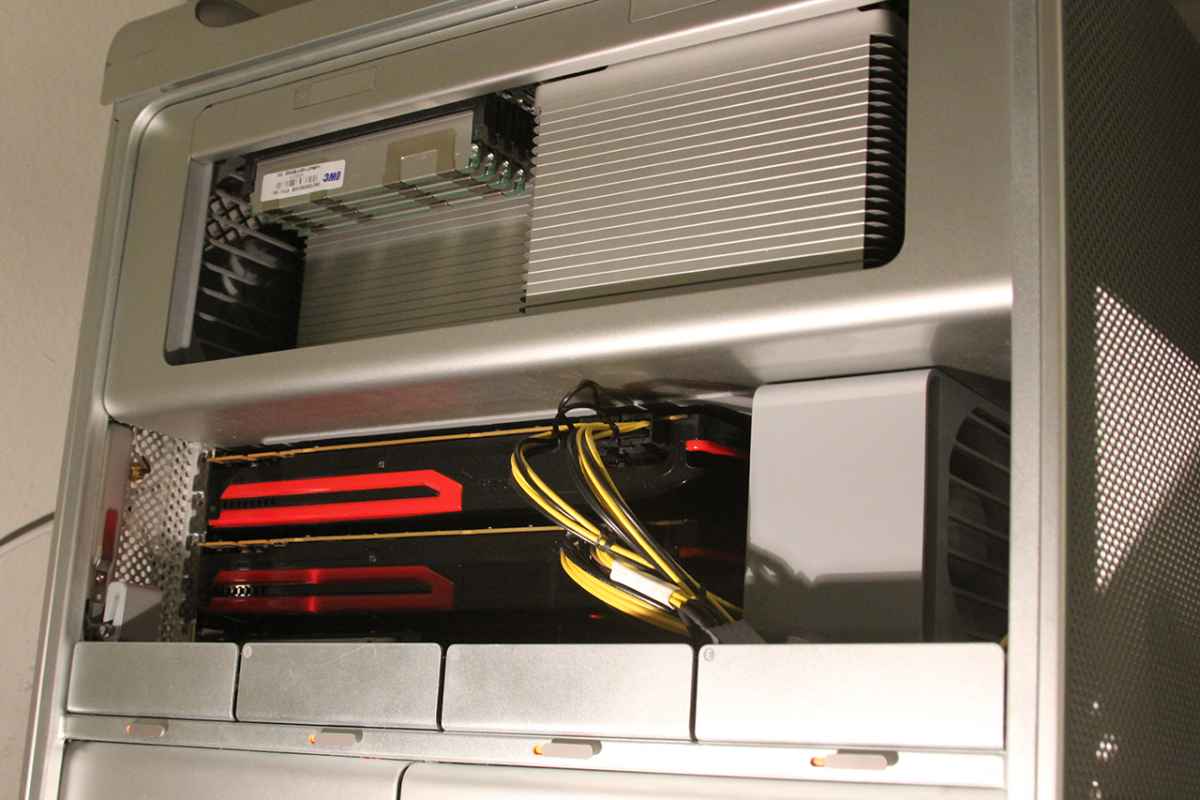
After hours wiring , it is a pita to wire that second power supply into the 5.25 doc. Splice run extension, crimp 2 8 pin molex connectors. Cut case for outlet above power supply sigh. It really is a project.
Now sporting dual 7970's
Will benchmark when i wake up
Now sporting dual 7970's
Will benchmark when i wake up
Please Log in to join the conversation.
22 Jan 2014 00:28 - 22 Jan 2014 05:31 #39460
by pollux
Replied by pollux on topic Dual GPUs in old (Classic!) Mac Pros
Got the card this morning and running Bruce X and my own benchmark (one of my previous projects)
Bruce X
Single 5770 - 68 sec
Dual 5770 - 40 sec
My own benchmark (project export)
Single 5770 - 83 sec
Dual 5770 - 65 sec
My own benchmark contains lots of heavily color-graded footage with LUT Utility so I am not surprise about the less significant improvement. But still 20-25% gain is nothing to be ashamed of. That decrease in time can be quite obvious when exporting long videos.
But I do notice FCPX launches in half the time with dual card. And general operation such as scrubbing in timeline is a lot smoother.
I am sure the Darth Vader™ Mac Pro will be even better but for now spending $200 is better than spending $6000
Bruce X
Single 5770 - 68 sec
Dual 5770 - 40 sec
My own benchmark (project export)
Single 5770 - 83 sec
Dual 5770 - 65 sec
My own benchmark contains lots of heavily color-graded footage with LUT Utility so I am not surprise about the less significant improvement. But still 20-25% gain is nothing to be ashamed of. That decrease in time can be quite obvious when exporting long videos.
But I do notice FCPX launches in half the time with dual card. And general operation such as scrubbing in timeline is a lot smoother.
I am sure the Darth Vader™ Mac Pro will be even better but for now spending $200 is better than spending $6000
Last edit: 22 Jan 2014 05:31 by pollux.
Please Log in to join the conversation.
22 Jan 2014 00:49 - 22 Jan 2014 00:53 #39462
by rgilman
Replied by rgilman on topic Dual GPUs in old (Classic!) Mac Pros
I got my second 5770 today also. I have a cMP 2008 3.1 with 16G RAM, OSX 10.9.1 and FCPX 10.1.1, and 7200 rpm HDs. My Bruce X score for the Dual 5770 exporting to ProRes was 37 sec. (I wasn't systematic or patient enough to do the single 5770 test.)
Like pollux I noticed faster launch and smoother operation.
I also ran Activity Monitor's graphic CPU Usage while Bruce X was running. The load was distributed over all 8 cores and never maxed any of them out.
So I'm another happy dual 5770 upgraded.
A tip for anyone doing this: The latch mechanism blocks the access to PCI slot 2 so I wasn't able to just slip the second 5770 in above the first one. I wound up removing the first one from PCI slot 1, moving it up to slot 2 and then I could slide the second one below it into slot 1. Otherwise it was straightforward.
I run two 23 Cinema Displays all the time but I'm not editing all the time, so I connected the monitors to the top 5770 (slot 2) for better ventilation. iStat Menu shows slightly more current draw to the top 5770.
Like pollux I noticed faster launch and smoother operation.
I also ran Activity Monitor's graphic CPU Usage while Bruce X was running. The load was distributed over all 8 cores and never maxed any of them out.
So I'm another happy dual 5770 upgraded.
A tip for anyone doing this: The latch mechanism blocks the access to PCI slot 2 so I wasn't able to just slip the second 5770 in above the first one. I wound up removing the first one from PCI slot 1, moving it up to slot 2 and then I could slide the second one below it into slot 1. Otherwise it was straightforward.
I run two 23 Cinema Displays all the time but I'm not editing all the time, so I connected the monitors to the top 5770 (slot 2) for better ventilation. iStat Menu shows slightly more current draw to the top 5770.
Last edit: 22 Jan 2014 00:53 by rgilman.
Please Log in to join the conversation.
22 Jan 2014 02:17 #39470
by pollux
Replied by pollux on topic Dual GPUs in old (Classic!) Mac Pros
Same here I needed to move the 1st card up one slot and put the second card in the 1st slot.
Please Log in to join the conversation.
- dude at keystone
-
- Offline
- New Member
-
Less
More
- Posts: 15
- Thank you received: 3
24 Jan 2014 17:03 #39711
by dude at keystone
Replied by dude at keystone on topic Dual GPUs in old (Classic!) Mac Pros
I asked this in another thread but am interested in what you guys are doing - has anyone worked long enough to test the effect of increased heat and decreased ventilation due to stacking two cards directly above each other? Optimally, you guys are using Slot 1 and Slot 2 since they are x16 lane slots (2009 - 2012 Mac Pro's) so in the case of two ATI Radeon 5770 cards, one directly above the other, there is virtually no space between each card and not only will the lower card's fan be completely blocked by the top card, but the bottom card will heat up the top card as well.
Can any of you look into the result of overheating cards - could translate to reduced performance at best and worst case scenario, failure down the road. The new Mac Pro's thermal design has a huge advantage in this area. Thanks for any testing that shows results after extended processing or editing. -s
Can any of you look into the result of overheating cards - could translate to reduced performance at best and worst case scenario, failure down the road. The new Mac Pro's thermal design has a huge advantage in this area. Thanks for any testing that shows results after extended processing or editing. -s
Please Log in to join the conversation.
24 Jan 2014 17:29 - 24 Jan 2014 18:42 #39716
by acl
I have two 7970's , and have had my cards run full spin up full draw for 4 days straight without issues. It is hot and very noisey though since the pci fan actually spins up to 3500RPM + . This is also why you buy reference designed cards and not the dual fan cards since air is pushed out of the chassis . Unfortunately ADL is not supported so you can't pull the GPU temps. I have one card wired to the AUX A/B and the second card wired to the aux power supply
There generally should not be a drop in performance unless there's opencl hw errors. Which i don't see any in the log files , which atleast can be caused by if your so inclined to run some FFT simulation ect.
Replied by acl on topic Dual GPUs in old (Classic!) Mac Pros
dude at keystone wrote: I asked this in another thread but am interested in what you guys are doing - has anyone worked long enough to test the effect of increased heat and decreased ventilation due to stacking two cards directly above each other? Optimally, you guys are using Slot 1 and Slot 2 since they are x16 lane slots (2009 - 2012 Mac Pro's) so in the case of two ATI Radeon 5770 cards, one directly above the other, there is virtually no space between each card and not only will the lower card's fan be completely blocked by the top card, but the bottom card will heat up the top card as well.
Can any of you look into the result of overheating cards - could translate to reduced performance at best and worst case scenario, failure down the road. The new Mac Pro's thermal design has a huge advantage in this area. Thanks for any testing that shows results after extended processing or editing. -s
I have two 7970's , and have had my cards run full spin up full draw for 4 days straight without issues. It is hot and very noisey though since the pci fan actually spins up to 3500RPM + . This is also why you buy reference designed cards and not the dual fan cards since air is pushed out of the chassis . Unfortunately ADL is not supported so you can't pull the GPU temps. I have one card wired to the AUX A/B and the second card wired to the aux power supply
There generally should not be a drop in performance unless there's opencl hw errors. Which i don't see any in the log files , which atleast can be caused by if your so inclined to run some FFT simulation ect.
Last edit: 24 Jan 2014 18:42 by acl.
Please Log in to join the conversation.
25 Jan 2014 14:26 #39765
by artofoe
Replied by artofoe on topic Dual GPUs in old (Classic!) Mac Pros
single 5770 65s
2 5770 36s
but you can only benefit from the 2 cards when you do effects
when you are doing dissolves/retiming, the render time is almost the same.
2 5770 36s
but you can only benefit from the 2 cards when you do effects
when you are doing dissolves/retiming, the render time is almost the same.
Please Log in to join the conversation.
