


- Posts: 8
- Thank you received: 0
3 Post Moderation Rule for New Boarders (25 Jan 2021)
New boarders will have their posts moderated - Don't worry if you cannot see your post immediately.
How to arrange keyworded clips so they appear in a correct sequence.
30 Nov 2013 14:27 #34914
by marjan
Hi, I am new to FCP but I love it so far, the only annoying thing at the moment is that when I keywaord my clips and they are put in a kyword collection the arrangement is a random. I would like so they appear the exact same way as they appear in the full movie clip.
Say if keyword 10 seonds with "one" and then say another 4 second with "one" again an so on they do not appear in the collection chronologically but instead they are mixed up and it defeat the whol point of doing so.
I tried the "group clips by" and "arrange clips by" but I cannot find the correct way. And it makes me scream!
I am sure there is simple solution to it but I cannot find it.
--
Mateusz
Say if keyword 10 seonds with "one" and then say another 4 second with "one" again an so on they do not appear in the collection chronologically but instead they are mixed up and it defeat the whol point of doing so.
I tried the "group clips by" and "arrange clips by" but I cannot find the correct way. And it makes me scream!
I am sure there is simple solution to it but I cannot find it.
--
Mateusz
Please Log in to join the conversation.
- Tom Wolsky
-

- Offline
- Moderator
-

30 Nov 2013 15:08 #34915
by Tom Wolsky
Replied by Tom Wolsky on topic How to arrange keyworded clips so they appear in a correct sequence.
Are you using list view? What column ordering are you using?
Please Log in to join the conversation.
30 Nov 2013 16:22 #34917
by marjan
Replied by marjan on topic How to arrange keyworded clips so they appear in a correct sequence.
If I go the the event itself and choose list view or filmstrip view then the kewoarded clips are marked correctly as they appear on the original clip, but if I go to the keyword collection then the keyworded clips (tagged clips) are all mixed up no matter which view. Both list and filmstrip is wrong. As to the column ordering, if I understood you well, I have:
Group clips by:
content created and ascending
and Arraneg clips by
time and ascending
This is what I would like to have, I have a clip lasting 10 minuts which I imported from my DSLR, now I want to keyword selections from this clip and tag it accordingly so I can use them later on and be able to find the parts I need with ease. But instead of the clips to appear in sequence as they appear on the orginal clip they are all messed up and I need to look for them each time.
Thanks in advance
--
Mateusz
Group clips by:
content created and ascending
and Arraneg clips by
time and ascending
This is what I would like to have, I have a clip lasting 10 minuts which I imported from my DSLR, now I want to keyword selections from this clip and tag it accordingly so I can use them later on and be able to find the parts I need with ease. But instead of the clips to appear in sequence as they appear on the orginal clip they are all messed up and I need to look for them each time.
Thanks in advance
--
Mateusz
Please Log in to join the conversation.
- Tom Wolsky
-
- Offline
- Moderator
-
30 Nov 2013 16:27 #34918
by Tom Wolsky
Replied by Tom Wolsky on topic How to arrange keyworded clips so they appear in a correct sequence.
In list view click on the media start column header so the content is ordered based on media start time.
Please Log in to join the conversation.
30 Nov 2013 16:44 #34919
by marjan
Replied by marjan on topic How to arrange keyworded clips so they appear in a correct sequence.
Ok this wokrs, thank you a lot and what about the filmstrip view as this is what Im actually after.
--
Mateusz
--
Mateusz
Please Log in to join the conversation.
- Tom Wolsky
-
- Offline
- Moderator
-
30 Nov 2013 17:18 #34921
by Tom Wolsky
Replied by Tom Wolsky on topic How to arrange keyworded clips so they appear in a correct sequence.
Sort Clips by Content Created doesn't work?
Please Log in to join the conversation.
30 Nov 2013 18:17 #34923
by marjan
Replied by marjan on topic How to arrange keyworded clips so they appear in a correct sequence.
I have just created new event and imported a single piece of footage, then I have keyworded 5, 10 seconds clips. Alle the clips are in one keyword collection but when I view them in filmstrip view the sequence is messed up. I tried different configuration but no luck. If thi is they way Apple intended then this is not really intuitive. I am doing the keywording so that I can have only the good stuff in order it was shot and it is up to me to decide later on in the timeline.
When in list view, the sorting is OK but here each keyworded clip is listed as a separate clip in the list, not really well thaugh either.
And what about you Tom, does it work for you?
--
Mateusz
When in list view, the sorting is OK but here each keyworded clip is listed as a separate clip in the list, not really well thaugh either.
And what about you Tom, does it work for you?
--
Mateusz
Please Log in to join the conversation.
- Tom Wolsky
-
- Offline
- Moderator
-
30 Nov 2013 18:39 #34926
by Tom Wolsky
Replied by Tom Wolsky on topic How to arrange keyworded clips so they appear in a correct sequence.
If I have content created the clips appear in the collection in timecode order.
Please Log in to join the conversation.

01 Dec 2013 15:14 - 01 Dec 2013 15:16 #34955
by BenB
Replied by BenB on topic How to arrange keyworded clips so they appear in a correct sequence.
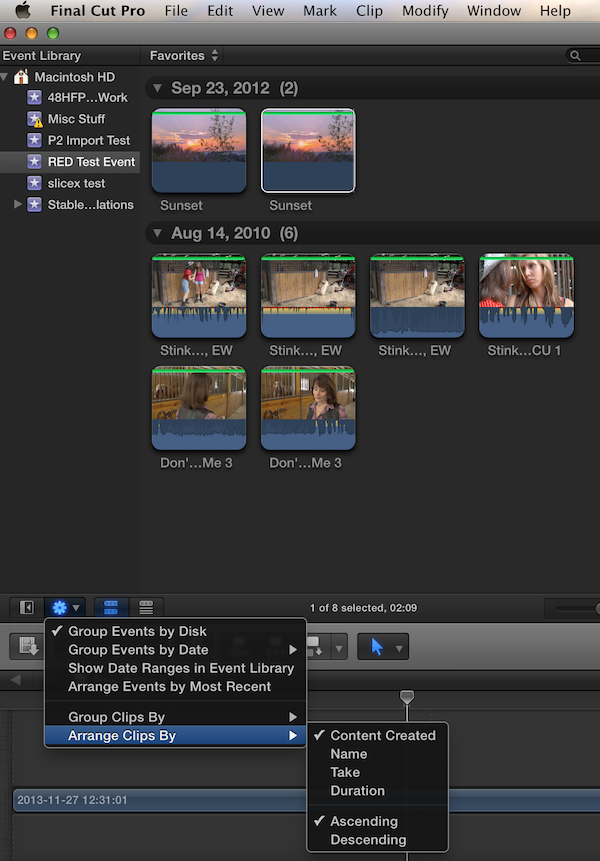
Yep, like Tom says, if you set the Action menu below the Browser to tell it to Arrange (Group works, too) them by Content Created, it does exactly that. Below I used both, works perfectly. Listed in the same order in both Filmstrip and List Browser views.
Last edit: 01 Dec 2013 15:16 by BenB.
Please Log in to join the conversation.
02 Dec 2013 07:51 #34977
by marjan
Replied by marjan on topic How to arrange keyworded clips so they appear in a correct sequence.
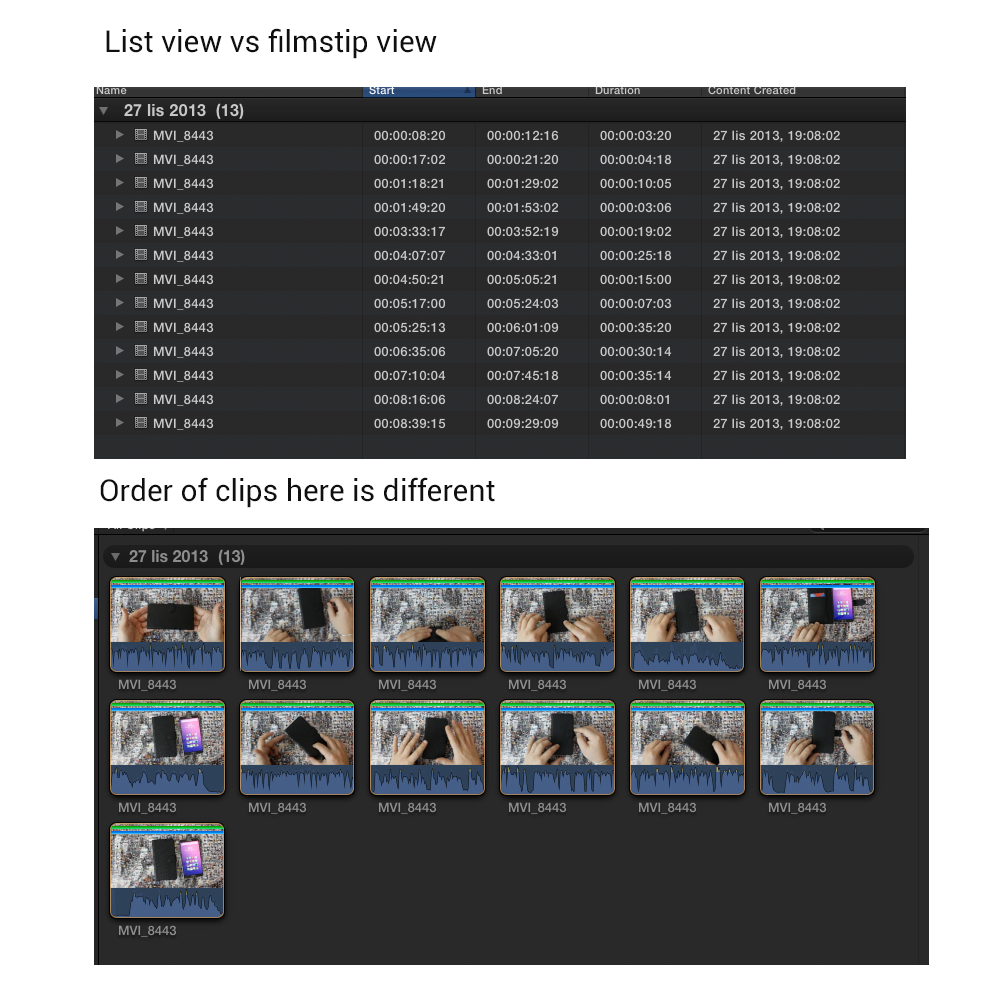
Hi BenB, I guess we misunderstood a bit. FCP sort my clips by date, that is fine. No problmes here. I am just wodering if I can set it to arange keyworded clips timecoded so it shows them in accordance with the way they appear on the acutal footage. At the moment the keyowrded clip which happens to be at the end of the footage appears as the first in the filmstrip and so on. Very confusing.
Please Log in to join the conversation.
- jjsanderson
-

- Offline
- Elite Member
-

02 Dec 2013 10:25 #34980
by jjsanderson
Replied by jjsanderson on topic How to arrange keyworded clips so they appear in a correct sequence.
Change the clip arrangement to 'Descending'? They should sort so the most recent (ie. the last clip on the master) is at the bottom of the list.
Of course, this will also affect the order of master clips - your whole bin will be upside-down, with the most recent clips at the bottom, but so it goes.
Of course, this will also affect the order of master clips - your whole bin will be upside-down, with the most recent clips at the bottom, but so it goes.
Please Log in to join the conversation.
02 Dec 2013 10:28 #34981
by marjan
Replied by marjan on topic How to arrange keyworded clips so they appear in a correct sequence.
It is not only about "descending" and "ascending" the clips are mixed up, instead of it being 1,2,3,4...its 3,2,4,1,5
Please Log in to join the conversation.

02 Dec 2013 11:38 #34982
by Seanus
Sean Lander - Editing since 1982 - AVID 1991 - FCP 1999 - FCPX 2011
Replied by Seanus on topic How to arrange keyworded clips so they appear in a correct sequence.
This used to be a big issue for me but then Apple fixed it. What version of FCPX do you have?
Sean Lander - Editing since 1982 - AVID 1991 - FCP 1999 - FCPX 2011
Please Log in to join the conversation.
02 Dec 2013 11:39 #34983
by marjan
Replied by marjan on topic How to arrange keyworded clips so they appear in a correct sequence.
10.0.9
Please Log in to join the conversation.
- Tom Wolsky
-
- Offline
- Moderator
-
02 Dec 2013 12:52 #34984
by Tom Wolsky
Replied by Tom Wolsky on topic How to arrange keyworded clips so they appear in a correct sequence.
The Sort By>Content Created works for me.
Please Log in to join the conversation.
03 Dec 2013 02:20 #35034
by marchyman
Replied by marchyman on topic How to arrange keyworded clips so they appear in a correct sequence.
That is not a solution. Multiple sections of a single clip that are marked with the same keyword will have the same content creation date.
Please Log in to join the conversation.
- Tom Wolsky
-
- Offline
- Moderator
-
03 Dec 2013 02:30 #35035
by Tom Wolsky
Replied by Tom Wolsky on topic How to arrange keyworded clips so they appear in a correct sequence.
It's not only the date; it's also the time and timecode of the clip. The media has been imported from a camera all the metadata is there to make this work correctly. I'm doing it with old DV footage shot in 2002.
Please Log in to join the conversation.
03 Dec 2013 03:25 #35044
by BenB
Replied by BenB on topic How to arrange keyworded clips so they appear in a correct sequence.
Again, works fine on my system. Ranges (sub-clips) are all in proper chronological order.
Please Log in to join the conversation.
03 Dec 2013 09:47 #35049
by marjan
Replied by marjan on topic How to arrange keyworded clips so they appear in a correct sequence.
It might work for some of you guys but it certainly does not work for me and it really bugs me alot. In my case these are selections of the same clip so, in my opinion, they should be in chronological order. Why are they in sequence in list view and not in the stipview. I guess I will have to live with it for now.
Thanks for you help anyways!
--
Mateusz
Thanks for you help anyways!
--
Mateusz
Please Log in to join the conversation.
03 Dec 2013 10:31 #35050
by Seanus
Sean Lander - Editing since 1982 - AVID 1991 - FCP 1999 - FCPX 2011
Replied by Seanus on topic How to arrange keyworded clips so they appear in a correct sequence.
I think I've worked out your problem.
Loaded up Final Cut Pro and did some keyword selections on a long clip.
I key worded clips from the end first, then one from the beginning then one from the middle of the clip.
Guess what? The order that I key worded them is the order that they appear in Frame view!
So the only way I can see you solving this problem is to re do the key names in the correct order or cross your fingers and hope that 10.1 has the ability to sort by timecode or time of day rather than creation tim.
Loaded up Final Cut Pro and did some keyword selections on a long clip.
I key worded clips from the end first, then one from the beginning then one from the middle of the clip.
Guess what? The order that I key worded them is the order that they appear in Frame view!
So the only way I can see you solving this problem is to re do the key names in the correct order or cross your fingers and hope that 10.1 has the ability to sort by timecode or time of day rather than creation tim.
Sean Lander - Editing since 1982 - AVID 1991 - FCP 1999 - FCPX 2011
Please Log in to join the conversation.
