


- Posts: 4455
- Thank you received: 962
3 Post Moderation Rule for New Boarders (25 Jan 2021)
New boarders will have their posts moderated - Don't worry if you cannot see your post immediately.
little app: fcpxImageExporter - export many images from FCPXML
- ronny courtens
-

- Offline
- Moderator
-

Less
More
13 Oct 2013 19:00 - 13 Oct 2013 19:08 #32460
by ronny courtens
Replied by ronny courtens on topic little app: fcpxImageExporter - export many images from FCPXML
Just tried again with XML without spaces, and it works :woohoo:
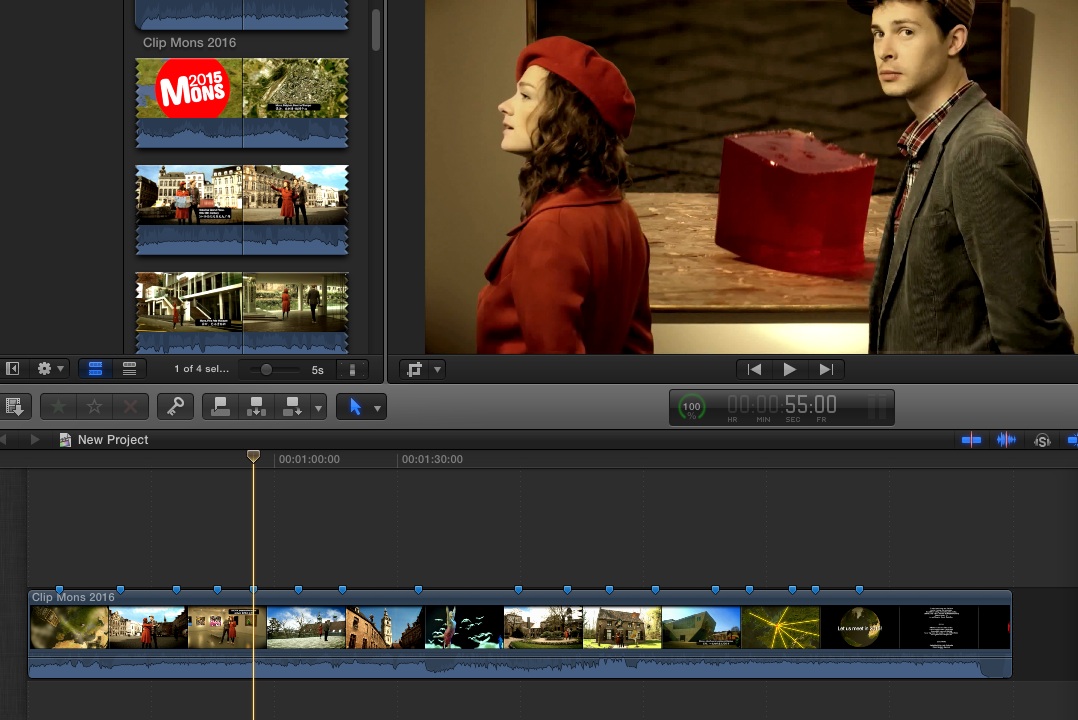
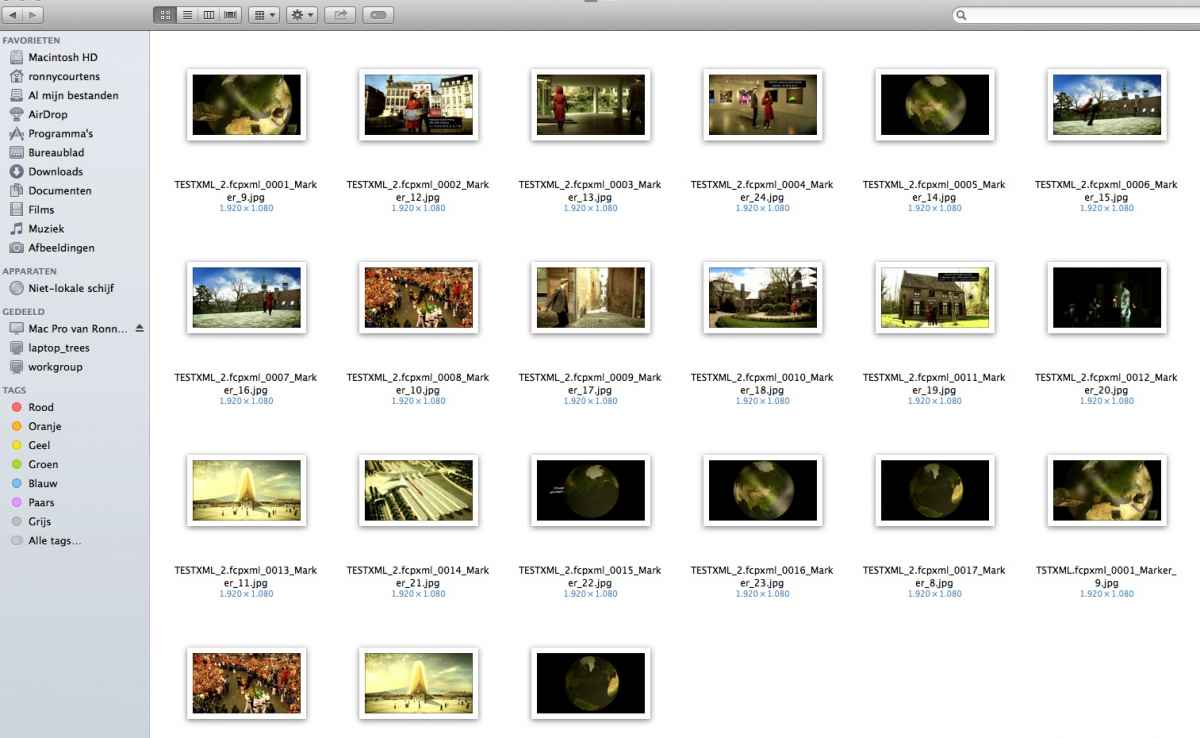
And when it works this is fantastic: 3 markers on a 1080p timeline, export XML, open the app, drop the FCPXML onto it and 2 seconds later I have 3 great stills from the timeline.
I then add another 18 markers to the TL, export a new XML, open the app and the 18 stills get exported in less than 7 seconds. I like this little app very, very much!
FCPX Timeline:
Exported stills:
I will now download the newest version and keep this little app in my Dock. I will do more testing tomorrow and will give you feedback on your page.
Thank you very much.
- Ronny
And when it works this is fantastic: 3 markers on a 1080p timeline, export XML, open the app, drop the FCPXML onto it and 2 seconds later I have 3 great stills from the timeline.
I then add another 18 markers to the TL, export a new XML, open the app and the 18 stills get exported in less than 7 seconds. I like this little app very, very much!
FCPX Timeline:
Exported stills:
I will now download the newest version and keep this little app in my Dock. I will do more testing tomorrow and will give you feedback on your page.
Thank you very much.
- Ronny
Last edit: 13 Oct 2013 19:08 by ronny courtens.
Please Log in to join the conversation.

13 Oct 2013 19:03 #32461
by ateale
Replied by ateale on topic little app: fcpxImageExporter - export many images from FCPXML
Great to hear Ronny!
v1.0.2 should let you work with spaces as far as I have tested.
Any ideas on how to make the app cooler please drop a comment on the app's page.
I think we can up the performance quite a bit - but for a first version we are doing ok i think.
Cheers!
v1.0.2 should let you work with spaces as far as I have tested.
Any ideas on how to make the app cooler please drop a comment on the app's page.
I think we can up the performance quite a bit - but for a first version we are doing ok i think.
Cheers!
Please Log in to join the conversation.
- ronny courtens
-
- Offline
- Moderator
-
Less
More
- Posts: 4455
- Thank you received: 962
13 Oct 2013 19:12 #32462
by ronny courtens
Replied by ronny courtens on topic little app: fcpxImageExporter - export many images from FCPXML
If you compare this with exporting individual stills from within FCPX this first version is already blazing fast. I will send some suggestions tomorrow. Thanks again.
- Ronny
- Ronny
Please Log in to join the conversation.
- Nervebroke
-

- Offline
- Elite Member
-

Less
More
- Posts: 177
- Thank you received: 12
13 Oct 2013 19:59 - 13 Oct 2013 20:06 #32463
by Nervebroke
Replied by Nervebroke on topic little app: fcpxImageExporter - export many images from FCPXML
I am trying Version 1.0.2 (1) off your web link and can not get it to work. The Destination file opens up and it is empty. I have tried with and with out spaces. The clip I tested was very short and was a .mov file
Update: I got it to work by by changing my clip from .mov to apple ProRes 422(HQ). Works as advertised this way.
Dave
Update: I got it to work by by changing my clip from .mov to apple ProRes 422(HQ). Works as advertised this way.
Dave
Last edit: 13 Oct 2013 20:06 by Nervebroke. Reason: updated Info
Please Log in to join the conversation.
13 Oct 2013 20:41 #32467
by ateale
Replied by ateale on topic little app: fcpxImageExporter - export many images from FCPXML
Hey Dave glad to hear you got it working - what was the work around in more details?
Also can you send me what appears in the console.app?
Thanks!
Also can you send me what appears in the console.app?
Thanks!
Please Log in to join the conversation.
- Nervebroke
-
- Offline
- Elite Member
-
Less
More
- Posts: 177
- Thank you received: 12
13 Oct 2013 21:54 #32470
by Nervebroke
Replied by Nervebroke on topic little app: fcpxImageExporter - export many images from FCPXML
I think the problem was on my end. The clip I used was a GoPro-CineForm HD/4K/3D, 1,920 x 1,080
Linear PCM, 16 bit little-endian signed integer, 2 channels, 48000 Hz. I converted this clip in MPEG streamclip to a Apple ProRes 422.
I just tried a Native MP4 clip H.264, 1,920 x 1,080 AAC, 48000 Hz, Stereo (L R) and It worked just fine. I am away from my laptop now. Will try and send you the screen shots later.
Linear PCM, 16 bit little-endian signed integer, 2 channels, 48000 Hz. I converted this clip in MPEG streamclip to a Apple ProRes 422.
I just tried a Native MP4 clip H.264, 1,920 x 1,080 AAC, 48000 Hz, Stereo (L R) and It worked just fine. I am away from my laptop now. Will try and send you the screen shots later.
Please Log in to join the conversation.
- Nervebroke
-
- Offline
- Elite Member
-
Less
More
- Posts: 177
- Thank you received: 12
14 Oct 2013 02:35 - 14 Oct 2013 02:37 #32474
by Nervebroke
Replied by Nervebroke on topic little app: fcpxImageExporter - export many images from FCPXML
I can get this Wonderful App to work with all my video Codecs except for the GoPro-CineForm file. This is not a problem.
It will work in the GoPro native format. If you convert the file inside GoPro Studio 2.0 and import it into FCPX it will not work.
This is a wonderful app that works as advertised now that I know the boundaries.
I tried to add a screen shot and It would not work
It will work in the GoPro native format. If you convert the file inside GoPro Studio 2.0 and import it into FCPX it will not work.
This is a wonderful app that works as advertised now that I know the boundaries.
I tried to add a screen shot and It would not work
Last edit: 14 Oct 2013 02:37 by Nervebroke.
Please Log in to join the conversation.
- ronny courtens
-
- Offline
- Moderator
-
Less
More
- Posts: 4455
- Thank you received: 962
14 Oct 2013 07:39 #32479
by ronny courtens
Replied by ronny courtens on topic little app: fcpxImageExporter - export many images from FCPXML
Hi David,
To add screenshots it's best to use JPEG and not make the screenshots very large in fill size.
Just click the Add File button, select your still,then press the Insert button.
- Ronny
To add screenshots it's best to use JPEG and not make the screenshots very large in fill size.
Just click the Add File button, select your still,then press the Insert button.
- Ronny
Please Log in to join the conversation.
- Andreas Kiel
-
- Offline
- Platinum Member
-

Less
More
- Posts: 1077
- Thank you received: 189
14 Oct 2013 09:01 #32480
by Andreas Kiel
Replied by Andreas Kiel on topic little app: fcpxImageExporter - export many images from FCPXML
ateale,
Really nice app.
Since more than a year I wanted to create an app like that but never found the time.
Now you did it. Thanks
-Andreas
Really nice app.
Since more than a year I wanted to create an app like that but never found the time.
Now you did it. Thanks
-Andreas
Please Log in to join the conversation.
14 Oct 2013 13:31 - 14 Oct 2013 13:32 #32483
by RonPriest
Replied by RonPriest on topic little app: fcpxImageExporter - export many images from FCPXML
I had posted this on the other thread, but thought I might post it here too.
Im sorry to put a damper on things, but It doesn't work so well for me. I first tried to export some stills from a multi clip timeline, and it produced zero stills. I then added some markers to the primary story line of a non multicam timeline (3 each) and it created 119 still images (all the same image) before it created my 3 stills. I then realized that I have a lot of markers on a secondary timeline which contains my music for the edit (marks to the beat) and it evidently gave me 119 still images of the very first image found on the primary story line where the first marker of the secondary storyline is located.
Also, there needs to be a way to select the desired folder from the app versus having to drag a folder from another finder window.
This app is a nice concept, I hope you get it working better, I can really use something like this.
Im sorry to put a damper on things, but It doesn't work so well for me. I first tried to export some stills from a multi clip timeline, and it produced zero stills. I then added some markers to the primary story line of a non multicam timeline (3 each) and it created 119 still images (all the same image) before it created my 3 stills. I then realized that I have a lot of markers on a secondary timeline which contains my music for the edit (marks to the beat) and it evidently gave me 119 still images of the very first image found on the primary story line where the first marker of the secondary storyline is located.
Also, there needs to be a way to select the desired folder from the app versus having to drag a folder from another finder window.
This app is a nice concept, I hope you get it working better, I can really use something like this.
Last edit: 14 Oct 2013 13:32 by RonPriest.
Please Log in to join the conversation.
- ronny courtens
-
- Offline
- Moderator
-
Less
More
- Posts: 4455
- Thank you received: 962
14 Oct 2013 14:07 #32484
by ronny courtens
Replied by ronny courtens on topic little app: fcpxImageExporter - export many images from FCPXML
This app does what it says: you add markers to a clip or a series of clips that are on the timeline and the app exports stills from the original media of the clips, based on these markers. Much faster and simpler than you could ever do this from within FCPX, and in batch. That alone makes this application wonderful, besides the fact that it is free 
There are a lot of things it does NOT do: export from markers on compound clips or multicam clips, export stills including any color corrections or effects that have been applied to the clips, a.s.o. And as Don rightfully said: you have to make sure to have no other markers anywhere on your timeline or it will also include them in the export.
Wether Adam will further enhance this application or not is entirely his choice. I know he is an outstanding VFX compositor, so I think he has other things to do Anyway, I am very happy with what it does now and if I need to send screenshots from a finished timeline including titles and effects I can export the edit, import the movie in FCPX and create my stills from the finished movie. For only a few stills this is not really worth it, but when you have to export a load of stills this app does make a huge difference.
- Ronny
There are a lot of things it does NOT do: export from markers on compound clips or multicam clips, export stills including any color corrections or effects that have been applied to the clips, a.s.o. And as Don rightfully said: you have to make sure to have no other markers anywhere on your timeline or it will also include them in the export.
Wether Adam will further enhance this application or not is entirely his choice. I know he is an outstanding VFX compositor, so I think he has other things to do
Anyway, I am very happy with what it does now and if I need to send screenshots from a finished timeline including titles and effects I can export the edit, import the movie in FCPX and create my stills from the finished movie. For only a few stills this is not really worth it, but when you have to export a load of stills this app does make a huge difference.- Ronny
Please Log in to join the conversation.
14 Oct 2013 14:28 - 14 Oct 2013 14:40 #32485
by RonPriest
Replied by RonPriest on topic little app: fcpxImageExporter - export many images from FCPXML
Well, there is no need to be defensive and I certainly don't doubt Adams abilities, however, Im just saying, if It's not going to work on a multi clip timeline, then it's not going to be a huge help for what I need. I appreciate the fact that he is giving it away for free, but If It doesn't work for me, it doesn't work.
Last edit: 14 Oct 2013 14:40 by RonPriest.
Please Log in to join the conversation.
- ronny courtens
-
- Offline
- Moderator
-
Less
More
- Posts: 4455
- Thank you received: 962
14 Oct 2013 14:32 #32486
by ronny courtens
Replied by ronny courtens on topic little app: fcpxImageExporter - export many images from FCPXML
Hi Don,
No defense or offense intended Like any other app this will be useful for some and less useful for others. Just stating the fact that it is very handy for what is was intended to, nothing more.
- Ronny
No defense or offense intended
Like any other app this will be useful for some and less useful for others. Just stating the fact that it is very handy for what is was intended to, nothing more.- Ronny
Please Log in to join the conversation.
- Andreas Kiel
-
- Offline
- Platinum Member
-
Less
More
- Posts: 1077
- Thank you received: 189
14 Oct 2013 15:22 #32489
by Andreas Kiel
I totally agree.
-Andreas
Replied by Andreas Kiel on topic little app: fcpxImageExporter - export many images from FCPXML
ronny courtens wrote: Hi Don,
No defense or offense intended
- Ronny
I totally agree.
-Andreas
Please Log in to join the conversation.
14 Oct 2013 15:40 #32491
by ateale
Replied by ateale on topic little app: fcpxImageExporter - export many images from FCPXML
Hey guys,
If there is enough interest and we can get some other ideas into the app I'd invest some time to do it.
Thanks for all your help!
Adam
If there is enough interest and we can get some other ideas into the app I'd invest some time to do it.
Thanks for all your help!
Adam
Please Log in to join the conversation.
- ronny courtens
-
- Offline
- Moderator
-
Less
More
- Posts: 4455
- Thank you received: 962
14 Oct 2013 16:15 #32492
by ronny courtens
Replied by ronny courtens on topic little app: fcpxImageExporter - export many images from FCPXML
Hi Adam,
Well that's good to know!
Reading most of the comments a wonderful addition would be if you could use this app to also batch-export stills from clips as they are on the FCPX timeline, including any corrections and filters applied. Pretty much like we can export stills from FCPX right now, but much faster and in batch. I don't think this is going to be easy, but you never know...
Another biggie, especially for collaborative work, would be to be able to export stills from clips in the Event Browser with superimposed original tc. Again not an easy one, I'm afraid.
A nice addition to the current version would be if we could select a destination folder by clicking on the folder icon instead of having to find the destination folder and then drag it onto the icon.
And, as Don suggested, being able to export snapshots from multicam clips and compound clips would also make this app more useful for a larger user base.
Just some ideas to get you started...
- Ronny
Well that's good to know!
Reading most of the comments a wonderful addition would be if you could use this app to also batch-export stills from clips as they are on the FCPX timeline, including any corrections and filters applied. Pretty much like we can export stills from FCPX right now, but much faster and in batch. I don't think this is going to be easy, but you never know...
Another biggie, especially for collaborative work, would be to be able to export stills from clips in the Event Browser with superimposed original tc. Again not an easy one, I'm afraid.
A nice addition to the current version would be if we could select a destination folder by clicking on the folder icon instead of having to find the destination folder and then drag it onto the icon.
And, as Don suggested, being able to export snapshots from multicam clips and compound clips would also make this app more useful for a larger user base.
Just some ideas to get you started...
- Ronny
Please Log in to join the conversation.
- Ichtrag Strapse
-
- Offline
- New Member
-

Less
More
- Posts: 6
- Thank you received: 2
15 Oct 2013 00:27 #32504
by Ichtrag Strapse
Replied by Ichtrag Strapse on topic little app: fcpxImageExporter - export many images from FCPXML
greath idea, but doesn´t work here on osx mavericks! maybe in the next week you can fix it!? thxx
Please Log in to join the conversation.
- Ichtrag Strapse
-
- Offline
- New Member
-
Less
More
- Posts: 6
- Thank you received: 2
15 Oct 2013 00:29 #32505
by Ichtrag Strapse
Replied by Ichtrag Strapse on topic little app: fcpxImageExporter - export many images from FCPXML
sry i mean in the next weeks
Please Log in to join the conversation.
- Ichtrag Strapse
-
- Offline
- New Member
-
Less
More
- Posts: 6
- Thank you received: 2
15 Oct 2013 00:41 #32506
by Ichtrag Strapse
Replied by Ichtrag Strapse on topic little app: fcpxImageExporter - export many images from FCPXML
upa, it workz without spaces. the direction for the output of the files i must take manually. so it workz! nice!
Please Log in to join the conversation.
15 Oct 2013 00:50 #32509
by fcpguru
Replied by fcpguru on topic little app: fcpxImageExporter - export many images from FCPXML
2nd the request to have it function with multicam and compound clips as that is the bulk of what I'm doing these days. Also if it could detect a keyword or note and export only those, I think that would be very useful as well. A serious timesaver for sure and if it worked really well I'd be willing to pay for something like this!
Please Log in to join the conversation.
