


- Posts: 4455
- Thank you received: 962
3 Post Moderation Rule for New Boarders (25 Jan 2021)
New boarders will have their posts moderated - Don't worry if you cannot see your post immediately.
glitch on cut, i.e. no transition
- ronny courtens
-

- Offline
- Moderator
-

Less
More
09 Oct 2013 16:22 #32312
by ronny courtens
Replied by ronny courtens on topic glitch on cut, i.e. no transition
I have watched the file and now I'm completely baffled. For the best of my life I cannot see any glitches in the video you have sent me :S
I have opened the mp4 in QTX player and have carefully played through every frame. No glitches. So first we must make sure we are addressing the real cause of this problem and if it's not something else, like a graphics card issue on your computer.
Do you have any other computer where you can view the file to make sure you still see the issues on that computer?
- Ronny
I have opened the mp4 in QTX player and have carefully played through every frame. No glitches. So first we must make sure we are addressing the real cause of this problem and if it's not something else, like a graphics card issue on your computer.
Do you have any other computer where you can view the file to make sure you still see the issues on that computer?
- Ronny
Please Log in to join the conversation.
- ronny courtens
-
- Offline
- Moderator
-
Less
More
- Posts: 4455
- Thank you received: 962
09 Oct 2013 16:33 #32314
by ronny courtens
Replied by ronny courtens on topic glitch on cut, i.e. no transition
Oh and, by the way, I really like the video you have sent. Beautiful pictures edited dynamically on a good music track. Well done! Now back to those :evil: glitches.
- Ronny
- Ronny
Please Log in to join the conversation.


09 Oct 2013 17:54 - 09 Oct 2013 17:57 #32319
by highab
Replied by highab on topic glitch on cut, i.e. no transition
Well thank you!
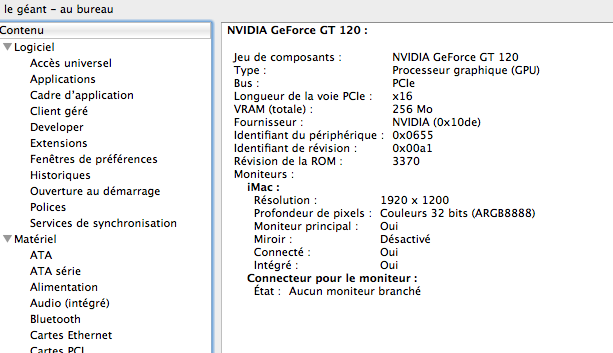
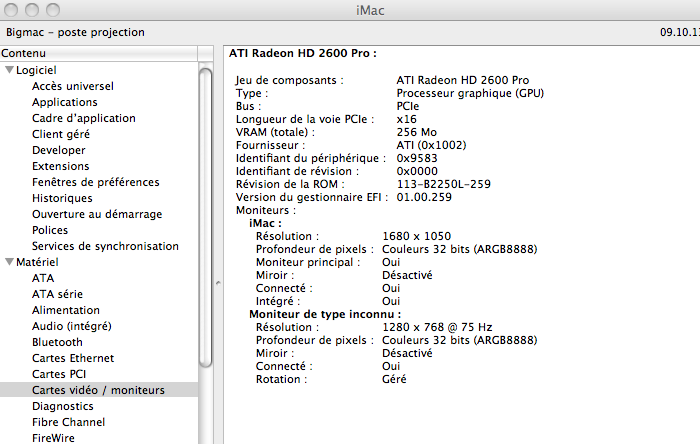
The graphic card thing would explain why I didn't notice the glitches until I played the file on the older computer....
i.e. the one that sends the images to the screens.
Working backwards I found I could see them in the original.... that or my eyes are going funny, which is a possibility, only I'm not the only one to see the problem live in the flesh.
I've put some screen capture video clips on the FTP and will add a cam vid of what it looks like on the TVs when the computer feels like doing what I ask it to... it looks like a cross between a very short flash/wipe when its just meant to cut.... hmm
anyway it's time to call it a night for today.
Thank you so much, and have a lovely evening.
The graphic card thing would explain why I didn't notice the glitches until I played the file on the older computer....
i.e. the one that sends the images to the screens.
Working backwards I found I could see them in the original.... that or my eyes are going funny, which is a possibility, only I'm not the only one to see the problem live in the flesh.
I've put some screen capture video clips on the FTP and will add a cam vid of what it looks like on the TVs when the computer feels like doing what I ask it to... it looks like a cross between a very short flash/wipe when its just meant to cut.... hmm
anyway it's time to call it a night for today.
Thank you so much, and have a lovely evening.

Last edit: 09 Oct 2013 17:57 by highab.
Please Log in to join the conversation.
- ronny courtens
-
- Offline
- Moderator
-
Less
More
- Posts: 4455
- Thank you received: 962
09 Oct 2013 17:59 #32320
by ronny courtens
Replied by ronny courtens on topic glitch on cut, i.e. no transition
Okay keep me updated on this and yes do put a cam vid of the issue on the screens.
I think we may be in the same time zone, so yes let's call it a night
- Ronny
I think we may be in the same time zone, so yes let's call it a night
- Ronny
Please Log in to join the conversation.
10 Oct 2013 13:52 #32359
by highab
Replied by highab on topic glitch on cut, i.e. no transition
cam vid uploaded to ftp. can you see what I mean?
Please Log in to join the conversation.
- ronny courtens
-
- Offline
- Moderator
-
Less
More
- Posts: 4455
- Thank you received: 962
10 Oct 2013 17:52 #32369
by ronny courtens
Replied by ronny courtens on topic glitch on cut, i.e. no transition
Do I need a new access code for the server? The old one does not seem to work anymore.
- Ronny
- Ronny
Please Log in to join the conversation.
10 Oct 2013 17:54 #32370
by highab
Replied by highab on topic glitch on cut, i.e. no transition
haven't changed it
Please Log in to join the conversation.
- ronny courtens
-
- Offline
- Moderator
-
Less
More
- Posts: 4455
- Thank you received: 962
10 Oct 2013 18:36 - 10 Oct 2013 18:37 #32372
by ronny courtens
Replied by ronny courtens on topic linear motion
Hi Ali,
Okay, I see what you mean. It's an optical glitch that is caused by the way a screen reacts to a sudden change in luminance. That's why it is more obvious on the TVs .
When a screen displays a very bright image (the zebra) and there is a sudden cut to a much darker image (the giraffe) the screen will hold the bright image for a fraction of a second (expressed in milliseconds) before switching to the darker one. This is called the response time of the screen (not to be confused by the refresh rate). The bigger the contrast the longer it will take for the screen to react.
If your screen has a very short response time and a high refresh rate you will hardly notice this. But with slower screens (such as older monitors and TVs) a major change in luminance will cause an optical delay while the screen changes its pixels from bright to dark. This will look like an ultra-short wipe. That's what I see on the camvid you made from the tv screen. I didn't see it yesterday on the original footage because I was watching it on a grade 1 studio monitor with a very fast response time.
I'm afraid there's not much you can do about this. Either you use faster screens for the projection or you avoid cutting from very bright to very dark images. Just try and put the zebra somewhere else in the timeline (e.g. between the group of zebras and the group of giraffes crossing the river later in the edit.) I think you won't notice any glitches between these clips, even on a slower monitor, because the luminance of the clips is equal.
Rest assured: if you show this to a regular audience I'm sure no-one will even notice the screen delay. But just like any good editor you seem to be a perfectionist, so I understand your concern.
- Ronny
Okay, I see what you mean. It's an optical glitch that is caused by the way a screen reacts to a sudden change in luminance. That's why it is more obvious on the TVs .
When a screen displays a very bright image (the zebra) and there is a sudden cut to a much darker image (the giraffe) the screen will hold the bright image for a fraction of a second (expressed in milliseconds) before switching to the darker one. This is called the response time of the screen (not to be confused by the refresh rate). The bigger the contrast the longer it will take for the screen to react.
If your screen has a very short response time and a high refresh rate you will hardly notice this. But with slower screens (such as older monitors and TVs) a major change in luminance will cause an optical delay while the screen changes its pixels from bright to dark. This will look like an ultra-short wipe. That's what I see on the camvid you made from the tv screen. I didn't see it yesterday on the original footage because I was watching it on a grade 1 studio monitor with a very fast response time.
I'm afraid there's not much you can do about this. Either you use faster screens for the projection or you avoid cutting from very bright to very dark images. Just try and put the zebra somewhere else in the timeline (e.g. between the group of zebras and the group of giraffes crossing the river later in the edit.) I think you won't notice any glitches between these clips, even on a slower monitor, because the luminance of the clips is equal.
Rest assured: if you show this to a regular audience I'm sure no-one will even notice the screen delay. But just like any good editor you seem to be a perfectionist, so I understand your concern.
- Ronny
Last edit: 10 Oct 2013 18:37 by ronny courtens.
Please Log in to join the conversation.
11 Oct 2013 08:45 #32386
by highab
Replied by highab on topic linear motion
Well thanks for all your help. It's nice to know that it's not because I did something wrong.
It is weird though.... we've only just bought the TVs in July... good price and end of range, granted, but not old really.
Response time isn't something they put in the specs although one site puts it at 2.4ms for the 42ls5600 from LG which seems pretty good to me
Thanks to your help I can now concentrate on learning how to work with the quirks of the TVs we have - thanks !
It is weird though.... we've only just bought the TVs in July... good price and end of range, granted, but not old really.
Response time isn't something they put in the specs although one site puts it at 2.4ms for the 42ls5600 from LG which seems pretty good to me
Thanks to your help I can now concentrate on learning how to work with the quirks of the TVs we have - thanks !
Please Log in to join the conversation.
- ronny courtens
-
- Offline
- Moderator
-
Less
More
- Posts: 4455
- Thank you received: 962
11 Oct 2013 09:08 #32387
by ronny courtens
Replied by ronny courtens on topic linear motion
2.4 ms is indeed good, so I wonder why you still get this optical glitch.
The only thing I know for sure is that it has nothing to do with your video, we have put it through our QC system and there is absolutely nothing wrong with it. You could try to avoid cutting between very high contrast and very low contrast clips (like the zebra and the giraffe), or you could slightly correct these clips so their contrast becomes more equal. And don't get too obsessed by this issue: the more you look at it the more glitches you will start to "see" I'm sure your audience will not notice anything. The video is cut really well and the images and the music are appealing. And that's what counts.
- Ronny
The only thing I know for sure is that it has nothing to do with your video, we have put it through our QC system and there is absolutely nothing wrong with it. You could try to avoid cutting between very high contrast and very low contrast clips (like the zebra and the giraffe), or you could slightly correct these clips so their contrast becomes more equal. And don't get too obsessed by this issue: the more you look at it the more glitches you will start to "see"
I'm sure your audience will not notice anything. The video is cut really well and the images and the music are appealing. And that's what counts.- Ronny
Please Log in to join the conversation.
18 Oct 2013 10:47 #32654
by highab
Replied by highab on topic linear motion
aha, I found a site that tests TVs it is pretty in depth and says the reponse time is 12ms ... that'd make more sense !
Please Log in to join the conversation.
- ronny courtens
-
- Offline
- Moderator
-
Less
More
- Posts: 4455
- Thank you received: 962
18 Oct 2013 11:15 #32656
by ronny courtens
Replied by ronny courtens on topic linear motion
That could indeed explain the issue.
- Ronny
- Ronny
Please Log in to join the conversation.
