


- Posts: 37
- Thank you received: 0
3 Post Moderation Rule for New Boarders (25 Jan 2021)
New boarders will have their posts moderated - Don't worry if you cannot see your post immediately.
glitch on cut, i.e. no transition
09 Oct 2013 07:46 #32251
by highab
glitch on cut, i.e. no transition was created by highab
Hi all,
I've a project in which I've several clips joined together without transitions.... just cutting from one clip to another, but the weird thing is that in some places, instead of a clean cut, it looks like I've a split second of a vertical wipe downwards that has gone wrong.... its in all the files I output, whether proRes or 1280px .mov.
Where do I start looking to find the source of the problem ?
If I change the clip after the dodgy cut transition, I don't have the problem.... but I don't have the clip sequence I wanted either....
any help much appreciated!
thanks
I've a project in which I've several clips joined together without transitions.... just cutting from one clip to another, but the weird thing is that in some places, instead of a clean cut, it looks like I've a split second of a vertical wipe downwards that has gone wrong.... its in all the files I output, whether proRes or 1280px .mov.
Where do I start looking to find the source of the problem ?
If I change the clip after the dodgy cut transition, I don't have the problem.... but I don't have the clip sequence I wanted either....
any help much appreciated!
thanks
Please Log in to join the conversation.
- ronny courtens
-

- Offline
- Moderator
-

Less
More
- Posts: 4455
- Thank you received: 962
09 Oct 2013 07:56 #32252
by ronny courtens
Replied by ronny courtens on topic glitch on cut, i.e. no transition
I would start with deleting all your render files for this project to see if this solves the issue.
If this does not solve it I would refresh the FCPX preferences. If you are not familiar with this procedure you can download a free app called Preference Manager to do this for you: www.digitalrebellion.com/prefman/
- Ronny
If this does not solve it I would refresh the FCPX preferences. If you are not familiar with this procedure you can download a free app called Preference Manager to do this for you: www.digitalrebellion.com/prefman/
- Ronny
Please Log in to join the conversation.
- Karsten Schlüter
-

- Offline
- Moderator
-
Less
More
- Posts: 3790
- Thank you received: 718
09 Oct 2013 09:14 #32260
by Karsten Schlüter
Your source is interlaced, correct?
It could be, you try to cut on a (wrong) field, instead of a frame.
If I remember correctly (Ronny, help!), you should zoom into timeline, use the cursor key to jump to clip, add another right-click to go one frame/field ahead and cut-off the field....
..... muddy waters, I don't use interlace ... :lol:
Replied by Karsten Schlüter on topic glitch on cut, i.e. no transition
highab wrote: … instead of a clean cut, it looks like I've a split second of a vertical wipe downwards that has gone wrong....
If I change the clip after the dodgy cut transition, I don't have the problem.... but I don't have the clip sequence I wanted either....
Your source is interlaced, correct?
It could be, you try to cut on a (wrong) field, instead of a frame.
If I remember correctly (Ronny, help!), you should zoom into timeline, use the cursor key to jump to clip, add another right-click to go one frame/field ahead and cut-off the field....
..... muddy waters, I don't use interlace ... :lol:
Please Log in to join the conversation.
- ronny courtens
-
- Offline
- Moderator
-
Less
More
- Posts: 4455
- Thank you received: 962
09 Oct 2013 09:27 #32261
by ronny courtens
Replied by ronny courtens on topic glitch on cut, i.e. no transition
Excellent remark! Yes you can see such issues when working in an interlaced project with incorrect field dominance settings. This can happen when you are working with video that originates from a DVD. If your footage IS interlaced use the method Karsten has laid out to check if the problematic cuts can be corrected by cutting off the problematic frame between the cuts.
- Ronny
- Ronny
Please Log in to join the conversation.
- Karsten Schlüter
-
- Offline
- Moderator
-
Less
More
- Posts: 3790
- Thank you received: 718
09 Oct 2013 09:49 #32264
by Karsten Schlüter
thanks for chiming in, Ronny!
I just named you, knowing, you're in my timezone, or at least, same working hours like me!
DVD rips ... yeah, in that context ...
Replied by Karsten Schlüter on topic glitch on cut, i.e. no transition
ronny courtens wrote: … This can happen when you are working with video that originates from a DVD. If your footage IS interlaced use the method Karsten has laid out …
thanks for chiming in, Ronny!
I just named you, knowing, you're in my timezone, or at least, same working hours like me!
DVD rips ... yeah, in that context ...
Please Log in to join the conversation.
09 Oct 2013 12:23 #32274
by highab
Replied by highab on topic glitch on cut, i.e. no transition
Hi am in front of the mac now, and can't seem to understand what I'm meant to do once I've zoomed in on the clip.
cursor keys just moves the play head around
right click gives me all sorts of options.
I have the French language version of FCPX so have to find the equivalent items to click on
cursor keys just moves the play head around
right click gives me all sorts of options.
I have the French language version of FCPX so have to find the equivalent items to click on
Please Log in to join the conversation.
- ronny courtens
-
- Offline
- Moderator
-
Less
More
- Posts: 4455
- Thank you received: 962
09 Oct 2013 12:38 #32276
by ronny courtens
Replied by ronny courtens on topic glitch on cut, i.e. no transition
So you have zoomed in on the problematic cut. Now put your playhead exactly on the cut, then move it 1 frame before the cut using the left arrow and advance frame by frame using the right arrow. Do you see any glitches as the playhead goes over the cut on to the next clip?
- Ronny
- Ronny
Please Log in to join the conversation.
09 Oct 2013 12:44 #32278
by highab
Replied by highab on topic glitch on cut, i.e. no transition
Hi thanks for the speedy help.
The frames all look correct when looked at individually.
I can jump from anywhere in clip A to clip B and see a sort of wipe even if I'm just jumping with the mouse, its barely noticeable in FCPX, you'd just think the computer is slow or the rendering hasn't finished yet.
The frames all look correct when looked at individually.
I can jump from anywhere in clip A to clip B and see a sort of wipe even if I'm just jumping with the mouse, its barely noticeable in FCPX, you'd just think the computer is slow or the rendering hasn't finished yet.
Please Log in to join the conversation.
- ronny courtens
-
- Offline
- Moderator
-
Less
More
- Posts: 4455
- Thank you received: 962
09 Oct 2013 13:01 #32280
by ronny courtens
Replied by ronny courtens on topic glitch on cut, i.e. no transition
This explains a lot. Are you working with video that has been converted from a DVD?
- Ronny
- Ronny
Please Log in to join the conversation.
09 Oct 2013 13:11 #32281
by highab
Replied by highab on topic glitch on cut, i.e. no transition
I don't know, possibly. I'm combining short segments, a few seconds each from various clips I've downloaded.
the project comprises about 52 clips in 2 minutes
the project comprises about 52 clips in 2 minutes
Please Log in to join the conversation.
- ronny courtens
-
- Offline
- Moderator
-
Less
More
- Posts: 4455
- Thank you received: 962
09 Oct 2013 13:13 #32282
by ronny courtens
Replied by ronny courtens on topic glitch on cut, i.e. no transition
Okay, it's starting to get clear now. And the glitches you see are not really on the cuts you have made in FCPX, but also anytime a scene changes in the video?
- Ronny
- Ronny
Please Log in to join the conversation.
09 Oct 2013 13:17 #32283
by highab
Replied by highab on topic glitch on cut, i.e. no transition
the worst is at one particular cut... at the moment the clip changes from one to the other.
Sometimes its in other places too. Sometimes you think its just your eyes doing something odd.
The others are also at the cuts
Sometimes its in other places too. Sometimes you think its just your eyes doing something odd.
The others are also at the cuts
Please Log in to join the conversation.
- ronny courtens
-
- Offline
- Moderator
-
Less
More
- Posts: 4455
- Thank you received: 962
09 Oct 2013 13:30 #32286
by ronny courtens
Replied by ronny courtens on topic glitch on cut, i.e. no transition
I have seen this before. We call this "ghost frames". They are a result of converting interlaced long-gop formats (such as video from a DVD) to progressive long-gop formats (such as formats for web delivery). The problem is with your original footage, not with FCPX.
I'm afraid the only thing you can do is go through all the scene changes in your video and delete the problematic ghost frames one by one. On every problematic scene change you blade the video (CMD+ and you trim the end of the outgoing clip or the start of the incoming clip by 1 frame. That should get rid of the ghost frames.
- Ronny
I'm afraid the only thing you can do is go through all the scene changes in your video and delete the problematic ghost frames one by one. On every problematic scene change you blade the video (CMD+
and you trim the end of the outgoing clip or the start of the incoming clip by 1 frame. That should get rid of the ghost frames.- Ronny
Please Log in to join the conversation.
09 Oct 2013 13:37 #32287
by highab
Replied by highab on topic glitch on cut, i.e. no transition
Hi, thsnk you so much for giving me your time.
I can cut clip B anywhere and the weird wipe remains.
I can slide it around with the cmd t tool. The weird wipe still remains.
I can cut clip B anywhere and the weird wipe remains.
I can slide it around with the cmd t tool. The weird wipe still remains.
Please Log in to join the conversation.
- ronny courtens
-
- Offline
- Moderator
-
Less
More
- Posts: 4455
- Thank you received: 962
09 Oct 2013 13:51 - 09 Oct 2013 13:52 #32289
by ronny courtens
Replied by ronny courtens on topic glitch on cut, i.e. no transition
Ah, so the problem is inside every frame of your video. This means it is related to how FCPX interprets the footage. Okay, this changes everything and we may be able to solve this.
In order to help you I would need two screenshots, can you do this?
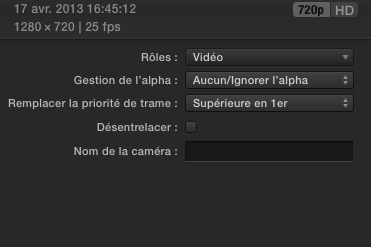
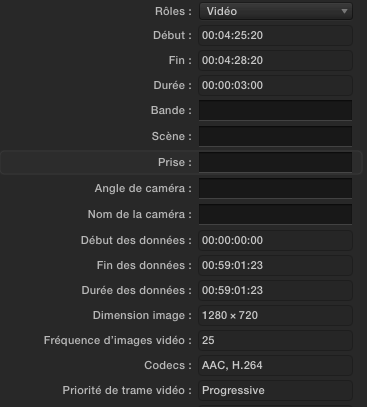
1. Select one of the problematic clips in your Event Browser and in the Inspector click the Info tab. Change the Info View to "Extended View" and make a screenshot of the Info window, making sure that I can see the Video Field Dominance.
2. Press CMD+O to open the Project Library. In the Project Library select the project you are working on and in the inspector click the Properties tab. Make a screenshot of the Properties window.
- Ronny
In order to help you I would need two screenshots, can you do this?
1. Select one of the problematic clips in your Event Browser and in the Inspector click the Info tab. Change the Info View to "Extended View" and make a screenshot of the Info window, making sure that I can see the Video Field Dominance.
2. Press CMD+O to open the Project Library. In the Project Library select the project you are working on and in the inspector click the Properties tab. Make a screenshot of the Properties window.
- Ronny
Last edit: 09 Oct 2013 13:52 by ronny courtens.
Please Log in to join the conversation.
09 Oct 2013 14:02 #32292
by highab
Replied by highab on topic glitch on cut, i.e. no transition
I started the project years ago when we were using projectors at 1400x1050, I'll have to change the finished project to 1920 x 1280 because we now use TVs for projection.

Please Log in to join the conversation.
- ronny courtens
-
- Offline
- Moderator
-
Less
More
- Posts: 4455
- Thank you received: 962
09 Oct 2013 14:23 #32294
by ronny courtens
Replied by ronny courtens on topic glitch on cut, i.e. no transition
The imported footage is progressive H.264, the clip's field dominance interpretation is set to "Upper Field First" and your project settings are 1440x1080 25i. This is wrong, and it explains the issues you are having. Also your project audio settings are 44.1 kHz, which is wrong as well, but we can deal with this.
As you are going to do your projection on HD TV screens anyway there is no reason whatsoever to edit your progressive footage in an interlaced timeline. So you are going to have to change a couple of things.
1. Open the Project Library (CMD+O) and at the bottom of the Inspector click the little wrench to open the Project Properties window.
In the Project Properties window set Video Properties to 1080p HD, Resolution to 1920x1080 and Frame Rate to 25p. While you are at it, also change the Audio Sample Rate to 48 kHz. Then press OK
2. Select every clip you use in the Event Library and make sure the Field Dominance Override (Remplacer la priorité de trame) is set to Progressive.
Now open your Project. As your original project settings were 1440x1080 (which is anamorphic HD) FCPX will probably automatically adapt the aspect of your clips on the timeline to the new settings (1080p square pixels). If the clips are not adjusted automatically you can either do this manually using the Scale tool, or just add the clips back on the timeline from the Event Browser.
Now play the timeline. Do you still see the glitches?
- Ronny
As you are going to do your projection on HD TV screens anyway there is no reason whatsoever to edit your progressive footage in an interlaced timeline. So you are going to have to change a couple of things.
1. Open the Project Library (CMD+O) and at the bottom of the Inspector click the little wrench to open the Project Properties window.
In the Project Properties window set Video Properties to 1080p HD, Resolution to 1920x1080 and Frame Rate to 25p. While you are at it, also change the Audio Sample Rate to 48 kHz. Then press OK
2. Select every clip you use in the Event Library and make sure the Field Dominance Override (Remplacer la priorité de trame) is set to Progressive.
Now open your Project. As your original project settings were 1440x1080 (which is anamorphic HD) FCPX will probably automatically adapt the aspect of your clips on the timeline to the new settings (1080p square pixels). If the clips are not adjusted automatically you can either do this manually using the Scale tool, or just add the clips back on the timeline from the Event Browser.
Now play the timeline. Do you still see the glitches?
- Ronny
Please Log in to join the conversation.
09 Oct 2013 15:41 #32304
by highab
Replied by highab on topic glitch on cut, i.e. no transition
Sorry about the delay, the computer has been on a go slow and Ihve had to restart fcpx several times.
project settings changed. thanks.
progressive on all clips = OK
but the weird effect is still there.
project settings changed. thanks.
progressive on all clips = OK
but the weird effect is still there.
Please Log in to join the conversation.
- ronny courtens
-
- Offline
- Moderator
-
Less
More
- Posts: 4455
- Thank you received: 962
09 Oct 2013 15:44 #32305
by ronny courtens
Replied by ronny courtens on topic glitch on cut, i.e. no transition
Wow that's weird. At least you now have everything set up correctly, so we can move on from here. Can you post a screenshot of this glitch?
- Ronny
- Ronny
Please Log in to join the conversation.
