


- Posts: 57
- Thank you received: 1
3 Post Moderation Rule for New Boarders (25 Jan 2021)
New boarders will have their posts moderated - Don't worry if you cannot see your post immediately.
Export 4 Ch Audio to MXF
22 Aug 2013 10:07 #30249
by Seanchas
Export 4 Ch Audio to MXF was created by Seanchas
Hi,
I'm wondering how to route my audio to 4 channel output... I'm delivering MXF files to my broadcaster and using Hamburg Pro Media AS-11 suite to do so.... I have a final mix with 4 channels and I'd like to route them to the 4 tracks of the MXF but I'm not sure how to do so...
Anybody doing this?
Thanks,
Johnny
I'm wondering how to route my audio to 4 channel output... I'm delivering MXF files to my broadcaster and using Hamburg Pro Media AS-11 suite to do so.... I have a final mix with 4 channels and I'd like to route them to the 4 tracks of the MXF but I'm not sure how to do so...
Anybody doing this?
Thanks,
Johnny
Please Log in to join the conversation.
22 Aug 2013 21:29 #30265
by AndersM
Replied by AndersM on topic Export 4 Ch Audio to MXF
Hi,
I asked the same thing a while back. Roles are your friend! I never tried it with mxf since I don't have any mxf plugins, but it works well with mov exports. You can find the thread here:
www.fcp.co/forum/4-final-cut-pro-x-fcpx/...mxf-with-four-tracks
I asked the same thing a while back. Roles are your friend! I never tried it with mxf since I don't have any mxf plugins, but it works well with mov exports. You can find the thread here:
www.fcp.co/forum/4-final-cut-pro-x-fcpx/...mxf-with-four-tracks
Please Log in to join the conversation.
- ronny courtens
-

- Offline
- Moderator
-

Less
More
- Posts: 4455
- Thank you received: 962
23 Aug 2013 22:04 #30309
by ronny courtens
Replied by ronny courtens on topic Export 4 Ch Audio to MXF
Unfortunately the AS-11 plugin does not allow you to use Roles when you export multichannel FCPX audio to MXF. As we need the AS-11 plugin to export DPP-certified MXF digital masters for broadcast we use the following procedure:
Export a Master File from FCPX and in Settings select Roles as: Multitrack QuickTime Movie. This will give you a QT movie with discrete audio channels according to the Roles you have set in FCPX.
Then open the exported movie in Compressor. In the Compressor Custom settings you will find all the MXF presets that came with AS-11. Select the preset you need and if required modify the Preset in the Inspector.
Just make sure that the audio mapping for your MXF preset is set correctly. To do this you click the Encoder tab and under "MXF4mac AS-11 Export" press Options. In the Options panel you can choose the Track Layout you need. Most of our 4-channel track layouts are "Stereo + M&E".
Once this is set correctly press Submit to export the MXF. When you open the exported MXF in MXF Viewer you will see your 4 audio tracks will be correctly mapped.
- Ronny
Export a Master File from FCPX and in Settings select Roles as: Multitrack QuickTime Movie. This will give you a QT movie with discrete audio channels according to the Roles you have set in FCPX.
Then open the exported movie in Compressor. In the Compressor Custom settings you will find all the MXF presets that came with AS-11. Select the preset you need and if required modify the Preset in the Inspector.
Just make sure that the audio mapping for your MXF preset is set correctly. To do this you click the Encoder tab and under "MXF4mac AS-11 Export" press Options. In the Options panel you can choose the Track Layout you need. Most of our 4-channel track layouts are "Stereo + M&E".
Once this is set correctly press Submit to export the MXF. When you open the exported MXF in MXF Viewer you will see your 4 audio tracks will be correctly mapped.
- Ronny
Please Log in to join the conversation.
24 Aug 2013 09:10 #30326
by Seanchas
Replied by Seanchas on topic Export 4 Ch Audio to MXF
Just the information I was looking for...thanks a million 
Does this retain the metadata?
j.
Does this retain the metadata?
j.
Please Log in to join the conversation.
- ronny courtens
-
- Offline
- Moderator
-
Less
More
- Posts: 4455
- Thank you received: 962
24 Aug 2013 09:47 #30327
by ronny courtens
Replied by ronny courtens on topic Export 4 Ch Audio to MXF
Hi Johnny,
Yes, but we have had some issues with it. I'm in contact with Hamburg Pro Media about this matter, I will get back to you on Monday with more information.
- Ronny
Yes, but we have had some issues with it. I'm in contact with Hamburg Pro Media about this matter, I will get back to you on Monday with more information.
- Ronny
Please Log in to join the conversation.
24 Aug 2013 11:11 #30330
by Seanchas
Replied by Seanchas on topic Export 4 Ch Audio to MXF
Thanks Ronny,
I really appreciate your help, I've got 3 more half hours to deliver in the near future so a good workflow is so important...
I did deliver one straight from FCP X... it was just a stereo mix and the other two tracks were empty so hopefully it will pass.. I hear Monday!
Johnny
I really appreciate your help, I've got 3 more half hours to deliver in the near future so a good workflow is so important...
I did deliver one straight from FCP X... it was just a stereo mix and the other two tracks were empty so hopefully it will pass.. I hear Monday!
Johnny
Please Log in to join the conversation.
- ronny courtens
-
- Offline
- Moderator
-
Less
More
- Posts: 4455
- Thank you received: 962
24 Aug 2013 11:43 - 24 Aug 2013 11:47 #30331
by ronny courtens
Replied by ronny courtens on topic Export 4 Ch Audio to MXF
Johnny,
Here's a quick workaround to make sure that all your audio is exported as discrete channels AND that all DPP metadata stays intact in the MXF file:
Export as a Master File as described above (Roles as Multitrack Quicktime movie).
Now instead of bringing the QT movie into Compressor re-import it in FCPX and drop it onto a timeline.
When you expand the Audio Components of your clip you will see it has discrete audio channels (this one has one Stereo Mix + 2 Mono M&E)
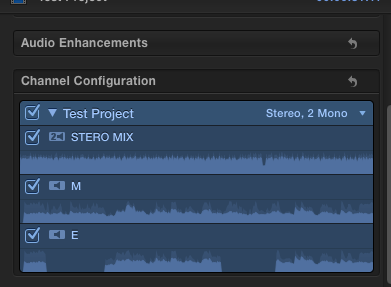
Now just Share the Project and select your multichannel DPP MXF Compressor preset as your sharing format. This will correctly export to MXF with discrete channels and all your DPP metadata will be included.
- Ronny
Here's a quick workaround to make sure that all your audio is exported as discrete channels AND that all DPP metadata stays intact in the MXF file:
Export as a Master File as described above (Roles as Multitrack Quicktime movie).
Now instead of bringing the QT movie into Compressor re-import it in FCPX and drop it onto a timeline.
When you expand the Audio Components of your clip you will see it has discrete audio channels (this one has one Stereo Mix + 2 Mono M&E)
Now just Share the Project and select your multichannel DPP MXF Compressor preset as your sharing format. This will correctly export to MXF with discrete channels and all your DPP metadata will be included.
- Ronny
Last edit: 24 Aug 2013 11:47 by ronny courtens.
Please Log in to join the conversation.
24 Aug 2013 12:17 #30332
by Seanchas
Replied by Seanchas on topic Export 4 Ch Audio to MXF
Perfect thank you so much..
j.
thank you so much..j.
Please Log in to join the conversation.
- ronny courtens
-
- Offline
- Moderator
-
Less
More
- Posts: 4455
- Thank you received: 962
24 Aug 2013 20:36 #30339
by ronny courtens
Replied by ronny courtens on topic Export 4 Ch Audio to MXF
You are very welcome. It feels good to know so many people are doing broadcast work on FCPX.
Hamburg really is a high-end company. I'm sure they are closely following the latest developments with FCPX and an upcoming version will allow us to export multichannel DPP masters without this little workaround.
- Ronny
Hamburg really is a high-end company. I'm sure they are closely following the latest developments with FCPX and an upcoming version will allow us to export multichannel DPP masters without this little workaround.
- Ronny
Please Log in to join the conversation.
24 Aug 2013 20:53 #30341
by AndersM
Replied by AndersM on topic Export 4 Ch Audio to MXF
Best of all would be if this was built in functionality in fcpx.
I wish Apple would stop being so stubborn and open up to other wrappers. I'd like to see import of other formats (P2, avchd ect.)without the needed rewrap as well as other export formats like mxf without plugins costing many times the price of fcpx.
I wish Apple would stop being so stubborn and open up to other wrappers. I'd like to see import of other formats (P2, avchd ect.)without the needed rewrap as well as other export formats like mxf without plugins costing many times the price of fcpx.
Please Log in to join the conversation.
- ronny courtens
-
- Offline
- Moderator
-
Less
More
- Posts: 4455
- Thank you received: 962
24 Aug 2013 21:06 #30343
by ronny courtens
Replied by ronny courtens on topic Export 4 Ch Audio to MXF
The reason this plugin costs that much has nothing to do with FCPX not with MXF. This is a high-end plugin for creating AS-11 DPP-compliant files with extremely extended metadata for delivery of finished programming from program producers and distributors to broadcast stations. Broadcasters can even play out these files while they are being uploaded ("late delivery" procedure). So this is much, much more than a simple MXF plugin. This will never be built in into FCPX nor in any other NLE.
- Ronny
- Ronny
Please Log in to join the conversation.
24 Aug 2013 21:12 #30344
by AndersM
Replied by AndersM on topic Export 4 Ch Audio to MXF
Sure, but the basic mxf import/export plugin from Hamburg is also €749.
Please Log in to join the conversation.
- ronny courtens
-
- Offline
- Moderator
-
Less
More
- Posts: 4455
- Thank you received: 962
24 Aug 2013 21:35 #30347
by ronny courtens
Replied by ronny courtens on topic Export 4 Ch Audio to MXF
Hi Anders,
Agreed, but I would never buy that for importing MXF because it just allows you to import a very select number of MXF formats without rewrapping. And FCPX already imports a lot more MXF formats than the plugin offers as it is now. FCPX does rewrap them upon import but this does not do anything to the media itself and the process is extremely fast, so I don't see any problems with this.
Exporting MXF is a different issue. Just like you I do think this should be implemented in the FCPX workflow. Many of us have submitted a feature request concerning this, I suggest you do the same. Past experience has shown that the more a feature gets requested the faster it gets implemented.
- Ronny
Agreed, but I would never buy that for importing MXF because it just allows you to import a very select number of MXF formats without rewrapping. And FCPX already imports a lot more MXF formats than the plugin offers as it is now. FCPX does rewrap them upon import but this does not do anything to the media itself and the process is extremely fast, so I don't see any problems with this.
Exporting MXF is a different issue. Just like you I do think this should be implemented in the FCPX workflow. Many of us have submitted a feature request concerning this, I suggest you do the same. Past experience has shown that the more a feature gets requested the faster it gets implemented.
- Ronny
Please Log in to join the conversation.
24 Aug 2013 21:39 #30348
by Seanchas
Replied by Seanchas on topic Export 4 Ch Audio to MXF
Despite the first time learning curve it's great to be delivering HD files to the broadcaster... saves me renting digi decks, buying tapes and that nail-biting laying to tape stuff (not to mention downconverting all my lovely HD material to SD!)
j.
(not to mention downconverting all my lovely HD material to SD!)j.
Please Log in to join the conversation.
- ronny courtens
-
- Offline
- Moderator
-
Less
More
- Posts: 4455
- Thank you received: 962
24 Aug 2013 21:47 - 24 Aug 2013 21:47 #30349
by ronny courtens
Replied by ronny courtens on topic Export 4 Ch Audio to MXF
Don't get me starting on this... I have a bunch of overly expensive Digibeta and HDCAM SR decks laying around. We still use them occasionally for some third-world clients but two years from now I'm sure I will have to pay money to give them with the trash. And this plugin costs less than 10 HDCAM SR tapes 
- Ronny
- Ronny
Last edit: 24 Aug 2013 21:47 by ronny courtens.
Please Log in to join the conversation.
24 Aug 2013 21:48 #30350
by AndersM
Replied by AndersM on topic Export 4 Ch Audio to MXF
Yes, I will submit it.
I find the whole rewrapping/copying to the Event Folder thing is a pain. I'd like more freedom in how I store my material. I like keeping the original files and file structure from the camera untouched if I were to use other software at some point.
It is obviously technically possible because if you import e.g. p2 or avchd files you can start editing straight away long before the files are copied and rewrapped in the Events folder. Just let me keep my files where they were!
Anders
I find the whole rewrapping/copying to the Event Folder thing is a pain. I'd like more freedom in how I store my material. I like keeping the original files and file structure from the camera untouched if I were to use other software at some point.
It is obviously technically possible because if you import e.g. p2 or avchd files you can start editing straight away long before the files are copied and rewrapped in the Events folder. Just let me keep my files where they were!
Anders
Please Log in to join the conversation.
- ronny courtens
-
- Offline
- Moderator
-
Less
More
- Posts: 4455
- Thank you received: 962
24 Aug 2013 22:45 #30356
by ronny courtens
Replied by ronny courtens on topic Export 4 Ch Audio to MXF
You always need to keep a backup of your original files anyway. Rewrapping imported files does not change anything to the original files nor to the file structure from your camera card, so you can keep these files wherever you wish and you can re-use them with any other software anytime you wish.
- Ronny
- Ronny
Please Log in to join the conversation.
24 Aug 2013 22:54 #30358
by AndersM
Replied by AndersM on topic Export 4 Ch Audio to MXF
Yes, I know, but I end up with two copies instead of just one...
I guess I'm just spoiled with the super easy AMA-linking in Avid.
I guess I'm just spoiled with the super easy AMA-linking in Avid.
Please Log in to join the conversation.
- ronny courtens
-
- Offline
- Moderator
-
Less
More
- Posts: 4455
- Thank you received: 962
25 Aug 2013 06:41 #30364
by ronny courtens
Replied by ronny courtens on topic Export 4 Ch Audio to MXF
I do hope you always keep at least two copies of any media you use or you definitely will get into trouble one day 
We used to be an Avid house and like many others we made the switch to FCP when Avid started falling behind by lack of innovation and bad arrogant management. But they seem to have learned from the past and I feel that MC is going in the right direction once again. AMA has finally opened the system to modern media but it still has a lot of issues, just look around in the Avid forums. Nevertheless Avid still has the best collaborative workflows and the most stable media management of any NLE, and should we decide to add a classic NLE to our FCPX workflow I certainly would consider Avid as a strong candidate.
- Ronny
We used to be an Avid house and like many others we made the switch to FCP when Avid started falling behind by lack of innovation and bad arrogant management. But they seem to have learned from the past and I feel that MC is going in the right direction once again. AMA has finally opened the system to modern media but it still has a lot of issues, just look around in the Avid forums. Nevertheless Avid still has the best collaborative workflows and the most stable media management of any NLE, and should we decide to add a classic NLE to our FCPX workflow I certainly would consider Avid as a strong candidate.
- Ronny
Please Log in to join the conversation.
25 Aug 2013 13:14 #30368
by AndersM
Replied by AndersM on topic Export 4 Ch Audio to MXF
I always keep the original media (P2 or SD) and the copy on the raid until the edit is done and delivered and then format the original media.
I work in news, so we're usually talking edit and deliver on the first day. With new projects every day, the whole fcpx media management causes lots of extra work if you only want to keep one copy of the original media(with original wrapping/folder structure) and still be able to open old timelines. This is a breeze with AMA. If you've moved the media to a different long term drive, just relink the media with two clicks and you're good to go.
Yes, Avid still has huge issues with file support. Many files still has to be converted before import/linking, and you can forget about editing avchd native even if it's supposed to be supported.
btw has this thread gone slightly off-topic? ;p
I work in news, so we're usually talking edit and deliver on the first day. With new projects every day, the whole fcpx media management causes lots of extra work if you only want to keep one copy of the original media(with original wrapping/folder structure) and still be able to open old timelines. This is a breeze with AMA. If you've moved the media to a different long term drive, just relink the media with two clicks and you're good to go.
Yes, Avid still has huge issues with file support. Many files still has to be converted before import/linking, and you can forget about editing avchd native even if it's supposed to be supported.
btw has this thread gone slightly off-topic? ;p
Please Log in to join the conversation.
