


- Posts: 59
- Thank you received: 1
3 Post Moderation Rule for New Boarders (25 Jan 2021)
New boarders will have their posts moderated - Don't worry if you cannot see your post immediately.
Import failed (again)
21 May 2013 21:23 #26111
by frandu
Import failed (again) was created by frandu
Let me try to explain as detailed as I can the error I am receiving. Here's my workflow:
I own an iMac 2011 (10.8.3), i5 3.1, 1TB HDD drive and 8GB RAM plugged with fw800 to an Iomega 4TB HDD storage.
I am editing a feature documentary, shot with 5d Mark II. To backup, I copy the entire folder to the external HDD, exactly as is on the card. No changes at all (photos sometimes are present).
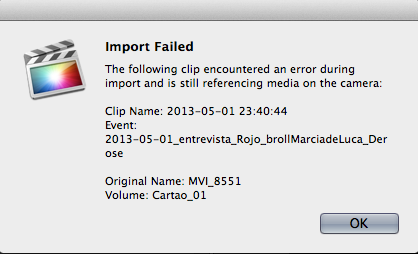
Then I open FCPX and hit command+i to import the footage. The FCPX is running in my MacOS (1TB HDD) and the events and projects are running on the external HDD (fw800). I choose to create optimize proxy media and then the iMac slugs to convert everything. From time to time, I receive the "Import failed"error (see image attached).
I click OK and after a couple of minutes I receive the error again AND I simply don't do anything in my iMac. I just keep staring at the FCPX.
Can someone help me solve this issue? With my customers deadlines, I am facing a hard time in FCPX, compared to FCP7 (also running in the same iMac). Somehow FCP7 seems more reliable to me. I have Growl, Perian, Adobe CS5 Master Collection, FXFactory and Magic Bullet running in my system.
Thank you very much
I own an iMac 2011 (10.8.3), i5 3.1, 1TB HDD drive and 8GB RAM plugged with fw800 to an Iomega 4TB HDD storage.
I am editing a feature documentary, shot with 5d Mark II. To backup, I copy the entire folder to the external HDD, exactly as is on the card. No changes at all (photos sometimes are present).
Then I open FCPX and hit command+i to import the footage. The FCPX is running in my MacOS (1TB HDD) and the events and projects are running on the external HDD (fw800). I choose to create optimize proxy media and then the iMac slugs to convert everything. From time to time, I receive the "Import failed"error (see image attached).
I click OK and after a couple of minutes I receive the error again AND I simply don't do anything in my iMac. I just keep staring at the FCPX.
Can someone help me solve this issue? With my customers deadlines, I am facing a hard time in FCPX, compared to FCP7 (also running in the same iMac). Somehow FCP7 seems more reliable to me. I have Growl, Perian, Adobe CS5 Master Collection, FXFactory and Magic Bullet running in my system.
Thank you very much
Please Log in to join the conversation.
23 May 2013 02:53 #26187
by frandu
Replied by frandu on topic Import failed (again)
No one? I'm still stuck with this error...
Please Log in to join the conversation.
23 May 2013 03:31 #26188
by marchyman
Replied by marchyman on topic Import failed (again)
Are you importing from the copy on your hard disk or from the media card?
Are you using the camera or a card reader to read the 5D memory card?
How old is the memory card?
Have you tried making an FCPX archive from the memory card and then import from the archive?
Are you using the camera or a card reader to read the 5D memory card?
How old is the memory card?
Have you tried making an FCPX archive from the memory card and then import from the archive?
Please Log in to join the conversation.
23 May 2013 09:57 #26190
by frandu
Replied by frandu on topic Import failed (again)
Hello,
I am not using the memory card (which is new BTW). I copy the entire card to an external HDD, with all file structure preserved. Then in FCPX I hit import and receive this nightmare Error.
The cardreader or the camera does NOT participate in the proccess.
I dont understand what you mean by creating an FCPX archive. How's that?
I am not using the memory card (which is new BTW). I copy the entire card to an external HDD, with all file structure preserved. Then in FCPX I hit import and receive this nightmare Error.
The cardreader or the camera does NOT participate in the proccess.
I dont understand what you mean by creating an FCPX archive. How's that?
Please Log in to join the conversation.
23 May 2013 10:56 #26193
by FvH
Replied by FvH on topic Import failed (again)
Hi, frandu, in order to generate a camera archive, just connect your DSLR directly to your computer or put the CF card into a card reader. If you then open the import window, your camera/card will show up in the menu on the left. Choose it and click the "make camera archive" option at the lower left of the window. This will generate a disk image "clone" of your card which you can move/copy to your liking. Should you move it to a back-up volume, make sure that this volume is online when you wish to access the particular archive. All archives will show up in the import window menu, and you can import your stuff from there as if it were the original card/camera. Quite handy.
Please Log in to join the conversation.

23 May 2013 12:42 #26198
by tpayton
Replied by tpayton on topic Import failed (again)
This is an odd issue and something I haven't heard of before. That message can come up when you have a corrupted file on the card, bit only when you import from the card, not a folder.
Also even with a new card clips can go bad. It is an unfortunate reality of tapeless media.
I follow the exact same procedure you do with my 7d footage for a good 100 hrs of footage and never seen this (that is copy my footage from the card to another drive, organize the footage a bit and then drag that into a event.)
What happens if you drag the folder of your footage directly into an event without using the import dialog?
Btw. I can't tell from your description but make sure you have two copies of all your shot media. I have an extra external drive with JUST clones of all my media. Fcpx camera archive is a great way to do this as my fellow posters have said.
Also if I make proxies for a project I will let that run overnight instead of doing it on import. That way I can get some work done during the day and not be slowed down as I wait for proxies to be generated.
Feel free to call my on the number on my website if you have further trouble. OneCreative.net. Ask for T.
Also even with a new card clips can go bad. It is an unfortunate reality of tapeless media.
I follow the exact same procedure you do with my 7d footage for a good 100 hrs of footage and never seen this (that is copy my footage from the card to another drive, organize the footage a bit and then drag that into a event.)
What happens if you drag the folder of your footage directly into an event without using the import dialog?
Btw. I can't tell from your description but make sure you have two copies of all your shot media. I have an extra external drive with JUST clones of all my media. Fcpx camera archive is a great way to do this as my fellow posters have said.
Also if I make proxies for a project I will let that run overnight instead of doing it on import. That way I can get some work done during the day and not be slowed down as I wait for proxies to be generated.
Feel free to call my on the number on my website if you have further trouble. OneCreative.net. Ask for T.
Please Log in to join the conversation.
- Don Rumsey
-

- Offline
- Elite Member
-

Less
More
- Posts: 220
- Thank you received: 17
23 May 2013 16:34 #26213
by Don Rumsey
Replied by Don Rumsey on topic Import failed (again)
I second TPAYTON here.
Otherwise I had this same problem over the weekend actually. Kept coming up but the rest of the clips would get imported. Soooooo... I copied and pasted the file to my desktop. Renamed it, then imported it. Worked like a charm. Tested it out as well in the timeline and exported it as a master file to. Worked fine.
Only problem is doing all that work for a clip I decided not to use! LOL
Otherwise I had this same problem over the weekend actually. Kept coming up but the rest of the clips would get imported. Soooooo... I copied and pasted the file to my desktop. Renamed it, then imported it. Worked like a charm. Tested it out as well in the timeline and exported it as a master file to. Worked fine.
Only problem is doing all that work for a clip I decided not to use! LOL
Please Log in to join the conversation.
- ronny courtens
-

- Offline
- Moderator
-

Less
More
- Posts: 4455
- Thank you received: 962
23 May 2013 18:04 #26220
by ronny courtens
Replied by ronny courtens on topic Import failed (again)
More people have had similar issues when importing from Canon DSLRs. Here's a couple of possible solutions I have seen:
1. If you are experiencing import problems while importing and optimizing at the same time: just import the files first, then optimize from within the Event Library.
2. If you have been recording to a .mov format: just copy the .mov files off your card to a folder on your desktop or an external drive. If there are photos in the same card folder: copy those to a separate folder. Then import the .mov files in FCPX. Of course you do need to create a safety copy of your entire card structure on another drive as final backup.
3. This has been mentioned before: create an Archive from your card and import from the Archive.
3. Try importing to another drive. Sometimes permission errors or drive errors can lead to this error message.
4. You could have conflicting QT components: remove Perian.
Just a few ideas, I hope one of them can help you.
1. If you are experiencing import problems while importing and optimizing at the same time: just import the files first, then optimize from within the Event Library.
2. If you have been recording to a .mov format: just copy the .mov files off your card to a folder on your desktop or an external drive. If there are photos in the same card folder: copy those to a separate folder. Then import the .mov files in FCPX. Of course you do need to create a safety copy of your entire card structure on another drive as final backup.
3. This has been mentioned before: create an Archive from your card and import from the Archive.
3. Try importing to another drive. Sometimes permission errors or drive errors can lead to this error message.
4. You could have conflicting QT components: remove Perian.
Just a few ideas, I hope one of them can help you.
Please Log in to join the conversation.
23 May 2013 19:12 #26225
by frandu
Replied by frandu on topic Import failed (again)
I think it's time for a fresh install of ML. Then I'll start the project again to see if there's any conflict with software. Importing without using the Import Dialog seens to work, but I feel that the background process is slow and the FCPX is laggy.
I'll post what happened after the fresh install.
BTW, everyone's on ML here?
I'll post what happened after the fresh install.
BTW, everyone's on ML here?
Please Log in to join the conversation.
- ronny courtens
-
- Offline
- Moderator
-
Less
More
- Posts: 4455
- Thank you received: 962
23 May 2013 19:15 #26226
by ronny courtens
Replied by ronny courtens on topic Import failed (again)
All our systems are on ML, and no problems here.
If you find importing is too slow on your system you might try to import first, and then optimize the imported clips from within the Event Library.
If you find importing is too slow on your system you might try to import first, and then optimize the imported clips from within the Event Library.
Please Log in to join the conversation.
23 May 2013 20:52 #26236
by tpayton
Yep. Latest Mountain Lion.
When you say the background process of transcoding to proxy is slow, you are right. It takes a while. And there are numbers or reasons that your FCPX might FEEL slow. Your FW800 drive is going to be taxed much more than it would with FCP 7, so that is a bit of a bottleneck in your workflow.
Replied by tpayton on topic Import failed (again)
frandu wrote: I feel that the background process is slow and the FCPX is laggy.
BTW, everyone's on ML here?
Yep. Latest Mountain Lion.
When you say the background process of transcoding to proxy is slow, you are right. It takes a while. And there are numbers or reasons that your FCPX might FEEL slow. Your FW800 drive is going to be taxed much more than it would with FCP 7, so that is a bit of a bottleneck in your workflow.
Please Log in to join the conversation.
27 May 2013 17:36 #26422
by frandu
Replied by frandu on topic Import failed (again)
Hello all,
just did a fresh install of ML and didn't installed nor Perian nor any plugin. First I installed FCP7 and all suite, then the FCPX and tried to import again.
Again, Import failed error. It just got stuck in some files, generally long time recorded canon 5d files.
Still don't know what to do.
just did a fresh install of ML and didn't installed nor Perian nor any plugin. First I installed FCP7 and all suite, then the FCPX and tried to import again.
Again, Import failed error. It just got stuck in some files, generally long time recorded canon 5d files.
Still don't know what to do.
Please Log in to join the conversation.

27 May 2013 17:49 #26423
by grailz
Replied by grailz on topic Import failed (again)
The clips that are failing to import in FCP X, are they able to be opened or imported into a project by Premiere, FCP 7, AE, Motion, etc?
Please Log in to join the conversation.
27 May 2013 18:19 #26424
by frandu
Replied by frandu on topic Import failed (again)
I tried in Premire Pro CS5 and it works fine. This first clip have 11:53 (4.27GB), so pretty much almost the limit of the record time.
Previously I could log and transfer in FCP7 and it worked OK too. FCPX is giving me a hard time....
It is happening with others clips too.
Previously I could log and transfer in FCP7 and it worked OK too. FCPX is giving me a hard time....
It is happening with others clips too.
Please Log in to join the conversation.
27 May 2013 19:49 #26425
by grailz
Replied by grailz on topic Import failed (again)
I have no idea why you're experiencing what you're experiencing. My two cents? Import the clips that you can with FCP X and use another app to import the others, convert them to ProRes and then import those clips into FCP X. Doesn't help with the proxy, I know, but if it works, it will at least get all of your online footage into FCP X.
Please Log in to join the conversation.
28 May 2013 15:29 #26439
by tpayton
So just dragging your footage in and bypassing the import dialog does work or it doesn't work? Please clarify.
Replied by tpayton on topic Import failed (again)
frandu wrote: Importing without using the Import Dialog seens to work.
So just dragging your footage in and bypassing the import dialog does work or it doesn't work? Please clarify.
Please Log in to join the conversation.
28 May 2013 20:35 #26449
by frandu
Replied by frandu on topic Import failed (again)
Hello tpayton,
it does seen to work. Even longer clips are converted to original (h264) format.
it does seen to work. Even longer clips are converted to original (h264) format.
Please Log in to join the conversation.
28 May 2013 21:16 #26451
by fcpguru
Replied by fcpguru on topic Import failed (again)
I have a theory. When it fails, open up your activity monitor and see how much RAM you have free. I've noticed that on longer clips, FCPX uses up all my memory and think this bug might be related to how ML is working with Virtual Memory. Weird, but maybe something.
But the workarounds of dragging it in seem to fix the problem. I've been using a beta of BulletProof which works too (and takes care of backing up/archiving, etc).
But the workarounds of dragging it in seem to fix the problem. I've been using a beta of BulletProof which works too (and takes care of backing up/archiving, etc).
Please Log in to join the conversation.
28 May 2013 22:15 #26452
by tpayton
Replied by tpayton on topic Import failed (again)
Glad it is working. However, what do you mean by this:
Converted to original format? I'm not sure what that means.
FCPX is relying on PTP or Picture-Transfer-Protocol build into cameras and therefore there could be many reasons why importing directly from the camera may not work. However, let me be frank, it is a bad idea to import directly from your camera unless you are just checking a few shots. You need a duplicate copy of your media before you start working on it. If you don't and you are editing for money, you will soon find you money running out because disaster will strike and you'll loose a drive, and lost of time and money with it. I would highly recommend making a copy first to a media backup HD, and then copy from the Media HD to your working media drive or if you have FCP manage your media, dragging in your media will make a copy which you can work from. The Camera Archive function in FCPX is great, but it is dependent on the PTP protocol, and if there are troubles with that then as you can see it fails.
BTW. You sound a little new to FCP. I would strongly recommend some training by Ripple Training, or Larry Jordan. Lynda.com is also good. Ripple is a bit more technical however.
frandu wrote: Even longer clips are converted to original (h264) format.
Converted to original format? I'm not sure what that means.
FCPX is relying on PTP or Picture-Transfer-Protocol build into cameras and therefore there could be many reasons why importing directly from the camera may not work. However, let me be frank, it is a bad idea to import directly from your camera unless you are just checking a few shots. You need a duplicate copy of your media before you start working on it. If you don't and you are editing for money, you will soon find you money running out because disaster will strike and you'll loose a drive, and lost of time and money with it. I would highly recommend making a copy first to a media backup HD, and then copy from the Media HD to your working media drive or if you have FCP manage your media, dragging in your media will make a copy which you can work from. The Camera Archive function in FCPX is great, but it is dependent on the PTP protocol, and if there are troubles with that then as you can see it fails.
BTW. You sound a little new to FCP. I would strongly recommend some training by Ripple Training, or Larry Jordan. Lynda.com is also good. Ripple is a bit more technical however.
Please Log in to join the conversation.
29 May 2013 05:08 #26456
by marchyman
Replied by marchyman on topic Import failed (again)
Camera archive function also works when using a card reader assuming the card looks to FCPX like a camera media card.
Please Log in to join the conversation.
