


- Posts: 164
- Thank you received: 0
3 Post Moderation Rule for New Boarders (25 Jan 2021)
New boarders will have their posts moderated - Don't worry if you cannot see your post immediately.
FIle size enquiry
06 Sep 2013 12:01 #30836
by Neil P
Replied by Neil P on topic FIle size enquiry
Hi Ben,
well, They are on my desktop and I try and play them from there (double clicking on them, the pictures play but not the sound (apart from the Mov file which I created to play online (1080)
As you can see I have created seperate M2v and audio ac3 files
I look forward to your help
thanks
Neil
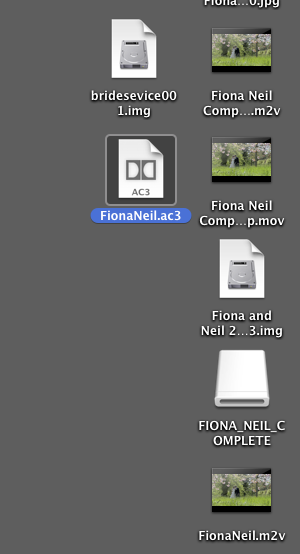
well, They are on my desktop and I try and play them from there (double clicking on them, the pictures play but not the sound (apart from the Mov file which I created to play online (1080)
As you can see I have created seperate M2v and audio ac3 files
I look forward to your help
thanks
Neil
Please Log in to join the conversation.
06 Sep 2013 12:10 #30837
by Neil P
Replied by Neil P on topic FIle size enquiry
Standard def dvd
Please Log in to join the conversation.

06 Sep 2013 12:16 #30840
by Dave_EP
Replied by Dave_EP on topic FIle size enquiry
This is still producing the two separated files.
If instead of targeting the HDD you target a DVD drive and burn a DVD you should get a playable DVD.
If instead of targeting the HDD you target a DVD drive and burn a DVD you should get a playable DVD.
Please Log in to join the conversation.
06 Sep 2013 12:21 #30841
by Neil P
Replied by Neil P on topic FIle size enquiry
Hi Ben
Not sure what you mean ?
Do you mean create a DVD in the DVD burner by dropping in the m2v and ac3 (audio) file ?
What is a HDD ?
thanks
Neil
Not sure what you mean ?
Do you mean create a DVD in the DVD burner by dropping in the m2v and ac3 (audio) file ?
What is a HDD ?
thanks
Neil
Please Log in to join the conversation.
06 Sep 2013 12:43 #30845
by Neil P
Replied by Neil P on topic FIle size enquiry
Hi Ben,
I created and burned a disk by dropping the 2 files onto the diskburner but once burnt they are still two separate files, see pic below, and they don't want to play in the dvd player ?
I created and burned a disk by dropping the 2 files onto the diskburner but once burnt they are still two separate files, see pic below, and they don't want to play in the dvd player ?
Please Log in to join the conversation.
06 Sep 2013 12:45 #30846
by Neil P
Replied by Neil P on topic FIle size enquiry
screenshot here
Please Log in to join the conversation.
06 Sep 2013 12:46 #30847
by Neil P
Replied by Neil P on topic FIle size enquiry
sorry I meant Dave,
any answers Dave
any answers Dave
Please Log in to join the conversation.
06 Sep 2013 13:08 #30848
by Dave_EP
HDD = Hard Disk Drive
Burn a DVD from FCPX or Compressor. Just dropping the files on to a DVD is no different from having them on your HDD, they still won't play. FCPX and Compressor can burn a working DVD.
Replied by Dave_EP on topic FIle size enquiry
Neil P wrote: Hi Ben
Not sure what you mean ?
Do you mean create a DVD in the DVD burner by dropping in the m2v and ac3 (audio) file ?
What is a HDD ?
thanks
Neil
HDD = Hard Disk Drive
Burn a DVD from FCPX or Compressor. Just dropping the files on to a DVD is no different from having them on your HDD, they still won't play. FCPX and Compressor can burn a working DVD.
Please Log in to join the conversation.
06 Sep 2013 13:18 #30849
by Neil P
Replied by Neil P on topic FIle size enquiry
Hi Dave
When I burned a DVd from FCPx it still had no sound, I'll try again, actually last time I ddin't have a dvd burner attached to the computer so I guess that wouldn't help.
Can you think of anything I'm doing wrong. Have you tried it recently ?
Neil
When I burned a DVd from FCPx it still had no sound, I'll try again, actually last time I ddin't have a dvd burner attached to the computer so I guess that wouldn't help.
Can you think of anything I'm doing wrong. Have you tried it recently ?
Neil
Please Log in to join the conversation.
06 Sep 2013 13:34 - 06 Sep 2013 13:35 #30851
by Dave_EP
Replied by Dave_EP on topic FIle size enquiry
Well, to make sure nothing was broken I just burned a test DVD from FCPX and there were zero problems. Video and Audio are both there.
So, just to check, what files are on the DVD you produced?
To make a DVD from FCPX select your project, then choose FILE-->SHARE-->DVD.
Under settings choose :
Output Device : DVD
Layers : Automatic
Disc Template : Black
When Disc Loads : Play Movie
Then click SHARE.
FCPX will transcode the audio and video and then author a DVD.
So, just to check, what files are on the DVD you produced?
To make a DVD from FCPX select your project, then choose FILE-->SHARE-->DVD.
Under settings choose :
Output Device : DVD
Layers : Automatic
Disc Template : Black
When Disc Loads : Play Movie
Then click SHARE.
FCPX will transcode the audio and video and then author a DVD.
Last edit: 06 Sep 2013 13:35 by Dave_EP.
Please Log in to join the conversation.
06 Sep 2013 18:01 #30865
by Neil P
Replied by Neil P on topic FIle size enquiry
Hi dave,
I got it going through FCPx burn DVD doing as you said and actually connecting the dvd player. Problem seems to be when I send it to compressor.
Is there a difference in quality between burning DVD in FCPX and compressor ?
I just need to get my head around sending it though compressor using a DVD pre set.
anyway job done for now.
th anks again
Neil
I got it going through FCPx burn DVD doing as you said and actually connecting the dvd player. Problem seems to be when I send it to compressor.
Is there a difference in quality between burning DVD in FCPX and compressor ?
I just need to get my head around sending it though compressor using a DVD pre set.
anyway job done for now.
th
anks againNeil
Please Log in to join the conversation.
07 Sep 2013 12:18 #30871
by Dave_EP
Replied by Dave_EP on topic FIle size enquiry
As I recall, the DVD presets in FCPX are the same as the Compressor DVD 'Preset' (where compressor also makes a completed DVD rather than making separate video/audio files that need authoring). Perhaps Benn can confirm this.
In terms of whether compressor can make higher quality DVD transcodes, the answer is it depends. With compressor you have the ability to make the split files and in the process have a lot more you can tweak, if you know what you are doing. The downside is you then need to use an authoring program to actually make the DVD.
So, both FCPX and Compressor can make basic DVDs using a preset. It works, and if it does all you need (e.g. producing dailies or simple DVD menus) then it's by far the easiest way. If on the other hand you want a lot more flexibility in the final DVD menus, including moving chapter menus, custom designed templates, stories, easter eggs etc then you have to dive much deeper in to things, including using an authoring program.
In terms of whether compressor can make higher quality DVD transcodes, the answer is it depends. With compressor you have the ability to make the split files and in the process have a lot more you can tweak, if you know what you are doing. The downside is you then need to use an authoring program to actually make the DVD.
So, both FCPX and Compressor can make basic DVDs using a preset. It works, and if it does all you need (e.g. producing dailies or simple DVD menus) then it's by far the easiest way. If on the other hand you want a lot more flexibility in the final DVD menus, including moving chapter menus, custom designed templates, stories, easter eggs etc then you have to dive much deeper in to things, including using an authoring program.
Please Log in to join the conversation.
08 Sep 2013 06:46 #30885
by Neil P
Replied by Neil P on topic FIle size enquiry
Hi David,
Thank, this makes sense (at last sorry!)
The frustrating thing is that I can't seem to get my hands on either DVD Studio Pro or Encore. Neither seem to be for sale any more ? Any suggestions anybody ?
Also, Do you know if there is a tutorial on making a compressor pre set for DVDs (chapters/menus etc) ?
Thanks again for your help.
Kind regards
Neil
Thank, this makes sense (at last sorry!)
The frustrating thing is that I can't seem to get my hands on either DVD Studio Pro or Encore. Neither seem to be for sale any more ? Any suggestions anybody ?
Also, Do you know if there is a tutorial on making a compressor pre set for DVDs (chapters/menus etc) ?
Thanks again for your help.
Kind regards
Neil
Please Log in to join the conversation.
08 Sep 2013 07:31 - 08 Sep 2013 07:32 #30888
by Dave_EP
Replied by Dave_EP on topic FIle size enquiry
Encore comes with Premiere Pro (up to CS6), so finding a CS5, CS5.5 or CS6 on ebay would get you Encore (it didn't change significantly between CS5 and 6). Encore has the advantage of being able to write Blu-ray, but the disadvantage (if you're editing in FCPX) of not reading Apple chapter markers, so you'll have to recreate them in Encore (it's easy).
DVD Studio Pro 4 comes with Final Cut Studio 2 or 3, so finding either one of those cheap on ebay is probably the best way to find it. Larry Jordan's tutorials on Lynda.com are as good as any.
For tutorials on FCPX/Compressor presets for making DVDs, err.... the user manuals are actually pretty good and FREE! It must be really disheartening for those Apple employees who write some excellent manuals that no one bothers with
After that, there's lots of tutorials around, including Lynda.com, RippleTraining.com and of course YouTube.
DVD Studio Pro 4 comes with Final Cut Studio 2 or 3, so finding either one of those cheap on ebay is probably the best way to find it. Larry Jordan's tutorials on Lynda.com are as good as any.
For tutorials on FCPX/Compressor presets for making DVDs, err.... the user manuals are actually pretty good and FREE! It must be really disheartening for those Apple employees who write some excellent manuals that no one bothers with
After that, there's lots of tutorials around, including Lynda.com, RippleTraining.com and of course YouTube.
Last edit: 08 Sep 2013 07:32 by Dave_EP.
Please Log in to join the conversation.

