


- Posts: 164
- Thank you received: 0
3 Post Moderation Rule for New Boarders (25 Jan 2021)
New boarders will have their posts moderated - Don't worry if you cannot see your post immediately.
FIle size enquiry
07 May 2013 07:31 #25430
by Neil P
FIle size enquiry was created by Neil P
Hi gang,
Sorry, Quick Question,
I've just put a 7 min 30 sec film together for a company which I was hoping to burn onto a dvd to give to a client.
File is over 6 Gb though ! - After finishing film I sent it to compressor and converted it to a Pro res 422 file (quicktime)
Any ideas on how I reduce the file size but still retain the quality (convert to a different format ?)
thanks
Neil
Sorry, Quick Question,
I've just put a 7 min 30 sec film together for a company which I was hoping to burn onto a dvd to give to a client.
File is over 6 Gb though ! - After finishing film I sent it to compressor and converted it to a Pro res 422 file (quicktime)
Any ideas on how I reduce the file size but still retain the quality (convert to a different format ?)
thanks
Neil
Please Log in to join the conversation.

07 May 2013 09:04 - 07 May 2013 09:06 #25435
by BenB
Replied by BenB on topic FIle size enquiry
ProRes will be a much larger file size than the DVD's AC3 and MPEG-2 files.
What are you using to author/burn the DVD with?
You can export as ProRes 422 directly from FCP X without going to Compressor. ProRes is going to keep the frame size/rate, date rate as the original. It doesn't change anything. MPEG-2 used for DVD authoring on the other hand can change a lot of things.
What are you using to author/burn the DVD with?
You can export as ProRes 422 directly from FCP X without going to Compressor. ProRes is going to keep the frame size/rate, date rate as the original. It doesn't change anything. MPEG-2 used for DVD authoring on the other hand can change a lot of things.
Last edit: 07 May 2013 09:06 by BenB.
Please Log in to join the conversation.
- Don Rumsey
-

- Offline
- Elite Member
-

Less
More
- Posts: 220
- Thank you received: 17
08 May 2013 04:59 #25485
by Don Rumsey
Replied by Don Rumsey on topic FIle size enquiry
My usual workflow is to export it out ProRes as a master file. Then import that into Compressor. Export that as MPEG 2 and AC 3 audio for importing into DVD Studio Pro. Now you may need to play with bit rate for all of that to fit onto a standard Single Side DVD. As I did today. Found out the total size was just over 5.1 gig. So I had to lower bit rate at the Compressor stage. I'm about to play with it some more to see if it fit. Somewhere there is some bit rate/minute calculator that can aid in this endeavor.
Please Log in to join the conversation.
08 May 2013 05:13 #25486
by BenB
Replied by BenB on topic FIle size enquiry
dvd-hq.info/bitrate_calculator.php
But anything under an hour and a half should work with the defaults of Compressor's MPEG-2 DVD preset. Just never increase the Average Bit Rate over 6.1, and never increase the Maximum Bit Rate over 7.7.
But anything under an hour and a half should work with the defaults of Compressor's MPEG-2 DVD preset. Just never increase the Average Bit Rate over 6.1, and never increase the Maximum Bit Rate over 7.7.
Please Log in to join the conversation.
08 May 2013 07:21 #25495
by Neil P
HI Guys
ok so I'm doing an an MPeg 2 and have tried to adjust the bit rate as above but the but I can't seem to go that low using the compressor slider, doesn't seem to want to go below 10.0 (average bit rate) or 12 on the other.
Am I reading this correctly ?
Neil
Replied by Neil P on topic FIle size enquiry
BenB wrote: dvd-hq.info/bitrate_calculator.php
"But anything under an hour and a half should work with the defaults of Compressor's MPEG-2 DVD preset. Just never increase the Average Bit Rate over 6.1, and never increase the Maximum Bit Rate over 7.7.
HI Guys
ok so I'm doing an an MPeg 2 and have tried to adjust the bit rate as above but the but I can't seem to go that low using the compressor slider, doesn't seem to want to go below 10.0 (average bit rate) or 12 on the other.
Am I reading this correctly ?
Neil
Please Log in to join the conversation.
- finalbug.net
-

- Offline
- Platinum Member
-

- Absence of Quality is the essence of squareness.
08 May 2013 09:18 - 08 May 2013 09:19 #25497
by finalbug.net
Replied by finalbug.net on topic FIle size enquiry
Hi Neil
There are 2 Tabs in the Encoding Preferences!
One is marked MPEG-3 SD
The other is marked MPEG-3 HD
My guess is that you are in the HD window.
Also guessing but you do want to make an SD DVD?
If so switch Tab and adjust slider it should get you where you want to be
There are 2 Tabs in the Encoding Preferences!
One is marked MPEG-3 SD
The other is marked MPEG-3 HD
My guess is that you are in the HD window.
Also guessing but you do want to make an SD DVD?
If so switch Tab and adjust slider it should get you where you want to be
Last edit: 08 May 2013 09:19 by finalbug.net.
Please Log in to join the conversation.
08 May 2013 17:50 #25528
by Neil P
Replied by Neil P on topic FIle size enquiry
Hi Guys
yes, but which Mpeg 2 do I use, there are 4 ? see attachment
which one will give me a useable H264 file ?
thanks
Neil
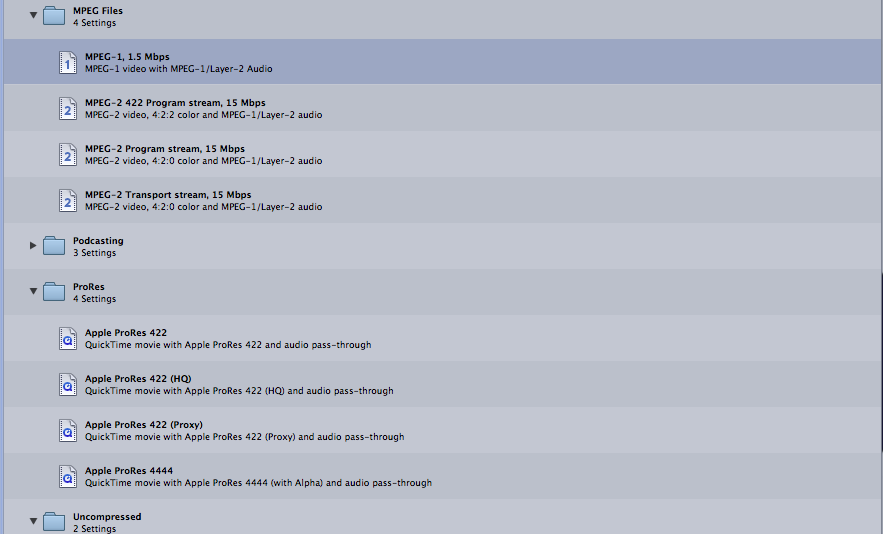
yes, but which Mpeg 2 do I use, there are 4 ? see attachment
which one will give me a useable H264 file ?
thanks
Neil
Please Log in to join the conversation.
- Don Rumsey
-
- Offline
- Elite Member
-
Less
More
- Posts: 220
- Thank you received: 17
08 May 2013 20:10 #25539
by Don Rumsey
Replied by Don Rumsey on topic FIle size enquiry
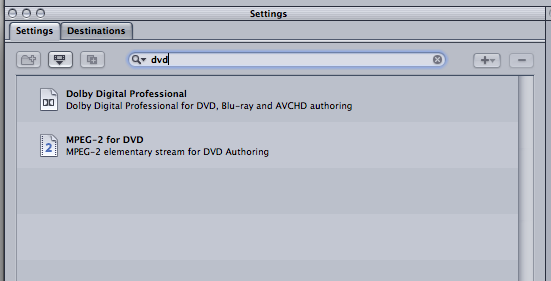
To burn a dvd you need to go into the Disc burning folder in the settings
Please Log in to join the conversation.
08 May 2013 22:58 #25556
by Neil P
Replied by Neil P on topic FIle size enquiry
Hi Guys
Just done the Mpeg-2 for DVD as instructed but there is no sound www.fcp.co/components/com_kunena/templat...es/emoticons/sad.png
Any ideas what I may have done wrong this time ?
Thanks
Neil
Just done the Mpeg-2 for DVD as instructed but there is no sound www.fcp.co/components/com_kunena/templat...es/emoticons/sad.png
Any ideas what I may have done wrong this time ?
Thanks
Neil
Please Log in to join the conversation.
08 May 2013 23:30 - 08 May 2013 23:30 #25560
by BenB
Replied by BenB on topic FIle size enquiry
You have to use both of those presets.
MPEG-2 is DVD video.
Dolby is DVD audio.
DVDs don't keep video and audio in one single file.
MPEG-2 is DVD video.
Dolby is DVD audio.
DVDs don't keep video and audio in one single file.
Last edit: 08 May 2013 23:30 by BenB.
Please Log in to join the conversation.
09 May 2013 07:08 #25572
by Neil P
Replied by Neil P on topic FIle size enquiry
Hi Ben,
Thanks for your quick reply and patience.
Neil
Thanks for your quick reply and patience.
Neil
Please Log in to join the conversation.
09 May 2013 10:06 #25577
by BenB
Replied by BenB on topic FIle size enquiry
That's my job, no problem.
Please Log in to join the conversation.
09 May 2013 15:44 #25593
by Neil P
Replied by Neil P on topic FIle size enquiry
Hi
I'm still struggling with this, I dragged both the Mpeg 2 file and the audio file onto the source and clicked submit. I still have no sound though ?
Any ideas
Is there a full tutorial/instructions on how to create a quality DVD with sound either in this site or elsewhere.
I seem to be getting stuck at every turn,
Sorry to be so hopeless on this,
Neil
I'm still struggling with this, I dragged both the Mpeg 2 file and the audio file onto the source and clicked submit. I still have no sound though ?
Any ideas
Is there a full tutorial/instructions on how to create a quality DVD with sound either in this site or elsewhere.
I seem to be getting stuck at every turn,
Sorry to be so hopeless on this,
Neil
Please Log in to join the conversation.
09 May 2013 16:06 #25594
by BenB
Replied by BenB on topic FIle size enquiry
Here is an old tutorial video I did from FCP 7. Skip the FCP part, jump to the compressor part. It is very easy.
Download here.
You are creating two separate files, one video, one audio, that you then take into your DVD authoring application.
Download here.
You are creating two separate files, one video, one audio, that you then take into your DVD authoring application.
Please Log in to join the conversation.
06 Sep 2013 08:05 #30820
by Neil P
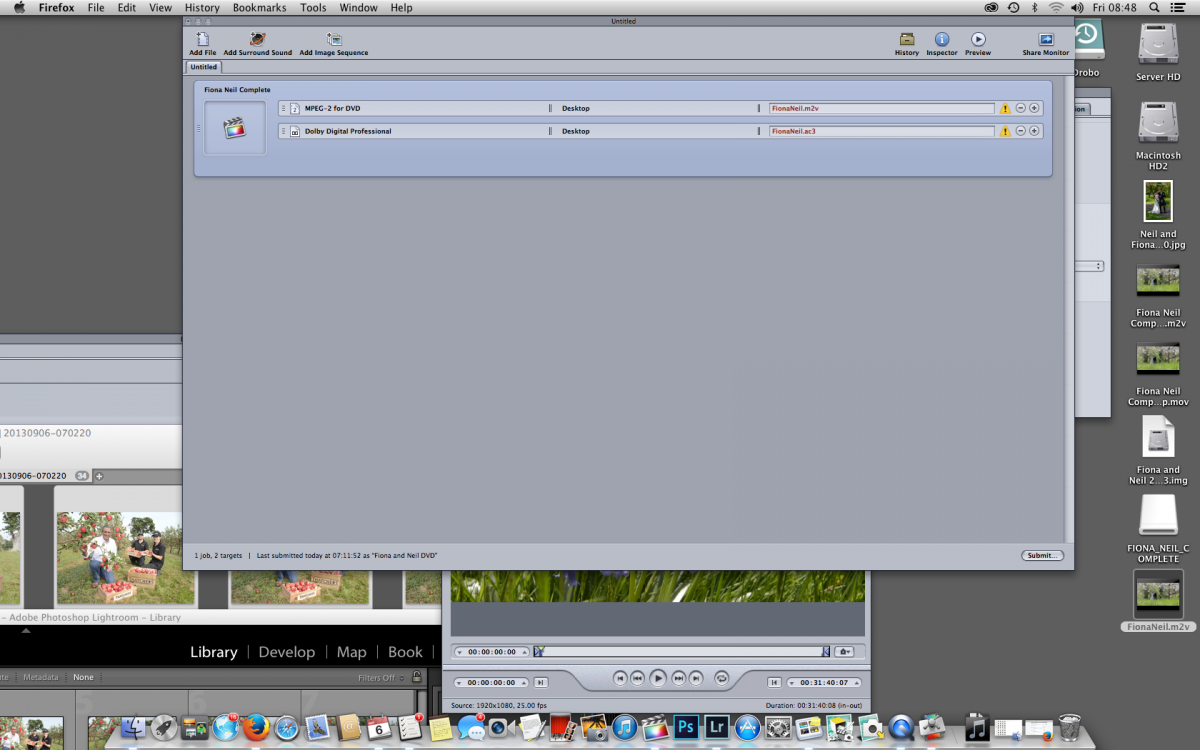
Hi Ben, gang
I'm burning a wedding DVD but as usual I'm getting stuck. See screen shoot, I submitted both MPEG-2 for DVD and Dolby professional files but when I opened the film to watch I can still hear nothing. Will I hear sound once DVD has been burnt ? I watched your Video Ben as instructed
Am I doing something wrong at the FCP stage ?
Quick reply would be much appreciated as I'm supposed to be putting DVD in the mail today !
thanks
Neil
Replied by Neil P on topic FIle size enquiry
Hi Ben, gang
I'm burning a wedding DVD but as usual I'm getting stuck. See screen shoot, I submitted both MPEG-2 for DVD and Dolby professional files but when I opened the film to watch I can still hear nothing. Will I hear sound once DVD has been burnt ? I watched your Video Ben as instructed
Am I doing something wrong at the FCP stage ?
Quick reply would be much appreciated as I'm supposed to be putting DVD in the mail today !
thanks
Neil
Please Log in to join the conversation.
06 Sep 2013 08:28 - 06 Sep 2013 08:30 #30821
by Dave_EP
Replied by Dave_EP on topic FIle size enquiry
If you are only opening the MPEG file you will not hear sound because the sound is in the AC3 file.
Now that you have the TWO files you need to use an authoring program like DVD Studio Pro or Adobe Encore to actually make the DVD (and add chapter menus etc if you want).
You can't just copy these files to a DVD and have it play. The authoring program is what combines the two files as a DVD compliant stream. Until they are combined you have only video in one file and audio in the other.
Alternatively, you can use a preset in compressor (or FCPX) to make a final DVD that is playable, but you loose all the flexibility in menus provided by real authoring programs like DVD Studio Pro or Adobe Encore.
Now that you have the TWO files you need to use an authoring program like DVD Studio Pro or Adobe Encore to actually make the DVD (and add chapter menus etc if you want).
You can't just copy these files to a DVD and have it play. The authoring program is what combines the two files as a DVD compliant stream. Until they are combined you have only video in one file and audio in the other.
Alternatively, you can use a preset in compressor (or FCPX) to make a final DVD that is playable, but you loose all the flexibility in menus provided by real authoring programs like DVD Studio Pro or Adobe Encore.
Last edit: 06 Sep 2013 08:30 by Dave_EP.
Please Log in to join the conversation.
06 Sep 2013 10:18 #30830
by Neil P
Replied by Neil P on topic FIle size enquiry
Hi David,
thanks for your kind reply.
You can't seem to buy dvd studio Pro anymore and I'm finding it hard to track down Adobe encore ( Is it integrated into Adobe Premier pro ?
I don't really need to make any chapters etc on this DVD but I don't know how to construct a preset in Compressor . Can you give me any simple instructions ? I can ring you ?
Thanks
Neil
thanks for your kind reply.
You can't seem to buy dvd studio Pro anymore and I'm finding it hard to track down Adobe encore ( Is it integrated into Adobe Premier pro ?
I don't really need to make any chapters etc on this DVD but I don't know how to construct a preset in Compressor . Can you give me any simple instructions ? I can ring you ?
Thanks
Neil
Please Log in to join the conversation.
06 Sep 2013 11:44 #30834
by Neil P
Replied by Neil P on topic FIle size enquiry
I have had no luck finding Encore or DVD studio pro, they don't seem to exist any more.
When I do go share within FCPX to burn a DVD the DVD still produces a file on my desktop with no sound. Why is that ? The instructions that open when I click share dvd, settings etc seem very basic.
Help please !!!!
thanks Neil
When I do go share within FCPX to burn a DVD the DVD still produces a file on my desktop with no sound. Why is that ? The instructions that open when I click share dvd, settings etc seem very basic.
Help please !!!!
thanks Neil
Please Log in to join the conversation.
06 Sep 2013 11:52 - 06 Sep 2013 11:56 #30835
by BenB
Replied by BenB on topic FIle size enquiry
How do you know there is no audio? How are you playing it back? Can you give us a screen shot of the files you're getting?
Are you creating a Blu-Ray or standard definition DVD?
Are you creating a Blu-Ray or standard definition DVD?
Last edit: 06 Sep 2013 11:56 by BenB.
Please Log in to join the conversation.
