


- Posts: 929
- Thank you received: 131
3 Post Moderation Rule for New Boarders (25 Jan 2021)
New boarders will have their posts moderated - Don't worry if you cannot see your post immediately.
Render and/or export hell
01 May 2013 16:40 #25243
by tpayton
Replied by tpayton on topic Render and/or export hell
What year is that iMac? Goto Apple, About This mac, and then More Info. What is the video card and how much VRAM in the card?
Please Log in to join the conversation.

01 May 2013 16:42 #25244
by robertdee
Replied by robertdee on topic Render and/or export hell
Thanks for taking the time to do this. I really appreciate it.
The font is the same as the one in the motion files.
I'm putting a dip to colour (white) transition between each clip for 15 frames. Apart from that, I'm not doing anything different.
The font is the same as the one in the motion files.
I'm putting a dip to colour (white) transition between each clip for 15 frames. Apart from that, I'm not doing anything different.
Please Log in to join the conversation.
01 May 2013 16:44 #25245
by robertdee
Replied by robertdee on topic Render and/or export hell
iMac is 2010, I think.
Card is NVIDIA GeForce 9400 with 256 VRAM
I'm using a second display as well. I have a feeling it's going to be the graphics card...
Card is NVIDIA GeForce 9400 with 256 VRAM
I'm using a second display as well. I have a feeling it's going to be the graphics card...
Please Log in to join the conversation.

01 May 2013 16:55 #25246
by anickt
Replied by anickt on topic Render and/or export hell
tpayton - what are the specs of your system? Thanks
Please Log in to join the conversation.
01 May 2013 17:23 - 01 May 2013 17:24 #25247
by tpayton
Replied by tpayton on topic Render and/or export hell
Okay I added a PSD logo and a text phone number. Put the transition "Swap" between each generator.
102 items on the timeline.
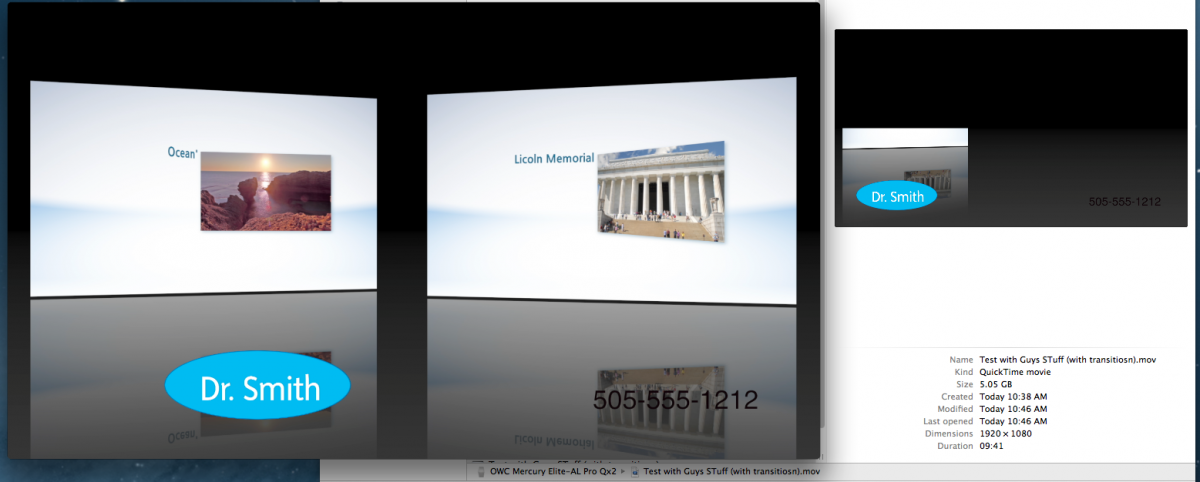
8 minutes to export without rendering. (But I was working on another job while it was doing that.)
I believe you have a iMac Late 2009 model. www.everymac.com/systems/apple/imac/spec...late-2009-specs.html
Unfortunately that graphic card really is the problem. It is using shared VRAM with the main RAM. I"m kinda shocked it is on the FCP X qualified list. support.apple.com/kb/HT4664?viewlocale=en_US&locale=en_US . It should still render but take a long time.
We have that as our "family iMac" at home, we play lots of games on it and there are often notes with the game that says "Does not work with GeForce 9400". I can do super simple things in FCP X on it, but now since 10.0.6 all rendering has moved to the GPU, I believe that machine is actually slower with the GPU that it was with the CPU.
FCPX is a really an App that runs on the GPU, that gets a bit of help from the CPU. We have two 2006 MacPros (yes 2006) with Radeon 5770's that run FCP X great. Before I upgraded the graphics card in them FCPX would barely open.
My 2007 MacBook Pro with a GeForce 8600M with 128MB of VRAM is technically unqualified, but actually runs FCP X better on that card than the GeForce 9400.
102 items on the timeline.
8 minutes to export without rendering. (But I was working on another job while it was doing that.)
NVIDIA GeForce 9400 with 256 VRAM
I believe you have a iMac Late 2009 model. www.everymac.com/systems/apple/imac/spec...late-2009-specs.html
Unfortunately that graphic card really is the problem. It is using shared VRAM with the main RAM. I"m kinda shocked it is on the FCP X qualified list. support.apple.com/kb/HT4664?viewlocale=en_US&locale=en_US . It should still render but take a long time.
We have that as our "family iMac" at home, we play lots of games on it and there are often notes with the game that says "Does not work with GeForce 9400". I can do super simple things in FCP X on it, but now since 10.0.6 all rendering has moved to the GPU, I believe that machine is actually slower with the GPU that it was with the CPU.
FCPX is a really an App that runs on the GPU, that gets a bit of help from the CPU. We have two 2006 MacPros (yes 2006) with Radeon 5770's that run FCP X great. Before I upgraded the graphics card in them FCPX would barely open.
My 2007 MacBook Pro with a GeForce 8600M with 128MB of VRAM is technically unqualified, but actually runs FCP X better on that card than the GeForce 9400.
Last edit: 01 May 2013 17:24 by tpayton.
Please Log in to join the conversation.
01 May 2013 17:29 - 01 May 2013 17:36 #25248
by tpayton
Replied by tpayton on topic Render and/or export hell
I ran these tests on a 2012 iMac 27". Just got it 2 weeks ago, upgraded from a MacPro. Makes you really wonder about the need for a "boat anchor" tower. My office is quieter, plus I'm hotswapping my Matrox MX02, BlackMagic, Esata Raid, FW Adapter, etc. Crazy. All I really in a machine is an upgradable video card and an easy to access HD and of course more RAM.
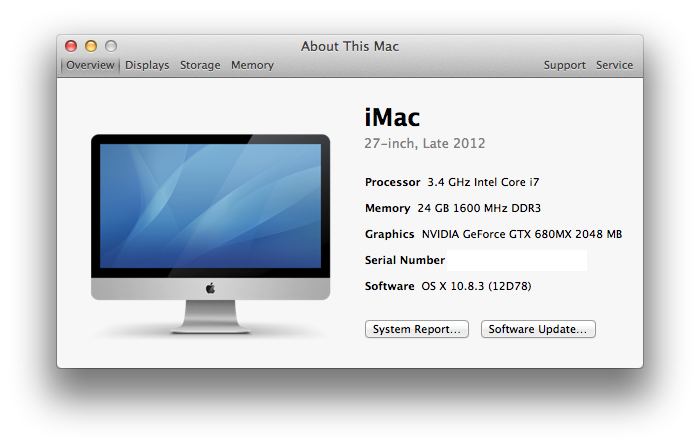
I'm running this same test on my family iMac right now via LogMeIn. I'll report back on the results.
I'm running this same test on my family iMac right now via LogMeIn. I'll report back on the results.
Last edit: 01 May 2013 17:36 by tpayton.
Please Log in to join the conversation.
01 May 2013 17:41 #25249
by tpayton
This is a problem. It reduces your available VRAM. Unplug it for now, should make things go smoother.
Replied by tpayton on topic Render and/or export hell
I'm using a second display as well.
This is a problem. It reduces your available VRAM. Unplug it for now, should make things go smoother.
Please Log in to join the conversation.

01 May 2013 17:47 - 01 May 2013 17:49 #25250
by Bobbyco
I agree. I always drop off external monitor for rendering, exporting steps with my mid 2010 MBPro.
Replied by Bobbyco on topic Render and/or export hell
tpayton wrote:
I'm using a second display as well.
This is a problem. It reduces your available VRAM. Unplug it for now, should make things go smoother.
I agree. I always drop off external monitor for rendering, exporting steps with my mid 2010 MBPro.
Last edit: 01 May 2013 17:49 by Bobbyco.
Please Log in to join the conversation.
01 May 2013 18:00 #25252
by robertdee
Replied by robertdee on topic Render and/or export hell
Thanks for all the feedback. Looks like it's time to upgrade the mac...
Please Log in to join the conversation.
01 May 2013 19:47 #25254
by tpayton
Replied by tpayton on topic Render and/or export hell
Finished the test on this 2009 iMac:
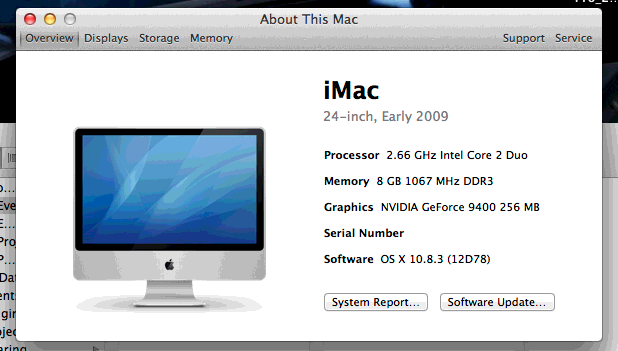
Export without render: 2 hrs, 10 minutes.
This isn't the CPU, this is all GPU effecting this time, and probably effecting render errors also.
One thing I would STRONGLY recommend is to turn off background rendering and not rendering if you don't absolutely need to. If I am working on a slower machine I will most of the time switch to proxy mode and do all my draft edits and get client approval from that. Then once it is locked I'll switch back and have a slightly longer export process on the locked picture.
So, new iMac 6 minutes. Old iMac 2 hrs. I think with your new iMac you are going to be churning out projects in record time.
Export without render: 2 hrs, 10 minutes.
This isn't the CPU, this is all GPU effecting this time, and probably effecting render errors also.
One thing I would STRONGLY recommend is to turn off background rendering and not rendering if you don't absolutely need to. If I am working on a slower machine I will most of the time switch to proxy mode and do all my draft edits and get client approval from that. Then once it is locked I'll switch back and have a slightly longer export process on the locked picture.
So, new iMac 6 minutes. Old iMac 2 hrs. I think with your new iMac you are going to be churning out projects in record time.
Please Log in to join the conversation.
01 May 2013 21:09 #25258
by robertdee
Replied by robertdee on topic Render and/or export hell
Thanks for all your help. I've known for a few months I need to upgrade - the original purchase was a quick one when my old MacPro died - better get those bills paid and invest!
Please Log in to join the conversation.
