


- Posts: 299
- Thank you received: 10
3 Post Moderation Rule for New Boarders (25 Jan 2021)
New boarders will have their posts moderated - Don't worry if you cannot see your post immediately.
Render and/or export hell
30 Apr 2013 21:41 - 01 May 2013 08:44 #25206
by robertdee
Render and/or export hell was created by robertdee
I'm getting tired of this. Feedback sent to Apple.
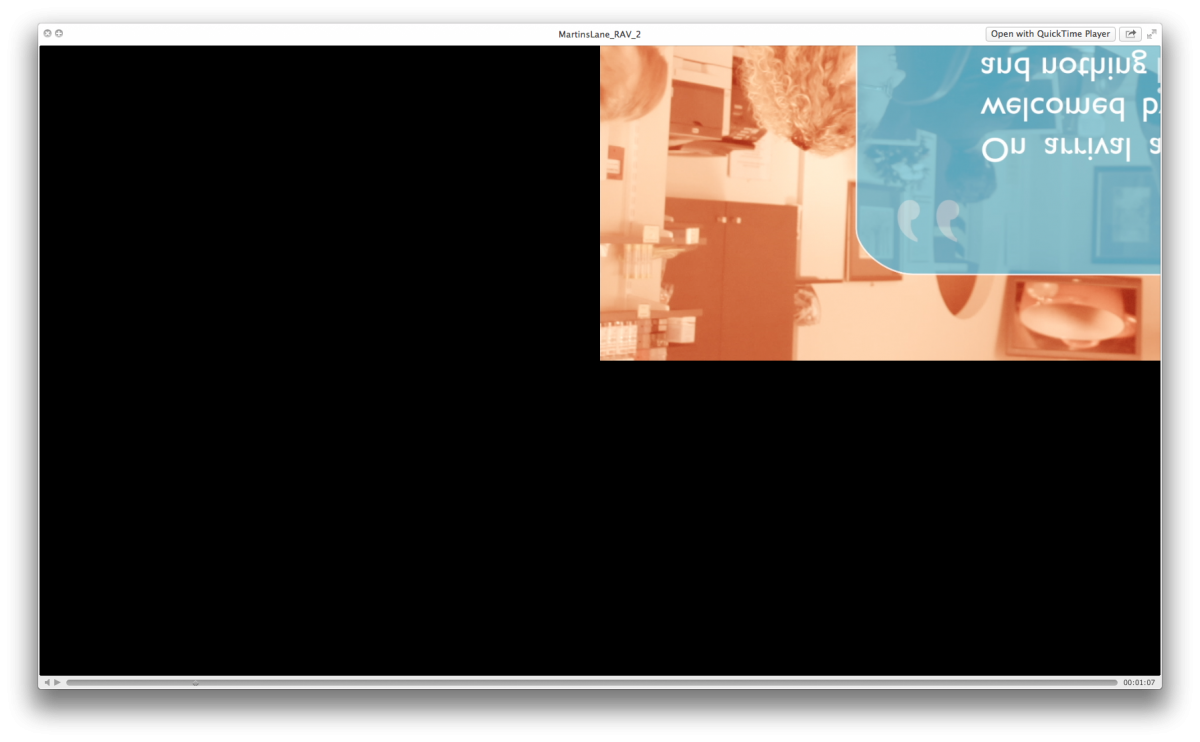
I work a lot with motion templates - building elements that have text on one side and video on the other. That's fine. I understand it takes time to render. Here's what irritates me. I render it out and I get a weird representation of the rendered file (upside down and off to the top right - impossible to understand if that's working). I export it, it looks good. Exporting though, that takes about 4 hours for no reason. Yes, I deleted my preferences. Yes, I'm saving to a different drive...I am so irritated right now I can barely speak.
I work a lot with motion templates - building elements that have text on one side and video on the other. That's fine. I understand it takes time to render. Here's what irritates me. I render it out and I get a weird representation of the rendered file (upside down and off to the top right - impossible to understand if that's working). I export it, it looks good. Exporting though, that takes about 4 hours for no reason. Yes, I deleted my preferences. Yes, I'm saving to a different drive...I am so irritated right now I can barely speak.
Last edit: 01 May 2013 08:44 by robertdee.
Please Log in to join the conversation.

30 Apr 2013 23:58 #25212
by tpayton
Replied by tpayton on topic Render and/or export hell
Bummer.
I helped out a fellow last week who was having a bunch of Motion Template rendering trouble also.
To get the job out I would try to see if you can render just a single motion template element at a time. Perhaps put it in its own timeline. Bring those back in and then you won't have these super long render times.
Compositing does take a good amount of time to render but in my experience Motion can get fairly overwhelmed easily. I'm creating titles and transitions in Motion Templates for FCP, but for any serious compositing I'm exporting straight from Motion or After Effects.
Also how long is your project that takes 4 hours to render?
I helped out a fellow last week who was having a bunch of Motion Template rendering trouble also.
To get the job out I would try to see if you can render just a single motion template element at a time. Perhaps put it in its own timeline. Bring those back in and then you won't have these super long render times.
Compositing does take a good amount of time to render but in my experience Motion can get fairly overwhelmed easily. I'm creating titles and transitions in Motion Templates for FCP, but for any serious compositing I'm exporting straight from Motion or After Effects.
Also how long is your project that takes 4 hours to render?
Please Log in to join the conversation.
01 May 2013 08:30 #25217
by robertdee
Replied by robertdee on topic Render and/or export hell
*deep breath*
OK. So this morning I've junked FCPX and reinstalled after repairing disk permissions. Exported a section and it seemed OK so going for the whole thing. It's 9 minutes long. There's obviously some underlying coding problem with FCPX as, regardless of the scaling/position weirdness, the render/export time issue with templates seems to come and go between updates. I love FCPX and I'm a strong advocate but the last "bug fix" update seems to have created more problems for me than it's solved. I sent two feedback forms to Apple last night so I'm sure they are aware of my problems. This is my livelihood (just as it is for many others) and they need to understand that.
OK. So this morning I've junked FCPX and reinstalled after repairing disk permissions. Exported a section and it seemed OK so going for the whole thing. It's 9 minutes long. There's obviously some underlying coding problem with FCPX as, regardless of the scaling/position weirdness, the render/export time issue with templates seems to come and go between updates. I love FCPX and I'm a strong advocate but the last "bug fix" update seems to have created more problems for me than it's solved. I sent two feedback forms to Apple last night so I'm sure they are aware of my problems. This is my livelihood (just as it is for many others) and they need to understand that.
Please Log in to join the conversation.
01 May 2013 08:33 #25218
by robertdee
Replied by robertdee on topic Render and/or export hell
As for building and exporting in motion, that kind of completely defeats the purpose of templates. I do a lot of presentation videos for surgeries, etc (boring but pays the bills) which involve 12 second sections of video in a drop zone and text so Motion templates are perfect for that built on a FCPX timeline.
Please Log in to join the conversation.
- jjsanderson
-

- Offline
- Elite Member
-

01 May 2013 08:35 #25219
by jjsanderson
Replied by jjsanderson on topic Render and/or export hell
Dumb question: are you running 10.0.8? 10.0.6 and .7 had a horrid bug with some Motion templates and third-party plugins which led to rendering errors, sometimes like those you describe. Even if you are on 10.0.8 you may need to remove effects and templates from projects and re-add them.
I've not seen anything like what you describe, though did suffer the green-screen/flipped render with some third-party plugins. Now sorted, happily.
I've not seen anything like what you describe, though did suffer the green-screen/flipped render with some third-party plugins. Now sorted, happily.
Please Log in to join the conversation.
01 May 2013 08:41 #25220
by robertdee
Replied by robertdee on topic Render and/or export hell
Not dumb at all 
I'm using 10.0.8
I rebuilt the templates yesterday so latest version of motion, latest version of fcpx. What I did do was drag and drop to replace the new templates onto the old one (it was a revision to an edit and the client didn't like the template so I had to change it).
What seems to cause the issue is dropping another layer over the top - a PSD and a couple of text templates (website, phone number) inside a compound clip which I stretched to the length of the edit.
I'm using 10.0.8
I rebuilt the templates yesterday so latest version of motion, latest version of fcpx. What I did do was drag and drop to replace the new templates onto the old one (it was a revision to an edit and the client didn't like the template so I had to change it).
What seems to cause the issue is dropping another layer over the top - a PSD and a couple of text templates (website, phone number) inside a compound clip which I stretched to the length of the edit.
Please Log in to join the conversation.
01 May 2013 08:42 #25221
by robertdee
Replied by robertdee on topic Render and/or export hell
Export is at 18% now so it seems quicker since the reinstall.
Please Log in to join the conversation.
01 May 2013 10:21 - 01 May 2013 10:22 #25222
by robertdee
Replied by robertdee on topic Render and/or export hell
Well, export time was quicker. 2 hrs and I am on an older iMac so that's forgiveable. The upside down problem was still there. It's not consistent though which is confusing as it's the same 4 templates with different text and video in them.
Removed the overlays and trying a render. I can export, re-import, overlay logo/website details and export again. A hassle but the safest solution, I think. i've attached a screen shot of what happens. Hopefully this might be of use to someone else in the future.
Removed the overlays and trying a render. I can export, re-import, overlay logo/website details and export again. A hassle but the safest solution, I think. i've attached a screen shot of what happens. Hopefully this might be of use to someone else in the future.
Last edit: 01 May 2013 10:22 by robertdee. Reason: redacted by the CIA
Please Log in to join the conversation.

01 May 2013 12:45 - 01 May 2013 12:45 #25225
by BenB
Replied by BenB on topic Render and/or export hell
Fill out the feedback for, let Apple know. This is the sort of thing they need to be informed of. Yes, the do read those feedback forms.
I'm also having Drop Zone and Behavior bugs with 10.0.8 big time. One workaround I've found is to use keyframes instead of behaviors, although I am super limited what Rigs I can make. But the Drop Zone issue is there in 10.0.8. Not exactly the same as in 10.0.7, but there none the less.
Can you Zip up the effect's folder and send me a copy to look over? I can help you verify or solve any issues easier that way.
I'm also having Drop Zone and Behavior bugs with 10.0.8 big time. One workaround I've found is to use keyframes instead of behaviors, although I am super limited what Rigs I can make. But the Drop Zone issue is there in 10.0.8. Not exactly the same as in 10.0.7, but there none the less.
Can you Zip up the effect's folder and send me a copy to look over? I can help you verify or solve any issues easier that way.
Last edit: 01 May 2013 12:45 by BenB.
Please Log in to join the conversation.

01 May 2013 12:45 #25226
by anickt
Replied by anickt on topic Render and/or export hell
I have found that drop shadows generated in text clips can cause a major increase in render/export time when there is a lot of text.
Is it possible that's part of the long export times?
I also found that using the drop shadow in Effects > Stylize on text did not increase render/export times.
Is it possible that's part of the long export times?
I also found that using the drop shadow in Effects > Stylize on text did not increase render/export times.
Please Log in to join the conversation.
01 May 2013 12:57 - 01 May 2013 12:59 #25227
by robertdee
Replied by robertdee on topic Render and/or export hell
Feedback sent twice last night.
I've just rendered the whole timeline without the second overlay (logos, website) on top and it's behaving itself. Seems like there's an issue with generators being placed on top of generators. I'd really like roundtripping or tighter integration between Motion and FCPX as I rarely do anything that's just straight cutting.
Anickt, there's no drop shadows on the text, though there is on the video dropzone. Rendering time is a lot better since I reinstalled. I had "reflections" - a cloned layer inverted with 50% opacity - on an earlier version and that took a lot of time.
I've just rendered the whole timeline without the second overlay (logos, website) on top and it's behaving itself. Seems like there's an issue with generators being placed on top of generators. I'd really like roundtripping or tighter integration between Motion and FCPX as I rarely do anything that's just straight cutting.
Anickt, there's no drop shadows on the text, though there is on the video dropzone. Rendering time is a lot better since I reinstalled. I had "reflections" - a cloned layer inverted with 50% opacity - on an earlier version and that took a lot of time.
Last edit: 01 May 2013 12:59 by robertdee.
Please Log in to join the conversation.
01 May 2013 13:09 #25228
by BenB
Replied by BenB on topic Render and/or export hell
I use a reflective floor for reflections and have no issues, fast render times. Here's a sample you can reverse engineer if you'd like.
Download a sample here.
But yeah, there's still very major bugs in 10.0.8 with Motion created templates, I'm having them with Drop Zones and Behaviors.
Download a sample here.
But yeah, there's still very major bugs in 10.0.8 with Motion created templates, I'm having them with Drop Zones and Behaviors.
Please Log in to join the conversation.
01 May 2013 13:11 - 01 May 2013 13:17 #25229
by robertdee
Replied by robertdee on topic Render and/or export hell
Now I'm trying to export master file and it says transcoding (for no reason). Whole timeline rendered already in ProRes. It should take minutes, not hours. The project is 9 minutes long. Trying again by sending to compressor with a QT passthrough. Now that's going up and up. At an hour and a half at the moment but this has happened before and keeps going until it's five hours or so. For something that's already taken 2 hours to render on the timeline.
It's not my job to try and fix Apple's software for them by finding arcane workarounds. I've been using variations of FCP for over a decade so I know what I'm doing. This is not a workable app for me at the moment. I'm about at the end of my patience.
Cheers, Ben. I did try a variation at one point with a reflective floor but the render times were insane. That may have been because it was an early version of FCPX (pre 10.0.3) and I was leaving render/exports overnight and often had 20 hour export times for 20 minute videos. This improved massively prior to .8 and now it seems like it's all come back.
It's not my job to try and fix Apple's software for them by finding arcane workarounds. I've been using variations of FCP for over a decade so I know what I'm doing. This is not a workable app for me at the moment. I'm about at the end of my patience.
Cheers, Ben. I did try a variation at one point with a reflective floor but the render times were insane. That may have been because it was an early version of FCPX (pre 10.0.3) and I was leaving render/exports overnight and often had 20 hour export times for 20 minute videos. This improved massively prior to .8 and now it seems like it's all come back.
Last edit: 01 May 2013 13:17 by robertdee.
Please Log in to join the conversation.
01 May 2013 15:27 #25233
by tpayton
Trying to reproduce this on my end.
So I take it you are using this as a generator?
So is your project largely 9 minutes of these generators?
Do you have a behavior based move on the Motion video layer by chance?
How many different generators do you have? The same one over and over or several different version?
So it is taking hours for it to export even with your removed the PSD and Text overlay?
Hang in there.
- T.
Replied by tpayton on topic Render and/or export hell
12 second sections of video in a drop zone and text
Trying to reproduce this on my end.
So I take it you are using this as a generator?
So is your project largely 9 minutes of these generators?
Do you have a behavior based move on the Motion video layer by chance?
How many different generators do you have? The same one over and over or several different version?
So it is taking hours for it to export even with your removed the PSD and Text overlay?
Hang in there.
- T.
Please Log in to join the conversation.
01 May 2013 15:55 - 01 May 2013 15:56 #25234
by robertdee
Hi,
Generators - 4 different types. I've attached them for you - the other two are reverses of them so identical. The 9 minutes is made up of these with different footage in the drop zone on one and laid underneath with a tint in the other (the speech bubble one).
Replied by robertdee on topic Render and/or export hell
Hi,
Generators - 4 different types. I've attached them for you - the other two are reverses of them so identical. The 9 minutes is made up of these with different footage in the drop zone on one and laid underneath with a tint in the other (the speech bubble one).
Last edit: 01 May 2013 15:56 by robertdee.
Please Log in to join the conversation.
01 May 2013 16:02 #25235
by tpayton
Replied by tpayton on topic Render and/or export hell
These are nice. Very simple. Humm. Odd. Let me rebuild something really quick on my end.
So when you say you have an older iMac. How old? What is your video card/RAM.
What is your destination format, 1080p ProRes?
What video format are you putting in the drop zones?
Are you editing in compound clips or in a project?
So when you say you have an older iMac. How old? What is your video card/RAM.
What is your destination format, 1080p ProRes?
What video format are you putting in the drop zones?
Are you editing in compound clips or in a project?
Please Log in to join the conversation.
01 May 2013 16:04 #25236
by BenB
Replied by BenB on topic Render and/or export hell
Those templates shouldn't cause any issues, they're so basic. Nicely done, too!
Wish the Drop Zone issues would get fixed.
Wish the Drop Zone issues would get fixed.
Please Log in to join the conversation.
01 May 2013 16:12 #25240
by robertdee
Replied by robertdee on topic Render and/or export hell
Mac is 3.06 GHz Intel Core 2 Duo. 12 GB RAM - I know I need to upgrade but the export issue comes and goes between point releases so it makes me think it ain't all hardware.
Destination 1080p ProRes
Video footage - 1080p ProRes (obviously smaller video would be better but it would take too long to export all the clips at lower res and be counter productive.
I'm editing in a project but sometimes make compound clips so I can put a transition between clips.
The weirdness that caused the occasional inverting and upside downing came when I overlaid a compound clip containing a PSD logo and 2 simple title generators for web address and phone no. I stretched this to the length of the project
Don't know if that helps.
Destination 1080p ProRes
Video footage - 1080p ProRes (obviously smaller video would be better but it would take too long to export all the clips at lower res and be counter productive.
I'm editing in a project but sometimes make compound clips so I can put a transition between clips.
The weirdness that caused the occasional inverting and upside downing came when I overlaid a compound clip containing a PSD logo and 2 simple title generators for web address and phone no. I stretched this to the length of the project
Don't know if that helps.
Please Log in to join the conversation.
01 May 2013 16:25 - 01 May 2013 16:27 #25241
by tpayton
Replied by tpayton on topic Render and/or export hell
Okay,
I put a ton of these on the timeline to fill 9 minutes. Added video clips to each drop zone. Threw in the quote box every once in a while.
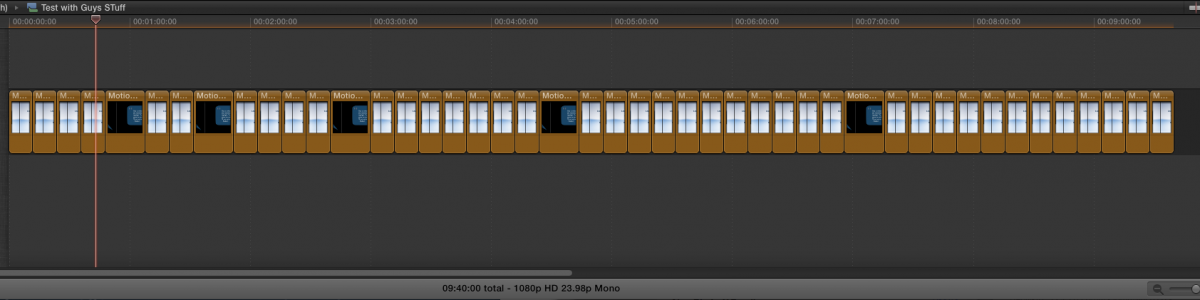
Exported without rendering to ProRes in 6 minutes. 4.3GB file.
I'm obviously missing something. What kind of transitions are you using?
I put a ton of these on the timeline to fill 9 minutes. Added video clips to each drop zone. Threw in the quote box every once in a while.
Exported without rendering to ProRes in 6 minutes. 4.3GB file.
I'm obviously missing something. What kind of transitions are you using?
Last edit: 01 May 2013 16:27 by tpayton.
Please Log in to join the conversation.
01 May 2013 16:29 - 01 May 2013 16:30 #25242
by tpayton
Replied by tpayton on topic Render and/or export hell
Here is a screnshot of the finished file:
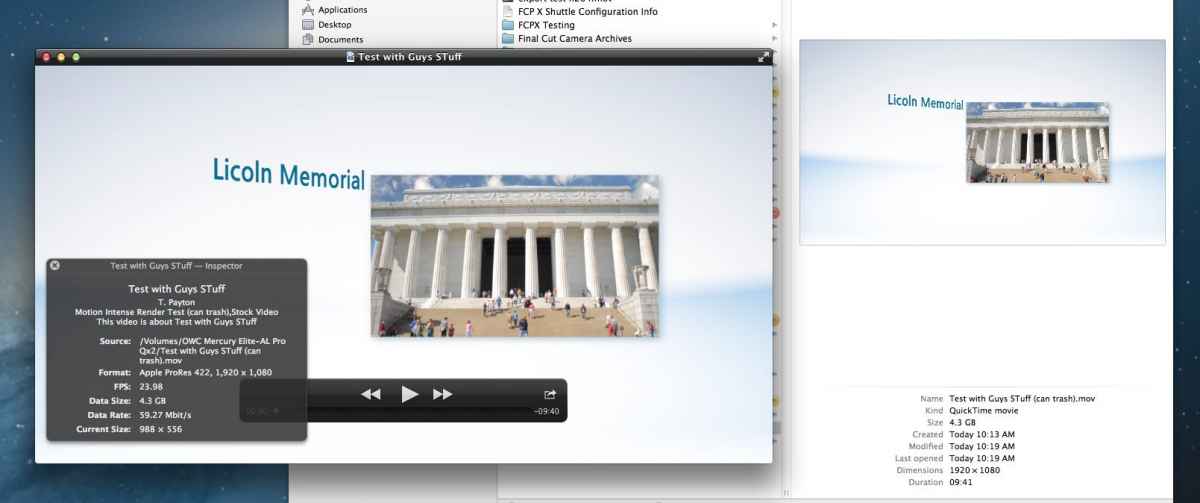
Also, are you changing the font? What font are you using for everything?
Also, are you changing the font? What font are you using for everything?
Last edit: 01 May 2013 16:30 by tpayton.
Please Log in to join the conversation.
