


- Posts: 267
- Thank you received: 24
3 Post Moderation Rule for New Boarders (25 Jan 2021)
New boarders will have their posts moderated - Don't worry if you cannot see your post immediately.
Would you pay for FCPX 10.1 ?
03 Apr 2013 19:37 #23692
by fcpguru
Replied by fcpguru on topic Would you pay for FCPX 10.1 ?
The argument that FCPX is iMovie pro is the most uneducated blanket piece of misinformation ever disseminated. It implies that the current version of the app pales in comparison the the beloved fcp 7. Well after being forced to open an old project in fcp 7 I can tell you that fcp 7 is a clunky dinosaur. The capabilities and features of FCPX has so far advanced my workflow that much of what I do now is simply not possible in 7.
It is my hope that apple offers an a la carte in app purchase system. I never liked paying for upgrades I wouldn't use only in order to get the other features I would want.
Would love to see an overhaul to the audio workflow with some more powerful tools (ala adobe audition). Better round trip to motion. And more timeline viewing options (like getting rid of the need to generate every thumbnail over and over - really bogs down feature length projects.
And yes, I'd pay. I'm amazed at the number of killer features we've gotten for free at this point.
It is my hope that apple offers an a la carte in app purchase system. I never liked paying for upgrades I wouldn't use only in order to get the other features I would want.
Would love to see an overhaul to the audio workflow with some more powerful tools (ala adobe audition). Better round trip to motion. And more timeline viewing options (like getting rid of the need to generate every thumbnail over and over - really bogs down feature length projects.
And yes, I'd pay. I'm amazed at the number of killer features we've gotten for free at this point.
Please Log in to join the conversation.
- mistermattsmith
-

- Offline
- Senior Member
-

03 Apr 2013 19:45 #23693
by mistermattsmith
Replied by mistermattsmith on topic Would you pay for FCPX 10.1 ?
Agree with the OP.
While I'm a big fan of FCPX (and we've adopted it as an edit platform at my company), we have all been essentially beta testing a product that was half baked on launch. We've taken the risk on something our peers and the industry said was cr*p. To pay again for the better formed 10.1 release would be at best cheeky, at worst, a bit insulting.
If anything, Apple should offer some cashback for having to install 7 updates since launch to get the software up to a usable level*
* being a bit melodramatic but you get my drift.
Love the development of FCPX, not sure I want to be taxed for it.
While I'm a big fan of FCPX (and we've adopted it as an edit platform at my company), we have all been essentially beta testing a product that was half baked on launch. We've taken the risk on something our peers and the industry said was cr*p. To pay again for the better formed 10.1 release would be at best cheeky, at worst, a bit insulting.
If anything, Apple should offer some cashback for having to install 7 updates since launch to get the software up to a usable level*
* being a bit melodramatic but you get my drift.
Love the development of FCPX, not sure I want to be taxed for it.
Please Log in to join the conversation.
03 Apr 2013 21:25 #23697
by MattDavis
Please, don't feel that you have to hold back your true opinion. By all means, say what you really mean to say. We're all friends here!
Opinions vary, hooray. You think I'm wrong, that's fine, I'm sticking to my opinion - to which I am entitled. I want my Media Management and Time Code - but hey, let's save it as we've done it all before last year.
As I said before, I'd pay for a solution that does proper reliable Media Management with handles, reports on plugins used on a Project/Sequence, and honours metadata from 'cradle to grave' like TIME OF DAY CODE. These things are affecting my business.
Replied by MattDavis on topic Would you pay for FCPX 10.1 ?
fcpguru wrote: The argument that FCPX is iMovie pro is the most uneducated blanket piece of misinformation ever disseminated.
Please, don't feel that you have to hold back your true opinion. By all means, say what you really mean to say. We're all friends here!
Opinions vary, hooray. You think I'm wrong, that's fine, I'm sticking to my opinion - to which I am entitled. I want my Media Management and Time Code - but hey, let's save it as we've done it all before last year.
As I said before, I'd pay for a solution that does proper reliable Media Management with handles, reports on plugins used on a Project/Sequence, and honours metadata from 'cradle to grave' like TIME OF DAY CODE. These things are affecting my business.
Please Log in to join the conversation.
03 Apr 2013 22:52 - 03 Apr 2013 23:31 #23705
by NocoDave
Replied by NocoDave on topic Would you pay for FCPX 10.1 ?
I'm with the FCPX as being iMovie Pro is bullshit camp. That's an echo from the pre-release screen shot reaction that should be long forgot. Take a look at how powerful the basic behind the scenes structure of the FCPX app is. That's what attracted me to it initially and what is slowly making it the NLE of the future.
It is one massively powerful base. There's nothing iMovie, or non-pro, about it. It is getting there, it is getting there quick, but not as fast as some might be trying to put across.
IMHO It's most definitely not re-payable for yet, it has a way to go.
It is potentially the most powerful NLE that is available, and it is getting very close.
Others are still building on what they have, but they have not considering a new foundation. What we have is still that, a new foundation. On top of that it has, since its beginnings, looked at the the most successful predecessor, "Avid" for that working base. It ignored it's previous legacy FCP workings to gather it's new power.
"I find Avid trimming super clunky and too many clicks."
There are no clicks in Avid's keyboard based dynamic trimming, that's what makes it so fast and fluent. But the clicks are available for those that choose to work that way with trimming, or for any reason don't work the other way.
The FCPX magnetic timeline has the possibilities to operate as fast and as fluent for Avid keyboard junkies and for mouse, pad, pen, touchscreen users alike.
The future?
It is one massively powerful base. There's nothing iMovie, or non-pro, about it. It is getting there, it is getting there quick, but not as fast as some might be trying to put across.
IMHO It's most definitely not re-payable for yet, it has a way to go.
It is potentially the most powerful NLE that is available, and it is getting very close.
Others are still building on what they have, but they have not considering a new foundation. What we have is still that, a new foundation. On top of that it has, since its beginnings, looked at the the most successful predecessor, "Avid" for that working base. It ignored it's previous legacy FCP workings to gather it's new power.
"I find Avid trimming super clunky and too many clicks."
There are no clicks in Avid's keyboard based dynamic trimming, that's what makes it so fast and fluent. But the clicks are available for those that choose to work that way with trimming, or for any reason don't work the other way.
The FCPX magnetic timeline has the possibilities to operate as fast and as fluent for Avid keyboard junkies and for mouse, pad, pen, touchscreen users alike.
The future?
Last edit: 03 Apr 2013 23:31 by NocoDave. Reason: grammar
Please Log in to join the conversation.

04 Apr 2013 11:58 - 04 Apr 2013 11:59 #23739
by BenB
Replied by BenB on topic Would you pay for FCPX 10.1 ?
I meant both keyboard shortcuts and mouse clicks, both, IMHO, are clunky in MC. But we're talking about very subjective things, no two people will agree on them across the board.
I simply find the keyboard shortcuts along with my Magic Trackpad to be super fast and super easy to edit with. I'd personally not want to go back to FCP 7 or PPro or MC for editing tools. Again, we're talking about very subjective things.
I simply find the keyboard shortcuts along with my Magic Trackpad to be super fast and super easy to edit with. I'd personally not want to go back to FCP 7 or PPro or MC for editing tools. Again, we're talking about very subjective things.
Last edit: 04 Apr 2013 11:59 by BenB.
Please Log in to join the conversation.
04 Apr 2013 12:08 - 04 Apr 2013 12:09 #23744
by Seanus
Sean Lander - Editing since 1982 - AVID 1991 - FCP 1999 - FCPX 2011
Replied by Seanus on topic Would you pay for FCPX 10.1 ?
Well if you can explain to me the simple act of trimming video only on two clips then I'll be a happy man. 
Am I missing something?
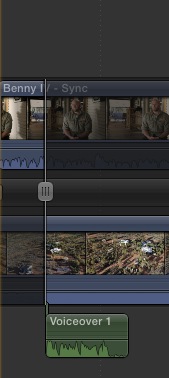
Am I missing something?
Sean Lander - Editing since 1982 - AVID 1991 - FCP 1999 - FCPX 2011
Last edit: 04 Apr 2013 12:09 by Seanus.
Please Log in to join the conversation.
04 Apr 2013 12:42 #23754
by BenB
Replied by BenB on topic Would you pay for FCPX 10.1 ?
You mean in the Precision Editor specifically? I'm not sure what you're asking. You can trim in it the same way you do in the regular timeline, just a different way of viewing things.
Keyboard left/right bracket and slash keys work, < and > keys work, typing in tc numbers work. Everything works in the Precision Editor exactly like it does in a regular timeline, but you can also grab the clips with your cursor and drag them, too. And you see what is in, and where your handles are.
I don't use the Precision Editor much, but the rare occasions I do, I like having it. But I find the keyboard commands in the Timeline just fine. I do wish the up/down arrow keys to jump between edit points would bring the trim highlight along with it, but I'm sure that's coming.
Keyboard left/right bracket and slash keys work, < and > keys work, typing in tc numbers work. Everything works in the Precision Editor exactly like it does in a regular timeline, but you can also grab the clips with your cursor and drag them, too. And you see what is in, and where your handles are.
I don't use the Precision Editor much, but the rare occasions I do, I like having it. But I find the keyboard commands in the Timeline just fine. I do wish the up/down arrow keys to jump between edit points would bring the trim highlight along with it, but I'm sure that's coming.
Please Log in to join the conversation.
04 Apr 2013 12:49 - 04 Apr 2013 12:49 #23758
by canelson
AFAIK you can´t do that in the precision editor. To trim video without moving the audio you have to expand the audio/video first from both clips, then with the trim tool move the video cut wherever you want strating from the exact cut point, where the cursor shows as ][.
PS: I have a shortcut in F5 to expand all the audio/video components, F6 to expand all audio/video clips, F7 to expand all audio splits and F8 to collapse all the audio.
--
Matias Canelson
www.canelson.us
Replied by canelson on topic Would you pay for FCPX 10.1 ?
Seanus wrote: Well if you can explain to me the simple act of trimming video only on two clips then I'll be a happy man.
Am I missing something?
AFAIK you can´t do that in the precision editor. To trim video without moving the audio you have to expand the audio/video first from both clips, then with the trim tool move the video cut wherever you want strating from the exact cut point, where the cursor shows as ][.
PS: I have a shortcut in F5 to expand all the audio/video components, F6 to expand all audio/video clips, F7 to expand all audio splits and F8 to collapse all the audio.
--
Matias Canelson
www.canelson.us
Last edit: 04 Apr 2013 12:49 by canelson.
Please Log in to join the conversation.
- Disproportionate Pictures
-

- Offline
- Platinum Member
-

Less
More
- Posts: 1433
- Thank you received: 64
04 Apr 2013 13:23 #23762
by Disproportionate Pictures
Replied by Disproportionate Pictures on topic Would you pay for FCPX 10.1 ?
As I mentioned in the other thread, I would, of course pay for a 10.1.
Improvements in functionality make me more productive- which makes me more profitable. $299 is a drop in the bucket in terms of my yearly business. I'd pay that EVERY year if those improvements made my work easier/faster/better.
Improvements in functionality make me more productive- which makes me more profitable. $299 is a drop in the bucket in terms of my yearly business. I'd pay that EVERY year if those improvements made my work easier/faster/better.
Please Log in to join the conversation.
04 Apr 2013 20:02 #23796
by Seanus
Expanding audio with the Precision Editor doesn't work. It just puts them back when entered.
You see in drama editing this is essential. You edit for dialogue first then trim the vision to smooth out the cuts.
In AVID all you do is lasso the vision track and trim. Either numerically, dynamically with JKL or with the mouse.
At ALL times you see a representation of the edit point. Vital for getting the cut point just right.
This is why AVID still owns Hollywood. In FCPX you have to break apart the clips (no going back once done) before you can use the Precision Editor for Video only. With FCP X lacking anyway of giving visual feedback about loss of Sync this is something many loathe doing.
For this reason I've given up on the Precision Editor and just use the timeline as Ben described, it works much better this way. But still not a patch on AVID. IMHO.
Sean Lander - Editing since 1982 - AVID 1991 - FCP 1999 - FCPX 2011
Replied by Seanus on topic Would you pay for FCPX 10.1 ?
canelson wrote:
Seanus wrote: Well if you can explain to me the simple act of trimming video only on two clips then I'll be a happy man.
Am I missing something?
AFAIK you can´t do that in the precision editor. To trim video without moving the audio you have to expand the audio/video first from both clips, then with the trim tool move the video cut wherever you want strating from the exact cut point, where the cursor shows as ][.
PS: I have a shortcut in F5 to expand all the audio/video components, F6 to expand all audio/video clips, F7 to expand all audio splits and F8 to collapse all the audio.
Expanding audio with the Precision Editor doesn't work. It just puts them back when entered.
You see in drama editing this is essential. You edit for dialogue first then trim the vision to smooth out the cuts.
In AVID all you do is lasso the vision track and trim. Either numerically, dynamically with JKL or with the mouse.
At ALL times you see a representation of the edit point. Vital for getting the cut point just right.
This is why AVID still owns Hollywood. In FCPX you have to break apart the clips (no going back once done) before you can use the Precision Editor for Video only. With FCP X lacking anyway of giving visual feedback about loss of Sync this is something many loathe doing.
For this reason I've given up on the Precision Editor and just use the timeline as Ben described, it works much better this way. But still not a patch on AVID. IMHO.
Sean Lander - Editing since 1982 - AVID 1991 - FCP 1999 - FCPX 2011
Please Log in to join the conversation.
04 Apr 2013 20:12 #23797
by canelson
--
Matias Canelson
www.canelson.us
Replied by canelson on topic Would you pay for FCPX 10.1 ?
Yeah I know how Avid trim works (I miss it every day for the last 17 months I had to start learning FCP 7 for my new job...yes FCP 7).
But without using the precision editor, the workflow I told you before can trim only video, FCPx opens a dual view for you to see how the cut is going. You have to make some more keystrokes or clicks but some specific procedures take more clicks, some less. That's how it works.
But without using the precision editor, the workflow I told you before can trim only video, FCPx opens a dual view for you to see how the cut is going. You have to make some more keystrokes or clicks but some specific procedures take more clicks, some less. That's how it works.
--
Matias Canelson
www.canelson.us
Please Log in to join the conversation.
04 Apr 2013 20:45 #23801
by Seanus
Yes got that thanks. I was really just commenting on the so-called Precision Editor. My workflow has always been as you described.
FWIW the rest of AVID is a catastrophe! Just started using 6.5 on a series and it just seems to be getting worse and worse. I sit there all day wishing I was on FCP X.
Sean Lander - Editing since 1982 - AVID 1991 - FCP 1999 - FCPX 2011
Replied by Seanus on topic Would you pay for FCPX 10.1 ?
canelson wrote: Yeah I know how Avid trim works (I miss it every day for the last 17 months I had to start learning FCP 7 for my new job...yes FCP 7).
But without using the precision editor, the workflow I told you before can trim only video, FCPx opens a dual view for you to see how the cut is going. You have to make some more keystrokes or clicks but some specific procedures take more clicks, some less. That's how it works.
Yes got that thanks. I was really just commenting on the so-called Precision Editor. My workflow has always been as you described.
FWIW the rest of AVID is a catastrophe! Just started using 6.5 on a series and it just seems to be getting worse and worse. I sit there all day wishing I was on FCP X.
Sean Lander - Editing since 1982 - AVID 1991 - FCP 1999 - FCPX 2011
Please Log in to join the conversation.
05 Apr 2013 01:34 #23807
by leohans
∴
Leonardo Hancevich
www.leohans.com
Editor - EDA Asociación Argentina de Editores Audiovisuales.
Replied by leohans on topic Would you pay for FCPX 10.1 ?
AVID do take a lot of click.
If you have a complex timeline with dialogues, sound fx and music it does take some work to trim.
If you have a complex timeline with dialogues, sound fx and music it does take some work to trim.
∴
Leonardo Hancevich
www.leohans.com
Editor - EDA Asociación Argentina de Editores Audiovisuales.
Please Log in to join the conversation.
-

- New Member
-

Less
More
- Thank you received: 0
18 Aug 2013 21:15 - 18 Aug 2013 21:16 #30090
by
Replied by on topic Would you pay for FCPX 10.1 ?
I am very excited about this update (10.1) and I hope the next features on FCPX 10.1 will be so much better than other pro NLE softwares (Avid,Premiere Pro,Sony Vegas and Smoke 2013). If the features are worth $300 bucks, I would definitely purchase the 10.1 update on the day will release it @ App Store. 
 :woohoo:
:woohoo:
Last edit: 18 Aug 2013 21:16 by .
Please Log in to join the conversation.
19 Aug 2013 00:11 - 19 Aug 2013 00:12 #30091
by sidderke
Replied by sidderke on topic Would you pay for FCPX 10.1 ?
Yes, I would pay, but I would also expect a lot of the big good features a lot of us have been talking about.
FCPX doesn't cost a lot, and we won a lot of new features for free, but on the other hand, we had some very unstable software at times, which was missing a LOT of important features on release, and some of which it still doesn't have.
So, yes, I would pay for a big update, but then I would also expect it to be *big*, and adress a lot of the concerns people have been sending Apple feedback about.
I also agree that, although a lot of us have seen the advantages of using X, it still has an uphill battle to climb in the perception of the industry.
FCPX doesn't cost a lot, and we won a lot of new features for free, but on the other hand, we had some very unstable software at times, which was missing a LOT of important features on release, and some of which it still doesn't have.
So, yes, I would pay for a big update, but then I would also expect it to be *big*, and adress a lot of the concerns people have been sending Apple feedback about.
I also agree that, although a lot of us have seen the advantages of using X, it still has an uphill battle to climb in the perception of the industry.
Last edit: 19 Aug 2013 00:12 by sidderke.
Please Log in to join the conversation.

19 Aug 2013 02:25 #30094
by pollux
Replied by pollux on topic Would you pay for FCPX 10.1 ?
To me it's really up to what's included in the new version.
I would be really curious, when the new version is optimized to the dual-GPU architecture of the new Mac Pro, will that work with older Mac Pros with twin graphic cards??
I would be really curious, when the new version is optimized to the dual-GPU architecture of the new Mac Pro, will that work with older Mac Pros with twin graphic cards??
Please Log in to join the conversation.

19 Aug 2013 03:40 - 19 Aug 2013 03:47 #30095
by Redifer
Replied by Redifer on topic Would you pay for FCPX 10.1 ?
I'm pretty sure they'll charge for FCPX 10.1. I'm pretty sure it'll be the same $300. And I'm sure every one of us will pay for it. But since it's a whole ten percent newer, we all hope to see lots of cool features and fixes. I just hope I won't need at least Mountain Lion to use it.
I don't know where a lot of people get that FCP7 was clunky. These same people praise how FCPX never ever goes out of sync. My question to those people would be what exactly were you doing in FCP7 that made things go out of sync so often that it was a legitimate issue? I have never had this issue. I can't even see how you could unless you were a careless editor. With FCPX, I drag one thing and then suddenly 50 different things move to new locations. I am not a fan of the magnetic timeline at all EXCEPT when putting new clips on it as it will automatically butt up against the previous clip. That rocks. I also don't get it when people say FCPX is sooooo much faster. Faster at what? What kind of projects are you doing? I use both FCPX and FCP7 and I'm still much faster at FCP7. I like not having to render in FCPX but as far as building the project itself I don't find it any faster, but instead slower. I also have a bunch more control and I really like having control over everything. I don't want things to be automatic. My grandma might, but I don't. Well, I do like that automatic butting of clips. I bet grandma would, too.
Speaking of control, a great many filters offer far more of it in FCP7 than their counterparts in FCPX. Why? Look at the Bad TV filer for example:

Why are there so many fewer parameters to adjust in FCPX? Am I no longer to be trusted in making these decisions? Does Apple know exactly how I want the filter to look? I want this kind of control back in 10.1. I don't want to be treated like an idiot and this certainly looks like Apple assumes that people using FCPX are idiots. I like control, I like options. I've heard it argued that some don't want any more preference screens or whatnot because it would make the app as a whole "less simple". Who cares? Well grandma might care. Is FCPX for grandma? If not, give me back more options and control, please. Let grandma use iMovie.
I don't know where a lot of people get that FCP7 was clunky. These same people praise how FCPX never ever goes out of sync. My question to those people would be what exactly were you doing in FCP7 that made things go out of sync so often that it was a legitimate issue? I have never had this issue. I can't even see how you could unless you were a careless editor. With FCPX, I drag one thing and then suddenly 50 different things move to new locations. I am not a fan of the magnetic timeline at all EXCEPT when putting new clips on it as it will automatically butt up against the previous clip. That rocks. I also don't get it when people say FCPX is sooooo much faster. Faster at what? What kind of projects are you doing? I use both FCPX and FCP7 and I'm still much faster at FCP7. I like not having to render in FCPX but as far as building the project itself I don't find it any faster, but instead slower. I also have a bunch more control and I really like having control over everything. I don't want things to be automatic. My grandma might, but I don't. Well, I do like that automatic butting of clips. I bet grandma would, too.
Speaking of control, a great many filters offer far more of it in FCP7 than their counterparts in FCPX. Why? Look at the Bad TV filer for example:
Why are there so many fewer parameters to adjust in FCPX? Am I no longer to be trusted in making these decisions? Does Apple know exactly how I want the filter to look? I want this kind of control back in 10.1. I don't want to be treated like an idiot and this certainly looks like Apple assumes that people using FCPX are idiots. I like control, I like options. I've heard it argued that some don't want any more preference screens or whatnot because it would make the app as a whole "less simple". Who cares? Well grandma might care. Is FCPX for grandma? If not, give me back more options and control, please. Let grandma use iMovie.
Last edit: 19 Aug 2013 03:47 by Redifer.
Please Log in to join the conversation.
19 Aug 2013 04:15 - 19 Aug 2013 04:15 #30096
by BenB
Replied by BenB on topic Would you pay for FCPX 10.1 ?
You actually have WAY more filter options than you did in v.7, and it is called Motion 5.
And yes, I would pay for a 10.1 update without a care.
And yes, I would pay for a 10.1 update without a care.
Last edit: 19 Aug 2013 04:15 by BenB.
Please Log in to join the conversation.
-
- New Member
-
Less
More
- Thank you received: 0
19 Aug 2013 04:52 - 19 Aug 2013 05:08 #30097
by
Replied by on topic Would you pay for FCPX 10.1 ?
I don't know if you guys remember this. About few months ago, Adobe Premiere Pro had released new updates with lots of features and bug fixed on the same day event of NAB Show 2013 in Las Vegas and that time, they didn't charged more to their users for that update.
So, why FCPX will have to charge their users for 10.1 update? Why they can't just like give the next update to all FCPX users for free and we'll be all happy,Right?
Anyway, like what I posted a comment before, if the new features will worth $300 or half price for the next update, I'll still buy it. But I'm still hoping that FCPX developers will give us this next update (10.1) for FREE! Unless, if next Final Cut Pro will become a version 11 or 12 and that's even more SURPRISING! ...lol :woohoo: :blink: :ohmy:
So, why FCPX will have to charge their users for 10.1 update? Why they can't just like give the next update to all FCPX users for free and we'll be all happy,Right?
Anyway, like what I posted a comment before, if the new features will worth $300 or half price for the next update, I'll still buy it. But I'm still hoping that FCPX developers will give us this next update (10.1) for FREE! Unless, if next Final Cut Pro will become a version 11 or 12 and that's even more SURPRISING! ...lol :woohoo: :blink: :ohmy:
Last edit: 19 Aug 2013 05:08 by .
Please Log in to join the conversation.
19 Aug 2013 04:56 #30098
by Redifer
I find this answer to be kind of a cop out. I don't want to be jumping back and forth between apps.
Replied by Redifer on topic Would you pay for FCPX 10.1 ?
BenB wrote: You actually have WAY more filter options than you did in v.7, and it is called Motion 5.
I find this answer to be kind of a cop out. I don't want to be jumping back and forth between apps.
Please Log in to join the conversation.
