


3 Post Moderation Rule for New Boarders (25 Jan 2021)
New boarders will have their posts moderated - Don't worry if you cannot see your post immediately.
Titles Quality

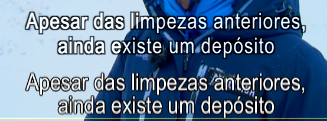
I do subtitles in final cut 7 and I can't jump to final cut x. The problem is the quality of the subtitle. Here in attachment is a screen capture of my problem. The lower subs are made in final cut 7 and the upper subs are made in final cut x. Does anybody know a way to export with the same quality? I've tried changing the project info to progressive, but that doesn't work. In final cut 7 I applied a flicker filter. The free plug ins here in the web site with flicker effect don't do the trick. In motion doesn't do either...
Any suggestions?
Please Log in to join the conversation.
Please Log in to join the conversation.

Please Log in to join the conversation.
- Disproportionate Pictures
-

- Offline
- Platinum Member
-

- Posts: 1433
- Thank you received: 64
How are you generating the subtitles? Text layer with what? Outline? Glow? Drop Shadow?
Please Log in to join the conversation.
This subs are only with outline. Final cut pro 7 they look great. Final cut x they look like I need glasses.
Please Log in to join the conversation.
- jjsanderson
-

- Offline
- Elite Member
-

Immediate question: are you editing Proxy media and exporting while still in that mode? FCPX is a little odd in that it doesn't really warn you it's working with Proxy, and it's easy to accidentally export at half-resolution. Be sure to reset 'optimised or original media' before export.
Please Log in to join the conversation.

Creating history....one edit at a time !
Please Log in to join the conversation.

Please Log in to join the conversation.
- jjsanderson
-
- Offline
- Elite Member
-
(Apologies if we've established this earlier in the thread, I'm on a phone and it's tricky to read!)
Please Log in to join the conversation.
Please Log in to join the conversation.
- ronny courtens
-

- Offline
- Moderator
-

- Posts: 4455
- Thank you received: 962
- What is your source footage? (tape or file-based, codec, interlaced or progressive, frame size)
- What are your Project settings in FCPX?
- Which Title template do you use?
- Do you apply any scaling or filters to your titles?
- When you export (Share) a ProRes master file from your timeline, do the titles look good in your exported QT movie?
Please Log in to join the conversation.
The project settings in final cut x are the same from the video.
The title template is the basic title from final cut.
No filter and no scaling. (In final cut pro 7 I use a flicker effect so that when I send back to the beta the subs remain good.)
When I export the titles look like in the previous screen shot. I can't seem to get the same quality from final cut 7.
Please Log in to join the conversation.
- ronny courtens
-
- Offline
- Moderator
-
- Posts: 4455
- Thank you received: 962
- Am I correct in thinking that you use FCP7 to capture from the Digibeta and you import the captured files in FCPX? If not, what device do you use for capturing into FCPX?
- How do you go back to the Digibeta from FCPX?
- Do you have an external video monitor connected to your FCPX system?
Please Log in to join the conversation.
I tried an external video monitor and the subs seemed slightly better. But when exporting to a QT file they never look good.
Please Log in to join the conversation.
- ronny courtens
-
- Offline
- Moderator
-
- Posts: 4455
- Thank you received: 962
Please Log in to join the conversation.
Please Log in to join the conversation.
- ronny courtens
-
- Offline
- Moderator
-
- Posts: 4455
- Thank you received: 962
I did some tests and there is a clear difference indeed. Trying to find a solution now. I will be back shortly.
Please Log in to join the conversation.
- Disproportionate Pictures
-
- Offline
- Platinum Member
-
- Posts: 1433
- Thank you received: 64
Maybe this will help.
Please Log in to join the conversation.
- ronny courtens
-
- Offline
- Moderator
-
- Posts: 4455
- Thank you received: 962
We managed to do some testing between jobs, and here's the results.
Test 1
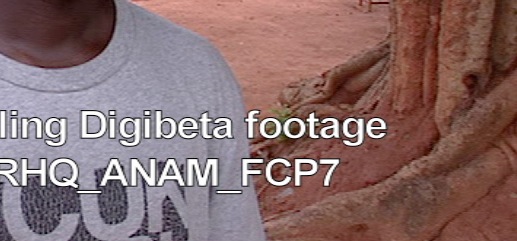
First I did a test with Digibeta footage captured to ProRes 422 (HQ) via a Blackmagic card over SDI in FCP7. I created a new Sequence, let FCP set the sequence settings based on first clip, put a title on the clip with the Boris titler and exported as a QT Movie. Great result.
Then I imported the same captured file in FCPX, created a new Project, let FCPX set the project settings based on first clip, put a title on the clip using the Basic title template and the same font as in FCP7, and exported as a ProRes 422 (HQ) master file. The result was not so good.
Here you see a screen grab of the FCP7 QT:
And this is the FCPX QT:
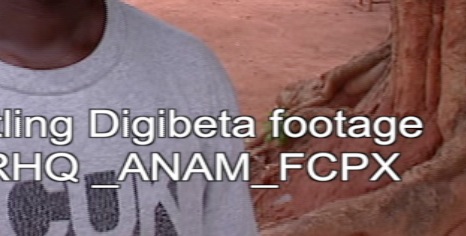
I then laid back both files to Digibeta. When viewing the tape on a Flanders Scientific grade 1 monitor the FCPX video looked better than in QT player, but still slightly softer than the FCP7 video. But what stroke me more was that not only the title but the entire image was softer.
Digibeta video is anamorphic (rectangle pixels), and I remember that from the launch of FCPX I have heard people complain that X does not play nice with anamorphic SD video. So this led to a second test.
Test 2
I decided to convert the file that I had captured in FCP7 to a ProRes (HQ) square pixel video. The original captured file is 16:9. I work in PAL land, so the equivalent for 16:9 PAL 720x576 anamorphic is 1050x576 square pixels.
Sidenote: This may sound strange to experienced broadcast editors because we have always learned that 16:9 PAL is 1024x576 square pixels. But 1050x576 is correct. It is the standard frame size for a 16:9 square SD comp preset in the latest versions of After Effects, in Photoshop CS6 and also in FCPX (FCPX 16:9 SD export is 1050x720 pixels). Older applications (FCP, Premiere etc... still use 1024x576). If you want to know more about this, here's a link: www.mikeafford.com/blog/2009/03/pal-d1-d...-effects-cs4-vs-cs3/
Anyway, I imported the square pixel file in FCP7and dropped it on a new timeline. Caveat: as FCP does not work natively with square pixel 16:9 SD video I got the red render bar. So I could not play the video without rendering but no sweat, I added the same subtitle as in test 1 an and exported the sequence as a QT Movie. Then I played the file in QT7: great result, just like with the anamorphic version.
Then I imported the file in FCPX. Caveat: FCPX does not work natively with square pixel 16:9 SD either. This means that when you drop the square pixel clip on a Project timeline FCPX will NOT accept the format and it will propose different Project settings. But fortunately there is a neat trick I have learned to overcome this problem (all credit goes to T. Payton for this): import the non standard clip in FCPX and from the Event Library open the clip in its own timeline. FCPX will happily display the clip correctly, as opposed to FCP it will play the non-standard video in realtime and in the timeline you can add your subtitles. I applied exactly the same title as I used in the anamorphic test and exported a master file.
I opened the file in QT player, and the result was great! Still slightly softer than the FCP7 video, but with less stepping-stair artifacts than the FCP7 titles. We should take into consideration that the titles in FCP7 were created with the high quality Boris title plugin, and in FCPX with a standard Motion template. As other posters have mentioned here you will get better results in FCPX with a dedicated title plugin such as the ones from Digital Heaven or CHV.
Here you see a comparison of the FCP7 and FCPX 16:9 square pixel SD videos:
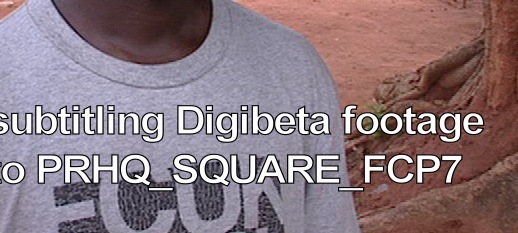
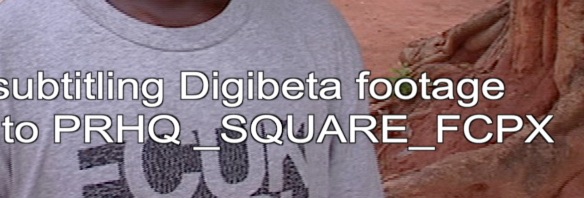
I laid back both videos to Digibeta and not only did the FCPX title look good, it looked better than the FCP7 one on the broadcast monitor because it has less aliasing artifacts.
Test 3
I created two Motion projects from the same still image: one NTSC 720x480 DV Anamorphic project and one NTSC 854x480 square pixel project. I exported both projects to ProRes 422 (HQ) and imported the QT movies in FCPX. There I added a title on both clips and exported the titled clips as ProRes 422 (HQ). As you can see in the next screenshots the title on the anamorphic video is slightly blurred, the title on the square pixel video is sharp.
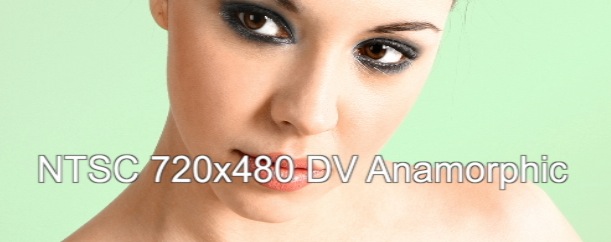

As a final check I brought the FCPX SD projects over to another system with a different graphics card (an iMac with the GTX 680MX whereas the first tests were done on a MacPro with the 5870). Same difference: square titles great, non-square titles blurrier.
And to make it complete I did some more tests with 720p and 1080i square and non-square pixel footage. No problems: all FCPX titles looked perfectly sharp.
My conclusion:
FCPX has had issues with anamorphic SD video from the start, and it still has. One could argue that this is not that important as most FCPX users work with prosumer or professional HD formats, but this reasoning does not hold when you consider that in many parts of the world TV stations still record and broadcast in SD. As a company working for international television we need to deliver many of our programs in SD versions as well, but that's not an issue with respect to the title problem as the vast majority of our masters are edited in HD.
Although this issue really should be fixed I don't think it is a priority for the FCPX Dev team. So what can you do to avoid blurry titles when you work with Digibeta footage?
Either you stay with FCP7 just for subtitling Digibeta, you convert the captured anamorphic video to square pixel ProRes, or you capture the Digibeta video as square pixel ProRes. If your capture card has square pixel format capture presets this could be an option.
Anyway I suggest you send a bug report to Apple.
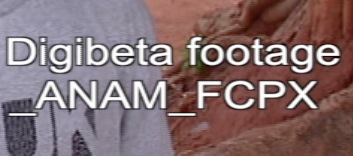
Here's a title in an FCPX anamorphic SD project:
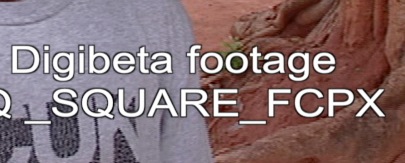
And this is a title in an FCPX square pixel SD project:
Please Log in to join the conversation.
In 1 of the updates to Motion 5 I think a couple of snapshot presets got added. I hadn't remembered seeing them before, and at some time they seemed to appear. But the list is still very incomplete in comparison to the project presets available in FCPX.
The titles supplied with FCPX are created in motion with square pixel snapshots and even if you create a non square pixel Motion Project it gets a square pixel conversion snapshot applied for publishing to FCPX.
But custom snapshots can be made with non-square pixels. I've just gone through a pretty big job relating to creating multiple snapshots, but I don't work with non-square pixels anymore so I never tested for that.
If anyone has a bit of time they could test creating a basic title template with all the standard non-square pixel ratio snapshots. If it turns out it works I'm sure it would be welcomed by many.
Please Log in to join the conversation.
