


3 Post Moderation Rule for New Boarders (25 Jan 2021)
New boarders will have their posts moderated - Don't worry if you cannot see your post immediately.
Do you have The Touch?


Those of you who remember the preview video of ColorTouchX may be interested in seeing what it's become:
Tim
P.S. I've accidentally posted this in the wrong forum, and now I can't move it. Sorry about that.
Please Log in to join the conversation.
- peteramwiggins
-

- Offline
- Administrator
-

- The Administrator :)
- Posts: 1049
- Thank you received: 404
Administrator
Please Log in to join the conversation.
- Scrubelicious
-

- Offline
- Platinum Member
-

- Posts: 1228
- Thank you received: 114
I still prefer muscle memory over touching glass.

Please Log in to join the conversation.
Sean Lander - Editing since 1982 - AVID 1991 - FCP 1999 - FCPX 2011
Please Log in to join the conversation.
Here's a quick demonstration of The Touch in action with FCPX:
and (for those interested), with Lightroom:
I hope it answers at least some of your questions

Tim
Please Log in to join the conversation.

Sean Lander - Editing since 1982 - AVID 1991 - FCP 1999 - FCPX 2011
Please Log in to join the conversation.

If you get "Better Touch Tool" you can customize the hell out of it, too. Pretty much like what you see in those videos.
That will be an interesting product when it is released. Looking forward to learning more details about it.
Please Log in to join the conversation.
- Scrubelicious
-
- Offline
- Platinum Member
-
- Posts: 1228
- Thank you received: 114
Please Log in to join the conversation.
The keyboard and mouse are both great tools - the objective of the Touch is certainly not to replace them, it's to complement them.
The heart of The Touch is in its Color Board control. This offers may advantages over either the mouse of the keyboard:
- By using different numbers of fingers The Touch will instantly pick up the right puck. You don't need to spend time clicking on them, and you can keep you eyes on your image at all times - it's hard to describe how much of a difference this makes until you give it a go.
- Even if the pucks are overlapping with just a couple of pixels of clicking area available, we can still pick them up.
- We slow down the puck's movement when you move you finger slowly to give you much greater precision than using a mouse, however we speed up as you move quickly from one part of the colour board to the other.
- When you reach one side of the color board we send the puck straight to the other side rather than having it blocked against the edge.
Try the trial version...
Tim
Please Log in to join the conversation.
- Scrubelicious
-
- Offline
- Platinum Member
-
- Posts: 1228
- Thank you received: 114
I will give the trial a try.
Please Log in to join the conversation.
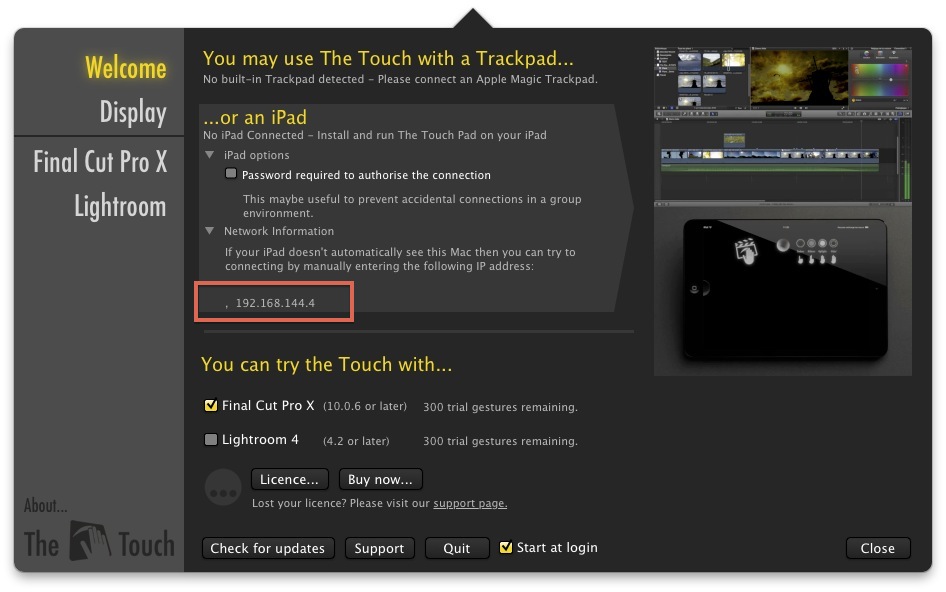
My issue with this program is that your computer needs to be connected to your network via WIFI to use with an iPad which is impossible for me as my MacPro doesn't have it.

Funny because I use iTap with it just fine.
Sean Lander - Editing since 1982 - AVID 1991 - FCP 1999 - FCPX 2011
Please Log in to join the conversation.
Your computer doesn't need to be connected via WiFi - it just needs to be on the same network...
Tim
Please Log in to join the conversation.
Sean Lander - Editing since 1982 - AVID 1991 - FCP 1999 - FCPX 2011
Please Log in to join the conversation.
Please Log in to join the conversation.
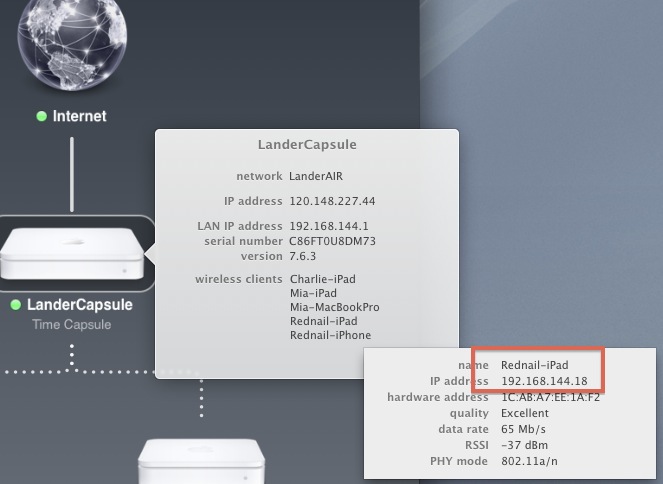
Network is an Apple Time Capsule dual band, with the iPad on the 5Ghz frequency.
I'll try switching to the 2.4 Ghz range and see if that helps.
…Nope. Still not connecting. hmmmm
Sean Lander - Editing since 1982 - AVID 1991 - FCP 1999 - FCPX 2011
Please Log in to join the conversation.
Please Log in to join the conversation.
That's strange, I've not had any other similar reports. Are you sure that you're on the same network?
Can you please try rebooting your router?
Tim
Please Log in to join the conversation.
Sean Lander - Editing since 1982 - AVID 1991 - FCP 1999 - FCPX 2011
Please Log in to join the conversation.
Please Log in to join the conversation.
The Touch shouldn't be altering the behaviour of your trackpad at all if you're not in FCPX or Lightroom. Does this happen systematically? Are you in automatic mode or manual?
Does anyone else have this issue? It's the first such report I've seen.
Tim
Please Log in to join the conversation.
