


- Posts: 4455
- Thank you received: 962
3 Post Moderation Rule for New Boarders (25 Jan 2021)
New boarders will have their posts moderated - Don't worry if you cannot see your post immediately.
10.0.6 Importing Error
- ronny courtens
-

- Offline
- Moderator
-

Less
More
17 Nov 2012 20:10 #17407
by ronny courtens
Replied by ronny courtens on topic 10.0.6 Importing Error
Hi Robert,
I haven't heard of such a workaround yet, but yes it would be interesting to know if breaking up the problematic file solves this issue. If you decide to try this, please post back with your findings.
I haven't heard of such a workaround yet, but yes it would be interesting to know if breaking up the problematic file solves this issue. If you decide to try this, please post back with your findings.
Please Log in to join the conversation.
- drew_bernard
-
 Topic Author
- Offline
- New Member
-

Less
More
- Posts: 7
- Thank you received: 0
18 Nov 2012 23:32 #17470
by drew_bernard
Replied by drew_bernard on topic 10.0.6 Importing Error
Another thing I'm noticing since updating is Final Cut is renaming all my clips. On the SD card, they're named something like "MVI_xxxx", with a series of numbers. But once I import them into FCPX, it renames them to something like "2012-11-17 23:48:18."
Is there any way to change that in settings? I need the same clip names as what's on the SD cards, so it's easy to see what clips I've imported and which ones I haven't.
Is there any way to change that in settings? I need the same clip names as what's on the SD cards, so it's easy to see what clips I've imported and which ones I haven't.
Please Log in to join the conversation.
- ronny courtens
-
- Offline
- Moderator
-
Less
More
- Posts: 4455
- Thank you received: 962
19 Nov 2012 08:43 - 19 Nov 2012 09:58 #17475
by ronny courtens
Replied by ronny courtens on topic 10.0.6 Importing Error
Hi Drew,
By default FCP10 uses the date-time clip metadata when importing clips from an SD card because this provides more specific information for each imported clip (date and time the clip was recorded) than the clip's name on the card (MVI.2345).
But if you want your clips to have the same name as on the card, or you want to give them a custom name, you can batch-rename your clips in the Info panel of the Inspector.
To do this, select all the clips you wish to change in the Events Browser. In the Inspector>Info tab press the little gear icon (bottom right) and choose "Apply Custom Name".
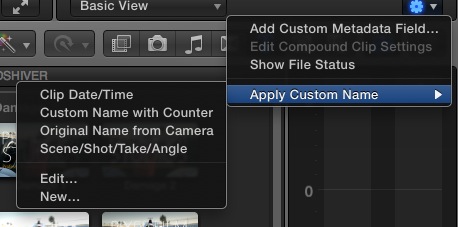
1. If you want the clips to have exactly the same name as their original name from the camera: select "Original name from the camera" from the list.
2. If during the shoot you haven entered scene/shot/take/angle information to your clips and you want these in your name, select this option.
3. If you want to give your clips a specific name that wasn't entered during the shoot (e.g. "Traffic") and you want all your renamed clips to have sequential numbers ("Traffic_01", "Traffic_02" etc...):
Select "Edit" and in the Naming Presets window select "Custom Name with Counter". Then you enter your custom name in the appropriate field and you press OK.
Press the gear icon again, select Apply Custom Name > Custom Name with Counter and all your selected clips will get the new name + every clip will have a higher number according to the date and time the clips were recorded.
4. Using the "New" option you can create more custom naming presets based on different clip metadata. These presets will then be added to the preset list when you select "Apply Custom Name".
In this video you can see how all this works:
www.fcp.co/final-cut-pro/tutorials/669-o...with-final-cut-pro-x
As a sidenote: when you import clips from a card you can make FCP10 hide all the clips you have imported. Just press the little switch bottom right of the import window and check the "Hide imported clips" checkbox.
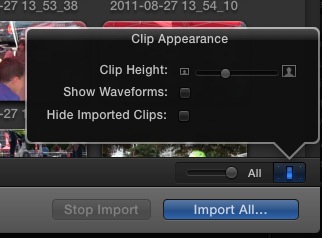
By default FCP10 uses the date-time clip metadata when importing clips from an SD card because this provides more specific information for each imported clip (date and time the clip was recorded) than the clip's name on the card (MVI.2345).
But if you want your clips to have the same name as on the card, or you want to give them a custom name, you can batch-rename your clips in the Info panel of the Inspector.
To do this, select all the clips you wish to change in the Events Browser. In the Inspector>Info tab press the little gear icon (bottom right) and choose "Apply Custom Name".
1. If you want the clips to have exactly the same name as their original name from the camera: select "Original name from the camera" from the list.
2. If during the shoot you haven entered scene/shot/take/angle information to your clips and you want these in your name, select this option.
3. If you want to give your clips a specific name that wasn't entered during the shoot (e.g. "Traffic") and you want all your renamed clips to have sequential numbers ("Traffic_01", "Traffic_02" etc...):
Select "Edit" and in the Naming Presets window select "Custom Name with Counter". Then you enter your custom name in the appropriate field and you press OK.
Press the gear icon again, select Apply Custom Name > Custom Name with Counter and all your selected clips will get the new name + every clip will have a higher number according to the date and time the clips were recorded.
4. Using the "New" option you can create more custom naming presets based on different clip metadata. These presets will then be added to the preset list when you select "Apply Custom Name".
In this video you can see how all this works:
www.fcp.co/final-cut-pro/tutorials/669-o...with-final-cut-pro-x
As a sidenote: when you import clips from a card you can make FCP10 hide all the clips you have imported. Just press the little switch bottom right of the import window and check the "Hide imported clips" checkbox.
Last edit: 19 Nov 2012 09:58 by ronny courtens. Reason: typo
Please Log in to join the conversation.

19 Nov 2012 15:35 #17487
by robertdee
Replied by robertdee on topic 10.0.6 Importing Error
OK, here's what I managed to find out over the weekend with my import problems:
The 'still referencing media on the camera' message occured when I chose to transcode on import (to both prores and proxy). The solution seems to be to import first and then chose transcode once the clips are imported.
What was odd was that it took a long time for FCPX to import the footage - much longer than it used to (I'd say 1-2 hours for the same length of footage). All the automation boxes (color balance, etc) were unchecked. I don't understand why this take so long. The software crashed at first half way through and when I re-opened I had '!' icons on some of the clips which I selected and chose to reimport. That seemed to work.
I'm taking a guess here but my workflow is to copy all the folders from each card into folders on my external FW800 drive (new) labelled 'card one', 'card two', etc. and I imagine there's metadata in those folders which FCPX is accessing and is potentially causing the delays. Like I say, that's a guess but I can't think why else there would be an issue. The clips it had a problem with were not the longer clips as I first thought and all the clips playback fine from the finder.
Hope this helps people with similar problems. Any feedback or thoughts are welcome, of course. Thanks for the feedback you guys have already given too.
The 'still referencing media on the camera' message occured when I chose to transcode on import (to both prores and proxy). The solution seems to be to import first and then chose transcode once the clips are imported.
What was odd was that it took a long time for FCPX to import the footage - much longer than it used to (I'd say 1-2 hours for the same length of footage). All the automation boxes (color balance, etc) were unchecked. I don't understand why this take so long. The software crashed at first half way through and when I re-opened I had '!' icons on some of the clips which I selected and chose to reimport. That seemed to work.
I'm taking a guess here but my workflow is to copy all the folders from each card into folders on my external FW800 drive (new) labelled 'card one', 'card two', etc. and I imagine there's metadata in those folders which FCPX is accessing and is potentially causing the delays. Like I say, that's a guess but I can't think why else there would be an issue. The clips it had a problem with were not the longer clips as I first thought and all the clips playback fine from the finder.
Hope this helps people with similar problems. Any feedback or thoughts are welcome, of course. Thanks for the feedback you guys have already given too.
Please Log in to join the conversation.
- drew_bernard
-
Topic Author
- Offline
- New Member
-
Less
More
- Posts: 7
- Thank you received: 0
19 Nov 2012 15:39 #17488
by drew_bernard
Replied by drew_bernard on topic 10.0.6 Importing Error
Thanks Ronny! That answers that question!
Please Log in to join the conversation.
- ronny courtens
-
- Offline
- Moderator
-
Less
More
- Posts: 4455
- Thank you received: 962
19 Nov 2012 18:06 #17496
by ronny courtens
Replied by ronny courtens on topic 10.0.6 Importing Error
Hi Robert,
Thank you for this information. You can safely put the folders from the card into new folders on your drive without any problems. We do that frequently. As long as you never, ever change the original name of the card folders.
Good to know that importing first and transcoding afterwards has solved the 'still referencing...' issue for you, but this really should not be happening in the first place. I have sent feedback about this issue and am awaiting a response.
Thank you for this information. You can safely put the folders from the card into new folders on your drive without any problems. We do that frequently. As long as you never, ever change the original name of the card folders.
Good to know that importing first and transcoding afterwards has solved the 'still referencing...' issue for you, but this really should not be happening in the first place. I have sent feedback about this issue and am awaiting a response.
Please Log in to join the conversation.
19 Nov 2012 18:21 #17499
by robertdee
Replied by robertdee on topic 10.0.6 Importing Error
Thanks Ronny,
I'm really pleased with the updates in this release but I am finding it buggy with this and the render/export issues I had as well (long times and crashes). I imagine the next point release will be a bug fix. I guess it's to be expected with so many additions/changes.
I'm really pleased with the updates in this release but I am finding it buggy with this and the render/export issues I had as well (long times and crashes). I imagine the next point release will be a bug fix. I guess it's to be expected with so many additions/changes.
Please Log in to join the conversation.
- ronny courtens
-
- Offline
- Moderator
-
Less
More
- Posts: 4455
- Thank you received: 962
19 Nov 2012 18:25 #17501
by ronny courtens
Replied by ronny courtens on topic 10.0.6 Importing Error
I agree. Very often we get a bug fix update relatively soon after a major feature update. This has been the case with legacy FCP as well, and with any other NLE software for that matter.
Please Log in to join the conversation.
- David Sands
-
- Offline
- New Member
-
Less
More
- Posts: 9
- Thank you received: 0
20 Nov 2012 21:52 #17550
by David Sands
Replied by David Sands on topic 10.0.6 Importing Error
I'm having an issue where my folders are not creating keywords on import. However, the folder the movies are in becomes the camera name & the reel of the clip. Example, I place my footage per day per shooters card: Day 1<Card 1 DS. All the clips from that folder are Card 1 DS for the camera name & reel. Easy enough to create a smart collection from, but I don't like losing the camera name and this is obviously a bug.
Please Log in to join the conversation.
- ronny courtens
-
- Offline
- Moderator
-
Less
More
- Posts: 4455
- Thank you received: 962
20 Nov 2012 21:56 #17551
by ronny courtens
Replied by ronny courtens on topic 10.0.6 Importing Error
You are right, this shouldn't happen. Fill in the feedback report.
Please Log in to join the conversation.
- Tom Wolsky
-

- Offline
- Moderator
-
21 Nov 2012 01:00 #17553
by Tom Wolsky
Replied by Tom Wolsky on topic 10.0.6 Importing Error
What kind of footage is this? Are you importing files or is the camera import function being used?
Please Log in to join the conversation.
- David Sands
-
- Offline
- New Member
-
Less
More
- Posts: 9
- Thank you received: 0
21 Nov 2012 01:42 #17554
by David Sands
Replied by David Sands on topic 10.0.6 Importing Error
Importing files. I'm copying the cards to a folder during the shoot. The name of that folder becomes the reel & camera name.
Also, during import, the codec says PAL until it's imported.
All footage is from 7D's & a 5Diii
Also, during import, the codec says PAL until it's imported.
All footage is from 7D's & a 5Diii
Please Log in to join the conversation.
- Tom Wolsky
-
- Offline
- Moderator
-
21 Nov 2012 02:04 #17555
by Tom Wolsky
Replied by Tom Wolsky on topic 10.0.6 Importing Error
You might want to check what's happening here. 10.0.6 handles DSLR media differently in this version. Use the import function and when you see the files, check the lower left corner of the import window. See if you have two buttons there to change from list view to filmstrip view. DSLRs now use the camera import function.
Please Log in to join the conversation.
- David Sands
-
- Offline
- New Member
-
Less
More
- Posts: 9
- Thank you received: 0
21 Nov 2012 02:07 - 21 Nov 2012 02:10 #17556
by David Sands
Replied by David Sands on topic 10.0.6 Importing Error
Will do as soon as I get back in the office. Thanks for the tip!
We have to dump the cards during some shoots; is camera archive the way to go?
We have to dump the cards during some shoots; is camera archive the way to go?
Last edit: 21 Nov 2012 02:10 by David Sands.
Please Log in to join the conversation.

21 Nov 2012 03:51 #17559
by BenB
Replied by BenB on topic 10.0.6 Importing Error
7D? I use one of those daily. It records an H.264 QT .mov file. It should import as any normal .mov file would. Nothing's changed about that.
Please Log in to join the conversation.
- Tom Wolsky
-
- Offline
- Moderator
-
21 Nov 2012 03:55 - 21 Nov 2012 03:56 #17560
by Tom Wolsky
Replied by Tom Wolsky on topic 10.0.6 Importing Error
The interface behavior has changed when you import from an archived card.
Last edit: 21 Nov 2012 03:56 by Tom Wolsky.
Please Log in to join the conversation.
24 Nov 2012 22:44 #17763
by fcpguru
Replied by fcpguru on topic 10.0.6 Importing Error
Chiming in here. Also getting this error. I've started to create camera archives of my work as a backup as well. For me, I haven't been able to put my finger on why or what happens, so I think it's a bit of a wonky bug. I will say that it happens with DSLR footage, but on a friend's copy of 10.0.4 a few weeks ago he was trying to import some P2 media and got this similar bug.
Filling out feedback and hoping for a bug fix soon!
Filling out feedback and hoping for a bug fix soon!
Please Log in to join the conversation.
11 Mar 2013 03:17 #22411
by Alekgelis
Replied by Alekgelis on topic 10.0.6 Importing Error
wpark wrote: I'm actually having trouble importing 5D clips ranging from 18MB to 4GB.
Failure circumstances:
1) I've tried copying and pasting all files on the card onto a folder on an external drive (to keep the file structure intact, just in case), and then importing files from the folder.
someone have already solved the problem?
Thanks.. !
Please Log in to join the conversation.
