


- Posts: 109
- Thank you received: 2
3 Post Moderation Rule for New Boarders (25 Jan 2021)
New boarders will have their posts moderated - Don't worry if you cannot see your post immediately.
10.0.6 RELEASED!!!
23 Oct 2012 19:08 #15467
by Mickey G
10.0.6 RELEASED!!! was created by Mickey G
Please Log in to join the conversation.

23 Oct 2012 19:47 #15480
by wooter

Replied by wooter on topic 10.0.6 RELEASED!!!
Please Log in to join the conversation.

23 Oct 2012 19:56 - 23 Oct 2012 19:58 #15483
by BenB
Replied by BenB on topic 10.0.6 RELEASED!!!
Lots of articles to fill you in on the new stuff to start appearing on
www.macprovideo.com/hub/category/final-cut
soon. Very exciting update. Beats PPro at REDCODE RAW now, with TWO WAY metadata read/write and 5K support.
Make sure ALL of your plugins are up to date.
Make sure ALL of your plugins are up to date.
Last edit: 23 Oct 2012 19:58 by BenB.
Please Log in to join the conversation.

23 Oct 2012 20:02 #15487
by Seanus
Sean Lander - Editing since 1982 - AVID 1991 - FCP 1999 - FCPX 2011
Replied by Seanus on topic 10.0.6 RELEASED!!!
Wow. Downloading now.
Looks like Apple really did listen to just about everything everyone wanted.
THANK YOU APPLE!
Looks like Apple really did listen to just about everything everyone wanted.
THANK YOU APPLE!
Sean Lander - Editing since 1982 - AVID 1991 - FCP 1999 - FCPX 2011
Please Log in to join the conversation.
- ronny courtens
-

- Offline
- Moderator
-

Less
More
- Posts: 4455
- Thank you received: 962
23 Oct 2012 20:19 #15496
by ronny courtens
Replied by ronny courtens on topic 10.0.6 RELEASED!!!
Beats PPro at REDCODE RAW now, with TWO WAY metadata read/write and 5K support.
Yes that's a very interesting workflow they have adopted. Proxy editing, even on slower systems, with direct access to raw R3D files for finishing. Way to go.
Yes that's a very interesting workflow they have adopted. Proxy editing, even on slower systems, with direct access to raw R3D files for finishing. Way to go.
Please Log in to join the conversation.
23 Oct 2012 20:28 #15498
by BenB
Replied by BenB on topic 10.0.6 RELEASED!!!
Be sure to back up your events, projects, the update may not work with some plugins, yet. Never update mid-project. See this KB article from Apple.
support.apple.com/kb/HT5550
support.apple.com/kb/HT5550
Please Log in to join the conversation.
23 Oct 2012 20:30 #15500
by Seanus
Sean Lander - Editing since 1982 - AVID 1991 - FCP 1999 - FCPX 2011
Replied by Seanus on topic 10.0.6 RELEASED!!!
Hmmm can't seem to get dual viewers working. Is this resolution dependant?
Sean Lander - Editing since 1982 - AVID 1991 - FCP 1999 - FCPX 2011
Please Log in to join the conversation.
23 Oct 2012 20:39 #15508
by BenB
Replied by BenB on topic 10.0.6 RELEASED!!!
Nope, just a regular viewer. It only views what is selected in the Browser, as it's a "Browser Viewer". Find it in the Window menu, Command-Control-3.
Please Log in to join the conversation.
23 Oct 2012 20:43 #15509
by Seanus
Sean Lander - Editing since 1982 - AVID 1991 - FCP 1999 - FCPX 2011
Replied by Seanus on topic 10.0.6 RELEASED!!!
For some reason it wasn't there but after trashing prefs it's now shown up. Thanks.
Sean Lander - Editing since 1982 - AVID 1991 - FCP 1999 - FCPX 2011
Please Log in to join the conversation.
23 Oct 2012 20:57 #15512
by BenB
Replied by BenB on topic 10.0.6 RELEASED!!!
The Tilde key is our best friend now when working with Connected Clips (try Slipping with the Tilde key).
Multiple ranges in the Browser, and remembered.
Chapter Markers work with more than just DVDs, and with DVDs can be used as sub titles.
Check out the Multichannel Audio Editing in conjunction with Multiclips. Just mind blowing.
Exports are now background processes and use GPU.
Scopes now have a horizontal split which is killer.
Anamorphic in 4:3 has better support.
Creation of compound clips in a Timeline adds them to the default Event automatically
Drop Shadow effect with onscreen controls
Rename clips directly in the Timeline
Supports multiple social network accounts (YouTube, Vimeo, etc)
It's the little things...
Multiple ranges in the Browser, and remembered.
Chapter Markers work with more than just DVDs, and with DVDs can be used as sub titles.
Check out the Multichannel Audio Editing in conjunction with Multiclips. Just mind blowing.
Exports are now background processes and use GPU.
Scopes now have a horizontal split which is killer.
Anamorphic in 4:3 has better support.
Creation of compound clips in a Timeline adds them to the default Event automatically
Drop Shadow effect with onscreen controls
Rename clips directly in the Timeline
Supports multiple social network accounts (YouTube, Vimeo, etc)
It's the little things...
Please Log in to join the conversation.

23 Oct 2012 21:28 - 23 Oct 2012 21:29 #15521
by RobM
Replied by RobM on topic 10.0.6 RELEASED!!!
Thanks for all the extra tidbits Ben.
The horizontal split feature (select vertical layout) is indeed killer.
Just having a play around with it now and the the luma waveform lines up almost exactly with the image in the viewer (1080 footage on a 1080 display, viewer set to 50%) At a glance you can quickly identify what parts of the waveform match what parts of the image.
The horizontal split feature (select vertical layout) is indeed killer.
Just having a play around with it now and the the luma waveform lines up almost exactly with the image in the viewer (1080 footage on a 1080 display, viewer set to 50%) At a glance you can quickly identify what parts of the waveform match what parts of the image.
Last edit: 23 Oct 2012 21:29 by RobM.
Please Log in to join the conversation.
23 Oct 2012 21:30 - 23 Oct 2012 21:38 #15525
by Seanus
Sean Lander - Editing since 1982 - AVID 1991 - FCP 1999 - FCPX 2011
Replied by Seanus on topic 10.0.6 RELEASED!!!
I've been holding off on starting a big project waiting for this so today is the day!
Loving it so far. Amazing to have scopes underneath both Viewer and Canvas simultaneously.
This will make colour grading a snap!
New Paste Attributes is yet another example of Apple going above and beyond!
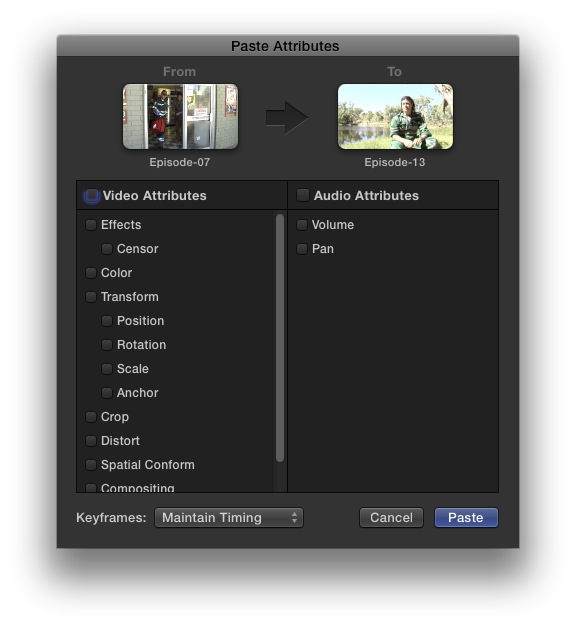
Loving it so far. Amazing to have scopes underneath both Viewer and Canvas simultaneously.
This will make colour grading a snap!
New Paste Attributes is yet another example of Apple going above and beyond!
Sean Lander - Editing since 1982 - AVID 1991 - FCP 1999 - FCPX 2011
Last edit: 23 Oct 2012 21:38 by Seanus.
Please Log in to join the conversation.

23 Oct 2012 23:53 #15581
by rickytin
Replied by rickytin on topic 10.0.6 RELEASED!!!
The Tilde key is our best friend now when working with Connected Clips (try Slipping with the Tilde key).
The tilde key is not working for me, I have cheek the keyboard setting with no luck.
To be sure the key is below the esc key.
The tilde key is not working for me, I have cheek the keyboard setting with no luck.
To be sure the key is below the esc key.
Please Log in to join the conversation.
24 Oct 2012 00:03 #15585
by BenB
Replied by BenB on topic 10.0.6 RELEASED!!!
Place a clip in the primary storyline.
Connect a clip to it.
Hit "T" for the trim tool.
Click the center of the clip.
Hold the Tilde key down.
While holding, click the center of the clip and slip it.
The Connected Clip should stay in place.
Try trashing prefs with Digital Rebellion's free app "Preference Manager". Then try again.
Connect a clip to it.
Hit "T" for the trim tool.
Click the center of the clip.
Hold the Tilde key down.
While holding, click the center of the clip and slip it.
The Connected Clip should stay in place.
Try trashing prefs with Digital Rebellion's free app "Preference Manager". Then try again.
Please Log in to join the conversation.

24 Oct 2012 01:16 #15595
by alex4D
Replied by alex4D on topic 10.0.6 RELEASED!!!
New keyboard shortcuts:
Command-Control-3 - Show or hide the Event Viewer
Option-X - Clear the start and end point of a range
Option- and Shift-Option-Tab to move directly to next and previous title text item
Command-Shift-I and -O set additional range selection start and end points
Option-F - Add freeze frame in timeline. If playhead is in an event, connect a freeze frame from event to timeline
Option-Control-S - Expand or collapse audio components for the selection in the Timeline
Command-Option-Delete - Delete the selection and attach the connected clip or clips to the resulting gap clip
If no clip is selected, Shift-C Crop, Cmd-Shift-D Distort + Shift-T Transform now show their controls on the topmost clip under the playhead
Command-Control-3 - Show or hide the Event Viewer
Option-X - Clear the start and end point of a range
Option- and Shift-Option-Tab to move directly to next and previous title text item
Command-Shift-I and -O set additional range selection start and end points
Option-F - Add freeze frame in timeline. If playhead is in an event, connect a freeze frame from event to timeline
Option-Control-S - Expand or collapse audio components for the selection in the Timeline
Command-Option-Delete - Delete the selection and attach the connected clip or clips to the resulting gap clip
If no clip is selected, Shift-C Crop, Cmd-Shift-D Distort + Shift-T Transform now show their controls on the topmost clip under the playhead
Please Log in to join the conversation.
24 Oct 2012 01:38 #15598
by BenB
Replied by BenB on topic 10.0.6 RELEASED!!!
"Command-Option-Delete - Delete the selection and attach the connected clip or clips to the resulting gap clip."
It does a ripple delete for me. Shift-Delete leaves a gap clip for me.
I'm using the delete key next to the = key, as found on a leptop, not the Delete key found in the navigation keys of a full sized keyboard.
The exception to make it work as you describe is if there's only one clip in the Primary Timeline.
It does a ripple delete for me. Shift-Delete leaves a gap clip for me.
I'm using the delete key next to the = key, as found on a leptop, not the Delete key found in the navigation keys of a full sized keyboard.
The exception to make it work as you describe is if there's only one clip in the Primary Timeline.
Please Log in to join the conversation.
- DSvoboda356
-

- Offline
- Premium Member
-

Less
More
- Posts: 109
- Thank you received: 5
24 Oct 2012 01:44 #15600
by DSvoboda356
Replied by DSvoboda356 on topic 10.0.6 RELEASED!!!
Hmm. When go to import footage from a DSLR not it seems that I have to have the media stored in the Events folder. Can anyone else replicate this?
Please Log in to join the conversation.
- DSvoboda356
-
- Offline
- Premium Member
-
Less
More
- Posts: 109
- Thank you received: 5
24 Oct 2012 01:46 - 24 Oct 2012 02:06 #15601
by DSvoboda356
Replied by DSvoboda356 on topic 10.0.6 RELEASED!!!
Here is a grab
Last edit: 24 Oct 2012 02:06 by DSvoboda356.
Please Log in to join the conversation.
24 Oct 2012 01:52 - 24 Oct 2012 02:01 #15603
by RobM
Replied by RobM on topic 10.0.6 RELEASED!!!
A few quick observations:
4K original Red R3D (not optimised) playing back in realtime (with playback quality set to better performance - i.e 1/4 res and timeline unrendered) off internal HD with custom colour correction filter applied plus two shape masks from the color board.
Rendering seems significantly quicker ( to master file) than 10.05. Background rendering and rendering from the modify menu is now as fast as render on export.
21 second ProRes 422 1080p clip with every parameter in the color board altered rendered/exported in 12 seconds to the internal drive on an early 2011 MacBook Pro 17inch.
Limited testing so YMMV.
4K original Red R3D (not optimised) playing back in realtime (with playback quality set to better performance - i.e 1/4 res and timeline unrendered) off internal HD with custom colour correction filter applied plus two shape masks from the color board.
Rendering seems significantly quicker ( to master file) than 10.05. Background rendering and rendering from the modify menu is now as fast as render on export.
21 second ProRes 422 1080p clip with every parameter in the color board altered rendered/exported in 12 seconds to the internal drive on an early 2011 MacBook Pro 17inch.
Limited testing so YMMV.
Last edit: 24 Oct 2012 02:01 by RobM.
Please Log in to join the conversation.
24 Oct 2012 03:01 - 24 Oct 2012 03:18 #15612
by bendermac
Replied by bendermac on topic 10.0.6 RELEASED!!!
still no way to create custom layouts.
i love the new event viewer - key feature for me - but having the damn event browser stick right next to without any chance to move it out of the way, it just sucks.
i want true "two up" for editing!!!
btw, to import r3d footage, you need to install the new r3d plugin which can be found here .
i love the new event viewer - key feature for me - but having the damn event browser stick right next to without any chance to move it out of the way, it just sucks.
i want true "two up" for editing!!!
btw, to import r3d footage, you need to install the new r3d plugin which can be found here .
Last edit: 24 Oct 2012 03:18 by bendermac.
Please Log in to join the conversation.
