


3 Post Moderation Rule for New Boarders (25 Jan 2021)
New boarders will have their posts moderated - Don't worry if you cannot see your post immediately.
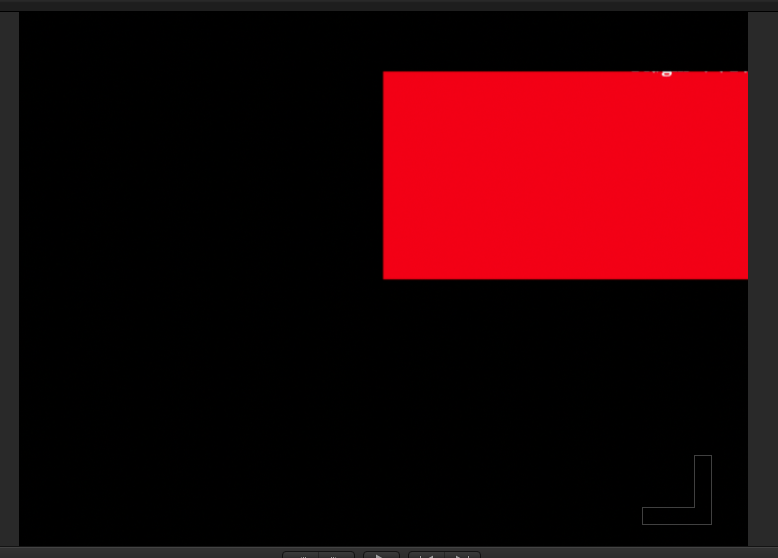
What the heck is this??


Can't sleep? Try this: fcpxpert.net ;-)
Please Log in to join the conversation.
- Tom Wolsky
-

- Offline
- Moderator
-

Please Log in to join the conversation.
Here's the thing... it has been on that clip for at least 2 days, playing and rendering fine, until this AM's start up. Nothing has changed. Also, when selecting the clip and skimming the effect preview box, it shows up fine. However, *apply* the effect to the clip and the red box results. Trashed all renders, trashed prefs.... weird.
EDIT: FWIW, just opened an HD project, different event, different media. Same result.
EDIT 2: And here's the problem "/ 8/10/12 11:58:01.448 AM Final Cut Pro: -[FFAnchoredGapGeneratorComponent effectiveRangeOfObjectIncludingTransitions:]: unrecognized selector sent to instance 0x14ea0c190"
Off to file a bug report I guess...
Can't sleep? Try this: fcpxpert.net ;-)
Please Log in to join the conversation.
"8/10/12 11:58:14.625 AM Final Cut Pro: *** OpenGL error 0x0506 (invalid framebuffer operation) in function "GL_CHECK_CURRENT_ERROR"
Anyone got an idea why this suddenly started happening, and uh... how to fix it? I've done all the usual things short of reinstalling FCP X. Frankly, it's not a big deal unless it's a precursor to some other horrible failure or other. Thanks!
Can't sleep? Try this: fcpxpert.net ;-)
Please Log in to join the conversation.

Did you try removing the effect from the clip? Removing the clip from the Timeline and then re-edit it in? Is the clip in the Browser still online?
Please Log in to join the conversation.
BenB wrote: What Mac model, how much RAM, what GPU, where are you Projects and Events stored?
Did you try removing the effect from the clip? Removing the clip from the Timeline and then re-edit it in? Is the clip in the Browser still online?
Mac Pro dual 2.26 Quad core, 16 GB ram, HD 5870 1024... It's not the hardware... well, maybe the GPU or drivers?
Tried all that, as i said, it happens with that filter in any project. All events/projects are local in the proper folders, all media is on a networked (appleshare) server. Again, this just started happening, the filter was fine until this AM...
Can't sleep? Try this: fcpxpert.net ;-)
Please Log in to join the conversation.
So, be sure you're up to date on all versions of the OS and apps (what OS version BTW?).
Move the app from the Applications folder to the Trash. Launch the App Store, in the Purchased tab, and click "Install" by FCP X.
Please Log in to join the conversation.
BenB wrote: Um, "Appleshare"? That's been dead for a decade. Is it an Ethernet network? FCP X is picky about networks.
So, be sure you're up to date on all versions of the OS and apps (what OS version BTW?).
Move the app from the Applications folder to the Trash. Launch the App Store, in the Purchased tab, and click "Install" by FCP X.
Whatever... Ethernet. Haven't upgrade to ML, but everything is the latest otherwise. The network is fine, I've been using it every day for months In X and years in 7. Guess I'll try reinstalling the app. Maybe that filter got screwed up somehow... Good thing the client isn't in love with it or I'd be screwed.... Oh Well..
Can't sleep? Try this: fcpxpert.net ;-)
Please Log in to join the conversation.
Yeah, sounds like a corrupted clip or corrupted template file. Fortunately reinstalling FCP X is super easy, and doesn't require a serial number or several dozen disks in a 150 pound box full of engineering manuals.
Please Log in to join the conversation.
BenB wrote: Yey, Ethernet is not Appleshare, although Appleshare piggybacked on Ethernet. But that was long, long, long ago. I'm amazed anyone even remembers Appleshare! LOL!
Yeah, sounds like a corrupted clip or corrupted template file. Fortunately reinstalling FCP X is super easy, and doesn't require a serial number or several dozen disks in a 150 pound box full of engineering manuals.
I am old.
 Yeah, hopefully that'll fix it, though DL'ing over a GB takes a while too...
 Can't sleep? Try this: fcpxpert.net ;-)
Please Log in to join the conversation.
I remember when the first breakthrough 500GB hard drives were blowing our minds, and before that when drives were only measured in MB and files were only measured in KB. I need a drink...
Please Log in to join the conversation.
BenB wrote: Us old guys gotta stick together. Yes, it's time to download, but not the 4+ hours those several dozen (or so it seemed) DVDs took to install. And you don't have to babysit it to change the disks out every hour or two. HA!
I remember when the first breakthrough 500GB hard drives were blowing our minds, and before that when drives were only measured in MB and files were only measured in KB. I need a drink...
Piles of System floppies. Avid R-Mags. 9GB, about 5 lbs. Thousands of dollars. :whistle: I'll say no more.... lol
Can't sleep? Try this: fcpxpert.net ;-)
Please Log in to join the conversation.
8/10/12 6:25:59.367 PM Final Cut Pro: -[FFAnchoredGapGeneratorComponent effectiveRangeOfObjectIncludingTransitions:]: unrecognized selector sent to instance 0x1338e37b0
What say you nerds?

Can't sleep? Try this: fcpxpert.net ;-)
Please Log in to join the conversation.
Please Log in to join the conversation.
- Tom Wolsky
-
- Offline
- Moderator
-
Where's the gap generator? What's it doing? What's the transition doing?
Please Log in to join the conversation.
BenB wrote: I'm suspecting a corrupted render file (delete all renders via the File menu) or a corrupted original media file.
That's where I started, but as I said, I got the same result now trying that filter in a project in a completely different event. totally different media/render files. It's either a bug in X, or something funky with my system. The only difference from when it was working till it stopped was the mac went to sleep overnight. Didn't even quit X.
Can't sleep? Try this: fcpxpert.net ;-)
Please Log in to join the conversation.
Tom Wolsky wrote: Reinstalling the application won't do anything.
Where's the gap generator? What's it doing? What's the transition doing?
I wish I knew... That info came from the console log, so it's something in the guts of FCPX... Have to ask whoever wrote the software.
It's not a transition, it's the "Trails" filter. Simply applied to a clip. Any clip. In any event. It's doesn't only happen on one particular source. I still have my developer bug tracker account, guess I'll report it if I can't isolate something on my end that's causing it.
Can't sleep? Try this: fcpxpert.net ;-)
Please Log in to join the conversation.
The next step, having done everything else, is to download the free app "Final Cut Remover" from Digital Rebellion (.com). This will remove all traces of the app. Reinstall the app, and you may have to reinstall the "Additional Content" (which we're after).
But there's not much left to do at this point. If it is in fact a corrupted effect, and I've seen this before, you have to wipe out all traces of the app with Final Cut Remover.
Yes, reinstalling the app can do LOTS. I've seen it over and over first hand solve problems.
But more important, document this all, including the URL for this thread, and fill our the Feedback page. No real need to use the bug report page, it all goes to the same place and gets cataloged the same way. The dev team follows up on things like this extremely well.
Please Log in to join the conversation.
- Tom Wolsky
-
- Offline
- Moderator
-
Please Log in to join the conversation.
I have no other solutions since everything else has been tried. I wouldn't normally think this would matter, but nothing else has worked.
I'm open to any suggestions.
Please Log in to join the conversation.
