


3 Post Moderation Rule for New Boarders (25 Jan 2021)
New boarders will have their posts moderated - Don't worry if you cannot see your post immediately.
iMac Edit Suite?
- mistermattsmith
-
 Topic Author
- Offline
- Senior Member
-

Please Log in to join the conversation.
I'm thinking of getting one myself as my old MacPro can't run Mountain Lion. But I'll wait at least until Oct as they're long overdue for an update.
Sean Lander - Editing since 1982 - AVID 1991 - FCP 1999 - FCPX 2011
Please Log in to join the conversation.

Please Log in to join the conversation.

Love it.
Please Log in to join the conversation.
- Scrubelicious
-

- Offline
- Platinum Member
-

- Posts: 1228
- Thank you received: 114
Please Log in to join the conversation.
- mistermattsmith
-
Topic Author
- Offline
- Senior Member
-
Re: the I/O, we're completely tapeless, so no tape ingest/layoff needed. With Thunderbolt, think we'd go for one of the new breakout boxes from Aja or Blackmagic to run a monitor/give us some input just in case. We don't need a reference monitor for the stuff we do, but clients do like a big screen for viewing.
Be good to hear more thoughts...
Please Log in to join the conversation.
- mistermattsmith
-
Topic Author
- Offline
- Senior Member
-
fcpguru wrote: Editing on the 27" iMac with the Pegasus RAID and it's an absolute dream. I maxxed out the graphics card and am rocking FCPX with RED workflows and Davinci like it ain't no thing. I have an UltraStudio 3D I'm using for monitoring
Love it.
Any pics of your set-up please? Be interested to see what it looks like in situ..
Please Log in to join the conversation.
Just get a nice monitor and plug it into the Thunderbolt port as it is also a display out.
Sean Lander - Editing since 1982 - AVID 1991 - FCP 1999 - FCPX 2011
Please Log in to join the conversation.
- mistermattsmith
-
Topic Author
- Offline
- Senior Member
-
Please Log in to join the conversation.
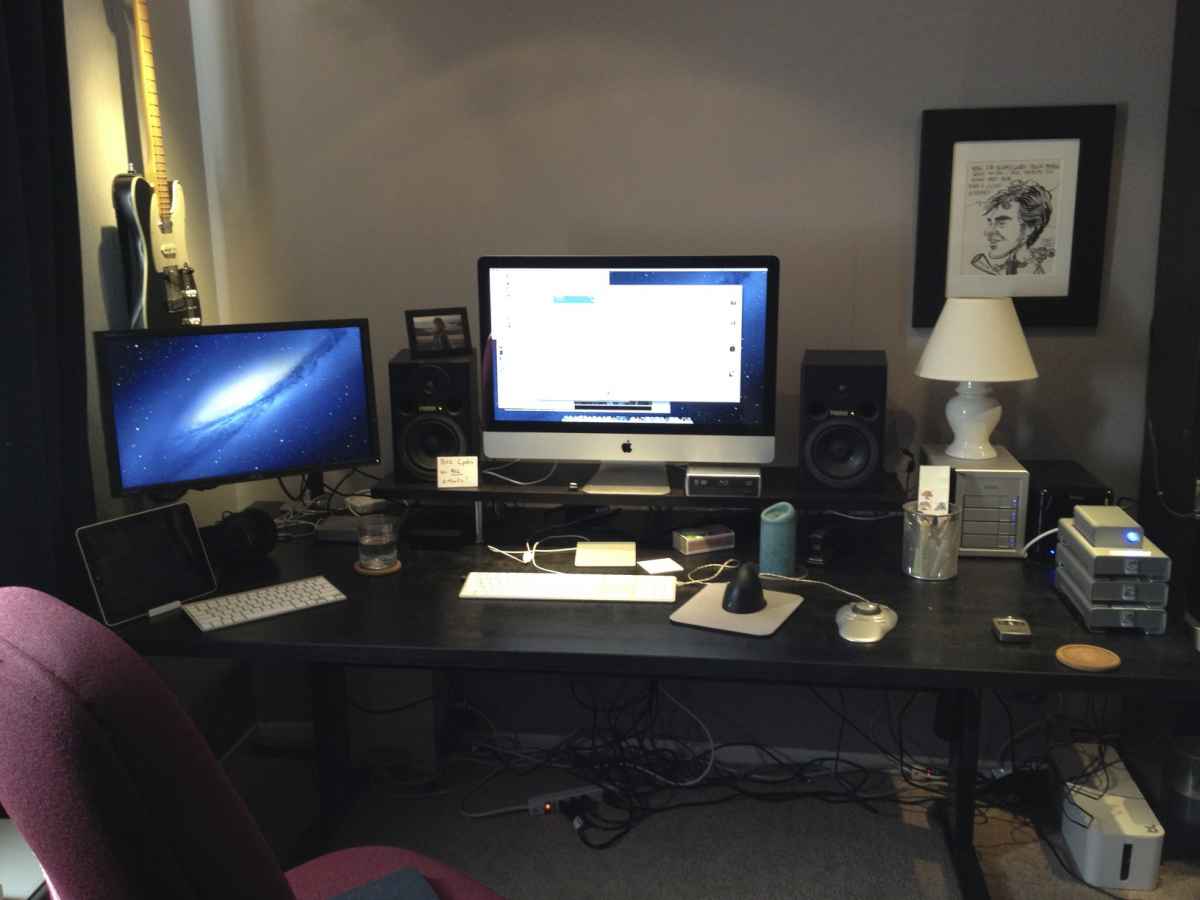
Please Log in to join the conversation.
- Marcus Samuel-Gaskin
-

- Offline
- Junior Member
-

- Posts: 24
- Thank you received: 1
With the Mac Pro morphing into something else next year, I'm hoping that the next rev of the iMac allows for card swapping. If not , fine, I'll just get the beefiest gfx, cpu and max out the RAM.
I'm on an FW800 iMac right now and it's a nice all-round machine but I desire an upgrade.
I'll need to run Resolve now it's gone to V9, I can't run it at all on my ATI card, which means my Resolve training has been put on hold but Color still runs like a dream on ATI hardware.

That's the thing for me. fcpguru, you say Resolve runs great. Questions..
Is that on ATI or on NVIDIA hardware?
Also, does TB carry a real baseband video signal that's legit for critical monitoring purposes?
Does Resolve run on two monitors as I'll be planning to use this existing iMac as a 2nd GUI monitor and hook up a grading monitor to the ioXT.
Please Log in to join the conversation.
Please Log in to join the conversation.
www.bhphotovideo.com/c/product/857191-REG/AJA_T_TAP_T_TAP.html
Please Log in to join the conversation.
- Marcus Samuel-Gaskin
-
- Offline
- Junior Member
-
- Posts: 24
- Thank you received: 1

fcpguru wrote: All recent macs with the exception of the Retina Mac Book Pros utilize ATI graphics. I haven't had any issues, but I also can't claim to playback in realtime either.
So how many fps do you get. Is it passable for client purposes or horrible? Because Resolve on ATI in my experience its been an unusable crawl. Color on the other hand flies.
fcpguru wrote: I noticed you were thinking an AJA ioXT, but I am not sure if that will be compatible with Resolve.
This is the first i'm hearing of this. Is this (semi)officially reported somewhere? Why wouldn't it work with the ioXT?
Also, can Resolve spread over two screens because I have a perfectly good iMac that I can use as a 2nd GUI monitor :whistle:
Ben, just to confirm, that signal is a proper signal that I can grade from?
Please Log in to join the conversation.
Footage is coming from the Pegasus raid and I have the AMD Radeon HD 6970M 2GB card installed.
I think it's passable for clients, as it still looks fairly good, but to really check the crispness I go to full res premium and then the system acts fairly slow. Hoping for a few speed improvements in 9 though.
Please Log in to join the conversation.
- Marcus Samuel-Gaskin
-
- Offline
- Junior Member
-
- Posts: 24
- Thank you received: 1
Sorry to press, but why wouldn't the ioXT work with Resolve? and about that 2nd GUI.
Cheers fcpguru, i appreciate your experience in this.
Please Log in to join the conversation.
Please Log in to join the conversation.
Of course. On a Mac Pro tower, you're using a PCI card to go out to an HD-SDI signal to a broadcast monitor. T'bolt is the same PCI data format. Same thing. AJA, Blackmagic and Matrox are riding the PCI data stream, not the monitor stream, for their devices to go to HD-SDI. Just like their cards do in a tower.
Please Log in to join the conversation.
- Marcus Samuel-Gaskin
-
- Offline
- Junior Member
-
- Posts: 24
- Thank you received: 1
fcpguru wrote: Read it here a while ago:
Wow, fcpguru, are they serious?! Isn't that anticompetitive ?
So i HAVE to buy BMD product to monitor with Resolve? say it ain't so Joe?
Please Log in to join the conversation.
Any reason why you prefer Aja over BMD?
Please Log in to join the conversation.
