


- Posts: 1011
- Thank you received: 208
3 Post Moderation Rule for New Boarders (25 Jan 2021)
New boarders will have their posts moderated - Don't worry if you cannot see your post immediately.
Image Sequences
25 Jul 2012 04:28 #12023
by VidGreg
Replied by VidGreg on topic Re: Image Sequences
Sorry BenB,
QT7 is on SL install disks extras, not FCS disk.
The download link will get you QT7 standard. Supposedly, Pro will magically appear if you have FCS installed. Didn't work for me going from FCS1(FCP5.1.4) to FCS3(FCP7). I skipped Leopard; Tiger>SnowLeopard. After install no QTPro, only standard. Remember getting Pro back to be a total hassle. Too many years ago. I think I copied QT7 registration # from TigerHD(QT system prefs??) and then installed directly into SL QT7 prefs.
If you know everything Apple asks exactly; name, email, and registration# it should install under QT7 Register/BuyNow.
You might get Apple to supply new Reg# if you registered FCS with Apple.
Sorry I can't be of more use in getting QT7Pro working for you.
We may be seeing the end of QT7 due to Mountain Lion, due out any minute now. QT7 is 32bit, no 32bit in ML. Apple needs to update QTX and give it all the functionality of 7Pro. QTX is 64bit, but been orphaned toooo long.
QT needs its own Topic.
QT7 is on SL install disks extras, not FCS disk.
The download link will get you QT7 standard. Supposedly, Pro will magically appear if you have FCS installed. Didn't work for me going from FCS1(FCP5.1.4) to FCS3(FCP7). I skipped Leopard; Tiger>SnowLeopard. After install no QTPro, only standard. Remember getting Pro back to be a total hassle. Too many years ago. I think I copied QT7 registration # from TigerHD(QT system prefs??) and then installed directly into SL QT7 prefs.
If you know everything Apple asks exactly; name, email, and registration# it should install under QT7 Register/BuyNow.
You might get Apple to supply new Reg# if you registered FCS with Apple.
Sorry I can't be of more use in getting QT7Pro working for you.
We may be seeing the end of QT7 due to Mountain Lion, due out any minute now. QT7 is 32bit, no 32bit in ML. Apple needs to update QTX and give it all the functionality of 7Pro. QTX is 64bit, but been orphaned toooo long.
QT needs its own Topic.
Please Log in to join the conversation.

25 Jul 2012 05:51 #12030
by BenB
Replied by BenB on topic Re: Image Sequences
Actually ML will in fact run 32-bit apps quite well. See my post here that explains it.
www.fcp.co/forum/2-off-topic/12029-mount...-32-bit-applications
www.fcp.co/forum/2-off-topic/12029-mount...-32-bit-applications
Please Log in to join the conversation.


13 Jan 2013 23:01 #19886
by grailz
Replied by grailz on topic Image Sequences
On a lark I wanted to see if there was a faster way to get image sequences into FCP X. I imported my 2003 frame image sequence into Motion, set it to play @ 24fps and then saved it as a generator. Not only did it take less than a minute to create, but it plays back in FCP flawlessly.
The only downside (and its a rather large one) is that it copied the entire image sequence to the motion templates folder on my system drive. Not a big deal in this instance, but I'm not sure I'd do it for a project where I'd be ingesting a couple dozen image sequences.
The only downside (and its a rather large one) is that it copied the entire image sequence to the motion templates folder on my system drive. Not a big deal in this instance, but I'm not sure I'd do it for a project where I'd be ingesting a couple dozen image sequences.
Please Log in to join the conversation.
14 Jan 2013 00:10 #19887
by sidderke
Isn't that the truth.
QTX came out, what? 3 years ago or so? Everyone said at the time: "wait, it will get all the QT7 Pro features, just wait". It's been 3 years, and QTX still has awful controls (IN the video window without a chance of getting them out) and no preferences.
If we use Mini Macs at conferences to play out stuff, we still use QT7.
Replied by sidderke on topic Re: Image Sequences
VidGreg wrote: Apple needs to update QTX and give it all the functionality of 7Pro. QTX is 64bit, but been orphaned toooo long.
QT needs its own Topic.
Isn't that the truth.
QTX came out, what? 3 years ago or so? Everyone said at the time: "wait, it will get all the QT7 Pro features, just wait". It's been 3 years, and QTX still has awful controls (IN the video window without a chance of getting them out) and no preferences.
If we use Mini Macs at conferences to play out stuff, we still use QT7.
Please Log in to join the conversation.
14 Jan 2013 06:16 #19895
by BenB
Strange, as full screen, plus loop playing, is exactly the same result in both.
But I may be missing something, and hope you would enlighten me about it.
Replied by BenB on topic Re: Image Sequences
sidderke wrote: we still use QT7.
Strange, as full screen, plus loop playing, is exactly the same result in both.
But I may be missing something, and hope you would enlighten me about it.
Please Log in to join the conversation.
14 Jan 2013 07:56 #19903
by FCPGuy
I agree with you fully. Still today avoiding QuickTime X which should be called QuickTime Lite.
Replied by FCPGuy on topic Re: Image Sequences
sidderke wrote:
VidGreg wrote: Apple needs to update QTX and give it all the functionality of 7Pro. QTX is 64bit, but been orphaned toooo long.
QT needs its own Topic.
Isn't that the truth.
QTX came out, what? 3 years ago or so? Everyone said at the time: "wait, it will get all the QT7 Pro features, just wait". It's been 3 years, and QTX still has awful controls (IN the video window without a chance of getting them out) and no preferences.
If we use Mini Macs at conferences to play out stuff, we still use QT7.
I agree with you fully. Still today avoiding QuickTime X which should be called QuickTime Lite.
Please Log in to join the conversation.
14 Jan 2013 11:39 #19907
by sidderke
No problem:
In FCP 7 you can choose not to display controls, and (this is the most important one), once you connect a second display you can choose to display movies full-screen automatically on the second screen. Why do we use this?
We connect a Mac Mini with 2 displays, with the second output going to a Video Mixer for a congress. You can easily go into the finder on your first screen (which is placed at the crew), choose the right video, put it ready. Once it needs to play, you just click CMD + F, and bam, it plays full screen on your second screen, the one that goes to your video-mixer feed, to the screen.
Replied by sidderke on topic Re: Image Sequences
BenB wrote:
sidderke wrote: we still use QT7.
Strange, as full screen, plus loop playing, is exactly the same result in both.
But I may be missing something, and hope you would enlighten me about it.
No problem:
In FCP 7 you can choose not to display controls, and (this is the most important one), once you connect a second display you can choose to display movies full-screen automatically on the second screen. Why do we use this?
We connect a Mac Mini with 2 displays, with the second output going to a Video Mixer for a congress. You can easily go into the finder on your first screen (which is placed at the crew), choose the right video, put it ready. Once it needs to play, you just click CMD + F, and bam, it plays full screen on your second screen, the one that goes to your video-mixer feed, to the screen.
Please Log in to join the conversation.
14 Jan 2013 14:16 - 14 Jan 2013 14:25 #19913
by BenB
Replied by BenB on topic Image Sequences
Command-F works in QT X.
Oh yes, there is that pesky transport control that you can't simply turn off.
But then again, there is a good reason why Apple still sells QT Pro 7 on their web site. So it is not end of life, anyone can still get it.
Oh yes, there is that pesky transport control that you can't simply turn off.
But then again, there is a good reason why Apple still sells QT Pro 7 on their web site. So it is not end of life, anyone can still get it.
Last edit: 14 Jan 2013 14:25 by BenB.
Please Log in to join the conversation.
14 Jan 2013 17:24 #19916
by sidderke
Replied by sidderke on topic Image Sequences
Hi Ben, the problem is then it will go full-screen on your main display, not on your second display.
If you want that, you first have to drag it to the second display.
For directors, working with video mixers, QT 7 lets them work without a problem quickly. With QT X, if they first have to drag the video to the second display etc, it's too much work being busy with other things.
Happy Apple still sells QT7, but I just hope they think of making QT X better too. It's very underpowered.
If you want that, you first have to drag it to the second display.
For directors, working with video mixers, QT 7 lets them work without a problem quickly. With QT X, if they first have to drag the video to the second display etc, it's too much work being busy with other things.
Happy Apple still sells QT7, but I just hope they think of making QT X better too. It's very underpowered.
Please Log in to join the conversation.
14 Jan 2013 19:50 #19921
by Seanus
Sean Lander - Editing since 1982 - AVID 1991 - FCP 1999 - FCPX 2011
Replied by Seanus on topic Image Sequences
Out of interest have you had a look at Player Pro by Digital Heaven? Not sure if it has the option to do full screen playback on a selected monitor but know the guys are very receptive to suggestions.
www.digital-heaven.co.uk/pro-player
www.digital-heaven.co.uk/pro-player
Sean Lander - Editing since 1982 - AVID 1991 - FCP 1999 - FCPX 2011
Please Log in to join the conversation.
14 Jan 2013 21:11 #19923
by sidderke
Replied by sidderke on topic Image Sequences
I saw it pass on this site a while ago, and although it seems nice, at this moment QT7 does everything that I want without extra charge. It's good to know there is an alternative though.
I think VLC has an option in the preference too for choosing where a video starts playing full screen.
Thank for the tip anyway!
I think VLC has an option in the preference too for choosing where a video starts playing full screen.
Thank for the tip anyway!
Please Log in to join the conversation.
15 Jan 2013 11:13 #19938
by Julian
Replied by Julian on topic Image Sequences
I never thought to do an image sequence in Motion. I tried it in compressor but didn't like it so I ended up just retiming all the images on the FCPX timeline. The motion way sounds much easier.
As for it saving the sequence as a generator, just create a project for that generator and export it as a master file, then delete the images from Motion.
Here's a time lapse I just did of the parking lot at Candlestick park emptying out after the 49ers beat the Packers on Saturday.
Emptying Parking Lot
As for it saving the sequence as a generator, just create a project for that generator and export it as a master file, then delete the images from Motion.
Here's a time lapse I just did of the parking lot at Candlestick park emptying out after the 49ers beat the Packers on Saturday.
Emptying Parking Lot
Please Log in to join the conversation.
15 Jan 2013 12:48 #19945
by BenB
Replied by BenB on topic Image Sequences
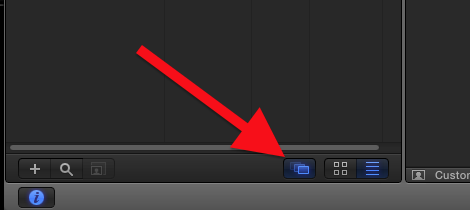
There is a button in Motion at the bottom right of the File Browser that cause Motion to see an image sequence as a regular movie right off the bat. Very easy, very nice.
Actually, Compressor can give you the absolute best results. But you need to know how to handle Compressor.
But Motion is fast and easy.
Actually, Compressor can give you the absolute best results. But you need to know how to handle Compressor.
But Motion is fast and easy.
Please Log in to join the conversation.
