


3 Post Moderation Rule for New Boarders (25 Jan 2021)
New boarders will have their posts moderated - Don't worry if you cannot see your post immediately.
Image Sequences
Don't want to reinstall just to get that feature back. Can you do it in Motion?
Sean Lander - Editing since 1982 - AVID 1991 - FCP 1999 - FCPX 2011
Please Log in to join the conversation.
Please Log in to join the conversation.

FCP X will export image sequences, as well as Motion.
Please Log in to join the conversation.
Sean Lander - Editing since 1982 - AVID 1991 - FCP 1999 - FCPX 2011
Please Log in to join the conversation.

Because I also used QuickTime Pro to convert an image sequence to import in FCP7.
For export you can easily do it with FCPX from the Share Menu, choosing whatever format you want, png, tiff... (it seems not tga)
For converting an image sequence to use in FCPX, you can import it in Motion, or in Compressor then share the project to obtain a .mov file, like we did in QT Pro.
In Motion, Import File, then choose your first image and check "Image Sequence" in the dialog box.
In Compressor, "Add an image sequence". Don't forget to check frequence in the inspector after importing.
Please Log in to join the conversation.
- Andreas Kiel
-

- Offline
- Platinum Member
-

- Posts: 1077
- Thank you received: 189
You can create a referenced movie out of an image sequence within seconds. Or make an image sequence out of a movie
I also can do a lot of other handy things.
Andreas
Please Log in to join the conversation.
- mobiletaylor
-
- Offline
- Elite Member
-

- Posts: 181
- Thank you received: 6
forums.creativecow.net/thread/170/870609
Please Log in to join the conversation.
In the File Browser pane, bottom right, is a button that looks like a stack of videos. It's left most in the group of three buttons, the other two being the Icon View and List View for the browser/library.
Gray is shows images in a sequence as images. Blue it automatically treats image sequences as a single file, and automatically treats them as a movie when imported.
Once imported re-timing it is a snap, and very good quality.
Motion is actually very flexible and very good at dealing with image sequences in a variety of ways once imported.
Please Log in to join the conversation.
Sean Lander - Editing since 1982 - AVID 1991 - FCP 1999 - FCPX 2011
Please Log in to join the conversation.
Please Log in to join the conversation.
BenB wrote: Gray is shows images in a sequence as images. Blue it automatically treats image sequences as a single file, and automatically treats them as a movie when imported.
Once imported re-timing it is a snap, and very good quality.
Motion is actually very flexible and very good at dealing with image sequences in a variety of ways once imported.
OMG this is brilliant! Much easier to deal with than QT7! These images are massive so the options for me to pan and scan are tremendous.
Thanks Ben. More good Karma coming your way!

Sean Lander - Editing since 1982 - AVID 1991 - FCP 1999 - FCPX 2011
Please Log in to join the conversation.
Please Log in to join the conversation.
You can extract QT from original FCS disk, enter Reg# at launch and should show up as Pro
Please Log in to join the conversation.
How do you extract QT 7 Player from the original FCS 3 disks? I don't see a way to get to it by itself.
Where do you get the QT 7 Pro s/n from when FCS installs that automatically?
Please Log in to join the conversation.
Several ways to get QT7,
Easiest is to just re-download from Apple... support.apple.com/kb/dl923
Here's MacWorld article... www.macworld.com/article/1161320/lion_quicktime7.html includes some extra info, need to know. QT7 standard includes all Pro files, S/N only unlocks the restricted parts so you will spend extra $30.00.
You can also extract from Install disks, control click>show contents
Use pacifist
Go commando CLi terminal
S/N on DVD package. Also, I think under FSC/QT/Motion etc... prefs, and a couple of other places I don't remember just now (About ... app menu or get info maybe?) Try clicking register, number should show up if installed on computer.
Sorry on different computer now so can't check.
The above MacWorld article includes how to retrieve from Apple.
I had issue while upgrading FCP5>7 and QT wouldn't activate Pro, so had to manually insert S/N number. HD in head removed that data long ago.
Please Log in to join the conversation.
Tried entering the FCStudio s/n and it will NOT take it as a QT Pro s/n.
You can't retrieve the QT Pro s/n via the method in that article if it was installed via FCStudio. As it is not listed as being purchased from the Apple online store.
In Lion (haven't looked at SL in ages) no FCP 7 Pro s/n shows up anywhere.
Been trying these methods all morning, unless I'm missing something.
Please Log in to join the conversation.

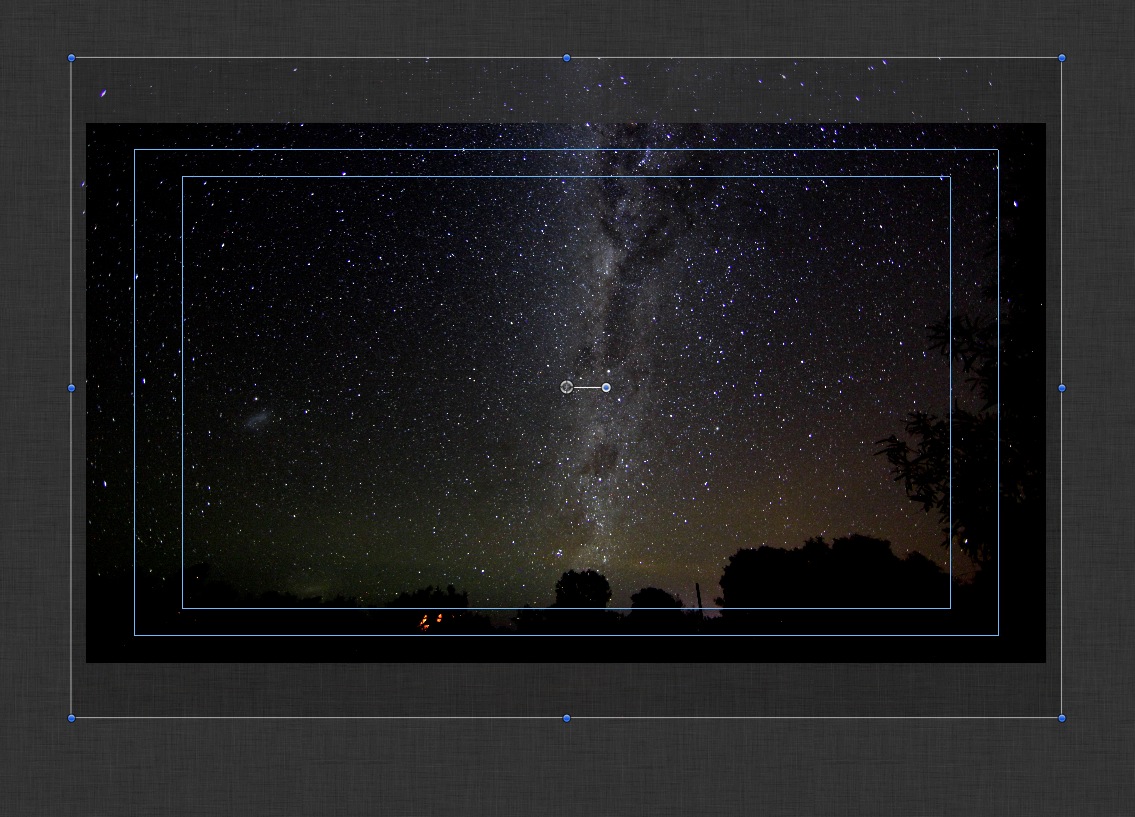
Ben. This was shot with the Canon 5D Mk II with a 14 mm lens and an intervalometer.
ISO set to 2500, lens 2.8 (wide open) and shutter speed 30 seconds.
The trick is to take test shots with ISO set as high it can go it makes it's much easier to determin your framing and focus. The duration of that shot was a little under 4 hours. Sadly the batteries gave out sooner than I expected in the freezing cold.
The next one I did I used my battery grip with two fresh batteries and got all the way through the night.
Sean Lander - Editing since 1982 - AVID 1991 - FCP 1999 - FCPX 2011
Please Log in to join the conversation.
Please Log in to join the conversation.
If your using a Canon lens make sure you don't just wind it all the way past infinity. Sounds crazy but they go to infinity AND BEYOND! Dial it back to the little L shaped marker.
Sean Lander - Editing since 1982 - AVID 1991 - FCP 1999 - FCPX 2011
Please Log in to join the conversation.
