


- Posts: 10
- Thank you received: 0
3 Post Moderation Rule for New Boarders (25 Jan 2021)
New boarders will have their posts moderated - Don't worry if you cannot see your post immediately.
Best way to convert 60fps to 30fps
28 Jun 2012 06:17 #10487
by sandrewb
Best way to convert 60fps to 30fps was created by sandrewb
I am trying the 30 day trial of FCPX and shot a few clips(one being my sons first talent show at school playing the drums) with a new AVCHD camera and realized that the footage I shot is at 60fps. What is the best way to convert it to 30fps and keep the audio in sync? It stutters when viewing at 60fps but some other 30fps footage also in HD plays fine.
Please Log in to join the conversation.

28 Jun 2012 10:36 #10499
by BenB
Replied by BenB on topic Re: Best way to convert 60fps to 30fps
Doesn't matter. You drop it all into a Timeline that is set for the frame rate you want your output to be at, that's all. It's seamless.
If you get stuttering playback, that has to do with your Preference settings and hardware configuration.
If you get stuttering playback, that has to do with your Preference settings and hardware configuration.
Please Log in to join the conversation.

28 Jun 2012 16:09 #10552
by Mickey G
Replied by Mickey G on topic Re: Best way to convert 60fps to 30fps
Whats your intended output? I’m assuming 30p (29.97)
I’d suggest making a timeline (compound clip or project) based on your intended output settings i.e. codec, framerate, etc. and then taking your 60p material and using the “conform” tool to get it to 30p. Now this will slow it down but then you just speed it up 2x and that should do it.
If you just take the 60p material and drop it in a 30p timeline FCPX will just drop frames to get it to 30fps which can look bad.
I’ve done a lot of 60p conforming for 24p slo-mo playback and a lot of 23.98 - 29.97 conversions and vice-versa.
Have never had to convert 60p into 30p with realtime playback but I’m assuming this should get you there.
Let us know how it works out as I’m really curious to hear how FCPX handles this software framerate conversion.
I’d suggest making a timeline (compound clip or project) based on your intended output settings i.e. codec, framerate, etc. and then taking your 60p material and using the “conform” tool to get it to 30p. Now this will slow it down but then you just speed it up 2x and that should do it.
If you just take the 60p material and drop it in a 30p timeline FCPX will just drop frames to get it to 30fps which can look bad.
I’ve done a lot of 60p conforming for 24p slo-mo playback and a lot of 23.98 - 29.97 conversions and vice-versa.
Have never had to convert 60p into 30p with realtime playback but I’m assuming this should get you there.
Let us know how it works out as I’m really curious to hear how FCPX handles this software framerate conversion.
Please Log in to join the conversation.
28 Jun 2012 16:27 - 28 Jun 2012 16:36 #10554
by BenB
Replied by BenB on topic Re: Best way to convert 60fps to 30fps
One technical issue. If you conform the clip, then change the speed, the same frames to make it fit the 30p timing will be dropped. Same algorithm is used.
I'm given 60 and 30 clips to edit all the time and never noticed any issues. Greater variances such as 60 and 24 really can be noticeable, though.
I'd like to know what the hardware is.
I'm given 60 and 30 clips to edit all the time and never noticed any issues. Greater variances such as 60 and 24 really can be noticeable, though.
I'd like to know what the hardware is.
Last edit: 28 Jun 2012 16:36 by BenB.
Please Log in to join the conversation.
28 Jun 2012 16:37 #10558
by Mickey G
I’d love to see a comparison between just dropping a 60p clip into a 30p timeline vs conforming then speeding up.
My experience with FCP7 (still testing the waters with X)
was a 29.97 to 23.98 conversion was not so great. I was easily able to spot the dropped frames.
Now doing a 23.98 - 29.97 conversion was seamless.
I did this alot when I shot on my 5D pre the 24p firmware update.
I took my 30p material and ran it through a custom template I created that interpreted the frames to get a damn near perfect 30p - 23.98 conversion (took forever to render on my old G5 though) Have no idea how 60p would work though
Replied by Mickey G on topic Re: Best way to convert 60fps to 30fps
BenB wrote: I'm given 60 and 30 clips to edit all the time and never noticed any issues. I'd like to know what the hardware is.
I’d love to see a comparison between just dropping a 60p clip into a 30p timeline vs conforming then speeding up.
My experience with FCP7 (still testing the waters with X)
was a 29.97 to 23.98 conversion was not so great. I was easily able to spot the dropped frames.
Now doing a 23.98 - 29.97 conversion was seamless.
I did this alot when I shot on my 5D pre the 24p firmware update.
I took my 30p material and ran it through a custom template I created that interpreted the frames to get a damn near perfect 30p - 23.98 conversion (took forever to render on my old G5 though) Have no idea how 60p would work though
Please Log in to join the conversation.
28 Jun 2012 16:39 - 28 Jun 2012 16:40 #10560
by BenB
Replied by BenB on topic Re: Best way to convert 60fps to 30fps
FCP X handles mixed frame rates head and shoulders above 7. My feeling is the new AVFramework is just that much more advanced than the QTFramework.
Last edit: 28 Jun 2012 16:40 by BenB.
Please Log in to join the conversation.
28 Jun 2012 17:07 - 28 Jun 2012 17:10 #10564
by Mickey G
Replied by Mickey G on topic Re: Best way to convert 60fps to 30fps
Here is a video that I shot with my GoPro 720/60p.
All finished at 23.98 inside FCPX. Ben you may have seen this because I posted it elsewhere but I figured it fit the topic of this thread.
vimeo.com/41117635
Now I 1st set up a 23.98 timeline and dropped all the 60p material in there. The motion looked like absolute dog turds so I then conformed all the 60p stuff to 23.98 which gave me fluid slow motion.
All the motion that plays back in real-time is the conformed 60p stuff being sped back up to realtime.
And the “super slow-mo" stuff is the conformed 60p material being slowed down even more via optical flow retiming.
There was no way I was getting that smooth of motion just letting FCPX handle the conversion. It was dropping random frames all over the place. I knew I wanted the clip to ramp in and out of slowmo/realtime and the only way to achieve that was to conform first.
To the OP I know this is not exactly what you are trying to do but its pretty similar and it worked for me. There may be better ways to achieve the conversions as Ben suggested. Keeping sync to audio is whole other can of worms so good look with that…
if you use my method you just need to figure out exactly how much you need to speed up your footage by. I think its a 2x speed increase from the conformed 60p material.
All finished at 23.98 inside FCPX. Ben you may have seen this because I posted it elsewhere but I figured it fit the topic of this thread.
vimeo.com/41117635
Now I 1st set up a 23.98 timeline and dropped all the 60p material in there. The motion looked like absolute dog turds so I then conformed all the 60p stuff to 23.98 which gave me fluid slow motion.
All the motion that plays back in real-time is the conformed 60p stuff being sped back up to realtime.
And the “super slow-mo" stuff is the conformed 60p material being slowed down even more via optical flow retiming.
There was no way I was getting that smooth of motion just letting FCPX handle the conversion. It was dropping random frames all over the place. I knew I wanted the clip to ramp in and out of slowmo/realtime and the only way to achieve that was to conform first.
To the OP I know this is not exactly what you are trying to do but its pretty similar and it worked for me. There may be better ways to achieve the conversions as Ben suggested. Keeping sync to audio is whole other can of worms so good look with that…
if you use my method you just need to figure out exactly how much you need to speed up your footage by. I think its a 2x speed increase from the conformed 60p material.
Last edit: 28 Jun 2012 17:10 by Mickey G.
Please Log in to join the conversation.
28 Jun 2012 17:19 #10565
by BenB
Replied by BenB on topic Re: Best way to convert 60fps to 30fps
60fps conformed to 24fps is roughly about 40 some odd percent. It actually comes out to 2.5x.
Please Log in to join the conversation.
28 Jun 2012 17:30 #10566
by Mickey G
Good to know but I was referring to the OP's needs of conforming to 30p.
Also OP is is exactly 30p or 29.97, depending on the length of your clip it's important to plan
for that, as that can cause sync issues.
Replied by Mickey G on topic Re: Best way to convert 60fps to 30fps
BenB wrote: 60fps conformed to 24fps is roughly about 40 some odd percent. It actually comes out to 2.5x.
Good to know but I was referring to the OP's needs of conforming to 30p.
Also OP is is exactly 30p or 29.97, depending on the length of your clip it's important to plan
for that, as that can cause sync issues.
Please Log in to join the conversation.
28 Jun 2012 17:50 #10570
by BenB
Replied by BenB on topic Re: Best way to convert 60fps to 30fps
FCP X will maintain audio sync. Is that what you're talking about?
Please Log in to join the conversation.
28 Jun 2012 20:46 #10578
by sandrewb
Replied by sandrewb on topic Re: Best way to convert 60fps to 30fps
Wow, thanks guys for all the info. I will give those suggestions the run through
tonight and let you know what happened.
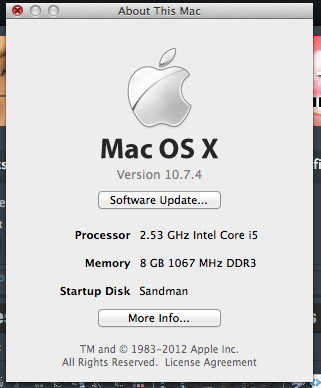
FYI I have a mid 2010 17" MBP with 8gb ram and I am using a LaCie HD via FW800 for the footage.
All I really want to do with this footage is convert it to 30p to edit and then output into iTunes so it will play on an Apple TV. I have changed the camera settings back to 30p from now one. It was mostly people talking and my son playing the drums so sync is my biggest concern. I will let you guys know how it goes.
Thanks.
tonight and let you know what happened.
FYI I have a mid 2010 17" MBP with 8gb ram and I am using a LaCie HD via FW800 for the footage.
All I really want to do with this footage is convert it to 30p to edit and then output into iTunes so it will play on an Apple TV. I have changed the camera settings back to 30p from now one. It was mostly people talking and my son playing the drums so sync is my biggest concern. I will let you guys know how it goes.
Thanks.
Please Log in to join the conversation.
28 Jun 2012 20:46 #10577
by sandrewb
Replied by sandrewb on topic Re: Best way to convert 60fps to 30fps
Wow, thanks guys for all the info. I will give those suggestions the run through
tonight and let you know what happened.
FYI I have a mid 2010 17" MBP with 8gb ram and I am using a LaCie HD via FW800 for the footage.
All I really want to do with this footage is convert it to 30p to edit and then output into iTunes so it will play on an Apple TV. I have changed the camera settings back to 30p from now one. It was mostly people talking and my son playing the drums so sync is my biggest concern. I will let you guys know how it goes.
Thanks.
tonight and let you know what happened.
FYI I have a mid 2010 17" MBP with 8gb ram and I am using a LaCie HD via FW800 for the footage.
All I really want to do with this footage is convert it to 30p to edit and then output into iTunes so it will play on an Apple TV. I have changed the camera settings back to 30p from now one. It was mostly people talking and my son playing the drums so sync is my biggest concern. I will let you guys know how it goes.
Thanks.
Please Log in to join the conversation.
28 Jun 2012 20:57 - 28 Jun 2012 20:58 #10579
by BenB
Replied by BenB on topic Re: Best way to convert 60fps to 30fps
Get 16GB RAM in that puppy, you'll see better performance.
If he's a drummer, that's a lot of fast motion. Stick to 60p from now on. It'll show smoother, more detailed movement. ATV will show 60p just fine. I do ATV output daily to a 63 inch HDTV screen.
If he's a drummer, that's a lot of fast motion. Stick to 60p from now on. It'll show smoother, more detailed movement. ATV will show 60p just fine. I do ATV output daily to a 63 inch HDTV screen.
Last edit: 28 Jun 2012 20:58 by BenB.
Please Log in to join the conversation.
28 Jun 2012 21:02 #10580
by sandrewb
Replied by sandrewb on topic Re: Best way to convert 60fps to 30fps
Unfortunately 8gb is max on this machine.
"Stick to 60p from now on"
but it barely plays back and is hard to edit at 60p?
"Stick to 60p from now on"
but it barely plays back and is hard to edit at 60p?
Please Log in to join the conversation.
28 Jun 2012 21:17 #10583
by BenB
Replied by BenB on topic Re: Best way to convert 60fps to 30fps
Yeah, right, you're on a FW800 drive. So make Proxies! That will solve everything!
Do you know how to do proxies to edit, then export full rez?
Do you know how to do proxies to edit, then export full rez?
Please Log in to join the conversation.
- mobiletaylor
-

- Offline
- Elite Member
-

Less
More
- Posts: 181
- Thank you received: 6
28 Jun 2012 21:38 #10585
by mobiletaylor
+1
A proxies workflow is so easy in FCPX. I'm not sure why you wouldn't use it all the time?
Replied by mobiletaylor on topic Re: Best way to convert 60fps to 30fps
BenB wrote: Yeah, right, you're on a FW800 drive. So make Proxies! That will solve everything!
Do you know how to do proxies to edit, then export full rez?
+1
A proxies workflow is so easy in FCPX. I'm not sure why you wouldn't use it all the time?
Please Log in to join the conversation.
28 Jun 2012 21:48 #10587
by sandrewb
Replied by sandrewb on topic Re: Best way to convert 60fps to 30fps
Thanks so much. It worked. I had converted a couple of clips yesterday but after your comment I searched it in the help menu and didn't realize that I had to select proxy in the playback prefs.
So I guess that when ever I import I should select proxy from the get-go? Does that mean that I will have two versions of each clip on my hard drive?
So I guess that when ever I import I should select proxy from the get-go? Does that mean that I will have two versions of each clip on my hard drive?
Please Log in to join the conversation.
28 Jun 2012 21:56 #10588
by sandrewb
Replied by sandrewb on topic Re: Best way to convert 60fps to 30fps
One last thing, I had imported 78 clips but when I select them all I don't see the proxy button. Is there anyway to batch proxy?
Please Log in to join the conversation.
28 Jun 2012 21:59 - 28 Jun 2012 22:01 #10589
by BenB
Replied by BenB on topic Re: Best way to convert 60fps to 30fps
Yes, you'll have 2 copies. Proxie for easy editing, full rez for export. It all depends on the hardware you've got to work with.
You can select to make copies on import.
To do it afterwards, select all the clips, right-click, select "Transcode Media".
You can select to make copies on import.
To do it afterwards, select all the clips, right-click, select "Transcode Media".
Last edit: 28 Jun 2012 22:01 by BenB.
Please Log in to join the conversation.

29 Jun 2012 04:13 #10600
by Krzysztof
Replied by Krzysztof on topic Re: Best way to convert 60fps to 30fps
Hello
I am quite pleased with the performance of this little piece of software: rarevision.com/5dtorgb/
One can use the free lite version that allows one clip at a time or pay the big bucks ($50 in the App Store) and have a couple of extra handy features.
Regards
Krzysztof Szychowski
I am quite pleased with the performance of this little piece of software: rarevision.com/5dtorgb/
One can use the free lite version that allows one clip at a time or pay the big bucks ($50 in the App Store) and have a couple of extra handy features.
Regards
Krzysztof Szychowski
Please Log in to join the conversation.
